

Readme
#31
by Toyosi22 - opened
README.md
DELETED
|
@@ -1,224 +0,0 @@
|
|
| 1 |
-
---
|
| 2 |
-
license: mit
|
| 3 |
-
language:
|
| 4 |
-
- zh
|
| 5 |
-
- en
|
| 6 |
-
- fr
|
| 7 |
-
- es
|
| 8 |
-
- ru
|
| 9 |
-
- de
|
| 10 |
-
- ja
|
| 11 |
-
- ko
|
| 12 |
-
pipeline_tag: image-to-text
|
| 13 |
-
library_name: transformers
|
| 14 |
-
---
|
| 15 |
-
|
| 16 |
-
# GLM-OCR
|
| 17 |
-
|
| 18 |
-
<div align="center">
|
| 19 |
-
<img src=https://raw.githubusercontent.com/zai-org/GLM-OCR/refs/heads/main/resources/logo.svg width="40%"/>
|
| 20 |
-
</div>
|
| 21 |
-
<p align="center">
|
| 22 |
-
👋 Join our <a href="https://raw.githubusercontent.com/zai-org/GLM-OCR/refs/heads/main/resources/wechat.jpg" target="_blank">WeChat</a> and <a href="https://discord.gg/QR7SARHRxK" target="_blank">Discord</a> community
|
| 23 |
-
<br>
|
| 24 |
-
📍 Use GLM-OCR's <a href="https://docs.z.ai/guides/vlm/glm-ocr" target="_blank">API</a>
|
| 25 |
-
<br>
|
| 26 |
-
👉 <a href="https://github.com/zai-org/GLM-OCR" target="_blank">GLM-OCR SDK</a> Recommended
|
| 27 |
-
</p>
|
| 28 |
-
|
| 29 |
-
|
| 30 |
-
## Introduction
|
| 31 |
-
|
| 32 |
-
GLM-OCR is a multimodal OCR model for complex document understanding, built on the GLM-V encoder–decoder architecture. It introduces Multi-Token Prediction (MTP) loss and stable full-task reinforcement learning to improve training efficiency, recognition accuracy, and generalization. The model integrates the CogViT visual encoder pre-trained on large-scale image–text data, a lightweight cross-modal connector with efficient token downsampling, and a GLM-0.5B language decoder. Combined with a two-stage pipeline of layout analysis and parallel recognition based on PP-DocLayout-V3, GLM-OCR delivers robust and high-quality OCR performance across diverse document layouts.
|
| 33 |
-
|
| 34 |
-
**Key Features**
|
| 35 |
-
|
| 36 |
-
- **State-of-the-Art Performance**: Achieves a score of 94.62 on OmniDocBench V1.5, ranking #1 overall, and delivers state-of-the-art results across major document understanding benchmarks, including formula recognition, table recognition, and information extraction.
|
| 37 |
-
|
| 38 |
-
- **Optimized for Real-World Scenarios**: Designed and optimized for practical business use cases, maintaining robust performance on complex tables, code-heavy documents, seals, and other challenging real-world layouts.
|
| 39 |
-
|
| 40 |
-
- **Efficient Inference**: With only 0.9B parameters, GLM-OCR supports deployment via vLLM, SGLang, and Ollama, significantly reducing inference latency and compute cost, making it ideal for high-concurrency services and edge deployments.
|
| 41 |
-
|
| 42 |
-
- **Easy to Use**: Fully open-sourced and equipped with a comprehensive [SDK](https://github.com/zai-org/GLM-OCR) and inference toolchain, offering simple installation, one-line invocation, and smooth integration into existing production pipelines.
|
| 43 |
-
|
| 44 |
-
## Performance
|
| 45 |
-
|
| 46 |
-
- Document Parsing & Information Extraction
|
| 47 |
-
|
| 48 |
-
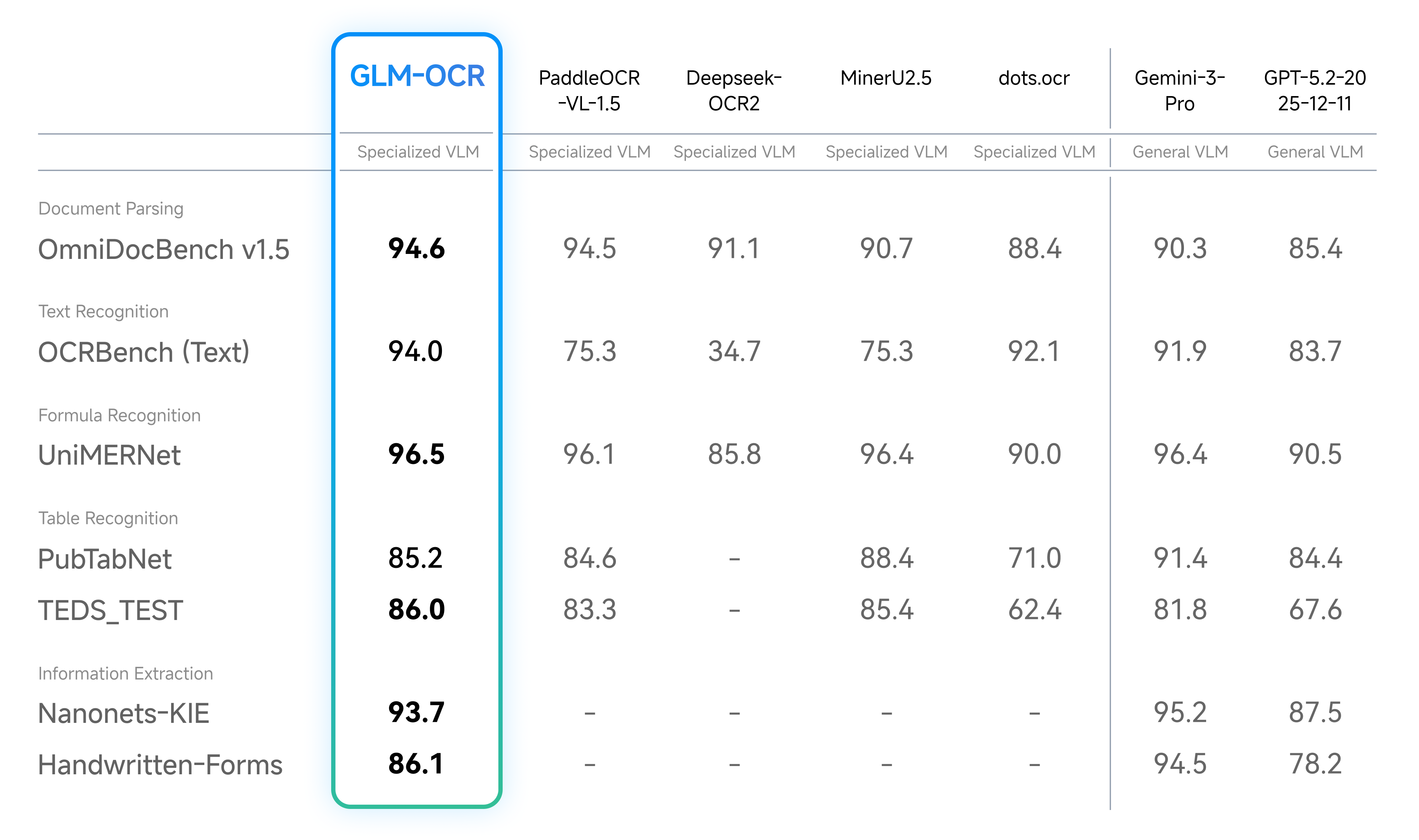
|
| 49 |
-
|
| 50 |
-
|
| 51 |
-
- Real-World Scenarios Performance
|
| 52 |
-
|
| 53 |
-
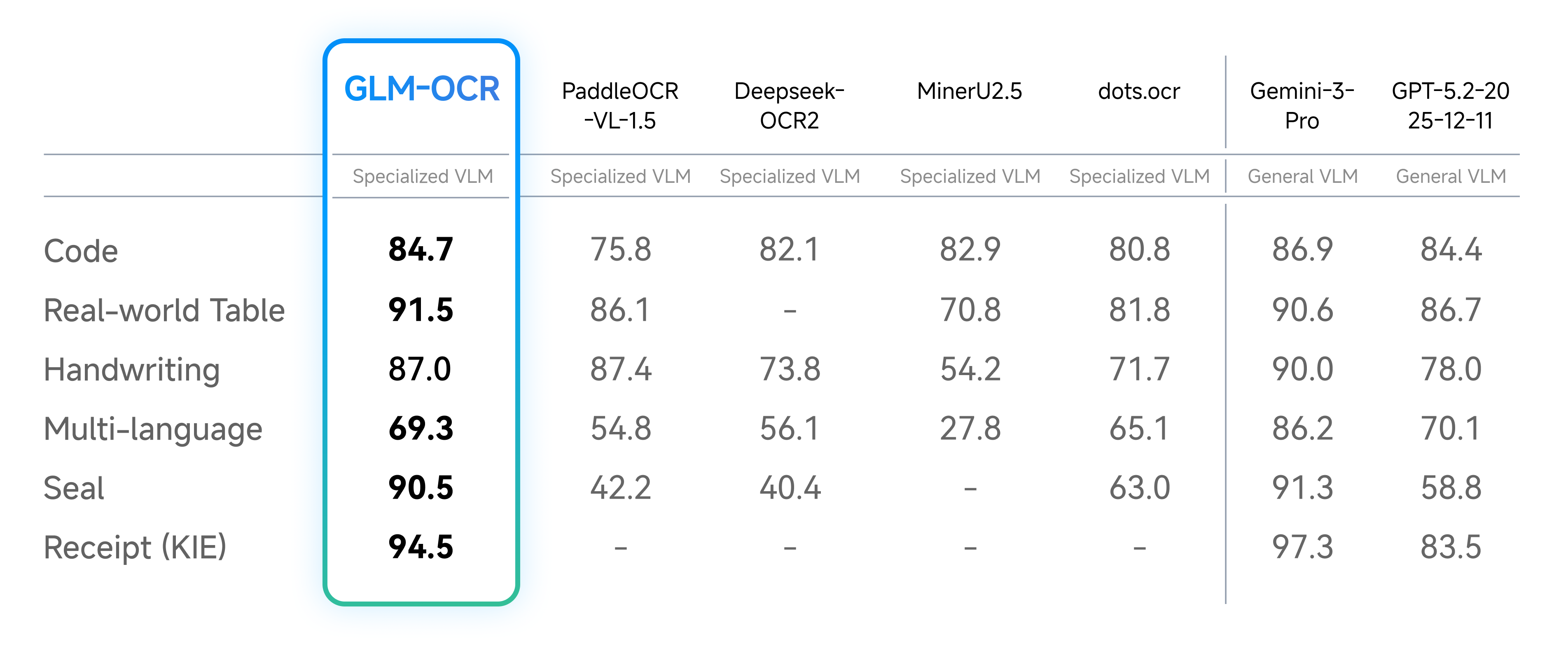
|
| 54 |
-
|
| 55 |
-
|
| 56 |
-
- Speed Test
|
| 57 |
-
|
| 58 |
-
For speed, we compared different OCR methods under identical hardware and testing conditions (single replica, single concurrency), evaluating their performance in parsing and exporting Markdown files from both image and PDF inputs. Results show GLM-OCR achieves a throughput of 1.86 pages/second for PDF documents and 0.67 images/second for images, significantly outperforming comparable models.
|
| 59 |
-
|
| 60 |
-
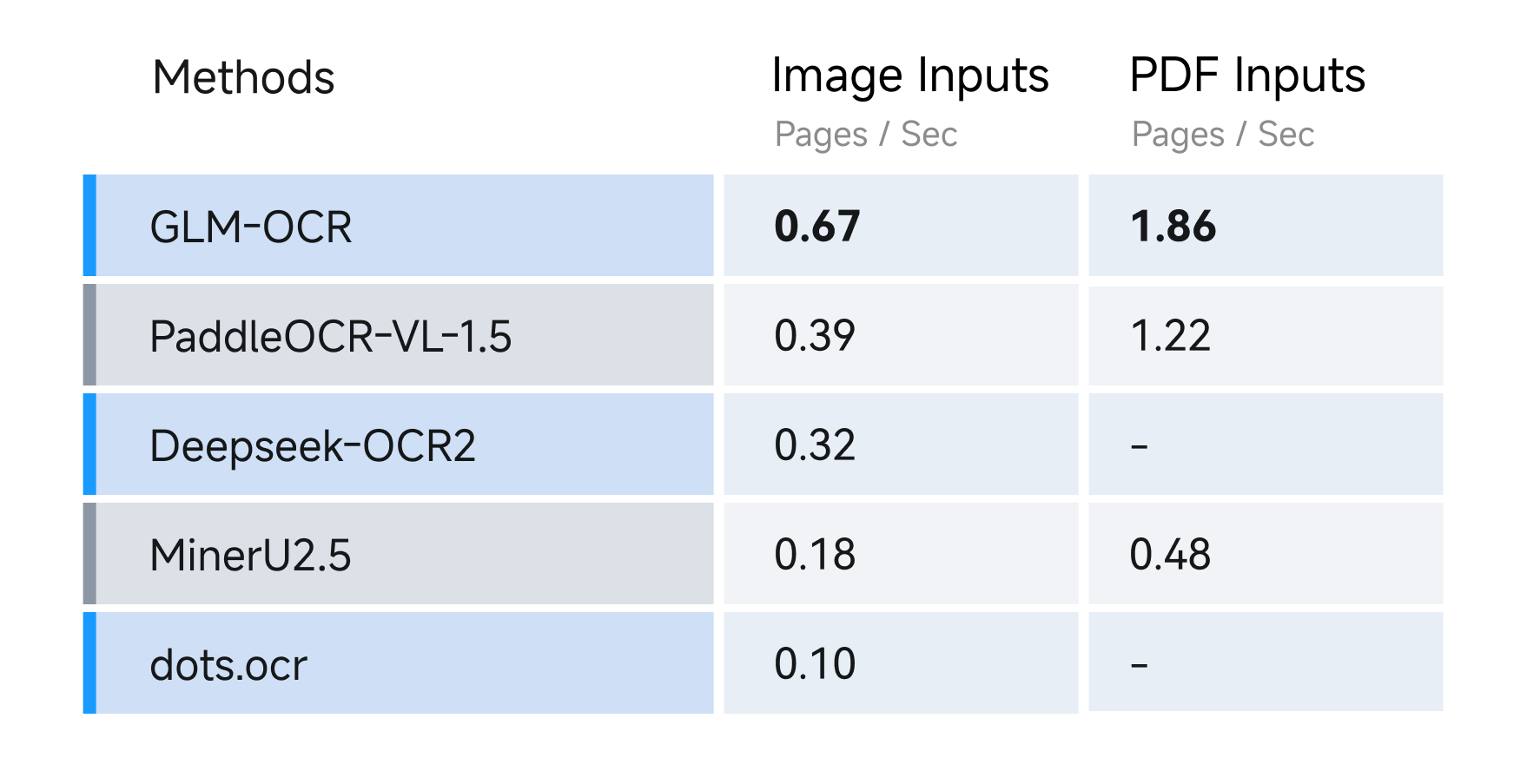
|
| 61 |
-
|
| 62 |
-
## Usage
|
| 63 |
-
|
| 64 |
-
### Official SDK
|
| 65 |
-
|
| 66 |
-
For document parsing tasks, we strongly recommend using our [official SDK](https://github.com/zai-org/GLM-OCR).
|
| 67 |
-
Compared with model-only inference, the SDK integrates PP-DocLayoutV3 and provides a complete, easy-to-use pipeline for document parsing, including layout analysis and structured output generation. This significantly reduces the engineering overhead required to build end-to-end document intelligence systems.
|
| 68 |
-
|
| 69 |
-
Note that the SDK is currently designed for document parsing tasks only. For information extraction tasks, please refer to the following section and run inference directly with the model.
|
| 70 |
-
|
| 71 |
-
### vLLM
|
| 72 |
-
|
| 73 |
-
1. run
|
| 74 |
-
|
| 75 |
-
```bash
|
| 76 |
-
pip install -U vllm --extra-index-url https://wheels.vllm.ai/nightly
|
| 77 |
-
```
|
| 78 |
-
|
| 79 |
-
or using docker with:
|
| 80 |
-
```
|
| 81 |
-
docker pull vllm/vllm-openai:nightly
|
| 82 |
-
```
|
| 83 |
-
|
| 84 |
-
2. run with:
|
| 85 |
-
|
| 86 |
-
```bash
|
| 87 |
-
pip install git+https://github.com/huggingface/transformers.git
|
| 88 |
-
vllm serve zai-org/GLM-OCR --allowed-local-media-path / --port 8080
|
| 89 |
-
```
|
| 90 |
-
|
| 91 |
-
### SGLang
|
| 92 |
-
|
| 93 |
-
|
| 94 |
-
1. using docker with:
|
| 95 |
-
|
| 96 |
-
```bash
|
| 97 |
-
docker pull lmsysorg/sglang:dev
|
| 98 |
-
```
|
| 99 |
-
|
| 100 |
-
or build it from source with:
|
| 101 |
-
|
| 102 |
-
```bash
|
| 103 |
-
pip install git+https://github.com/sgl-project/sglang.git#subdirectory=python
|
| 104 |
-
```
|
| 105 |
-
|
| 106 |
-
2. run with:
|
| 107 |
-
|
| 108 |
-
```bash
|
| 109 |
-
pip install git+https://github.com/huggingface/transformers.git
|
| 110 |
-
python -m sglang.launch_server --model zai-org/GLM-OCR --port 8080
|
| 111 |
-
```
|
| 112 |
-
|
| 113 |
-
### Ollama
|
| 114 |
-
|
| 115 |
-
1. Download [Ollama](https://ollama.com/download).
|
| 116 |
-
2. run with:
|
| 117 |
-
|
| 118 |
-
```bash
|
| 119 |
-
ollama run glm-ocr
|
| 120 |
-
```
|
| 121 |
-
|
| 122 |
-
Ollama will automatically use image file path when an image is dragged into the terminal:
|
| 123 |
-
|
| 124 |
-
```bash
|
| 125 |
-
ollama run glm-ocr Text Recognition: ./image.png
|
| 126 |
-
```
|
| 127 |
-
|
| 128 |
-
### Transformers
|
| 129 |
-
|
| 130 |
-
```
|
| 131 |
-
pip install git+https://github.com/huggingface/transformers.git
|
| 132 |
-
```
|
| 133 |
-
|
| 134 |
-
```python
|
| 135 |
-
from transformers import AutoProcessor, AutoModelForImageTextToText
|
| 136 |
-
import torch
|
| 137 |
-
|
| 138 |
-
MODEL_PATH = "zai-org/GLM-OCR"
|
| 139 |
-
messages = [
|
| 140 |
-
{
|
| 141 |
-
"role": "user",
|
| 142 |
-
"content": [
|
| 143 |
-
{
|
| 144 |
-
"type": "image",
|
| 145 |
-
"url": "test_image.png"
|
| 146 |
-
},
|
| 147 |
-
{
|
| 148 |
-
"type": "text",
|
| 149 |
-
"text": "Text Recognition:"
|
| 150 |
-
}
|
| 151 |
-
],
|
| 152 |
-
}
|
| 153 |
-
]
|
| 154 |
-
processor = AutoProcessor.from_pretrained(MODEL_PATH)
|
| 155 |
-
model = AutoModelForImageTextToText.from_pretrained(
|
| 156 |
-
pretrained_model_name_or_path=MODEL_PATH,
|
| 157 |
-
torch_dtype="auto",
|
| 158 |
-
device_map="auto",
|
| 159 |
-
)
|
| 160 |
-
inputs = processor.apply_chat_template(
|
| 161 |
-
messages,
|
| 162 |
-
tokenize=True,
|
| 163 |
-
add_generation_prompt=True,
|
| 164 |
-
return_dict=True,
|
| 165 |
-
return_tensors="pt"
|
| 166 |
-
).to(model.device)
|
| 167 |
-
inputs.pop("token_type_ids", None)
|
| 168 |
-
generated_ids = model.generate(**inputs, max_new_tokens=8192)
|
| 169 |
-
output_text = processor.decode(generated_ids[0][inputs["input_ids"].shape[1]:], skip_special_tokens=False)
|
| 170 |
-
print(output_text)
|
| 171 |
-
```
|
| 172 |
-
|
| 173 |
-
### Prompt Limited
|
| 174 |
-
|
| 175 |
-
GLM-OCR currently supports two types of prompt scenarios:
|
| 176 |
-
|
| 177 |
-
1. **Document Parsing** – extract raw content from documents. Supported tasks include:
|
| 178 |
-
|
| 179 |
-
```python
|
| 180 |
-
{
|
| 181 |
-
"text": "Text Recognition:",
|
| 182 |
-
"formula": "Formula Recognition:",
|
| 183 |
-
"table": "Table Recognition:"
|
| 184 |
-
}
|
| 185 |
-
```
|
| 186 |
-
|
| 187 |
-
2. **Information Extraction** – extract structured information from documents. Prompts must follow a strict JSON schema. For example, to extract personal ID information:
|
| 188 |
-
|
| 189 |
-
```python
|
| 190 |
-
请按下列JSON格式输出图中信息:
|
| 191 |
-
{
|
| 192 |
-
"id_number": "",
|
| 193 |
-
"last_name": "",
|
| 194 |
-
"first_name": "",
|
| 195 |
-
"date_of_birth": "",
|
| 196 |
-
"address": {
|
| 197 |
-
"street": "",
|
| 198 |
-
"city": "",
|
| 199 |
-
"state": "",
|
| 200 |
-
"zip_code": ""
|
| 201 |
-
},
|
| 202 |
-
"dates": {
|
| 203 |
-
"issue_date": "",
|
| 204 |
-
"expiration_date": ""
|
| 205 |
-
},
|
| 206 |
-
"sex": ""
|
| 207 |
-
}
|
| 208 |
-
```
|
| 209 |
-
|
| 210 |
-
⚠️ Note: When using information extraction, the output must strictly adhere to the defined JSON schema to ensure downstream processing compatibility.
|
| 211 |
-
|
| 212 |
-
## Acknowledgement
|
| 213 |
-
|
| 214 |
-
This project is inspired by the excellent work of the following projects and communities:
|
| 215 |
-
|
| 216 |
-
- [PP-DocLayout-V3](https://huggingface.co/PaddlePaddle/PP-DocLayoutV3)
|
| 217 |
-
- [PaddleOCR](https://github.com/PaddlePaddle/PaddleOCR)
|
| 218 |
-
- [MinerU](https://github.com/opendatalab/MinerU)
|
| 219 |
-
|
| 220 |
-
## License
|
| 221 |
-
|
| 222 |
-
The GLM-OCR model is released under the MIT License.
|
| 223 |
-
|
| 224 |
-
The complete OCR pipeline integrates [PP-DocLayoutV3](https://huggingface.co/PaddlePaddle/PP-DocLayoutV3) for document layout analysis, which is licensed under the Apache License 2.0. Users should comply with both licenses when using this project.
|
|
|
|
|
|
|
|
|
|
|
|
|
|
|
|
|
|
|
|
|
|
|
|
|
|
|
|
|
|
|
|
|
|
|
|
|
|
|
|
|
|
|
|
|
|
|
|
|
|
|
|
|
|
|
|
|
|
|
|
|
|
|
|
|
|
|
|
|
|
|
|
|
|
|
|
|
|
|
|
|
|
|
|
|
|
|
|
|
|
|
|
|
|
|
|
|
|
|
|
|
|
|
|
|
|
|
|
|
|
|
|
|
|
|
|
|
|
|
|
|
|
|
|
|
|
|
|
|
|
|
|
|
|
|
|
|
|
|
|
|
|
|
|
|
|
|
|
|
|
|
|
|
|
|
|
|
|
|
|
|
|
|
|
|
|
|
|
|
|
|
|
|
|
|
|
|
|
|
|
|
|
|
|
|
|
|
|
|
|
|
|
|
|
|
|
|
|
|
|
|
|
|
|
|
|
|
|
|
|
|
|
|
|
|
|
|
|
|
|
|
|
|
|
|
|
|
|
|
|
|
|
|
|
|
|
|
|
|
|
|
|
|
|
|
|
|
|
|
|
|
|
|
|
|
|
|
|
|
|
|
|
|
|
|
|
|
|
|
|
|
|
|
|
|
|
|
|
|
|
|
|
|
|
|
|
|
|
|
|
|
|
|
|
|
|
|
|
|
|
|
|
|
|
|
|
|
|
|
|
|
|
|
|
|
|
|
|
|
|
|
|
|
|
|
|
|
|
|
|
|
|
|
|
|
|
|
|
|
|
|
|
|
|
|
|
|
|
|
|
|
|
|
|
|
|
|
|
|
|
|
|
|
|
|
|
|
|
|
|
|
|
|
|
|
|
|
|
|
|
|
|
|
|
|
|
|
|
|
|
|
|
|
|
|
|
|
|
|
|
|
|
|
|
|
|
|
|
|
|
|
|
|
|
|
|
|
|
|
|
|
|
|
|
|
|
|
|
|
|
|
|
|
|
|
|
|
|
|
|
|
|
|
|
|
|
|
|
|
|
|
|
|
|
|
|
|
|
|
|
|
|
|
|
|
|
|
|
|
|
|
|
|
|
|
|
|
|
|
|
|
|
|
|
|
|
|
|
|
|
|
|
|
|
|
|
|
|
|
|
|
|
|
|
|
|
|
|
|
|
|
|
|
|
|
|
|
|
|
|
|
|
|
|
|
|
|
|
|
|
|
|
|
|
|
|
|
|
|
|
|
|
|
|
|
|
|
|
|
|
|
|
|
|
|
|
|
|
|
|
|
|
|
|
|
|
|
|
|
|
|
|
|
|
|
|
|
|
|
|
|
|
|
|
|
|
|
|
|
|
|
|
|
|
|
|
|
|
|
|
|
|
|
|
|
|
|
|
|
|
|
|
|
|
|
|
|
|
|
|
|
|
|
|
|
|
|
|
|
|
|
|
|
|
|
|
|
|
|
|
|
|
|
|
|
|
|
|
|
|
|
|
|
|
|
|
|
|
|
|
|
|
|
|
|
|
|
|
|
|
|
|
|
|
|