

| 中文 | [English](README_EN.md) | |
| <p align="center"> | |
| <picture> | |
| <img alt="Ultravox" src="https://zfmrfvimiaqahezndsse.supabase.co/storage/v1/object/public/images/custom/Introducing%20Ultravox%20Wide.jpg"> | |
| </picture> | |
| </p> | |
| <h3 align="center"> | |
| 一款为实时语音交互设计的快速多模态LLM | |
| </h3> | |
| # 概述 | |
| Ultravox是一种新型的多模态LLM,能够理解文本和人类语音,无需单独的自动语音识别(ASR)阶段。基于[AudioLM](https://arxiv.org/abs/2209.03143)、[SeamlessM4T](https://ai.meta.com/blog/seamless-m4t/)、[Gazelle](https://tincans.ai/slm)、[SpeechGPT](https://github.com/0nutation/SpeechGPT/tree/main/speechgpt)等研究,Ultravox能够将任何开放权重LLM扩展为一个多模态投影器,直接将音频转换为LLM使用的高维空间。 | |
| ultravox官方仓库:[https://github.com/fixie-ai/ultravox](https://github.com/fixie-ai/ultravox) | |
| ultravox-cn仓库:[https://github.com/seanzhang-zhichen/ultravox-cn](https://github.com/seanzhang-zhichen/ultravox-cn) | |
| 由于官方版本模型对中文支持较差,因此,我们训练了基于Qwen2.5-7B-Instruct和whisper-large-v3-turbo的中文友好的语音多模态模型 | |
| ### 架构 | |
| [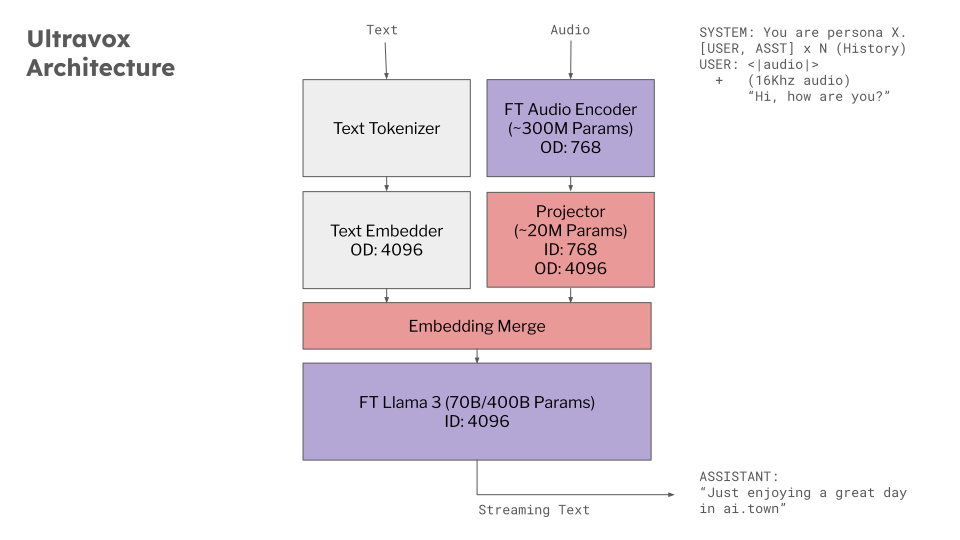](https://docs.google.com/presentation/d/1ey81xuuMzrJaBwztb_Rq24Cit37GQokD2aAes_KkGVI/edit) | |
| ### 效果 | |
|  | |
| ### 模型 | |
| - Huggingface下载地址:[https://huggingface.co/zhichen/ultravox-cn](https://huggingface.co/zhichen/ultravox-cn) | |
| - Modelscope下载地址:[https://modelscope.cn/models/seanzhang/ultravox-cn](https://modelscope.cn/models/seanzhang/ultravox-cn) | |
| ## 环境设置 | |
| 安装`just` | |
| ```bash | |
| git clone https://github.com/seanzhang-zhichen/ultravox-cn.git | |
| cd ultravox-cn | |
| sudo apt-get install just | |
| conda create -n ultravox python=3.11 | |
| conda activate ultravox | |
| just install | |
| ``` | |
| ## 模型准备 | |
| 运行demo前,需准备以下模型: | |
| - Qwen2.5-7B-Instruct | |
| - whisper-large-v3-turbo | |
| - seanzhang/ultravox-cn | |
| 以上模型准备好后,修改seanzhang/ultravox-cn/config.json中的audio_model_id为本地whisper-large-v3-turbo路径,text_model_id为本地Qwen2.5-7B-Instruct路径。 | |
|  | |
| ### Web Demo | |
| ```bash | |
| python ultravox/tools/gradio_demo.py --model_path seanzhang/ultravox-cn(或本地路径) | |
| ``` | |