

Marco-Agent
Collection
4 items • Updated • 4
GGUF quantized versions of AIDC-AI/Marco-DeepResearch-8B for use with llama.cpp and compatible inference engines.
Marco DeepResearch is an efficient 8B-scale deep research agent developed by Alibaba International Digital Commerce (AIDC-AI), based on Qwen3-8B. It autonomously conducts open-ended investigations by integrating complex information retrieval with multi-step reasoning across diverse web sources. The model uses tools (search, visit) for iterative web research with built-in verification.
Under a maximum budget of 600 tool calls, Marco DeepResearch significantly outperforms other 8B-scale agents and surpasses or approaches several 30B-scale agents on challenging benchmarks.
| Filename | Quant Type | Size | Description |
|---|---|---|---|
| Marco-DeepResearch-8B-f16.gguf | F16 | 16 GB | Full 16-bit weights. Maximum quality, largest size. |
| Marco-DeepResearch-8B-Q8_0.gguf | Q8_0 | 8.2 GB | Extremely high quality. Virtually indistinguishable from F16. |
| Marco-DeepResearch-8B-Q6_K.gguf | Q6_K | 6.3 GB | Very high quality. Recommended for users who want near-perfect quality. |
| Marco-DeepResearch-8B-Q5_K_M.gguf | Q5_K_M | 5.5 GB | High quality. Recommended for most users. Good balance of quality and size. |
| Marco-DeepResearch-8B-Q5_K_S.gguf | Q5_K_S | 5.4 GB | High quality. Slightly smaller than Q5_K_M. |
| Marco-DeepResearch-8B-Q4_K_M.gguf | Q4_K_M | 4.7 GB | Good quality. Recommended if memory is limited. Best 4-bit option. |
| Marco-DeepResearch-8B-Q4_K_S.gguf | Q4_K_S | 4.5 GB | Good quality. Slightly smaller than Q4_K_M. |
| Marco-DeepResearch-8B-IQ4_XS.gguf | IQ4_XS | 4.3 GB | Decent quality. Smallest 4-bit variant. |
| Marco-DeepResearch-8B-Q3_K_L.gguf | Q3_K_L | 4.2 GB | Lower quality. Usable for experimentation. |
| Marco-DeepResearch-8B-Q3_K_M.gguf | Q3_K_M | 3.9 GB | Lower quality. Trade-off between size and coherence. |
| Marco-DeepResearch-8B-Q3_K_S.gguf | Q3_K_S | 3.6 GB | Low quality. Noticeable degradation. |
| Marco-DeepResearch-8B-Q2_K.gguf | Q2_K | 3.1 GB | Very low quality. Only for testing or extreme memory constraints. |
CPU inference:
./llama-cli -m Marco-DeepResearch-8B-Q5_K_M.gguf \
  -p "<your prompt>" \
  -n 4096 \
  --temp 0.7 --top-p 0.95 \
  -t $(nproc)
GPU-accelerated inference:
./llama-cli -m Marco-DeepResearch-8B-Q5_K_M.gguf \
  -p "<your prompt>" \
  -n 4096 \
  --temp 0.7 --top-p 0.95 \
  -ngl 99
Server mode (OpenAI-compatible API):
./llama-server -m Marco-DeepResearch-8B-Q5_K_M.gguf \
  --port 8080 \
  -ngl 99 \
  -c 32768
Create a Modelfile:
FROM ./Marco-DeepResearch-8B-Q5_K_M.gguf

PARAMETER temperature 0.7
PARAMETER top_p 0.95
PARAMETER num_ctx 32768
Then:
ollama create marco-deepresearch -f Modelfile
ollama run marco-deepresearch
from llama_cpp import Llama

llm = Llama(
    model_path="Marco-DeepResearch-8B-Q5_K_M.gguf",
    n_ctx=32768,
    n_gpu_layers=-1,  # Use all GPU layers; set to 0 for CPU-only
)

output = llm(
    "<your prompt>",
    max_tokens=4096,
    temperature=0.7,
    top_p=0.95,
)

print(output["choices"][0]["text"])
Marco-DeepResearch-8B-Q5_K_M.gguf).This model uses a structured prompt format with <think>, <tool_call>, and <answer> tags.
You are an expert web researcher. Your task is to find accurate, complete answers through iterative search, extraction, and verification.

## Core Principles

1) Strategic Planning
   - Decompose complex questions into targeted sub-tasks
   - Choose the right tool for each step
   - Refine your approach based on what you learn

2) Precise Execution
   - Define clear objectives before using any tool
   - Provide sufficient detail for accurate results
   - Avoid vague or overly broad requests

3) Rigorous Verification
   - Cross-check important facts across multiple sources
   - Resolve conflicts by gathering additional evidence
   - Only conclude when evidence is sufficient and consistent

## Output Format

In each turn, you can either call a tool or provide the final answer.

**Call a tool:**
<think>your reasoning process</think>
<tool_call>
{"name": "tool_name", "arguments": {"param1": "value1", "param2": "value2"}}
</tool_call>

**Provide final answer (when you have gathered enough information):**
<think>your reasoning and analysis</think>
<answer>the direct answer to the question</answer>

Note: All reasoning should be in <think>, <answer> should contain only the final answer.

Current date: {current_date}

# Tools

You may call one or more functions to assist with the user query.

You are provided with function signatures within <tools></tools> XML tags:
<tools>
{tools_json}
</tools>

For each function call, return a json object with function name and arguments within <tool_call></tool_call> XML tags:
<tool_call>
{"name": <function-name>, "arguments": <args-json-object>}
</tool_call>
The model expects tools in OpenAI function calling format:
[
  {
    "type": "function",
    "function": {
      "name": "search",
      "description": "Search the web via Google to find relevant information and URLs.",
      "parameters": {
        "type": "object",
        "properties": {
          "querys": {
            "type": "array",
            "items": {"type": "string"},
            "description": "Search queries for finding relevant information."
          }
        },
        "required": ["querys"]
      }
    }
  },
  {
    "type": "function",
    "function": {
      "name": "visit",
      "description": "Read webpage content to extract specific information, verify claims, or understand context.",
      "parameters": {
        "type": "object",
        "properties": {
          "urls": {
            "type": "array",
            "items": {"type": "string"},
            "description": "URL(s) to visit."
          },
          "goal": {
            "type": "string",
            "description": "The specific information to retrieve. Be precise, not vague."
          }
        },
        "required": ["urls", "goal"]
      }
    }
  }
]
Tool call turn:
<think>
I need to search for information about X to answer the user's question.
</think>
<tool_call>
{"name": "search", "arguments": {"querys": ["search query here"]}}
</tool_call>
Final answer turn:
<think>
Based on the evidence gathered from multiple sources, I can now conclude that...
</think>
<answer>
The direct answer to the question.
</answer>
Evaluated on a suite of deep search benchmarks under a maximum budget of 600 tool calls.
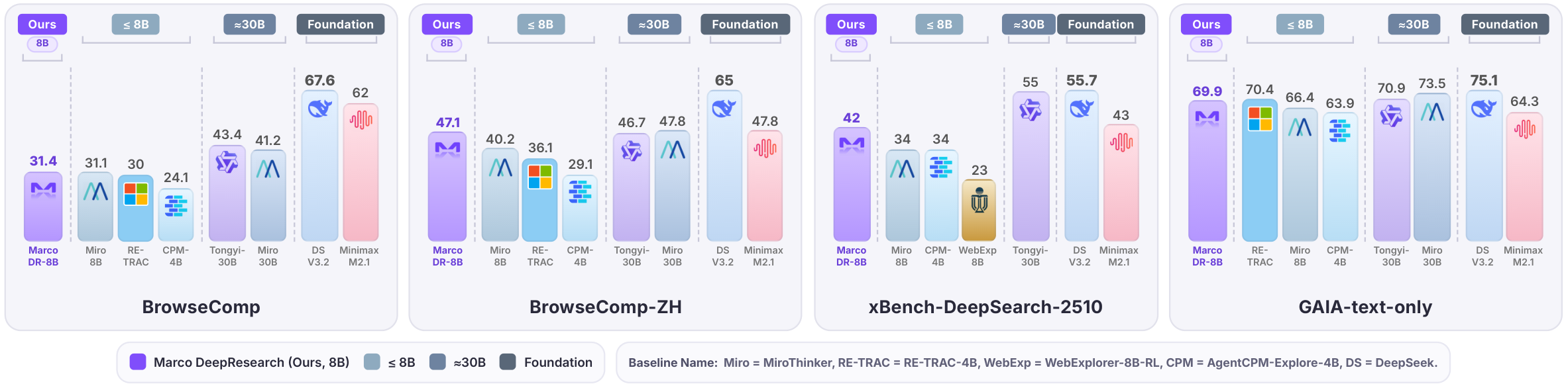
This is a quantized version of AIDC-AI/Marco-DeepResearch-8B. Please refer to the original model card for full details on training methodology, intended use, and limitations.
@article{zhu2026marco,
  title={Marco DeepResearch: Unlocking Efficient Deep Research Agents via Verification-Centric Design},
  author={Bin Zhu and Qianghuai Jia and Tian Lan and Junyang Ren and Feng Gu and Feihu Jiang and Longyue Wang and Zhao Xu and Weihua Luo},
  journal={arXiv preprint arXiv:2603.28376},
  year={2026}
}
This model is released under the Apache 2.0 License.
2-bit
3-bit
4-bit
5-bit
6-bit
8-bit
16-bit