

LMMS-Eval v0.4: Major Update Release
Introduction
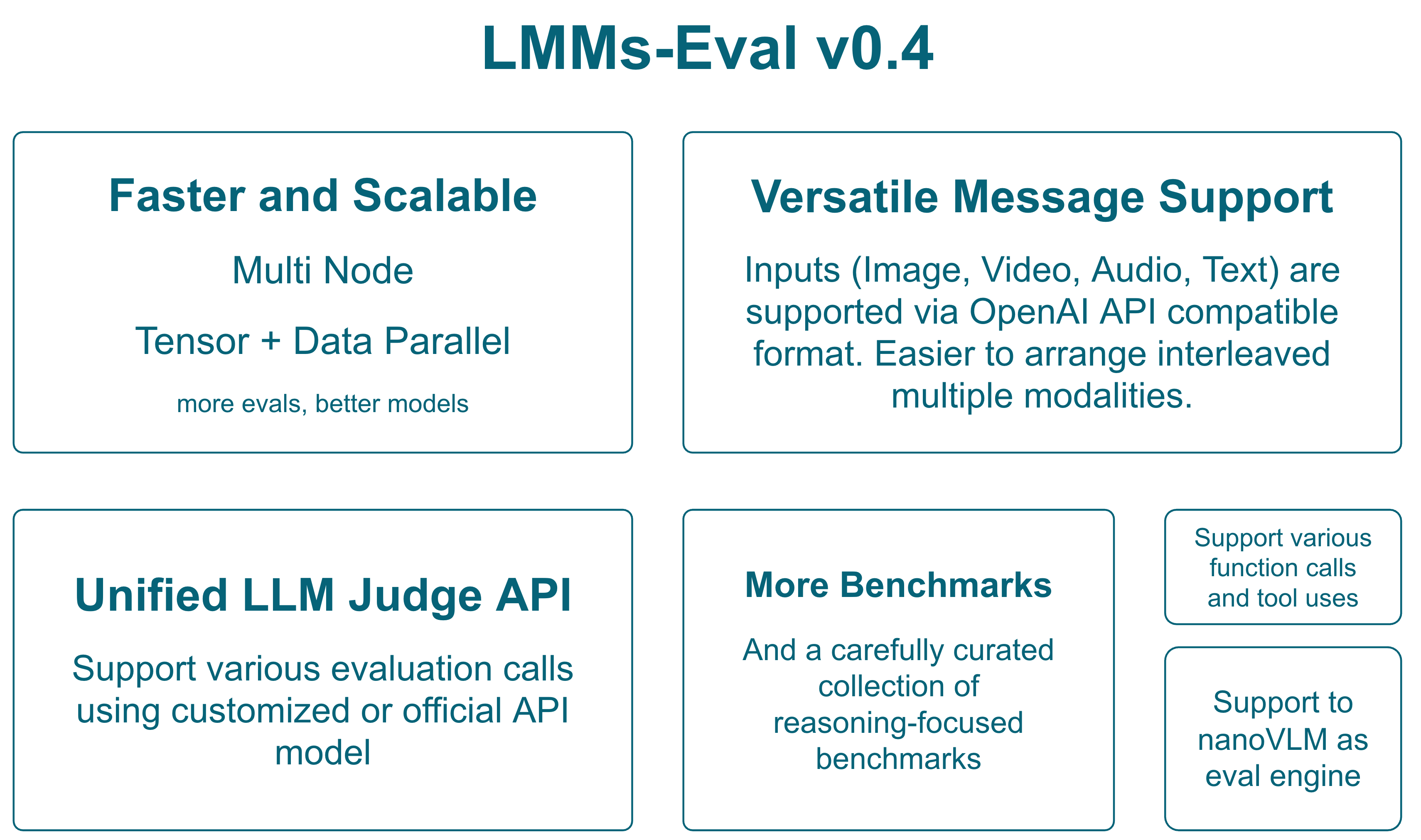
LMMS-Eval v0.4 represents a significant evolution in multimodal model evaluation, introducing groundbreaking features for distributed evaluation, reasoning-oriented benchmarks, and a unified interface for modern multimodal models. This release focuses on scalability, extensibility, and comprehensive evaluation capabilities across diverse multimodal tasks.
Table of Contents
- LMMS-Eval v0.4: Major Update Release
Backward Compatibility Check
To ensure backward compatibility, we've conducted comprehensive performance comparisons between v0.3 and v0.4 across multiple models and benchmarks. The following table shows performance metrics for the same models evaluated with both versions:
| Models (v0.3/v0.4) | AI2D | ChartQA | DocVQA-Val | MME Perception | MME Cognition | RealWorldQA | OCRBench | MiaBench | MMMU-Val Reasoning | MathVerse Testmini | MathVision Testmini | MathVista Testmini | K12 Reasoning |
|---|---|---|---|---|---|---|---|---|---|---|---|---|---|
| LLaVA-OneVision-7B | 81.35/81.35 | 80.0/80.0 | 87.1/87.1 | 1578.64/1578.64 | 418.21/418.21 | 66.27/66.27 | 621/621 | 76.25/77.63 | 42.44/41.67 | 30.53/29.52 | 18.09/17.76 | 60.50/60.60 | 20.80/20.20 |
| Qwen-2.5-VL-3B (qwen2_5_vl) | 78.66/78.89 | 83.52/83.44 | 92.42/92.54 | 1520.52/1534.44 | 630/614.28 | 59.08/59.08 | 786/791 | 77.98/80.85 | 44.00/42.22 | 36.22/33.43 | 15.46/15.46 | 61.9/61.00 | 27.8/26.40 |
| Qwen-2.5-VL-3B (vllm) | 79.05/78.95 | 83.76/83.68 | 92.88/92.81 | 1521.87/1515.25 | 613.57/619.64 | 60.00/59.22 | 778/781 | 53.83/55.15 | 43.33/43.22 | 30.28/31.78 | 16.78/15.82 | 63.40/64.40 | 26.00/27.60 |
We could see that most benchmarks show minimal performance differences between v0.3 and v0.4. Both native PyTorch and VLLM implementations maintain consistent performance, and performance remains stable across different model architectures (Qwen2.5-VL vs LLaVA-OneVision).
Major Features
1. Unified Message Interface
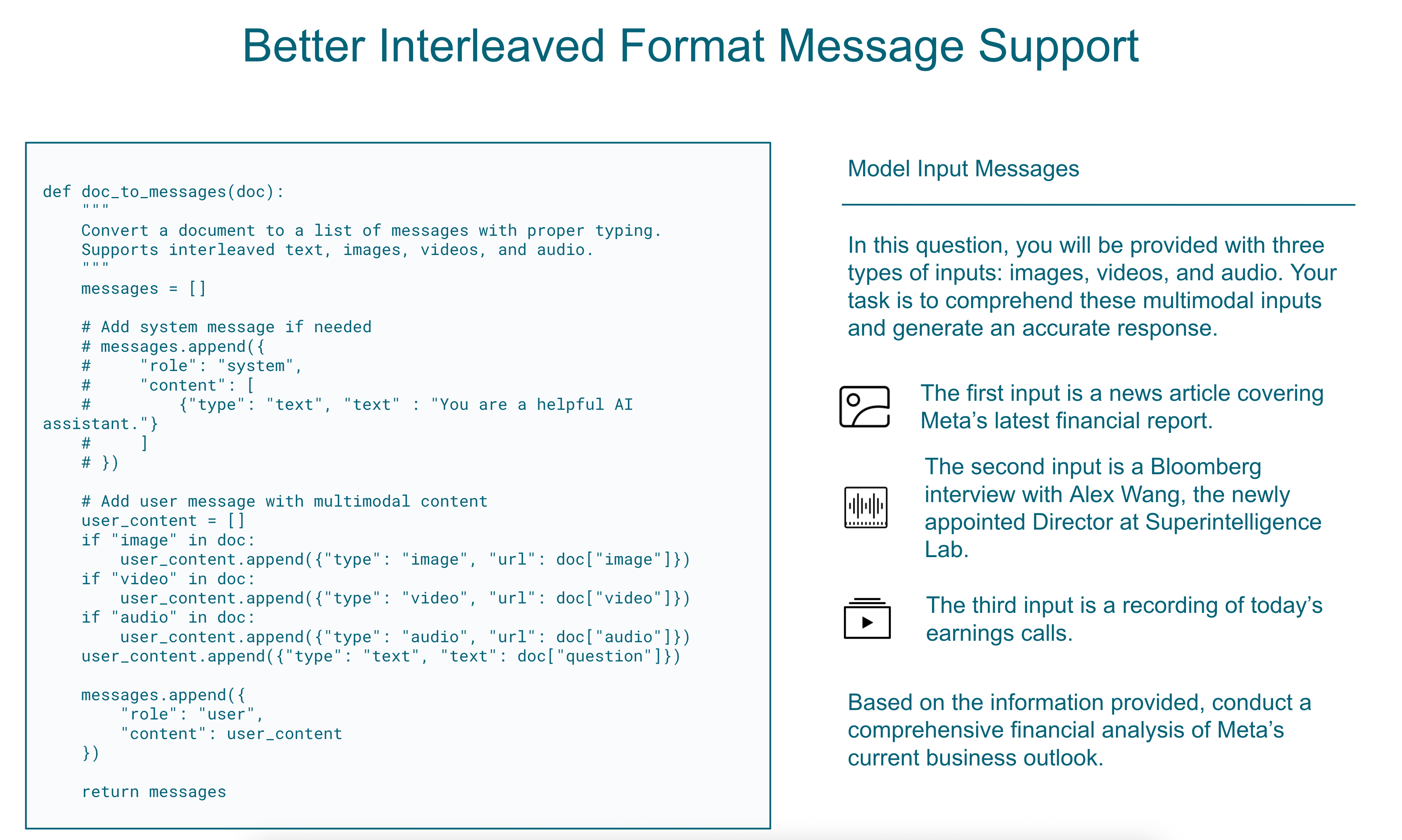
Replacing Legacy doc_to_visual and doc_to_text with doc_to_messages
The new unified interface streamlines how multimodal inputs are processed, providing a consistent format across all modalities:
def doc_to_messages(doc):
    """
    Convert a document to a list of messages with proper typing.
    Supports interleaved text, images, videos, and audio.
    """
    messages = []

    # Add system message if needed
    # messages.append({
    #     "role": "system",
    #     "content": [
    #         {"type": "text", "text" : "You are a helpful AI assistant."}
    #     ]
    # })

    # Add user message with multimodal content
    user_content = []
    if "image" in doc:
        user_content.append({"type": "image", "url": doc["image"]})
    if "video" in doc:
        user_content.append({"type": "video", "url": doc["video"]})
    if "audio" in doc:
        user_content.append({"type": "audio", "url": doc["audio"]})
    user_content.append({"type": "text", "text": doc["question"]})

    messages.append({
        "role": "user",
        "content": user_content
    })

    return messages
This change provides:
- Consistency: Single interface for all multimodal inputs
- Flexibility: Easy support for interleaved modalities
- Compatibility: Aligns with modern chat-based model APIs
We provide two examples to guide the implementation of a custom doc_to_messages function:
In
api/task.py, within theConfigurableMessagesTaskclass, you can find adoc_to_messagesfunction used for tasks that do not implementdoc_to_messagesdirectly but instead definedoc_to_textanddoc_to_visual. This allows the new chat model to be compatible with legacy tasks lacking explicitdoc_to_messagesimplementations.For a more customized approach, refer to the
mmmu_doc_to_messagesfunction intasks/mmmu/utils.py. This implementation demonstrates how to format text and image inputs into a well-structured, interleaved message format, replacing older image token representations.
To utilize doc_to_messages, we provide a protocol class that allows you to convert the output into either Hugging Face chat template format or OpenAI messages format. Here's a basic example:
chat_messages = doc_to_messages(self.task_dict[task][split][doc_id])
chat_messages: ChatMessages = ChatMessages(**{"messages": chat_messages})

# To openai messages
messages = chat_messages.to_openai_messages()

# To hf messages
hf_messages = chat_messages.to_hf_messages()
You can then use these messages with a chat template or the chat completion API. If you wish to implement your own message processing logic, please refer to the protocol definition in lmms_eval/protocol.py for more details.
Replacing the Simple Model with a Chat Model
To use the doc_to_messages function, you must implement a chat model capable of processing the message format it produces. Examples of such models can be found in the lmms_eval/models/chat directory.
If you prefer to fall back to the previous simple model implementation, you can add the --force_simple flag to the launch command.
To implement a new chat model, follow these steps:
- Create the chat model (e.g.,
lmms_eval/models/vllm.py). - Register the model in
lmms_eval/models/__init__.py.
2. Multi-Node Distributed Evaluation
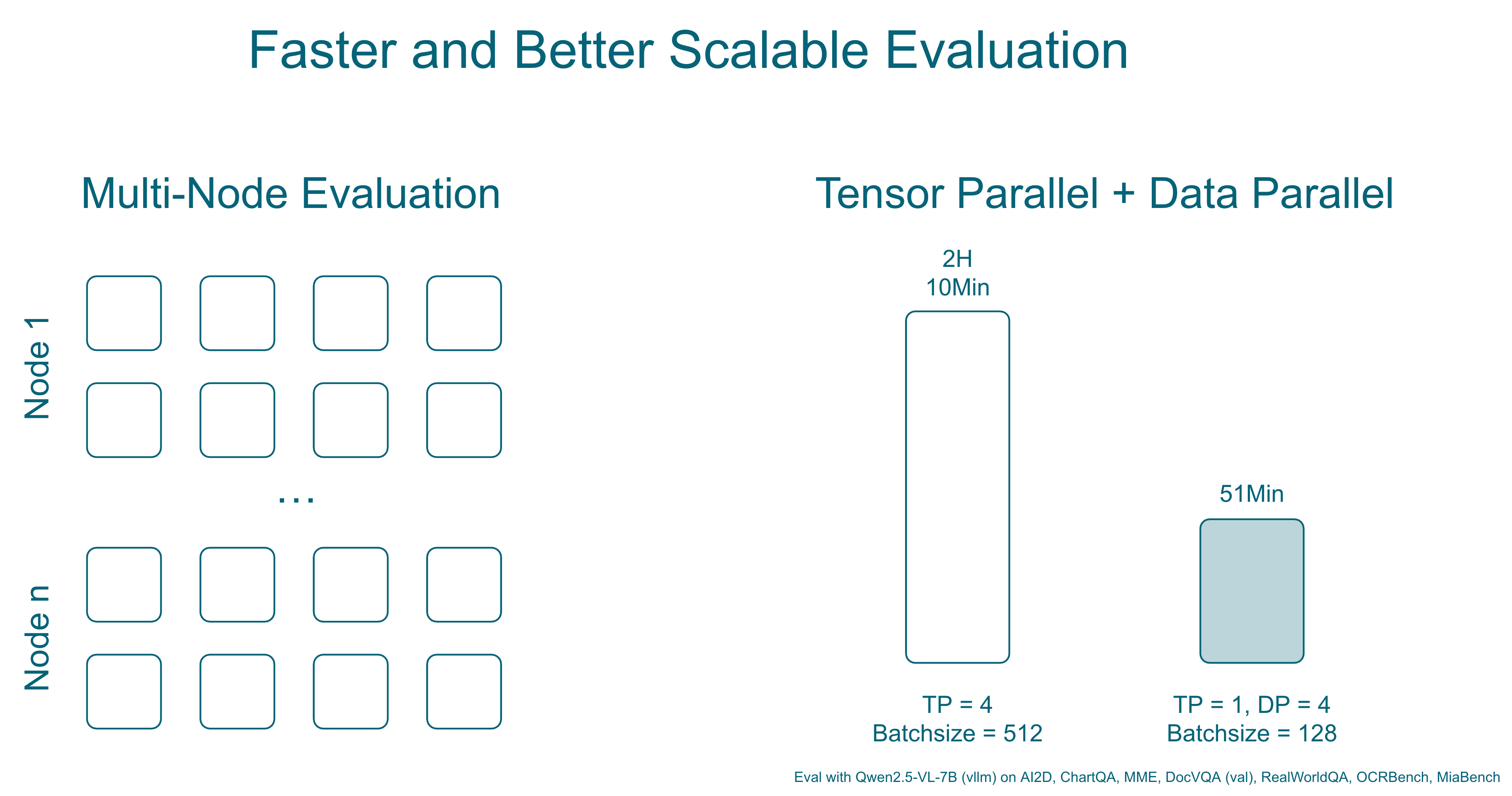
Support for large-scale evaluations across multiple machines using PyTorch's distributed capabilities:
torchrun --nproc_per_node="${MLP_WORKER_GPU}" \
         --nnodes="${MLP_WORKER_NUM}" \
         --node_rank="${MLP_ROLE_INDEX}" \
         --master_addr="${MLP_WORKER_0_HOST}" \
         --master_port="${MLP_WORKER_0_PORT}" \
         -m lmms_eval \
         --model qwen2_5_vl \
         --model_args pretrained=Qwen/Qwen2.5-VL-3B-Instruct,device_map=cuda \
         --tasks mmmu_val \
         --batch_size 1 \
         --output_path ./logs/ \
         --log_samples
For vllm, you can use the following command to enable tensor parallel and data parallel to launch more workers to split data for faster evaluation:
accelerate launch --num_processes=1 --main_process_port=12346 -m lmms_eval \
    --model vllm \
    --model_args=model=Qwen/Qwen2.5-VL-3B-Instruct,tensor_parallel_size=2,data_parallel_size=4 \
    --tasks ai2d \
    --batch_size 512 \
    --verbosity=DEBUG
Key Benefits:
- Scalability: Evaluate large models and datasets across multiple GPUs/nodes
- Efficiency: Automatic work distribution and result aggregation
- Flexibility: Works with existing PyTorch distributed infrastructure
3. Unified LLM/LMM Judge Interface
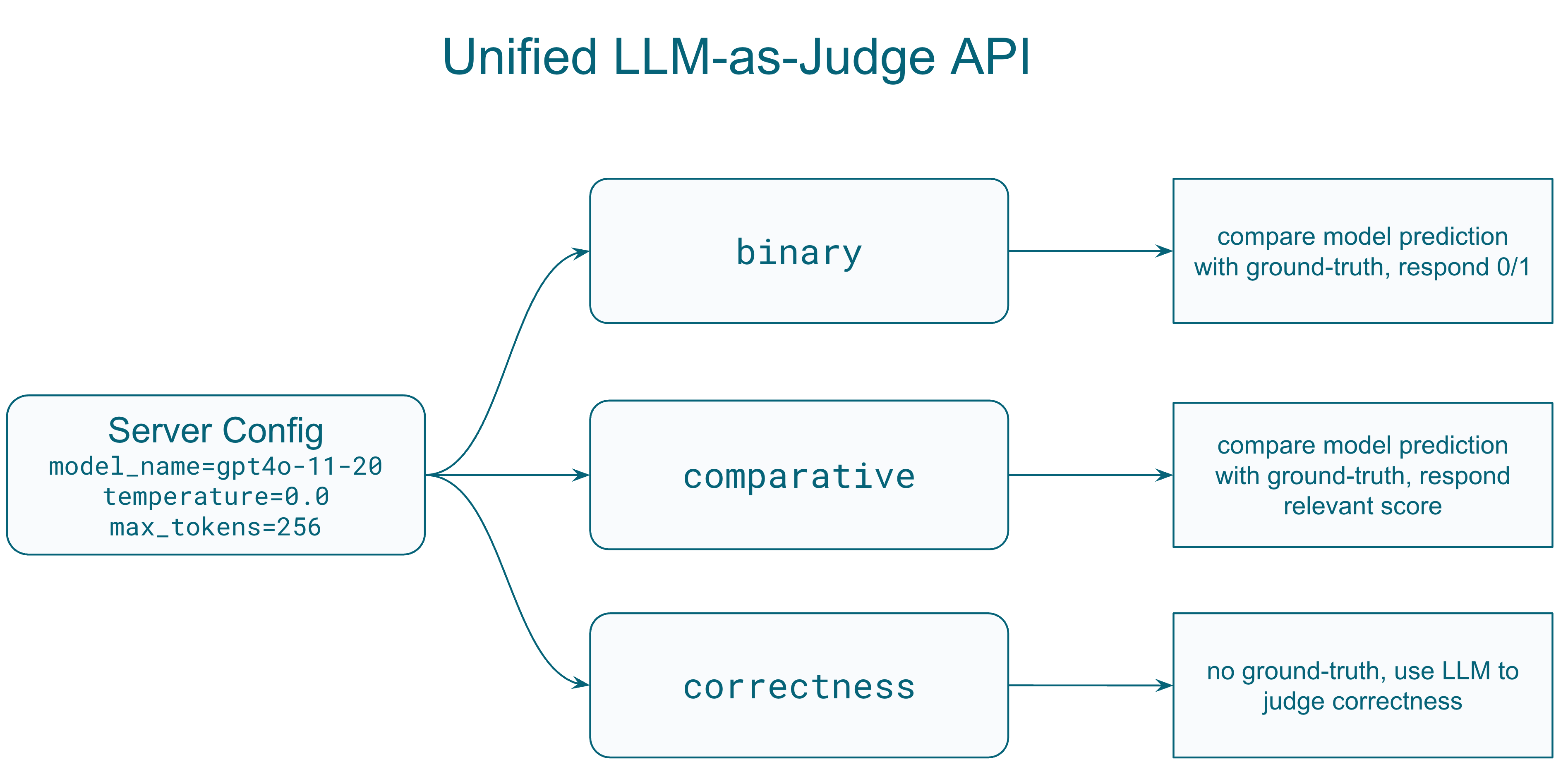
A standardized protocol for using language models as judges to evaluate other model outputs:
from lmms_eval.llm_judge.protocol import Request, ServerConfig

# Configure the judge model
config = ServerConfig(
    model_name="gpt-4o-2024-11-20",
    temperature=0.0,
    max_tokens=1024,
    judge_type="score",  # Options: 'general', 'binary', 'score', 'comparative'
    score_range=(0, 10),
    evaluation_criteria={
        "accuracy": "How factually correct is the response?",
        "completeness": "Does the response fully address the question?"
    }
)

# Create evaluation request
request = Request(
    question="What objects are in this image?",
    answer="A cat sitting on a red couch",  # Ground truth
    prediction="A dog on a sofa",  # Model output to evaluate
    images=["path/to/image.jpg"],  # Optional visual context
    config=config
)
Supported Judge Types:
- General: Open-ended evaluation with custom prompts
- Binary: Yes/No or 0/1 judgments
- Score: Numerical scoring within a defined range
- Comparative: Compare two model responses
Key Features:
- Structured Input Format: Consistent interface for question, answer, prediction, and context
- Multimodal Support: Handle both text and image inputs for evaluation
- Flexible Output Formats: Configurable response formats (JSON/text)
- Retry Logic: Built-in retry mechanism with configurable delays
- Concurrent Processing: Support for parallel evaluation requests
Tasks Using the Unified Judge API:
Mathematical Reasoning Tasks:
- MathVista: Uses custom
MathVistaEvaluatorwithget_chat_response()method - MathVerse: Dedicated
MathVerseEvaluatorclass withscore_answer()method - MathVision: Binary evaluation for mathematical correctness
- K12: Yes/no evaluation focusing on semantic correctness while ignoring formatting differences
Competition and Advanced Tasks:
- OlympiadBench: Binary evaluation for competition math problems (physics, mathematics)
- MMMU Thinking: Enhanced evaluation for multi-modal reasoning tasks
Example Task Implementation:
# In task utils.py
from lmms_eval.llm_judge import ServerConfig, get_server

def process_results_with_judge(doc, results):
    prediction = results[0].strip()
    question = doc["question"]
    answer = doc["answer"]

    # Configure judge
    config = ServerConfig(
        model_name="gpt-4o-2024-11-20",
        temperature=0.0,
        max_tokens=256
    )
    server = get_server(server_name="openai", config=config)

    # Evaluate with binary judge
    result = server.evaluate_binary(
        question=question,
        answer=answer,
        prediction=prediction,
        output_format="1/0",
        custom_prompt="Judge if the prediction is mathematically equivalent to the answer."
    )

    return {"llm_as_judge_eval": 1 if result["success"] and result["result"] == "1" else 0}
Task YAML Configuration:
metric_list:
  - metric: llm_as_judge_eval
    aggregation: mean
    higher_is_better: true
process_results: !function utils.process_results_with_judge
4. Tool Call Integration
Support for models that can make tool/function calls during evaluation:
accelerate launch --num_processes=1 --main_process_port 12345 -m lmms_eval \
    --model async_openai \
    --model_args model_version=Qwen/Qwen2.5-VL-7B-Instruct,mcp_server_path=path/to/mcp_server.py\
    --tasks mmmu_val \
    --batch_size 1 \
    --output_path ./logs/ \
    --log_samples
Features:
- Tool-use Evaluation: Assess models' ability to call external functions
- Multi-step Reasoning: Support for complex reasoning with tool assistance
- Function Call Integration: Seamless integration with various API endpoints
To use this feature, you must first setup a vllm/sglang or any openai compatible server that support tool parsing. If the default model template does not support tool parsing, you might need to create your own for it, examples can be found in examples/chat_templates/tool_call_qwen2_5_vl.jinja
6. NanoVLM Integration
Direct support for HuggingFace's NanoVLM framework:
- Simplified model loading and evaluation
- Optimized for small-scale vision-language models
- Efficient training/finetuning integration
Programmatic API Usage
LMMS-Eval v0.4 provides a comprehensive Python API for programmatic evaluation, making it easy to integrate into research workflows, training pipelines, and automated benchmarking systems.
Basic Evaluation API
from lmms_eval.evaluator import simple_evaluate
from lmms_eval.models.simple.qwen2_5_vl import Qwen2_5_VL

# Initialize your model
model = Qwen2_5_VL(
    pretrained="Qwen/Qwen2.5-VL-3B-Instruct",
    device="cuda"
)

# Run evaluation on multiple tasks
results = simple_evaluate(
    model=model,
    tasks=["mmstar", "mme", "mathvista_testmini"],
    batch_size=1,
    num_fewshot=0,
    device="cuda",
    limit=100  # Limit for testing
)

# Results structure:
# {
#     "results": {
#         "mmstar": {
#             "acc": 0.75,
#             "acc_stderr": 0.02
#         },
#         "mme": {
#             "mme_perception_score": 1245.5,
#             "mme_cognition_score": 287.5
#         },
#         "mathvista_testmini": {
#             "llm_as_judge_eval": 0.68
#         }
#     },
#     "config": {...},
#     "samples": [...] if log_samples=True
# }
Advanced API with Custom Configuration
from lmms_eval.evaluator import evaluate
from lmms_eval.tasks import TaskManager, get_task_dict

# Create task manager with custom task paths
task_manager = TaskManager(
    include_path="/path/to/custom/tasks"
)

# Get specific task configurations
task_dict = get_task_dict(
    task_name_list=["custom_task", "mmmu_val"],
    task_manager=task_manager
)

# Run evaluation with full control
results = evaluate(
    lm=model,  # Must be LM object, not string
    task_dict=task_dict,
    limit=None,
    bootstrap_iters=100,  # For confidence intervals
    log_samples=True
)
Task Management API
from lmms_eval.tasks import TaskManager, get_task_dict

# List available tasks
task_manager = TaskManager()
all_tasks = task_manager.all_tasks
print(f"Available tasks: {all_tasks}")

# Get task groups
all_groups = task_manager.all_groups
print(f"Task groups: {all_groups}")

# Get task dictionary for evaluation
task_dict = get_task_dict(
    task_name_list=["mmstar", "mme", "vqav2"],
    task_manager=task_manager
)
Distributed Evaluation API
import os
import torch
import torch.distributed as dist
from lmms_eval.evaluator import simple_evaluate
from lmms_eval.models.simple.qwen2_5_vl import Qwen2_5_VL

# Initialize distributed environment
dist.init_process_group(backend="nccl")
local_rank = int(os.environ["LOCAL_RANK"])
torch.cuda.set_device(local_rank)

# Model with distributed support
model = Qwen2_5_VL(
    pretrained="Qwen/Qwen2.5-VL-72B-Instruct",
    device_map=f"cuda:{local_rank}"
)

# Distributed evaluation
results = simple_evaluate(
    model=model,
    tasks=["mmmu_val", "mathvista_testmini"],
    batch_size=4,
    device=f"cuda:{local_rank}"
)

# Results are automatically aggregated across all processes
if dist.get_rank() == 0:
    print(f"Final results: {results}")
Judge API Integration
from lmms_eval.llm_judge.protocol import ServerConfig
from lmms_eval.llm_judge import get_server

# Setup judge for custom evaluation
judge_config = ServerConfig(
    model_name="gpt-4o-2024-11-20",
    temperature=0.0,
    max_tokens=256,
    judge_type="binary"
)

judge_server = get_server("openai", judge_config)

# Custom evaluation with judge
def evaluate_responses(questions, predictions, ground_truths):
    results = []
    for q, p, gt in zip(questions, predictions, ground_truths):
        result = judge_server.evaluate_binary(
            question=q,
            answer=gt,
            prediction=p,
            output_format="1/0"
        )
        results.append(1 if result["success"] and result["result"] == "1" else 0)
    return sum(results) / len(results)
Batch Processing and Efficiency
import torch
from lmms_eval.evaluator import simple_evaluate
from lmms_eval.models.simple.qwen2_5_vl import Qwen2_5_VL

# Efficient batch processing
def batch_evaluate_models(models, tasks, batch_size=8):
    results = {}

    for model_name, model in models.items():
        print(f"Evaluating {model_name}...")

        model_results = simple_evaluate(
            model=model,
            tasks=tasks,
            batch_size=batch_size,
            device="cuda",
            limit=None,
            cache_requests=True,  # Enable caching for faster re-runs
            write_out=False,  # Disable debug output
            log_samples=False  # Save memory
        )

        results[model_name] = model_results["results"]

        # Clean up GPU memory between models
        torch.cuda.empty_cache()

    return results

# Usage
models = {
    "qwen2.5-vl-3b": Qwen2_5_VL(pretrained="Qwen/Qwen2.5-VL-3B-Instruct", device="cuda"),
    "qwen2.5-vl-7b": Qwen2_5_VL(pretrained="Qwen/Qwen2.5-VL-7B-Instruct", device="cuda")
}

benchmark_results = batch_evaluate_models(
    models=models,
    tasks=["mmstar", "mme", "vqav2_val"],
    batch_size=4
)
New Benchmarks
Vision Understanding
- VideoEval-Pro: Comprehensive video understanding evaluation
- V*: Visual reasoning benchmark
- VLMs are Blind: Challenging visual perception tasks
- HallusionBench: Detecting visual hallucinations
- VisualWebBench: Web-based visual understanding
- TOMATO: Temporal and motion understanding
- MMVU: Multi-modal visual understanding
Reasoning-Oriented Benchmarks
A new suite of benchmarks focusing on mathematical and logical reasoning:
Mathematical Reasoning
- AIME: Advanced mathematical problem solving
- AMC: American Mathematics Competitions tasks
- OpenAI Math: Diverse mathematical challenges
- MMK12: K-12 mathematics curriculum
- MathVision TestMini: Visual mathematics problems
- MathVerse TestMini: Multimodal math reasoning
- MathVista TestMini: Mathematical visual understanding
- WeMath: Comprehensive math evaluation
- Dynamath: Dynamic mathematical reasoning
Olympic-Level Challenges
- OlympiadBench: International olympiad problems
- OlympiadBench MIMO: Multi-input multi-output format
Technical Details
Multi-Node Evaluation Architecture
The distributed evaluation system introduces significant architectural changes:
- Global Rank Management: All rank and world size operations now use global rank, with local rank used only for device management
- Automatic Work Distribution: Tasks are automatically distributed across nodes based on dataset size
- Result Aggregation: Efficient gathering of results from all nodes with deduplication
Async OpenAI API Integration
Enhanced API calling with asynchronous support:
import asyncio
import aiohttp

# Concurrent API calls for faster evaluation
async def evaluate_with_api(samples, model="gpt-4o-2024-11-20"):
    async with aiohttp.ClientSession() as session:
        tasks = [evaluate_single(session, sample, model) for sample in samples]
        results = await asyncio.gather(*tasks)
    return results
Benefits:
- 10x faster evaluation for API-based models
- Rate limit handling with automatic retry
- Cost optimization through batching
Migration Guide
Updating Task Configurations
Old Format (v0.3):
doc_to_visual: !function utils.doc_to_visual
doc_to_text: !function utils.doc_to_text
New Format (v0.4):
doc_to_messages: !function utils.doc_to_messages
Model Implementation Changes
Models should now implement the unified message interface:
class MyModel(lmms):
    def generate_until(self, requests: list[Instance]) -> list[str]:
        for request in requests:
            # New: Extract messages directly
            doc_to_messages, gen_kwargs, doc_id, task, split = request.args
            messages = doc_to_messages(doc)

            # Process messages with proper role handling
            response = self.process_messages(messages, **gen_kwargs)
Deprecated Features
Deprecated Models
The following models are deprecated in v0.4:
- mplug_owl: Legacy architecture incompatible with modern transformers
- video-chatgpt: Superseded by newer video models
Migration Path:
- For continued use, manually copy model implementations from v0.3
- Consider migrating to supported alternatives (e.g., LLaVA-NeXT for video)
Legacy Interfaces
doc_to_visualanddoc_to_textare deprecated- Simple model interface is discouraged for new implementations
Future Roadmap
Upcoming in v0.4.x
- Cached Requests: Persistent caching for expensive computations
- Insights Feature: Automated error analysis and pattern detection
- Agent Benchmarks: Comprehensive evaluation of tool-use capabilities
Long-term Vision
- Unified Evaluation Platform: Single framework for all modality combinations
- Community Benchmark Hub: Easier integration of community benchmarks
Contributing
We welcome contributions to LMMS-Eval v0.4! Here are the priority areas where contributions are most needed:
High-Priority Areas
- New Benchmark Implementations: Help us add more evaluation tasks and datasets
- Model Integrations: Add support for new multimodal models
- Performance Optimizations: Improve evaluation speed and memory efficiency
- Documentation: Enhance guides, examples, and API documentation
How to Contribute
- Fork the repository and create a feature branch
- Follow existing code patterns and documentation style
- Test your changes thoroughly
- Submit a pull request with clear description of changes
For specific implementation guidelines, refer to:
- Model Guide (
docs/model_guide.md) - For adding new models - Task Guide (
docs/task_guide.md) - For implementing new benchmarks - Existing implementations in
lmms_eval/models/andlmms_eval/tasks/
Acknowledgments
The v0.4 release was made possible by contributions from the LMMS-Eval community:
Core Development Team
- Bo Li - Unified judge interface and mathematical reasoning benchmarks
- Kaichen Zhang - Unified message interface and architecture improvements
- Cong Pham Ba - VisualWebBench and MMVU benchmark implementations
- Thang Luu - TOMATO benchmark and temporal understanding tasks
Getting Help
For questions and support:
- Issues: Report bugs or request features on GitHub Issues
- Discussions: Join community discussions on GitHub Discussions
- Documentation: Check the
docs/directory for implementation guides