
issue_owner_repo listlengths 2 2 | issue_body stringlengths 0 262k ⌀ | issue_title stringlengths 1 1.02k | issue_comments_url stringlengths 53 116 | issue_comments_count int64 0 2.49k | issue_created_at stringdate 1999-03-17 02:06:42 2025-06-23 11:41:49 | issue_updated_at stringdate 2000-02-10 06:43:57 2025-06-23 11:43:00 | issue_html_url stringlengths 34 97 | issue_github_id int64 132 3.17B | issue_number int64 1 215k |
|---|---|---|---|---|---|---|---|---|---|
[
"LibreCAD",
"LibreCAD"
] | ### Summary
An out-of-bounds read on a heap buffer in the `importshp` plugin may allow an attacker to read unintended data.
### Cause
A DBF file has the following structure:
```
* file header
* number of records
* record length
* size of file header + size of field headers
* 1 or more field header... | Security: Out-of-bounds read in importshp plugin, due to mismatched sizes in DBF file header | https://api.github.com/repos/LibreCAD/LibreCAD/issues/1481/comments | 7 | 2021-12-28T23:24:22Z | 2023-07-09T20:09:39Z | https://github.com/LibreCAD/LibreCAD/issues/1481 | 1,090,174,655 | 1,481 |
[
"LibreCAD",
"LibreCAD"
] | We should have an option to enable/disable glow effect on lines or parts of drawings whenever mouse is hovered upon them. We should also be able to adjust the intensity of the glow. This will be somewhat helpful if we implement the line grids in next versions of LibreCAD. | Add glowing effect to lines / parts of drawings when mouse is hovered upon them. | https://api.github.com/repos/LibreCAD/LibreCAD/issues/1480/comments | 11 | 2021-12-28T08:41:24Z | 2022-04-24T17:12:09Z | https://github.com/LibreCAD/LibreCAD/issues/1480 | 1,089,709,675 | 1,480 |
[
"LibreCAD",
"LibreCAD"
] | Hello,
TinyVG seems a very interesting format to support.
https://tinyvg.tech/
It's a binary encoded vector graphics format
https://zig.news/xq/a-challenger-to-the-throne-of-vector-graphics-svg-is-dead-long-live-tinyvg-4on8
https://github.com/TinyVG
Any opinion about supporting this kind of format?
Kind re... | TinyVG support | https://api.github.com/repos/LibreCAD/LibreCAD/issues/1479/comments | 0 | 2021-12-27T21:16:57Z | 2024-05-18T13:07:00Z | https://github.com/LibreCAD/LibreCAD/issues/1479 | 1,089,477,220 | 1,479 |
[
"LibreCAD",
"LibreCAD"
] | All the fonts that we use in LibreCAD are all outdated-looking. Moreover, they are not even properly anti-aliased. I have gone to the settings and turned on anti-aliasing and restarted the project after saving the settings, but that still didn't give me properly anti-aliased fonts like the ones in AutoCAD. Also, in the... | Need Better Fonts, A Proper Tool to Convert Fonts We Wish To Use and Improve Anti-Aliasing. | https://api.github.com/repos/LibreCAD/LibreCAD/issues/1478/comments | 4 | 2021-12-26T13:17:15Z | 2024-05-18T13:07:50Z | https://github.com/LibreCAD/LibreCAD/issues/1478 | 1,088,769,834 | 1,478 |
[
"LibreCAD",
"LibreCAD"
] | I got this feedback from one of my colleagues; and I felt it too in the beginning that the background grid is not that impressive. Please add the one like AutoCAD.
As of now, we have a background grid consisting of dots that is not even a grid by definition; as grids are supposed to be a uniformly overlapping lines.... | Add More Background Grids. | https://api.github.com/repos/LibreCAD/LibreCAD/issues/1477/comments | 4 | 2021-12-26T13:04:06Z | 2024-09-04T13:47:06Z | https://github.com/LibreCAD/LibreCAD/issues/1477 | 1,088,767,496 | 1,477 |
[
"LibreCAD",
"LibreCAD"
] | In current versions of Freecad, when we choose to make or draw dashed/dotted lines, the dashes and dots are drawn, but they appear to be screenspace scaled (the scale of dashes/dots and space between them remains constant irrespective of actual zoom of the entire drawing), which means that the distances between dots an... | Need for Non-scaling dashes' and dots' lines. (Or Proportionately Scaling Dash Lines and Dot Lines) | https://api.github.com/repos/LibreCAD/LibreCAD/issues/1476/comments | 2 | 2021-12-26T12:57:47Z | 2021-12-31T02:02:16Z | https://github.com/LibreCAD/LibreCAD/issues/1476 | 1,088,766,498 | 1,476 |
[
"LibreCAD",
"LibreCAD"
] | ### Steps to reproduce or sample file
1. Unzip and load the [attached proof of concept file](https://github.com/LibreCAD/LibreCAD/files/7744679/drw_entities_1265.zip) in LibreCAD 2.2.0-rc3
### Cause
The bounds check at [drw_entities.cpp:1264](https://github.com/LibreCAD/LibreCAD/blob/415f8fcbe4e8b256884c17da344b0f... | Crash in DRW_LWPolyline::parseDwg due to inverted bounds check | https://api.github.com/repos/LibreCAD/LibreCAD/issues/1474/comments | 1 | 2021-12-20T10:50:22Z | 2022-01-04T19:59:57Z | https://github.com/LibreCAD/LibreCAD/issues/1474 | 1,084,639,160 | 1,474 |
[
"LibreCAD",
"LibreCAD"
] | ### Steps to reproduce or sample file
1. Unzip and load the [attached proof of concept file](https://github.com/LibreCAD/LibreCAD/files/7744605/drw_entities_1203.zip) in LibreCAD 2.2.0-rc3
### Cause
The length of the vertex list `vertexnum` is read directly from the DWG file. The value passed to `std::vector<>::re... | Crash in DRW_LWPolyline::parseDwg due to excessive vertex list length | https://api.github.com/repos/LibreCAD/LibreCAD/issues/1473/comments | 0 | 2021-12-20T10:34:44Z | 2024-05-18T14:35:33Z | https://github.com/LibreCAD/LibreCAD/issues/1473 | 1,084,625,132 | 1,473 |
[
"LibreCAD",
"LibreCAD"
] | ### Steps to reproduce or sample file
1. Unzip and load the [attached proof of concept file](https://github.com/LibreCAD/LibreCAD/files/7744531/dwgreader21_230.zip) in LibreCAD 2.2.0-rc3
### Cause
The field `PagesMapSizeUncompressed` is read directly from the DWG file. The value is used to allocate an `std::vect... | Crash in dwgReader21::readFileHeader due to excessive PagesMapSizeUncompressed | https://api.github.com/repos/LibreCAD/LibreCAD/issues/1472/comments | 0 | 2021-12-20T10:22:04Z | 2024-05-18T14:36:46Z | https://github.com/LibreCAD/LibreCAD/issues/1472 | 1,084,612,372 | 1,472 |
[
"LibreCAD",
"LibreCAD"
] | I know that this is my third issue report in one day, but this one too is as important as the previous two. This feature can be seen in many popular CAD softwares like AutoCAD. This feature helps in keeping the drawings well organized within one file itself. As of now, we have to create multiple drawings and keep them ... | Add the feature of having multiple sheets in one LibreCAD file. | https://api.github.com/repos/LibreCAD/LibreCAD/issues/1471/comments | 15 | 2021-12-19T17:09:29Z | 2022-01-08T18:23:16Z | https://github.com/LibreCAD/LibreCAD/issues/1471 | 1,084,146,075 | 1,471 |
[
"LibreCAD",
"LibreCAD"
] | This is really an annoying thing. The status bar resizes everytime I save my drawing. This resizing moves the entire drawing space up and down and happens just before I have snapped a point and about to click. Many a times, I click on a different snap point and this causes me to go back and redo it. It may seem a simpl... | Fix the Status Bar size readjusting everytime when saving. | https://api.github.com/repos/LibreCAD/LibreCAD/issues/1470/comments | 1 | 2021-12-19T17:05:44Z | 2021-12-19T19:42:54Z | https://github.com/LibreCAD/LibreCAD/issues/1470 | 1,084,145,255 | 1,470 |
[
"LibreCAD",
"LibreCAD"
] | ### Steps to reproduce or sample file
1. Unzip and load the [attached proof of concept file](https://github.com/LibreCAD/LibreCAD/files/7741210/dxf_hatch93.zip) in LibreCAD 2.2.0-rc3
### Cause
The `std::shared_ptr` `DRW_Hatch::loop` is written to when loading a `HATCH` entity with code 93. If this occurs before a ... | NULL pointer dereference in DXF parser, HATCH code 93 | https://api.github.com/repos/LibreCAD/LibreCAD/issues/1468/comments | 2 | 2021-12-19T17:00:48Z | 2022-01-25T12:25:06Z | https://github.com/LibreCAD/LibreCAD/issues/1468 | 1,084,144,167 | 1,468 |
[
"LibreCAD",
"LibreCAD"
] | <!-- Use mixed case please. UPPER CASE LOOKS AS IF YOU'RE SHOUTING
see https://datatracker.ietf.org/doc/html/rfc1855
KINDLY PLEASE MAKE THESE CHANGES AS SOON AS POSSIBLE IN THE UPCOMING VERSIONS AS LIBRECAD WON'T BE INDUSTRY FRIENDLY FOR AS LONG AS IT ISN'T PRINT FRIENDLY. THANK YOU.
-->
First of all, **we... | Need to integrate more Printing Features / Options and fix existing ones. | https://api.github.com/repos/LibreCAD/LibreCAD/issues/1467/comments | 1 | 2021-12-19T16:54:19Z | 2025-06-08T11:47:54Z | https://github.com/LibreCAD/LibreCAD/issues/1467 | 1,084,142,793 | 1,467 |
[
"LibreCAD",
"LibreCAD"
] | ### Steps to reproduce or sample file
1. Unzip and load the [attached proof of concept file](https://github.com/LibreCAD/LibreCAD/files/7740987/dwgreader21_161.zip) in LibreCAD 2.2.0-rc3
### Cause
The field `fileHdrCompLength` is read directly from the DWG file. If negative, code enters the block at [dwgreader21... | Crash in dwgReader21::readFileHeader due to excessive fileHdrCompLength | https://api.github.com/repos/LibreCAD/LibreCAD/issues/1466/comments | 0 | 2021-12-19T14:48:52Z | 2021-12-19T19:46:41Z | https://github.com/LibreCAD/LibreCAD/issues/1466 | 1,084,114,987 | 1,466 |
[
"LibreCAD",
"LibreCAD"
] | # Vulnerable Products
* LibreCAD 2.2.0-rc3 and older
### Steps to reproduce or sample file
1. Start LibreCAD 2.2.0 in a debugger
2. File/Open...
3. Unzip and open the [attached proof-of-concept file](https://github.com/LibreCAD/LibreCAD/files/7740065/jww_cdatalist.zip)
4. Observe `ACCESS_VIOLATION` crash, w... | Remote Code Execution vulnerability in LibreCAD 2.2.0-rc3 (JWW CDataList) | https://api.github.com/repos/LibreCAD/LibreCAD/issues/1464/comments | 2 | 2021-12-18T22:48:34Z | 2022-01-25T12:09:59Z | https://github.com/LibreCAD/LibreCAD/issues/1464 | 1,083,960,819 | 1,464 |
[
"LibreCAD",
"LibreCAD"
] | ### Vulnerable Products
* LibreCAD 2.2.0-rc3 and older
* Jw_cad 8.24a and older
### Steps to reproduce or sample file
1. Start LibreCAD 2.2.0-rc3 in a debugger
2. File/Open...
3. Unzip and open the attached [proof of concept file](https://github.com/LibreCAD/LibreCAD/files/7739792/jww_cdatamoji.zip)
4. Obser... | Remote Code Execution vulnerability in LibreCAD 2.2.0-rc3 (JWW CDataMoji) | https://api.github.com/repos/LibreCAD/LibreCAD/issues/1462/comments | 5 | 2021-12-18T19:01:27Z | 2022-01-25T12:03:26Z | https://github.com/LibreCAD/LibreCAD/issues/1462 | 1,083,924,119 | 1,462 |
[
"LibreCAD",
"LibreCAD"
] |
### Expected behavior
Choosing center point of elipse with center and 3 points should not cause program freeze and data loss.
### Observed behavior
Attempting to draw an elipse with center and 3 points after clicking on center point with snap on intersection of polar coordinate isometric view drawing Librecad free... | Elipse center with 3 points causes freeze when choosing second point. | https://api.github.com/repos/LibreCAD/LibreCAD/issues/1459/comments | 7 | 2021-12-16T03:11:09Z | 2024-05-18T14:36:25Z | https://github.com/LibreCAD/LibreCAD/issues/1459 | 1,081,721,974 | 1,459 |
[
"LibreCAD",
"LibreCAD"
] | <!--
This is a comment, not shown in your issue. You can delete it or leave it as it is.
Please give your issue an useful title.
And please enter as much information as possible into each paragraph below (###).
Think twice, post once ;-)
If your issue is about how to use LibreCAD consider to ask in the forum ... | Refresh issue on custom color for layer attributes | https://api.github.com/repos/LibreCAD/LibreCAD/issues/1458/comments | 3 | 2021-12-12T08:40:13Z | 2023-06-09T18:47:05Z | https://github.com/LibreCAD/LibreCAD/issues/1458 | 1,077,749,569 | 1,458 |
[
"LibreCAD",
"LibreCAD"
] | Another tiny GUI improvement:
In Drawing Preferences - Dimensions - Fixed length the naming is "units" instead of the actually used units (mm, m, inches or whatever) like in the other according fields. This might induce the user to think something here works differently.
This might have made some sense in V 2.1.3, a... | In Drawing Preferences - Dimensions - Fixed length change naming "units" to the actually used units like in the other fields | https://api.github.com/repos/LibreCAD/LibreCAD/issues/1453/comments | 2 | 2021-12-05T23:01:30Z | 2022-06-06T19:19:35Z | https://github.com/LibreCAD/LibreCAD/issues/1453 | 1,071,581,222 | 1,453 |
[
"LibreCAD",
"LibreCAD"
] | It is confusing to see absolute and relative coordinates running side by side in the status bar, at first sight I'm always not sure what is what. Newbees often don't realize the meaning at all.
So what about just putting an "@" in front of the readings. Seems simple, so maybe ok to include in 2.2.0.
As i can't inser... | Mark relative position coordinates in status bar with @ (small GUI improvment) | https://api.github.com/repos/LibreCAD/LibreCAD/issues/1452/comments | 7 | 2021-12-05T21:52:53Z | 2022-06-06T19:21:44Z | https://github.com/LibreCAD/LibreCAD/issues/1452 | 1,071,567,244 | 1,452 |
[
"LibreCAD",
"LibreCAD"
] | <!--
This is a comment, not shown in your issue. You can delete it or leave it as it is.
Please give your issue an useful title.
And please enter as much information as possible into each paragraph below (###).
Think twice, post once ;-)
If your issue is about how to use LibreCAD consider to ask in the forum ... | Grid appears when opening a second file | https://api.github.com/repos/LibreCAD/LibreCAD/issues/1451/comments | 6 | 2021-12-05T15:40:53Z | 2023-06-24T20:25:25Z | https://github.com/LibreCAD/LibreCAD/issues/1451 | 1,071,489,483 | 1,451 |
[
"LibreCAD",
"LibreCAD"
] | I know that the **Plot Plugin** already exists, though it seems outdated.
Also, it is better to do the plotting whilst using the Polyline tool.
So, basically, using polyline equations via the command line, embedded within the Polyline tool itself.
<hr>
Video link : [https://youtu.be/6IlKiwm-mlg](https://yo... | [Feature Request] Create polylines with equations | https://api.github.com/repos/LibreCAD/LibreCAD/issues/1448/comments | 0 | 2021-12-01T03:35:15Z | 2021-12-19T19:48:30Z | https://github.com/LibreCAD/LibreCAD/issues/1448 | 1,067,917,215 | 1,448 |
[
"LibreCAD",
"LibreCAD"
] | <!--
This is a comment, not shown in your issue. You can delete it or leave it as it is.
Please give your issue an useful title.
And please enter as much information as possible into each paragraph below (###).
Think twice, post once ;-)
If your issue is about how to use LibreCAD consider to ask in the forum ... | Multiple issues when dragging text around | https://api.github.com/repos/LibreCAD/LibreCAD/issues/1444/comments | 0 | 2021-11-28T20:33:06Z | 2023-06-08T05:28:59Z | https://github.com/LibreCAD/LibreCAD/issues/1444 | 1,065,428,936 | 1,444 |
[
"LibreCAD",
"LibreCAD"
] | <!--
This is a comment, not shown in your issue. You can delete it or leave it as it is.
Please give your issue an useful title.
And please enter as much information as possible into each paragraph below (###).
Think twice, post once ;-)
If your issue is about how to use LibreCAD consider to ask in the forum ... | Not all entities displayed while dragging them to new position | https://api.github.com/repos/LibreCAD/LibreCAD/issues/1439/comments | 4 | 2021-11-28T05:28:53Z | 2021-11-28T22:09:28Z | https://github.com/LibreCAD/LibreCAD/issues/1439 | 1,065,192,934 | 1,439 |
[
"LibreCAD",
"LibreCAD"
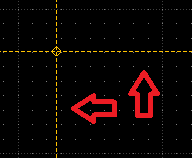
] | The below two images illustrate the supposedly inaccurate distinction.
<hr>
<hr>
.
Think twice, post once ;-)
If your issue is about how to use LibreCAD consider to ask in the forum ... | Importing a 2D DXF file generates Z-axis scaling of 0 for DXF output | https://api.github.com/repos/LibreCAD/LibreCAD/issues/1428/comments | 5 | 2021-11-23T14:33:03Z | 2024-05-18T14:37:01Z | https://github.com/LibreCAD/LibreCAD/issues/1428 | 1,061,356,679 | 1,428 |
[
"LibreCAD",
"LibreCAD"
] | Deselecting is a very frecuent task, and doing it with a mouse click is actually a time-saver. LibreCAD and AutoCAD have the key `Escape` for this task. Also, the shortcut `Ctrl+k` can be used.
**QCAD deselects everything with a left-button mouse click in the background.** Allplan does it with a right-button mouse c... | deselect all with the mouse | https://api.github.com/repos/LibreCAD/LibreCAD/issues/1426/comments | 1 | 2021-11-22T21:09:20Z | 2022-01-13T12:53:22Z | https://github.com/LibreCAD/LibreCAD/issues/1426 | 1,060,595,451 | 1,426 |
[
"LibreCAD",
"LibreCAD"
] | Enhancement to add a add a new method to snap to a point that is in the middle between two points.
This snap is implemented in QCAD. See the relative [article](https://qcad.org/doc/qcad/latest/reference/en/scripts/Snap/SnapMiddleManual/doc/SnapMiddleManual_en.html).
[Video demo](https://www.youtube.com/watch?v=4p... | add button to snap middle manual | https://api.github.com/repos/LibreCAD/LibreCAD/issues/1421/comments | 18 | 2021-11-18T21:18:35Z | 2022-01-13T12:53:50Z | https://github.com/LibreCAD/LibreCAD/issues/1421 | 1,057,809,505 | 1,421 |
[
"LibreCAD",
"LibreCAD"
] | Enhancement to add a button to break out a segment limited by intersecting entities.
This button is already implemented in QCAD. See the relative [article](https://qcad.org/doc/qcad/latest/reference/en/scripts/Modify/BreakOut/doc/BreakOut_en.html).
[Video demo](https://www.youtube.com/watch?v=oivRKom4ri8). | add button to break out segment | https://api.github.com/repos/LibreCAD/LibreCAD/issues/1420/comments | 10 | 2021-11-18T21:13:10Z | 2024-02-24T11:46:50Z | https://github.com/LibreCAD/LibreCAD/issues/1420 | 1,057,805,391 | 1,420 |
[
"LibreCAD",
"LibreCAD"
] | **Location :**
`Menu Bar → Options → Application Preferences → Defaults → Program Defaults → Auto save time`
**LibreCAD version :**
Latest development version 2.2.0
<hr>
It would be better to specify the units of time.
* One way would be to append ` (seconds)` to the label.
* Another way would be to add a... | Specify auto save time units | https://api.github.com/repos/LibreCAD/LibreCAD/issues/1412/comments | 1 | 2021-11-17T04:30:14Z | 2022-06-04T16:23:05Z | https://github.com/LibreCAD/LibreCAD/issues/1412 | 1,055,693,637 | 1,412 |
[
"LibreCAD",
"LibreCAD"
] | As described in [release](https://github.com/LibreCAD/LibreCAD/releases/tag/2.2.0-rc2) latest (2.2.0-rc2) version has M1 support, but it's not true.
The app successfully installed and launched, but via Rosetta (Intel)!
.
Think twice, post once ;-)
If your issue is about how to use LibreCAD consider to ask in the forum ... | Enhancement: separate the move and copy buttons | https://api.github.com/repos/LibreCAD/LibreCAD/issues/1404/comments | 21 | 2021-11-14T13:17:12Z | 2023-09-12T11:03:31Z | https://github.com/LibreCAD/LibreCAD/issues/1404 | 1,052,937,376 | 1,404 |
[
"LibreCAD",
"LibreCAD"
] |
<!--
This is a comment, not shown in your issue. You can delete it or leave it as it is.
Please give your issue an useful title.
And please enter as much information as possible into each paragraph below (###).
Think twice, post once ;-)
If your issue is about how to use LibreCAD consider to ask in the foru... | "Closing drawing" dialog bug | https://api.github.com/repos/LibreCAD/LibreCAD/issues/1403/comments | 10 | 2021-11-13T16:53:59Z | 2025-04-18T08:03:42Z | https://github.com/LibreCAD/LibreCAD/issues/1403 | 1,052,723,189 | 1,403 |
[
"LibreCAD",
"LibreCAD"
] | The current process for saving a block to a file is counterintuitive and results in loss of data
In CAD systems other than LibreCad, clicking File>Save will save the object that is _currently open in front of the user_, not other objects that are open in other workspaces, and therefore invisible to the user. Some s... | Feature request: save block to file behaviour | https://api.github.com/repos/LibreCAD/LibreCAD/issues/1400/comments | 3 | 2021-10-26T04:45:41Z | 2021-11-04T23:35:33Z | https://github.com/LibreCAD/LibreCAD/issues/1400 | 1,035,821,455 | 1,400 |
[
"LibreCAD",
"LibreCAD"
] | > **ATTENTION!** Do NOT buy LibreCAD for Windows on Microsoft Store!
### Expected behavior
There should be no illegal distribution of LibreCAD in any software stores
### Observed behavior
LibreCAD in Microsoft Store is on sold by publisher `Alef_Soft` as paid software *"LibreCad 2"*:
- https://www.micros... | LibreCAD on sale by 3rd-party publisher in Microsoft Store | https://api.github.com/repos/LibreCAD/LibreCAD/issues/1399/comments | 9 | 2021-10-25T18:12:46Z | 2021-11-21T16:37:10Z | https://github.com/LibreCAD/LibreCAD/issues/1399 | 1,035,428,583 | 1,399 |
[
"LibreCAD",
"LibreCAD"
] | From time to time the drawing screen shifts down by about a centimetre, then shifts back up a second or so later
### Expected behavior
Drawing screen does not move
### Observed behavior
During file save or autosave, the 2-line status bar at the bottom of the screen is replaced by a 1-line message bar saying eit... | File save shifts drawing screen down | https://api.github.com/repos/LibreCAD/LibreCAD/issues/1398/comments | 1 | 2021-10-25T01:58:39Z | 2021-10-25T08:03:47Z | https://github.com/LibreCAD/LibreCAD/issues/1398 | 1,034,594,312 | 1,398 |
[
"LibreCAD",
"LibreCAD"
] | Saving an edited block saves the main drawing instead
### Expected behavior
Edited block is saved to block filename on disc
Edited main drawing is saved to main drawing filename on disc
### Observed behavior
Main drawing is saved to block filename on disc instead of edited block
Main drawing is not saved to m... | Edited blocks do not save correctly | https://api.github.com/repos/LibreCAD/LibreCAD/issues/1397/comments | 4 | 2021-10-25T00:38:14Z | 2021-10-25T23:32:14Z | https://github.com/LibreCAD/LibreCAD/issues/1397 | 1,034,559,811 | 1,397 |
[
"LibreCAD",
"LibreCAD"
] | When Text Alignment is set to Horizontal, moving a Dimension from one layer to another does not move the entire dimension to the new layer. The dimension's text, arrows and extension lines are moved but its dimension line remains on the current layer.
This bug does not occur if Text Alignment is set to Aligned, onl... | Dimension lines do not move to new layer when text alignment is set to Horizontal | https://api.github.com/repos/LibreCAD/LibreCAD/issues/1396/comments | 6 | 2021-10-23T05:22:22Z | 2023-07-10T07:28:28Z | https://github.com/LibreCAD/LibreCAD/issues/1396 | 1,034,077,025 | 1,396 |
[
"LibreCAD",
"LibreCAD"
] | ### Expected behavior
Using *snap on middle point* with e.g. 3 middle points, must snap on 3 points of the *spline through points* entity.
### Observed behavior
Only the first 2 points are snapped, the last one is missed.
It is always the last one missing, when more than 1 middle points are used.
### Steps to ... | spline through points: snap on middle point fails for last one, when more than one middle point is used | https://api.github.com/repos/LibreCAD/LibreCAD/issues/1395/comments | 1 | 2021-10-22T18:36:52Z | 2022-06-04T13:02:37Z | https://github.com/LibreCAD/LibreCAD/issues/1395 | 1,033,852,103 | 1,395 |
[
"LibreCAD",
"LibreCAD"
] | 1. no c, z, p, t commands
2. Can't customize keyboard shortkey
3. Can't customize command?
4. Some commands like object-snap not show on command line
5. No object-snap command
Looks like programer never used AutoCAD before
| Lots problems, need improve commands and keyboard input | https://api.github.com/repos/LibreCAD/LibreCAD/issues/1394/comments | 3 | 2021-10-21T16:42:26Z | 2021-11-21T15:09:59Z | https://github.com/LibreCAD/LibreCAD/issues/1394 | 1,032,707,615 | 1,394 |
[
"LibreCAD",
"LibreCAD"
] | ### Expected behavior
I would like to have an option for:
- Show / hide the relative zero position
- Change color to relative zero position
### Operating System and LibreCAD version info
Version: 2.1.3 from Debian Stable repos.
| Options for Relative zero position | https://api.github.com/repos/LibreCAD/LibreCAD/issues/1393/comments | 14 | 2021-10-18T08:23:34Z | 2023-06-28T18:08:19Z | https://github.com/LibreCAD/LibreCAD/issues/1393 | 1,028,787,154 | 1,393 |
[
"LibreCAD",
"LibreCAD"
] | <!--
This is a comment, not shown in your issue. You can delete it or leave it as it is.
Please give your issue an useful title.
And please enter as much information as possible into each paragraph below (###).
Think twice, post once ;-)
If your issue is about how to use LibreCAD consider to ask in the forum ... | Enter fillet radius in command box | https://api.github.com/repos/LibreCAD/LibreCAD/issues/1388/comments | 1 | 2021-10-11T06:17:56Z | 2023-06-07T19:10:11Z | https://github.com/LibreCAD/LibreCAD/issues/1388 | 1,022,306,812 | 1,388 |
[
"LibreCAD",
"LibreCAD"
] | In LibreCad, I expect to be able to specify a dot or a dash pattern precisely, like "dots, 2 mm spaced", or "dashes, 2 mm long, 3 mm space", for lines, circles, or other shapes.
Currently, the distance between the dashes is related to the paper output. This is nice for some situations, because zooming will always sh... | Create real dash or dot patterns | https://api.github.com/repos/LibreCAD/LibreCAD/issues/1387/comments | 1 | 2021-10-06T14:45:26Z | 2021-11-21T15:10:21Z | https://github.com/LibreCAD/LibreCAD/issues/1387 | 1,018,482,682 | 1,387 |
[
"LibreCAD",
"LibreCAD"
] | This is a copy of SourceForge ticket [619](https://sourceforge.net/p/librecad/bugs/619/)
### Expected behavior
Using *Tangent 3 Circles* tool should provide 2 possible solutions when parallel lines are involved.
### Observed behavior
Randomly it is not possible to select the 3rd line.
### Steps to reproduce ... | Tangent 3 Circles tool fails randomly with parallel lines | https://api.github.com/repos/LibreCAD/LibreCAD/issues/1386/comments | 2 | 2021-10-03T17:04:47Z | 2023-06-08T06:20:31Z | https://github.com/LibreCAD/LibreCAD/issues/1386 | 1,014,461,225 | 1,386 |
[
"LibreCAD",
"LibreCAD"
] | Hi,
I can build MinGW32 in the QT5.9.0,but Msvc32 or Msvc64 is not Successful in the QT or VS ,LibreCAD How to build in the Msvc32 and Msvc64 debuggers?Thank you!
| How to build in the Msvc32 and Msvc64 debuggers | https://api.github.com/repos/LibreCAD/LibreCAD/issues/1385/comments | 1 | 2021-09-26T09:14:19Z | 2021-10-03T18:49:50Z | https://github.com/LibreCAD/LibreCAD/issues/1385 | 1,007,331,464 | 1,385 |
[
"LibreCAD",
"LibreCAD"
] | ### Expected behavior
Once the polyline tool is active, entering coordinates in command line text box should add nodes to the polyline
### Observed behavior
Coordinates entered in the text box are ignored. The command line prompt "Specify first point" does not change. The entered coordinate pair is shown in th... | polyline not accepting command line coordinates | https://api.github.com/repos/LibreCAD/LibreCAD/issues/1381/comments | 2 | 2021-09-19T01:56:58Z | 2021-10-03T19:04:45Z | https://github.com/LibreCAD/LibreCAD/issues/1381 | 1,000,181,436 | 1,381 |
[
"LibreCAD",
"LibreCAD"
] | Hi, after many attempts to continue the task I am handing the issue over.
operation:_Drawing vertical construction lines on layer (#0021) of 9 layers - application hanging as scroll to right to draw 4th line(dot dash) on zoom view
Version: 2.1.3
Compiler: Clang 8.0.0
Compiled on: Sep 22 2016
Qt Version: 5.6.1
... | LibreCAD - hangs when zoomed | https://api.github.com/repos/LibreCAD/LibreCAD/issues/1380/comments | 1 | 2021-09-13T02:07:02Z | 2021-11-21T15:12:16Z | https://github.com/LibreCAD/LibreCAD/issues/1380 | 994,370,953 | 1,380 |
[
"LibreCAD",
"LibreCAD"
] | Many distributions of Linux don't allow ELF files in `usr/share`; Debian solves this by creating symlinks.
I'd like to avoid symlinks and actually specify that plugins can be loaded from `usr/lib/librecad/plugins`.
Help? Thanks. | Plugins only load from `usr/share` | https://api.github.com/repos/LibreCAD/LibreCAD/issues/1379/comments | 2 | 2021-09-03T00:42:12Z | 2025-04-10T16:37:01Z | https://github.com/LibreCAD/LibreCAD/issues/1379 | 987,288,018 | 1,379 |
[
"LibreCAD",
"LibreCAD"
] | Can the box of the capture point be adjusted larger and the color more eye-catching?
Every time the software is opened, the grid will be displayed by default. Whether the grid is displayed or not allows the software to automatically remember the user's settings, and whether the grid is displayed when the software is... | Snap point size | https://api.github.com/repos/LibreCAD/LibreCAD/issues/1378/comments | 1 | 2021-08-25T00:36:19Z | 2021-08-25T08:45:08Z | https://github.com/LibreCAD/LibreCAD/issues/1378 | 978,590,873 | 1,378 |
[
"LibreCAD",
"LibreCAD"
] | Can the box of the capture point be adjusted larger and the color more eye-catching?
Every time the software is opened, the grid will be displayed by default. Whether the grid is displayed or not allows the software to automatically remember the user's settings, and whether the grid is displayed when the software is... | Snap point size | https://api.github.com/repos/LibreCAD/LibreCAD/issues/1377/comments | 1 | 2021-08-25T00:34:50Z | 2021-08-25T08:44:40Z | https://github.com/LibreCAD/LibreCAD/issues/1377 | 978,590,086 | 1,377 |
[
"LibreCAD",
"LibreCAD"
] | Does the librecad software have no shortcut keys? | Librecad software shortcut keys | https://api.github.com/repos/LibreCAD/LibreCAD/issues/1376/comments | 2 | 2021-08-24T10:54:00Z | 2021-08-24T19:00:38Z | https://github.com/LibreCAD/LibreCAD/issues/1376 | 977,968,933 | 1,376 |
[
"LibreCAD",
"LibreCAD"
] | When I run the `text` command, I can change the actual text and angle on the fly.
I'd like to also be able to edit the text height in the same way, rather than having to cancel the text command and re-run it in order to edit the size.
Here's the bar I mean:
.
Think twice, post once ;-)
If your issue is about how to use LibreCAD consider to ask in the forum ... | Trim-tool entirely inactive when pressing <escape> button, not able to select second limiting entity. | https://api.github.com/repos/LibreCAD/LibreCAD/issues/1373/comments | 3 | 2021-08-12T14:23:43Z | 2021-08-17T18:35:53Z | https://github.com/LibreCAD/LibreCAD/issues/1373 | 968,934,039 | 1,373 |
[
"LibreCAD",
"LibreCAD"
] | <!--
This is a comment, not shown in your issue. You can delete it or leave it as it is.
Please give your issue an useful title.
And please enter as much information as possible into each paragraph below (###).
Think twice, post once ;-)
If your issue is about how to use LibreCAD consider to ask in the forum ... | Feature request: On-the-fly dimension units | https://api.github.com/repos/LibreCAD/LibreCAD/issues/1372/comments | 1 | 2021-08-12T09:46:24Z | 2021-11-21T16:40:10Z | https://github.com/LibreCAD/LibreCAD/issues/1372 | 968,471,034 | 1,372 |
[
"LibreCAD",
"LibreCAD"
] | ### Expected behavior
Open the DXF file or show a more detailed reason why it fails to open.
### Observed behavior
There are no details about the error
### Steps to reproduce or sample file
./unix/librecad my-file.dxf
### Operating System and LibreCAD version info
Debian 10
LibreCAD built from G... | Import error: Error reading DXF/DWG sections | https://api.github.com/repos/LibreCAD/LibreCAD/issues/1371/comments | 13 | 2021-08-03T12:43:02Z | 2021-08-06T13:09:54Z | https://github.com/LibreCAD/LibreCAD/issues/1371 | 959,077,972 | 1,371 |
[
"LibreCAD",
"LibreCAD"
] | I have not been able to activate the command line without manually clicking on it first. I tried Space Bar, ctrl+m, etc, but nothing worked. I finally found what appears to be the answer in another issue:
"
Note also that you need to enable the SPACE BAR validation in the **Application Preferences** menu.
| Option to disable the Reference Line | https://api.github.com/repos/LibreCAD/LibreCAD/issues/1361/comments | 1 | 2021-07-11T18:40:54Z | 2021-07-12T12:58:18Z | https://github.com/LibreCAD/LibreCAD/issues/1361 | 941,510,863 | 1,361 |
[
"LibreCAD",
"LibreCAD"
] | ### Expected behavior
1- When I set the environment to meter unit, I expect the measurement in meter.
2- When I save the General Scale, from Drawing Preferences menu, next time I open up the original value is back to 0.001.
### Observed behavior
For me it's a little bit strange the default values from the Drawing... | Measurement issue meters unit | https://api.github.com/repos/LibreCAD/LibreCAD/issues/1360/comments | 1 | 2021-07-11T18:22:45Z | 2024-05-18T14:38:18Z | https://github.com/LibreCAD/LibreCAD/issues/1360 | 941,508,125 | 1,360 |
[
"LibreCAD",
"LibreCAD"
] | ### Expected behavior, Observed behavior
I have turned on "Auto backup" in "Application preference". However, after the crash of this app, there is no hint of where can I find it!
### Steps to reproduce or sample file
### Operating System and LibreCAD version info
```
Fedora 33 (Workstation Edition)
```
... | Cannot find auto-backup file | https://api.github.com/repos/LibreCAD/LibreCAD/issues/1358/comments | 4 | 2021-07-02T01:50:56Z | 2021-07-03T11:25:40Z | https://github.com/LibreCAD/LibreCAD/issues/1358 | 935,340,095 | 1,358 |
[
"LibreCAD",
"LibreCAD"
] | ### Expected behavior, Observed behavior and Steps to reproduce
Multiple Copy anything, for example, 40 copies. Then using ctrl-z to cancel this action. Intuitively, this is one action so one ctrl-z is enough. Actually, I have to use 40 ctrl-z's to cancel it. I can understand reusing the function of "Keep Original" ... | "Multiple Copies" in "Move/Copy" should be considered as one action and be cancled by one ctrl-z | https://api.github.com/repos/LibreCAD/LibreCAD/issues/1357/comments | 2 | 2021-07-02T01:45:27Z | 2021-07-02T16:18:34Z | https://github.com/LibreCAD/LibreCAD/issues/1357 | 935,338,320 | 1,357 |
[
"LibreCAD",
"LibreCAD"
] | <!--
This is a comment, not shown in your issue. You can delete it or leave it as it is.
Please give your issue an useful title.
And please enter as much information as possible into each paragraph below (###).
Think twice, post once ;-)
If your issue is about how to use LibreCAD consider to ask in the forum ... | command language chages only with interface | https://api.github.com/repos/LibreCAD/LibreCAD/issues/1356/comments | 1 | 2021-06-08T09:08:08Z | 2023-03-10T13:14:35Z | https://github.com/LibreCAD/LibreCAD/issues/1356 | 914,643,720 | 1,356 |
[
"LibreCAD",
"LibreCAD"
] | ### Expected behavior
If a layer is non printable, but visible, it should not count for «Fit to page» or «Center to page».
### Observed behavior
When a layer is non printable, but visible, elements in it count for «Fit to page» or «Center to page».
### Steps to reproduce or sample file
Create two squares... | Non printable layers shouldn't count for fit and center to paper | https://api.github.com/repos/LibreCAD/LibreCAD/issues/1355/comments | 1 | 2021-06-07T18:20:30Z | 2021-06-26T08:08:45Z | https://github.com/LibreCAD/LibreCAD/issues/1355 | 913,825,802 | 1,355 |
[
"LibreCAD",
"LibreCAD"
] | ### Expected behavior
The following AutoCAD DXF 2013 file: [dxf-2013-hatch.dxf](https://github.com/LibreCAD/LibreCAD/files/6580099/dxf-2013-hatch.dxf.txt)
Renders correctly within eDrawings Viewer 29.2.0.0029 on macOS 10.15.7:
<img width="1579" alt="Screen Shot 2021-06-01 at 3 15 27 PM" src="https://user-image... | Incorrect import of DXF file with large Hatch | https://api.github.com/repos/LibreCAD/LibreCAD/issues/1353/comments | 1 | 2021-06-01T19:26:34Z | 2022-04-16T11:33:05Z | https://github.com/LibreCAD/LibreCAD/issues/1353 | 908,618,937 | 1,353 |
[
"LibreCAD",
"LibreCAD"
] | I was wondering if a poly line break line feature could be added (like the one in QCAD). It allows a break line to be created between two points. This would be great for engineers and architects with large drawings. | (Suggestion) Insert Polyline Break Line | https://api.github.com/repos/LibreCAD/LibreCAD/issues/1352/comments | 2 | 2021-05-26T22:58:07Z | 2024-09-29T17:14:13Z | https://github.com/LibreCAD/LibreCAD/issues/1352 | 903,001,142 | 1,352 |
[
"LibreCAD",
"LibreCAD"
] | ### Steps to reproduce
1. Disable "Auto Backup"

2. Open a file
3. Make a change (or make the program think something has changed by making a change and then undoing it)
4. Save the file
### Observed... | Auto backup file created when auto backup is disabled | https://api.github.com/repos/LibreCAD/LibreCAD/issues/1351/comments | 1 | 2021-05-21T23:46:35Z | 2023-06-21T16:11:11Z | https://github.com/LibreCAD/LibreCAD/issues/1351 | 898,666,320 | 1,351 |
[
"LibreCAD",
"LibreCAD"
] | Solvespace uses the vector font from LibreCAD and has had some character added since then:
https://github.com/solvespace/solvespace/issues/1042#issuecomment-844820653
Some Ukrainian characters as well as the Depth, Counterbore, and Countersink commonly used to annotate holes.
I can make PR to merge these into th... | Add new glyphs to the vectorfont from Solvespace | https://api.github.com/repos/LibreCAD/LibreCAD/issues/1349/comments | 2 | 2021-05-20T19:14:35Z | 2024-08-31T20:45:05Z | https://github.com/LibreCAD/LibreCAD/issues/1349 | 897,315,006 | 1,349 |
[
"LibreCAD",
"LibreCAD"
] | I am in the process of switching from Draftsight to Librecad and what i felt horrifying is i am missing my XY coordinate menu which i use a lot.
So every time now i have to change a line i have to right click and click properties instead of just clicking on the line and it will show the properties.
So i would like t... | Suggestion: Possible to have properties menu always showing on toolbar(example on the right side toolbar) | https://api.github.com/repos/LibreCAD/LibreCAD/issues/1348/comments | 3 | 2021-05-20T10:59:59Z | 2021-11-22T21:37:32Z | https://github.com/LibreCAD/LibreCAD/issues/1348 | 896,648,084 | 1,348 |
[
"LibreCAD",
"LibreCAD"
] | Hi
I get crashes and errors when opening large dwg files in Windows. Here is a link to sample data : https://easyupload.io/3yjmfh
I also found a ton of files that fail in this same manner : https://www.3drotterdam.nl/downloads/#/
I either get duplicated ids of a page map section or invalid addresses outside the buff... | Large DWG reading errors | https://api.github.com/repos/LibreCAD/LibreCAD/issues/1347/comments | 2 | 2021-05-18T10:37:03Z | 2021-05-19T07:05:29Z | https://github.com/LibreCAD/LibreCAD/issues/1347 | 894,235,524 | 1,347 |
[
"LibreCAD",
"LibreCAD"
] | <!--
This is a comment, not shown in your issue. You can delete it or leave it as it is.
Please give your issue an useful title.
And please enter as much information as possible into each paragraph below (###).
Think twice, post once ;-)
If your issue is about how to use LibreCAD consider to ask in the forum ... | Status bar height toggling | https://api.github.com/repos/LibreCAD/LibreCAD/issues/1346/comments | 1 | 2021-05-05T17:50:42Z | 2021-05-05T19:24:31Z | https://github.com/LibreCAD/LibreCAD/issues/1346 | 876,696,946 | 1,346 |
[
"LibreCAD",
"LibreCAD"
] | Expected Behavour: Pasting blocks from the clipboard creates new instance of the original block name and the block list does not change.
Observed Behavour: Pasting blocks from the clipboard creates a new block name in the block list and the block list grows with every pasted block entity. If multiple objects are pa... | Copy paste block from clipboard adds new block names to block list | https://api.github.com/repos/LibreCAD/LibreCAD/issues/1344/comments | 8 | 2021-05-02T17:42:11Z | 2024-05-18T14:48:58Z | https://github.com/LibreCAD/LibreCAD/issues/1344 | 874,000,922 | 1,344 |
[
"LibreCAD",
"LibreCAD"
] | Building librecad 2.1.3 release with boost 1.76 fails:
`lib/engine/rs_ellipse.cpp:70:15: error: ‘tuple’ in namespace ‘boost::math’ does not name a template type
70 | boost::math::tuple<double, double, double> operator()(double const& z) const {
| ^~~~~
In file included from /usr/include/bo... | Build error with boost 1.76 | https://api.github.com/repos/LibreCAD/LibreCAD/issues/1342/comments | 2 | 2021-04-30T14:25:53Z | 2021-05-19T11:09:57Z | https://github.com/LibreCAD/LibreCAD/issues/1342 | 872,607,574 | 1,342 |
[
"LibreCAD",
"LibreCAD"
] | Hi,
I get an error "Please check its existence and permission" when trying to open a .dwg file
with LibreCAD on Ubuntu (arm64), . I had created the .dwg with AutoCAD (2021). Attached the screenshots and .dwg file.
 and i want to be able to delete the top right point and end up with an "L".

While i understand this is maybe not that easy with... | Delete a point from lines | https://api.github.com/repos/LibreCAD/LibreCAD/issues/1340/comments | 9 | 2021-04-23T18:12:15Z | 2021-11-26T17:02:05Z | https://github.com/LibreCAD/LibreCAD/issues/1340 | 866,329,588 | 1,340 |
[
"LibreCAD",
"LibreCAD"
] | I don't know if this is a decision/feature, quirk or bug. None the less I'll bring it up.
LiberCAD doesn't follow the POSIX standard regarding options, particlarly relative to filenames which start with a dash character.
# Create a drawing with a dash as the leading character in the filename (on Linux).
#
$ cp ... | Drawing filename starting with a dash | https://api.github.com/repos/LibreCAD/LibreCAD/issues/1339/comments | 1 | 2021-04-20T13:23:41Z | 2021-04-25T14:59:29Z | https://github.com/LibreCAD/LibreCAD/issues/1339 | 862,814,773 | 1,339 |
[
"LibreCAD",
"LibreCAD"
] | <!--
This is a comment, not shown in your issue. You can delete it or leave it as it is.
Please give your issue an useful title.
And please enter as much information as possible into each paragraph below (###).
Think twice, post once ;-)
If your issue is about how to use LibreCAD consider to ask in the forum ... | Scale according to 2 reference point (no manual calculation needed) | https://api.github.com/repos/LibreCAD/LibreCAD/issues/1338/comments | 5 | 2021-04-19T07:25:09Z | 2021-04-21T00:12:36Z | https://github.com/LibreCAD/LibreCAD/issues/1338 | 860,992,359 | 1,338 |
[
"LibreCAD",
"LibreCAD"
] | ### Expected behavior
It should display a polyline.
### Observed behavior
It displays nothing except a point. It is not something wrong with the scale; zooming does not help.
### Steps to reproduce or sample file
This errors occurs even if the DXF file is generated by LibreCAD itself.
Draw a simple po... | DXF R12 Invalid Polyline Import | https://api.github.com/repos/LibreCAD/LibreCAD/issues/1337/comments | 3 | 2021-04-18T16:40:28Z | 2021-04-18T21:25:39Z | https://github.com/LibreCAD/LibreCAD/issues/1337 | 860,707,552 | 1,337 |
[
"LibreCAD",
"LibreCAD"
] | <!--
This is a comment, not shown in your issue. You can delete it or leave it as it is.
Please give your issue an useful title.
And please enter as much information as possible into each paragraph below (###).
Think twice, post once ;-)
If your issue is about how to use LibreCAD consider to ask in the forum ... | Dark theme usability | https://api.github.com/repos/LibreCAD/LibreCAD/issues/1336/comments | 4 | 2021-04-08T14:24:35Z | 2021-04-09T06:07:14Z | https://github.com/LibreCAD/LibreCAD/issues/1336 | 853,530,336 | 1,336 |
[
"LibreCAD",
"LibreCAD"
] | <!--
This is a comment, not shown in your issue. You can delete it or leave it as it is.
Please give your issue an useful title.
And please enter as much information as possible into each paragraph below (###).
Think twice, post once ;-)
If your issue is about how to use LibreCAD consider to ask in the forum ... | Importing .DWG files error on macOS Catalina | https://api.github.com/repos/LibreCAD/LibreCAD/issues/1335/comments | 4 | 2021-04-05T06:41:08Z | 2021-04-06T06:40:41Z | https://github.com/LibreCAD/LibreCAD/issues/1335 | 850,125,099 | 1,335 |
[
"LibreCAD",
"LibreCAD"
] | <!--
Hello,
I tried to improve my skill using libraries and templates. Before that, LibreCAD worked just fine (it never crashed).
At some point, it continuously crashes when I try to use some tools like "trim" or "explode". Then, I took out all the groups I imported from the library but the project still crash. I s... | LibreCAD crash continously on windows 10 | https://api.github.com/repos/LibreCAD/LibreCAD/issues/1334/comments | 9 | 2021-04-02T14:21:34Z | 2024-05-18T17:26:20Z | https://github.com/LibreCAD/LibreCAD/issues/1334 | 849,246,741 | 1,334 |
[
"LibreCAD",
"LibreCAD"
] | Hi,
i think it would be useful, if the Status Line would display the name of a block, if it gets selected.
I have projects with many blocks with nearly the same name. But i cannot identify, which of them i am currently selecting.
Or do i miss some documentation, where this is described?
Thank you and keep up the ... | Feature Request: Display Name of selected Block in Status Line | https://api.github.com/repos/LibreCAD/LibreCAD/issues/1333/comments | 2 | 2021-03-29T08:57:59Z | 2021-11-30T21:55:06Z | https://github.com/LibreCAD/LibreCAD/issues/1333 | 843,144,427 | 1,333 |
[
"LibreCAD",
"LibreCAD"
] | <!--
This is a comment, not shown in your issue. You can delete it or leave it as it is.
Please give your issue an useful title.
And please enter as much information as possible into each paragraph below (###).
Think twice, post once ;-)
If your issue is about how to use LibreCAD consider to ask in the forum ... | Print Preview Problem | https://api.github.com/repos/LibreCAD/LibreCAD/issues/1332/comments | 1 | 2021-03-26T00:23:00Z | 2021-03-26T07:47:22Z | https://github.com/LibreCAD/LibreCAD/issues/1332 | 841,469,184 | 1,332 |
[
"LibreCAD",
"LibreCAD"
] | This issue is confirmed and copied from Sourceforge https://sourceforge.net/p/librecad/bugs/608/ the attached file has been opened with LC2.2rc2 and resaved.
### Expected behavior
.dxf files from LibreCAD should open in Autodesk Products
### Observed behavior
The attached file will not open and hangs AutoCAD 20... | .dxf file won't open in Autodesk Products | https://api.github.com/repos/LibreCAD/LibreCAD/issues/1330/comments | 4 | 2021-03-16T16:11:20Z | 2021-03-17T07:01:57Z | https://github.com/LibreCAD/LibreCAD/issues/1330 | 832,966,111 | 1,330 |
[
"LibreCAD",
"LibreCAD"
] | This issue was triggered by forum thread https://forum.librecad.org/point-select-not-working-tp5720321p5720351.html
and is related to #1328
### Observed behavior
When both, arrow size AND tick size, are set to 0 in *Current Drawing Preferences*, dimensions become sticky for single click selection.
It's impossible... | Secure dimension settings in current drawing preferences | https://api.github.com/repos/LibreCAD/LibreCAD/issues/1329/comments | 0 | 2021-03-14T10:56:31Z | 2021-03-14T10:56:31Z | https://github.com/LibreCAD/LibreCAD/issues/1329 | 831,126,941 | 1,329 |
[
"LibreCAD",
"LibreCAD"
] | ### Expected behavior
When tick size in *Current Drawing Preferences* is set > 0, all kind of dimensions should have ticks instead of arrows.
Only exception I think are leaders. Correct?
### Observed behavior
* radial dimensions have neither ticks nor arrows
* angular dimensions still have arrows
### Steps to... | Dimension ticks missing for radial and angular dimensions | https://api.github.com/repos/LibreCAD/LibreCAD/issues/1328/comments | 0 | 2021-03-14T10:36:15Z | 2021-03-14T10:36:15Z | https://github.com/LibreCAD/LibreCAD/issues/1328 | 831,123,451 | 1,328 |
[
"LibreCAD",
"LibreCAD"
] | <!--
This is a comment, not shown in your issue. You can delete it or leave it as it is.
Please give your issue an useful title.
And please enter as much information as possible into each paragraph below (###).
Think twice, post once ;-)
If your issue is about how to use LibreCAD consider to ask in the forum ... | Save a single layer as a dxf | https://api.github.com/repos/LibreCAD/LibreCAD/issues/1327/comments | 3 | 2021-03-12T10:37:04Z | 2023-06-16T05:32:09Z | https://github.com/LibreCAD/LibreCAD/issues/1327 | 829,983,990 | 1,327 |
[
"LibreCAD",
"LibreCAD"
] | The default linewidth for layer 0 and all newly created layers is 0.00 mm.
New inexperienced users often are drawing with this setting without being conscious of it. On screen everything looks all right but when printing on paper or exporting to pdf often entities with linewidth 0.00 mm don't appear at all or are very... | Change default linewidth to 0.25 mm | https://api.github.com/repos/LibreCAD/LibreCAD/issues/1326/comments | 16 | 2021-03-06T23:42:58Z | 2022-11-29T09:07:57Z | https://github.com/LibreCAD/LibreCAD/issues/1326 | 823,780,613 | 1,326 |
[
"LibreCAD",
"LibreCAD"
] | I recently got started with LibreCAD to edit an existing drawing, which was exported from vectorworks and quite complex (with a lot of nested blocks). That complexity, combined with my inexperience with LibreCAD, made it hard to figure out how this drawing was structured.
One thing that would be helpful, is if the b... | Suggestion: Improved block list navigation | https://api.github.com/repos/LibreCAD/LibreCAD/issues/1324/comments | 7 | 2021-02-24T10:33:07Z | 2025-04-21T10:09:47Z | https://github.com/LibreCAD/LibreCAD/issues/1324 | 815,344,741 | 1,324 |
[
"LibreCAD",
"LibreCAD"
] | ### Expected behavior
When I insert a block from the library browser, I expect to get one block in the block list for the drawing, and one entitity in my drawing.
### Observed behavior
I get two blocks in the block list, and two entities (one for each block). This duplication is also present in the saved DXF file.... | Wacom tablet pen registers single click as two clicks | https://api.github.com/repos/LibreCAD/LibreCAD/issues/1323/comments | 4 | 2021-02-24T10:27:31Z | 2024-08-27T21:52:47Z | https://github.com/LibreCAD/LibreCAD/issues/1323 | 815,340,150 | 1,323 |
[
"LibreCAD",
"LibreCAD"
] | I recently got started with LibreCAD to edit an existing drawing, which was exported from vectorworks and quite complex (with a lot of nested blocks). That complexity, combined with my inexperience with LibreCAD, made it hard to figure out how this drawing was structured.
One thing that I would think could help here... | Suggestion: Adding info on selected objects to statusbar | https://api.github.com/repos/LibreCAD/LibreCAD/issues/1322/comments | 9 | 2021-02-24T09:17:05Z | 2021-04-04T21:46:34Z | https://github.com/LibreCAD/LibreCAD/issues/1322 | 815,281,895 | 1,322 |
[
"LibreCAD",
"LibreCAD"
] | I lost dimension information from a complex project.
I test around and could not solve the problem.
In invest a lot of time. Does somebody has a tipp for me?
best regards from munich,
Stefan | Lost Dimension | https://api.github.com/repos/LibreCAD/LibreCAD/issues/1321/comments | 2 | 2021-02-14T13:16:58Z | 2021-02-25T16:43:31Z | https://github.com/LibreCAD/LibreCAD/issues/1321 | 807,959,202 | 1,321 |
[
"LibreCAD",
"LibreCAD"
] | The ttf(DejavuSans) file was converted to lff font using ttf2lff with archlinux
It looks well made, no error or warning message.
> [wonhae@office1:~]$ ttf2lff DejaVuSans.ttf DejaVuSans.lff
> TTF file: DejaVuSans.ttf
> LFF file: DejaVuSans.lff
> Family: DejaVu Sans
> Height: 2384
> Ascender: 1901
> Des... | converted lff font files do not work. | https://api.github.com/repos/LibreCAD/LibreCAD/issues/1319/comments | 2 | 2021-02-02T06:51:47Z | 2021-04-04T21:18:28Z | https://github.com/LibreCAD/LibreCAD/issues/1319 | 798,990,724 | 1,319 |
[
"LibreCAD",
"LibreCAD"
] | Probably the most popular CAD program is **AutoCAD**.
So why not change the LibreCAD interface so that it becomes exactly the same as in AutoCAD?

Of course first of all this concerns... | Appearance of LibreCAD vs AutoCAD | https://api.github.com/repos/LibreCAD/LibreCAD/issues/1318/comments | 1 | 2021-01-31T15:08:26Z | 2021-02-02T18:56:32Z | https://github.com/LibreCAD/LibreCAD/issues/1318 | 797,732,893 | 1,318 |
[
"LibreCAD",
"LibreCAD"
] | **LibreCAD 2.0.9**.
The folder contains the drawings. Most drawings have an extension of **dwg**. But some drawings have the extension **DWG** that is written in capital letters.
For example:
- window.dwg
- chair.DWG
Run **LibreCAD 2.0.9** and open the folder with the files and see only the file there **window.d... | LibreCAD does not see the drawing if its extension is DWG (uppercase) | https://api.github.com/repos/LibreCAD/LibreCAD/issues/1317/comments | 5 | 2021-01-31T11:41:49Z | 2021-01-31T16:22:24Z | https://github.com/LibreCAD/LibreCAD/issues/1317 | 797,691,541 | 1,317 |
[
"LibreCAD",
"LibreCAD"
] | When you open a [**dwg** file](http://www.dwgindir.com/puansiz/puansiz-2-boyutlu-dwgler/puansiz-yapi-ve-binalar/asma-katli-cafe-projesi.html), **LibreCAD 2.0.9** closes automatically!
You can also download the **dwg** file from **[here](https://wdfiles.ru/8465ab06c9f5c660)**. | Application Crash when opening the dwg | https://api.github.com/repos/LibreCAD/LibreCAD/issues/1316/comments | 3 | 2021-01-31T11:23:34Z | 2021-01-31T14:37:50Z | https://github.com/LibreCAD/LibreCAD/issues/1316 | 797,688,326 | 1,316 |
Subsets and Splits
No community queries yet
The top public SQL queries from the community will appear here once available.