
issue_owner_repo listlengths 2 2 | issue_body stringlengths 0 262k ⌀ | issue_title stringlengths 1 1.02k | issue_comments_url stringlengths 53 116 | issue_comments_count int64 0 2.49k | issue_created_at stringdate 1999-03-17 02:06:42 2025-06-23 11:41:49 | issue_updated_at stringdate 2000-02-10 06:43:57 2025-06-23 11:43:00 | issue_html_url stringlengths 34 97 | issue_github_id int64 132 3.17B | issue_number int64 1 215k |
|---|---|---|---|---|---|---|---|---|---|
[
"LibreCAD",
"LibreCAD"
] | <!--
This is a comment, not shown in your issue. You can delete it or leave it as it is.
Please give your issue an useful title.
And please enter as much information as possible into each paragraph below (###).
Think twice, post once ;-)
If your issue is about how to use LibreCAD consider to ask in the forum ... | Working on a drawing, cannot see anything displayed in the layer list | https://api.github.com/repos/LibreCAD/LibreCAD/issues/1313/comments | 10 | 2021-01-28T00:15:15Z | 2025-03-18T22:45:38Z | https://github.com/LibreCAD/LibreCAD/issues/1313 | 795,554,559 | 1,313 |
[
"LibreCAD",
"LibreCAD"
] | If possible, let **Linux** users have access to **[download](https://librecad.org/#download)** ***. deb** packages! | deb packages for Linux users | https://api.github.com/repos/LibreCAD/LibreCAD/issues/1312/comments | 1 | 2021-01-24T11:33:46Z | 2021-01-24T14:12:01Z | https://github.com/LibreCAD/LibreCAD/issues/1312 | 792,776,121 | 1,312 |
[
"LibreCAD",
"LibreCAD"
] | LibreCAD **2.0.9** is currently available for installation in **Ubuntu Software Center**.
But version **2.0.9** was released in **2016**. If possible, please update the program to version **2.1.3** or **2.2.0** (when it becomes stable).
P.S.: I checked in **Ubuntu 16.04**. | Update the program version in the Ubuntu Software Center | https://api.github.com/repos/LibreCAD/LibreCAD/issues/1311/comments | 1 | 2021-01-24T11:28:13Z | 2021-01-24T13:54:34Z | https://github.com/LibreCAD/LibreCAD/issues/1311 | 792,775,177 | 1,311 |
[
"LibreCAD",
"LibreCAD"
] | Simple as it is. | Import from .pdf | https://api.github.com/repos/LibreCAD/LibreCAD/issues/1310/comments | 2 | 2021-01-23T08:35:15Z | 2025-04-14T11:36:23Z | https://github.com/LibreCAD/LibreCAD/issues/1310 | 792,494,661 | 1,310 |
[
"LibreCAD",
"LibreCAD"
] | When installing on Ubuntu 20.04 from GitHub Master on 2021/01/16, no text was displayed in drawings and font dropdowns were blank and not selectable.
The issue relates to the settings under "Options -> Application Preferences -> Paths" which was blank with a clean installation.
The resolution to this is to manual... | No Text Display And Font DropDowns Empty | https://api.github.com/repos/LibreCAD/LibreCAD/issues/1309/comments | 4 | 2021-01-18T18:04:33Z | 2021-02-01T00:32:51Z | https://github.com/LibreCAD/LibreCAD/issues/1309 | 788,459,601 | 1,309 |
[
"LibreCAD",
"LibreCAD"
] | I have just finished installing LibreCad from Master on Github on a Ubuntu 20.04 system. The make went well and I could find the desktop files and executable and libraries under unix directory. However, I could not find any instructions on how to install the desktop file and get all the files to be properly deployed.
... | How To Install After Make From Source on Linux | https://api.github.com/repos/LibreCAD/LibreCAD/issues/1308/comments | 2 | 2021-01-17T05:31:26Z | 2021-01-31T12:00:41Z | https://github.com/LibreCAD/LibreCAD/issues/1308 | 787,621,092 | 1,308 |
[
"LibreCAD",
"LibreCAD"
] | After in Print Preview, setting 1:50 scale, fixed and centered to page, saving the file does not seem to store these attributes.
When reopening the drawing, first thing entering Print Preview and the settings are gone.
I observed this in Windows and Unix, and on multiple drawing files.
Could this feature be im... | Save Print Scale on File | https://api.github.com/repos/LibreCAD/LibreCAD/issues/1307/comments | 6 | 2021-01-16T02:01:40Z | 2021-01-31T23:29:59Z | https://github.com/LibreCAD/LibreCAD/issues/1307 | 787,323,027 | 1,307 |
[
"LibreCAD",
"LibreCAD"
] | Hey, my LibreCAD suddenly stopped exporting and printing. Everytime I press Print or Export to PDF program displays "Printing... " in left bottom corner and freezes here. Happens on every drawing and also on empty file. The drawing Im trying to export, exports to pdf with no problems on different machine. I reinstalled... | Export - freezing on Windows 10 | https://api.github.com/repos/LibreCAD/LibreCAD/issues/1306/comments | 1 | 2021-01-12T08:45:23Z | 2021-01-22T10:30:20Z | https://github.com/LibreCAD/LibreCAD/issues/1306 | 784,035,182 | 1,306 |
[
"LibreCAD",
"LibreCAD"
] | <!--
This is a comment, not shown in your issue. You can delete it or leave it as it is.
Please give your issue an useful title.
And please enter as much information as possible into each paragraph below (###).
Think twice, post once ;-)
If your issue is about how to use LibreCAD consider to ask in the forum ... | Application Crash on macOS Big Sur (11.1) | https://api.github.com/repos/LibreCAD/LibreCAD/issues/1305/comments | 5 | 2021-01-10T16:49:06Z | 2021-03-18T10:28:21Z | https://github.com/LibreCAD/LibreCAD/issues/1305 | 782,857,710 | 1,305 |
[
"LibreCAD",
"LibreCAD"
] | ### Expected behavior
When redimensioning the status bar and the text in the status bar, the vertical centering should be kept.
### Observed behavior
When redimensioning the status bar through Options/Widget options/Status bar, there is more padding (in HTML sense) on the top than on the bottom.
Size changed from... | Status bar dimensioning: text is not properly vertically aligned | https://api.github.com/repos/LibreCAD/LibreCAD/issues/1304/comments | 3 | 2021-01-10T13:40:35Z | 2022-06-04T08:12:58Z | https://github.com/LibreCAD/LibreCAD/issues/1304 | 782,820,815 | 1,304 |
[
"LibreCAD",
"LibreCAD"
] | ### Expected behavior
Mouse image should be redimensioned as the status bar height.
### Observed behavior
When redimensioning the status bar through **Options/Widget options/Status bar**, the mouse image is not redimensioned.
Size changed from 32 to 30. Test changed from 11 to 8.

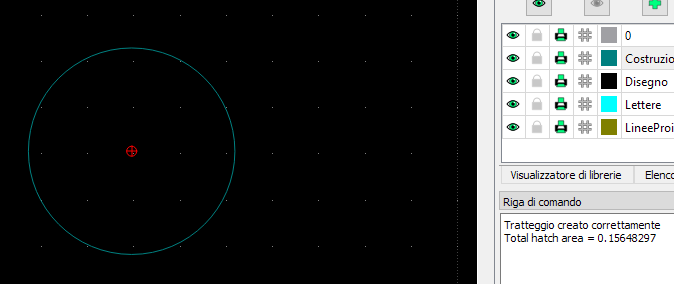
"Hatch created correctly"
"Hatch area = ..."
But there's clearly no hatch on the plane.
Doe... | Hatch not displaying. | https://api.github.com/repos/LibreCAD/LibreCAD/issues/1302/comments | 3 | 2021-01-10T13:19:57Z | 2021-01-12T12:15:18Z | https://github.com/LibreCAD/LibreCAD/issues/1302 | 782,817,283 | 1,302 |
[
"LibreCAD",
"LibreCAD"
] | Hello,
In LibreCAD, export function (as pdf or as svg) opens a "save as" window.
Unfortunately, no filename is given by default.
Maybe a good idea could be to preserve filename (just changing file extension) and so,
save as window should open with such a filename as default.
Kind regards | Export - save as window should preserve filename (just changing extension) | https://api.github.com/repos/LibreCAD/LibreCAD/issues/1301/comments | 4 | 2021-01-09T08:19:28Z | 2022-01-12T18:32:30Z | https://github.com/LibreCAD/LibreCAD/issues/1301 | 782,555,455 | 1,301 |
[
"LibreCAD",
"LibreCAD"
] |
<!--
This is a comment, not shown in your issue. You can delete it or leave it as it is.
Please give your issue an useful title.
And please enter as much information as possible into each paragraph below (###).
Think twice, post once ;-)
If your issue is about how to use LibreCAD consider to ask in the foru... | all text displays as boxes | https://api.github.com/repos/LibreCAD/LibreCAD/issues/1300/comments | 4 | 2021-01-07T22:40:07Z | 2021-01-08T10:43:58Z | https://github.com/LibreCAD/LibreCAD/issues/1300 | 781,668,358 | 1,300 |
[
"LibreCAD",
"LibreCAD"
] | When an object is stretched, other selected objects that are not stretched will vanish.
A number of times, I have selected objects, zoom into an area and stretch another object. Then later discover a large portion of my drawing has vanished. Either I need to undo work, sometimes a large amount. Revert to the file lo... | Stretch: selected objects outside of stretch box vanish | https://api.github.com/repos/LibreCAD/LibreCAD/issues/1299/comments | 1 | 2021-01-01T22:05:17Z | 2021-03-16T15:14:08Z | https://github.com/LibreCAD/LibreCAD/issues/1299 | 777,360,699 | 1,299 |
[
"LibreCAD",
"LibreCAD"
] | When I am editing a drawing, the trim function will randomly not work. I will not be able to select a line. The command line says it was selected, but it does not highlight and trim will not work. I also can't select lines at all sometimes. I have tried re-installing the software, but the problem recurs. | Trim Function Stops Working | https://api.github.com/repos/LibreCAD/LibreCAD/issues/1296/comments | 2 | 2020-12-21T17:01:37Z | 2021-01-28T21:29:02Z | https://github.com/LibreCAD/LibreCAD/issues/1296 | 772,321,985 | 1,296 |
[
"LibreCAD",
"LibreCAD"
] | #### Hello admin,
#### When I opened a dxf file with LibreCAD and then closed it, I found that the memory of the LibreCAD process became larger. I tried this operation hundreds of times and found that the memory keeps increasing. May I ask what is the reason?
| Question about memory | https://api.github.com/repos/LibreCAD/LibreCAD/issues/1295/comments | 5 | 2020-12-15T03:16:00Z | 2021-01-29T23:07:32Z | https://github.com/LibreCAD/LibreCAD/issues/1295 | 767,123,547 | 1,295 |
[
"LibreCAD",
"LibreCAD"
] | ### Expected behavior
Opening .DWG file
### Observed behavior
Receiving warning: "Experimental - Save your work first"
When hitting "Continue" button, nothing happens
### Steps to reproduce or sample file
See attachment
### Operating System and LibreCAD version info
Win10 - 64bit
[Cover.zip](https://... | Importing .DWG files error | https://api.github.com/repos/LibreCAD/LibreCAD/issues/1294/comments | 8 | 2020-12-07T09:10:40Z | 2021-04-27T06:43:15Z | https://github.com/LibreCAD/LibreCAD/issues/1294 | 758,320,824 | 1,294 |
[
"LibreCAD",
"LibreCAD"
] |
### Operating System and LibreCAD version info
Linux Mint 19
I am unsure how to generate the ttf2lff converter. I have tried:
cd /tools/ttf2lff
qmake ttf2lff.pro
make
and it generates a ./generated/obj/main.o but it it fails to execute with:
**cannot execute binary file: Exec format error**
Does... | How to generate a ttf2lff converter program on Linux | https://api.github.com/repos/LibreCAD/LibreCAD/issues/1291/comments | 1 | 2020-11-18T21:48:02Z | 2021-03-16T15:15:03Z | https://github.com/LibreCAD/LibreCAD/issues/1291 | 746,035,632 | 1,291 |
[
"LibreCAD",
"LibreCAD"
] | Hi All
How do I change the background colour to white an the line colour to black?
Greg
<!--
This is a comment, not shown in your issue. You can delete it or leave it as it is.
Please give your issue an useful title.
And please enter as much information as possible into each paragraph below (###).
Think... | Inverting background colour | https://api.github.com/repos/LibreCAD/LibreCAD/issues/1290/comments | 1 | 2020-11-17T02:15:06Z | 2020-11-17T07:15:26Z | https://github.com/LibreCAD/LibreCAD/issues/1290 | 744,348,933 | 1,290 |
[
"LibreCAD",
"LibreCAD"
] | Hi,
My boyfriend and I are working on our plans for our house and I was happy to find LibreCAD to draw it under my **Ubuntu 18.04 64 bits **. It's been more than ten years I've totally given up with windows and been working on opensource software, and your project is awesome ! Thank you for that :+1:
We're expe... | ppa issue(s) : 404 not found | https://api.github.com/repos/LibreCAD/LibreCAD/issues/1289/comments | 4 | 2020-11-10T13:57:37Z | 2021-01-24T14:22:51Z | https://github.com/LibreCAD/LibreCAD/issues/1289 | 739,931,996 | 1,289 |
[
"LibreCAD",
"LibreCAD"
] | <!--
This is a comment, not shown in your issue. You can delete it or leave it as it is.
Please give your issue an useful title.
And please enter as much information as possible into each paragraph below (###).
Think twice, post once ;-)
If your issue is about how to use LibreCAD consider to ask in the forum ... | tangential two circles, point circle drawing | https://api.github.com/repos/LibreCAD/LibreCAD/issues/1288/comments | 3 | 2020-11-01T12:25:20Z | 2023-06-06T05:13:01Z | https://github.com/LibreCAD/LibreCAD/issues/1288 | 733,953,967 | 1,288 |
[
"LibreCAD",
"LibreCAD"
] | <!--
This is a comment, not shown in your issue. You can delete it or leave it as it is.
Please give your issue an useful title.
And please enter as much information as possible into each paragraph below (###).
Think twice, post once ;-)
If your issue is about how to use LibreCAD consider to ask in the forum ... | Diagonal line artefact across screen | https://api.github.com/repos/LibreCAD/LibreCAD/issues/1287/comments | 5 | 2020-10-31T09:37:54Z | 2021-03-16T15:35:49Z | https://github.com/LibreCAD/LibreCAD/issues/1287 | 733,679,275 | 1,287 |
[
"LibreCAD",
"LibreCAD"
] | I've noticed that there are various features missing in the LibreCAD use of MText. The 'rich codes' that it recognizes are fairly limited.
In particular, I'd like to add in the features for setting a character width factor and underlining. I'd like MText able to set text into a list format. To do that, the app code ... | Better MText | https://api.github.com/repos/LibreCAD/LibreCAD/issues/1286/comments | 8 | 2020-10-02T19:03:26Z | 2022-01-15T00:41:53Z | https://github.com/LibreCAD/LibreCAD/issues/1286 | 713,840,142 | 1,286 |
[
"LibreCAD",
"LibreCAD"
] | ### Expected behavior
Copy & Peste a block from one drawing to another, copy the block with its attributes, scales, angle, rows and columns and spacing.
### Observed behavior
It dupicates the angle in the paste drawing.
### Steps to reproduce or sample file
1.- Draw a rectangle in drawing "A", convert to block... | Copy & paste block with angle, duplicate the angle | https://api.github.com/repos/LibreCAD/LibreCAD/issues/1284/comments | 3 | 2020-09-29T21:02:45Z | 2023-06-04T19:09:35Z | https://github.com/LibreCAD/LibreCAD/issues/1284 | 711,449,406 | 1,284 |
[
"LibreCAD",
"LibreCAD"
] | [librecad/src/ui/forms/qg_polylineequidistantoptions.cpp line 116
void QG_PolylineEquidistantOptions::updateNumber() {
if (action) {
const QString& l = ui->leNumber->text();
bool ok;
unsigned i=static_cast<unsigned>(RS_Math::eval(l,&ok)+0.5);
if (!ok || (i==0 && i>100)) // <-- impossible
i=1;
... | Impossible Condition | https://api.github.com/repos/LibreCAD/LibreCAD/issues/1282/comments | 4 | 2020-09-28T10:39:34Z | 2021-03-16T22:47:34Z | https://github.com/LibreCAD/LibreCAD/issues/1282 | 710,151,345 | 1,282 |
[
"LibreCAD",
"LibreCAD"
] | Hi,
### Expected behavior
The unicode text with Persian/Arabic letters in the attached dxf file renders right in qcad.
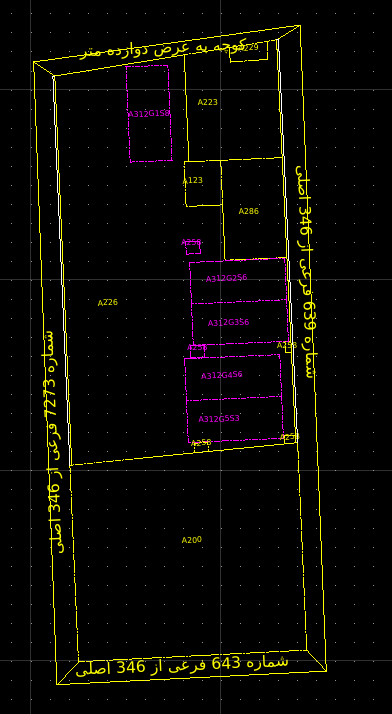
### Observed behavior
In libreCAD, this is what I get once I open the same file:... | Unicode text not showing correctly in libreCAD | https://api.github.com/repos/LibreCAD/LibreCAD/issues/1281/comments | 0 | 2020-09-27T01:36:56Z | 2020-09-27T01:36:56Z | https://github.com/LibreCAD/LibreCAD/issues/1281 | 709,645,288 | 1,281 |
[
"LibreCAD",
"LibreCAD"
] |

I use PTC Creo to draw sheetmetal parts for laser cutting and when I do more complicated signs I import a dxf into a sketch, then create a planar feature and project the sketch as a cutout in the ... | LibreCAD DXF cleanup to PTC CREO import | https://api.github.com/repos/LibreCAD/LibreCAD/issues/1280/comments | 2 | 2020-09-23T15:33:03Z | 2020-12-30T21:54:34Z | https://github.com/LibreCAD/LibreCAD/issues/1280 | 707,470,615 | 1,280 |
[
"LibreCAD",
"LibreCAD"
] | <!--
This is a comment, not shown in your issue. You can delete it or leave it as it is.
Please give your issue an useful title.
And please enter as much information as possible into each paragraph below (###).
Think twice, post once ;-)
If your issue is about how to use LibreCAD consider to ask in the forum ... | Command Compatibility with Autocad and Draftsight need to be ensured for larger adoption of this software. | https://api.github.com/repos/LibreCAD/LibreCAD/issues/1279/comments | 6 | 2020-09-16T01:45:19Z | 2024-05-18T17:27:55Z | https://github.com/LibreCAD/LibreCAD/issues/1279 | 702,383,621 | 1,279 |
[
"LibreCAD",
"LibreCAD"
] | I have been using LibreCAD since the last semester for school projects and it has been being an excellent tool for me.
I used to use LibreCAD on Ubuntu, but two months ago I switched to Manjaro and LibreCAD theme seems to be weird.
This is how LibreCAD looks for me, I thought that it was just an adaptation to my gt... | LibreCAD theme conflicting | https://api.github.com/repos/LibreCAD/LibreCAD/issues/1278/comments | 3 | 2020-09-15T22:41:36Z | 2020-11-09T00:05:39Z | https://github.com/LibreCAD/LibreCAD/issues/1278 | 702,319,577 | 1,278 |
[
"LibreCAD",
"LibreCAD"
] | ### Expected behavior
I expect that a filesystem copy of a drawing is contained.
### Observed behavior
When editing the copy after a save the original is also changed with the same changes.
### Steps to reproduce or sample file
Create copy of drawing on the filesystem
Edit the copy and save
Check original.
... | Editing a filesystem copy of design changes original | https://api.github.com/repos/LibreCAD/LibreCAD/issues/1277/comments | 2 | 2020-09-10T07:34:11Z | 2021-03-16T15:42:07Z | https://github.com/LibreCAD/LibreCAD/issues/1277 | 697,555,249 | 1,277 |
[
"LibreCAD",
"LibreCAD"
] | ### Expected behavior
Files saved in DXF should open in other CAD software, as this format has been created for exchange purposes, and exchanging designs with customers and co-workers who use other tools is an important part of the CAD workflow.
### Observed behavior
Files saved by librecad master in DXF R14, 2000... | PLOTSETTING section creates compatibility problems with AutoCAD | https://api.github.com/repos/LibreCAD/LibreCAD/issues/1276/comments | 0 | 2020-09-05T14:47:37Z | 2020-12-28T17:13:26Z | https://github.com/LibreCAD/LibreCAD/issues/1276 | 694,100,452 | 1,276 |
[
"LibreCAD",
"LibreCAD"
] | Dear sirs, I just installed the latest version of LibreCAD; I wanted to install it into "d:\progs\LibreCAD", but I made a mistake, so it was installed into "d:\progs\" directory where other directories are with some other programs. I decided to uninstall and then re-install LibreCAD to a new location. I ran "d:]progs\U... | Uninstaller | https://api.github.com/repos/LibreCAD/LibreCAD/issues/1275/comments | 1 | 2020-09-04T16:02:44Z | 2021-03-16T15:42:56Z | https://github.com/LibreCAD/LibreCAD/issues/1275 | 693,335,694 | 1,275 |
[
"LibreCAD",
"LibreCAD"
] | ### Expected behavior
Hi,
Librecad currently cannot open dwg files 2018 (AC1032)
It would be possible for them to implement LIBREDWG currently supports dwg version 2018 (AC1032), I have tried it and it is very good:
https://github.com/LibreDWG/libredwg
Thank's | DWG 2018 (AC1032) | https://api.github.com/repos/LibreCAD/LibreCAD/issues/1274/comments | 2 | 2020-09-04T04:30:42Z | 2020-12-29T00:04:29Z | https://github.com/LibreCAD/LibreCAD/issues/1274 | 692,698,600 | 1,274 |
[
"LibreCAD",
"LibreCAD"
] | When Changing the Dimensioning Label of a small but regularly still fitting dimensioning using the Properties Tool, the arrows stay when they should update to be from the outside when the text gets too long.
### Expected behavior
- Text on the outside
- Arrows go on the outside as well
```
| | (0.9)
-... | Arrows of Dimensioning not Updating with Custom Text | https://api.github.com/repos/LibreCAD/LibreCAD/issues/1273/comments | 0 | 2020-08-20T02:32:31Z | 2020-08-20T03:25:56Z | https://github.com/LibreCAD/LibreCAD/issues/1273 | 682,320,081 | 1,273 |
[
"LibreCAD",
"LibreCAD"
] | Hi!
I have a problem with export as image:
Version 2.1.3 in Windows 20 2004 x64 on HP elitedesk 8000
DXF2007 file with several layers. Some of them has black/white color and others have other colours.
When I export as image (same issue in all formats).
Resolution: auto
Background: white
Coloured checked.
... | Export as image don't show black lines | https://api.github.com/repos/LibreCAD/LibreCAD/issues/1272/comments | 2 | 2020-08-19T11:37:41Z | 2021-04-03T23:40:10Z | https://github.com/LibreCAD/LibreCAD/issues/1272 | 681,770,950 | 1,272 |
[
"LibreCAD",
"LibreCAD"
] | #### Hello, administrator,
Have you considered using the drawText function in the QPainter class and the QFont class to implement single-line fonts instead of the double-line fonts currently implemented by reading lff files?
Looking forward to your reply.
| How to implement single-line font? | https://api.github.com/repos/LibreCAD/LibreCAD/issues/1271/comments | 2 | 2020-08-04T02:33:42Z | 2024-05-18T14:41:01Z | https://github.com/LibreCAD/LibreCAD/issues/1271 | 672,459,858 | 1,271 |
[
"LibreCAD",
"LibreCAD"
] | I converted a dwg drawing into dxf using onlineconvertfree. The dxf file opens well in librecad and I can do all the editing work, I want to do.
If I try to create a PDF file with librecadt, but I obtain only an empty page. No matter if I print to file, export to pdf, run a print preview before or not. The print pre... | File does not print into pdf, just produces empty page | https://api.github.com/repos/LibreCAD/LibreCAD/issues/1270/comments | 2 | 2020-08-03T13:48:26Z | 2022-11-29T09:02:51Z | https://github.com/LibreCAD/LibreCAD/issues/1270 | 672,089,973 | 1,270 |
[
"LibreCAD",
"LibreCAD"
] | a few months ago, I ran into an issue where LibreCAD would no longer load and run properly. It shows up in the taskbar, but when I open the program or open a known-good dxf file, the program window will not show itself, but the program does show up in the task bar. De-install and re-install, get the same behavior. ... | LibreCAD window invisible upon running program | https://api.github.com/repos/LibreCAD/LibreCAD/issues/1269/comments | 1 | 2020-08-01T23:18:48Z | 2020-08-01T23:25:07Z | https://github.com/LibreCAD/LibreCAD/issues/1269 | 671,288,698 | 1,269 |
[
"LibreCAD",
"LibreCAD"
] | ### Observed behavior
It launch two "File already exists" warning
### Expected behavior
Only one warning is enogh
### Steps to reproduce or sample file
1. Print
2. Select Print To File (PDF)
3. Clik "..." to select Output File (to a file that already exist)
4. Click "Save"
5. Launch Overwrite warning messa... | Duplicate overwrite warning in print to file (PDF) | https://api.github.com/repos/LibreCAD/LibreCAD/issues/1268/comments | 3 | 2020-07-31T16:36:23Z | 2021-04-03T23:21:12Z | https://github.com/LibreCAD/LibreCAD/issues/1268 | 669,996,748 | 1,268 |
[
"LibreCAD",
"LibreCAD"
] | <!--
This is a comment, not shown in your issue. You can delete it or leave it as it is.
Please give your issue an useful title.
And please enter as much information as possible into each paragraph below (###).
Think twice, post once ;-)
If your issue is about how to use LibreCAD consider to ask in the forum ... | Unable to process 3D DWG/DXF | https://api.github.com/repos/LibreCAD/LibreCAD/issues/1267/comments | 2 | 2020-07-29T02:42:45Z | 2020-07-29T08:27:50Z | https://github.com/LibreCAD/LibreCAD/issues/1267 | 667,504,560 | 1,267 |
[
"LibreCAD",
"LibreCAD"
] | I am having a lot of trouble w/ my LibreCAD install - it is constantly hanging and going into a non-responding mode especially if I try to zoom in or pan a drawing so that part of it is outside the active window.
When I do 'about' in the program, I get:
Version: 2.1.3
Compiler: GNU GCC 8.3.0
Compiled on: May 16... | What is current version??? | https://api.github.com/repos/LibreCAD/LibreCAD/issues/1266/comments | 4 | 2020-07-28T03:50:23Z | 2021-01-24T14:18:18Z | https://github.com/LibreCAD/LibreCAD/issues/1266 | 666,731,664 | 1,266 |
[
"LibreCAD",
"LibreCAD"
] | Now when I draw second line there's no snap when lines are perpendicular
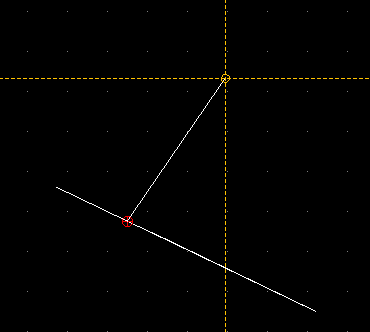
It would be nice if those lines snapped when perpendicular

| Chinese display error problem, parsing DXF error | https://api.github.com/repos/LibreCAD/LibreCAD/issues/1264/comments | 4 | 2020-07-16T01:55:31Z | 2021-04-03T23:27:37Z | https://github.com/LibreCAD/LibreCAD/issues/1264 | 657,780,044 | 1,264 |
[
"LibreCAD",
"LibreCAD"
] | SECTION
2
ENTITIES
0
OLE2FRAME
5
281
330
1F
100
AcDbEntity
8
0
100
AcDbOle2Frame
70
2
3
Picture (Device Independent Bitmap)
10
2147.279748970612
20
2248.34104767737
30
0.0
11
4530.180851497799
21
633.0270850613914
31
0.0
71
3
72
0
73
2
90
... | Does anyone know how to convert the hex data corresponding to group code 310 into image? | https://api.github.com/repos/LibreCAD/LibreCAD/issues/1263/comments | 2 | 2020-07-14T07:24:43Z | 2020-07-15T01:46:22Z | https://github.com/LibreCAD/LibreCAD/issues/1263 | 656,391,381 | 1,263 |
[
"LibreCAD",
"LibreCAD"
] | When you save a block to a file, it preserves the layer associated with that block.
I consider this an unwanted side effect, as layers are an aspect of organization (meta level). They are not part of the element itself. It's really a different dimension.
This gets especially annoying if you import someone else's blo... | Blocks should not preserve layer property | https://api.github.com/repos/LibreCAD/LibreCAD/issues/1262/comments | 13 | 2020-07-12T16:02:04Z | 2021-04-03T23:30:25Z | https://github.com/LibreCAD/LibreCAD/issues/1262 | 655,427,445 | 1,262 |
[
"LibreCAD",
"LibreCAD"
] | How to use ttf2lff tool to generate a single line font instead of double line font? | https://api.github.com/repos/LibreCAD/LibreCAD/issues/1261/comments | 1 | 2020-07-10T06:58:32Z | 2020-07-10T18:18:14Z | https://github.com/LibreCAD/LibreCAD/issues/1261 | 654,557,497 | 1,261 | |
[
"LibreCAD",
"LibreCAD"
] | Why doesn't LibreCAD parse the OLE2FRAME entity in the dxf specification? | https://api.github.com/repos/LibreCAD/LibreCAD/issues/1260/comments | 3 | 2020-07-10T06:55:17Z | 2025-02-28T16:15:52Z | https://github.com/LibreCAD/LibreCAD/issues/1260 | 654,556,013 | 1,260 | |
[
"LibreCAD",
"LibreCAD"
] | If you try to select an entity which is lying within an image by clicking on it, the image gets selected instead. If you lock the layer of the image (in the case it has an extra layer), no selection occurs either, it is blocked.
It is possible to select such entities by pulling up a window around them. But some operat... | Image prevents selection of line entities | https://api.github.com/repos/LibreCAD/LibreCAD/issues/1259/comments | 11 | 2020-07-06T22:03:46Z | 2024-01-24T16:10:58Z | https://github.com/LibreCAD/LibreCAD/issues/1259 | 651,846,798 | 1,259 |
[
"LibreCAD",
"LibreCAD"
] | When asking Properties of an image always the active layer is indicated, instead of the actual layer. This can lead to confusion.
| Properties shows wrong layer for images | https://api.github.com/repos/LibreCAD/LibreCAD/issues/1258/comments | 5 | 2020-07-06T21:26:09Z | 2023-08-01T04:43:06Z | https://github.com/LibreCAD/LibreCAD/issues/1258 | 651,829,089 | 1,258 |
[
"LibreCAD",
"LibreCAD"
] | ### Expected behavior
Objects who's color match closely with the background color should have their colors modified for improved visibility.
For example, black lines drawn on a `#1f2730` background (default autocad background color) should appear white for visibility. This is the normal behavior in most CAD programs.... | Increase visibility of lines on similarly colored backgrounds | https://api.github.com/repos/LibreCAD/LibreCAD/issues/1256/comments | 0 | 2020-07-04T06:17:35Z | 2020-12-28T13:35:46Z | https://github.com/LibreCAD/LibreCAD/issues/1256 | 650,836,022 | 1,256 |
[
"LibreCAD",
"LibreCAD"
] | <!--
This is a comment, not shown in your issue. You can delete it or leave it as it is.
Please give your issue an useful title.
And please enter as much information as possible into each paragraph below (###).
Think twice, post once ;-)
If your issue is about how to use LibreCAD consider to ask in the forum ... | DimArc does not support? | https://api.github.com/repos/LibreCAD/LibreCAD/issues/1255/comments | 2 | 2020-07-02T01:11:13Z | 2023-06-04T21:35:21Z | https://github.com/LibreCAD/LibreCAD/issues/1255 | 649,485,248 | 1,255 |
[
"LibreCAD",
"LibreCAD"
] | <!--
This is a comment, not shown in your issue. You can delete it or leave it as it is.
Please give your issue an useful title.
And please enter as much information as possible into each paragraph below (###).
Think twice, post once ;-)
If your issue is about how to use LibreCAD consider to ask in the forum ... | Read dwg file crash, code:tmpByteStr.resize(size) | https://api.github.com/repos/LibreCAD/LibreCAD/issues/1254/comments | 2 | 2020-07-01T09:31:44Z | 2021-01-31T14:44:58Z | https://github.com/LibreCAD/LibreCAD/issues/1254 | 648,827,738 | 1,254 |
[
"LibreCAD",
"LibreCAD"
] | Problem: The properties/attributes of new entities are being reset when moved. The set configuration of LibreCAD is to use "By Layer" in the creation of new entities.
### Steps to reproduce or sample file
0. The following assumes that the drawing is configured such that new entities will initially take their prop... | Move command resets entity attributes/properties | https://api.github.com/repos/LibreCAD/LibreCAD/issues/1253/comments | 1 | 2020-06-23T13:02:35Z | 2020-06-25T13:20:04Z | https://github.com/LibreCAD/LibreCAD/issues/1253 | 643,823,583 | 1,253 |
[
"LibreCAD",
"LibreCAD"
] | Problem: LibreCAD "forgets" non-standard fonts. If I install new lff fonts in a custom location, upon closing and reopening a drawing the font is "forgotten" by LibreCAD.
Actually, this is incidental to my task. I want to create a table in LibreCAD (Switch positions versus contact connections) adjacent to a switch m... | LibreCAD forgets non-standard fonts | https://api.github.com/repos/LibreCAD/LibreCAD/issues/1252/comments | 4 | 2020-06-23T13:00:03Z | 2021-04-20T18:14:41Z | https://github.com/LibreCAD/LibreCAD/issues/1252 | 643,821,776 | 1,252 |
[
"LibreCAD",
"LibreCAD"
] | <!--
This is a comment, not shown in your issue. You can delete it or leave it as it is.
Please give your issue an useful title.
And please enter as much information as possible into each paragraph below (###).
Think twice, post once ;-)
If your issue is about how to use LibreCAD consider to ask in the forum ... | LibreCAD crashed on opening DXF from file browser or CLI | https://api.github.com/repos/LibreCAD/LibreCAD/issues/1250/comments | 1 | 2020-06-16T17:05:45Z | 2020-06-16T20:05:51Z | https://github.com/LibreCAD/LibreCAD/issues/1250 | 639,833,464 | 1,250 |
[
"LibreCAD",
"LibreCAD"
] | Hi Friends!
When we invoke text command a dialog appears. Is there any method to input arguments in the command line itself? This will be useful for drawing text while psuedo-scripting.
I have gone through the plugins and issues #689 , #256 and #782 but with no avail as I am unable to write a plugin as I am not p... | Command line arguments for 'text' command | https://api.github.com/repos/LibreCAD/LibreCAD/issues/1248/comments | 4 | 2020-06-13T09:09:19Z | 2020-10-09T10:31:06Z | https://github.com/LibreCAD/LibreCAD/issues/1248 | 638,127,379 | 1,248 |
[
"LibreCAD",
"LibreCAD"
] | ANSI B Issues:
1) Export ANSI B size to PDF fails, but the other ANSI sizes export correctly.
2) Page size in "Options" -> "Current Drawing Preferences" -> "Paper" tab revert to "Ledger".
Built from LibreCAD-master (of 2020/06/06, a857c382e316847aeb1a398cbc5713af1489b444)
- Export to PDF for ANSI B (only) size... | ANSI B size problem | https://api.github.com/repos/LibreCAD/LibreCAD/issues/1247/comments | 7 | 2020-06-11T13:56:36Z | 2020-12-28T12:01:40Z | https://github.com/LibreCAD/LibreCAD/issues/1247 | 637,038,043 | 1,247 |
[
"LibreCAD",
"LibreCAD"
] | So, if LibreCAD2 doesn't change to LibreDWG, kindly please stop LibreCAD2 and develop LibreCAD3 only.
Hope LibreCAD3 can be released the first revision ASAP. | LibreCAD can't open DWG file(from autocad), Autocad can't read dwg made by LibreCAD | https://api.github.com/repos/LibreCAD/LibreCAD/issues/1246/comments | 4 | 2020-06-08T07:11:52Z | 2020-06-20T09:16:25Z | https://github.com/LibreCAD/LibreCAD/issues/1246 | 634,272,299 | 1,246 |
[
"LibreCAD",
"LibreCAD"
] | https://forum.librecad.org/LibreCAD-quot-lff-quot-fonts-continued-td4807481.html
>I have written a converter from jhf (Hershey fonts) to lff
>Is a qt4 console, you can get it:
>http://sourceforge.net/projects/rallaz.u/files/fontconverter/fontconverter.zip/download
But the jhftolff conversion software mentione... | jhftolff conversion software | https://api.github.com/repos/LibreCAD/LibreCAD/issues/1245/comments | 2 | 2020-06-08T06:35:22Z | 2024-08-18T03:27:25Z | https://github.com/LibreCAD/LibreCAD/issues/1245 | 634,234,304 | 1,245 |
[
"LibreCAD",
"LibreCAD"
] | Is there any way or software that can convert shp/shx (shx files decompiled to get shx files) fonts to lff fonts? | Convert shx font | https://api.github.com/repos/LibreCAD/LibreCAD/issues/1244/comments | 8 | 2020-06-08T01:25:06Z | 2024-12-24T11:38:05Z | https://github.com/LibreCAD/LibreCAD/issues/1244 | 633,958,128 | 1,244 |
[
"LibreCAD",
"LibreCAD"
] | how can i upload the Chinese LLF fonts to LibreCAD ?

| I have converted 4 Chinese lff fonts for LibreCAD, but the size is bigger than 25m can't upload to github | https://api.github.com/repos/LibreCAD/LibreCAD/issues/1243/comments | 7 | 2020-06-08T01:24:53Z | 2023-08-08T10:11:27Z | https://github.com/LibreCAD/LibreCAD/issues/1243 | 633,957,944 | 1,243 |
[
"LibreCAD",
"LibreCAD"
] | windows 10 1909 64 bit libreCAD 2.20-RC1-251
I have set the windows fonts paths for Fonts in application preferences setting.
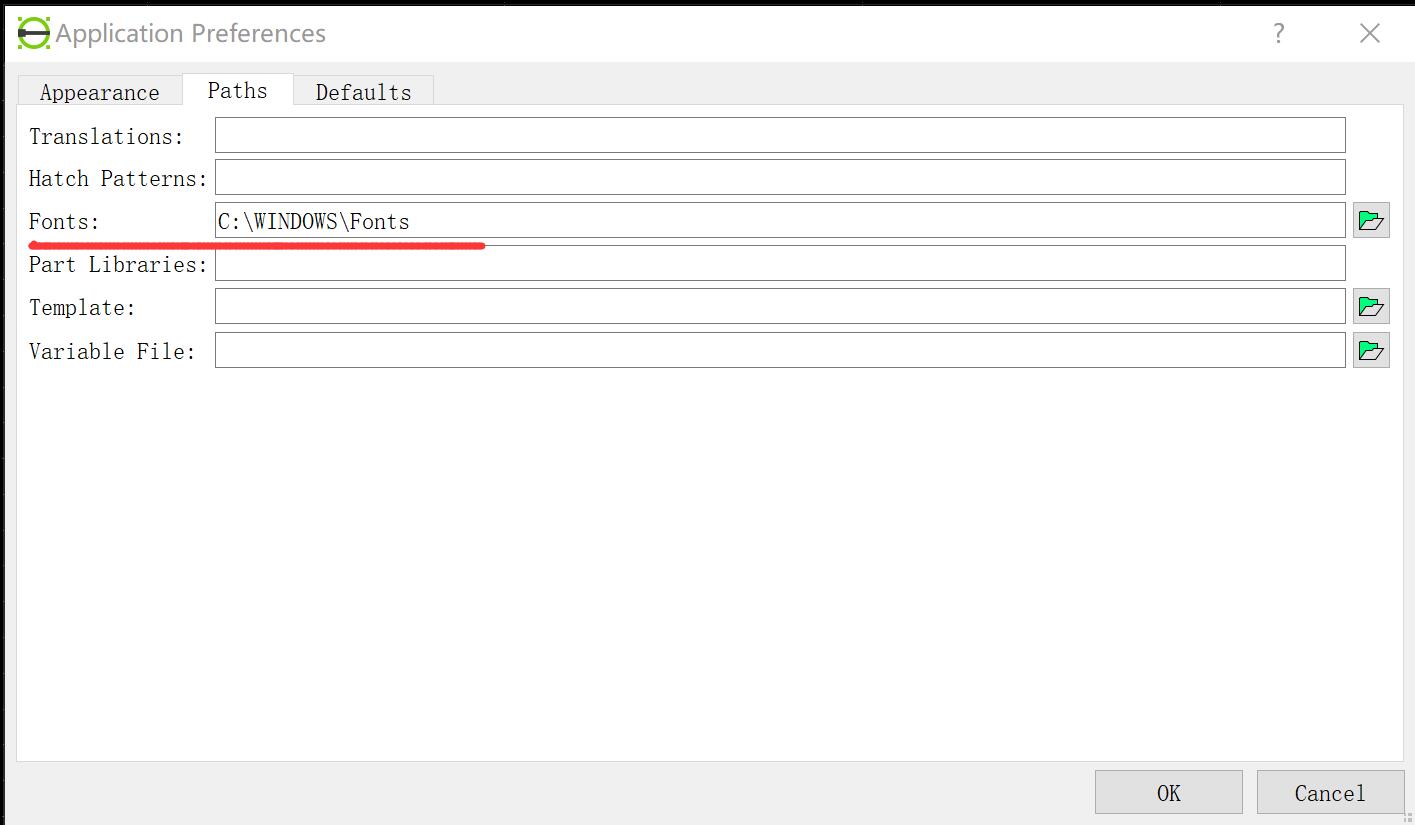
but when i insert a Mtext , there is no any system Fonts still
. With this look, you really want to do work.

| The program's appearance | https://api.github.com/repos/LibreCAD/LibreCAD/issues/1240/comments | 1 | 2020-06-03T19:00:31Z | 2021-04-03T23:34:05Z | https://github.com/LibreCAD/LibreCAD/issues/1240 | 630,245,568 | 1,240 |
[
"LibreCAD",
"LibreCAD"
] | Hi!
Please support the DWG format. There is a "open DWG" tab, but the function doesn't actually work. | Support for DWG format | https://api.github.com/repos/LibreCAD/LibreCAD/issues/1239/comments | 8 | 2020-06-03T18:55:02Z | 2021-01-09T16:07:42Z | https://github.com/LibreCAD/LibreCAD/issues/1239 | 630,242,033 | 1,239 |
[
"LibreCAD",
"LibreCAD"
] | Are there any documents in lff format? I want to understand this format, but I can't find relevant information. | Document introduction in lff font format | https://api.github.com/repos/LibreCAD/LibreCAD/issues/1238/comments | 2 | 2020-06-02T12:03:57Z | 2024-08-31T21:02:27Z | https://github.com/LibreCAD/LibreCAD/issues/1238 | 629,148,153 | 1,238 |
[
"LibreCAD",
"LibreCAD"
] | This is a copy of [sourceforge/librecad/bugs/#596](https://sourceforge.net/p/librecad/bugs/596/)
Additional info is found in #1084
The fix in #1084 leads to exceptions on nearly every circle or arc draw command.
The issue is generally solved there, but the impact in circle or arc drawing actions is not acceptable... | DXF with elevated ARC's is not drawn properly | https://api.github.com/repos/LibreCAD/LibreCAD/issues/1237/comments | 3 | 2020-06-01T12:47:55Z | 2022-10-25T21:51:24Z | https://github.com/LibreCAD/LibreCAD/issues/1237 | 628,413,150 | 1,237 |
[
"LibreCAD",
"LibreCAD"
] | Many new users have issues with the *Draft* mode which is not intuitive when one starts using LibreCAD.
I suggest that we implement a modal *Warning* window upon launching the command saying something like:
*Draft mode speeds up the view process but alter some view properties like line thickness, dimension values and... | Draft mode warning | https://api.github.com/repos/LibreCAD/LibreCAD/issues/1236/comments | 3 | 2020-06-01T09:03:43Z | 2025-01-06T09:26:49Z | https://github.com/LibreCAD/LibreCAD/issues/1236 | 628,271,465 | 1,236 |
[
"LibreCAD",
"LibreCAD"
] | Hello, i create rectangle, fillet the corners and i do offset. it is done correctly (all offset segments are correctly inside or outside the rectangle). But when i explode it, the offset is done for individual segments instead (some inside, some outside). Is there way to join exploded shape back to single object?
Be... | Reverse operation to explode? | https://api.github.com/repos/LibreCAD/LibreCAD/issues/1235/comments | 6 | 2020-06-01T07:35:15Z | 2021-04-04T15:00:37Z | https://github.com/LibreCAD/LibreCAD/issues/1235 | 628,220,803 | 1,235 |
[
"LibreCAD",
"LibreCAD"
] | ctrl + z do not place element back in earlier position, just what was edited in the element | ctrl + z do a mess | https://api.github.com/repos/LibreCAD/LibreCAD/issues/1231/comments | 1 | 2020-05-30T02:41:15Z | 2020-05-30T08:11:03Z | https://github.com/LibreCAD/LibreCAD/issues/1231 | 627,635,408 | 1,231 |
[
"LibreCAD",
"LibreCAD"
] | Hi!
When using the program I found only two drawbacks:
- not enough support for the DWG format,
- when developing the design and functionality of the program, I think it is necessary to focus on ZWCAD.
| Updating the program | https://api.github.com/repos/LibreCAD/LibreCAD/issues/1230/comments | 1 | 2020-05-29T20:55:43Z | 2021-01-31T15:07:32Z | https://github.com/LibreCAD/LibreCAD/issues/1230 | 627,533,335 | 1,230 |
[
"LibreCAD",
"LibreCAD"
] | Trying to save to a file that is readonly
### Expected behavior
There should be a warning, that saving the file wasn't succesfull
### Observed behavior
No warning, no message. Librecad behaves like it has succesfull saved the file.
### Steps to reproduce or sample file
Open librecad, draw one thing, save it... | Saving readonly files: no warning! | https://api.github.com/repos/LibreCAD/LibreCAD/issues/1228/comments | 2 | 2020-05-27T19:17:29Z | 2023-08-12T11:01:33Z | https://github.com/LibreCAD/LibreCAD/issues/1228 | 625,964,143 | 1,228 |
[
"LibreCAD",
"LibreCAD"
] | How does ttf2lff software convert ttf font to lff font?
What is the specific operation of the software? | How does ttf2lff software convert ttf font to lff font? | https://api.github.com/repos/LibreCAD/LibreCAD/issues/1226/comments | 2 | 2020-05-23T12:15:42Z | 2021-04-04T23:14:08Z | https://github.com/LibreCAD/LibreCAD/issues/1226 | 623,647,837 | 1,226 |
[
"LibreCAD",
"LibreCAD"
] | ### Expected behavior
Each action which is available in menus or tool bars should be accessible from command line too
### Observed behavior
Not all actions have a command line instruction and therefor no aliases
### Steps to reproduce or sample file
`RS2::ActionDrawLineTangent1` is an example for an existing ma... | complete the alias - instruction mapping | https://api.github.com/repos/LibreCAD/LibreCAD/issues/1225/comments | 7 | 2020-05-22T10:13:27Z | 2024-05-18T14:42:33Z | https://github.com/LibreCAD/LibreCAD/issues/1225 | 623,104,478 | 1,225 |
[
"LibreCAD",
"LibreCAD"
] | I am currently running LibreCAD 2.2.0 (Alpha). I wonder if nested blocks are supposed to work - I couldn't find any mention. Qcad does mention it though.
I had a keyboard block defined. I needed a new block of a tray with the keyboard on it. The tray has the keyboard at 45 degrees. The definition of the tray went we... | Nested blocks | https://api.github.com/repos/LibreCAD/LibreCAD/issues/1223/comments | 0 | 2020-05-18T04:54:33Z | 2020-05-18T04:54:33Z | https://github.com/LibreCAD/LibreCAD/issues/1223 | 619,907,315 | 1,223 |
[
"LibreCAD",
"LibreCAD"
] | hi.Do you have any plans to support CAM function? i did not find it.
For example, you can open a DXF file and convert it to a G-code.
thank you.
| Do you have any plans to support CAM function | https://api.github.com/repos/LibreCAD/LibreCAD/issues/1222/comments | 0 | 2020-05-18T02:17:33Z | 2020-05-28T05:09:33Z | https://github.com/LibreCAD/LibreCAD/issues/1222 | 619,860,159 | 1,222 |
[
"LibreCAD",
"LibreCAD"
] | From a Cadalyst Article on the subject. Very useful for lining a new point up with the x,y,or z value of another point.
https://cadtips.cadalyst.com/2d-operations/x-y-z-filters
Use these filters to place text in the center of a box or move an object in the z direction.
"This simple tip relies on the .X, .Y, .Z, .X... | Feature Request: Add .x .y .z filtering | https://api.github.com/repos/LibreCAD/LibreCAD/issues/1221/comments | 0 | 2020-05-18T00:31:30Z | 2020-05-18T00:31:30Z | https://github.com/LibreCAD/LibreCAD/issues/1221 | 619,833,880 | 1,221 |
[
"LibreCAD",
"LibreCAD"
] | When I toggle the visibility button in the layer list, by switch off the object becomes not visible, but when switched on again, the object does not build up correctly, in case the object has been hatched. When not hatched, the issue does not occur. Have to close the file and re-open again, to correct the issue.
use... | Problem rebuild object after toggling show button in layer list | https://api.github.com/repos/LibreCAD/LibreCAD/issues/1220/comments | 1 | 2020-05-16T10:38:31Z | 2020-05-16T14:35:56Z | https://github.com/LibreCAD/LibreCAD/issues/1220 | 619,440,119 | 1,220 |
[
"LibreCAD",
"LibreCAD"
] | <!--
This is a comment, not shown in your issue. You can delete it or leave it as it is.
Please give your issue an useful title.
And please enter as much information as possible into each paragraph below (###).
Think twice, post once ;-)
If your issue is about how to use LibreCAD consider to ask in the forum ... | Appliocation is regularly crashing, seems to be random. | https://api.github.com/repos/LibreCAD/LibreCAD/issues/1219/comments | 1 | 2020-05-03T20:27:06Z | 2020-06-08T04:47:03Z | https://github.com/LibreCAD/LibreCAD/issues/1219 | 611,499,899 | 1,219 |
[
"LibreCAD",
"LibreCAD"
] | when export to svg all line becomes black. | Can't export the lines color to svg | https://api.github.com/repos/LibreCAD/LibreCAD/issues/1218/comments | 6 | 2020-05-02T12:46:29Z | 2020-06-09T05:37:42Z | https://github.com/LibreCAD/LibreCAD/issues/1218 | 611,180,803 | 1,218 |
[
"LibreCAD",
"LibreCAD"
] | <!--
This is a comment, not shown in your issue. You can delete it or leave it as it is.
Please give your issue an useful title.
And please enter as much information as possible into each paragraph below (###).
Think twice, post once ;-)
If your issue is about how to use LibreCAD consider to ask in the forum ... | Add an application preference whether to mirror text or not | https://api.github.com/repos/LibreCAD/LibreCAD/issues/1217/comments | 0 | 2020-04-23T06:54:44Z | 2020-04-23T07:07:31Z | https://github.com/LibreCAD/LibreCAD/issues/1217 | 605,287,641 | 1,217 |
[
"LibreCAD",
"LibreCAD"
] | ### Expected behavior
Menu **Help/On line/Commands** should redirect to https://librecad.readthedocs.io/en/latest/ref/tools.html
### Observed behavior
Menu **Help/On line/Commands** currently directs to deprecated Wiki.
### Steps to reproduce or sample file
### Operating System and LibreCAD version info
Ver... | Help: commands linkshould be updated. | https://api.github.com/repos/LibreCAD/LibreCAD/issues/1215/comments | 4 | 2020-04-14T12:49:40Z | 2020-12-30T13:31:27Z | https://github.com/LibreCAD/LibreCAD/issues/1215 | 599,547,640 | 1,215 |
[
"LibreCAD",
"LibreCAD"
] | After zooming in/out a lot or making construction line layers visible again the program locks up and requires a forced shutdown of the program. Bug appears to be itermittent.
Program crash/locks up and need to force quit to restart program
Refer to the attached file
Mac OS 10.15.4 and Libre CAD 2.1.3
[Git D... | After modifying layers program crashes | https://api.github.com/repos/LibreCAD/LibreCAD/issues/1214/comments | 1 | 2020-04-12T00:12:48Z | 2020-04-12T22:10:03Z | https://github.com/LibreCAD/LibreCAD/issues/1214 | 598,377,747 | 1,214 |
[
"LibreCAD",
"LibreCAD"
] | HI
So as being really easy and working for everything.. like for a centos... Is there any plan to released the last version of Appimage, or a snaps package for LibreCad ? It's been over quite long time that it's not present.
Thanks and great soft. | Appimage not present | https://api.github.com/repos/LibreCAD/LibreCAD/issues/1213/comments | 1 | 2020-04-10T21:07:41Z | 2020-06-07T13:52:43Z | https://github.com/LibreCAD/LibreCAD/issues/1213 | 598,095,450 | 1,213 |
[
"LibreCAD",
"LibreCAD"
] | It would be great to have MacOS build (dmg) of 2.2.0 RC available in Releases section. | 2.2.0 RC build for MacOS is missing | https://api.github.com/repos/LibreCAD/LibreCAD/issues/1212/comments | 8 | 2020-04-08T21:25:53Z | 2024-05-18T14:43:09Z | https://github.com/LibreCAD/LibreCAD/issues/1212 | 596,873,960 | 1,212 |
[
"LibreCAD",
"LibreCAD"
] | Version: 2.1.3
Compliler: 8.0.0
Compiled on: Sep 22 2016
QT Ver: 5.6.1
Boost Ver: 1.60.0
System: OS X 10.14.16
After printing a file as a PDF to disk it appears that you cannot then print to the physical printer afterwards. Any further printing goes to disk as a PDF with the name of the last PDF saved no matter... | Not printing to physical printer after printing to PDF | https://api.github.com/repos/LibreCAD/LibreCAD/issues/1211/comments | 0 | 2020-04-08T21:15:47Z | 2024-08-06T12:41:30Z | https://github.com/LibreCAD/LibreCAD/issues/1211 | 596,868,296 | 1,211 |
[
"LibreCAD",
"LibreCAD"
] | ### Feature request
In line mode, after you've entered the first point, it would be great if you could specify the next point by entering the length, with the line then being produced in the direction of the cursor. This is especially handy in ortho mode for quickly drawing up plans, and this is the main mode of dra... | Specify length of next line | https://api.github.com/repos/LibreCAD/LibreCAD/issues/1210/comments | 22 | 2020-04-05T10:52:54Z | 2024-07-06T12:44:12Z | https://github.com/LibreCAD/LibreCAD/issues/1210 | 594,391,446 | 1,210 |
[
"LibreCAD",
"LibreCAD"
] | <!--
This is a comment, not shown in your issue. You can delete it or leave it as it is.
Please give your issue an useful title.
And please enter as much information as possible into each paragraph below (###).
Think twice, post once ;-)
If your issue is about how to use LibreCAD consider to ask in the forum ... | LibreCAD hangs up in Windows 10 after about 20 operations | https://api.github.com/repos/LibreCAD/LibreCAD/issues/1209/comments | 0 | 2020-03-28T19:24:19Z | 2020-03-28T20:08:35Z | https://github.com/LibreCAD/LibreCAD/issues/1209 | 589,642,157 | 1,209 |
[
"LibreCAD",
"LibreCAD"
] | <!--
This is a comment, not shown in your issue. You can delete it or leave it as it is.
Please give your issue an useful title.
And please enter as much information as possible into each paragraph below (###).
Think twice, post once ;-)
If your issue is about how to use LibreCAD consider to ask in the forum ... | Exiting print preview displays wrong drawing | https://api.github.com/repos/LibreCAD/LibreCAD/issues/1207/comments | 7 | 2020-03-18T21:49:51Z | 2024-02-06T19:52:55Z | https://github.com/LibreCAD/LibreCAD/issues/1207 | 584,024,307 | 1,207 |
[
"LibreCAD",
"LibreCAD"
] | <!--
This is a comment, not shown in your issue. You can delete it or leave it as it is.
Please give your issue an useful title.
And please enter as much information as possible into each paragraph below (###).
Think twice, post once ;-)
If your issue is about how to use LibreCAD consider to ask in the forum ... | Slow saving over network | https://api.github.com/repos/LibreCAD/LibreCAD/issues/1205/comments | 7 | 2020-03-18T09:28:41Z | 2022-07-06T21:40:16Z | https://github.com/LibreCAD/LibreCAD/issues/1205 | 583,589,741 | 1,205 |
[
"LibreCAD",
"LibreCAD"
] | ### Expected behavior
Would save block just as any other
### Observed behavior
Crashes while saving block
### Steps to reproduce or sample file
1) open LibreCAD
2) open Crank circuit.dxf [Crank circuit.zip](https://github.com/LibreCAD/LibreCAD/files/4337616/Crank.circuit.zip)
3) select Block List tab
4) sel... | Crash when saving a block | https://api.github.com/repos/LibreCAD/LibreCAD/issues/1202/comments | 2 | 2020-03-07T22:09:01Z | 2020-05-22T14:57:53Z | https://github.com/LibreCAD/LibreCAD/issues/1202 | 577,408,066 | 1,202 |
[
"LibreCAD",
"LibreCAD"
] | <!--
This is a comment, not shown in your issue. You can delete it or leave it as it is.
Please give your issue an useful title.
And please enter as much information as possible into each paragraph below (###).
Think twice, post once ;-)
If your issue is about how to use LibreCAD consider to ask in the forum ... | Adding any Dimension freezes Application after selecting the two reference points. | https://api.github.com/repos/LibreCAD/LibreCAD/issues/1199/comments | 3 | 2020-03-02T17:59:35Z | 2020-03-03T07:03:21Z | https://github.com/LibreCAD/LibreCAD/issues/1199 | 574,146,877 | 1,199 |
[
"LibreCAD",
"LibreCAD"
] | Hello,
I try to deploy LibreCAD for windows within WSUS package publisher
I build MSI package with Exe to MSI.
I don't find argument for silent install.
what's the argument can i used ?
Otherwise , it's possible to specify the n°version in future build /release ?
Thanks
best regards | How to deploy MSI / silent install ? | https://api.github.com/repos/LibreCAD/LibreCAD/issues/1198/comments | 1 | 2020-02-28T14:48:18Z | 2024-05-18T14:43:40Z | https://github.com/LibreCAD/LibreCAD/issues/1198 | 572,801,979 | 1,198 |
[
"LibreCAD",
"LibreCAD"
] | <!--
This is a comment, not shown in your issue. You can delete it or leave it as it is.
Please give your issue an useful title.
And please enter as much information as possible into each paragraph below (###).
Think twice, post once ;-)
If your issue is about how to use LibreCAD consider to ask in the forum ... | Export as PDF produces a tiny or a huge blank pdf | https://api.github.com/repos/LibreCAD/LibreCAD/issues/1194/comments | 4 | 2020-02-22T01:25:42Z | 2020-02-27T08:14:20Z | https://github.com/LibreCAD/LibreCAD/issues/1194 | 569,258,974 | 1,194 |
[
"LibreCAD",
"LibreCAD"
] | <!--
This is a comment, not shown in your issue. You can delete it or leave it as it is.
Please give your issue an useful title.
And please enter as much information as possible into each paragraph below (###).
Think twice, post once ;-)
If your issue is about how to use LibreCAD consider to ask in the forum ... | Copy/paste into a file fails if current layer is locked | https://api.github.com/repos/LibreCAD/LibreCAD/issues/1193/comments | 5 | 2020-02-13T22:24:39Z | 2022-09-29T16:11:28Z | https://github.com/LibreCAD/LibreCAD/issues/1193 | 564,986,464 | 1,193 |
[
"LibreCAD",
"LibreCAD"
] | 
I have circle and two lines: I would like to remove {red arrows} and keep {green arrows} - at the moment it's impossible.
### Operating System and LibreCAD version info
Version: 2.1.2
Compiler: G... | Trim by two limiting entities | https://api.github.com/repos/LibreCAD/LibreCAD/issues/1192/comments | 9 | 2020-02-03T19:14:01Z | 2021-07-15T09:11:09Z | https://github.com/LibreCAD/LibreCAD/issues/1192 | 559,278,082 | 1,192 |
[
"LibreCAD",
"LibreCAD"
] | If I want to print only a portion of a drawing, in "print preview", I move the blank paper under the desired detail, then the printer creates a pdf file that apparently contains only the detail. The file size is an indicator that the pdf contains much more of what I can see.
Infact, if I open the pdf with an svg edito... | "Print to file" always exports the whole drawing | https://api.github.com/repos/LibreCAD/LibreCAD/issues/1191/comments | 0 | 2020-01-30T20:57:21Z | 2020-01-30T20:57:21Z | https://github.com/LibreCAD/LibreCAD/issues/1191 | 557,748,472 | 1,191 |
[
"LibreCAD",
"LibreCAD"
] | <!--
This is a comment, not shown in your issue. You can delete it or leave it as it is.
Please give your issue an useful title.
And please enter as much information as possible into each paragraph below (###).
Think twice, post once ;-)
If your issue is about how to use LibreCAD consider to ask in the forum ... | IDE support for the compilation of the sources for Windows | https://api.github.com/repos/LibreCAD/LibreCAD/issues/1190/comments | 1 | 2020-01-30T19:42:00Z | 2020-01-30T20:21:02Z | https://github.com/LibreCAD/LibreCAD/issues/1190 | 557,708,771 | 1,190 |
[
"LibreCAD",
"LibreCAD"
] | ### Steps to reproduce the issue
1. create a rectangle
2. fillet an angle with a generic radius
3. repeat the fillet on the same angle with a bigger radius
4. the angle is not rounded off (while working on an angle between two lines the fillet command work as expected)
### Operating System and LibreCAD version ... | It's not possibile to fillet 2x a corner of a rectangle | https://api.github.com/repos/LibreCAD/LibreCAD/issues/1189/comments | 2 | 2020-01-26T23:02:16Z | 2023-06-21T10:36:46Z | https://github.com/LibreCAD/LibreCAD/issues/1189 | 555,301,397 | 1,189 |
[
"LibreCAD",
"LibreCAD"
] | At start-up, show a window introducing a tip with a link to RtD documentation in order to encourage the user to discover and read the documentation.
There can be a list of interesting links for functions less known and possibly some links to Dokuwiki for how-tos or FAQ. Random function would pick up one tip among th... | Start-up tip window | https://api.github.com/repos/LibreCAD/LibreCAD/issues/1187/comments | 0 | 2020-01-10T22:59:36Z | 2021-12-28T15:07:18Z | https://github.com/LibreCAD/LibreCAD/issues/1187 | 548,330,707 | 1,187 |
Subsets and Splits
No community queries yet
The top public SQL queries from the community will appear here once available.