
issue_owner_repo listlengths 2 2 | issue_body stringlengths 0 262k ⌀ | issue_title stringlengths 1 1.02k | issue_comments_url stringlengths 53 116 | issue_comments_count int64 0 2.49k | issue_created_at stringdate 1999-03-17 02:06:42 2025-06-23 11:41:49 | issue_updated_at stringdate 2000-02-10 06:43:57 2025-06-23 11:43:00 | issue_html_url stringlengths 34 97 | issue_github_id int64 132 3.17B | issue_number int64 1 215k |
|---|---|---|---|---|---|---|---|---|---|
[
"LibreCAD",
"LibreCAD"
] | ### Observed behavior
After importing a block with several layers, 'Hide all layers'/'Show all layers'
(and also 'Lock all layers'/'Unlock all layers') actions are switching not all layers.
### Expected behavior
Those actions should always switch all layers.
### Steps to reproduce
1. Open a drawing (or create... | Multilayer block import makes 'Hide/Show all layers' semifunctional | https://api.github.com/repos/LibreCAD/LibreCAD/issues/1024/comments | 4 | 2018-10-22T19:50:20Z | 2018-11-08T18:11:19Z | https://github.com/LibreCAD/LibreCAD/issues/1024 | 372,671,593 | 1,024 |
[
"LibreCAD",
"LibreCAD"
] | This issue is obviously created by the fix https://github.com/LibreCAD/LibreCAD/commit/8d8c154552be592960259f570484c32734f3f73a for the https://github.com/LibreCAD/LibreCAD/issues/980 issue.
Currently it looks like this:
.
Think twice, post once ;-)
If your issue is about how to use LibreCAD consider to ask in the forum ... | Menu windows too compacted using a Microsoft Surface Tablet | https://api.github.com/repos/LibreCAD/LibreCAD/issues/1020/comments | 3 | 2018-10-13T14:04:55Z | 2019-05-19T07:58:43Z | https://github.com/LibreCAD/LibreCAD/issues/1020 | 369,805,266 | 1,020 |
[
"LibreCAD",
"LibreCAD"
] | <!--
When an angular dimension is used in a drawing and then copied or moved to another position, the angular dimension does not move with the rest of the objects. If I save the file, close it, then re-open it, the angular dimensions are then moved correctly.
This will happen 100% of the time using windows 10 & lib... | Angular dimension not moving during a copy, move, or drag. | https://api.github.com/repos/LibreCAD/LibreCAD/issues/1019/comments | 1 | 2018-10-11T17:12:49Z | 2018-10-11T21:13:50Z | https://github.com/LibreCAD/LibreCAD/issues/1019 | 369,220,531 | 1,019 |
[
"LibreCAD",
"LibreCAD"
] |
i've downloaded Version '2.1.3' but when selecting it in the Finder and using 'Get Info' it doesn't show any Version-number at all. i guess the **CFBundleVersion** and **CFBundleShortVersionString** entries in your **Info.plist** file are missing.
all apps on macOS are supposed to contain valid version information.
... | version numbers missing on macOS | https://api.github.com/repos/LibreCAD/LibreCAD/issues/1017/comments | 2 | 2018-10-01T18:31:38Z | 2023-08-10T16:29:01Z | https://github.com/LibreCAD/LibreCAD/issues/1017 | 365,587,131 | 1,017 |
[
"LibreCAD",
"LibreCAD"
] | ### Expected behavior
For instance when selecting line 2-points, the expected behaviour is that after the first point is entered with the mouse, the second point can be directly typed in autocad style. "@250<15".
### Observed behavior
The keypress of the "@" is not detected, so typing "@250<15" displays on the s... | Command Line does not respond to all key presses | https://api.github.com/repos/LibreCAD/LibreCAD/issues/1016/comments | 3 | 2018-09-30T02:53:45Z | 2023-11-02T08:51:40Z | https://github.com/LibreCAD/LibreCAD/issues/1016 | 365,186,015 | 1,016 |
[
"LibreCAD",
"LibreCAD"
] | One RS_Insert is always connected to one block,when rs_block name is same ,there will be a problem to process rs_insert.
I suggest that:
when RS_BlockList adding a block , we shouldn't check the block is already exist by blockName(
because actually there will be blocks have the same blockName)
<img width="621" alt=... | when rs_block name is same ,there will be a problem to process rs_insert | https://api.github.com/repos/LibreCAD/LibreCAD/issues/1015/comments | 1 | 2018-09-26T03:24:50Z | 2019-05-24T22:50:54Z | https://github.com/LibreCAD/LibreCAD/issues/1015 | 363,843,669 | 1,015 |
[
"LibreCAD",
"LibreCAD"
] | The blockName is garbled when a DXF is Encode With GB18030? I suggest that before loading a dxf, checking the dxf encoding,transform it to UTF8. | The blockName is garbled when a DXF is Encode With GB18030? | https://api.github.com/repos/LibreCAD/LibreCAD/issues/1014/comments | 5 | 2018-09-18T13:41:26Z | 2019-06-04T07:31:28Z | https://github.com/LibreCAD/LibreCAD/issues/1014 | 361,310,583 | 1,014 |
[
"LibreCAD",
"LibreCAD"
] | I am an user who regard Chinese as my mother language. Some days before i received a file from my friend which was down by autocad. The words in the file were shown as squares. I know this may because that the word is not supported. However, i just cannot find where to change existing characters. The information that ... | ask for help | https://api.github.com/repos/LibreCAD/LibreCAD/issues/1013/comments | 1 | 2018-09-12T10:44:09Z | 2018-10-11T06:38:55Z | https://github.com/LibreCAD/LibreCAD/issues/1013 | 359,422,064 | 1,013 |
[
"LibreCAD",
"LibreCAD"
] | <!--
This is a comment, not shown in your issue. You can delete it or leave it as it is.
Please give your issue an useful title.
And please enter as much information as possible into each paragraph below (###).
Think twice, post once ;-)
If your issue is about how to use LibreCAD consider to ask in the forum ... | PDF Dimension Numbers are blurry unless made to be really big. | https://api.github.com/repos/LibreCAD/LibreCAD/issues/1012/comments | 2 | 2018-09-01T01:13:59Z | 2018-10-11T06:48:58Z | https://github.com/LibreCAD/LibreCAD/issues/1012 | 356,159,352 | 1,012 |
[
"LibreCAD",
"LibreCAD"
] | <!--
This is a comment, not shown in your issue. You can delete it or leave it as it is.
Please give your issue an useful title.
And please enter as much information as possible into each paragraph below (###).
Think twice, post once ;-)
If your issue is about how to use LibreCAD consider to ask in the forum ... | Cannot paste geometry into a block. | https://api.github.com/repos/LibreCAD/LibreCAD/issues/1011/comments | 2 | 2018-08-29T21:08:25Z | 2020-05-21T20:21:59Z | https://github.com/LibreCAD/LibreCAD/issues/1011 | 355,334,038 | 1,011 |
[
"LibreCAD",
"LibreCAD"
] | Just installed LibreCAD on Win10 64b PRO on HP Envy i7 3840 x 2160 screen resolution and started a learning tutorial.
The important statusbar information is clipped as shown in the PNG. I applied the Options->Widget Options->statusbar height->99. The 99 only seems to effect the left set of figures in the red box, t... | statusbar clipped problem | https://api.github.com/repos/LibreCAD/LibreCAD/issues/1010/comments | 8 | 2018-08-25T02:41:05Z | 2022-06-03T20:16:27Z | https://github.com/LibreCAD/LibreCAD/issues/1010 | 353,976,139 | 1,010 |
[
"LibreCAD",
"LibreCAD"
] | Under the Drawing Preferences ->Units dialog you can change the format of Length and Angle units. When choosing between "Decimal Degrees" and "D/M/S" (for example) it updates the precision options in both the angle and length drop down boxes. Seems to be some error in which precision drop down is being updated based on... | Changing unit format affects the wrong precision box | https://api.github.com/repos/LibreCAD/LibreCAD/issues/1009/comments | 2 | 2018-08-21T03:58:34Z | 2018-08-30T07:19:22Z | https://github.com/LibreCAD/LibreCAD/issues/1009 | 352,377,086 | 1,009 |
[
"LibreCAD",
"LibreCAD"
] | ### Expected behavior
Show object properties popup box
### Observed behavior
No box
### Steps to reproduce or sample file
Draw a line, select a line, click properties, nothing happens. No popup box.
### Operating System and LibreCAD version info
Version: 2.1.2
Compiler: GNU GCC 6.2.0
Compiled on... | Cant see properties popup box (Kubuntu 18.04) | https://api.github.com/repos/LibreCAD/LibreCAD/issues/1008/comments | 1 | 2018-08-14T08:22:50Z | 2018-10-11T07:52:51Z | https://github.com/LibreCAD/LibreCAD/issues/1008 | 350,327,296 | 1,008 |
[
"LibreCAD",
"LibreCAD"
] | [Flatpak](http://docs.flatpak.org/en/latest/introduction.html) is a technology for building, distributing, installing and running applications – primarily targeted at the Linux desktop and desktop applications. | Provide a Flatpak as software package — for Linux systems | https://api.github.com/repos/LibreCAD/LibreCAD/issues/1007/comments | 8 | 2018-08-11T14:21:06Z | 2023-01-06T21:19:01Z | https://github.com/LibreCAD/LibreCAD/issues/1007 | 349,737,475 | 1,007 |
[
"LibreCAD",
"LibreCAD"
] | <!--
This is a comment, not shown in your issue. You can delete it or leave it as it is.
Please give your issue an useful title.
And please enter as much information as possible into each paragraph below (###).
Think twice, post once ;-)
If your issue is about how to use LibreCAD consider to ask in the forum ... | Is there a portable version for x86/x64? | https://api.github.com/repos/LibreCAD/LibreCAD/issues/1006/comments | 1 | 2018-08-10T16:17:40Z | 2019-05-25T01:28:41Z | https://github.com/LibreCAD/LibreCAD/issues/1006 | 349,576,685 | 1,006 |
[
"LibreCAD",
"LibreCAD"
] | <!--
This is a comment, not shown in your issue. You can delete it or leave it as it is.
Please give your issue an useful title.
And please enter as much information as possible into each paragraph below (###).
Think twice, post once ;-)
If your issue is about how to use LibreCAD consider to ask in the forum ... | Command Line Commands in Tooltips, Menus | https://api.github.com/repos/LibreCAD/LibreCAD/issues/1005/comments | 4 | 2018-08-09T17:45:38Z | 2023-08-09T16:06:50Z | https://github.com/LibreCAD/LibreCAD/issues/1005 | 349,226,030 | 1,005 |
[
"LibreCAD",
"LibreCAD"
] | ### Expected behavior
No crash
### Observed behavior
Crashes
### Steps to reproduce or sample file
Create a line. Dimension the line.
move the dimension with the mv command. delete the origonal with the mv.
undo the mv
move the dimension with the mv command. delete the origonal with the mv.
crashes
### ... | Crash by doing mv with delete, undo, mv with delete. | https://api.github.com/repos/LibreCAD/LibreCAD/issues/1004/comments | 3 | 2018-08-09T01:53:17Z | 2018-10-28T11:14:14Z | https://github.com/LibreCAD/LibreCAD/issues/1004 | 348,950,350 | 1,004 |
[
"LibreCAD",
"LibreCAD"
] | <!--
This is a comment, not shown in your issue. You can delete it or leave it as it is.
Please give your issue an useful title.
And please enter as much information as possible into each paragraph below (###).
Think twice, post once ;-)
If your issue is about how to use LibreCAD consider to ask in the forum ... | Undo removes last entity placed instead of undoing the last operation | https://api.github.com/repos/LibreCAD/LibreCAD/issues/1002/comments | 1 | 2018-08-04T14:53:12Z | 2018-10-20T15:18:58Z | https://github.com/LibreCAD/LibreCAD/issues/1002 | 347,624,605 | 1,002 |
[
"LibreCAD",
"LibreCAD"
] | <!--
This is a comment, not shown in your issue. You can delete it or leave it as it is.
Please give your issue an useful title.
And please enter as much information as possible into each paragraph below (###).
Think twice, post once ;-)
If your issue is about how to use LibreCAD consider to ask in the forum ... | Hatch tool only works once | https://api.github.com/repos/LibreCAD/LibreCAD/issues/1001/comments | 1 | 2018-08-03T21:20:49Z | 2018-08-16T14:38:43Z | https://github.com/LibreCAD/LibreCAD/issues/1001 | 347,539,671 | 1,001 |
[
"LibreCAD",
"LibreCAD"
] | <!--
This is a comment, not shown in your issue. You can delete it or leave it as it is.
Please give your issue an useful title.
And please enter as much information as possible into each paragraph below (###).
Think twice, post once ;-)
If your issue is about how to use LibreCAD consider to ask in the forum ... | Librecad freezes when zooming in Ubuntu 18.04 on a specific drawing | https://api.github.com/repos/LibreCAD/LibreCAD/issues/1000/comments | 10 | 2018-08-01T10:39:57Z | 2023-05-22T12:23:14Z | https://github.com/LibreCAD/LibreCAD/issues/1000 | 346,544,916 | 1,000 |
[
"LibreCAD",
"LibreCAD"
] | Hi, everyone
I have some experience on C++ coding, and I want to make a 2D sketcher using C++ and Qt, I have searched open source code for help, QCAD and LibreCAD seems to be the most popular free code, but I didn't find enough resources for me to start the develop based LibreCAD, anyone can help me?
| How can I start to develop the LibreCAD? | https://api.github.com/repos/LibreCAD/LibreCAD/issues/999/comments | 1 | 2018-07-30T07:50:32Z | 2018-10-10T21:52:08Z | https://github.com/LibreCAD/LibreCAD/issues/999 | 345,648,172 | 999 |
[
"LibreCAD",
"LibreCAD"
] | ### Expected behavior
copy and paste a 3 corner solid should not modify the entity
### Observed behavior
the pasted 3 corner entity got a 4th corner at 0,0 (related to the copy position)
### Steps to reproduce or sample file
There is no tool for solids, so add any dimension.
Select the dimension and explode i... | copy/paste of solid triangle entities fails | https://api.github.com/repos/LibreCAD/LibreCAD/issues/998/comments | 1 | 2018-07-12T17:51:29Z | 2018-07-13T13:00:40Z | https://github.com/LibreCAD/LibreCAD/issues/998 | 340,736,995 | 998 |
[
"LibreCAD",
"LibreCAD"
] | ### Expected behavior
Not segfault
### Observed behavior
segfaults in
### Steps to reproduce or sample file
draw two lines. Cut the lines. Paste the lines.
Cttrl-z till crash
### Operating System and LibreCAD version info
64bit Debian testing & LibreCAD trunk
| Crash when doing Cut, paste, undo till before cut | https://api.github.com/repos/LibreCAD/LibreCAD/issues/993/comments | 5 | 2018-07-10T21:45:32Z | 2018-10-20T15:18:58Z | https://github.com/LibreCAD/LibreCAD/issues/993 | 340,018,381 | 993 |
[
"LibreCAD",
"LibreCAD"
] | I often find myself in need to generate shapes that will not slip in hand. As you can see on following drawing of simple knob. I usualy start with basic shape (left) and then add "knurling" manualy (right).
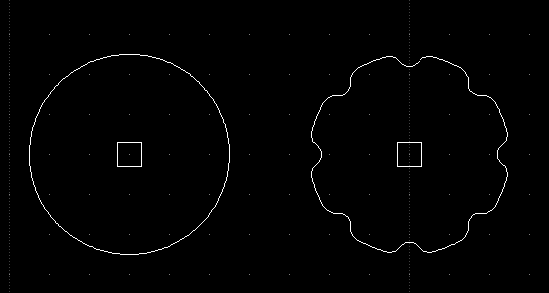
... | Generate anti-slip profiles for hand grips | https://api.github.com/repos/LibreCAD/LibreCAD/issues/992/comments | 0 | 2018-06-25T19:00:17Z | 2018-07-11T06:55:42Z | https://github.com/LibreCAD/LibreCAD/issues/992 | 335,528,449 | 992 |
[
"LibreCAD",
"LibreCAD"
] | ### Expected behavior
* An exported SVG file that replicates the original DXF
### Observed behavior
* SVG file with low resolution, resulting in details of the DXF shape missing.
### Steps to reproduce or sample file
1. Render OpenScad file
* https://github.com/OpenSourceEcology/CEB-Press/blob/master/v1... | Adjustable MakerCAM SVG Export Resolution | https://api.github.com/repos/LibreCAD/LibreCAD/issues/989/comments | 5 | 2018-06-10T19:03:19Z | 2018-06-14T05:57:49Z | https://github.com/LibreCAD/LibreCAD/issues/989 | 330,993,691 | 989 |
[
"LibreCAD",
"LibreCAD"
] | I cannot open these dwg files. The library fails to decode objects handles map correctly generating invalid handle values and object offset locations what leads to corrupted read. Here are samples :
[2000.zip](https://github.com/LibreCAD/LibreCAD/files/2087750/2000.zip)
Are there active dwg reader developers yet ... | libdxfrw - fails opening some dwg files | https://api.github.com/repos/LibreCAD/LibreCAD/issues/988/comments | 6 | 2018-06-10T11:38:11Z | 2025-04-18T17:04:39Z | https://github.com/LibreCAD/LibreCAD/issues/988 | 330,961,459 | 988 |
[
"LibreCAD",
"LibreCAD"
] | See forum thread http://forum.librecad.org/Basic-Dimensioning-Functionality-tp5716062p5716068.html No. 5
This may be different for various OS. I assume the current solution is the OS default behavior. Probably a custom solution, storing and setting the starting location for different file dialogs, would be more user... | Keep seperate 'last location' for e.g. save, new from template or possibly other file dialogs | https://api.github.com/repos/LibreCAD/LibreCAD/issues/987/comments | 0 | 2018-06-05T06:23:42Z | 2019-05-24T17:56:25Z | https://github.com/LibreCAD/LibreCAD/issues/987 | 329,316,693 | 987 |
[
"LibreCAD",
"LibreCAD"
] | <!--
This is a comment, not shown in your issue. You can delete it or leave it as it is.
Please give your issue an useful title.
And please enter as much information as possible into each paragraph below (###).
Think twice, post once ;-)
If your issue is about how to use LibreCAD consider to ask in the forum ... | Crash when doing rotate - undo - rotate | https://api.github.com/repos/LibreCAD/LibreCAD/issues/985/comments | 5 | 2018-05-30T11:29:27Z | 2018-10-28T11:23:09Z | https://github.com/LibreCAD/LibreCAD/issues/985 | 327,688,993 | 985 |
[
"LibreCAD",
"LibreCAD"
] | master at e8a4a95
### Expected behavior
LibreCad can be build with Qt 5.11RC
### Observed behavior
Can't build due to missed incomplete type (corresponding include missed)
### Steps to reproduce or sample file
try to build with Qt 5.11RC (20180505 from Qt SDK or Qt repo) with gcc on Linux\Windows
### Op... | Build issue with Qt 5.11RC with master branch | https://api.github.com/repos/LibreCAD/LibreCAD/issues/984/comments | 2 | 2018-05-16T10:31:23Z | 2018-06-14T12:37:39Z | https://github.com/LibreCAD/LibreCAD/issues/984 | 323,562,553 | 984 |
[
"LibreCAD",
"LibreCAD"
] | Add full specification on LFF-font format on LibreCAD wiki, as for now there NO (or I don't know where it is)
- http://wiki.librecad.org/index.php?title=Fonts
- http://github.com/LibreCAD/LibreCAD/tree/master/librecad/support/fonts
- http://forum.librecad.org/Re-LFF-specification-td5158408.html
There is old... | LFF-font format specification | https://api.github.com/repos/LibreCAD/LibreCAD/issues/983/comments | 4 | 2018-05-14T11:57:32Z | 2024-09-01T23:30:13Z | https://github.com/LibreCAD/LibreCAD/issues/983 | 322,785,436 | 983 |
[
"LibreCAD",
"LibreCAD"
] | ### Expected behavior
Copy/ Move > First point (0,0) > Second point (-1,0) > Launches Copy/Move Window
### Observed behavior
Copy/ Move > First point (0,0) > Second point (-1,0) > No response with negative input
As a workaround you can flip the points, but it is inconvenient. Prior versions did not have this is... | [2.2.0 Release Candidate] Negative numbers are not accepted for Copy/Move input points | https://api.github.com/repos/LibreCAD/LibreCAD/issues/981/comments | 25 | 2018-05-05T14:49:06Z | 2021-01-30T23:33:04Z | https://github.com/LibreCAD/LibreCAD/issues/981 | 320,515,070 | 981 |
[
"LibreCAD",
"LibreCAD"
] | <!--
This is a comment, not shown in your issue. You can delete it or leave it as it is.
Please give your issue an useful title.
And please enter as much information as possible into each paragraph below (###).
Think twice, post once ;-)
If your issue is about how to use LibreCAD consider to ask in the forum ... | Layer list panel buggy in Ubuntu MATE 18.04 - Icon columns take too much space | https://api.github.com/repos/LibreCAD/LibreCAD/issues/980/comments | 15 | 2018-05-03T13:06:51Z | 2019-08-19T09:00:12Z | https://github.com/LibreCAD/LibreCAD/issues/980 | 319,912,593 | 980 |
[
"LibreCAD",
"LibreCAD"
] | ### Expected behavior
I expect the program to remain responsive when a dashed construction line from 2,98 to 1.999999999999993,-6 is rendered off-screen.
### Observed behavior
The program becomes non-responsive when panning, zooming, changing layer visibility or undeleting results in the specified line being poten... | Program stops responding consistently when showing a specific construction layer | https://api.github.com/repos/LibreCAD/LibreCAD/issues/979/comments | 2 | 2018-05-02T01:40:42Z | 2020-04-12T21:29:56Z | https://github.com/LibreCAD/LibreCAD/issues/979 | 319,383,126 | 979 |
[
"LibreCAD",
"LibreCAD"
] | <!--
This is a comment, not shown in your issue. You can delete it or leave it as it is.
Please give your issue an useful title.
And please enter as much information as possible into each paragraph below (###).
Think twice, post once ;-)
If your issue is about how to use LibreCAD consider to ask in the forum ... | With "open" menu option - always empty DXFs | https://api.github.com/repos/LibreCAD/LibreCAD/issues/978/comments | 5 | 2018-05-01T13:26:25Z | 2022-03-24T07:15:14Z | https://github.com/LibreCAD/LibreCAD/issues/978 | 319,197,005 | 978 |
[
"LibreCAD",
"LibreCAD"
] | ### Expected behavior 1
GUI Language: English
Command Language: Russian русский
### Observed behavior 1
GUI Language: English
Command Language: English
In Application Preferences:
GUI Language: English
Command Language: Russian русский
Command line:
дуга
Unknown command: дуга
### Steps to reproduce... | The command line language does not match the setting. | https://api.github.com/repos/LibreCAD/LibreCAD/issues/976/comments | 7 | 2018-04-22T15:15:12Z | 2022-11-10T12:57:21Z | https://github.com/LibreCAD/LibreCAD/issues/976 | 316,587,247 | 976 |
[
"LibreCAD",
"LibreCAD"
] |
### Expected behavior
When finished trimming a line (e.g., pressing ESC), the trimming line should un-highlight.
### Observed behavior
After completing a trimming operation, the trimming line does not un-hilight until you zoom.
### Steps to reproduce or sample file
1. Draw 2 intersecting lines
2. Type 'tm' ... | Trimming line does not un-highlight after done trimming | https://api.github.com/repos/LibreCAD/LibreCAD/issues/974/comments | 1 | 2018-04-15T04:34:16Z | 2020-06-01T14:05:10Z | https://github.com/LibreCAD/LibreCAD/issues/974 | 314,384,893 | 974 |
[
"LibreCAD",
"LibreCAD"
] | <!--
This is a comment, not shown in your issue. You can delete it or leave it as it is.
Please give your issue an useful title.
And please enter as much information as possible into each paragraph below (###).
Think twice, post once ;-)
If your issue is about how to use LibreCAD consider to ask in the forum ... | The outside offset result of polyline isn't connected when the direction of polyline is counterclockwise. | https://api.github.com/repos/LibreCAD/LibreCAD/issues/972/comments | 2 | 2018-04-11T06:45:22Z | 2019-10-30T14:43:44Z | https://github.com/LibreCAD/LibreCAD/issues/972 | 313,192,749 | 972 |
[
"LibreCAD",
"LibreCAD"
] | <!--
This is a comment, not shown in your issue. You can delete it or leave it as it is.
Please give your issue an useful title.
And please enter as much information as possible into each paragraph below (###).
Think twice, post once ;-)
If your issue is about how to use LibreCAD consider to ask in the forum ... | Error DXF x, y, z scale not equal | https://api.github.com/repos/LibreCAD/LibreCAD/issues/971/comments | 6 | 2018-04-08T13:48:43Z | 2021-11-24T16:29:53Z | https://github.com/LibreCAD/LibreCAD/issues/971 | 312,307,267 | 971 |
[
"LibreCAD",
"LibreCAD"
] | On certain drawings, when you pick "export as image", the choose "PNG", it will export as an "empty image". Info on the drawing shows it to be 0 KB, so it really is empty, for some reason.
Note: unable to upload file to GitHub.
| Export image on Mac produces an "empty image" | https://api.github.com/repos/LibreCAD/LibreCAD/issues/970/comments | 0 | 2018-04-07T02:35:36Z | 2023-08-09T16:08:40Z | https://github.com/LibreCAD/LibreCAD/issues/970 | 312,163,694 | 970 |
[
"LibreCAD",
"LibreCAD"
] | First of all, thanks for this awesome program!
I would like to find a way to convert a drawing dxf file
to pdf with a bash script, use case:
continuos integration (Travis or whatever) of built artifacts.
I've read this [thread](http://forum.librecad.org/Printing-to-PDF-via-command-line-td5712735.html) (but had ... | [Question] PDF conversion from command line (bash) | https://api.github.com/repos/LibreCAD/LibreCAD/issues/969/comments | 2 | 2018-04-06T19:01:53Z | 2019-05-19T05:53:22Z | https://github.com/LibreCAD/LibreCAD/issues/969 | 312,083,139 | 969 |
[
"LibreCAD",
"LibreCAD"
] | <!--
This is a comment, not shown in your issue. You can delete it or leave it as it is.
Please give your issue an useful title.
And please enter as much information as possible into each paragraph below (###).
Think twice, post once ;-)
If your issue is about how to use LibreCAD consider to ask in the forum ... | I buit this project whit Qt5.10.1, do as "http://wiki.librecad.org/index.php?title=How_to_built_LibreCAD_(master_branch)_on_Windows " 's said.But an error occurred:Project ERROR: Can not find Boost installation in C:/boost/boost_1_60_0/ Makefile:33: recipe for target 'sub-src-qmake_all' failed mingw32-make[1]: Leaving... | https://api.github.com/repos/LibreCAD/LibreCAD/issues/968/comments | 0 | 2018-04-03T06:44:18Z | 2018-04-03T08:52:59Z | https://github.com/LibreCAD/LibreCAD/issues/968 | 310,713,100 | 968 |
[
"LibreCAD",
"LibreCAD"
] | <!--
This is a comment, not shown in your issue. You can delete it or leave it as it is.
Please give your issue an useful title.
And please enter as much information as possible into each paragraph below (###).
Think twice, post once ;-)
If your issue is about how to use LibreCAD consider to ask in the forum ... | No Start Menu entry or Desktop Shortcut created on Windows installer. | https://api.github.com/repos/LibreCAD/LibreCAD/issues/966/comments | 2 | 2018-03-29T19:04:14Z | 2023-02-23T19:58:56Z | https://github.com/LibreCAD/LibreCAD/issues/966 | 309,868,593 | 966 |
[
"LibreCAD",
"LibreCAD"
] | <!--
This is a comment, not shown in your issue. You can delete it or leave it as it is.
Please give your issue an useful title.
And please enter as much information as possible into each paragraph below (###).
Think twice, post once ;-)
If your issue is about how to use LibreCAD consider to ask in the forum ... | Slow Zoom | https://api.github.com/repos/LibreCAD/LibreCAD/issues/965/comments | 2 | 2018-03-28T02:43:33Z | 2019-03-17T18:09:04Z | https://github.com/LibreCAD/LibreCAD/issues/965 | 309,201,222 | 965 |
[
"LibreCAD",
"LibreCAD"
] | Hello
I have just installed Librecad after a few hours work it started crashing and recrashing (after restart, and reinstaillation) i checked auto save set for 5mins but the crash is random, though it gives an indication its about to happen as if something else is happening at the same time. My pc E8400 3ghz runs usin... | Librecad crashing win7 64bit | https://api.github.com/repos/LibreCAD/LibreCAD/issues/963/comments | 1 | 2018-03-24T08:06:33Z | 2019-05-25T03:33:19Z | https://github.com/LibreCAD/LibreCAD/issues/963 | 308,238,729 | 963 |
[
"LibreCAD",
"LibreCAD"
] | <!--
This is a comment, not shown in your issue. You can delete it or leave it as it is.
Please give your issue an useful title.
And please enter as much information as possible into each paragraph below (###).
Think twice, post once ;-)
If your issue is about how to use LibreCAD consider to ask in the forum ... | Colors(black and white) don't switch while exporting | https://api.github.com/repos/LibreCAD/LibreCAD/issues/962/comments | 2 | 2018-03-21T23:21:55Z | 2020-06-05T20:20:55Z | https://github.com/LibreCAD/LibreCAD/issues/962 | 307,452,238 | 962 |
[
"LibreCAD",
"LibreCAD"
] | If you select the CIRCLE (Center, Radius) command and enter the center on the command line (i.e. 0,0) it never follows up by asking you the radius. It just continues to ask for the center. | Bug - CIRCLE (Center, Radius) doesn't work correctly | https://api.github.com/repos/LibreCAD/LibreCAD/issues/961/comments | 2 | 2018-03-18T01:27:03Z | 2018-03-21T21:57:57Z | https://github.com/LibreCAD/LibreCAD/issues/961 | 306,204,981 | 961 |
[
"LibreCAD",
"LibreCAD"
] | It seems that a POINT added to a drawing (using the POINT command) can only have one style. When adding points that overlay lines, they are not visible. It would be better if the point style could be defined (a cross, a circle, ...) | Feature request - Ability to set the style of a POINT | https://api.github.com/repos/LibreCAD/LibreCAD/issues/960/comments | 5 | 2018-03-18T01:07:44Z | 2022-03-28T23:38:10Z | https://github.com/LibreCAD/LibreCAD/issues/960 | 306,204,163 | 960 |
[
"LibreCAD",
"LibreCAD"
] | I needed a way to quickly divide a line into 50, marking each division with a point. It seems that DIVIDE cannot do this. It would be good and useful to add this sort of ability.
* Invoke DIVIDE command
* Select object to divide
* Enter number of divisions required | Feature request - DIVIDE should accept a number of segments into which to divide a line | https://api.github.com/repos/LibreCAD/LibreCAD/issues/959/comments | 1 | 2018-03-18T01:03:01Z | 2020-04-12T22:47:41Z | https://github.com/LibreCAD/LibreCAD/issues/959 | 306,203,935 | 959 |
[
"LibreCAD",
"LibreCAD"
] | I am a Chinese engineer who often uses CAD, and I am also a part-time C++ programmer. I love LibreCAD and its spirit of freedom. But LibreCAD's support for Chinese fonts is not good which limits its practical use. So I've been trying to do something about it. Recently I've been studying LibreCAD's source code for sever... | Is there any team or individual that try to improve LibreCAD's support for Chinese fonts? | https://api.github.com/repos/LibreCAD/LibreCAD/issues/957/comments | 1 | 2018-03-17T02:06:52Z | 2018-03-21T22:22:49Z | https://github.com/LibreCAD/LibreCAD/issues/957 | 306,119,844 | 957 |
[
"LibreCAD",
"LibreCAD"
] | ~~~
lib/engine/rs_dimangular.cpp: In member function ‘virtual QString RS_DimAngular::getMeasuredLabel()’:
lib/engine/rs_dimangular.cpp:144:69: error: ‘QStringLiteral’ was not declared in this scope
int dimaunit {getGraphicVariableInt( QStringLiteral( "$DIMAUNIT"), 0)};
... | lib/engine/rs_dimangular.cpp:144:69: error: ‘QStringLiteral’ was not declared in this scope | https://api.github.com/repos/LibreCAD/LibreCAD/issues/955/comments | 3 | 2018-03-13T20:31:34Z | 2018-03-14T10:31:09Z | https://github.com/LibreCAD/LibreCAD/issues/955 | 304,924,543 | 955 |
[
"LibreCAD",
"LibreCAD"
] | ### Expected behavior
LibreCAD should issue a warning that it cannot save the file.
### Observed behavior
LibreCAD silently ignores the error.
### Steps to reproduce or sample file
1) Create a DXF file
2) chmod a-w DXF.file
3) Reopen with LibreCAD and save it.
### Operating System and LibreCAD version info
Lib... | No warning during save when DXF file is write protected | https://api.github.com/repos/LibreCAD/LibreCAD/issues/954/comments | 0 | 2018-03-12T09:41:58Z | 2019-05-19T06:14:33Z | https://github.com/LibreCAD/LibreCAD/issues/954 | 304,299,503 | 954 |
[
"LibreCAD",
"LibreCAD"
] | ### Expected behavior
I have large dxf drawings (~ 2 MB) with many parts and want to export some contours as dxf for our plasma cutter machine. I want to create small dxf files that only include the blocks that are used (or no blocks at all). Selecting the contours I want to have is no problem, but I cant get rid of a... | Huge dxf: delete all (unused) blocks | https://api.github.com/repos/LibreCAD/LibreCAD/issues/951/comments | 2 | 2018-03-06T12:38:47Z | 2025-06-14T10:44:29Z | https://github.com/LibreCAD/LibreCAD/issues/951 | 302,684,715 | 951 |
[
"LibreCAD",
"LibreCAD"
] | Drawing looks good on screen.
When printing, print preview looks fine too, but when printed to my Brother HL-L2360D, it comes out very faint on paper.
I printed same file through CutePDF to PDF format file, then printed from Adobe reader.
Printout is perfect. just like on screen in LibreCAD.
Using:
LibreC... | Printing a drawing is very faint, hardly visible. | https://api.github.com/repos/LibreCAD/LibreCAD/issues/950/comments | 2 | 2018-02-18T11:50:20Z | 2023-08-09T16:13:36Z | https://github.com/LibreCAD/LibreCAD/issues/950 | 298,078,958 | 950 |
[
"LibreCAD",
"LibreCAD"
] | Tool to quickly replace corners with dogbones of given diameter the same way we make fillets would be super usefull when drawing plans for CNC milling.

| Add tool to make dogbone corners | https://api.github.com/repos/LibreCAD/LibreCAD/issues/949/comments | 24 | 2018-02-15T23:27:13Z | 2019-09-25T16:55:29Z | https://github.com/LibreCAD/LibreCAD/issues/949 | 297,633,790 | 949 |
[
"LibreCAD",
"LibreCAD"
] | LibreCad crashes while loading a empty draw.
Input: see enclosed file.
Output:
Program received signal SIGSEGV, Segmentation fault.
0x00005555556480bc in DRW_Variant::addString (s="", c=1, this=0x0)
at libraries/libdxfrw/src/drw_base.h:234
234 void addString(int c, UTF8STRING s) {vType = STRING; s... | libdxfrw: crash in DRW_Header::parseCode | https://api.github.com/repos/LibreCAD/LibreCAD/issues/948/comments | 1 | 2018-02-10T23:11:24Z | 2023-10-05T07:03:08Z | https://github.com/LibreCAD/LibreCAD/issues/948 | 296,142,814 | 948 |
[
"LibreCAD",
"LibreCAD"
] | <!--
This is a comment, not shown in your issue. You can delete it or leave it as it is.
Please give your issue an useful title.
And please enter as much information as possible into each paragraph below (###).
Think twice, post once ;-)
If your issue is about how to use LibreCAD consider to ask in the forum ... | drawing a circle "tangential 2 circles with radius": missing intersection | https://api.github.com/repos/LibreCAD/LibreCAD/issues/946/comments | 3 | 2018-01-22T19:16:03Z | 2020-02-04T14:45:08Z | https://github.com/LibreCAD/LibreCAD/issues/946 | 290,582,562 | 946 |
[
"LibreCAD",
"LibreCAD"
] | <!--
This is a comment, not shown in your issue. You can delete it or leave it as it is.
Please give your issue an useful title.
And please enter as much information as possible into each paragraph below (###).
Think twice, post once ;-)
If your issue is about how to use LibreCAD consider to ask in the forum ... | Printing does not work - drawing clipped | https://api.github.com/repos/LibreCAD/LibreCAD/issues/945/comments | 2 | 2018-01-21T18:03:43Z | 2020-04-12T22:49:37Z | https://github.com/LibreCAD/LibreCAD/issues/945 | 290,292,296 | 945 |
[
"LibreCAD",
"LibreCAD"
] | <!--
This is a comment, not shown in your issue. You can delete it or leave it as it is.
Please give your issue an useful title.
And please enter as much information as possible into each paragraph below (###).
Think twice, post once ;-)
If your issue is about how to use LibreCAD consider to ask in the forum ... | Leaving 'print preview' shows random drawing | https://api.github.com/repos/LibreCAD/LibreCAD/issues/944/comments | 1 | 2018-01-21T17:51:55Z | 2021-03-26T07:48:31Z | https://github.com/LibreCAD/LibreCAD/issues/944 | 290,291,484 | 944 |
[
"LibreCAD",
"LibreCAD"
] | ### Expected behavior
Open the save dialog window.
### Observed behavior
Segmentation Fault.
### Steps to reproduce or sample file
Open the attached dxf file, try to save the 'grouped_stacks' block to a file. [segfault_grouped_stacks_block.dxf.gz](https://github.com/LibreCAD/LibreCAD/files/1609212/segfault_gro... | Segmentation fault when saving block (rs_blocklist.cpp:229) | https://api.github.com/repos/LibreCAD/LibreCAD/issues/943/comments | 0 | 2018-01-06T20:42:25Z | 2020-05-22T14:57:51Z | https://github.com/LibreCAD/LibreCAD/issues/943 | 286,516,436 | 943 |
[
"LibreCAD",
"LibreCAD"
] | <!--
This is a comment, not shown in your issue. You can delete it or leave it as it is.
Please give your issue an useful title.
And please enter as much information as possible into each paragraph below (###).
Think twice, post once ;-)
If your issue is about how to use LibreCAD consider to ask in the forum ... | What resource in terms of CPU, RAM and Storage are required for LibreCAD? | https://api.github.com/repos/LibreCAD/LibreCAD/issues/942/comments | 1 | 2018-01-05T14:04:55Z | 2018-01-05T14:33:40Z | https://github.com/LibreCAD/LibreCAD/issues/942 | 286,297,547 | 942 |
[
"LibreCAD",
"LibreCAD"
] | This file gives an error in AutoCAD but loads okay in LibreCAD [valentina_sock.dxf.zip](https://github.com/LibreCAD/LibreCAD/files/1595239/valentina_sock.dxf.zip) I think LibreCAD should also give an error.
I was chasing it up as a potential issue with dxfgrabber: https://github.com/mozman/dxfgrabber/issues/11
T... | Multiple blocks with the same name should give an error | https://api.github.com/repos/LibreCAD/LibreCAD/issues/941/comments | 0 | 2017-12-31T15:06:03Z | 2017-12-31T15:06:03Z | https://github.com/LibreCAD/LibreCAD/issues/941 | 285,261,927 | 941 |
[
"LibreCAD",
"LibreCAD"
] | A regression with the SPLINE type happened between versions 2.0.10 and 2.0.11, possibly around the point when non-uniform knot support was added: https://github.com/LibreCAD/LibreCAD/commit/765ee0e3cf8d6f690d8695a16bf2bbd6d521130d
In the attached example, the first point of some splines is set to the origin, making... | First point of spline wrongly evaluating to origin | https://api.github.com/repos/LibreCAD/LibreCAD/issues/940/comments | 1 | 2017-12-30T12:40:13Z | 2018-09-30T20:01:58Z | https://github.com/LibreCAD/LibreCAD/issues/940 | 285,200,819 | 940 |
[
"LibreCAD",
"LibreCAD"
] | <!--
This is a comment, not shown in your issue. You can delete it or leave it as it is.
Please give your issue an useful title.
And please enter as much information as possible into each paragraph below (###).
Think twice, post once ;-)
If your issue is about how to use LibreCAD consider to ask in the forum ... | Properties dialog too small for HDPI, let remember last resize would be a fix. | https://api.github.com/repos/LibreCAD/LibreCAD/issues/939/comments | 1 | 2017-12-27T14:07:56Z | 2018-11-29T15:53:28Z | https://github.com/LibreCAD/LibreCAD/issues/939 | 284,730,144 | 939 |
[
"LibreCAD",
"LibreCAD"
] | ### Expected behavior
Properties for arc should show deg/min/sec if set that way in Drawing prefs
### Observed behavior
Decimal Degrees are used
### Steps to reproduce or sample file
Draw arc -- then Modify Properties
### Operating System and LibreCAD version info
Win 10 v2.1.3
I just downloaded this s... | Properties for an Arc not showing Deg/Min/Sec | https://api.github.com/repos/LibreCAD/LibreCAD/issues/937/comments | 2 | 2017-12-10T19:00:14Z | 2023-08-09T13:54:15Z | https://github.com/LibreCAD/LibreCAD/issues/937 | 280,834,023 | 937 |
[
"LibreCAD",
"LibreCAD"
] | <!--
This is a comment, not shown in your issue. You can delete it or leave it as it is.
Please give your issue an useful title.
And please enter as much information as possible into each paragraph below (###).
Think twice, post once ;-)
If your issue is about how to use LibreCAD consider to ask in the forum ... | Librecad freezes during zoom in with mouse wheel or zoom in button | https://api.github.com/repos/LibreCAD/LibreCAD/issues/936/comments | 8 | 2017-12-08T22:52:38Z | 2021-11-05T12:47:15Z | https://github.com/LibreCAD/LibreCAD/issues/936 | 280,640,704 | 936 |
[
"LibreCAD",
"LibreCAD"
] |
<!--
This is a comment, not shown in your issue. You can delete it or leave it as it is.
Please give your issue an useful title.
And please enter as much information as possible into each paragraph below (###).
Think twice, post once ;-)
If your issue is about how to use LibreCAD consider to ask in the for... | Fix behaviour of Add Layer dialog to auto number the next layer by default | https://api.github.com/repos/LibreCAD/LibreCAD/issues/935/comments | 1 | 2017-12-04T18:57:03Z | 2018-01-25T19:11:58Z | https://github.com/LibreCAD/LibreCAD/issues/935 | 279,108,482 | 935 |
[
"LibreCAD",
"LibreCAD"
] | As requested in the forum:
http://forum.librecad.org/Cycloid-Suggestion-tp5715544.html
Reference:
https://en.wikipedia.org/wiki/Cycloid | Create a new plugin to draw a cycloid | https://api.github.com/repos/LibreCAD/LibreCAD/issues/933/comments | 0 | 2017-12-04T08:07:43Z | 2019-05-19T06:02:24Z | https://github.com/LibreCAD/LibreCAD/issues/933 | 278,905,753 | 933 |
[
"LibreCAD",
"LibreCAD"
] | Steps to reproduce:
* Open a document with two objects, at least one of them is a polyline
* Select and copy object_1
* Select object_2 (a polyline)
* Paste
Result:
* object_1 is pasted (as expected).
* object_2 is now exploded into individual lines.
The exploded lines: belong to their original layer, but ... | librecad-2.2.0-alpha: pasting while a polyline is selected explodes the polyline into buggy individual segments | https://api.github.com/repos/LibreCAD/LibreCAD/issues/932/comments | 0 | 2017-12-03T16:39:45Z | 2018-10-25T13:23:05Z | https://github.com/LibreCAD/LibreCAD/issues/932 | 278,796,692 | 932 |
[
"LibreCAD",
"LibreCAD"
] | My OS is win7. I use Qt Creator 4.4.1(based on Qt5.9.3). When compiling, I met with the following error.
\LibreCAD\librecad\src\lib\math\rs_math.cpp:305: error: no matching function for call to 'mu::Parser::DefineConst(const char [3], double)'
p.DefineConst("pi",M_PI);
^ ... | LibreCAD source code compile problem | https://api.github.com/repos/LibreCAD/LibreCAD/issues/930/comments | 5 | 2017-11-27T07:48:29Z | 2019-05-08T20:58:57Z | https://github.com/LibreCAD/LibreCAD/issues/930 | 276,927,618 | 930 |
[
"LibreCAD",
"LibreCAD"
] | <!--
This is a comment, not shown in your issue. You can delete it or leave it as it is.
Please give your issue an useful title.
And please enter as much information as possible into each paragraph below (###).
Think twice, post once ;-)
If your issue is about how to use LibreCAD consider to ask in the forum ... | Block insert from Library browser with wrong insert point | https://api.github.com/repos/LibreCAD/LibreCAD/issues/929/comments | 1 | 2017-11-24T10:20:19Z | 2017-11-24T11:35:09Z | https://github.com/LibreCAD/LibreCAD/issues/929 | 276,572,521 | 929 |
[
"LibreCAD",
"LibreCAD"
] | <!--
This is a comment, not shown in your issue. You can delete it or leave it as it is.
Please give your issue an useful title.
And please enter as much information as possible into each paragraph below (###).
Think twice, post once ;-)
If your issue is about how to use LibreCAD consider to ask in the forum ... | Crash when loading librecad (same version)-generated dxf | https://api.github.com/repos/LibreCAD/LibreCAD/issues/926/comments | 8 | 2017-11-18T14:08:42Z | 2017-11-19T18:11:31Z | https://github.com/LibreCAD/LibreCAD/issues/926 | 275,081,804 | 926 |
[
"LibreCAD",
"LibreCAD"
] | <!--
I've created several files which worked just fine. In the last few days, the drawings have disappeared, although they show as having data in Windows explorer. Neither can I open them in other applications which can open .dxf files.
### Expected behavior: I expect my drawing to appear when I open the f... | File opens but no drawing shows | https://api.github.com/repos/LibreCAD/LibreCAD/issues/923/comments | 0 | 2017-11-13T22:14:27Z | 2017-11-24T21:19:55Z | https://github.com/LibreCAD/LibreCAD/issues/923 | 273,597,206 | 923 |
[
"LibreCAD",
"LibreCAD"
] | <!--
This is a comment, not shown in your issue. You can delete it or leave it as it is.
Please give your issue an useful title.
And please enter as much information as possible into each paragraph below (###).
Think twice, post once ;-)
If your issue is about how to use LibreCAD consider to ask in the forum ... | File fails to print but can be printed after export by document viewer | https://api.github.com/repos/LibreCAD/LibreCAD/issues/920/comments | 0 | 2017-11-10T15:19:36Z | 2017-11-10T15:19:36Z | https://github.com/LibreCAD/LibreCAD/issues/920 | 272,965,266 | 920 |
[
"LibreCAD",
"LibreCAD"
] | ### Expected behavior
When drawing parallel lines through fixed distance, the crosshair should detect the reference line easily so the new line can be drawn.
### Observed behavior
Drawing lines with an offset of 1852 units, is very difficult to get the _candidate line_ appear. Apparently, it is solved setting a big... | Reference line detection while drawing parallel lines | https://api.github.com/repos/LibreCAD/LibreCAD/issues/917/comments | 0 | 2017-10-31T09:44:11Z | 2017-10-31T09:44:11Z | https://github.com/LibreCAD/LibreCAD/issues/917 | 269,894,322 | 917 |
[
"LibreCAD",
"LibreCAD"
] | some files cann't be found,eg:
ui\forms\qg_cadtoolbar.ui,
ui\forms\qg_cadtoolbararcs.ui,
ui\forms\qg_cadtoolbarcircles.u
ui\forms\qg_cadtoolbardim.ui,
ui\forms\qg_cadtoolbarellipses.
ui\forms\qg_cadtoolbarinfo.ui,
ui\forms\qg_cadtoolbarlines.ui,
ui\forms\qg_cadtoolbarmain.ui,
ui\forms\qg_cadtoolbarmodify.ui
... | cannot find some files, while LibreCAD2.1.3 is compiled by VS2015 and Qt5.7.1 | https://api.github.com/repos/LibreCAD/LibreCAD/issues/914/comments | 3 | 2017-10-23T07:59:31Z | 2020-04-13T19:53:18Z | https://github.com/LibreCAD/LibreCAD/issues/914 | 267,574,067 | 914 |
[
"LibreCAD",
"LibreCAD"
] | <!--
This is a comment, not shown in your issue. You can delete it or leave it as it is.
Please give your issue an useful title.
And please enter as much information as possible into each paragraph below (###).
Think twice, post once ;-)
If your issue is about how to use LibreCAD consider to ask in the forum ... | Current drawings preferences (dimensions, etc.) change when opening a previously saved file | https://api.github.com/repos/LibreCAD/LibreCAD/issues/913/comments | 3 | 2017-10-21T20:18:58Z | 2022-03-24T14:54:49Z | https://github.com/LibreCAD/LibreCAD/issues/913 | 267,411,005 | 913 |
[
"LibreCAD",
"LibreCAD"
] | <!--
This is a comment, not shown in your issue. You can delete it or leave it as it is.
Please give your issue an useful title.
And please enter as much information as possible into each paragraph below (###).
Think twice, post once ;-)
If your issue is about how to use LibreCAD consider to ask in the forum ... | Image Importing | https://api.github.com/repos/LibreCAD/LibreCAD/issues/912/comments | 5 | 2017-10-09T22:57:51Z | 2017-10-11T05:55:14Z | https://github.com/LibreCAD/LibreCAD/issues/912 | 264,049,806 | 912 |
[
"LibreCAD",
"LibreCAD"
] | This is a copy of an existing issue ticket on Sourceforge. See https://sourceforge.net/p/librecad/bugs/581/.
This bug seems to be unresolved on my current LibreCAD version.
### Observed behavior
> Hi,
>
> When I make an angular dimension between two lines, the dimension lines are snapped to the end of
> the l... | Dimension, angular, dimensions lines too long | https://api.github.com/repos/LibreCAD/LibreCAD/issues/911/comments | 0 | 2017-10-04T17:59:45Z | 2018-02-15T21:12:57Z | https://github.com/LibreCAD/LibreCAD/issues/911 | 262,877,382 | 911 |
[
"LibreCAD",
"LibreCAD"
] | As a sorta hobbyist who finds that there always is a plethora of projects to do and never enough money to do what I need to do never mind what I want to do LibreCAD is helping me work more 'professionally'. I just can't afford spending even $1k usd and take the time to learn how to use it for somewhat commercial softwa... | allow metadata for drawings or even entities | https://api.github.com/repos/LibreCAD/LibreCAD/issues/910/comments | 2 | 2017-09-29T21:08:24Z | 2022-01-21T10:41:37Z | https://github.com/LibreCAD/LibreCAD/issues/910 | 261,771,275 | 910 |
[
"LibreCAD",
"LibreCAD"
] | I'm trying to import image (*.jpeg
) and this is the result of import:
.
Think twice, post once ;-)
If your issue is about how to use LibreCAD consider to ask in the forum ... | Snap on entity does not work in front of imported image | https://api.github.com/repos/LibreCAD/LibreCAD/issues/906/comments | 2 | 2017-09-13T07:30:55Z | 2021-04-19T11:15:56Z | https://github.com/LibreCAD/LibreCAD/issues/906 | 257,283,602 | 906 |
[
"LibreCAD",
"LibreCAD"
] | <!--
This is a comment, not shown in your issue. You can delete it or leave it as it is.
Please give your issue an useful title.
And please enter as much information as possible into each paragraph below (###).
Think twice, post once ;-)
If your issue is about how to use LibreCAD consider to ask in the forum ... | layer gets invisible while zooming | https://api.github.com/repos/LibreCAD/LibreCAD/issues/905/comments | 6 | 2017-08-27T08:18:40Z | 2017-11-23T22:27:11Z | https://github.com/LibreCAD/LibreCAD/issues/905 | 253,149,155 | 905 |
[
"LibreCAD",
"LibreCAD"
] | <!--
This is a comment, not shown in your issue. You can delete it or leave it as it is.
If your issue is about how to use LibreCAD consider to ask in the forum http://forum.librecad.org/.
The chances for fast help are much higher as there are much more user active, not only developer.
-->
### Expected behavi... | GUI freezes while autosave | https://api.github.com/repos/LibreCAD/LibreCAD/issues/904/comments | 1 | 2017-08-14T13:27:34Z | 2017-12-08T22:17:59Z | https://github.com/LibreCAD/LibreCAD/issues/904 | 250,030,604 | 904 |
[
"LibreCAD",
"LibreCAD"
] |
[Boden-1150-01.zip](https://github.com/LibreCAD/LibreCAD/files/1218514/Boden-1150-01.zip)
<!--
This is a comment, not shown in your issue. You can delete it or leave it as it is.
Please give your issue an useful title.
And please enter as much information as possible into each paragraph below (###).
Think twi... | Program not responding | https://api.github.com/repos/LibreCAD/LibreCAD/issues/903/comments | 0 | 2017-08-11T16:54:27Z | 2017-08-11T16:54:27Z | https://github.com/LibreCAD/LibreCAD/issues/903 | 249,691,462 | 903 |
[
"LibreCAD",
"LibreCAD"
] | when i built with qt-createor(qt with mingw),that signed errors just like “mingw32-make[3]: *** No rule to make target '../../generated/lib/dxfrw.lib', needed by '../../windows/LibreCAD.exe'. Stop.” what can i do next,thanks! | complied error on window | https://api.github.com/repos/LibreCAD/LibreCAD/issues/902/comments | 0 | 2017-08-03T07:13:02Z | 2017-08-03T07:13:02Z | https://github.com/LibreCAD/LibreCAD/issues/902 | 247,612,927 | 902 |
[
"LibreCAD",
"LibreCAD"
] | I just noticed that you can hide a layer, but it still remains active as your current layer. This means that you can be drawing objects without being able to see them. I have done a search and have found references to this issue in versions prior to the active layer being displayed on the status bar, which would indi... | Current Layer Visibility | https://api.github.com/repos/LibreCAD/LibreCAD/issues/901/comments | 1 | 2017-07-28T05:34:13Z | 2021-01-10T13:21:10Z | https://github.com/LibreCAD/LibreCAD/issues/901 | 246,244,465 | 901 |
[
"LibreCAD",
"LibreCAD"
] | When you close a document, the app should not still think the document is open.
To reproduce:
1. Open LibreCad. The default "Unnamed document" is active, as expected
2. Close the document via File/Close or "X" on the document window
3. The layer list for the document is still visible but greyed-out/disabled
4.... | 2.2.0-alpha: Close document not working | https://api.github.com/repos/LibreCAD/LibreCAD/issues/900/comments | 4 | 2017-07-27T13:17:35Z | 2020-04-14T13:02:10Z | https://github.com/LibreCAD/LibreCAD/issues/900 | 246,036,343 | 900 |
[
"LibreCAD",
"LibreCAD"
] | Thank you for your work to help people read DWG files! I'm a volunteer contributor to Wikidata, and I'd like to know if you support importing all versions of DWG files. On this [Wikidata item](https://www.wikidata.org/wiki/Q1053358), there is a list of versions 1.0 up through version 2013-2014. I'd like to create speci... | Support for DWG versions? | https://api.github.com/repos/LibreCAD/LibreCAD/issues/899/comments | 1 | 2017-07-27T12:48:59Z | 2021-01-31T14:53:59Z | https://github.com/LibreCAD/LibreCAD/issues/899 | 246,028,588 | 899 |
[
"LibreCAD",
"LibreCAD"
] | ### Unexpected behavior while using Spline
Hello,
It appears to me that there is a bug with the current spline implementation when using spline with degree 1. The line does not pass through the vertices as it should or is supposed to be intended.
This is a picture of what I get using LibreCAD:
![screen shot ... | Unexpected behavior while using Spline | https://api.github.com/repos/LibreCAD/LibreCAD/issues/898/comments | 0 | 2017-07-25T11:09:39Z | 2017-07-25T11:09:39Z | https://github.com/LibreCAD/LibreCAD/issues/898 | 245,366,477 | 898 |
[
"LibreCAD",
"LibreCAD"
] |
Software is not centered on the mouse to zoom in, blossom will produce deviation | Centered on the mouse to zoom in | https://api.github.com/repos/LibreCAD/LibreCAD/issues/897/comments | 0 | 2017-07-18T09:14:06Z | 2017-07-18T09:14:06Z | https://github.com/LibreCAD/LibreCAD/issues/897 | 243,650,358 | 897 |
[
"LibreCAD",
"LibreCAD"
] | <!--
-->
Please offer an stable LibreCAD 2.1.3 Debian-Packet for Ubuntu. One argument to use this software is the multi-platform ability. **Stable releases of the same version should be available on all platforms.**
The situation now:
* 2.1.3: LibreCAD for Windows
* 2.0.9: LibreCAD for Ubuntu LTS 16.04 (Xenia... | LibreCAD 2.1.3 not available for Ubuntu | https://api.github.com/repos/LibreCAD/LibreCAD/issues/894/comments | 9 | 2017-05-26T04:15:58Z | 2023-08-09T14:03:11Z | https://github.com/LibreCAD/LibreCAD/issues/894 | 231,521,612 | 894 |
[
"LibreCAD",
"LibreCAD"
] | <!--
This is a comment, not shown in your issue. You can delete it or leave it as it is.
Please give your issue an useful title.
And please enter as much information as possible into each paragraph below (###).
Think twice, post once ;-)
If your issue is about how to use LibreCAD consider to ask in the forum ... | clang: error: unknown argument: '-fext-numeric-literals' | https://api.github.com/repos/LibreCAD/LibreCAD/issues/892/comments | 2 | 2017-05-23T05:45:37Z | 2019-02-25T01:46:46Z | https://github.com/LibreCAD/LibreCAD/issues/892 | 230,593,421 | 892 |
[
"LibreCAD",
"LibreCAD"
] | ### Expected behavior
It should open the file normally, show all lines and not freeze while we "navigate" the file.
### Observed behavior
LibreCAD freezes and the CPU jumps to 100%. It will never recover from this state
### Steps to reproduce or sample file
1- Open the sample dxf file,
2- LibreCAD will not sh... | LibreCAD freezes opening a dxf previously saved | https://api.github.com/repos/LibreCAD/LibreCAD/issues/891/comments | 4 | 2017-05-21T14:55:09Z | 2023-05-22T12:07:59Z | https://github.com/LibreCAD/LibreCAD/issues/891 | 230,226,109 | 891 |
[
"LibreCAD",
"LibreCAD"
] | ### Expected behavior
Changing the *Angle Format* combobox should update the *Angle Precision* combobox
### Observed behavior
Changing the *Angle Format* combobox modifies the *Length Precision* combobox.
The *Angle Precision* combobox keeps unchanged.
### Steps to reproduce or sample file
Open the Current Dr... | Improve Current Drawing Preferences - Units tab | https://api.github.com/repos/LibreCAD/LibreCAD/issues/884/comments | 1 | 2017-05-08T15:53:38Z | 2017-05-12T22:31:57Z | https://github.com/LibreCAD/LibreCAD/issues/884 | 227,091,751 | 884 |
[
"LibreCAD",
"LibreCAD"
] | <!--
This is a comment, not shown in your issue. You can delete it or leave it as it is.
Please give your issue an useful title.
And please enter as much information as possible into each paragraph below (###).
Think twice, post once ;-)
If your issue is about how to use LibreCAD consider to ask in the forum ... | Document Surveyor's Units in Current Drawing Preferences | https://api.github.com/repos/LibreCAD/LibreCAD/issues/883/comments | 2 | 2017-05-07T23:43:10Z | 2017-05-30T21:22:47Z | https://github.com/LibreCAD/LibreCAD/issues/883 | 226,905,869 | 883 |
[
"LibreCAD",
"LibreCAD"
] | <!--
This is a comment, not shown in your issue. You can delete it or leave it as it is.
Please give your issue an useful title.
And please enter as much information as possible into each paragraph below (###).
Think twice, post once ;-)
If your issue is about how to use LibreCAD consider to ask in the forum ... | The Offset function have an potential bug And it leads to some corners dont's come out | https://api.github.com/repos/LibreCAD/LibreCAD/issues/882/comments | 0 | 2017-04-28T07:34:33Z | 2017-04-28T07:34:33Z | https://github.com/LibreCAD/LibreCAD/issues/882 | 225,002,252 | 882 |
[
"LibreCAD",
"LibreCAD"
] | <!--
This is a comment, not shown in your issue. You can delete it or leave it as it is.
Please give your issue an useful title.
And please enter as much information as possible into each paragraph below (###).
Think twice, post once ;-)
If your issue is about how to use LibreCAD consider to ask in the forum ... | potential memory leak? | https://api.github.com/repos/LibreCAD/LibreCAD/issues/881/comments | 1 | 2017-04-26T05:49:00Z | 2017-05-31T15:54:21Z | https://github.com/LibreCAD/LibreCAD/issues/881 | 224,350,390 | 881 |
Subsets and Splits
No community queries yet
The top public SQL queries from the community will appear here once available.