| --- |
| license: apache-2.0 |
| language: |
| - en |
| - zh |
| pipeline_tag: text-to-image |
| tags: |
| - text-to-image |
| - diffusion |
| - z-image |
| - s3-dit |
| - gguf |
| - quantized |
| - on-device |
| - ios |
| - mobile |
| - apple-silicon |
| base_model: Tongyi-MAI/Z-Image-Turbo |
| --- |
| |
| # Z-Image-Turbo — iOS bundle |
|
|
| <p align="center"> |
| <a href="https://github.com/haplollc/Mirage"> |
| <img alt="Mirage" src="https://img.shields.io/badge/Runs%20on-Mirage-orange" /> |
| </a> |
| <a href="https://huggingface.co/Tongyi-MAI/Z-Image-Turbo"> |
| <img alt="Upstream" src="https://img.shields.io/badge/Upstream-Tongyi--MAI%2FZ--Image--Turbo-blue" /> |
| </a> |
| <img alt="License" src="https://img.shields.io/badge/license-Apache--2.0-lightgrey" /> |
| <img alt="Params" src="https://img.shields.io/badge/params-6B-purple" /> |
| <img alt="Steps" src="https://img.shields.io/badge/steps-9-green" /> |
| </p> |
| |
| A pre-flighted bundle of **Z-Image-Turbo** + **Qwen3-4B-Instruct** (text encoder) + **FLUX VAE**, sized and quantized to fit on iPhone 16 Pro / 17 Pro and run via [**Mirage**](https://github.com/haplollc/Mirage) — the on-device diffusion engine for iOS / macOS / visionOS. |
|
|
| Z-Image-Turbo is a 6B-parameter [**S3-DiT**](https://arxiv.org/abs/2511.22699) (Scalable Single-Stream Diffusion Transformer), distilled to **8-9 sampling steps** via Decoupled-DMD + DMDR. It produces photorealistic images at 1024×1024 with bilingual (English + Chinese) prompt understanding. |
|
|
| ## What's inside |
|
|
| | File | Role | Size | |
| |---|---|---| |
| | [`z-image-turbo-Q3_K_M.gguf`](./z-image-turbo-Q3_K_M.gguf) | Diffusion transformer — 6B params, Q3_K_M quant | 3.9 GB | |
| | [`Qwen3-4B-Instruct-2507-Q4_K_M.gguf`](./Qwen3-4B-Instruct-2507-Q4_K_M.gguf) | Text encoder | 2.3 GB | |
| | [`ae.safetensors`](./ae.safetensors) | VAE (from FLUX.1) | 320 MB | |
|
|
| Total bundle size: **~6.5 GB**. Total GPU residency at generation time: ~7-8 GB (weights + activations + KV cache). |
|
|
| ## Quick start (Mirage) |
|
|
| ```swift |
| import Mirage |
| |
| let docs = FileManager.default.urls(for: .documentDirectory, in: .userDomainMask)[0] |
| |
| let engine = try Engine(models: ModelFiles( |
| diffusionModel: docs.appendingPathComponent("z-image-turbo-Q3_K_M.gguf"), |
| vae: docs.appendingPathComponent("ae.safetensors"), |
| textEncoder: docs.appendingPathComponent("Qwen3-4B-Instruct-2507-Q4_K_M.gguf") |
| )) |
| |
| let image = try await engine.generate(.init( |
| prompt: "a photorealistic golden retriever puppy in a sunlit field of wildflowers", |
| width: 1024, height: 1024, |
| steps: 9, // Turbo distillation — don't go higher |
| cfgScale: 1.0 // CFG is baked in |
| )) |
| ``` |
|
|
| That's the whole pipeline. See the [Mirage README](https://github.com/haplollc/Mirage) for the full SwiftUI example. |
|
|
| ## Performance (measured via Mirage) |
|
|
| | Device | 1024² @ 9 steps | 512² @ 9 steps | |
| |---|---|---| |
| | iPhone 17 Pro | ~3 min | ~50 s | |
| | iPhone 16 Pro | ~5 min | ~90 s | |
| | M2 / M3 Mac | ~7.5 min | ~2 min | |
|
|
| Memory ceiling — iPhone 14 and older cannot run this bundle. Gate availability on: |
|
|
| ```swift |
| ProcessInfo.processInfo.physicalMemory >= 8 * 1024 * 1024 * 1024 |
| ``` |
|
|
| ## Sample output |
|
|
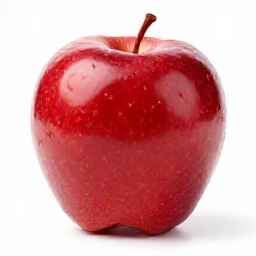
| Prompt: *"a single red apple on a white background, photorealistic"* · 256² · 4 steps · 28 s on Apple Silicon Mac: |
|
|
|  |
|
|
| Prompt: *"a photorealistic golden retriever puppy in a sunlit field of wildflowers"* · 1024² · 9 steps · 7.5 min on Apple Silicon Mac: |
|
|
|  |
|
|
| ## Why this bundle exists |
|
|
| The official Z-Image release is PyTorch + Diffusers — great for servers, doesn't run on iPhone. Unsloth shipped the GGUF-quantized variant, but using it on iOS requires: |
|
|
| 1. An engine that speaks GGUF + S3-DiT (only stable-diffusion.cpp does, as of Dec 2025) |
| 2. A matching text encoder (Z-Image's training partner is Qwen3-4B, not the more common T5 or CLIP) |
| 3. A VAE (Z-Image reuses FLUX.1's `ae.safetensors`) |
|
|
| Picking those three apart from upstream takes effort. This bundle packages them once, with the right quants for iPhone memory budgets. |
|
|
| ## Provenance |
|
|
| | Component | Upstream | License | |
| |---|---|---| |
| | Diffusion transformer | [Tongyi-MAI/Z-Image-Turbo](https://huggingface.co/Tongyi-MAI/Z-Image-Turbo) | Apache 2.0 | |
| | GGUF conversion | [unsloth/Z-Image-Turbo-GGUF](https://huggingface.co/unsloth/Z-Image-Turbo-GGUF) | Apache 2.0 | |
| | Text encoder | [unsloth/Qwen3-4B-Instruct-2507-GGUF](https://huggingface.co/unsloth/Qwen3-4B-Instruct-2507-GGUF) | Tongyi-Qianwen | |
| | VAE | [ffxvs/vae-flux](https://huggingface.co/ffxvs/vae-flux) (re-host of FLUX.1's `ae.safetensors`) | FLUX-1-dev-non-commercial | |
|
|
| ## License |
|
|
| This repository's bundling and documentation are released under **Apache 2.0**. The individual model weights retain their upstream licenses (linked above). Read each license before commercial use. |
|
|
| ## Built by |
|
|
| [Haplo](https://haplo.app) · [@jc_builds](https://twitter.com/jc_builds) · [Mirage on GitHub](https://github.com/haplollc/Mirage) |
|
|

