

File size: 6,878 Bytes
ee8eec0 520b765 ee8eec0 520b765 73c54dc 520b765 eb5fc4b 73c54dc 520b765 cedb5e5 73c54dc 520b765 8d28966 520b765 73c54dc 520b765 73c54dc 520b765 73c54dc 520b765 229ebaa 520b765 eb5fc4b 520b765 eb5fc4b 520b765 eb5fc4b 73c54dc eb5fc4b 73c54dc 520b765 eb5fc4b 520b765 cedb5e5 520b765 c1ad786 520b765 a0fa032 520b765 a0fa032 520b765 |
1 2 3 4 5 6 7 8 9 10 11 12 13 14 15 16 17 18 19 20 21 22 23 24 25 26 27 28 29 30 31 32 33 34 35 36 37 38 39 40 41 42 43 44 45 46 47 48 49 50 51 52 53 54 55 56 57 58 59 60 61 62 63 64 65 66 67 68 69 70 71 72 73 74 75 76 77 78 79 80 81 82 83 84 85 86 87 88 89 90 91 92 93 94 95 96 97 98 99 100 101 102 103 104 105 106 107 108 109 110 111 112 113 114 115 116 117 118 119 120 121 122 123 124 125 126 127 128 129 130 131 132 133 134 135 136 137 138 139 140 141 142 143 144 145 146 147 148 149 150 151 152 153 154 155 156 157 158 159 160 161 162 163 164 165 166 167 168 169 170 171 172 173 174 175 176 177 178 179 180 181 182 183 184 185 186 187 188 189 190 191 192 193 194 195 196 197 198 199 200 |
---
datasets:
- letxbe/BoundingDocs
language:
- en
pipeline_tag: visual-question-answering
tags:
- Visual-Question-Answering
- Question-Answering
- Document
license: apache-2.0
---
<div align="center">
<h1>DocExplainer: Visual Document QA with Bounding Box Localization</h1>
[](https://creativecommons.org/licenses/by/4.0/)
<!-- []() -->
[](https://huggingface.co/letxbe/DocExplainer)
</div>
## Model description
DocExplainer is a an approach to Visual Document Question Answering with bounding box localization.
Unlike standard VLMs that only provide text-based answers, DocExplainer adds **visual evidence through bounding boxes**, making model predictions more interpretable.
It is designed as a **plug-and-play module** to be combined with existing Vision-Language Models (VLMs), decoupling answer generation from spatial grounding.
- **Authors:** Alessio Chen, Simone Giovannini, Andrea Gemelli, Fabio Coppini, Simone Marinai
- **Affiliations:** [Letxbe AI](https://letxbe.ai/), [University of Florence](https://www.unifi.it/it)
- **License:** CC-BY-4.0
- **Paper:** ["Towards Reliable and Interpretable Document Question Answering via VLMs"](https://arxiv.org/abs/2501.03403) by Alessio Chen et al.
<div align="center">
<img src="https://cdn.prod.website-files.com/655f447668b4ad1dd3d4b3d9/664cc272c3e176608bc14a4c_LOGO%20v0%20-%20LetXBebicolore.svg" alt="letxbe ai logo" width="200">
<img src="https://www.dinfo.unifi.it/upload/notizie/Logo_Dinfo_web%20(1).png" alt="Logo Unifi" width="200">
</div>
## Model Details
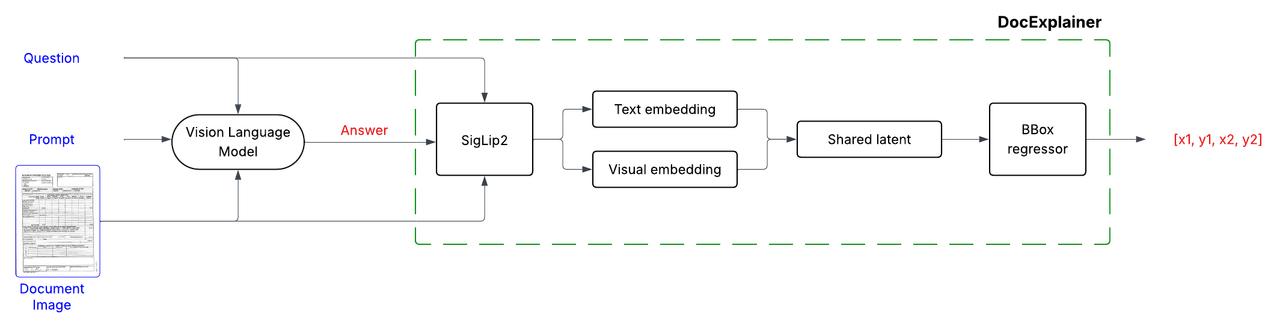
DocExplainer is a fine-tuned SigLIP-based regressor that predicts bounding box coordinates for answer localization in document images. The system operates in a two-stage process:
1. **Question Answering**: Any VLM processes the document image and question to generate a textual answer.
2. **Bounding Box Explanation**: DocExplainer takes the image, question, and generated answer to predict the coordinates of the supporting evidence.
## Model Architecture
DocExplainer builds on [SigLIP2](https://huggingface.co/google/siglip2-giant-opt-patch16-384) visual and text embeddings.
## Training Procedure
- Visual and textual embeddings from SigLiP2 are projected into a shared latent space, fused via fully connected layers.
- A regression head outputs normalized coordinates `[x1, y1, x2, y2]`.
- **Backbone**: SigLiP2 (frozen).
- **Loss Function**: Smooth L1 (Huber loss) applied to normalized coordinates in [0,1].
#### Training Setup
- **Dataset**: [BoundingDocs v2.0](https://huggingface.co/datasets/letxbe/BoundingDocs)
- **Epochs**: 20
- **Optimizer**: AdamW
- **Hardware**: 1 × NVIDIA L40S-1-48G GPU
- **Model Selection**: Best checkpoint chosen by highest mean IoU on the validation split.
## Quick Start
Here is a simple example of how to use `DocExplainer` to get an answer and its corresponding bounding box from a document image.
```python
from PIL import Image
import requests
import torch
from transformers import AutoModel, AutoModelForImageTextToText, AutoProcessor
import json
url = "https://i.postimg.cc/BvftyvS3/image-1d100e9.jpg"
image = Image.open(requests.get(url, stream=True).raw).convert("RGB")
question = "What is the invoice number?"
# -----------------------
# 1. Load SmolVLM2-2.2B for answer generation
# -----------------------
vlm_model = AutoModelForImageTextToText.from_pretrained(
"HuggingFaceTB/SmolVLM2-2.2B-Instruct",
torch_dtype=torch.bfloat16,
device_map="auto",
attn_implementation="flash_attention_2"
)
processor = AutoProcessor.from_pretrained("HuggingFaceTB/SmolVLM2-2.2B-Instruct")
PROMPT = """Based only on the document image, answer the following question:
Question: {QUESTION}
Provide ONLY a JSON response in the following format (no trailing commas!):
{{
"content": "answer"
}}
"""
prompt_text = PROMPT.format(QUESTION=question)
messages = [
{
"role": "user",
"content": [
{"type": "image", "image": image},
{"type": "text", "text": prompt_text},
]
},
]
inputs = processor.apply_chat_template(
messages,
add_generation_prompt=True,
tokenize=True,
return_dict=True,
return_tensors="pt",
).to(vlm_model.device, dtype=torch.bfloat16)
input_length = inputs['input_ids'].shape[1]
generated_ids = vlm_model.generate(**inputs, do_sample=False, max_new_tokens=2056)
output_ids = generated_ids[:, input_length:]
generated_texts = processor.batch_decode(
output_ids,
skip_special_tokens=True,
)
decoded_output = generated_texts[0].replace("Assistant:", "", 1).strip()
answer = json.loads(decoded_output)['content']
print(f"Answer: {answer}")
# -----------------------
# 2. Load DocExplainer for bounding box prediction
# -----------------------
explainer = AutoModel.from_pretrained("letxbe/DocExplainer", trust_remote_code=True)
bbox = explainer.predict(image, answer)
print(f"Predicted bounding box (normalized): {bbox}")
```
<table>
<tr>
<td width="50%" valign="top">
Example Output:
**Question**: What is the invoice number? <br>
**Answer**: 3Y8M2d-846<br><br>
**Predicted BBox**: [0.6353235244750977, 0.03685223311185837, 0.8617828488349915, 0.058749228715896606] <br>
</td>
<td width="50%" valign="top">
Visualized Answer Location:
<img src="https://i.postimg.cc/0NmBM0b1/invoice-explained.png" alt="Invoice with predicted bounding box" width="100%">
</td>
</tr>
</table>
## Performance
Evaluated on [BoundingDocs v2.0](https://huggingface.co/datasets/letxbe/BoundingDocs) dataset:
### Full DocExplainer Pipeline
| VLM Model | ANLS ↑| IoU ↑ |
| --------------- | ----- | ----- |
| SmolVLM2-2.2b | 0.572 | 0.175 |
| qwen2.5-vl-7b | 0.689 | 0.188 |
### VLM-only Baseline (for comparison)
| VLM Model | ANLS ↑| IoU ↑ |
| --------------- | ----- | ----- |
| SmolVLM2-2.2b | 0.561 | 0.011 |
| qwen2.5-vl-7b | 0.720 | 0.038 |
| Claude Sonnet 4 | 0.737 | 0.031 |
## Limitations
- **Prototype only**: Intended as a first approach, not a production-ready solution.
- **Dataset constraints**: Current evaluation is limited to cases where an answer fits in a single bounding box. Answers requiring reasoning over multiple regions or not fully captured by OCR cannot be properly evaluated.
## Citation
To cite this model in your research, please use:
```
bibtex@misc{docexplainer2025,
title={Towards Reliable and Interpretable Document Question Answering via VLMs},
author={[Your Name]},
year={2025},
url={}
}
```
|