| --- |
| license: apache-2.0 |
| library_name: peft |
| tags: |
| - ui-grounding |
| - screen-grounding |
| - browser-agent |
| - claude-computer-use |
| - codex |
| - browser-use |
| - skyvern |
| - hybrid-ai |
| - compound-ai |
| - specialist-model |
| - lora |
| - peft |
| - mlx |
| - gguf |
| - ollama |
| - apple-silicon |
| - qwen3-vl |
| - gpt-4v-alternative |
| - cost-effective-ai |
| base_model: Qwen/Qwen3-VL-2B-Instruct |
| pipeline_tag: image-text-to-text |
| language: |
| - en |
| datasets: |
| - OS-Copilot/OS-Atlas-Data |
| - agentsea/wave-ui |
| --- |
| |
| <p align="center"> |
| <img src="https://raw.githubusercontent.com/renezander030/browserground/main/assets/banner-v03.png" alt="browserground v0.3 — local UI-grounding specialist for hybrid AI agents. MLX 4-bit, npm, pip, Ollama. ScreenSpot-v2 60%. Strict JSON output."/> |
| </p> |
|
|
| # browserground — Qwen3-VL-2B LoRA for hybrid AI agents (v0.3) |
|
|
| > **The local UI-grounding specialist for hybrid AI agents.** Drop in a screenshot + text target, get a strict JSON bbox. 2B params. MLX-native. Apache 2.0. |
|
|
| --- |
|
|
| ## TL;DR — when to use browserground (and when to use UI-TARS-MLX instead) |
|
|
| If you're on Apple Silicon with ≥16 GB RAM and you need **generic, max-accuracy UI grounding**, use **[mlx-community/UI-TARS-1.5-7B-4bit](https://huggingface.co/mlx-community/UI-TARS-1.5-7B-4bit)**. It's the obvious default — ~94% on ScreenSpot-v2, MLX-native, drops into `mlx-vlm` directly. ByteDance research-lab compute, you couldn't reproduce it on a budget. |
|
|
| browserground is for two narrower jobs: |
|
|
| ### 1. The recipe for *your product's* custom UI grounder |
|
|
| UI-TARS is a finished model. You can use it; you can't easily extend it. The training pipeline is closed, the data mix is proprietary, the base is non-trivial to swap. |
|
|
| browserground is the opposite — it's a **template**. Open base (Qwen3-VL-2B), open training scripts, open data mix. Total recipe cost: **$5 of L40S time + 26k examples + a public LoRA**. Swap in your dashboard's screenshots / your customer app / your internal tooling → ship a domain-trained grounder over a weekend. The 60% generic ScreenSpot-v2 score isn't the deliverable; the *recipe* is. A 60-point baseline on generic screens often becomes 85-95% on your own product's narrow surface because the test distribution finally matches the training distribution. |
|
|
| ### 2. The smallest viable slot in a multi-model stack |
|
|
| | Model | Disk @ 4-bit | RAM at inference | |
| |---|---:|---:| |
| | UI-TARS-1.5-7B-MLX | ~4 GB | ~5-6 GB | |
| | **browserground 4-bit MLX** | **~1 GB** | **~2 GB** | |
|
|
| 2 GB matters when you're on an 8 GB Mac, or when your agent already runs a 7B planner + an OCR model + an embedding model and you need a small grounder in the same RAM budget. Plus strict JSON output (100% parseable, no regex on prose) — small win, but real. |
|
|
| **A direct head-to-head benchmark of browserground vs UI-TARS-1.5-7B-MLX on the same Apple Silicon hardware is forthcoming.** |
|
|
| ### When NOT to pick browserground |
|
|
| - You're on a Mac with ≥16 GB RAM and want max generic accuracy → use [UI-TARS-1.5-7B-MLX](https://huggingface.co/mlx-community/UI-TARS-1.5-7B-4bit) |
| - You're not going to fine-tune for your product, and accuracy is the only thing that matters → use UI-TARS-1.5-7B-MLX |
| - You need a complete agent toolkit, not a piece → look at ByteDance's full UI-TARS stack |
|
|
| ### When to pick browserground |
|
|
| - You want to ship a **custom UI grounder trained on your product's screenshots** without spending lab-scale money — use the recipe in this repo as a template |
| - You're squeezing into a tight RAM budget (8 GB Mac, multi-model hybrid stack) |
| - You want a CLI / npm / pip / Ollama distribution layer with daemon, HTTP REST, batch, confidence-routed cloud fallback, eval-on-your-data — and you specifically want it on top of an open recipe you can re-run |
|
|
| Full per-split numbers (60% breakdown): mobile-app buttons 78%, text-labelled targets ~74%, icon-only ~41%. On labelled-button-heavy workloads (the common browser case), real-world accuracy is closer to the high end. Icons get fixed in v0.4 with more icon-rich training data. |
|
|
| --- |
|
|
| ## The hybrid AI argument — for people new to this pattern |
|
|
| Today, most AI agents route **every** screenshot to a cloud frontier model (GPT-4V, Claude Vision, Gemini) just to find click coordinates. That's a $0.01–0.05 multimodal call adding 800ms–2s of latency, repeated 20–50× per agent run. Cost and latency compound. Screenshots full of private UI leave your machine. |
|
|
| A general 200B-parameter LLM is overkill for "where is the Submit button?" — that's a narrow vision task. The right shape is a **hybrid one**: cheap fast specialist local models for the dedicated tasks they handle better, and the cloud LLM only for the planning and reasoning it's uniquely good at. |
|
|
| That's exactly what browserground is — the click-grounding specialist. |
|
|
| 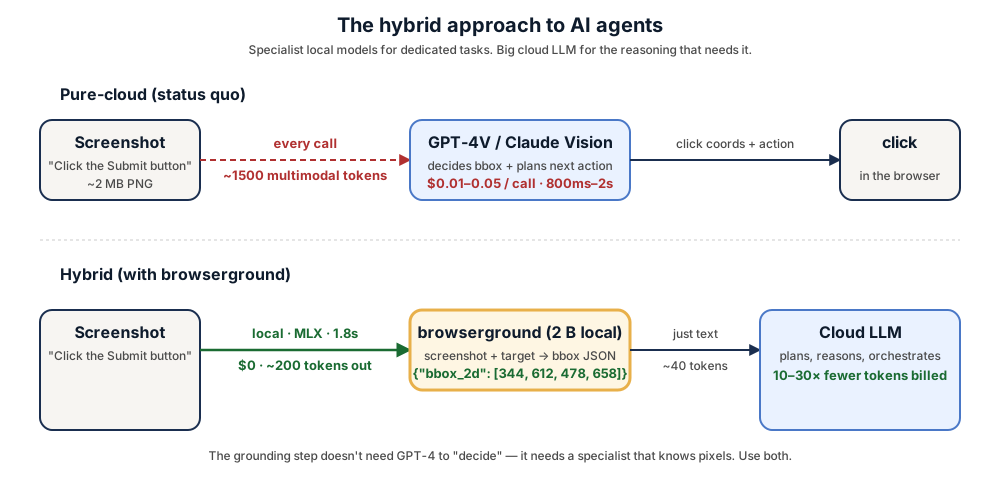 |
|
|
| | | Pure-cloud (status quo) | Hybrid (+ browserground + confidence routing) | |
| |---|---|---| |
| | Per-screenshot cost on the common case | $0.01–0.05 | **$0** (local), cloud only on low-confidence escalations | |
| | Tokens billed by cloud per step | 1500+ multimodal | **~40 text** on the local path | |
| | Screenshots leave machine | yes | **no** for the local path | |
| | Rate limits | yes | **no** for the local path | |
|
|
| ## Three packaged builds |
|
|
| | Build | Use it for | Install | |
| |---|---|---| |
| | **MLX 4-bit** ([renezander030/browserground-mlx](https://huggingface.co/renezander030/browserground-mlx)) | Apple Silicon, fastest | `npm install -g browserground` (auto) or `pip install "browserground[mlx]"` | |
| | **GGUF Q4_K_M + f16 mmproj** ([renezander030/browserground-gguf](https://huggingface.co/renezander030/browserground-gguf)) | Ollama, llama.cpp | `ollama run renezander030/browserground` | |
| | **PEFT LoRA** (this repo) | `transformers`, training, fine-tuning | `pip install "browserground[transformers]"` | |
|
|
| ## What it does |
|
|
| Given a screenshot and a target description (`"submit form button"`, `"the red Sign Up link"`, `"the second profile picture from the left"`), this LoRA-fine-tuned Qwen3-VL-2B emits a strict JSON object: |
|
|
| ```json |
| {"bbox_2d": [x1, y1, x2, y2]} |
| ``` |
|
|
| — the pixel coordinates of the element to click. **100% format compliance** on the held-out evaluation. Drop it into any browser-agent / screen-automation pipeline that needs to ground language → click target. |
|
|
| With `--confidence`, output extends to: |
|
|
| ```json |
| {"bbox_2d": [x1, y1, x2, y2], "confidence": 0.92, "alternatives": [{"bbox_2d": [...]}]} |
| ``` |
|
|
| ## Full results on ScreenSpot-v2 |
|
|
| Point-grounding accuracy, 300 held-out items (100 per split: mobile / desktop / web). A hit = predicted bbox center falls inside the ground-truth bbox. |
|
|
| | Model | Params | Overall | Mobile | Desktop | Web | Format-OK | |
| |---|---:|---:|---:|---:|---:|---:| |
| | GPT-5.4 (cloud frontier) ¹ | — | 85.4% | — | — | — | — | |
| | SeeClick (Qwen-VL-Chat) | 9.6B | 55.1% | — | — | — | — | |
| | ShowUI-2B | 2B | 75.5% | — | — | — | — | |
| | UI-TARS-2B-SFT (ByteDance) | 2B | 89.5% | — | — | — | — | |
| | OS-Atlas-Base-7B | 7B | ~91% | — | — | — | — | |
| | **browserground v0.3** | **2B** | **60.0%** | **78.0%** | **44.0%** | **58.0%** | **100%** | |
| | Qwen3-VL-2B-Instruct (zero-shot baseline) | 2B | 6.3% | 7.0% | 6.0% | 6.0% | 100% | |
|
|
| ¹ GPT-5.4 score is on the harder **ScreenSpot-Pro** benchmark — no public ScreenSpot-v2 number for the 2026 cloud generation. Open-source numbers in the table use v2 throughout. |
|
|
| - **+10× over zero-shot baseline** on the same benchmark (6.3% → 60.0%) |
| - **Beats SeeClick (9.6B) at 4.8× smaller** — 2B params, +5 pp accuracy |
| - **100% strict-JSON format compliance** — no markdown fences, no `<ref>` tokens, parseable every time |
|
|
| ## Quick start |
|
|
| ### npm CLI |
|
|
| ```bash |
| npm install -g browserground |
| browserground parse screenshot.png --target "Submit button" |
| # {"bbox_2d": [344, 612, 478, 658]} |
| ``` |
|
|
| Daemon, HTTP server, batch, confidence, eval — all in the CLI. See the [GitHub README](https://github.com/renezander030/browserground) for the full surface. |
|
|
| ### Python |
|
|
| ```bash |
| pip install "browserground[mlx]" # Apple Silicon (recommended) |
| pip install "browserground[transformers]" # everywhere else |
| ``` |
|
|
| ```python |
| from browserground import ground, click_xy |
| |
| res = ground("screenshot.png", "the green Subscribe button") |
| print(res["bbox_2d"]) |
| |
| x, y = click_xy("screenshot.png", "the back arrow") |
| ``` |
|
|
| ### Ollama |
|
|
| ```bash |
| ollama pull renezander030/browserground |
| ollama run renezander030/browserground "Locate: Submit button" /path/to/screen.png |
| ``` |
|
|
| ### From this LoRA directly (transformers) |
|
|
| ```python |
| from transformers import AutoProcessor, Qwen3VLForConditionalGeneration |
| from peft import PeftModel |
| import torch |
| from PIL import Image |
| |
| processor = AutoProcessor.from_pretrained("Qwen/Qwen3-VL-2B-Instruct") |
| model = Qwen3VLForConditionalGeneration.from_pretrained( |
| "Qwen/Qwen3-VL-2B-Instruct", dtype=torch.bfloat16, device_map="auto" |
| ) |
| model = PeftModel.from_pretrained(model, "renezander030/browserground") |
| model = model.merge_and_unload(); model.eval() |
| |
| img = Image.open("screenshot.png").convert("RGB") |
| messages = [ |
| {"role": "system", "content": [{"type": "text", "text": |
| 'You are a UI-grounding model. Given a screenshot and a target description, ' |
| 'output the bounding box of the SINGLE UI element to click. Output ONLY a JSON ' |
| 'object: {"bbox_2d": [x1, y1, x2, y2]} with pixel coordinates, origin at top-left.'}]}, |
| {"role": "user", "content": [ |
| {"type": "image", "image": img}, |
| {"type": "text", "text": "Locate the element described: Submit button"}, |
| ]}, |
| ] |
| prompt = processor.apply_chat_template(messages, tokenize=False, add_generation_prompt=True) |
| inputs = processor(text=[prompt], images=[[img]], return_tensors="pt").to(model.device) |
| out = model.generate(**inputs, max_new_tokens=64, do_sample=False) |
| print(processor.tokenizer.decode(out[0, inputs.input_ids.shape[1]:], skip_special_tokens=True)) |
| ``` |
|
|
| ## What would it take to reach UI-TARS-level accuracy (~89-90%)? |
|
|
| The gap is **compute + data**, not architecture. Concrete recipe to close it: |
|
|
| | Lever | v0.3 (this) | v0.5+ target | |
| |---|---|---| |
| | Training records | 26k | 250k–500k (10–20× more) | |
| | Epochs | 1 | 3–5 | |
| | Adapter size | LoRA rank 32 (1.6% of base) | rank 128 or full fine-tune | |
| | Icon-rich data | thin | balanced — closes the 41% icon split | |
| | Training stages | SFT only | SFT → DPO with preference data | |
| | Compute spend | $2.20 | ~$200–500 | |
|
|
| This is reproducible — the training scripts in `imgparse-tier1` are the template. The current v0.3 is the *recipe-validated* milestone at the cheap end of the spectrum. |
|
|
| ## Training recipe (v0.2 LoRA — what's in this repo) |
|
|
| v0.3 is the same underlying LoRA as v0.2 — what shipped in v0.3 is **packaging**: MLX 4-bit, GGUF, Ollama, PyPI, browser-use + Skyvern adapters, batch / confidence / HTTP daemon / eval CLI surfaces. |
|
|
| - **Base**: `Qwen/Qwen3-VL-2B-Instruct` |
| - **Method**: LoRA rank 32, alpha 64, dropout 0.05, on all 7 linear modules of the LM (q/k/v/o/gate/up/down) |
| - **Trainable params**: 34.9 M (1.6% of base) |
| - **Data mix (26k examples)**: |
| - OS-Atlas-Data desktop_domain (macOS): 6k |
| - OS-Atlas-Data mobile_domain (aw_mobile, Android): 6k |
| - OS-Atlas-Data mobile_domain (UIBert): 6k |
| - agentsea/wave-ui (web-platform-filtered): 8k |
| - **Hyperparams**: bf16, LR 1e-4, cosine schedule, batch 1 × grad-accum 8 (effective batch 8), 1 epoch, gradient checkpointing on |
| - **Hardware**: 1× RTX A6000 48 GB (RunPod Secure Cloud) |
| - **Wall time**: ~4.5 hr training + ~5 min eval |
|
|
| Full training scripts (private repo, request access): [renezander030/imgparse-tier1](https://github.com/renezander030/imgparse-tier1). |
|
|
| ## Use cases |
|
|
| - **Claude Computer Use / Claude Code** screen-grounding tool calls |
| - **OpenAI Codex CLI** screen-grounding extension |
| - **browser-use** click-targeting (drop-in adapter in [GitHub plugins/browser-use/](https://github.com/renezander030/browserground/tree/main/plugins/browser-use)) |
| - **Skyvern** local-first grounding with cloud fallback (adapter in [GitHub plugins/skyvern/](https://github.com/renezander030/browserground/tree/main/plugins/skyvern)) |
| - **Custom agent stacks** that need a $0/call grounding step for the common-case calls instead of GPT-4V per screenshot |
| - **Self-hosted compound-AI systems** with a routing layer (specialist model for grounding, general LLM for planning) |
|
|
| ## Limitations & next |
|
|
| - **Icon UI accuracy (~41%) lags text UI (~74%)** — icons under-represented in the 26k training mix; planned for v0.4 |
| - **Web and desktop accuracy** lag mobile — more web/desktop training data in v0.4 |
| - **No mouse-action prediction** — this model only locates; doesn't decide click vs hover vs type. Pair with an action predictor for full computer-use loops |
| - **English-only training data** |
| - **MLX latency numbers are targets** until v0.4 independent benchmarks |
|
|
| ## Work with me |
|
|
| This adapter is a public reference of the recipe I deliver to freelance clients: small, fast, structured-output local specialists that slot into compound-AI agent stacks and cut cloud-LLM bills without losing capability. |
|
|
| If you need one of these, I can build it: |
|
|
| - a **UI-grounding model trained on your own product's screenshots** — your dashboard, your app, your customer interfaces — for higher recall on the elements your agents actually click |
| - a **hybrid agent architecture** that routes narrow tasks (grounding, OCR, classification, embedding, extraction) to local specialist models and reserves cloud frontier LLMs for the reasoning that actually needs them |
| - an **on-prem agent deployment** — Apple Silicon (MLX), CUDA box, or your existing K8s — with no screenshots leaving your infrastructure |
| - a **confidence-routed harness** that tells you when the local model is actually good enough to keep the call out of the cloud bill in production |
|
|
| Reach out: <https://renezander.com> |
|
|
| ## Citation |
|
|
| ```bibtex |
| @misc{browserground-2026, |
| title = {browserground: Qwen3-VL-2B LoRA for hybrid AI agent UI grounding}, |
| author = {Zander, René}, |
| year = {2026}, |
| url = {https://huggingface.co/renezander030/browserground} |
| } |
| ``` |
|
|
| ## License |
|
|
| Apache 2.0, same as the base model `Qwen/Qwen3-VL-2B-Instruct`. |
|
|
| ## Acknowledgements |
|
|
| - `Qwen/Qwen3-VL-2B-Instruct` base |
| - `OS-Copilot/OS-Atlas-Data` training data |
| - `agentsea/wave-ui` web slice |
| - `OS-Copilot/ScreenSpot-v2` evaluation set |
|
|

