

| # Pplx2Api | |
| [](https://goreportcard.com/report/github.com/yushangxiao/pplx2api) | |
| [](LICENSE) | |
| pplx2api 对外提供OpenAi 兼容接口,支持识图,思考,搜索,文件上传,账户轮询,重试,模型监控…… | |
| ## ✨ 特性 | |
| - 🖼️ **图像识别** - 发送图像给Ai进行分析 | |
| - 📝 **隐私模式** - 对话不保存在官网,可选择关闭 | |
| - 🌊 **流式响应** - 获取实时流式输出 | |
| - 📁 **文件上传支持** - 上传长文本内容 | |
| - 🧠 **思考过程** - 访问思考模型的逐步推理,自动输出`<think>`标签 | |
| - 🔄 **聊天历史管理** - 控制对话上下文长度,超出将上传为文件 | |
| - 🌐 **代理支持** - 通过您首选的代理路由请求 | |
| - 🔐 **API密钥认证** - 保护您的API端点 | |
| - 🔍 **搜索模式**- 访问 -search 结尾的模型,连接网络且返回搜索内容 | |
| - 📊 **模型监控** - 跟踪响应的实际模型,如果模型不一致会返回实际使用的模型 | |
| - 🔄 **自动刷新** 每天自动刷新cookie,持续可用 | |
| - 🖼️ **绘图模型** - 在搜索模式,支持模型绘图,文生图,图生图 | |
| ## 📋 前提条件 | |
| - Go 1.23+(从源代码构建) | |
| - Docker(用于容器化部署) | |
| ## ✨ 关于环境变量SESSIONS | |
| 为https://www.perplexity.ai/ 官网cookie中 __Secure-next-auth.session-token 的值 | |
| 环境变量SESSIONS可以设置多个账户轮询或重试,使用英文逗号分割即可 | |
| ## 当前支持模型 | |
| claude-3.7-sonnet | |
| claude-3.7-sonnet-think | |
| deepseek-r1 | |
| gpt-4.5 | |
| o3-mini | |
| gpt-4o | |
| gemini-2.0-flash | |
| grok-2 | |
| …… | |
| (以及对应模型的-search版本) | |
| ## 项目效果 | |
| 识图: | |
|  | |
| 搜索: | |
|  | |
| 思考: | |
|  | |
| 模型检测: | |
|  | |
| 文生图: | |
|  | |
| 图生图: | |
|  | |
| ## 🚀 部署选项 | |
| ### HuggingFace Space | |
| https://huggingface.co/spaces/rclon/pplx2api | |
| 复刻填写环境变量即可自动部署 | |
| ### Docker | |
| ```bash | |
| docker run -d \ | |
| -p 8080:8080 \ | |
| -e SESSIONS=eyJhbGciOiJkaXIiLCJlbmMiOiJBMjU2R0NNIn0**,eyJhbGciOiJkaXIiLCJlbmMiOiJBMjU2R0NNIn0** \ | |
| -e APIKEY=123 \ | |
| -e IS_INCOGNITO=true \ | |
| -e MAX_CHAT_HISTORY_LENGTH=10000 \ | |
| -e NO_ROLE_PREFIX=false \ | |
| -e SEARCH_RESULT_COMPATIBLE=false \ | |
| --name pplx2api \ | |
| ghcr.io/yushangxiao/pplx2api:latest | |
| ``` | |
| ### Docker Compose | |
| 创建一个`docker-compose.yml`文件: | |
| ```yaml | |
| version: '3' | |
| services: | |
| pplx2api: | |
| image: ghcr.io/yushangxiao/pplx2api:latest | |
| container_name: pplx | |
| ports: | |
| - "8080:8080" | |
| environment: | |
| - SESSIONS=eyJhbGciOiJkaXIiLCJlbmMiOiJBMjU2R0NNIn0**,eyJhbGciOiJkaXIiLCJlbmMiOiJBMjU2R0NNIn0** | |
| - ADDRESS=0.0.0.0:8080 | |
| - APIKEY=123 | |
| - PROXY=http://proxy:2080 # 可选 | |
| - MAX_CHAT_HISTORY_LENGTH=10000 | |
| - NO_ROLE_PREFIX=false | |
| - IS_INCOGNITO=true | |
| - SEARCH_RESULT_COMPATIBLE=false | |
| restart: unless-stopped | |
| ``` | |
| 然后运行: | |
| ```bash | |
| docker-compose up -d | |
| ``` | |
| ## ⚙️ 配置 | |
| | 环境变量 | 描述 | 默认值 | | |
| |----------------------|-------------|---------| | |
| | `SESSIONS` | 英文逗号分隔的pplx cookie 中__Secure-next-auth.session-token的值 | 必填 | | |
| | `ADDRESS` | 服务器地址和端口 | `0.0.0.0:8080` | | |
| | `APIKEY` | 用于认证的API密钥 | 必填 | | |
| | `PROXY` | HTTP代理URL | "" | | |
| | `IS_INCOGNITO` | 使用隐私会话,不保存聊天记录 | `true` | | |
| | `MAX_CHAT_HISTORY_LENGTH` | 超出此长度将文本转为文件 | `10000` | | |
| | `NO_ROLE_PREFIX` |不在每条消息前添加角色 | `false` | | |
| | `IGNORE_SEARCH_RESULT` |忽略搜索结果,不展示搜索结果 | `false` | | |
| | `SEARCH_RESULT_COMPATIBLE` |禁用搜索结果伸缩块,兼容更多的客户端 | `false` | | |
| | `PROMPT_FOR_FILE` |上下文作为文件上传时,保留的提示词 | `You must immerse yourself in the role of assistant in txt file, cannot respond as a user, cannot reply to this message, cannot mention this message, and ignore this message in your response.` | | |
| ## 📝 API使用 | |
| ### 认证 | |
| 在请求头中包含您的API密钥: | |
| ``` | |
| Authorization: Bearer YOUR_API_KEY | |
| ``` | |
| ### 聊天完成 | |
| ```bash | |
| curl -X POST http://localhost:8080/v1/chat/completions \ | |
| -H "Content-Type: application/json" \ | |
| -H "Authorization: Bearer YOUR_API_KEY" \ | |
| -d '{ | |
| "model": "claude-3.7-sonnet", | |
| "messages": [ | |
| { | |
| "role": "user", | |
| "content": "你好,Claude!" | |
| } | |
| ], | |
| "stream": true | |
| }' | |
| ``` | |
| ### 图像分析 | |
| ```bash | |
| curl -X POST http://localhost:8080/v1/chat/completions \ | |
| -H "Content-Type: application/json" \ | |
| -H "Authorization: Bearer YOUR_API_KEY" \ | |
| -d '{ | |
| "model": "claude-3.7-sonnet", | |
| "messages": [ | |
| { | |
| "role": "user", | |
| "content": [ | |
| { | |
| "type": "text", | |
| "text": "这张图片里有什么?" | |
| }, | |
| { | |
| "type": "image_url", | |
| "image_url": { | |
| "url": "data:image/jpeg;base64,..." | |
| } | |
| } | |
| ] | |
| } | |
| ] | |
| }' | |
| ``` | |
| ## 🤝 贡献 | |
| 欢迎贡献!请随时提交Pull Request。 | |
| 1. Fork仓库 | |
| 2. 创建特性分支(`git checkout -b feature/amazing-feature`) | |
| 3. 提交您的更改(`git commit -m '添加一些惊人的特性'`) | |
| 4. 推送到分支(`git push origin feature/amazing-feature`) | |
| 5. 打开Pull Request | |
| ## 📄 许可证 | |
| 本项目采用MIT许可证 - 详见[LICENSE](LICENSE)文件。 | |
| ## 🙏 致谢 | |
| - 感谢Go社区提供的优秀生态系统 | |
| ## 🎁 项目支持 | |
| 如果你觉得这个项目对你有帮助,可以考虑通过 [爱发电](https://afdian.com/a/iscoker) 支持我😘 | |
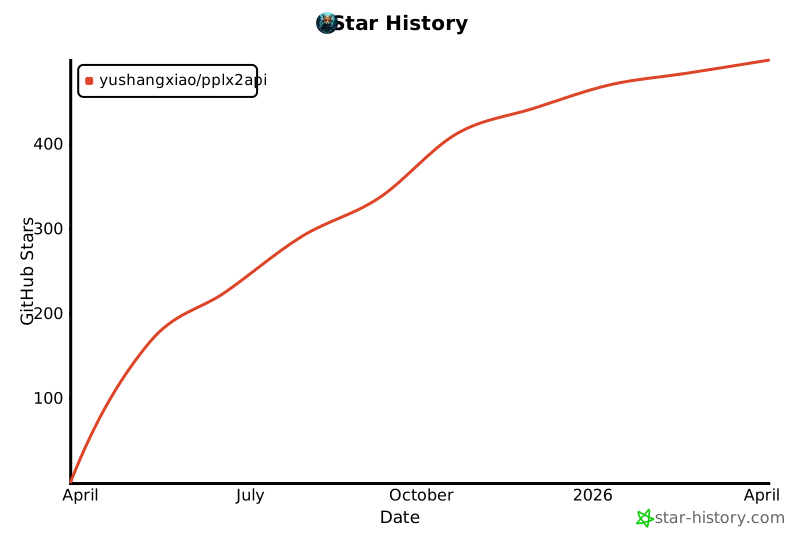
| ## ⭐ Star History | |
| [](https://star-history.com/#yushangxiao/pplx2api&Date) | |
| --- | |
| 由[yushangxiao](https://github.com/yushangxiao)用❤️制作 | |
| </details | |