

| <div align="center"> | |
| <a href="#gh-light-mode-only"> | |
| <img | |
| src="https://image-url-2-feature-1251524319.cos.ap-shanghai.myqcloud.com/openstoryline/web/static/brand_white.png" | |
| alt="openstoryline" | |
| width="70%" | |
| /> | |
| </a> | |
| <a href="#gh-dark-mode-only"> | |
| <img | |
| src="https://image-url-2-feature-1251524319.cos.ap-shanghai.myqcloud.com/openstoryline/web/static/brand_black.png" | |
| alt="openstoryline" | |
| width="70%" | |
| /> | |
| </a> | |
| <p> | |
| <a href="./README_zh.md">🇨🇳 简体中文</a> | | |
| <a href="./README.md">🌏 English</a> | |
| </p> | |
| <p> | |
| <a href="https://huggingface.co/FireRedTeam" target="_blank"> | |
| <img alt="Hugging Face" src="https://img.shields.io/badge/%F0%9F%A4%97%20Hugging%20Face-FireRedTeam-ffc107?color=ffc107&logoColor=white" style="display: inline-block;"/> | |
| </a> | |
| <img src="https://img.shields.io/badge/python-≥3.11-blue" alt="Python"> | |
| <img src="https://img.shields.io/badge/license-Apache%202.0-blue" alt="License"> | |
| <a href="https://image-url-2-feature-1251524319.cos.ap-shanghai.myqcloud.com/openstoryline/docs/media/others/group.jpg"><img src="https://img.shields.io/badge/Xiaohongshu-Group-E9DBFC?style=flat&logo=xiaohongshu&logoColor=white" alt="xiaohongshu"></a> | |
| </p> | |
| </div> | |
| <div align="center"> | |
| [🤗 HuggingFace Demo](https://fireredteam-firered-openstoryline.hf.space/) • [🌐 Homepage](https://fireredteam.github.io/demos/firered_openstoryline/) | |
| </div> | |
| <div align="center"> | |
| <video src="https://github.com/user-attachments/assets/9116767e-bcd9-417a-93d8-2db4d3d5df8e" width="70%" poster=""> </video> | |
| </div> | |
| **FireRed-OpenStoryline** 将复杂的视频创作转化为自然直观的对话体验。兼顾易用性和企业级可靠性,让视频创作对初学者和创意爱好者都变得简单友好。 | |
| > FireRed,字面意思红色的火苗,取自“星星之火,可以燎原”。我们将这团火苗取名为 FireRed,就是希望将我们在真实场景中打磨出的 SOTA 能力,像火种一样撒向旷野,点燃全球开发者的想象力,共同改变这个 AI 的世界。 | |
| ## ✨ 核心特性 | |
| - 🌐 **智能素材搜索与整理**: 自动在线搜索并下载符合你需求的图片和视频片段。基于用户主题素材进行片段拆分与内容理解 | |
| - ✍️ **智能文案生成**: 结合用户主题、画面理解与情绪识别,自动构建故事线及契合的旁白。内置少样本(Few-shot)仿写能力,支持通过输入参考文本(如种草测评、日常碎碎念等)定义文案风格,实现语感、节奏与句式的精准复刻。 | |
| - 🎵 **智能推荐音乐、配音与字体**:支持导入私有歌单,根据视频内容和情绪自动推荐背景音乐并智能卡点。只需描述"克制一点","偏情绪化","像纪录片旁白"等风格,系统即可匹配合适的配音与字体,保证整体风格协调统一。 | |
| - 💬 **对话式精修**:支持快速删减、替换或重组片段;修改任意字幕文案;调整文字颜色、字体、描边、位置等视觉元素——所有操作均通过自然语言完成,即改即得。 | |
| - ⚡ **剪辑技能沉淀**: 可一键保存为专属剪辑Skill,记录完整的剪辑逻辑。下次只需更换素材并选择对应Skill,即可快速复刻同款风格,实现高效批量生产。 | |
| ## 🏗️ 架构 | |
| <p align="center"> | |
| <img src="https://raw.githubusercontent.com/FireRedTeam/fireredteam.github.io/main/demos/firered_openstoryline/pics/structure.jpg" alt="openstoryline 架构" width="800"> | |
| </p> | |
| ## ✨ 演示案例 | |
| <table align="center"> | |
| <tr> | |
| <td align="center"><b>种草视频</b></td> | |
| <td align="center"><b>幽默有趣</b></td> | |
| <td align="center"><b>好物分享</b></td> | |
| <td align="center"><b>文艺风格</b></td> | |
| </tr> | |
| <tr> | |
| <td align="center"><video src="https://github.com/user-attachments/assets/28043813-1fda-4077-80d4-c6f540d7c7cb" controls width="220"></video></td> | |
| <td align="center"><video src="https://github.com/user-attachments/assets/a1e33da2-a799-4398-a1bb-b25bb5143d7c" controls width="220"></video></td> | |
| <td align="center"><video src="https://github.com/user-attachments/assets/444fd0fb-8824-4c25-b449-9309b0fcfd85" controls width="220"></video></td> | |
| <td align="center"><video src="https://github.com/user-attachments/assets/2e69fa0d-b693-4d4f-b4d2-45146254f9e8" controls width="220"></video></td> | |
| </tr> | |
| </tr> | |
| <tr> | |
| <td align="center"><b>开箱视频</b></td> | |
| <td align="center"><b>宠物说话</b></td> | |
| <td align="center"><b>旅行Vlog</b></td> | |
| <td align="center"><b>年终总结</b></td> | |
| </tr> | |
| <tr> | |
| <td align="center"><video src="https://github.com/user-attachments/assets/ff1d669b-1d27-4cf8-b0be-1b141c717466" controls width="220"></video></td> | |
| <td align="center"><video src="https://github.com/user-attachments/assets/063608bb-7fbd-4841-a08f-032ae459499f" controls width="220"></video></td> | |
| <td align="center"><video src="https://github.com/user-attachments/assets/bc441dfa-e995-4575-8401-ecefa269e57b" controls width="220"></video></td> | |
| <td align="center"><video src="https://github.com/user-attachments/assets/533ef5c3-bb76-4416-bff7-825e88b00b7d" controls width="220"></video></td> | |
| </tr> | |
| </tr> | |
| </table> | |
| > <sub> | |
| > 🎨 <b>效果说明:</b>受限于开源素材的版权协议,第一行默认演示中的元素(字体/音乐)仅为基础效果。<b>强烈建议</b>接入<a href="https://github.com/FireRedTeam/FireRed-OpenStoryline/blob/main/docs/source/zh/guide.md#2-%E9%AB%98%E7%BA%A7%E4%BD%BF%E7%94%A8%E6%95%99%E7%A8%8B">自建元素库教程</a>,解锁商用级字体、音乐、特效等,可实现显著优于默认效果的视频质量。<br> | |
| > ⚠️ <b>画质注:</b>受限于README展示空间,演示视频经过极限压缩。实际运行默认保持原分辨率输出,支持自定义尺寸。<br> | |
| > Demo中:<b>第一行</b>为默认开源素材效果(受限模式),<b>第二行</b>为小红书App「AI剪辑」元素库效果。👉 <a href="https://image-url-2-feature-1251524319.cos.ap-shanghai.myqcloud.com/openstoryline/docs/media/others/ai_cut_guide.png">点击查看体验教程</a><br> | |
| > ⚖️ <b>免责声明:</b>演示中包含的用户自摄素材及品牌标识仅作技术能力展示,版权归原作者所有,严禁二次分发。如有侵权请联系删除。 | |
| > </sub> | |
| ## 📦 安装 | |
| ### 1. 克隆仓库 | |
| ```bash | |
| # 如果没有安装git,参考官方网站进行安装:https://git-scm.com/install/ | |
| # 或手动打包下载,并解压 | |
| git clone https://github.com/FireRedTeam/FireRed-OpenStoryline.git | |
| cd FireRed-OpenStoryline | |
| ``` | |
| ### 2. 创建虚拟环境 | |
| 按照官方指南安装 Conda(推荐Miniforge,安装过程中建议勾选上自动配置环境变量):https://docs.conda.io/projects/conda/en/latest/user-guide/install/index.html | |
| ``` | |
| # 要求python>=3.11 | |
| conda create -n storyline python=3.11 | |
| conda activate storyline | |
| ``` | |
| ### 3. 资源下载与依赖安装 | |
| #### 3.1 一键安装(仅支持Linux和MacOS) | |
| ``` | |
| sh build_env.sh | |
| ``` | |
| #### 3.2 手动安装 | |
| ##### A. MacOS 或 Linux | |
| - Step 1: 安装 wget(如果尚未安装) | |
| ``` | |
| # MacOS: 如果你还没有安装 Homebrew,请先安装:https://brew.sh/ | |
| brew install wget | |
| # Ubuntu/Debian | |
| sudo apt-get install wget | |
| # CentOS | |
| sudo yum install wget | |
| ``` | |
| - Step 2: 下载资源 | |
| ```bash | |
| sh download.sh | |
| ``` | |
| - Step 3: 安装依赖 | |
| ```bash | |
| pip install -r requirements.txt | |
| ``` | |
| ###### B. Windows | |
| - Step 1: 准备目录:在项目根目录下新建目录 `.storyline`。 | |
| - Step 2: 下载并解压: | |
| * [下载模型 (models.zip)](https://image-url-2-feature-1251524319.cos.ap-shanghai.myqcloud.com/openstoryline/models.zip) -> 解压至 `.storyline` 目录。 | |
| * [下载资源 (resource.zip)](https://image-url-2-feature-1251524319.cos.ap-shanghai.myqcloud.com/openstoryline/resource.zip) -> 解压至 `resource` 目录。 | |
| - Step 3: **安装依赖**: | |
| ```bash | |
| pip install -r requirements.txt | |
| ``` | |
| ## 🚀 快速开始 | |
| 注意:在开始之前,您需要先在 config.toml 中配置 API-Key。详细信息请参阅文档 [API-Key 配置](docs/source/zh/api-key.md) | |
| ### 1. 启动 MCP 服务器 | |
| #### MacOS or Linux | |
| ```bash | |
| PYTHONPATH=src python -m open_storyline.mcp.server | |
| ``` | |
| #### Windows | |
| ``` | |
| $env:PYTHONPATH="src"; python -m open_storyline.mcp.server | |
| ``` | |
| ### 2. 启动对话界面 | |
| - 方式 1:命令行界面 | |
| ```bash | |
| python cli.py | |
| ``` | |
| - 方式 2:Web 界面 | |
| ```bash | |
| uvicorn agent_fastapi:app --host 127.0.0.1 --port 7860 | |
| ``` | |
| ## 🐳 Docker 部署 | |
| 如果未安装 Docker,请先安装 https://www.docker.com/products/docker-desktop/ | |
| ### 拉取镜像 | |
| ``` | |
| docker pull openstoryline/openstoryline:v1.0.0 | |
| ``` | |
| ### 启动镜像 | |
| ``` | |
| docker run \ | |
| -v $(pwd)/config.toml:/app/config.toml \ | |
| -v $(pwd)/outputs:/app/outputs \ | |
| -p 7860:7860 \ | |
| openstoryline/openstoryline:v1.0.0 | |
| ``` | |
| 启动后访问Web界面 http://127.0.0.1:7860 | |
| ## 📁 项目结构 | |
| ``` | |
| FireRed-OpenStoryline/ | |
| ├── 🎯 src/open_storyline/ 核心应用 | |
| │ ├── mcp/ 🔌 模型上下文协议 | |
| │ ├── nodes/ 🎬 视频处理节点 | |
| │ ├── skills/ 🛠️ Agent 技能库 | |
| │ ├── storage/ 💾 Agent 记忆系统 | |
| │ ├── utils/ 🧰 工具函数 | |
| │ ├── agent.py 🤖 Agent 构建 | |
| │ └── config.py ⚙️ 配置管理 | |
| ├── 📚 docs/ 文档 | |
| ├── 🐳 Dockerfile Docker 配置 | |
| ├── 💬 prompts/ LLM 提示词模板 | |
| ├── 🎨 resource/ 静态资源 | |
| │ ├── bgms/ 背景音乐库 | |
| │ ├── fonts/ 字体文件 | |
| │ ├── script_templates/ 视频脚本模板 | |
| │ └── unicode_emojis.json Emoji 列表 | |
| ├── 🔧 scripts/ 工具脚本 | |
| ├── 🌐 web/ Web 界面 | |
| ├── 🚀 agent_fastapi.py FastAPI 服务器 | |
| ├── 🖥️ cli.py 命令行界面 | |
| ├── ⚙️ config.toml 主配置文件 | |
| ├── 🚀 build_env.sh 环境构建脚本 | |
| ├── 📥 download.sh 资源下载脚本 | |
| ├── 📦 requirements.txt 运行时依赖 | |
| └── ▶️ run.sh 启动脚本 | |
| ``` | |
| ## 📚 文档 | |
| ### 📖 教程索引 | |
| - [API申请与配置](docs/source/zh/api-key.md) - 如何申请和配置 API 密钥 | |
| - [使用教程](docs/source/zh/guide.md) - 常见用例和基本操作 | |
| - [常见问题](docs/source/zh/faq.md) - 常见问题解答 | |
| ## TODO | |
| - [ ] 添加口播类型视频剪辑功能 | |
| - [ ] 添加音色克隆功能 | |
| - [ ] 添加更多的转场/滤镜/特效功能 | |
| - [ ] 添加图像/视频生成和编辑能力 | |
| - [ ] 支持GPU渲染和高光裁切 | |
| ## 致谢 | |
| 本项目基于以下优秀的开源项目构建: | |
| ### 核心依赖 | |
| - [MoviePy](https://github.com/Zulko/moviepy) - 视频编辑库 | |
| - [FFmpeg](https://ffmpeg.org/) - 多媒体框架 | |
| - [LangChain](https://www.langchain.com/) - 提供预构建Agent的框架 | |
| ## 📄 License | |
| This project is licensed under the Apache License 2.0 - see the [LICENSE](LICENSE) file for details. | |
| ## ⭐ Star History | |
| [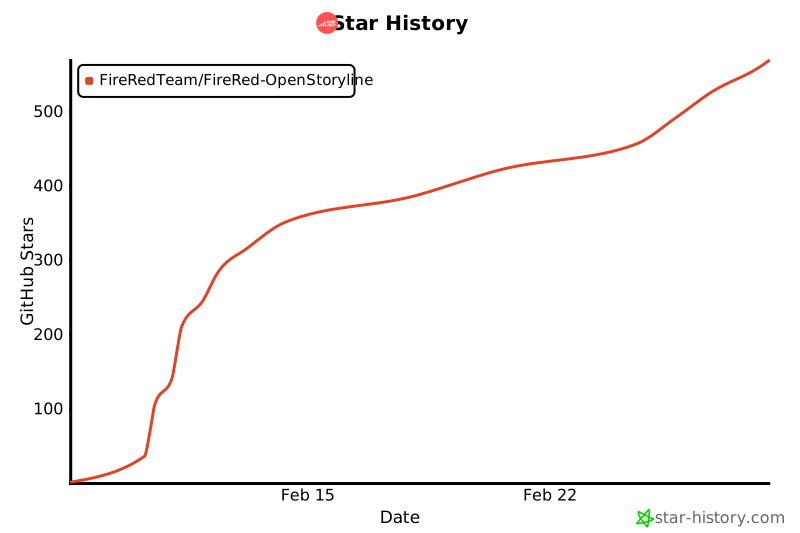](https://www.star-history.com/#FireRedTeam/FireRed-OpenStoryline&type=date&legend=top-left) | |