| <p align="center"> |
| <img src="../docs/logo.svg" width="120" alt="Gemini Business2API logo" /> |
| </p> |
| <h1 align="center">Gemini Business2API</h1> |
| <p align="center">Empowering AI with seamless integration</p> |
| <p align="center"> |
| <a href="../README.md">简体中文</a> | <strong>English</strong> |
| </p> |
| <p align="center"><img src="https://img.shields.io/badge/License-MIT-yellow.svg" /> <img src="https://img.shields.io/badge/Python-3.11+-3776AB?logo=python&logoColor=white" /> <img src="https://img.shields.io/badge/FastAPI-0.110-009688?logo=fastapi&logoColor=white" /> <img src="https://img.shields.io/badge/Vue-3-4FC08D?logo=vue.js&logoColor=white" /> <img src="https://img.shields.io/badge/Vite-7-646CFF?logo=vite&logoColor=white" /> <img src="https://img.shields.io/badge/Docker-ready-2496ED?logo=docker&logoColor=white" /></p> |
|
|
| <p align="center"> |
| <a href="https://huggingface.co/spaces/xiaoyukkkk/gemini-business2api?duplicate=true"> |
| <img src="https://huggingface.co/datasets/huggingface/badges/resolve/main/deploy-to-spaces-md.svg" /> |
| </a> |
| </p> |
| |
| <p align="center"><em>💡 Tip: Remote environments (Hugging Face/Linux) and local environments can share the same database for automatic account data synchronization</em></p> |
|
|
| <p align="center">Convert Gemini Business to OpenAI-compatible API with multi-account load balancing, image generation, multimodal capabilities, and built-in admin panel.</p> |
|
|
| --- |
|
|
| ## 📜 License & Disclaimer |
|
|
| **License**: MIT License - See [LICENSE](../LICENSE) for details |
|
|
| ### ⚠️ Prohibited Use & Anti-Abuse Policy |
|
|
| **This tool is strictly prohibited for:** |
| - Commercial use or profit-making activities |
| - Batch operations or automated abuse of any scale |
| - Market disruption or malicious competition |
| - Violations of Google's Terms of Service |
| - Violations of Microsoft's Terms of Service |
|
|
| **Consequences of Abuse**: Violations may result in permanent account suspension, legal liability, and all consequences are the sole responsibility of the user. |
|
|
| **Legitimate Use Only**: This project is intended solely for personal learning, technical research, and non-commercial educational purposes. |
|
|
| 📖 **Full Disclaimer**: [DISCLAIMER_EN.md](DISCLAIMER_EN.md) |
|
|
| --- |
|
|
| ## ✨ Features |
|
|
| - ✅ Full OpenAI API compatibility - Seamless integration with existing tools |
| - ✅ Multi-account load balancing - Round-robin with automatic failover |
| - ✅ Automated account management - Auto registration and login with DuckMail and Microsoft email integration, supports headless browser mode |
| - ✅ Streaming output - Real-time responses |
| - ✅ Multimodal input - 100+ file types (images, PDF, Office docs, audio, video, code, etc.) |
| - ✅ Image generation & image-to-image - Configurable models, Base64 or URL output |
| - ✅ Smart file handling - Auto file type detection, supports URL and Base64 |
| - ✅ Logging & monitoring - Real-time status and statistics |
| - ✅ Proxy support - Configure in the admin settings |
| - ✅ Built-in admin panel - Online configuration and account management |
| - ✅ Optional PostgreSQL backend — persists accounts/settings/stats [thanks PR](https://github.com/Dreamy-rain/gemini-business2api/pull/4) |
|
|
| ## 🤖 Model Capabilities |
|
|
| | Model ID | Vision | Native Web | File Multimodal | Image Gen | |
| | ------------------------ | ------ | ---------- | --------------- | --------- | |
| | `gemini-auto` | ✅ | ✅ | ✅ | Optional | |
| | `gemini-2.5-flash` | ✅ | ✅ | ✅ | Optional | |
| | `gemini-2.5-pro` | ✅ | ✅ | ✅ | Optional | |
| | `gemini-3-flash-preview` | ✅ | ✅ | ✅ | Optional | |
| | `gemini-3-pro-preview` | ✅ | ✅ | ✅ | Optional | |
|
|
| ## 🚀 Quick Start |
|
|
| ### Method 1: Using Setup Script (Recommended) |
|
|
| **Linux/macOS:** |
| ```bash |
| git clone https://github.com/Dreamy-rain/gemini-business2api.git |
| cd gemini-business2api |
| bash setup.sh |
| |
| cp .env.example .env |
| # Edit .env to set ADMIN_KEY |
| |
| source .venv/bin/activate # Linux/macOS |
| # .venv\Scripts\activate.bat # Windows |
| |
| python main.py |
| |
| # Run with pm2 in background |
| # Make sure you're in the project directory |
| pm2 start main.py --name gemini-api --interpreter ./.venv/bin/python3 |
| ``` |
|
|
| **Windows:** |
| ```cmd |
| git clone https://github.com/Dreamy-rain/gemini-business2api.git |
| cd gemini-business2api |
| setup.bat |
| |
| copy .env.example .env |
| # Edit .env to set ADMIN_KEY |
| |
| source .venv/bin/activate # Linux/macOS |
| # .venv\Scripts\activate.bat # Windows |
| |
| python main.py |
| |
| # Run with pm2 in background |
| # Make sure you're in the project directory |
| pm2 start main.py --name gemini-api --interpreter ./.venv/bin/python3 |
| ``` |
|
|
| **Script Features:** |
| - ✅ Automatically syncs latest code |
| - ✅ Updates frontend to latest versions |
| - ✅ Creates/updates Python virtual environment |
| - ✅ Installs/updates dependencies |
| - ✅ Automatically creates `.env` config file (if not exists) |
|
|
| **First Installation:** After completion, edit `.env` to set `ADMIN_KEY`, then run `python main.py` |
|
|
| **Update Project:** Simply run the same command, the script will automatically update all components (code, dependencies, frontend) |
|
|
| ### Method 2: Manual Deployment |
|
|
| ```bash |
| git clone https://github.com/Dreamy-rain/gemini-business2api.git |
| cd gemini-business2api |
| |
| # Build frontend |
| cd frontend |
| npm install |
| npm run build |
| cd .. |
| |
| # Create virtual environment (recommended) |
| python3 -m venv .venv |
| source .venv/bin/activate # Linux/macOS |
| # .venv\Scripts\activate.bat # Windows |
| |
| # Install Python dependencies |
| pip install -r requirements.txt |
| cp .env.example .env |
| # win copy .env.example .env |
| # Edit .env to set ADMIN_KEY |
| python main.py |
| |
| # Run with pm2 in background |
| # Make sure you're in the project directory |
| pm2 start main.py --name gemini-api --interpreter ./.venv/bin/python3 |
| ``` |
|
|
| ### Method 3: Docker Compose (Recommended for Production) |
|
|
| **Supports ARM64 and AMD64 architectures** |
|
|
| ```bash |
| # 1. Clone the repository |
| git clone https://github.com/Dreamy-rain/gemini-business2api.git |
| cd gemini-business2api |
| |
| # 2. Configure environment variables |
| cp .env.example .env |
| # Edit .env to set ADMIN_KEY |
| |
| # 3. Start the service |
| docker-compose up -d |
| |
| # 4. View logs |
| docker-compose logs -f |
| |
| # 5. Update to the latest version |
| docker-compose pull && docker-compose up -d |
| ``` |
|
|
| Thanks to [PR #9](https://github.com/Dreamy-rain/gemini-business2api/pull/9) for optimizing the Dockerfile build |
|
|
|
|
| ### Optional: Database Persistence (Local / HF Spaces) |
|
|
| - Recommended on HF Spaces (free tier) to avoid data loss after restart |
| - Set `DATABASE_URL=postgresql://user:password@host/dbname?sslmode=require` |
| - Local: put it in `.env` |
| - HF Spaces: Settings -> Variables/Secrets |
| - Accounts/settings/stats are stored in the database |
| - Keep the connection string secret (it includes credentials) |
|
|
| ``` |
| # Get DATABASE_URL from Neon (recommended) |
| 1. Open https://neon.tech and sign in |
| 2. Create project -> choose a region |
| 3. Open the project page, copy the Connection string |
| 4. Example: |
| postgresql://user:password@ep-xxx.neon.tech/dbname?sslmode=require |
| ``` |
|
|
| ### Access |
|
|
| - Admin Panel: `http://localhost:7860/` (Login with `ADMIN_KEY`) |
| - OpenAI-compatible API: `http://localhost:7860/v1/chat/completions` |
|
|
| ### Configuration Tips |
|
|
| - Account config prioritizes `ACCOUNTS_CONFIG` env var, or can be entered in admin panel and saved to `data/accounts.json`. |
| - For authentication, configure `API_KEY` in the admin settings to protect `/v1/chat/completions`. |
|
|
| ### Documentation |
|
|
| - Supported file types: [SUPPORTED_FILE_TYPES.md](SUPPORTED_FILE_TYPES.md) |
|
|
| ## 📸 Screenshots |
|
|
| ### Admin System |
|
|
| <table> |
| <tr> |
| <td><img src="img/1.png" alt="Admin System 1" /></td> |
| <td><img src="img/2.png" alt="Admin System 2" /></td> |
| </tr> |
| <tr> |
| <td><img src="img/3.png" alt="Admin System 3" /></td> |
| <td><img src="img/4.png" alt="Admin System 4" /></td> |
| </tr> |
| <tr> |
| <td><img src="img/5.png" alt="Admin System 5" /></td> |
| <td><img src="img/6.png" alt="Admin System 6" /></td> |
| </tr> |
| </table> |
| |
| ### Image Effects |
|
|
| <table> |
| <tr> |
| <td><img src="img/img_1.png" alt="Image Effects 1" /></td> |
| <td><img src="img/img_2.png" alt="Image Effects 2" /></td> |
| </tr> |
| <tr> |
| <td><img src="img/img_3.png" alt="Image Effects 3" /></td> |
| <td><img src="img/img_4.png" alt="Image Effects 4" /></td> |
| </tr> |
| </table> |
| |
| ## ⭐ Star History |
|
|
| [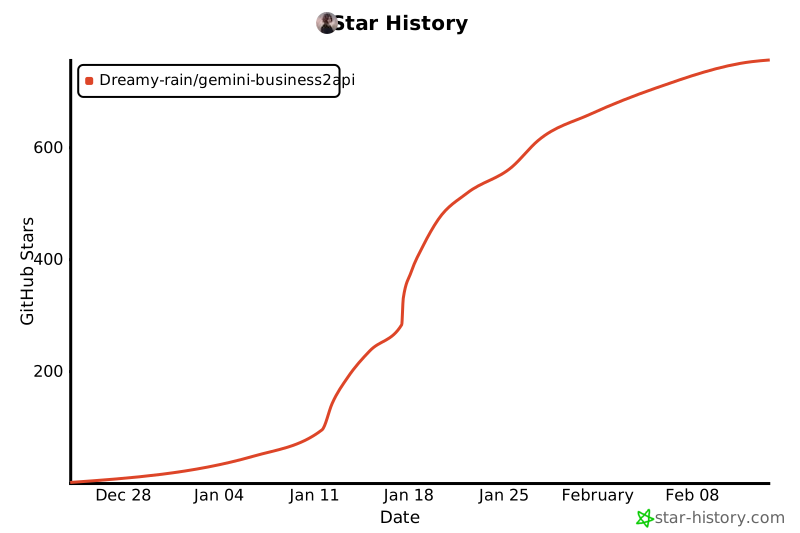](https://www.star-history.com/#Dreamy-rain/gemini-business2api&type=date&legend=top-left) |
|
|
| **If this project helps you, please give it a ⭐ Star!** |
|
|
|
|
|
|
|
|


