
Spaces:
Sleeping


A newer version of the Gradio SDK is available: 6.19.0
title: Rosetta Decoder
emoji: 👁
colorFrom: gray
colorTo: yellow
sdk: gradio
sdk_version: 6.0.1
app_file: app.py
pinned: false
short_description: Detect & Translate hieroglyphics
tags:
  - building-mcp-track-creative
  - building-mcp-track-consumer
  - mcp-in-action-track-creative
  - mcp-in-action-track-consumer
  - mcp-server
𓀀 Egyptian Hieroglyph Detector (MCP Server)
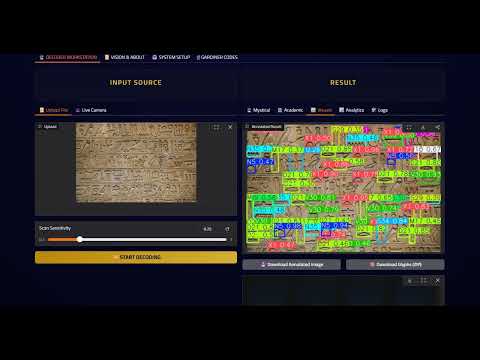
This project bridges the gap between ancient history and modern AI Agents. It provides an MCP Server that allows Ai Agents to "see" and identify Hieroglyphs in any image.
👥 Team
- youkii-xr – XR Developer, did the MCP and Gradio part
- MariamEssam204 – AI Engineer, did the AI model part

🎥 Demo Video
| Gradio App V2 | Mobile Camera Test | MCP Server |
|---|---|---|
 |
 |
 |
🔗 Social Media Post:
[Gradio App - V2]
[Mobile camera test]
[Gradio App - V1]
[MCP Server - V1]
🗂️ Capabilities & Tools
Hieroglyphs Detection:
- trained on 400+ different glyphs
- able to detect with high confidence
Translation
- Mystical prophecy : translates for tourists and non-academics as a story
- Academic Translation : a linguistics breakdown of symbols and their meaning and how they fit together
Analytics
- Spatial Heatmaps : visualizes where glyphs are clustered on the wall / papyrus
- Confidence Charts : Shows how sure the AI is about every symbol
- Frequency Analysis : Counts the occurrence of distinguished symbols
Digital Encyclopedia
- Includes a searchable database of supported Gardiner Codes with descriptions and transliteration
Downloadable Results
- Download the detection result with bounding boxes surrounding each glyph on the wall / papyrus
- Download glyphs gallery as a zip containing all glyphs detected individually cropped
🔌Available MCP Tools
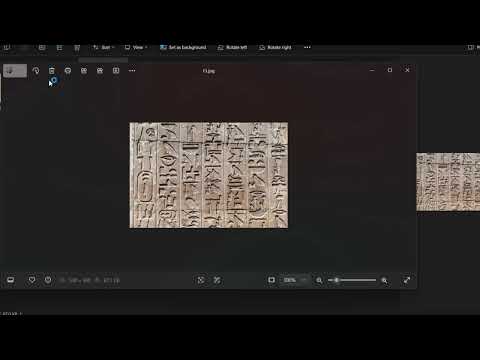
When connected to Claude Desktop, this server exposes 4 specific tools that allow the Agent to perform the full archaeological pipeline:
detect glyphs
- Description: Scans an input image to find hieroglyphs.
- Returns: A path to the annotated image (boxes drawn) and a JSON object containing the list of found codes and confidence scores.
translate story
- Description: Takes a list of Gardiner codes or keywords and interprets them.
- Returns: Two distinct texts: a "Mystical Story" (creative interpretation) and an "Academic Translation" (scientific interpretation).
get stats
- Description: Takes the detection data and generates visual reports.
- Returns: A path to an image file containing charts for Symbol Frequency, Confidence Levels, and Spatial Heatmaps.
list codes
- Description: Provides access to the full internal database of Egyptian hieroglyphs.
- Returns: The complete dictionary of supported Gardiner codes, descriptions, and categories.
🚀 How to Use (Claude Desktop)
You can connect this tool to your own Claude Desktop right now!
Prerequisites
- Claude Desktop installed.
- Node.js & Python installed.
- Gradio MCP: Run
pip install "gradio[mcp]"
Configuration
Add this to your %APPDATA%\Claude\claude_desktop_config.json (Windows) or ~/Library/Application Support/Claude/claude_desktop_config.json (Mac):
{
  "mcpServers": {
    "gradio": {
      "command": "npx",
      "args": [
        "mcp-remote",
        "https://mcp-1st-birthday-rosetta-decoder.hf.space/gradio_api/mcp/",
        "--transport",
        "streamable-http"
      ]
    },
    "upload_helper": {
      "command": "C:\\Python313\\python.exe",
      "args": [
        "-m",
        "gradio",
        "upload-mcp",
        "https://mcp-1st-birthday-rosetta-decoder.hf.space/",
        "C:\\Claude_Work"
      ]
    }
  }
}
(Note: Change C:\\Claude_Work to the actual folder where you keep your images)
🧩 Technical Architecture
- Framework: Gradio 6.0.0 (with native MCP support)
- Model: Ultralytics YOLOv8 (Private Weights)
- Storage: Hugging Face Hub
- Protocol: Model Context Protocol (MCP) via SSE (Server-Sent Events)
Built with ❤️ for the Hugging Face MCP Hackathon 2025