
Spaces:
Build error

Build error

| <a id="readme-top"></a> | |
| <!-- [![Contributors][contributors-shield]][contributors-url] --> | |
| [![Forks][forks-shield]][forks-url] | |
| [![Stargazers][stars-shield]][stars-url] | |
| [![Issues][issues-shield]][issues-url] | |
| [![MIT License][license-shield]][license-url] | |
| <!-- [![LinkedIn][linkedin-shield]][linkedin-url] --> | |
| <!-- PROJECT LOGO --> | |
| <br /> | |
| <div align="center"> | |
| <a href="https://github.com/lfnovo/open-notebook"> | |
| <img src="docs/assets/hero.svg" alt="Logo"> | |
| </a> | |
| <h3 align="center">Open Notebook</h3> | |
| <p align="center"> | |
| An open source, privacy-focused alternative to Google's Notebook LM! | |
| <br /><strong>Join our <a href="https://discord.gg/37XJPXfz2w">Discord server</a> for help, to share workflow ideas, and suggest features!</strong> | |
| <br /> | |
| <a href="https://www.open-notebook.ai"><strong>Checkout our website »</strong></a> | |
| <br /> | |
| <br /> | |
| <a href="docs/getting-started/index.md">📚 Get Started</a> | |
| · | |
| <a href="docs/user-guide/index.md">📖 User Guide</a> | |
| · | |
| <a href="docs/features/index.md">✨ Features</a> | |
| · | |
| <a href="docs/deployment/index.md">🚀 Deploy</a> | |
| </p> | |
| </div> | |
| <div align="center"> | |
| <!-- Keep these links. Translations will automatically update with the README. --> | |
| <a href="https://zdoc.app/de/lfnovo/open-notebook">Deutsch</a> | | |
| <a href="https://zdoc.app/es/lfnovo/open-notebook">Español</a> | | |
| <a href="https://zdoc.app/fr/lfnovo/open-notebook">français</a> | | |
| <a href="https://zdoc.app/ja/lfnovo/open-notebook">日本語</a> | | |
| <a href="https://zdoc.app/ko/lfnovo/open-notebook">한국어</a> | | |
| <a href="https://zdoc.app/pt/lfnovo/open-notebook">Português</a> | | |
| <a href="https://zdoc.app/ru/lfnovo/open-notebook">Русский</a> | | |
| <a href="https://zdoc.app/zh/lfnovo/open-notebook">中文</a> | |
| </div> | |
| ## A private, multi-model, 100% local, full-featured alternative to Notebook LM | |
|  | |
| In a world dominated by Artificial Intelligence, having the ability to think 🧠 and acquire new knowledge 💡, is a skill that should not be a privilege for a few, nor restricted to a single provider. | |
| **Open Notebook empowers you to:** | |
| - 🔒 **Control your data** - Keep your research private and secure | |
| - 🤖 **Choose your AI models** - Support for 16+ providers including OpenAI, Anthropic, Ollama, LM Studio, and more | |
| - 📚 **Organize multi-modal content** - PDFs, videos, audio, web pages, and more | |
| - 🎙️ **Generate professional podcasts** - Advanced multi-speaker podcast generation | |
| - 🔍 **Search intelligently** - Full-text and vector search across all your content | |
| - 💬 **Chat with context** - AI conversations powered by your research | |
| Learn more about our project at [https://www.open-notebook.ai](https://www.open-notebook.ai) | |
| --- | |
| ## ⚠️ IMPORTANT: v1.0 Breaking Changes | |
| **If you're upgrading from a previous version**, please note: | |
| - 🏷️ **Docker tags have changed**: The `latest` tag is now **frozen** at the last Streamlit version | |
| - 🆕 **Use `v1-latest` tag** for the new React/Next.js version (recommended) | |
| - 🔌 **Port 5055 required**: You must expose port 5055 for the API to work | |
| - 📖 **Read the migration guide**: See [MIGRATION.md](MIGRATION.md) for detailed upgrade instructions | |
| **New users**: You can ignore this notice and proceed with the Quick Start below using the `v1-latest-single` tag. | |
| --- | |
| ## 🆚 Open Notebook vs Google Notebook LM | |
| | Feature | Open Notebook | Google Notebook LM | Advantage | | |
| |---------|---------------|--------------------|-----------| | |
| | **Privacy & Control** | Self-hosted, your data | Google cloud only | Complete data sovereignty | | |
| | **AI Provider Choice** | 16+ providers (OpenAI, Anthropic, Ollama, LM Studio, etc.) | Google models only | Flexibility and cost optimization | | |
| | **Podcast Speakers** | 1-4 speakers with custom profiles | 2 speakers only | Extreme flexibility | | |
| | **Context Control** | 3 granular levels | All-or-nothing | Privacy and performance tuning | | |
| | **Content Transformations** | Custom and built-in | Limited options | Unlimited processing power | | |
| | **API Access** | Full REST API | No API | Complete automation | | |
| | **Deployment** | Docker, cloud, or local | Google hosted only | Deploy anywhere | | |
| | **Citations** | Comprehensive with sources | Basic references | Research integrity | | |
| | **Customization** | Open source, fully customizable | Closed system | Unlimited extensibility | | |
| | **Cost** | Pay only for AI usage | Monthly subscription + usage | Transparent and controllable | | |
| **Why Choose Open Notebook?** | |
| - 🔒 **Privacy First**: Your sensitive research stays completely private | |
| - 💰 **Cost Control**: Choose cheaper AI providers or run locally with Ollama | |
| - 🎙️ **Better Podcasts**: Full script control and multi-speaker flexibility vs limited 2-speaker deep-dive format | |
| - 🔧 **Unlimited Customization**: Modify, extend, and integrate as needed | |
| - 🌐 **No Vendor Lock-in**: Switch providers, deploy anywhere, own your data | |
| ### Built With | |
| [![Python][Python]][Python-url] [![Next.js][Next.js]][Next-url] [![React][React]][React-url] [![SurrealDB][SurrealDB]][SurrealDB-url] [![LangChain][LangChain]][LangChain-url] | |
| ## 🚀 Quick Start | |
| **Docker Images Available:** | |
| - **Docker Hub**: `lfnovo/open_notebook:v1-latest-single` | |
| - **GitHub Container Registry**: `ghcr.io/lfnovo/open-notebook:v1-latest-single` | |
| Both registries contain identical images - choose whichever you prefer! | |
| ### Choose Your Setup: | |
| <table> | |
| <tr> | |
| <td width="50%"> | |
| #### 🏠 **Local Machine Setup** | |
| Perfect if Docker runs on the **same computer** where you'll access Open Notebook. | |
| ```bash | |
| mkdir open-notebook && cd open-notebook | |
| docker run -d \ | |
| --name open-notebook \ | |
| -p 8502:8502 -p 5055:5055 \ | |
| -v ./notebook_data:/app/data \ | |
| -v ./surreal_data:/mydata \ | |
| -e OPENAI_API_KEY=your_key_here \ | |
| -e SURREAL_URL="ws://localhost:8000/rpc" \ | |
| -e SURREAL_USER="root" \ | |
| -e SURREAL_PASSWORD="root" \ | |
| -e SURREAL_NAMESPACE="open_notebook" \ | |
| -e SURREAL_DATABASE="production" \ | |
| lfnovo/open_notebook:v1-latest-single | |
| ``` | |
| **Access at:** http://localhost:8502 | |
| </td> | |
| <td width="50%"> | |
| #### 🌐 **Remote Server Setup** | |
| Use this for servers, Raspberry Pi, NAS, Proxmox, or any remote machine. | |
| ```bash | |
| mkdir open-notebook && cd open-notebook | |
| docker run -d \ | |
| --name open-notebook \ | |
| -p 8502:8502 -p 5055:5055 \ | |
| -v ./notebook_data:/app/data \ | |
| -v ./surreal_data:/mydata \ | |
| -e OPENAI_API_KEY=your_key_here \ | |
| -e API_URL=http://YOUR_SERVER_IP:5055 \ | |
| -e SURREAL_URL="ws://localhost:8000/rpc" \ | |
| -e SURREAL_USER="root" \ | |
| -e SURREAL_PASSWORD="root" \ | |
| -e SURREAL_NAMESPACE="open_notebook" \ | |
| -e SURREAL_DATABASE="production" \ | |
| lfnovo/open_notebook:v1-latest-single | |
| ``` | |
| **Replace `YOUR_SERVER_IP`** with your server's IP (e.g., `192.168.1.100`) or domain | |
| **Access at:** http://YOUR_SERVER_IP:8502 | |
| </td> | |
| </tr> | |
| </table> | |
| > **⚠️ Critical Setup Notes:** | |
| > | |
| > **Both ports are required:** | |
| > - **Port 8502**: Web interface (what you see in your browser) | |
| > - **Port 5055**: API backend (required for the app to function) | |
| > | |
| > **API_URL must match how YOU access the server:** | |
| > - ✅ Access via `http://192.168.1.100:8502` → set `API_URL=http://192.168.1.100:5055` | |
| > - ✅ Access via `http://myserver.local:8502` → set `API_URL=http://myserver.local:5055` | |
| > - ❌ Don't use `localhost` for remote servers - it won't work from other devices! | |
| ### Using Docker Compose (Recommended for Easy Management) | |
| Create a `docker-compose.yml` file: | |
| ```yaml | |
| services: | |
| open_notebook: | |
| image: lfnovo/open_notebook:v1-latest-single | |
| # Or use: ghcr.io/lfnovo/open-notebook:v1-latest-single | |
| ports: | |
| - "8502:8502" # Web UI | |
| - "5055:5055" # API (required!) | |
| environment: | |
| - OPENAI_API_KEY=your_key_here | |
| # For remote access, uncomment and set your server IP/domain: | |
| # - API_URL=http://192.168.1.100:5055 | |
| # Database connection (required for single-container) | |
| - SURREAL_URL=ws://localhost:8000/rpc | |
| - SURREAL_USER=root | |
| - SURREAL_PASSWORD=root | |
| - SURREAL_NAMESPACE=open_notebook | |
| - SURREAL_DATABASE=production | |
| volumes: | |
| - ./notebook_data:/app/data | |
| - ./surreal_data:/mydata | |
| restart: always | |
| ``` | |
| Start with: `docker compose up -d` | |
| **What gets created:** | |
| ``` | |
| open-notebook/ | |
| ├── docker-compose.yml # Your configuration | |
| ├── notebook_data/ # Your notebooks and research content | |
| └── surreal_data/ # Database files | |
| ``` | |
| ### 🆘 Quick Troubleshooting | |
| | Problem | Solution | | |
| |---------|----------| | |
| | **"Unable to connect to server"** | Set `API_URL` environment variable to match how you access the server (see remote setup above) | | |
| | **Blank page or errors** | Ensure BOTH ports (8502 and 5055) are exposed in your docker command | | |
| | **Works on server but not from other computers** | Don't use `localhost` in `API_URL` - use your server's actual IP address | | |
| | **"404" or "config endpoint" errors** | Don't add `/api` to `API_URL` - use just `http://your-ip:5055` | | |
| | **Still having issues?** | Check our [5-minute troubleshooting guide](docs/troubleshooting/quick-fixes.md) or [join Discord](https://discord.gg/37XJPXfz2w) | | |
| ### How Open Notebook Works | |
| ``` | |
| ┌─────────────────────────────────────────────────────────┐ | |
| │ Your Browser │ | |
| │ Access: http://your-server-ip:8502 │ | |
| └────────────────┬────────────────────────────────────────┘ | |
| │ | |
| ▼ | |
| ┌───────────────┐ | |
| │ Port 8502 │ ← Next.js Frontend (what you see) | |
| │ Frontend │ Also proxies API requests internally! | |
| └───────┬───────┘ | |
| │ proxies /api/* requests ↓ | |
| ▼ | |
| ┌───────────────┐ | |
| │ Port 5055 │ ← FastAPI Backend (handles requests) | |
| │ API │ | |
| └───────┬───────┘ | |
| │ | |
| ▼ | |
| ┌───────────────┐ | |
| │ SurrealDB │ ← Database (internal, auto-configured) | |
| │ (Port 8000) │ | |
| └───────────────┘ | |
| ``` | |
| **Key Points:** | |
| - **v1.1+**: Next.js automatically proxies `/api/*` requests to the backend, simplifying reverse proxy setup | |
| - Your browser loads the frontend from port 8502 | |
| - The frontend needs to know where to find the API - when accessing remotely, set: `API_URL=http://your-server-ip:5055` | |
| - **Behind reverse proxy?** You only need to proxy to port 8502 now! See [Reverse Proxy Guide](docs/deployment/reverse-proxy.md) | |
| ## Star History | |
| [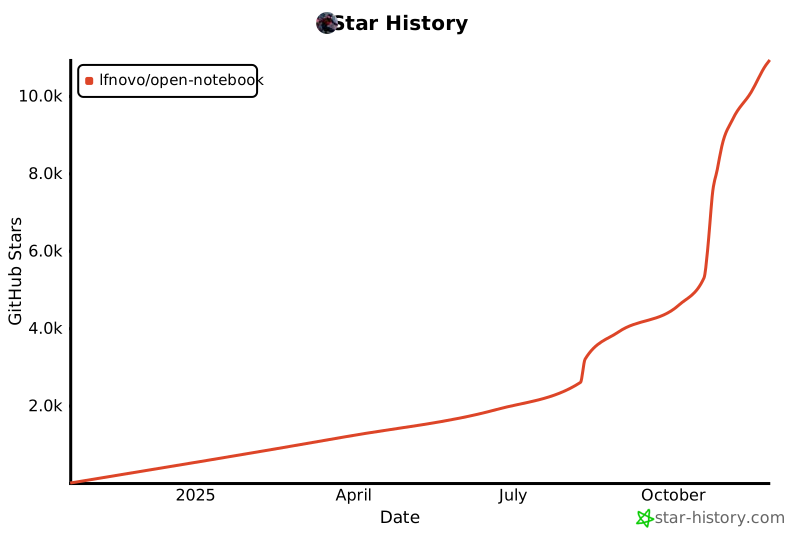](https://www.star-history.com/#lfnovo/open-notebook&type=date&legend=top-left) | |
| ### 🛠️ Full Installation | |
| For development or customization: | |
| ```bash | |
| git clone https://github.com/lfnovo/open-notebook | |
| cd open-notebook | |
| make start-all | |
| ``` | |
| ### 📖 Need Help? | |
| - **🤖 AI Installation Assistant**: We have a [CustomGPT built to help you install Open Notebook](https://chatgpt.com/g/g-68776e2765b48191bd1bae3f30212631-open-notebook-installation-assistant) - it will guide you through each step! | |
| - **New to Open Notebook?** Start with our [Getting Started Guide](docs/getting-started/index.md) | |
| - **Need installation help?** Check our [Installation Guide](docs/getting-started/installation.md) | |
| - **Want to see it in action?** Try our [Quick Start Tutorial](docs/getting-started/quick-start.md) | |
| ## Provider Support Matrix | |
| Thanks to the [Esperanto](https://github.com/lfnovo/esperanto) library, we support this providers out of the box! | |
| | Provider | LLM Support | Embedding Support | Speech-to-Text | Text-to-Speech | | |
| |--------------|-------------|------------------|----------------|----------------| | |
| | OpenAI | ✅ | ✅ | ✅ | ✅ | | |
| | Anthropic | ✅ | ❌ | ❌ | ❌ | | |
| | Groq | ✅ | ❌ | ✅ | ❌ | | |
| | Google (GenAI) | ✅ | ✅ | ❌ | ✅ | | |
| | Vertex AI | ✅ | ✅ | ❌ | ✅ | | |
| | Ollama | ✅ | ✅ | ❌ | ❌ | | |
| | Perplexity | ✅ | ❌ | ❌ | ❌ | | |
| | ElevenLabs | ❌ | ❌ | ✅ | ✅ | | |
| | Azure OpenAI | ✅ | ✅ | ❌ | ❌ | | |
| | Mistral | ✅ | ✅ | ❌ | ❌ | | |
| | DeepSeek | ✅ | ❌ | ❌ | ❌ | | |
| | Voyage | ❌ | ✅ | ❌ | ❌ | | |
| | xAI | ✅ | ❌ | ❌ | ❌ | | |
| | OpenRouter | ✅ | ❌ | ❌ | ❌ | | |
| | OpenAI Compatible* | ✅ | ❌ | ❌ | ❌ | | |
| *Supports LM Studio and any OpenAI-compatible endpoint | |
| ## ✨ Key Features | |
| ### Core Capabilities | |
| - **🔒 Privacy-First**: Your data stays under your control - no cloud dependencies | |
| - **🎯 Multi-Notebook Organization**: Manage multiple research projects seamlessly | |
| - **📚 Universal Content Support**: PDFs, videos, audio, web pages, Office docs, and more | |
| - **🤖 Multi-Model AI Support**: 16+ providers including OpenAI, Anthropic, Ollama, Google, LM Studio, and more | |
| - **🎙️ Professional Podcast Generation**: Advanced multi-speaker podcasts with Episode Profiles | |
| - **🔍 Intelligent Search**: Full-text and vector search across all your content | |
| - **💬 Context-Aware Chat**: AI conversations powered by your research materials | |
| - **📝 AI-Assisted Notes**: Generate insights or write notes manually | |
| ### Advanced Features | |
| - **⚡ Reasoning Model Support**: Full support for thinking models like DeepSeek-R1 and Qwen3 | |
| - **🔧 Content Transformations**: Powerful customizable actions to summarize and extract insights | |
| - **🌐 Comprehensive REST API**: Full programmatic access for custom integrations [](http://localhost:5055/docs) | |
| - **🔐 Optional Password Protection**: Secure public deployments with authentication | |
| - **📊 Fine-Grained Context Control**: Choose exactly what to share with AI models | |
| - **📎 Citations**: Get answers with proper source citations | |
| ### Three-Column Interface | |
| 1. **Sources**: Manage all your research materials | |
| 2. **Notes**: Create manual or AI-generated notes | |
| 3. **Chat**: Converse with AI using your content as context | |
| [](https://www.youtube.com/watch?v=D-760MlGwaI) | |
| ## 📚 Documentation | |
| ### Getting Started | |
| - **[📖 Introduction](docs/getting-started/introduction.md)** - Learn what Open Notebook offers | |
| - **[⚡ Quick Start](docs/getting-started/quick-start.md)** - Get up and running in 5 minutes | |
| - **[🔧 Installation](docs/getting-started/installation.md)** - Comprehensive setup guide | |
| - **[🎯 Your First Notebook](docs/getting-started/first-notebook.md)** - Step-by-step tutorial | |
| ### User Guide | |
| - **[📱 Interface Overview](docs/user-guide/interface-overview.md)** - Understanding the layout | |
| - **[📚 Notebooks](docs/user-guide/notebooks.md)** - Organizing your research | |
| - **[📄 Sources](docs/user-guide/sources.md)** - Managing content types | |
| - **[📝 Notes](docs/user-guide/notes.md)** - Creating and managing notes | |
| - **[💬 Chat](docs/user-guide/chat.md)** - AI conversations | |
| - **[🔍 Search](docs/user-guide/search.md)** - Finding information | |
| ### Advanced Topics | |
| - **[🎙️ Podcast Generation](docs/features/podcasts.md)** - Create professional podcasts | |
| - **[🔧 Content Transformations](docs/features/transformations.md)** - Customize content processing | |
| - **[🤖 AI Models](docs/features/ai-models.md)** - AI model configuration | |
| - **[🔧 REST API Reference](docs/development/api-reference.md)** - Complete API documentation | |
| - **[🔐 Security](docs/deployment/security.md)** - Password protection and privacy | |
| - **[🚀 Deployment](docs/deployment/index.md)** - Complete deployment guides for all scenarios | |
| <p align="right">(<a href="#readme-top">back to top</a>)</p> | |
| ## 🗺️ Roadmap | |
| ### Upcoming Features | |
| - **Live Front-End Updates**: Real-time UI updates for smoother experience | |
| - **Async Processing**: Faster UI through asynchronous content processing | |
| - **Cross-Notebook Sources**: Reuse research materials across projects | |
| - **Bookmark Integration**: Connect with your favorite bookmarking apps | |
| ### Recently Completed ✅ | |
| - **Next.js Frontend**: Modern React-based frontend with improved performance | |
| - **Comprehensive REST API**: Full programmatic access to all functionality | |
| - **Multi-Model Support**: 16+ AI providers including OpenAI, Anthropic, Ollama, LM Studio | |
| - **Advanced Podcast Generator**: Professional multi-speaker podcasts with Episode Profiles | |
| - **Content Transformations**: Powerful customizable actions for content processing | |
| - **Enhanced Citations**: Improved layout and finer control for source citations | |
| - **Multiple Chat Sessions**: Manage different conversations within notebooks | |
| See the [open issues](https://github.com/lfnovo/open-notebook/issues) for a full list of proposed features and known issues. | |
| <p align="right">(<a href="#readme-top">back to top</a>)</p> | |
| ## 🤝 Community & Contributing | |
| ### Join the Community | |
| - 💬 **[Discord Server](https://discord.gg/37XJPXfz2w)** - Get help, share ideas, and connect with other users | |
| - 🐛 **[GitHub Issues](https://github.com/lfnovo/open-notebook/issues)** - Report bugs and request features | |
| - ⭐ **Star this repo** - Show your support and help others discover Open Notebook | |
| ### Contributing | |
| We welcome contributions! We're especially looking for help with: | |
| - **Frontend Development**: Help improve our modern Next.js/React UI | |
| - **Testing & Bug Fixes**: Make Open Notebook more robust | |
| - **Feature Development**: Build the coolest research tool together | |
| - **Documentation**: Improve guides and tutorials | |
| **Current Tech Stack**: Python, FastAPI, Next.js, React, SurrealDB | |
| **Future Roadmap**: Real-time updates, enhanced async processing | |
| See our [Contributing Guide](CONTRIBUTING.md) for detailed information on how to get started. | |
| <p align="right">(<a href="#readme-top">back to top</a>)</p> | |
| ## 📄 License | |
| Open Notebook is MIT licensed. See the [LICENSE](LICENSE) file for details. | |
| ## 📞 Contact | |
| **Luis Novo** - [@lfnovo](https://twitter.com/lfnovo) | |
| **Community Support**: | |
| - 💬 [Discord Server](https://discord.gg/37XJPXfz2w) - Get help, share ideas, and connect with users | |
| - 🐛 [GitHub Issues](https://github.com/lfnovo/open-notebook/issues) - Report bugs and request features | |
| - 🌐 [Website](https://www.open-notebook.ai) - Learn more about the project | |
| ## 🙏 Acknowledgments | |
| Open Notebook is built on the shoulders of amazing open-source projects: | |
| * **[Podcast Creator](https://github.com/lfnovo/podcast-creator)** - Advanced podcast generation capabilities | |
| * **[Surreal Commands](https://github.com/lfnovo/surreal-commands)** - Background job processing | |
| * **[Content Core](https://github.com/lfnovo/content-core)** - Content processing and management | |
| * **[Esperanto](https://github.com/lfnovo/esperanto)** - Multi-provider AI model abstraction | |
| * **[Docling](https://github.com/docling-project/docling)** - Document processing and parsing | |
| <p align="right">(<a href="#readme-top">back to top</a>)</p> | |
| <!-- MARKDOWN LINKS & IMAGES --> | |
| <!-- https://www.markdownguide.org/basic-syntax/#reference-style-links --> | |
| [contributors-shield]: https://img.shields.io/github/contributors/lfnovo/open-notebook.svg?style=for-the-badge | |
| [contributors-url]: https://github.com/lfnovo/open-notebook/graphs/contributors | |
| [forks-shield]: https://img.shields.io/github/forks/lfnovo/open-notebook.svg?style=for-the-badge | |
| [forks-url]: https://github.com/lfnovo/open-notebook/network/members | |
| [stars-shield]: https://img.shields.io/github/stars/lfnovo/open-notebook.svg?style=for-the-badge | |
| [stars-url]: https://github.com/lfnovo/open-notebook/stargazers | |
| [issues-shield]: https://img.shields.io/github/issues/lfnovo/open-notebook.svg?style=for-the-badge | |
| [issues-url]: https://github.com/lfnovo/open-notebook/issues | |
| [license-shield]: https://img.shields.io/github/license/lfnovo/open-notebook.svg?style=for-the-badge | |
| [license-url]: https://github.com/lfnovo/open-notebook/blob/master/LICENSE.txt | |
| [linkedin-shield]: https://img.shields.io/badge/-LinkedIn-black.svg?style=for-the-badge&logo=linkedin&colorB=555 | |
| [linkedin-url]: https://linkedin.com/in/lfnovo | |
| [product-screenshot]: images/screenshot.png | |
| [Next.js]: https://img.shields.io/badge/Next.js-000000?style=for-the-badge&logo=next.js&logoColor=white | |
| [Next-url]: https://nextjs.org/ | |
| [React]: https://img.shields.io/badge/React-61DAFB?style=for-the-badge&logo=react&logoColor=black | |
| [React-url]: https://reactjs.org/ | |
| [Python]: https://img.shields.io/badge/Python-3776AB?style=for-the-badge&logo=python&logoColor=white | |
| [Python-url]: https://www.python.org/ | |
| [LangChain]: https://img.shields.io/badge/LangChain-3A3A3A?style=for-the-badge&logo=chainlink&logoColor=white | |
| [LangChain-url]: https://www.langchain.com/ | |
| [SurrealDB]: https://img.shields.io/badge/SurrealDB-FF5E00?style=for-the-badge&logo=databricks&logoColor=white | |
| [SurrealDB-url]: https://surrealdb.com/ | |