

| # llmpm — LLM Package Manager | |
| > Command-line package manager for open-sourced large language models. Download and run 10,000+ models, and share LLMs with a single command. | |
| `llmpm` is a CLI package manager for large language models, inspired by pip and npm. Your command line hub for open-source LLMs. We’ve done the heavy lifting so you can discover, install, and run models instantly. | |
| Models are sourced from [HuggingFace Hub](https://huggingface.co), [Ollama](https://ollama.com/search) & [Mistral AI](https://docs.mistral.ai/getting-started/models). | |
| **Explore a Suite of Models at [llmpm.co](https://llmpm.co/models) →** | |
| Supports: | |
| - Text generation (GGUF via llama.cpp and Transformer checkpoints) | |
| - Image generation (Diffusion models) | |
| - Vision models | |
| - Speech-to-text (ASR) | |
| - Text-to-speech (TTS) | |
| --- | |
| ## Installation | |
| ### via pip (recommended) | |
| ```sh | |
| pip install llmpm | |
| ``` | |
| The pip install is intentionally lightweight — it only installs the CLI tools needed to bootstrap. On first run, `llmpm` automatically creates an isolated environment at `~/.llmpm/venv` and installs all ML backends into it, keeping your system Python untouched. | |
| ### via npm | |
| ```sh | |
| npm install -g llmpm | |
| ``` | |
| The npm package finds Python on your PATH, creates `~/.llmpm/venv`, and installs all backends into it during `postinstall`. | |
| ### Environment isolation | |
| All `llmpm` commands always run inside `~/.llmpm/venv`. | |
| Set `LLPM_NO_VENV=1` to bypass this (useful in CI or Docker where isolation is already provided). | |
| --- | |
| ## Quick start | |
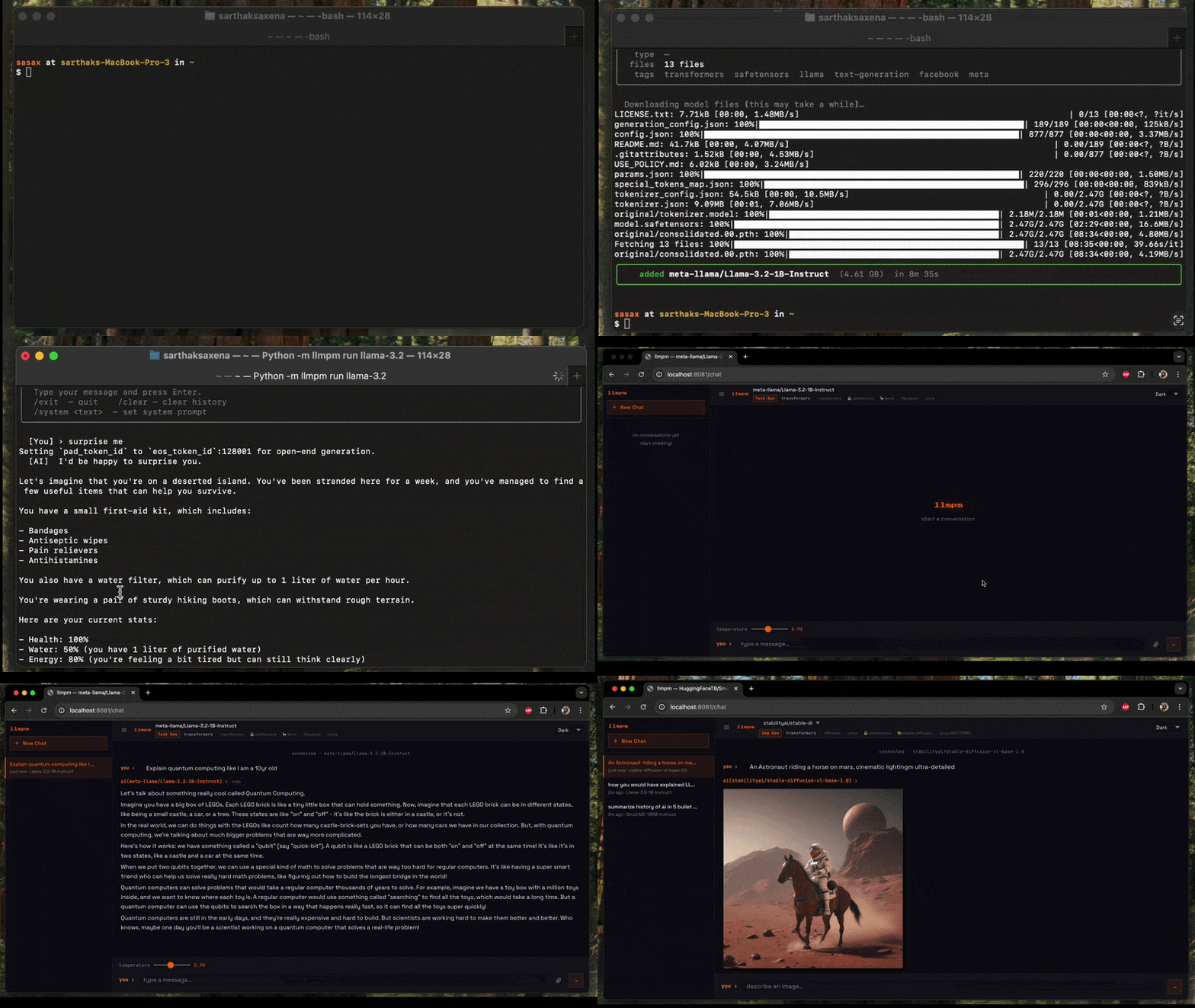
| ```sh | |
| # Install a model | |
| llmpm install meta-llama/Llama-3.2-3B-Instruct | |
| # Run it | |
| llmpm run meta-llama/Llama-3.2-3B-Instruct | |
| llmpm serve meta-llama/Llama-3.2-3B-Instruct | |
| ``` | |
|  | |
| --- | |
| ## Commands | |
| | Command | Description | | |
| | ------------------------------- | --------------------------------------------------------------- | | |
| | `llmpm init` | Initialise a `llmpm.json` in the current directory | | |
| | `llmpm install` | Install all models listed in `llmpm.json` | | |
| | `llmpm install <repo>` | Download and install a model from HuggingFace, Ollama & Mistral | | |
| | `llmpm run <repo>` | Run an installed model (interactive chat) | | |
| | `llmpm serve [repo] [repo] ...` | Serve one or more models as an OpenAI-compatible API | | |
| | `llmpm serve` | Serve every installed model on a single HTTP server | | |
| | `llmpm push <repo>` | Upload a model to HuggingFace Hub | | |
| | `llmpm list` | Show all installed models | | |
| | `llmpm info <repo>` | Show details about a model | | |
| | `llmpm uninstall <repo>` | Uninstall a model | | |
| | `llmpm clean` | Remove the managed environment (`~/.llmpm/venv`) | | |
| | `llmpm clean --all` | Remove environment + all downloaded models and registry | | |
| --- | |
| ## Local vs global mode | |
| `llmpm` works in two modes depending on whether a `llmpm.json` file is present. | |
| ### Global mode (default) | |
| All models are stored in `~/.llmpm/models/` and the registry lives at | |
| `~/.llmpm/registry.json`. This is the default when no `llmpm.json` is found. | |
| ### Local mode | |
| When a `llmpm.json` exists in the current directory (or any parent), llmpm | |
| switches to **local mode**: models are stored in `.llmpm/models/` next to the | |
| manifest file. This keeps project models isolated from your global environment. | |
| ``` | |
| my-project/ | |
| ├── llmpm.json ← manifest | |
| └── .llmpm/ ← local model store (auto-created) | |
| ├── registry.json | |
| └── models/ | |
| ``` | |
| All commands (`install`, `run`, `serve`, `list`, `info`, `uninstall`) automatically | |
| detect the mode and operate on the correct store — no flags required. | |
| --- | |
| ## `llmpm init` | |
| Initialise a new project manifest in the current directory. | |
| ```sh | |
| llmpm init # interactive prompts for name & description | |
| llmpm init --yes # skip prompts, use directory name as package name | |
| ``` | |
| This creates a `llmpm.json`: | |
| ```json | |
| { | |
| "name": "my-project", | |
| "description": "", | |
| "dependencies": {} | |
| } | |
| ``` | |
| Models are listed under `dependencies` without version pins — llmpm models | |
| don't use semver. The value is always `"*"`. | |
| --- | |
| ## `llmpm install` | |
| ```sh | |
| # Install a Transformer model | |
| llmpm install meta-llama/Llama-3.2-3B-Instruct | |
| # Install a GGUF model (interactive quantisation picker) | |
| llmpm install unsloth/Llama-3.2-3B-Instruct-GGUF | |
| # Install a specific GGUF quantisation | |
| llmpm install unsloth/Llama-3.2-3B-Instruct-GGUF --quant Q4_K_M | |
| # Install a single specific file | |
| llmpm install unsloth/Llama-3.2-3B-Instruct-GGUF --file Llama-3.2-3B-Instruct-Q4_K_M.gguf | |
| # Skip prompts (pick best default) | |
| llmpm install meta-llama/Llama-3.2-3B-Instruct --no-interactive | |
| # Install and record in llmpm.json (local projects) | |
| llmpm install meta-llama/Llama-3.2-3B-Instruct --save | |
| # Install all models listed in llmpm.json (like npm install) | |
| llmpm install | |
| ``` | |
| In **global mode** models are stored in `~/.llmpm/models/`. | |
| In **local mode** (when `llmpm.json` is present) they go into `.llmpm/models/`. | |
| ### `llmpm install` options | |
| | Option | Description | | |
| | ------------------ | -------------------------------------------------------------- | | |
| | `--quant` / `-q` | GGUF quantisation to download (e.g. `Q4_K_M`) | | |
| | `--file` / `-f` | Download a specific file from the repo | | |
| | `--no-interactive` | Never prompt; pick the best default quantisation automatically | | |
| | `--save` | Add the model to `llmpm.json` dependencies after installing | | |
| --- | |
| ## `llmpm run` | |
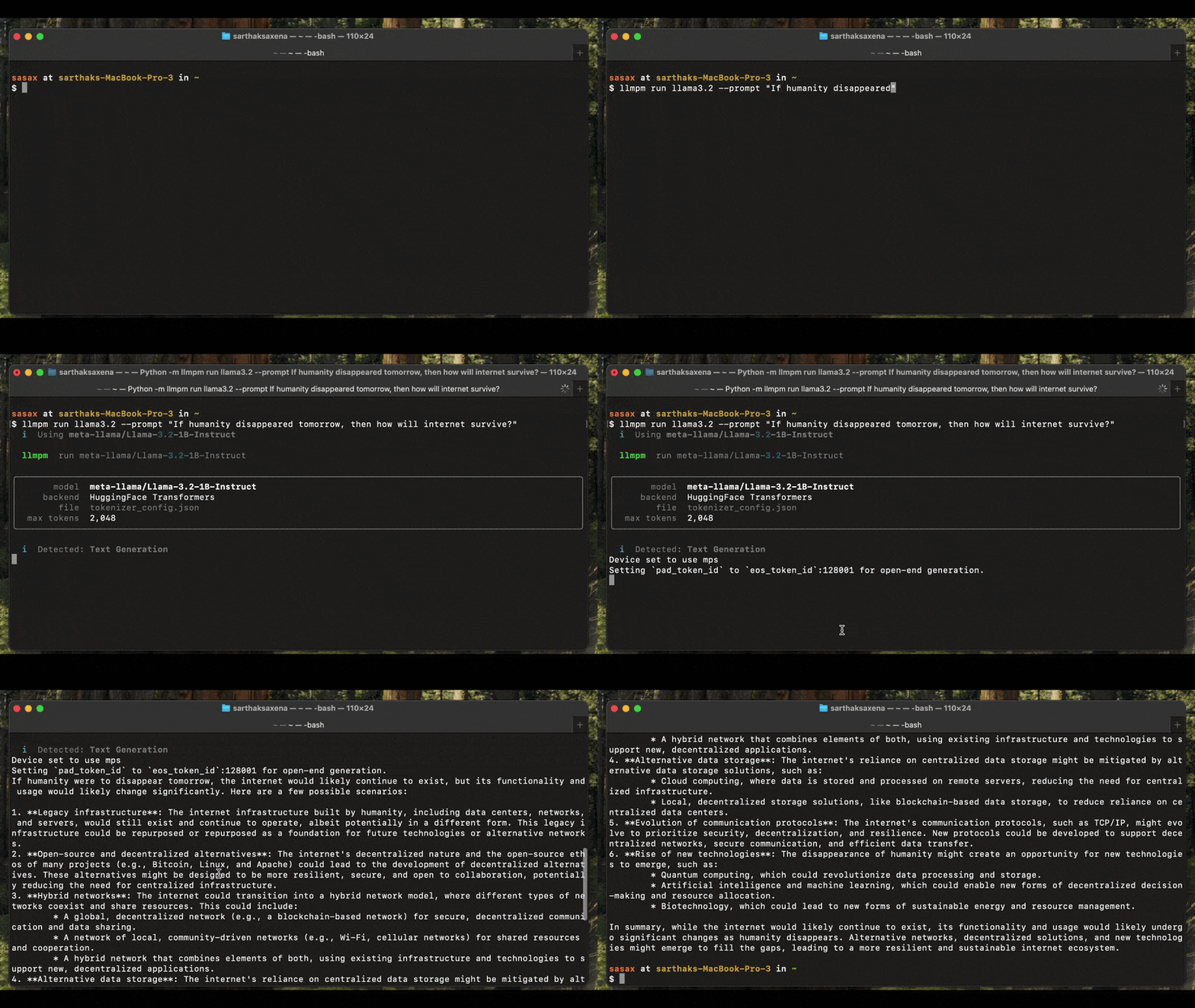
| `llmpm run` auto-detects the model type and launches the appropriate interactive session. It supports text generation, image generation, vision, speech-to-text (ASR), and text-to-speech (TTS) models. | |
|  | |
| ### Text generation (GGUF & Transformers) | |
| ```sh | |
| # Interactive chat | |
| llmpm run meta-llama/Llama-3.2-3B-Instruct | |
| # Single-turn inference | |
| llmpm run meta-llama/Llama-3.2-3B-Instruct --prompt "Explain quantum computing" | |
| # With a system prompt | |
| llmpm run meta-llama/Llama-3.2-3B-Instruct --system "You are a helpful pirate." | |
| # Limit response length | |
| llmpm run meta-llama/Llama-3.2-3B-Instruct --max-tokens 512 | |
| # GGUF model — tune context window and GPU layers | |
| llmpm run unsloth/Llama-3.2-3B-Instruct-GGUF --ctx 8192 --gpu-layers 32 | |
| ``` | |
| ### Image generation (Diffusion) | |
| Generates an image from a text prompt and saves it as a PNG on your Desktop. | |
| ```sh | |
| # Single prompt → saves llmpm_<timestamp>.png to ~/Desktop | |
| llmpm run amused/amused-256 --prompt "a cyberpunk city at sunset" | |
| # Interactive session (type a prompt, get an image each time) | |
| llmpm run amused/amused-256 | |
| ``` | |
| In interactive mode type your prompt and press Enter. The output path is printed after each generation. Type `/exit` to quit. | |
| > Requires: `pip install diffusers torch accelerate` | |
| ### Vision (image-to-text) | |
| Describe or answer questions about an image. Pass the image file path via `--prompt`. | |
| ```sh | |
| # Single image description | |
| llmpm run Salesforce/blip-image-captioning-base --prompt /path/to/photo.jpg | |
| # Interactive session: type an image path at each prompt | |
| llmpm run Salesforce/blip-image-captioning-base | |
| ``` | |
| > Requires: `pip install transformers torch Pillow` | |
| ### Speech-to-text / ASR | |
| Transcribe an audio file. Pass the audio file path via `--prompt`. | |
| ```sh | |
| # Transcribe a single file | |
| llmpm run openai/whisper-base --prompt recording.wav | |
| # Interactive: enter an audio file path at each prompt | |
| llmpm run openai/whisper-base | |
| ``` | |
| Supported formats depend on your installed audio libraries (wav, flac, mp3, …). | |
| > Requires: `pip install transformers torch` | |
| ### Text-to-speech / TTS | |
| Convert text to speech. The output WAV file is saved to your Desktop. | |
| ```sh | |
| # Single utterance → saves llmpm_<timestamp>.wav to ~/Desktop | |
| llmpm run suno/bark-small --prompt "Hello, how are you today?" | |
| # Interactive session | |
| llmpm run suno/bark-small | |
| ``` | |
| > Requires: `pip install transformers torch` | |
| ### `llmpm run` options | |
| | Option | Default | Description | | |
| | ----------------- | -------- | ------------------------------------------------------- | | |
| | `--prompt` / `-p` | — | Single-turn prompt or input file path (non-interactive) | | |
| | `--system` / `-s` | — | System prompt (text generation only) | | |
| | `--max-tokens` | `128000` | Maximum tokens to generate per response | | |
| | `--ctx` | `128000` | Context window size (GGUF only) | | |
| | `--gpu-layers` | `-1` | GPU layers to offload, `-1` = all (GGUF only) | | |
| | `--verbose` | off | Show model loading output | | |
| ### Interactive session commands | |
| These commands work in any interactive session: | |
| | Command | Action | | |
| | ---------------- | ------------------------------------------ | | |
| | `/exit` | End the session | | |
| | `/clear` | Clear conversation history (text gen only) | | |
| | `/system <text>` | Update the system prompt (text gen only) | | |
| ### Model type detection | |
| `llmpm run` reads `config.json` / `model_index.json` from the installed model to determine the pipeline type before loading any weights. The detected type is printed at startup: | |
| ``` | |
| Detected: Image Generation (Diffusion) | |
| Loading model… ✓ | |
| ``` | |
| If detection is ambiguous the model falls back to the text-generation backend. | |
| --- | |
| ## `llmpm serve` | |
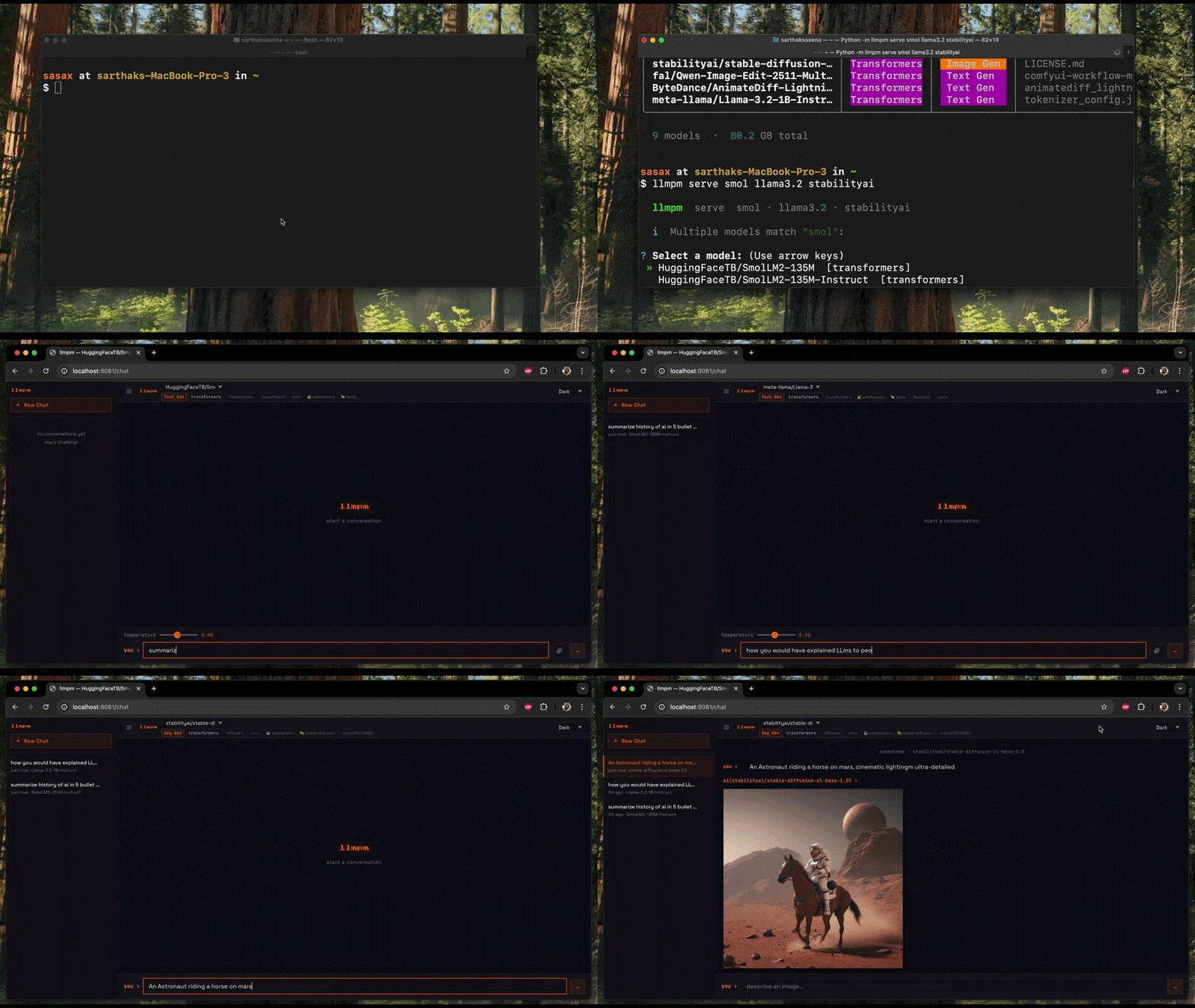
| Start a **single** local HTTP server exposing one or more models as an OpenAI-compatible REST API. | |
| A browser-based chat UI is available at `/chat`. | |
|  | |
| ```sh | |
| # Serve a single model on the default port (8080) | |
| llmpm serve meta-llama/Llama-3.2-3B-Instruct | |
| # Serve multiple models on one server | |
| llmpm serve meta-llama/Llama-3.2-3B-Instruct amused/amused-256 | |
| # Serve ALL installed models automatically | |
| llmpm serve | |
| # Custom port and host | |
| llmpm serve meta-llama/Llama-3.2-3B-Instruct --port 9000 --host 0.0.0.0 | |
| # Set the default max tokens (clients may override per-request) | |
| llmpm serve meta-llama/Llama-3.2-3B-Instruct --max-tokens 2048 | |
| # GGUF model — tune context window and GPU layers | |
| llmpm serve unsloth/Llama-3.2-3B-Instruct-GGUF --ctx 8192 --gpu-layers 32 | |
| ``` | |
| Fuzzy model-name matching is applied to each argument — if multiple installed models match you will be prompted to pick one. | |
| ### `llmpm serve` options | |
| | Option | Default | Description | | |
| | --------------- | ----------- | --------------------------------------------------------- | | |
| | `--port` / `-p` | `8080` | Port to listen on (auto-increments if busy) | | |
| | `--host` / `-H` | `localhost` | Host/address to bind to | | |
| | `--max-tokens` | `128000` | Default max tokens per response (overridable per-request) | | |
| | `--ctx` | `128000` | Context window size (GGUF only) | | |
| | `--gpu-layers` | `-1` | GPU layers to offload, `-1` = all (GGUF only) | | |
| ### Multi-model routing | |
| When multiple models are loaded, POST endpoints accept an optional `"model"` field in the JSON body. | |
| If omitted, the first loaded model is used. | |
| ```sh | |
| # Target a specific model when multiple are loaded | |
| curl -X POST http://localhost:8080/v1/chat/completions \ | |
| -H "Content-Type: application/json" \ | |
| -d '{"model": "meta-llama/Llama-3.2-3B-Instruct", | |
| "messages": [{"role": "user", "content": "Hello!"}]}' | |
| ``` | |
| The chat UI at `/chat` shows a model dropdown when more than one model is loaded. | |
| Switching models resets the conversation and adapts the UI to the new model's category. | |
| ### Endpoints | |
| | Method | Path | Description | | |
| | ------ | -------------------------- | -------------------------------------------------------------------- | | |
| | `GET` | `/chat` | Browser chat / image-gen UI (model dropdown for multi-model serving) | | |
| | `GET` | `/health` | `{"status":"ok","models":["id1","id2",…]}` | | |
| | `GET` | `/v1/models` | List all loaded models with id, category, created | | |
| | `GET` | `/v1/models/<id>` | Info for a specific loaded model | | |
| | `POST` | `/v1/chat/completions` | OpenAI-compatible chat inference (SSE streaming supported) | | |
| | `POST` | `/v1/completions` | Legacy text completion | | |
| | `POST` | `/v1/embeddings` | Text embeddings | | |
| | `POST` | `/v1/images/generations` | Text-to-image; pass `"image"` (base64) for image-to-image | | |
| | `POST` | `/v1/audio/transcriptions` | Speech-to-text | | |
| | `POST` | `/v1/audio/speech` | Text-to-speech | | |
| All POST endpoints accept `"model": "<id>"` to target a specific loaded model. | |
| ### Example API calls | |
| ```sh | |
| # Text generation (streaming) | |
| curl -X POST http://localhost:8080/v1/chat/completions \ | |
| -H "Content-Type: application/json" \ | |
| -d '{"messages": [{"role": "user", "content": "Hello!"}], | |
| "max_tokens": 256, "stream": true}' | |
| # Target a specific model when multiple are loaded | |
| curl -X POST http://localhost:8080/v1/chat/completions \ | |
| -H "Content-Type: application/json" \ | |
| -d '{"model": "meta-llama/Llama-3.2-1B-Instruct", | |
| "messages": [{"role": "user", "content": "Hello!"}]}' | |
| # List all loaded models | |
| curl http://localhost:8080/v1/models | |
| # Text-to-image | |
| curl -X POST http://localhost:8080/v1/images/generations \ | |
| -H "Content-Type: application/json" \ | |
| -d '{"prompt": "a cat in a forest", "n": 1}' | |
| # Image-to-image (include the source image as base64 in the same endpoint) | |
| IMAGE_B64=$(base64 -i input.png) | |
| curl -X POST http://localhost:8080/v1/images/generations \ | |
| -H "Content-Type: application/json" \ | |
| -d "{\"prompt\": \"turn it into a painting\", \"image\": \"$IMAGE_B64\"}" | |
| # Speech-to-text | |
| curl -X POST http://localhost:8080/v1/audio/transcriptions \ | |
| -H "Content-Type: application/octet-stream" \ | |
| --data-binary @recording.wav | |
| # Text-to-speech | |
| curl -X POST http://localhost:8080/v1/audio/speech \ | |
| -H "Content-Type: application/json" \ | |
| -d '{"input": "Hello world"}' \ | |
| --output speech.wav | |
| ``` | |
| Response shape for chat completions (non-streaming): | |
| ```json | |
| { | |
| "object": "chat.completion", | |
| "model": "<model-id>", | |
| "choices": [{ | |
| "index": 0, | |
| "message": { "role": "assistant", "content": "<text>" }, | |
| "finish_reason": "stop" | |
| }], | |
| "usage": { "prompt_tokens": 0, "completion_tokens": 0, "total_tokens": 0 } | |
| } | |
| ``` | |
| Response shape for chat completions (streaming SSE): | |
| Each chunk: | |
| ```json | |
| { | |
| "object": "chat.completion.chunk", | |
| "model": "<model-id>", | |
| "choices": [{ | |
| "index": 0, | |
| "delta": { "content": "<token>" }, | |
| "finish_reason": null | |
| }] | |
| } | |
| ``` | |
| Followed by a final `data: [DONE]` sentinel. | |
| Response shape for image generation: | |
| ```json | |
| { | |
| "created": 1234567890, | |
| "data": [{ "b64_json": "<base64-png>" }] | |
| } | |
| ``` | |
| --- | |
| ## `llmpm push` | |
| ```sh | |
| # Push an already-installed model | |
| llmpm push my-org/my-fine-tune | |
| # Push a local directory | |
| llmpm push my-org/my-fine-tune --path ./my-model-dir | |
| # Push as private repository | |
| llmpm push my-org/my-fine-tune --private | |
| # Custom commit message | |
| llmpm push my-org/my-fine-tune -m "Add Q4_K_M quantisation" | |
| ``` | |
| Requires a HuggingFace token (run `huggingface-cli login` or set `HF_TOKEN`). | |
| --- | |
| ## Backends | |
| All backends (torch, transformers, diffusers, llama-cpp-python, …) are included in `pip install llmpm` by default and are installed into the managed `~/.llmpm/venv`. | |
| | Model type | Pipeline | Backend | | |
| | ----------------------- | ---------------- | ------------------------------ | | |
| | `.gguf` files | Text generation | llama.cpp via llama-cpp-python | | |
| | `.safetensors` / `.bin` | Text generation | HuggingFace Transformers | | |
| | Diffusion models | Image generation | HuggingFace Diffusers | | |
| | Vision models | Image-to-text | HuggingFace Transformers | | |
| | Whisper / ASR models | Speech-to-text | HuggingFace Transformers | | |
| | TTS models | Text-to-speech | HuggingFace Transformers | | |
| ### Selective backend install | |
| If you only need one backend (e.g. on a headless server), install without defaults and add just what you need: | |
| ```sh | |
| pip install llmpm --no-deps # CLI only (no ML backends) | |
| pip install llmpm[gguf] # + GGUF / llama.cpp | |
| pip install llmpm[transformers] # + text generation | |
| pip install llmpm[diffusion] # + image generation | |
| pip install llmpm[vision] # + vision / image-to-text | |
| pip install llmpm[audio] # + ASR + TTS | |
| ``` | |
| --- | |
| ## Configuration | |
| | Variable | Default | Description | | |
| | -------------- | ---------- | ------------------------------------------------------------ | | |
| | `LLMPM_HOME` | `~/.llmpm` | Root directory for models and registry | | |
| | `HF_TOKEN` | — | HuggingFace API token for gated models | | |
| | `LLPM_PYTHON` | `python3` | Python binary used by the npm shim (fallback only) | | |
| | `LLPM_NO_VENV` | — | Set to `1` to skip venv isolation (CI / Docker / containers) | | |
| ### Configuration examples | |
| **Use a HuggingFace token for gated models:** | |
| ```sh | |
| HF_TOKEN=hf_your_token llmpm install meta-llama/Llama-3.2-3B-Instruct | |
| # or export for the session | |
| export HF_TOKEN=hf_your_token | |
| llmpm install meta-llama/Llama-3.2-3B-Instruct | |
| ``` | |
| **Skip venv isolation (CI / Docker):** | |
| ```sh | |
| # Inline — single command | |
| LLPM_NO_VENV=1 llmpm serve meta-llama/Llama-3.2-3B-Instruct | |
| # Exported — all subsequent commands skip the venv | |
| export LLPM_NO_VENV=1 | |
| llmpm install meta-llama/Llama-3.2-3B-Instruct | |
| llmpm serve meta-llama/Llama-3.2-3B-Instruct | |
| ``` | |
| > When using `LLPM_NO_VENV=1`, install all backends first: `pip install llmpm[all]` | |
| **Custom model storage location:** | |
| ```sh | |
| LLMPM_HOME=/mnt/models llmpm install meta-llama/Llama-3.2-3B-Instruct | |
| LLMPM_HOME=/mnt/models llmpm serve meta-llama/Llama-3.2-3B-Instruct | |
| ``` | |
| **Use a specific Python binary (npm installs):** | |
| ```sh | |
| LLPM_PYTHON=/usr/bin/python3.11 llmpm run meta-llama/Llama-3.2-3B-Instruct | |
| ``` | |
| **Combining variables:** | |
| ```sh | |
| HF_TOKEN=hf_your_token LLMPM_HOME=/data/models LLPM_NO_VENV=1 \ | |
| llmpm install meta-llama/Llama-3.2-3B-Instruct | |
| ``` | |
| **Docker / CI example:** | |
| ```dockerfile | |
| ENV LLPM_NO_VENV=1 | |
| ENV HF_TOKEN=hf_your_token | |
| RUN pip install llmpm[all] | |
| RUN llmpm install meta-llama/Llama-3.2-3B-Instruct | |
| CMD ["llmpm", "serve", "meta-llama/Llama-3.2-3B-Instruct", "--host", "0.0.0.0"] | |
| ``` | |
| --- | |
| ## License | |
| MIT | |