
Spaces:
Sleeping


Sleeping
| title: Gemini Business2API | |
| emoji: 💎 | |
| colorFrom: pink | |
| colorTo: blue | |
| sdk: docker | |
| pinned: false | |
| license: mit | |
| # Gemini Business2API | |
| 将 Google Gemini Business API 转换为 OpenAI 兼容接口,支持多账户负载均衡。 | |
| 感谢Claude老师! | |
| [](https://opensource.org/licenses/MIT) | |
| [](https://www.python.org/downloads/) | |
| **快速部署到 HuggingFace Spaces:** | |
| [](https://huggingface.co/spaces/xiaoyukkkk/gemini-business2api?duplicate=true) | |
| ## ✨ 功能特性 | |
| - ✅ **OpenAI API 完全兼容** - 无缝对接现有工具 | |
| - ✅ **流式响应支持** - 实时输出 | |
| - ✅ **多模态支持** - 文本 + 图片输入 | |
| - ✅ **图片生成 & 图生图** - 支持 `gemini-3-pro-preview` 模型 | |
| - ✅ **多账户负载均衡** - 支持多账户轮询,故障自动转移 | |
| - ✅ **智能会话复用** - 自动管理对话历史 | |
| - ✅ **JWT自动管理** - 无需手动刷新令牌 | |
| - 📊 **可视化管理面板** - 实时监控账户状态 | |
| - 📝 **公开日志系统** - 实时查看服务运行状态 | |
| ## 📸 功能展示 | |
| ### 图片生成效果 | |
| <table> | |
| <tr> | |
| <td><img src="https://github.com/user-attachments/assets/5378ad0b-2a96-4239-9582-df68e8ffa53f" alt="图片生成示例1" width="800"/></td> | |
| <td><img src="https://github.com/user-attachments/assets/82aeedf8-ad87-40bc-ae41-defa7271e8b1" alt="图片生成示例2" width="800"/></td> | |
| </tr> | |
| <tr> | |
| <td><img src="https://github.com/user-attachments/assets/772d29c3-a75c-4ab8-98eb-cefea164b62c" alt="图片生成示例3" width="800"/></td> | |
| <td><img src="https://github.com/user-attachments/assets/15d36604-dedd-4411-bbfb-f4cf95365101" alt="图片生成示例4" width="800"/></td> | |
| </tr> | |
| </table> | |
| ### 管理面板 | |
| <table> | |
| <tr> | |
| <td><img src="https://github.com/user-attachments/assets/42c0a906-e926-4199-97e4-73ac06381b07" alt="管理面板1" width="800"/></td> | |
| <td><img src="https://github.com/user-attachments/assets/d6b9a16b-2ed1-4be9-8465-4c28f974daa7" alt="管理面板2" width="800"/></td> | |
| </tr> | |
| </table> | |
| ###开日志系统 | |
| <table> | |
| <tr> | |
| <td><img src="https://github.com/user-attachments/assets/8640d7ce-9d22-41de-9907-5c2292883f0c" alt="日志系统1" width="800"/></td> | |
| <td><img src="https://github.com/user-attachments/assets/048a6253-fa7d-4e00-a748-2bb615e16638" alt="日志系统2" width="800"/></td> | |
| </tr> | |
| </table> | |
| ## 🚀 快速开始 | |
| ### 方法一: HuggingFace Spaces 部署(推荐) | |
| 1. Fork 本项目到你的 GitHub 账户 | |
| 2. 在 [HuggingFace Spaces](https://huggingface.co/spaces) 创建新 Space | |
| 3. 选择 Docker SDK,关联你的 GitHub 仓库 | |
| 4. 配置环境变量(Settings → Variables and secrets): | |
| ```bash | |
| ACCOUNTS_CONFIG='[{"secure_c_ses":"your_cookie","csesidx":"your_idx","config_id":"your_config"}]' | |
| PATH_PREFIX=path_prefix | |
| ADMIN_KEY=your_admin_key | |
| API_KEY=your_api_key | |
| LOGO_URL=https://your-domain.com/logo.png | |
| CHAT_URL=https://your-chat-app.com | |
| ``` | |
| 5. 等待构建完成(约 2-3 分钟) | |
| 6. 访问你的 Space URL 开始使用 | |
| ### 方法二: Docker 部署 | |
| ```bash | |
| # 1. 克隆项目 | |
| git clone https://github.com/YOUR_USERNAME/gemini-business2api.git | |
| cd gemini-business2api | |
| # 2. 构建并运行 | |
| docker build -t gemini-business2api . | |
| docker run -d \ | |
| -p 7860:7860 \ | |
| -e ACCOUNTS_CONFIG='[{"secure_c_ses":"your_cookie","csesidx":"your_idx","config_id":"your_config"}]' \ | |
| -e PATH_PREFIX=path_prefix \ | |
| -e ADMIN_KEY=your_admin_key \ | |
| -e API_KEY=your_api_key \ | |
| -e LOGO_URL=https://your-domain.com/logo.png \ | |
| -e CHAT_URL=https://your-chat-app.com \ | |
| gemini-business2api | |
| ``` | |
| ### 方法三: 本地运行 | |
| ```bash | |
| # 1. 安装依赖 | |
| pip install -r requirements.txt | |
| # 2. 配置环境变量 | |
| cp .env.example .env | |
| # 编辑 .env 文件,填入实际配置 | |
| # 3. 启动服务 | |
| python main.py | |
| ``` | |
| 服务将在 `http://localhost:7860` 启动 | |
| ## ⚙️ 配置说明 | |
| ### 必需的环境变量 | |
| ```bash | |
| # 账户配置(必需) | |
| ACCOUNTS_CONFIG='[{"secure_c_ses":"your_cookie","csesidx":"your_idx","config_id":"your_config"}]' | |
| # 路径前缀(必需) | |
| PATH_PREFIX=path_prefix | |
| # 管理员密钥(必需) | |
| ADMIN_KEY=your_admin_key | |
| # API访问密钥(可选,推荐设置) | |
| API_KEY=your_api_key | |
| # 图片URL生成(可选,推荐设置) | |
| BASE_URL=https://your-domain.com | |
| # 全局代理(可选) | |
| PROXY=http://127.0.0.1:7890 | |
| # 公开展示配置(可选) | |
| LOGO_URL=https://your-domain.com/logo.png | |
| CHAT_URL=https://your-chat-app.com | |
| MODEL_NAME=gemini-business | |
| ``` | |
| ### 多账户配置示例 | |
| ```bash | |
| ACCOUNTS_CONFIG='[ | |
| { | |
| "id": "account_1", | |
| "secure_c_ses": "CSE.Ad...", | |
| "csesidx": "498...", | |
| "config_id": "0cd...", | |
| "host_c_oses": "COS.Af...", | |
| "expires_at": "2025-12-23 23:03:20" | |
| }, | |
| { | |
| "id": "account_2", | |
| "secure_c_ses": "CSE.Ad...", | |
| "csesidx": "208...", | |
| "config_id": "782..." | |
| } | |
| ]' | |
| ``` | |
| **配置字段说明**: | |
| - `secure_c_ses` (必需): `__Secure-C_SES` Cookie 值 | |
| - `csesidx` (必需): 会话索引 | |
| - `config_id` (必需): 配置 ID | |
| - `id` (可选): 账户标识 | |
| - `host_c_oses` (可选): `__Host-C_OSES` Cookie 值 | |
| - `expires_at` (可选): 过期时间,格式 `YYYY-MM-DD HH:MM:SS` | |
| **提示**: 参考项目根目录的 `.env.example` 和 `accounts_config.example.json` 文件 | |
| ## 🔧 获取配置参数 | |
| 1. 访问 [Google Gemini Business](https://business.gemini.google) | |
| 2. 打开浏览器开发者工具 (F12) | |
| 3. 切换到 **Application** → **Cookies**,找到: | |
| - `__Secure-C_SES` → `secure_c_ses` | |
| - `__Host-C_OSES` → `host_c_oses` (可选) | |
| 4. 切换到 **Network** 标签,刷新页面 | |
| 5. 找到 `streamGenerate` 请求,查看 Payload: | |
| - `csesidx` → `csesidx` | |
| - `configId` → `config_id` | |
| ## 📖 API 使用 | |
| ### 支持的模型 | |
| | 模型名称 | 说明 | 图片生成 | | |
| | ------------------------ | ---------------------- | -------- | | |
| | `gemini-auto` | 自动选择最佳模型(默认) | ❌ | | |
| | `gemini-2.5-flash` | Flash 2.5 - 快速响应 | ❌ | | |
| | `gemini-2.5-pro` | Pro 2.5 - 高质量输出 | ❌ | | |
| | `gemini-3-flash-preview` | Flash 3 预览版 | ❌ | | |
| | `gemini-3-pro-preview` | Pro 3 预览版 | ✅ | | |
| ### 基本对话 | |
| ```bash | |
| curl -X POST http://localhost:7860/v1/v1/chat/completions \ | |
| -H "Content-Type: application/json" \ | |
| -H "Authorization: Bearer your_api_key" \ | |
| -d '{ | |
| "model": "gemini-2.5-flash", | |
| "messages": [ | |
| {"role": "user", "content": "Hello!"} | |
| ], | |
| "stream": true | |
| }' | |
| ``` | |
| ### 图片输入(多模态) | |
| ```bash | |
| curl -X POST http://localhost:7860/v1/v1/chat/completions \ | |
| -H "Content-Type: application/json" \ | |
| -H "Authorization: Bearer your_api_key" \ | |
| -d '{ | |
| "model": "gemini-2.5-pro", | |
| "messages": [ | |
| { | |
| "role": "user", | |
| "content": [ | |
| {"type": "text", "text": "这张图片里有什么?"}, | |
| {"type": "image_url", "image_url": {"url": "data:image/jpeg;base64,<base64_encoded_image>"}} | |
| ] | |
| } | |
| ] | |
| }' | |
| ``` | |
| ### 图片生成 | |
| ```bash | |
| curl -X POST http://localhost:7860/v1/v1/chat/completions \ | |
| -H "Content-Type: application/json" \ | |
| -H "Authorization: Bearer your_api_key" \ | |
| -d '{ | |
| "model": "gemini-3-pro-preview", | |
| "messages": [ | |
| {"role": "user", "content": "画一只可爱的猫咪"} | |
| ] | |
| }' | |
| ``` | |
| ### 图生图(Image-to-Image) | |
| ```bash | |
| curl -X POST http://localhost:7860/v1/v1/chat/completions \ | |
| -H "Content-Type: application/json" \ | |
| -H "Authorization: Bearer your_api_key" \ | |
| -d '{ | |
| "model": "gemini-3-pro-preview", | |
| "messages": [ | |
| { | |
| "role": "user", | |
| "content": [ | |
| {"type": "text", "text": "将这张图片改成水彩画风格"}, | |
| {"type": "image_url", "image_url": {"url": "data:image/jpeg;base64,<base64_encoded_image>"}} | |
| ] | |
| } | |
| ] | |
| }' | |
| ``` | |
| ### 其他端点 | |
| | 端点 | 方法 | 说明 | | |
| | -------------------------- | ---- | --------------------- | | |
| | `/{PATH_PREFIX}/v1/models` | GET | 获取模型列表 | | |
| | `/{PATH_PREFIX}/admin` | GET | 管理面板(需ADMIN_KEY) | | |
| | `/public/log/html` | GET | 公开日志页面 | | |
| | `/health` | GET | 健康检查 | | |
| **访问示例**: | |
| 假设你的配置为: | |
| - Space URL: `https://your-space.hf.space` | |
| - PATH_PREFIX: `my_prefix` | |
| - ADMIN_KEY: `my_admin_key` | |
| 则访问地址为: | |
| - **管理面板**: `https://your-space.hf.space/my_prefix/admin?key=my_admin_key` | |
| - **公开日志**: `https://your-space.hf.space/public/log/html` | |
| - **API 端点**: `https://your-space.hf.space/my_prefix/v1/chat/completions` | |
| ## ❓ 常见问题 | |
| ### 1. 图片生成后在哪里找到文件? | |
| - **临时存储**: 图片保存在 `./images/`,可通过 URL 访问 | |
| - **重启后会丢失**,建议使用持久化存储 | |
| ### 2. 如何设置 BASE_URL? | |
| **自动检测**(推荐): | |
| - 不设置 `BASE_URL` 环境变量 | |
| - 系统自动从请求头检测域名 | |
| **手动设置**: | |
| ```bash | |
| BASE_URL=https://your-domain.com | |
| ``` | |
| **使用反向代理**: | |
| 如果你使用自己的域名反向代理到 HuggingFace Space,可以通过以下方式配置: | |
| **Nginx 配置示例**: | |
| ```nginx | |
| location / { | |
| proxy_pass https://your-username-space-name.hf.space; | |
| proxy_set_header Host your-username-space-name.hf.space; | |
| proxy_ssl_server_name on; | |
| } | |
| ``` | |
| **Deno Deploy 配置示例**: | |
| ```typescript | |
| async function handler(request: Request): Promise<Response> { | |
| const url = new URL(request.url); | |
| url.host = 'your-username-space-name.hf.space'; | |
| return fetch(new Request(url, request)); | |
| } | |
| Deno.serve(handler); | |
| ``` | |
| 配置反向代理后,将 `BASE_URL` 设置为你的自定义域名即可。 | |
| ### 3. API_KEY 和 ADMIN_KEY 的区别? | |
| - **API_KEY**: 保护聊天接口 (`/v1/chat/completions`) | |
| - **ADMIN_KEY**: 保护管理面板 (`/admin`) | |
| 可以设置相同的值,也可以分开 | |
| ### 4. 如何查看日志? | |
| - **公开日志**: 访问 `/public/log/html` (无需密钥) | |
| - **管理面板**: 访问 `/admin?key=YOUR_ADMIN_KEY` | |
| ## 🔧 油猴脚本使用说明 | |
| 本项目提供油猴脚本辅助获取配置参数,使用前需要配置 TamperMonkey: | |
| ### TamperMonkey 设置 | |
| 1. **配置模式**:改为 `高级` | |
| 2. **安全设置**:允许脚本访问 Cookie 改为 `All` | |
| ### Google Chrome 额外设置 | |
| 1. 打开油猴扩展设置 | |
| 2. 启用 **允许运行用户脚本** | |
| 3. 设置 **有权访问的网站** 权限 | |
| 配置完成后即可使用脚本自动获取 `secure_c_ses`、`csesidx`、`config_id` 等参数。 | |
| --- | |
| ## 📁 项目结构 | |
| ``` | |
| gemini-business2api/ | |
| ├── main.py # 主程序 | |
| ├── util/ # 工具模块 | |
| │ └── streaming_parser.py | |
| ├── requirements.txt # Python依赖 | |
| ├── Dockerfile # Docker构建 | |
| ├── README.md # 项目文档 | |
| ├── .env.example # 环境变量配置示例 | |
| ├── accounts_config.example.json # 多账户配置示例 | |
| └── .gitignore # Git忽略文件 | |
| ``` | |
| **运行时生成的目录**: | |
| - `images/` - 生成的图片存储 | |
| - `static/` - 静态文件缓存 | |
| - `logs/` - 日志文件 | |
| ## 🛠️ 技术栈 | |
| - **Python 3.11+** | |
| - **FastAPI** - 现代Web框架 | |
| - **Uvicorn** - ASGI服务器 | |
| - **httpx** - HTTP客户端 | |
| - **Docker** - 容器化部署 | |
| ## 📝 License | |
| MIT License - 查看 [LICENSE](LICENSE) 文件了解详情 | |
| --- | |
| ## 🙏 致谢 | |
| - 源项目:[heixxin/gemini](https://huggingface.co/spaces/heixxin/gemini/tree/main) | [Linux.do 讨论](https://linux.do/t/topic/1226413) | |
| - 绘图参考:[Gemini-Link-System](https://github.com/qxd-ljy/Gemini-Link-System) | [Linux.do 讨论](https://linux.do/t/topic/1234363) | |
| - Gemini Business 2API Helper 参考:[Linux.do 讨论](https://linux.do/t/topic/1231008) | |
| --- | |
| ## ⭐ Star History | |
| [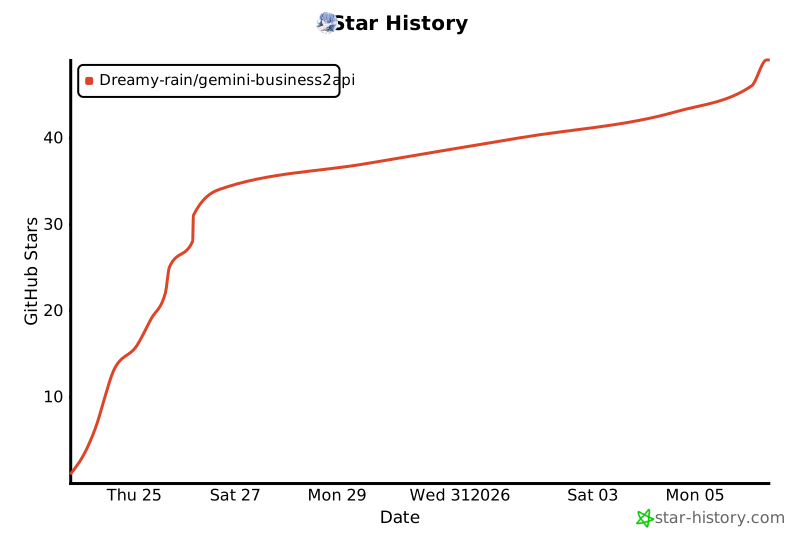](https://star-history.com/#Dreamy-rain/gemini-business2api&Date) | |
| --- | |
| **如果这个项目对你有帮助,请给个 ⭐ Star!** | |