

ComfyUI VideoX-Fun
Easily use VideoX-Fun and Wan2.1-Fun inside ComfyUI!
Installation
1. ComfyUI Installation
Option 1: Install via ComfyUI Manager
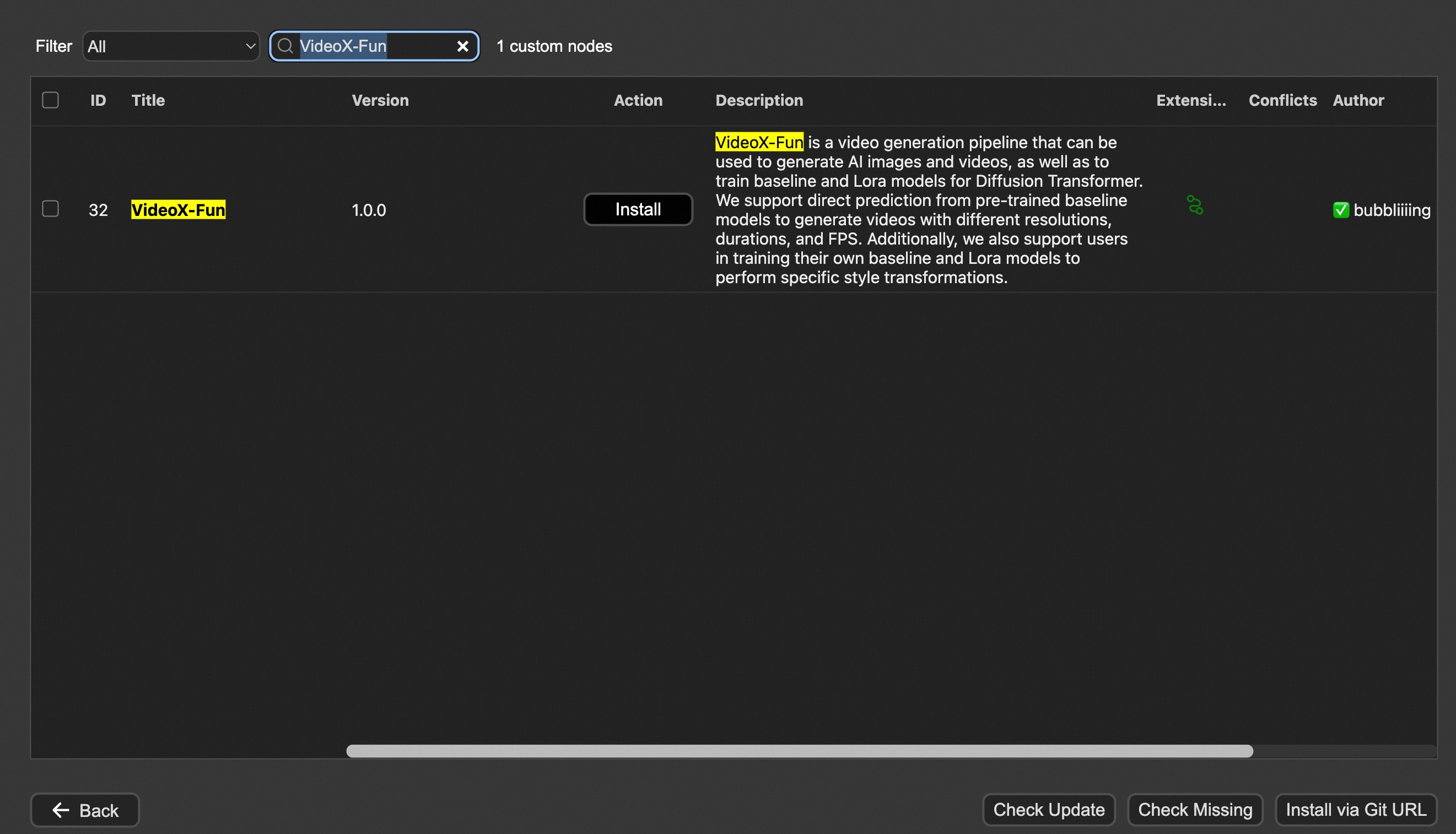
Option 2: Install manually
The VideoX-Fun repository needs to be placed at ComfyUI/custom_nodes/VideoX-Fun/.
cd ComfyUI/custom_nodes/

# Git clone the cogvideox_fun itself
git clone https://github.com/aigc-apps/VideoX-Fun.git

# Git clone the video outout node
git clone https://github.com/Kosinkadink/ComfyUI-VideoHelperSuite.git

# Git clone the KJ Nodes
git clone https://github.com/kijai/ComfyUI-KJNodes.git

cd VideoX-Fun/
python install.py
2. Download models
i、Full loading
Download full model into ComfyUI/models/Fun_Models/.
ii、Chunked loading
Put the transformer model weights to the ComfyUI/models/diffusion_models/.
Put the text encoer model weights to the ComfyUI/models/text_encoders/.
Put the clip vision model weights to the ComfyUI/models/clip_vision/.
Put the vae model weights to the ComfyUI/models/vae/.
Put the tokenizer files to the ComfyUI/models/Fun_Models/ (For example: ComfyUI/models/Fun_Models/umt5-xxl).
3. (Optional) Download preprocess weights into ComfyUI/custom_nodes/Fun_Models/Third_Party/.
Except for the fun models' weights, if you want to use the control preprocess nodes, you can download the preprocess weights to ComfyUI/custom_nodes/Fun_Models/Third_Party/.
remote_onnx_det = "https://huggingface.co/yzd-v/DWPose/resolve/main/yolox_l.onnx"
remote_onnx_pose = "https://huggingface.co/yzd-v/DWPose/resolve/main/dw-ll_ucoco_384.onnx"
remote_zoe= "https://huggingface.co/lllyasviel/Annotators/resolve/main/ZoeD_M12_N.pt"
i. Wan2.2-Fun
| Name | Hugging Face | Model Scope | Description | |--|--|--|--|--| | Wan2.2-Fun-A14B-InP | 64.0 GB | 🤗Link | 😄Link | Wan2.2-Fun-14B text-to-video generation weights, trained at multiple resolutions, supports start-end image prediction. | | Wan2.2-Fun-A14B-Control | 64.0 GB | 🤗Link | 😄Link| Wan2.2-Fun-14B video control weights, supporting various control conditions such as Canny, Depth, Pose, MLSD, etc., and trajectory control. Supports multi-resolution (512, 768, 1024) video prediction at 81 frames, trained at 16 frames per second, with multilingual prediction support. | | Wan2.2-Fun-A14B-Control-Camera | 64.0 GB | 🤗Link | 😄Link| Wan2.2-Fun-14B camera lens control weights. Supports multi-resolution (512, 768, 1024) video prediction, trained with 81 frames at 16 FPS, supports multilingual prediction. | | Wan2.2-Fun-5B-InP | 23.0 GB | 🤗Link | 😄Link | Wan2.2-Fun-5B text-to-video weights trained at 121 frames, 24 FPS, supporting first/last frame prediction. | | Wan2.2-Fun-5B-Control | 23.0 GB | 🤗Link | 😄Link| Wan2.2-Fun-5B video control weights, supporting control conditions like Canny, Depth, Pose, MLSD, and trajectory control. Trained at 121 frames, 24 FPS, with multilingual prediction support. | | Wan2.2-Fun-5B-Control-Camera | 23.0 GB | 🤗Link | 😄Link| Wan2.2-Fun-5B camera lens control weights. Trained at 121 frames, 24 FPS, with multilingual prediction support. |
ii. Wan2.2
| Name | Hugging Face | Model Scope | Description |
|---|---|---|---|
| Wan2.2-TI2V-5B | 🤗Link | 😄Link | Wan2.2-5B Text-to-Video Weights |
| Wan2.2-T2V-14B | 🤗Link | 😄Link | Wan2.2-14B Text-to-Video Weights |
| Wan2.2-I2V-A14B | 🤗Link | 😄Link | Wan2.2-I2V-A14B Image-to-Video Weights |
iii. Wan2.1-Fun
V1.1:
| Name | Storage Size | Hugging Face | Model Scope | Description |
|---|---|---|---|---|
| Wan2.1-Fun-V1.1-1.3B-InP | 19.0 GB | 🤗Link | 😄Link | Wan2.1-Fun-V1.1-1.3B text-to-video generation weights, trained at multiple resolutions, supports start-end image prediction. |
| Wan2.1-Fun-V1.1-14B-InP | 47.0 GB | 🤗Link | 😄Link | Wan2.1-Fun-V1.1-14B text-to-video generation weights, trained at multiple resolutions, supports start-end image prediction. |
| Wan2.1-Fun-V1.1-1.3B-Control | 19.0 GB | 🤗Link | 😄Link | Wan2.1-Fun-V1.1-1.3B video control weights support various control conditions such as Canny, Depth, Pose, MLSD, etc., supports reference image + control condition-based control, and trajectory control. Supports multi-resolution (512, 768, 1024) video prediction, trained with 81 frames at 16 FPS, supports multilingual prediction. |
| Wan2.1-Fun-V1.1-14B-Control | 47.0 GB | 🤗Link | 😄Link | Wan2.1-Fun-V1.1-14B video control weights support various control conditions such as Canny, Depth, Pose, MLSD, etc., supports reference image + control condition-based control, and trajectory control. Supports multi-resolution (512, 768, 1024) video prediction, trained with 81 frames at 16 FPS, supports multilingual prediction. |
| Wan2.1-Fun-V1.1-1.3B-Control-Camera | 19.0 GB | 🤗Link | 😄Link | Wan2.1-Fun-V1.1-1.3B camera lens control weights. Supports multi-resolution (512, 768, 1024) video prediction, trained with 81 frames at 16 FPS, supports multilingual prediction. |
| Wan2.1-Fun-V1.1-14B-Control-Camera | 47.0 GB | 🤗Link | 😄Link | Wan2.1-Fun-V1.1-14B camera lens control weights. Supports multi-resolution (512, 768, 1024) video prediction, trained with 81 frames at 16 FPS, supports multilingual prediction. |
V1.0:
| Name | Storage Space | Hugging Face | Model Scope | Description |
|---|---|---|---|---|
| Wan2.1-Fun-1.3B-InP | 19.0 GB | 🤗Link | 😄Link | Wan2.1-Fun-1.3B text-to-video weights, trained at multiple resolutions, supporting start and end frame prediction. |
| Wan2.1-Fun-14B-InP | 47.0 GB | 🤗Link | 😄Link | Wan2.1-Fun-14B text-to-video weights, trained at multiple resolutions, supporting start and end frame prediction. |
| Wan2.1-Fun-1.3B-Control | 19.0 GB | 🤗Link | 😄Link | Wan2.1-Fun-1.3B video control weights, supporting various control conditions such as Canny, Depth, Pose, MLSD, etc., and trajectory control. Supports multi-resolution (512, 768, 1024) video prediction at 81 frames, trained at 16 frames per second, with multilingual prediction support. |
| Wan2.1-Fun-14B-Control | 47.0 GB | 🤗Link | 😄Link | Wan2.1-Fun-14B video control weights, supporting various control conditions such as Canny, Depth, Pose, MLSD, etc., and trajectory control. Supports multi-resolution (512, 768, 1024) video prediction at 81 frames, trained at 16 frames per second, with multilingual prediction support. |
iv. Wan2.1
| Name | Hugging Face | Model Scope | Description |
|---|---|---|---|
| Wan2.1-T2V-1.3B | 🤗Link | 😄Link | Wanxiang 2.1-1.3B text-to-video weights |
| Wan2.1-T2V-14B | 🤗Link | 😄Link | Wanxiang 2.1-14B text-to-video weights |
| Wan2.1-I2V-14B-480P | 🤗Link | 😄Link | Wanxiang 2.1-14B-480P image-to-video weights |
| Wan2.1-I2V-14B-720P | 🤗Link | 😄Link | Wanxiang 2.1-14B-720P image-to-video weights |
v. CogVideoX-Fun
V1.5:
| Name | Storage Space | Hugging Face | Model Scope | Description |
|---|---|---|---|---|
| CogVideoX-Fun-V1.5-5b-InP | 20.0 GB | 🤗Link | 😄Link | Our official graph-generated video model is capable of predicting videos at multiple resolutions (512, 768, 1024) and has been trained on 85 frames at a rate of 8 frames per second. |
| CogVideoX-Fun-V1.5-Reward-LoRAs | - | 🤗Link | 😄Link | The official reward backpropagation technology model optimizes the videos generated by CogVideoX-Fun-V1.5 to better match human preferences. | |
V1.1:
| Name | Storage Space | Hugging Face | Model Scope | Description |
|---|---|---|---|---|
| CogVideoX-Fun-V1.1-2b-InP | 13.0 GB | 🤗Link | 😄Link | Our official graph-generated video model is capable of predicting videos at multiple resolutions (512, 768, 1024, 1280) and has been trained on 49 frames at a rate of 8 frames per second. |
| CogVideoX-Fun-V1.1-5b-InP | 20.0 GB | 🤗Link | 😄Link | Our official graph-generated video model is capable of predicting videos at multiple resolutions (512, 768, 1024, 1280) and has been trained on 49 frames at a rate of 8 frames per second. Noise has been added to the reference image, and the amplitude of motion is greater compared to V1.0. |
| CogVideoX-Fun-V1.1-2b-Pose | 13.0 GB | 🤗Link | 😄Link | Our official pose-control video model is capable of predicting videos at multiple resolutions (512, 768, 1024, 1280) and has been trained on 49 frames at a rate of 8 frames per second. |
| CogVideoX-Fun-V1.1-2b-Control | 13.0 GB | 🤗Link | 😄Link | Our official control video model is capable of predicting videos at multiple resolutions (512, 768, 1024, 1280) and has been trained on 49 frames at a rate of 8 frames per second. Supporting various control conditions such as Canny, Depth, Pose, MLSD, etc. |
| CogVideoX-Fun-V1.1-5b-Pose | 20.0 GB | 🤗Link | 😄Link | Our official pose-control video model is capable of predicting videos at multiple resolutions (512, 768, 1024, 1280) and has been trained on 49 frames at a rate of 8 frames per second. |
| CogVideoX-Fun-V1.1-5b-Control | 20.0 GB | 🤗Link | 😄Link | Our official control video model is capable of predicting videos at multiple resolutions (512, 768, 1024, 1280) and has been trained on 49 frames at a rate of 8 frames per second. Supporting various control conditions such as Canny, Depth, Pose, MLSD, etc. |
| CogVideoX-Fun-V1.1-Reward-LoRAs | - | 🤗Link | 😄Link | The official reward backpropagation technology model optimizes the videos generated by CogVideoX-Fun-V1.1 to better match human preferences. | |
(Obsolete) V1.0:
| Name | Storage Space | Hugging Face | Model Scope | Description |
|---|---|---|---|---|
| CogVideoX-Fun-2b-InP | 13.0 GB | 🤗Link | 😄Link | Our official graph-generated video model is capable of predicting videos at multiple resolutions (512, 768, 1024, 1280) and has been trained on 49 frames at a rate of 8 frames per second. |
| CogVideoX-Fun-5b-InP | 20.0 GB | 🤗Link | 😄Link | Our official graph-generated video model is capable of predicting videos at multiple resolutions (512, 768, 1024, 1280) and has been trained on 49 frames at a rate of 8 frames per second. |
3. (Optional) Download Lora models into ComfyUI/models/loras/fun_models/
If you want to use lora in CogVideoX-Fun, please put the lora to ComfyUI/models/loras/fun_models/.
Node types
1. Wan-Fun
- LoadWanFunModel
- Loads the Wan-Fun Model.
- LoadWanFunLora
- Write the prompt for Wan-Fun model
- WanFunInpaintSampler
- Wan-Fun Sampler for Image to Video
- WanFunT2VSampler
- Wan-Fun Sampler for Text to Video
2. Wan
- LoadWanModel
- Loads the Wan-Fun Model.
- LoadWanLora
- Write the prompt for Wan-Fun model
- WanI2VSampler
- Wan-Fun Sampler for Image to Video
- WanT2VSampler
- Wan-Fun Sampler for Text to Video
3. CogVideoX-Fun
- LoadCogVideoXFunModel
- Loads the CogVideoX-Fun model
- FunTextBox
- Write the prompt for CogVideoX-Fun model
- CogVideoXFunInpaintSampler
- CogVideoX-Fun Sampler for Image to Video
- CogVideoXFunT2VSampler
- CogVideoX-Fun Sampler for Text to Video
- CogVideoXFunV2VSampler
- CogVideoX-Fun Sampler for Video to Video
Example workflows
1. Wan-Fun
i. Image to video generation
Download link for wan-fun.
Our ui is shown as follow:
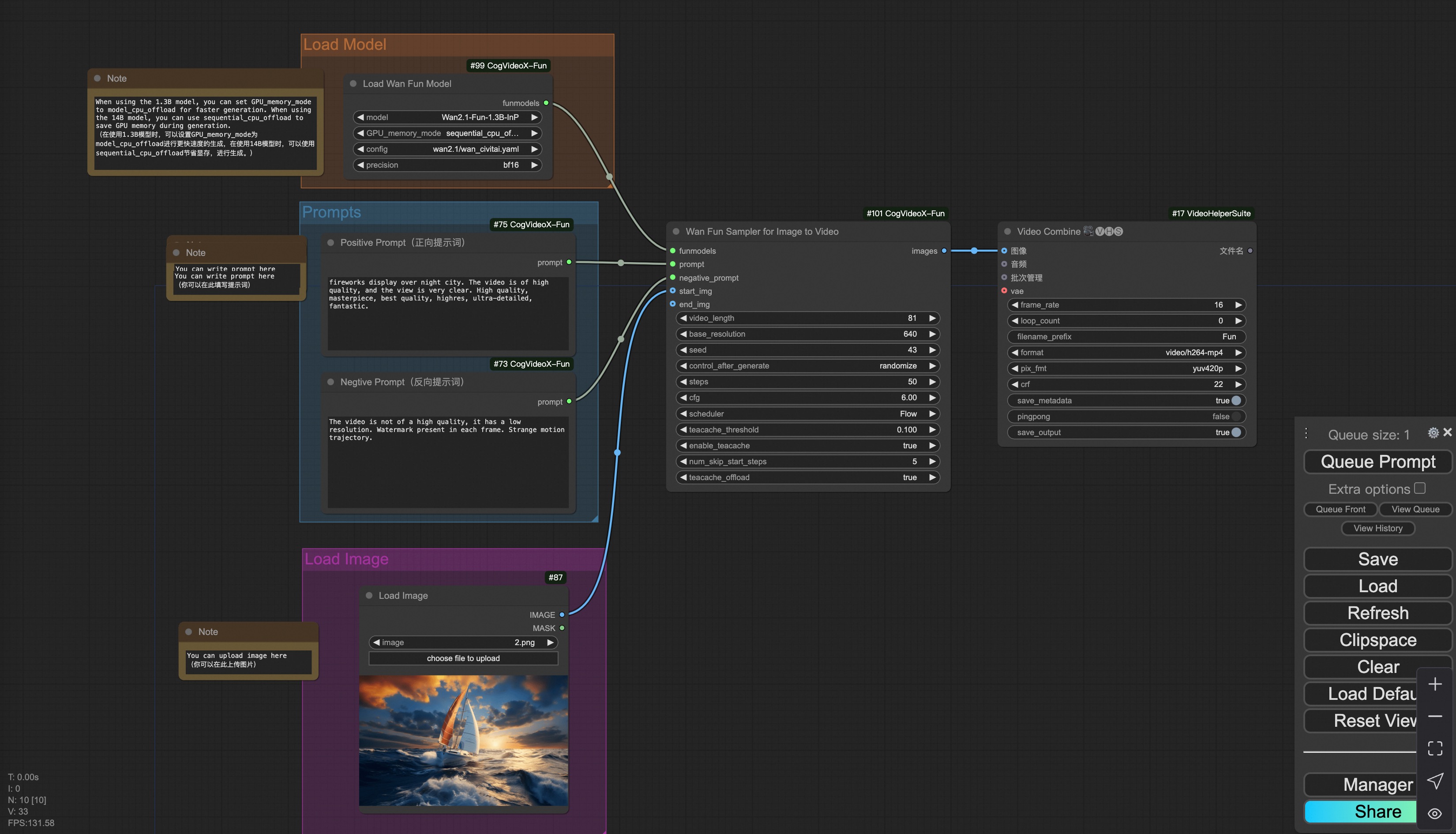
You can run the demo using following photo:

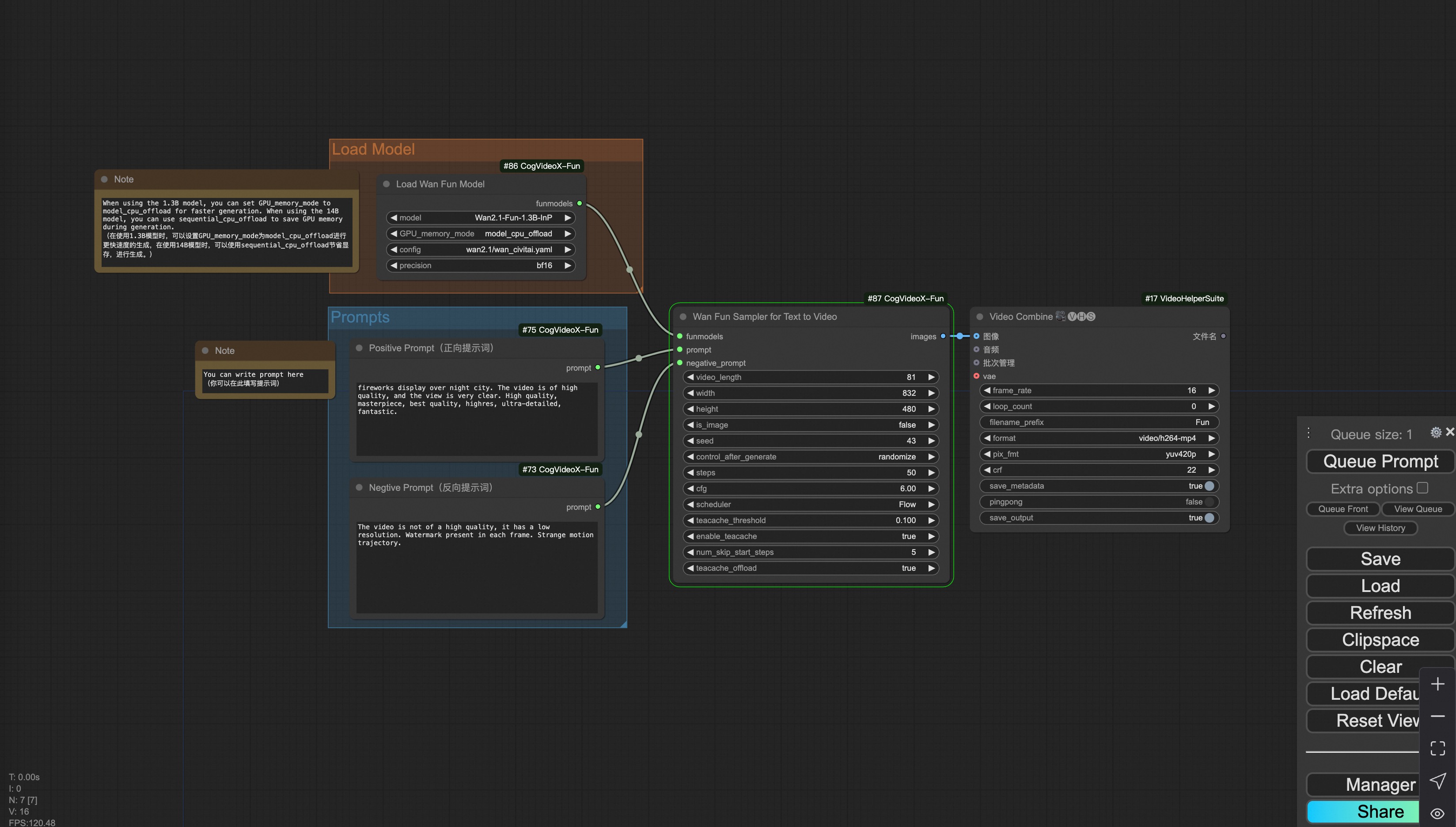
ii. Text to video generation
Download link for wan-fun.
iii. Trajectory Control Video Generation
Our user interface is shown as follows, this is the json:
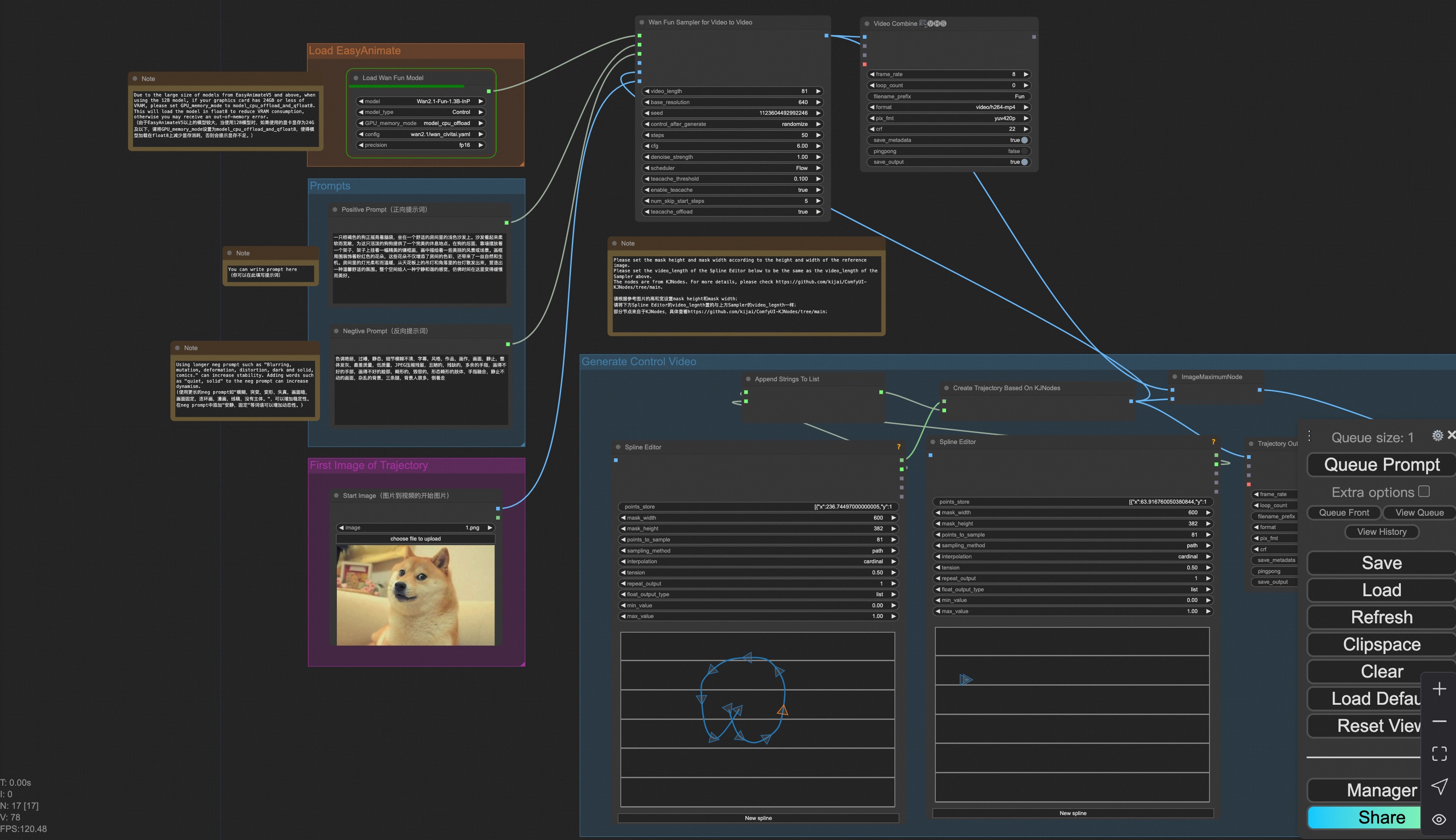
You can run a demo using the following photo:

iv. Control Video Generation
Our user interface is shown as follows, this is the json:
To facilitate usage, we have added several JSON configurations that automatically process input videos into the necessary control videos. These include canny processing, pose processing, and depth processing.
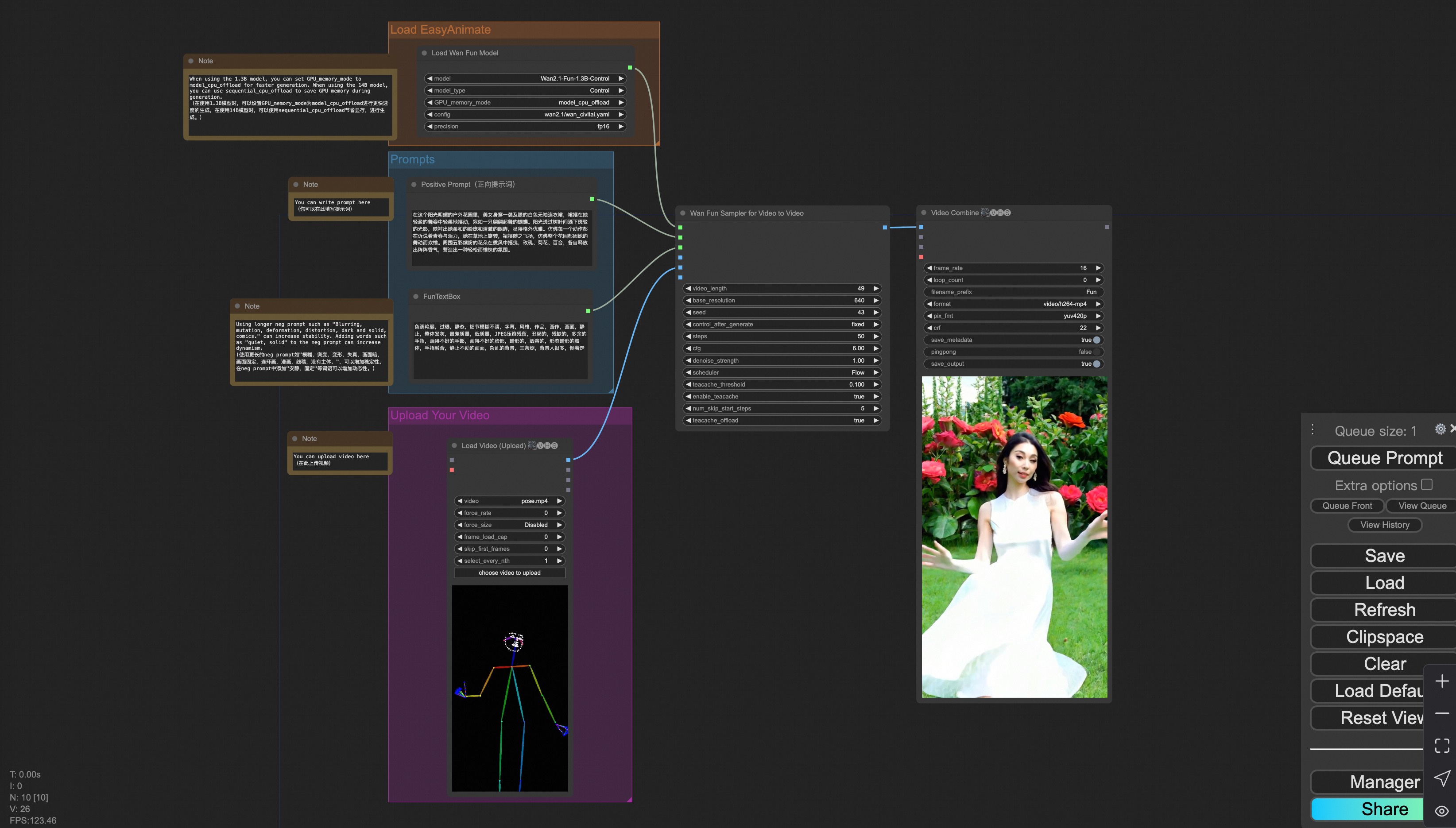
You can run a demo using the following video:
v. Control + Ref Video Generation
Our user interface is shown as follows, this is the json:
To facilitate usage, we have added several JSON configurations that automatically process input videos into the necessary control videos. These include pose processing, and depth processing.
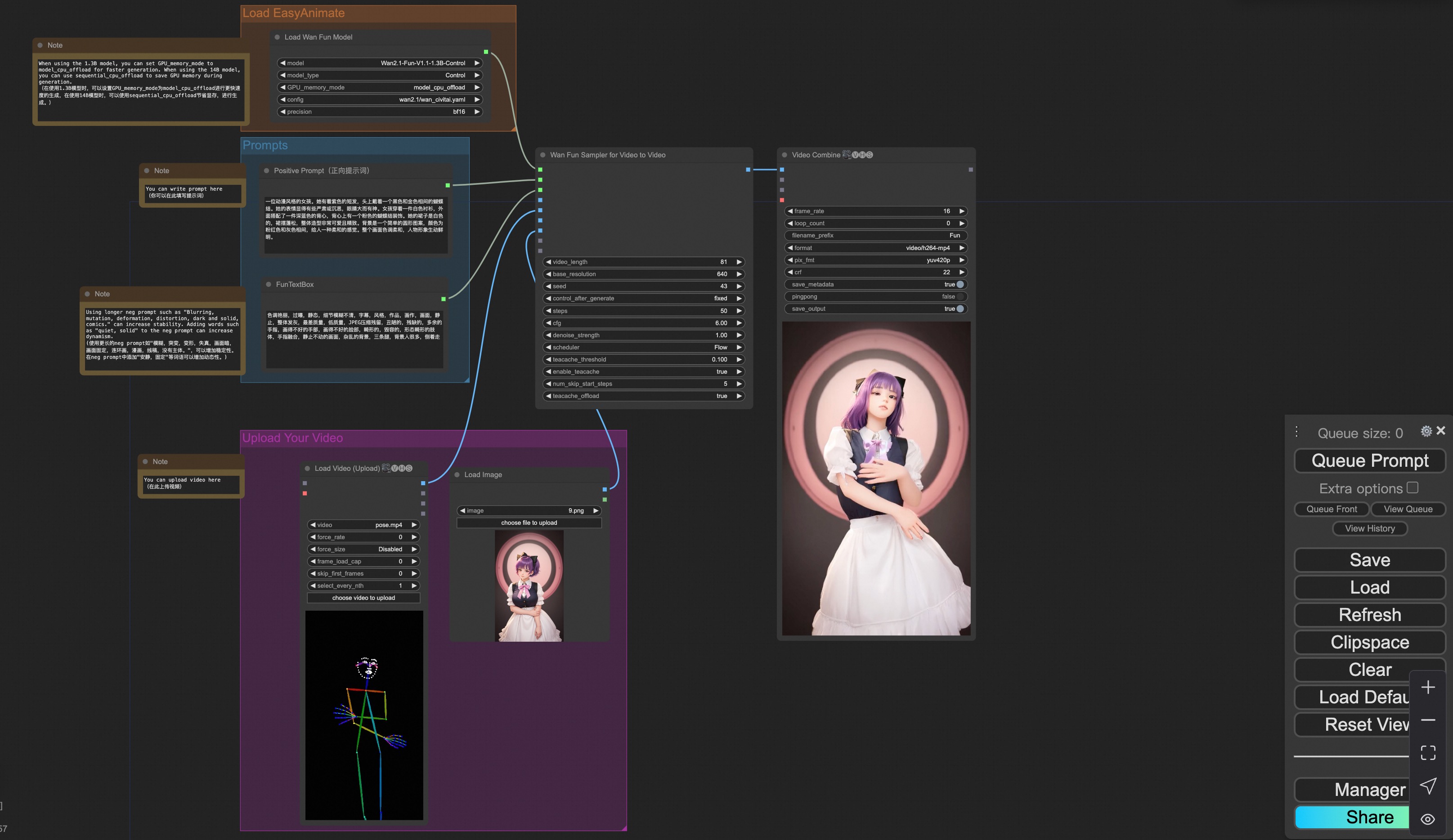
You can run a demo using the following video:

vi. Camera Control Video Generation
Our user interface is shown as follows, this is the json:
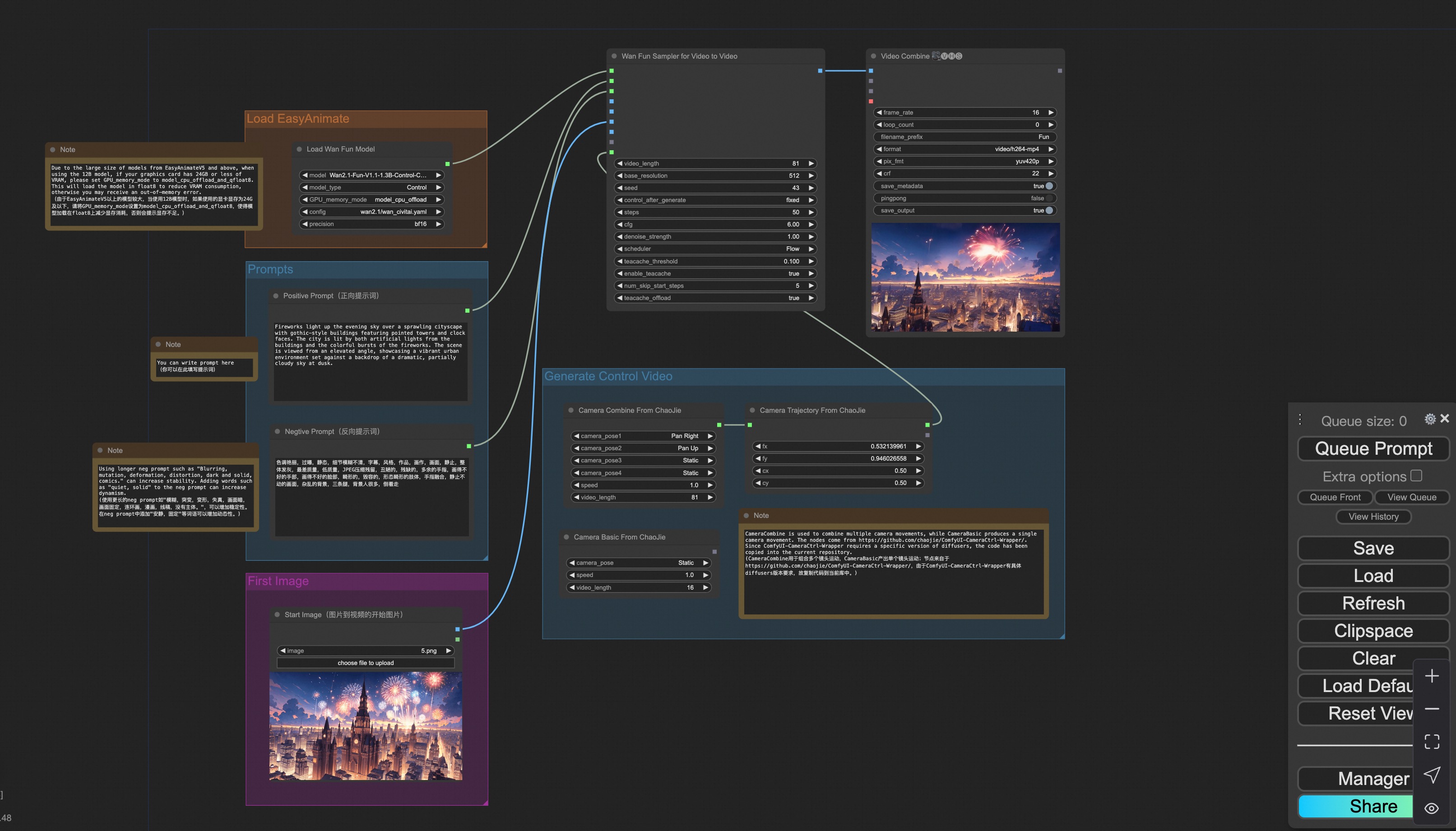
You can run a demo using the following photo:
2. Wan
i. Image to video generation
Download link for wan-fun.
Our ui is shown as follow:
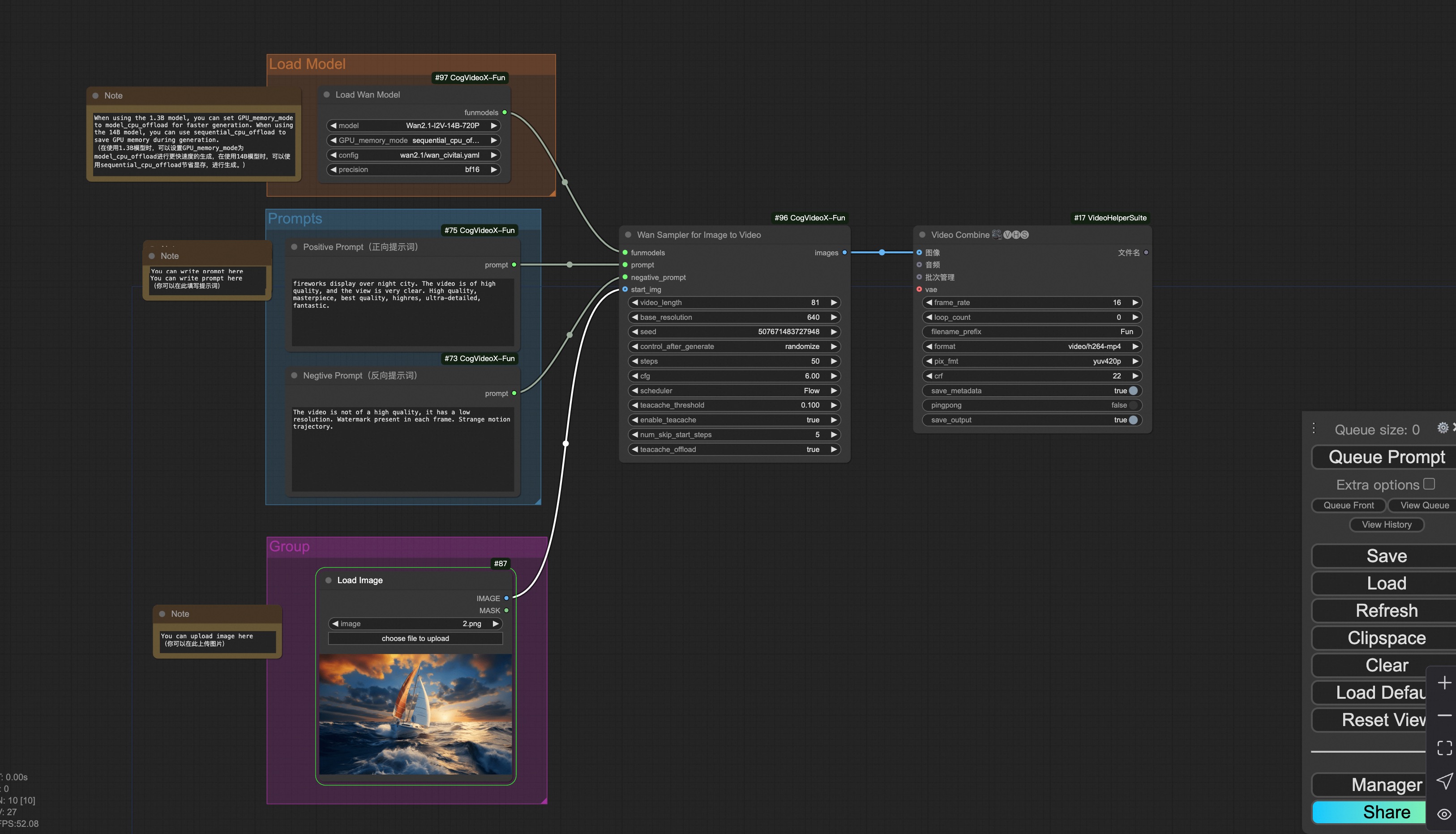
You can run the demo using following photo:
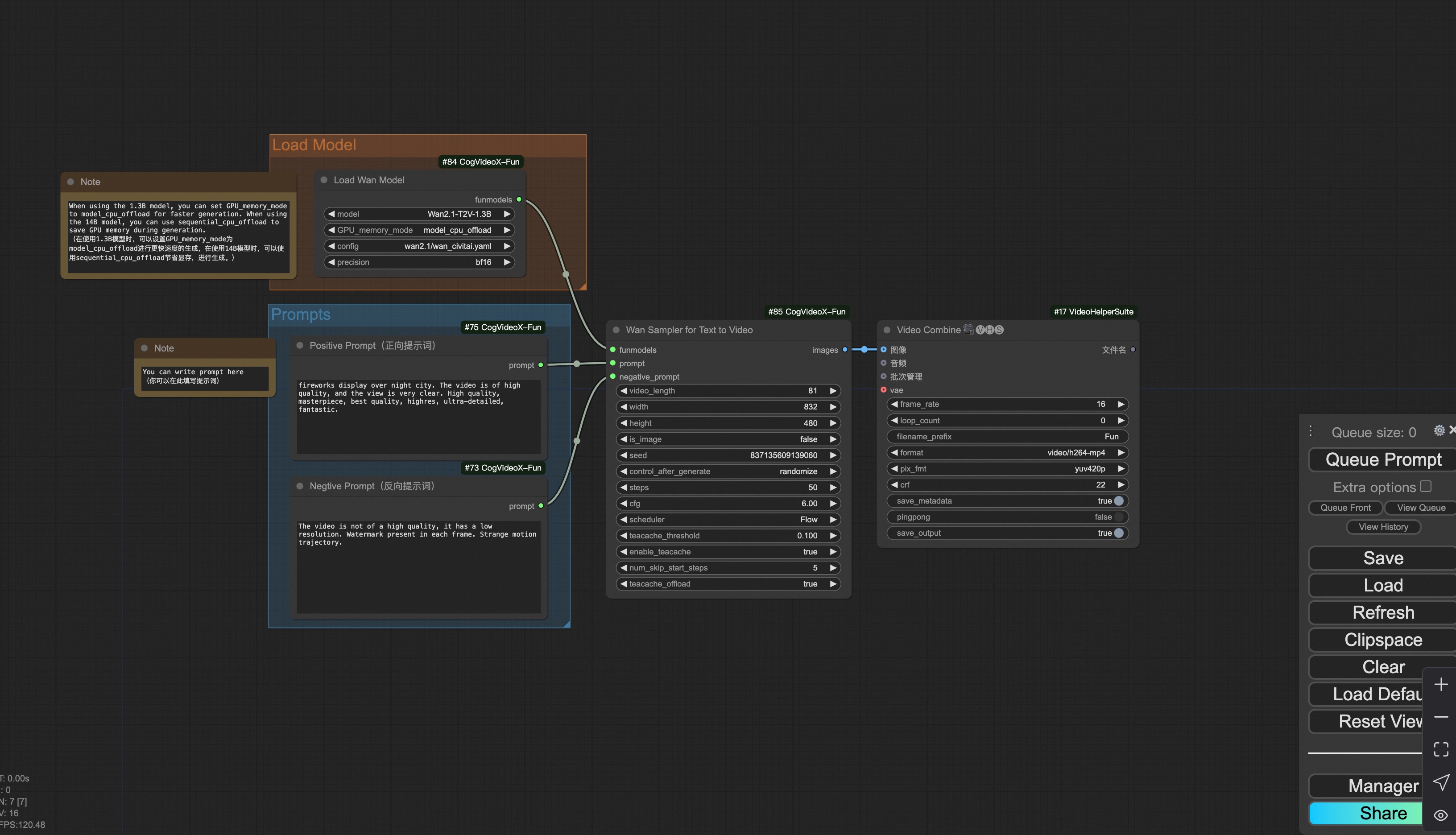
ii. Text to video generation
Download link for wan-fun.
3. CogVideoX-Fun
i. Video to video generation
Download link for v1.5.
Download link for v1.1.
Our ui is shown as follow:

You can run the demo using following video: demo video
ii. Image to video generation
Download link for v1.5.
Download link for v1.1.
Our ui is shown as follow:

You can run the demo using following photo:
iii. Text to video generation
Download link for v1.5.
Download link for v1.1.

iv. Control video generation
Download link for v1.1.
Our ui is shown as follow:

You can run the demo using following video: demo video
v. Lora usage.
Download link for v1.1.
Our ui is shown as follow:
