

| # Select Dropdown | |
| React component used to display a dropdown selector. | |
| It can be utilized via two different techniques: children components or an options array. These techniques are available because certain use cases prefer the "selection" logic to be built into `SelectDropdown`, while others prefer to explicitly define that logic elsewhere. | |
| --- | |
| ## Using Children | |
| The children technique is appropriate when you'd like to define the "selection" logic at the same point where `<SelectDropdown>` is implemented. | |
| A good example for this case is navigation. Sometimes the option that is selected is defined by the route, other times it's a state value, external prop, etc. | |
| ```jsx | |
| import SelectDropdown from 'calypso/components/select-dropdown'; | |
| export default function MyComponent() { | |
| return ( | |
| <SelectDropdown selectedText="Published"> | |
| <SelectDropdown.Item selected path="/published"> | |
| Published | |
| </SelectDropdown.Item> | |
| <SelectDropdown.Item path="/scheduled">Scheduled</SelectDropdown.Item> | |
| <SelectDropdown.Item path="/drafts">Drafts</SelectDropdown.Item> | |
| <SelectDropdown.Item path="/trashed">Trashed</SelectDropdown.Item> | |
| </SelectDropdown> | |
| ); | |
| } | |
| ``` | |
| The key here is that it's up to the parent component to explicitly define things like: which item is selected, what the selected text is (used in the dropdown header), and potentially `onClick` callbacks, etc. | |
| ### Props | |
| #### Select Dropdown | |
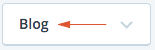
| `selectedText` | |
| Used for displaying the text on the dropdown header. | |
|  | |
| `selectedCount` | |
| Used for displaying the count on the dropdown header. | |
| `selectedIcon` | |
| Used for displaying an icon on the dropdown header. | |
| `className` | |
| Optional extra class(es) to be applied to the `.select-dropdown`. | |
| `tabIndex` | |
| Optional tabIndex setting to override tab order via keyboard navigation. By default this is set to `0` which simply puts the element in the tabbing flow according to the component's placement in the document. | |
| `disabled` | |
| Used to determine whether the select dropdown is in a disabled state. When disabled it will not respond to interaction and will render to appear disabled. | |
| `ariaLabel` | |
| Optional dropdown header label that can be used to improve the accessibility for screen readers. | |
| #### Dropdown Item | |
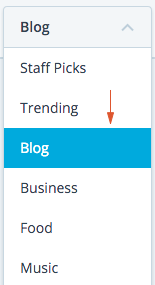
| `selected` | |
| Boolean representing the selected visual state. `selected={ true }` creates a blue background on the selected item. | |
| `count` | |
| Optional number to show a Count next to the item text. | |
|  | |
| `icon` | |
| Optional icon to show before the item text. | |
| `path` | |
| Optional URL to navigate to when option is clicked. | |
| `disabled` | |
| Optional bool to disable dropdown item. | |
| `onClick` | |
| Optional callback that will be applied when a `SelectDropdown.Item` has been clicked. This could be used for updating a parent's state, tracking analytics, etc. | |
| `ariaLabel` | |
| Optional dropdown item label that can be used to improve the accessibility for screen readers. | |
| ### Label | |
| An item "label" can be added like as a sibling to `SelectDropdown.Item`. The purpose | |
| of this `SelectDropdown.Label` component is used to display a static item, for example, to group | |
| items. | |
| ### Separator | |
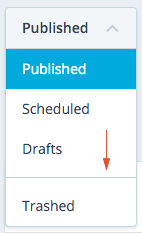
| As a sibling to `SelectDropdown.Item`, an item "separator" or horizontal line can be used to visually separate items. | |
|  | |
| ```js | |
| import SelectDropdown from 'calypso/components/select-dropdown'; | |
| export default class extends React.Component { | |
| // ... | |
| render() { | |
| return ( | |
| <SelectDropdown selectedText="Published"> | |
| <SelectDropdown.Label> | |
| <em>Post status</em> | |
| </SelectDropdown.Label> | |
| <SelectDropdown.Item selected path="/published"> | |
| Published | |
| </SelectDropdown.Item> | |
| <SelectDropdown.Item path="/scheduled">Scheduled</SelectDropdown.Item> | |
| <SelectDropdown.Item path="/drafts">Drafts</SelectDropdown.Item> | |
| <SelectDropdown.Separator /> | |
| <SelectDropdown.Item path="/trashed">Trashed</SelectDropdown.Item> | |
| </SelectDropdown> | |
| ); | |
| } | |
| } | |
| ``` | |
| --- | |
| ## Using options array | |
| `SelectDropdown` can also be used by passing in an `options` array as a prop. This technique is great for situations where you don't want to explicitly define things like what happens when an item is clicked or which item is currently selected, etc. | |
| A good example for this case is a form element. You don't want to have to write the logic for updating the component when a new selection is made, but you might want to hook into certain events like: when a new selection is made, what was the option? | |
| > **NOTE** - there is still more work here in order to be fully functional as a form element, not recommended use case... yet. | |
| ```js | |
| import SelectDropdown from 'calypso/components/select-dropdown'; | |
| const options = [ | |
| { label: 'Post status', isLabel: true }, | |
| { value: 'published', label: 'Published' }, | |
| { value: 'scheduled', label: 'Scheduled' }, | |
| { value: 'drafts', label: 'Drafts' }, | |
| { value: 'trashed', label: 'Trashed' }, | |
| ]; | |
| export default class extends React.Component { | |
| // ... | |
| handleOnSelect = ( option ) => { | |
| console.log( 'selected option:', option ); // full object of selected option | |
| }; | |
| render() { | |
| return <SelectDropdown options={ options } onSelect={ this.handleOnSelect } />; | |
| } | |
| } | |
| ``` | |
| Note that all the "selection" logic will be applied in `SelectDropdown` itself using a simple `selected` value comparison in state. It will update itself when an option has been clicked. | |
| ### Props | |
| `options` | |
| The main data set for rendering out the various options. | |
| ```js | |
| const options = [ | |
| { | |
| value: 'the value', // *required* - (string) tracked by component | |
| label: 'the label', // *required* - (string) displayed to user | |
| isLabel: true, // optional - (boolean) set this item like a static label | |
| path: '/', // optional - (string) URL to navigate when clicked | |
| }, | |
| // ... | |
| ]; | |
| ``` | |
| `initialSelected` | |
| Optional string representing the initial selected option's `value`. Default will be the first option's `value`. | |
| `compact` | |
| Optional boolean indicating the dropdown will be rendered in compact mode | |
| `onSelect` | |
| Optional callback that will be run whenever a new selection has been clicked. | |
| `onToggle` | |
| Optional callback that will be run after the dropdown is opened or closed. An event object is passed, including a `target` property equal to the `SelectDropdown` React element instance, and `open` equal to the current toggle state of the dropdown. | |
| ### Label | |
| Adding `isLabel` key set to `true` into the item object will create a `SelectDropdown.Label` component. | |
| ```js | |
| const options = [ | |
| { label: 'Post status', isLabel: true }, | |
| { value: 'published', label: 'Published' }, | |
| { value: 'scheduled', label: 'Scheduled' }, | |
| { value: 'drafts', label: 'Drafts' }, | |
| null, | |
| { value: 'trashed', label: 'Trashed' }, | |
| ]; | |
| ``` | |
| ### Separator | |
| Using a `null` or `false` item in the `options` will render an item "separator" or horizontal line can be used to visually separate items. | |
|  | |
| ```js | |
| const options = [ | |
| { value: 'published', label: 'Published' }, | |
| { value: 'scheduled', label: 'Scheduled' }, | |
| { value: 'drafts', label: 'Drafts' }, | |
| null, | |
| { value: 'trashed', label: 'Trashed' }, | |
| ]; | |
| ``` | |