
issue_owner_repo listlengths 2 2 | issue_body stringlengths 0 262k ⌀ | issue_title stringlengths 1 1.02k | issue_comments_url stringlengths 53 116 | issue_comments_count int64 0 2.49k | issue_created_at stringdate 1999-03-17 02:06:42 2025-06-23 11:41:49 | issue_updated_at stringdate 2000-02-10 06:43:57 2025-06-23 11:43:00 | issue_html_url stringlengths 34 97 | issue_github_id int64 132 3.17B | issue_number int64 1 215k |
|---|---|---|---|---|---|---|---|---|---|
[
"shd101wyy",
"vscode-markdown-preview-enhanced"
] | I connot get pdf with Chrome. It will be like

I lost my formula | wrong in getting pdf with Chrome | https://api.github.com/repos/shd101wyy/vscode-markdown-preview-enhanced/issues/638/comments | 3 | 2022-11-11T21:55:58Z | 2022-12-01T14:18:17Z | https://github.com/shd101wyy/vscode-markdown-preview-enhanced/issues/638 | 1,446,038,365 | 638 |
[
"shd101wyy",
"vscode-markdown-preview-enhanced"
] | null | wrong in getting pdf | https://api.github.com/repos/shd101wyy/vscode-markdown-preview-enhanced/issues/637/comments | 0 | 2022-11-11T21:51:38Z | 2022-11-11T21:51:38Z | https://github.com/shd101wyy/vscode-markdown-preview-enhanced/issues/637 | 1,446,035,464 | 637 |
[
"shd101wyy",
"vscode-markdown-preview-enhanced"
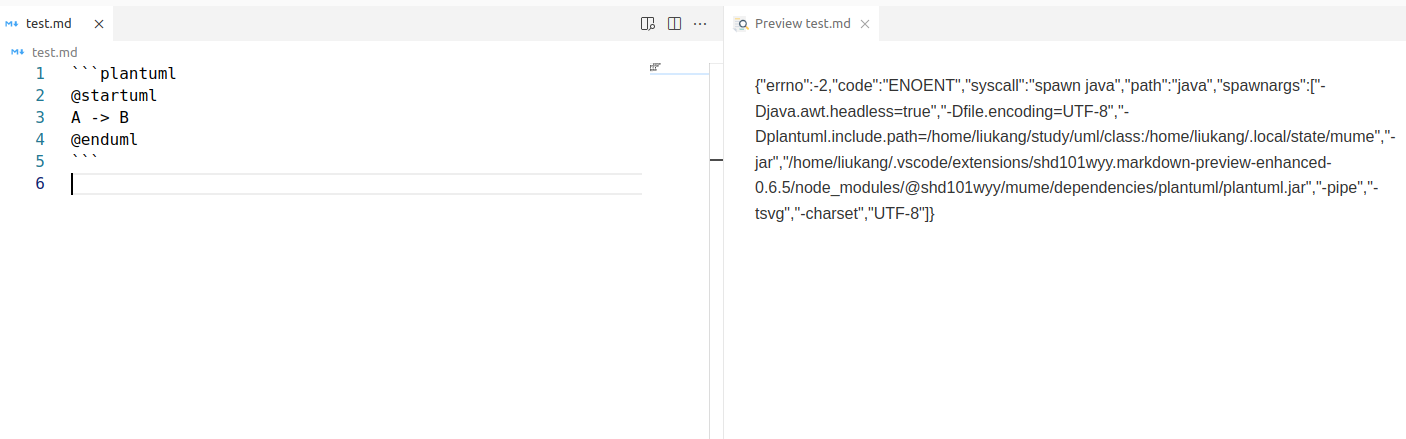
] | 
| ubuntu 预览报错 | https://api.github.com/repos/shd101wyy/vscode-markdown-preview-enhanced/issues/782/comments | 1 | 2022-11-11T06:49:19Z | 2023-08-23T02:20:53Z | https://github.com/shd101wyy/vscode-markdown-preview-enhanced/issues/782 | 1,862,443,136 | 782 |
[
"shd101wyy",
"vscode-markdown-preview-enhanced"
] | I'm using this package. it is so useful. However local style does not work recently. It is supposed that my less file is imported. | Local style file does not work | https://api.github.com/repos/shd101wyy/vscode-markdown-preview-enhanced/issues/783/comments | 0 | 2022-11-11T02:38:21Z | 2023-08-23T02:20:55Z | https://github.com/shd101wyy/vscode-markdown-preview-enhanced/issues/783 | 1,862,443,159 | 783 |
[
"shd101wyy",
"vscode-markdown-preview-enhanced"
] | ````
> [!NOTE]
> Information the user should notice even if skimming
:::note
This is a note
:::
> **alert#9a6700;Warning**
> This is a warning
> [!Note] Callout can have an _optional_ title
> Callouts can also be nested:
> > [!Hint]- You can also create foldable callouts with `+` or `-`
> > This is h... | support at least one version of note block. Please add support for at least one of these note blocks | https://api.github.com/repos/shd101wyy/vscode-markdown-preview-enhanced/issues/636/comments | 0 | 2022-11-07T22:46:37Z | 2022-11-07T22:46:37Z | https://github.com/shd101wyy/vscode-markdown-preview-enhanced/issues/636 | 1,439,112,236 | 636 |
[
"shd101wyy",
"vscode-markdown-preview-enhanced"
] | In the following md doc, the puml is rendered correctly, but python or bash block is not rendered or executed. I already enabled the "Enable Script Execution".
````
--
presentation:
width: 800
height: 600
---
<!-- slide -->
## hello
```puml
@startuml
skinparam backgroundcolor transparent
A ->... | Under presentation mode, no code block is getting executed. What did I miss? | https://api.github.com/repos/shd101wyy/vscode-markdown-preview-enhanced/issues/635/comments | 0 | 2022-11-07T22:43:55Z | 2022-11-07T22:43:55Z | https://github.com/shd101wyy/vscode-markdown-preview-enhanced/issues/635 | 1,439,109,841 | 635 |
[
"shd101wyy",
"vscode-markdown-preview-enhanced"
] | In the following md doc, the puml is rendered correctly, but python or bash block is not rendered or executed. I already enabled the "Enable Script Execution".
````
--
presentation:
width: 800
height: 600
---
<!-- slide -->
## hello
```puml
@startuml
skinparam backgroundcolor transparent
A ->... | Under presentation mode, no code block is getting executed. What did I miss? | https://api.github.com/repos/shd101wyy/vscode-markdown-preview-enhanced/issues/784/comments | 1 | 2022-11-07T22:14:23Z | 2023-08-23T02:20:58Z | https://github.com/shd101wyy/vscode-markdown-preview-enhanced/issues/784 | 1,862,443,184 | 784 |
[
"shd101wyy",
"vscode-markdown-preview-enhanced"
] | writing reading notes, the document is quite long (but totally valid MD, no warnings), and I see weird `<p data-line="1691" class="sync-line" style="margin:0;"></p>` lines at the end of every code block from some point in the file. The screenshot will explain it better
 -> PDF,
this is my md code:

and this is my perview code:

Open file upload interface:

正常:
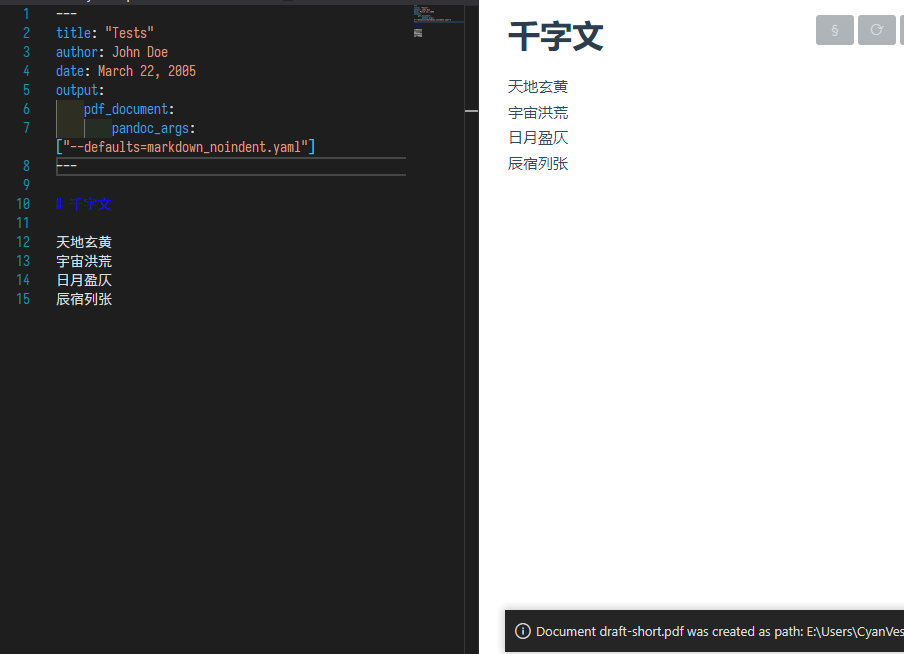
我用命令行直接运行pandoc就不存在这个问题 | 关于Pandoc转换对标头的要求 | https://api.github.com/repos/shd101wyy/vscode-markdown-preview-enhanced/issues/791/comments | 0 | 2022-10-22T05:07:22Z | 2023-08-23T02:21:13Z | https://github.com/shd101wyy/vscode-markdown-preview-enhanced/issues/791 | 1,862,443,368 | 791 |
[
"shd101wyy",
"vscode-markdown-preview-enhanced"
] | Can I change `assets` to `assets/images` in ImageHelper? Just provide a setting for use to set path. I think it should be not very hard. Thanks! | [feature] Change ImageHelper path: assets | https://api.github.com/repos/shd101wyy/vscode-markdown-preview-enhanced/issues/792/comments | 0 | 2022-10-22T04:40:07Z | 2023-08-23T02:21:16Z | https://github.com/shd101wyy/vscode-markdown-preview-enhanced/issues/792 | 1,862,443,393 | 792 |
[
"shd101wyy",
"vscode-markdown-preview-enhanced"
] | 现在vscode里面有有跟随系统主题的功能,我用Auto Dark Mode软件实现每天白天用浅色主题晚上用黑色主题,希望插件可以添加一个配置:当vscode是浅色时使用的css、当vscode是深色时使用的css,希望可以在vscode切换主题时插件也可以自动切换,谢谢! | 请求添加“css样式颜色跟随系统设置(或针对vscode深浅色配置不同css)”功能 | https://api.github.com/repos/shd101wyy/vscode-markdown-preview-enhanced/issues/793/comments | 1 | 2022-10-20T12:49:59Z | 2025-03-10T02:16:58Z | https://github.com/shd101wyy/vscode-markdown-preview-enhanced/issues/793 | 1,862,443,423 | 793 |
[
"shd101wyy",
"vscode-markdown-preview-enhanced"
] | When I user code below within vscode, the preview does'nt shows right:
There should be a arrow-line starts from 'pp_signal_t ::algo<enum>', ends at head of 'precess_algorithm_t', but it's actually not start from the right position of the member algo<enum>, it's start form the bottom of 'pp_signal_t ' outer border.
... | wrong display with plantuml | https://api.github.com/repos/shd101wyy/vscode-markdown-preview-enhanced/issues/629/comments | 0 | 2022-10-17T03:53:45Z | 2022-10-17T03:57:44Z | https://github.com/shd101wyy/vscode-markdown-preview-enhanced/issues/629 | 1,410,846,550 | 629 |
[
"shd101wyy",
"vscode-markdown-preview-enhanced"
] | This is a spawn of shd101wyy/vscode-markdown-preview-enhanced#934, since using mathjax with a mathematics paper is as slow as (maybe even slower) compiling with latex.
Using katex together with the pandoc parser "hangs" the preview. The problem is that pandoc moved from using the katex autorenderer to injecting the ... | Pandoc parser breaks katex | https://api.github.com/repos/shd101wyy/vscode-markdown-preview-enhanced/issues/794/comments | 0 | 2022-10-13T09:22:35Z | 2023-08-23T02:26:46Z | https://github.com/shd101wyy/vscode-markdown-preview-enhanced/issues/794 | 1,862,443,453 | 794 |
[
"shd101wyy",
"vscode-markdown-preview-enhanced"
] | 在vs code里下载了markdown preview enhanced,写了文字,打开预览,预览界面的字太大了,不像markdown preview enhanced介绍页面那样,字的大小合适,如何调整?
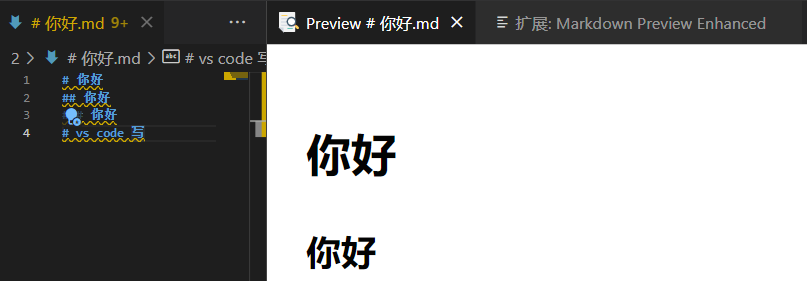
| 预览界面字太大,如何调小 | https://api.github.com/repos/shd101wyy/vscode-markdown-preview-enhanced/issues/795/comments | 1 | 2022-10-12T08:32:11Z | 2023-08-23T02:21:24Z | https://github.com/shd101wyy/vscode-markdown-preview-enhanced/issues/795 | 1,862,443,493 | 795 |
[
"shd101wyy",
"vscode-markdown-preview-enhanced"
] | 输入命令:`Markdown Preview Enhanced: Image Helper`
报错:`Command 'Markdown Preview Enhanced: Image Helper' resulted in an error (Cannot read properties of undefined (reading 'document'))`
Vscode Mac 版 Version: 1.72.0 | image helper 无法打开 | https://api.github.com/repos/shd101wyy/vscode-markdown-preview-enhanced/issues/796/comments | 0 | 2022-10-11T14:36:44Z | 2023-08-23T02:21:26Z | https://github.com/shd101wyy/vscode-markdown-preview-enhanced/issues/796 | 1,862,443,518 | 796 |
[
"shd101wyy",
"vscode-markdown-preview-enhanced"
] | pikchr language is similar to 'pic' and could be useful for simple diagrams.
It seems quite embeddable in Markdown:
https://fossil-scm.org/home/doc/trunk/www/pikchr.md
| Support pikchr language for diagrama | https://api.github.com/repos/shd101wyy/vscode-markdown-preview-enhanced/issues/797/comments | 0 | 2022-10-06T18:00:55Z | 2023-08-23T02:21:28Z | https://github.com/shd101wyy/vscode-markdown-preview-enhanced/issues/797 | 1,862,443,546 | 797 |
[
"shd101wyy",
"vscode-markdown-preview-enhanced"
] | 1. When I try to type in a multiline formula, it seems that the height of every line can't autofit, i.e. a formula line will be overlaped if a line nearby uses a "big" symbol like $\int$. Example is below:

... | Imperfect display of formulas | https://api.github.com/repos/shd101wyy/vscode-markdown-preview-enhanced/issues/798/comments | 0 | 2022-10-04T16:03:09Z | 2023-08-28T23:28:11Z | https://github.com/shd101wyy/vscode-markdown-preview-enhanced/issues/798 | 1,862,443,582 | 798 |
[
"shd101wyy",
"vscode-markdown-preview-enhanced"
] | The C4 Context Diagram is missing from the bundled mermaid plugin. Maybe the plugin needs to be updated.
```
C4Context
title System Context diagram for Internet Banking System
Enterprise_Boundary(b0, "BankBoundary0") {
Person(customerA, "Banking Customer A", "A customer of the bank, with personal ban... | mermaid / C4Context Diagram Syntax is missing | https://api.github.com/repos/shd101wyy/vscode-markdown-preview-enhanced/issues/628/comments | 0 | 2022-10-02T09:23:18Z | 2022-10-02T09:23:18Z | https://github.com/shd101wyy/vscode-markdown-preview-enhanced/issues/628 | 1,393,699,459 | 628 |
[
"shd101wyy",
"vscode-markdown-preview-enhanced"
] | The bundled plantuml.jar is from PlantUML 1.2021.12.
So you get errors that contain a version warning like this:
```
error:
PlantUML 1.2021.12
This version of PlantUML is 219 days old, so you should
consider upgrading from [plantuml.com/download](https://plantuml.com/download)
[From string (line 2) ]
@start... | PlantUML version is a bit old | https://api.github.com/repos/shd101wyy/vscode-markdown-preview-enhanced/issues/799/comments | 1 | 2022-10-01T14:08:37Z | 2023-08-23T02:21:32Z | https://github.com/shd101wyy/vscode-markdown-preview-enhanced/issues/799 | 1,862,443,610 | 799 |
[
"shd101wyy",
"vscode-markdown-preview-enhanced"
] | Hello,
Following code fences are not rendered:
colons fence is not rendered at all:
```bash
:::{note}
foobar
:::
```
backticks fence is render as `>`:
````bash
```{note}
foobar
```
````
only `!` is render well:
```bash
!!! note
foobar
```
' and cannot preview it.
- VSCode version 1.71.0
- Markdown Preview Enhanced v0.6.3
Capture
 to VS Code's built-in markdown preview.](https://marketplace.visualstudio.com/items?itemName=phoihos.markdown-markmap)[https://markmap.js.org/](https://markmap.js.org/) | mindmap with markmap.js | https://api.github.com/repos/shd101wyy/vscode-markdown-preview-enhanced/issues/624/comments | 1 | 2022-09-11T06:13:44Z | 2022-09-13T14:24:25Z | https://github.com/shd101wyy/vscode-markdown-preview-enhanced/issues/624 | 1,368,844,405 | 624 |
[
"shd101wyy",
"vscode-markdown-preview-enhanced"
] | I customized parser.js and style.less and added a new file to display some colored labels. It worked well when I open preview for some small markdown files; However, when I put them in one file, the preview window became something shown in screenshot, or simply got stuck. This couldn't be solved until I run the "Extens... | MPE got stuck while loading large .md files. | https://api.github.com/repos/shd101wyy/vscode-markdown-preview-enhanced/issues/623/comments | 0 | 2022-09-09T08:16:04Z | 2022-09-09T08:16:04Z | https://github.com/shd101wyy/vscode-markdown-preview-enhanced/issues/623 | 1,367,460,776 | 623 |
[
"shd101wyy",
"vscode-markdown-preview-enhanced"
] | Markdown preview enhanced follows internal links fine. Ie, you click on a link and it will open both the file and the preview of the markdown. However, what would be absolutely outstanding is to have a `back` capability. Ie, it would be possible click back and get to the initial document from where you clicked the link... | Following internal links with back capability | https://api.github.com/repos/shd101wyy/vscode-markdown-preview-enhanced/issues/622/comments | 0 | 2022-09-08T15:52:17Z | 2022-09-08T15:52:17Z | https://github.com/shd101wyy/vscode-markdown-preview-enhanced/issues/622 | 1,366,601,591 | 622 |
[
"shd101wyy",
"vscode-markdown-preview-enhanced"
] | When exporting a pdf, if the table contains <img /> tags, the images in the pdf are rendered abnormally.
md:
<img width="1139" alt="image" src="https://user-images.githubusercontent.com/24382022/188549004-7a80c32a-0252-4828-a94d-b1fac961e5c1.png">
html:
<img width="867" alt="image" src="https://user-images.githu... | pdf table img error | https://api.github.com/repos/shd101wyy/vscode-markdown-preview-enhanced/issues/621/comments | 0 | 2022-09-06T04:43:53Z | 2022-09-06T04:53:31Z | https://github.com/shd101wyy/vscode-markdown-preview-enhanced/issues/621 | 1,362,697,091 | 621 |
[
"shd101wyy",
"vscode-markdown-preview-enhanced"
] | Hey all, I was wondering if there was any support for any quick and dirty variables in this previewer, a la: https://www.brianchildress.co/variables-in-markdown/ | Does this previewer support any kind of variables? | https://api.github.com/repos/shd101wyy/vscode-markdown-preview-enhanced/issues/803/comments | 0 | 2022-09-02T23:44:40Z | 2023-08-23T02:21:41Z | https://github.com/shd101wyy/vscode-markdown-preview-enhanced/issues/803 | 1,862,443,726 | 803 |
[
"shd101wyy",
"vscode-markdown-preview-enhanced"
] | Markdown example:
```markdown
# 123
## 456
```
At the top of the preview panel the following message gets shown:
```
[WARNING] Duplicate identifier 'section' at line 14 column 1
```
Disabling `auto_identifiers` or enabling `gfm_auto_identifiers` doesn't affect this at all — even though when I run pan... | "Duplicate identifiers" warning on numerical headers — even with auto_identifiers disabled | https://api.github.com/repos/shd101wyy/vscode-markdown-preview-enhanced/issues/620/comments | 0 | 2022-08-31T19:11:53Z | 2022-08-31T19:11:53Z | https://github.com/shd101wyy/vscode-markdown-preview-enhanced/issues/620 | 1,357,751,696 | 620 |
[
"shd101wyy",
"vscode-markdown-preview-enhanced"
] | @import "test.js"导入文件无法显示,`py、csv、png`可以正常
<img width="530" alt="image" src="https://user-images.githubusercontent.com/42070770/187625046-83146b1c-d8e9-47d4-9e9a-ef5c8ff8f7a0.png">
| 导入文件无法显示 | https://api.github.com/repos/shd101wyy/vscode-markdown-preview-enhanced/issues/804/comments | 3 | 2022-08-31T08:01:27Z | 2023-08-23T02:21:43Z | https://github.com/shd101wyy/vscode-markdown-preview-enhanced/issues/804 | 1,862,443,757 | 804 |
[
"shd101wyy",
"vscode-markdown-preview-enhanced"
] | Hope admonitions can be rendered, in a future version. It has been very helpful to my work and I am sure it will be helpful to everyone.
```
Admonitions, also known as call-outs, are an excellent choice for including side content without significantly interrupting the document flow. Material for MkDocs provides sev... | Hope admonitions can be rendered, in a future version | https://api.github.com/repos/shd101wyy/vscode-markdown-preview-enhanced/issues/619/comments | 0 | 2022-08-27T18:26:38Z | 2022-08-27T18:26:38Z | https://github.com/shd101wyy/vscode-markdown-preview-enhanced/issues/619 | 1,353,113,394 | 619 |
[
"shd101wyy",
"vscode-markdown-preview-enhanced"
] | Markdown links to other local markddown files (e.g. ) works fine; however, it does not work if I'm editing files using Microsoft's 'Remote Development' extensions. In that case, Markdown Preview Enhanced seems to think the link is referencing a web site rather than the local (to the ssh remote system) file. It attempts... | Links not working over vscode-remote+ssh | https://api.github.com/repos/shd101wyy/vscode-markdown-preview-enhanced/issues/618/comments | 0 | 2022-08-17T21:58:38Z | 2022-08-17T21:58:38Z | https://github.com/shd101wyy/vscode-markdown-preview-enhanced/issues/618 | 1,342,330,336 | 618 |
[
"shd101wyy",
"vscode-markdown-preview-enhanced"
] | I've installed the latest version via VSCode but open trying to open the preview, I receive this error:
```
Command 'Markdown: Markdown Preview Enhanced: Open Preview' resulted in an error (command 'markdown-preview-enhanced.openPreview' not found)
```
I've tried uninstalling, re-installing, and `rm -rf ~/.vsco... | Command 'Markdown: Markdown Preview Enhanced: Open Preview' resulted in an error (command 'markdown-preview-enhanced.openPreview' not found) | https://api.github.com/repos/shd101wyy/vscode-markdown-preview-enhanced/issues/617/comments | 2 | 2022-08-17T15:18:41Z | 2022-11-06T09:22:35Z | https://github.com/shd101wyy/vscode-markdown-preview-enhanced/issues/617 | 1,341,931,870 | 617 |
[
"shd101wyy",
"vscode-markdown-preview-enhanced"
] | 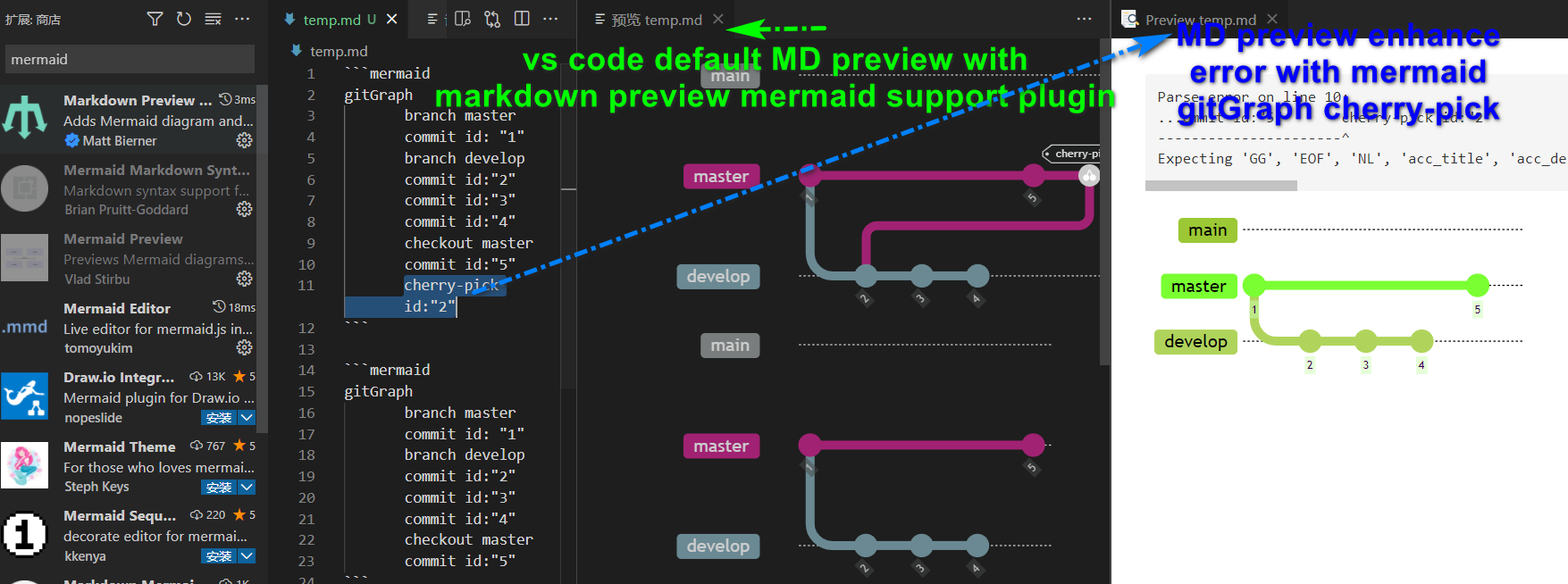
| mermaid cherry-pick cmd error | https://api.github.com/repos/shd101wyy/vscode-markdown-preview-enhanced/issues/805/comments | 0 | 2022-08-15T08:16:33Z | 2023-08-23T02:21:45Z | https://github.com/shd101wyy/vscode-markdown-preview-enhanced/issues/805 | 1,862,443,780 | 805 |
[
"shd101wyy",
"vscode-markdown-preview-enhanced"
] | Vscode has the extension: [Modelica](https://marketplace.visualstudio.com/items?itemName=SimplyDanny.modelica). Follow the [link ](https://squidfunk.github.io/mkdocs-material/reference/code-blocks/)in [markdown-basics](https://shd101wyy.github.io/markdown-preview-enhanced/#/zh-cn/markdown-basics) page, I find the[list ... | Need the syntax highlighting of modelica language | https://api.github.com/repos/shd101wyy/vscode-markdown-preview-enhanced/issues/806/comments | 0 | 2022-08-09T07:30:18Z | 2023-08-23T02:21:47Z | https://github.com/shd101wyy/vscode-markdown-preview-enhanced/issues/806 | 1,862,443,803 | 806 |
[
"shd101wyy",
"vscode-markdown-preview-enhanced"
] | A math expression such as $p(x|y)$ in the table will cause a bad rendering, since there is a `|` in the expression. Another unserious problem is that the table could not have an empty cell. | Bug about math expressions in table | https://api.github.com/repos/shd101wyy/vscode-markdown-preview-enhanced/issues/616/comments | 0 | 2022-08-08T03:54:46Z | 2022-08-08T03:54:46Z | https://github.com/shd101wyy/vscode-markdown-preview-enhanced/issues/616 | 1,331,286,470 | 616 |
[
"shd101wyy",
"vscode-markdown-preview-enhanced"
] | 点赞👍 这个插件太棒了!
great and neat job!
----
Currently, it seems that I have to modify/overwrite themes in the predefined preview theme list to call the custom CSS.
👍 I wonder if it's ok for me to add my custom theme to the list here.

| header id rendered erroneous format for headers with dash (-) with trailing and leading whitespace | https://api.github.com/repos/shd101wyy/vscode-markdown-preview-enhanced/issues/807/comments | 0 | 2022-08-04T05:27:44Z | 2023-08-23T02:21:50Z | https://github.com/shd101wyy/vscode-markdown-preview-enhanced/issues/807 | 1,862,443,829 | 807 |
[
"shd101wyy",
"vscode-markdown-preview-enhanced"
] | Dear @shd101wyy:
MPE works well without front matter.
However, when the front matter is added, I can not get the correct preview.
<img width="149" alt="image" src="https://user-images.githubusercontent.com/11893394/181704531-8679069f-f08a-42da-9733-e8ef6d4db749.png">
<img width="208" alt="image" src="https://use... | Front matter can not be resolve? | https://api.github.com/repos/shd101wyy/vscode-markdown-preview-enhanced/issues/808/comments | 2 | 2022-07-29T07:26:13Z | 2023-08-23T02:21:52Z | https://github.com/shd101wyy/vscode-markdown-preview-enhanced/issues/808 | 1,862,443,854 | 808 |
[
"shd101wyy",
"vscode-markdown-preview-enhanced"
] | 您好我最近从别的地方移植markdown到vscode中,使用了你们的插件,它非常好用,就是有些地方不太兼容,比如这里:
```
```value```
```value```
```
第一行,开头有一个空格,后面跟一个`` ``` ``对,其中的内容(value)具体内容无所谓,
第二行没空格,后面跟`` ``` ``对,内容无所谓
当文本中存在这样的内容时,似乎触发了某种解析异常,然后出现一些奇怪的现象,比如[TOC]解析中断
完整代码如下:
```
[TOC]
# 标题
```value1```
```value2```
## 副标题
## 凑数副... | 关于 ``` 符号解析异常 | https://api.github.com/repos/shd101wyy/vscode-markdown-preview-enhanced/issues/809/comments | 3 | 2022-07-28T03:16:09Z | 2023-08-23T02:21:54Z | https://github.com/shd101wyy/vscode-markdown-preview-enhanced/issues/809 | 1,862,443,877 | 809 |
[
"shd101wyy",
"vscode-markdown-preview-enhanced"
] | According to [Extend Markdown Parser](https://shd101wyy.github.io/markdown-preview-enhanced/#/extend-parser?id=extend-markdown-parser), the parser extensions are stored in the user's home directory: `~/.mume/parser.js`
I have a project that needs some customised markdown parsers. They only apply to one project.
... | Store `.mume/parser.js` in the project? | https://api.github.com/repos/shd101wyy/vscode-markdown-preview-enhanced/issues/810/comments | 0 | 2022-07-25T10:47:22Z | 2023-08-23T02:21:56Z | https://github.com/shd101wyy/vscode-markdown-preview-enhanced/issues/810 | 1,862,443,901 | 810 |
[
"shd101wyy",
"vscode-markdown-preview-enhanced"
] | For example, when I type `foo.sh` or `foo\.sh` it will be recognized as hyperlink in preview window.
For now I have to use `foo<!-- -->.sh` as remedy method. | Unwanted text conversion to hyperlink | https://api.github.com/repos/shd101wyy/vscode-markdown-preview-enhanced/issues/614/comments | 0 | 2022-07-25T05:45:07Z | 2022-07-25T05:45:07Z | https://github.com/shd101wyy/vscode-markdown-preview-enhanced/issues/614 | 1,316,301,472 | 614 |
[
"shd101wyy",
"vscode-markdown-preview-enhanced"
] | 一个文档中有多个plantuml的block,预览的时候,有的时候正常,有的时候多个plantuml块的预览是同一个图片,即其中一个代码块生成的图片。

| plantuml预览图乱了 | https://api.github.com/repos/shd101wyy/vscode-markdown-preview-enhanced/issues/811/comments | 1 | 2022-07-21T03:47:35Z | 2023-09-11T14:01:49Z | https://github.com/shd101wyy/vscode-markdown-preview-enhanced/issues/811 | 1,862,443,927 | 811 |
[
"shd101wyy",
"vscode-markdown-preview-enhanced"
] | 较长的代码块在导出pdf时会导致代码块另起一页
**html预览:**
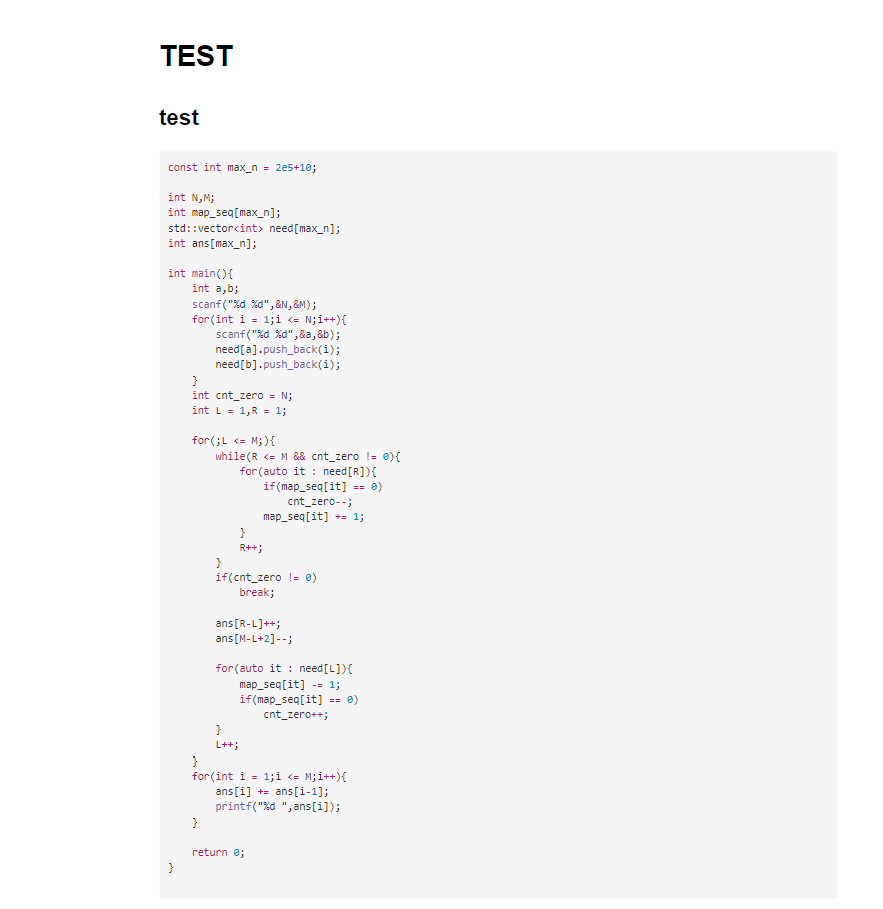
**打印pdf预览:**
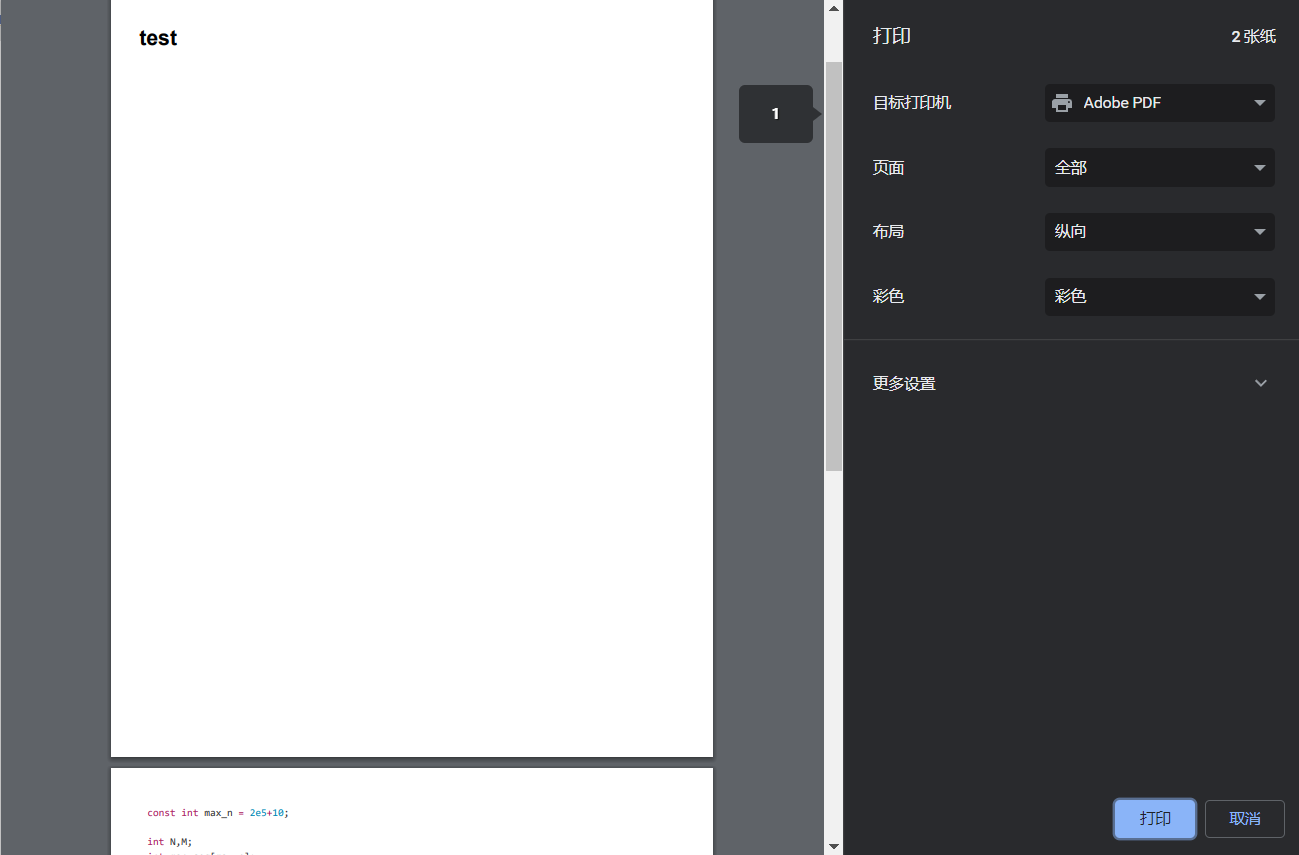
... | 导出pdf的pagebreak问题 | https://api.github.com/repos/shd101wyy/vscode-markdown-preview-enhanced/issues/812/comments | 1 | 2022-07-20T05:52:32Z | 2023-08-23T02:22:00Z | https://github.com/shd101wyy/vscode-markdown-preview-enhanced/issues/812 | 1,862,443,954 | 812 |
[
"shd101wyy",
"vscode-markdown-preview-enhanced"
] | how to escape & (ampersand) in hyperlink urls
[lnk]\(example.com?something&rest_of_url_is_cut_off\) | escape ampersand in urls | https://api.github.com/repos/shd101wyy/vscode-markdown-preview-enhanced/issues/612/comments | 0 | 2022-07-18T05:14:35Z | 2022-07-18T05:14:35Z | https://github.com/shd101wyy/vscode-markdown-preview-enhanced/issues/612 | 1,307,416,166 | 612 |
[
"shd101wyy",
"vscode-markdown-preview-enhanced"
] | <img width="1159" alt="image" src="https://user-images.githubusercontent.com/13595509/179411510-80b9aaac-82a2-40e5-b663-f607fdd8dce9.png">
Version:
- ImageMagick 7.1.0-43 Q16-HDRI x86_64 20237
Markdown Content:
```md---
markdown:
image_dir: ./
path: output.md
ignore_from_front_matter: true
absol... | plantuml markdown export without border line | https://api.github.com/repos/shd101wyy/vscode-markdown-preview-enhanced/issues/813/comments | 0 | 2022-07-17T16:30:23Z | 2023-08-23T02:22:02Z | https://github.com/shd101wyy/vscode-markdown-preview-enhanced/issues/813 | 1,862,443,979 | 813 |
[
"shd101wyy",
"vscode-markdown-preview-enhanced"
] | I experienced paste image with local image using absolute Path doesn't work.
Please Check this issue
Thank you!
<img width="1599" alt="스크린샷 2022-07-17 오후 3 38 40" src="https://user-images.githubusercontent.com/56223639/179387358-947dd18f-4c8e-4398-a453-fbe4699c3bc9.png">.
*Left: using your extension w... | Bug: Pasting image which is local image file using absolute Path doesn't work | https://api.github.com/repos/shd101wyy/vscode-markdown-preview-enhanced/issues/611/comments | 0 | 2022-07-17T06:51:50Z | 2022-07-17T06:51:50Z | https://github.com/shd101wyy/vscode-markdown-preview-enhanced/issues/611 | 1,307,006,642 | 611 |
[
"shd101wyy",
"vscode-markdown-preview-enhanced"
] | ```mermaid
gantt
dateFormat YYYY-MM-DD
title Adding GANTT diagram functionality to mermaid
section A section
Completed task :done, des1, 2014-01-06,2014-01-08
Active task :active, des2, 2014-01-09, 3d
Future task : des3, after des2, 5d
Future task2... | mermaid doesn't render | https://api.github.com/repos/shd101wyy/vscode-markdown-preview-enhanced/issues/814/comments | 0 | 2022-07-16T03:48:51Z | 2023-08-23T02:22:04Z | https://github.com/shd101wyy/vscode-markdown-preview-enhanced/issues/814 | 1,862,444,003 | 814 |
[
"shd101wyy",
"vscode-markdown-preview-enhanced"
] | It would be nice to support the rendering of logseq markdown as I like to sometimes edit a file within VS Code. | [feature] logseq support | https://api.github.com/repos/shd101wyy/vscode-markdown-preview-enhanced/issues/815/comments | 0 | 2022-07-15T09:28:47Z | 2023-08-23T02:22:06Z | https://github.com/shd101wyy/vscode-markdown-preview-enhanced/issues/815 | 1,862,444,026 | 815 |
[
"shd101wyy",
"vscode-markdown-preview-enhanced"
] | Can Markdown rendering be added for files with a file extension other than .md? I suggest a "Preferences" configuration that contains a list of Markdown file extensions. By default it would be initialised to [".md"] but the user could add other file types, e.g. [".md", ".dox"].
My company's Doxygen code documentatio... | Markdown preview for .dox files | https://api.github.com/repos/shd101wyy/vscode-markdown-preview-enhanced/issues/610/comments | 0 | 2022-07-14T08:43:44Z | 2022-07-14T08:43:44Z | https://github.com/shd101wyy/vscode-markdown-preview-enhanced/issues/610 | 1,304,461,013 | 610 |
[
"shd101wyy",
"vscode-markdown-preview-enhanced"
] | when use mermaid syntax first time in the markdown file like below:
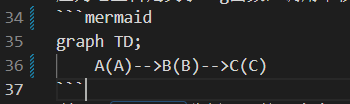
will render err
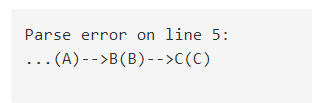
but if ... | Mermaid syntax render err | https://api.github.com/repos/shd101wyy/vscode-markdown-preview-enhanced/issues/609/comments | 0 | 2022-07-09T16:36:20Z | 2022-07-09T16:36:20Z | https://github.com/shd101wyy/vscode-markdown-preview-enhanced/issues/609 | 1,299,719,504 | 609 |
[
"shd101wyy",
"vscode-markdown-preview-enhanced"
] | 

正常应该是:
. I would like this to not occur, but no option seems to be available or documented.
Can this be added? Have I missed one? What solutions do I ha... | How to disable auto-opening of PDFs on export? | https://api.github.com/repos/shd101wyy/vscode-markdown-preview-enhanced/issues/817/comments | 0 | 2022-07-07T05:46:19Z | 2023-08-23T02:22:10Z | https://github.com/shd101wyy/vscode-markdown-preview-enhanced/issues/817 | 1,862,444,076 | 817 |
[
"shd101wyy",
"vscode-markdown-preview-enhanced"
] | null | 希望允许手动调整预览器中目录的宽度 | https://api.github.com/repos/shd101wyy/vscode-markdown-preview-enhanced/issues/818/comments | 0 | 2022-07-06T07:30:59Z | 2023-08-23T02:22:12Z | https://github.com/shd101wyy/vscode-markdown-preview-enhanced/issues/818 | 1,862,444,096 | 818 |
[
"shd101wyy",
"vscode-markdown-preview-enhanced"
] | - Are you planning to support previews for .rst files
- Is it possible to view them currently? | Support for reStructured Text? | https://api.github.com/repos/shd101wyy/vscode-markdown-preview-enhanced/issues/608/comments | 0 | 2022-07-04T05:49:50Z | 2022-07-04T05:49:50Z | https://github.com/shd101wyy/vscode-markdown-preview-enhanced/issues/608 | 1,292,659,562 | 608 |
[
"shd101wyy",
"vscode-markdown-preview-enhanced"
] | For a long document, knowing where is the current position is very beneficial, I guess what the title suggests is doable by some adjustment of current package given the fact that the preview is itself auto updated with the scrolling position of the markdown file. | Can the TOC be auto updated with the current preview position, also an an adjustable toc width ? | https://api.github.com/repos/shd101wyy/vscode-markdown-preview-enhanced/issues/819/comments | 0 | 2022-07-04T02:08:35Z | 2023-08-23T02:22:14Z | https://github.com/shd101wyy/vscode-markdown-preview-enhanced/issues/819 | 1,862,444,123 | 819 |
[
"shd101wyy",
"vscode-markdown-preview-enhanced"
] | I try to use plant.uml server and kroki server and see only this error message in the preview:

i do not see any further errors from plugin in log view.
how to debug? | FetchError: Cannot follow redirect with body being a readable stream | https://api.github.com/repos/shd101wyy/vscode-markdown-preview-enhanced/issues/607/comments | 11 | 2022-07-02T09:39:32Z | 2023-09-05T20:14:56Z | https://github.com/shd101wyy/vscode-markdown-preview-enhanced/issues/607 | 1,292,014,920 | 607 |
[
"shd101wyy",
"vscode-markdown-preview-enhanced"
] | 不加链接跳转,需要修改文件还要手动去找 😭 | Import 文件需要链接跳转 | https://api.github.com/repos/shd101wyy/vscode-markdown-preview-enhanced/issues/820/comments | 0 | 2022-06-28T08:49:17Z | 2023-08-23T02:22:17Z | https://github.com/shd101wyy/vscode-markdown-preview-enhanced/issues/820 | 1,862,444,151 | 820 |
[
"shd101wyy",
"vscode-markdown-preview-enhanced"
] | Hi,
markdown-preview-enhanced v0.6.3
The [document](https://shd101wyy.github.io/markdown-preview-enhanced/#/usages?id=keyboard-shortcuts) shows there is a shortcut for “Preview zoom in(`cmd`+`=`)”
However, the markdown-preview-enhanced extension did not define shortcut binding; the (`cmd`+`=`) is by default b... | Preview zoom in shortcut | https://api.github.com/repos/shd101wyy/vscode-markdown-preview-enhanced/issues/606/comments | 0 | 2022-06-27T22:56:56Z | 2022-06-27T23:05:48Z | https://github.com/shd101wyy/vscode-markdown-preview-enhanced/issues/606 | 1,286,535,962 | 606 |
[
"shd101wyy",
"vscode-markdown-preview-enhanced"
] | <link href="file:///E:/song.css" rel="stylesheet" type="text/css" >
在预览时,链接的css文件没有效果,必须生成html才起作用。 | 链接的css不能即时预览 | https://api.github.com/repos/shd101wyy/vscode-markdown-preview-enhanced/issues/605/comments | 0 | 2022-06-26T14:59:11Z | 2022-06-26T15:22:55Z | https://github.com/shd101wyy/vscode-markdown-preview-enhanced/issues/605 | 1,284,947,048 | 605 |
[
"shd101wyy",
"vscode-markdown-preview-enhanced"
] | 我在vscode下使用markdown-preview-enhanced插件预览md文件,在parser.js里面添加了如下代码
> `onWillParseMarkdown: function(markdown) {
return new Promise((resolve, reject)=> {
markdown = markdown.replace(
/\{%\s*asset_img\s*(.*)\s*%\}/g,
(whole, content) => (``)
)
return resolve(markdown)
})
... | 本地加相对路径可以预览图片,但是生成hexo博文后不能访问图片。 | https://api.github.com/repos/shd101wyy/vscode-markdown-preview-enhanced/issues/821/comments | 0 | 2022-06-24T01:58:22Z | 2023-08-23T02:22:19Z | https://github.com/shd101wyy/vscode-markdown-preview-enhanced/issues/821 | 1,862,444,193 | 821 |
[
"shd101wyy",
"vscode-markdown-preview-enhanced"
] | `Scale` of plantuml is handled incorrectly when a markdown file contains a plantuml code block and a wavedrom code block.
For MPE versions of `v0.6.0` and `v0.6.3`:
Bad case (characters are overlapping):
 when having `"markdown-preview-enhanced.automaticallyShowPreviewOfMarkdownBeingEdited": true,` (automatically show preview) set?
Every time I edit a markdown block in the notebook, the preview is automatically show... | Exclude Markdown Blocks in Jupyter Notebook | https://api.github.com/repos/shd101wyy/vscode-markdown-preview-enhanced/issues/604/comments | 2 | 2022-06-17T17:29:15Z | 2025-04-27T02:57:50Z | https://github.com/shd101wyy/vscode-markdown-preview-enhanced/issues/604 | 1,275,298,106 | 604 |
[
"shd101wyy",
"vscode-markdown-preview-enhanced"
] | I would like to see that the extension can automatically change the preview theme based on the system dark/light setting. It can be done in a way similar to how VS Code itself changes the theme: the user can select which theme to be used in light/dark mode, and whether the automatic change is enabled. | Feature Request: Automatically change preview theme following system dark/light setting | https://api.github.com/repos/shd101wyy/vscode-markdown-preview-enhanced/issues/603/comments | 3 | 2022-06-17T00:32:29Z | 2023-01-03T01:07:29Z | https://github.com/shd101wyy/vscode-markdown-preview-enhanced/issues/603 | 1,274,287,888 | 603 |
[
"shd101wyy",
"vscode-markdown-preview-enhanced"
] | When inserting an image into a Markdown document at a relative path, using a forward slash doesn't work (at least on Win10). For example, this renders a broken image:
``
Where-as this renders correctly:
``
I need to utilize forwar... | Image path doesn't work properly on Windows 10 | https://api.github.com/repos/shd101wyy/vscode-markdown-preview-enhanced/issues/602/comments | 0 | 2022-06-15T17:43:39Z | 2022-06-15T17:43:39Z | https://github.com/shd101wyy/vscode-markdown-preview-enhanced/issues/602 | 1,272,548,754 | 602 |
[
"shd101wyy",
"vscode-markdown-preview-enhanced"
] | The MPE preview is not displayed when a picture is inserted in the table. | Can't show picture in table | https://api.github.com/repos/shd101wyy/vscode-markdown-preview-enhanced/issues/824/comments | 0 | 2022-06-15T02:45:33Z | 2023-08-23T02:22:25Z | https://github.com/shd101wyy/vscode-markdown-preview-enhanced/issues/824 | 1,862,444,259 | 824 |
[
"shd101wyy",
"vscode-markdown-preview-enhanced"
] | Resource: https://github.blog/2022-06-08-sunsetting-atom/ | The MPE extension will no longer be maintained for the Atom editor as the Atom editor project is now stopped by GitHub. | https://api.github.com/repos/shd101wyy/vscode-markdown-preview-enhanced/issues/825/comments | 0 | 2022-06-10T04:23:28Z | 2023-08-23T03:25:29Z | https://github.com/shd101wyy/vscode-markdown-preview-enhanced/issues/825 | 1,862,444,290 | 825 |
[
"shd101wyy",
"vscode-markdown-preview-enhanced"
] | 如图所示,javascript不能正确执行,但是test_1的输出会一闪而过,可能是执行后被覆盖。已禁用过所有扩展,可排除是其他扩展问题。
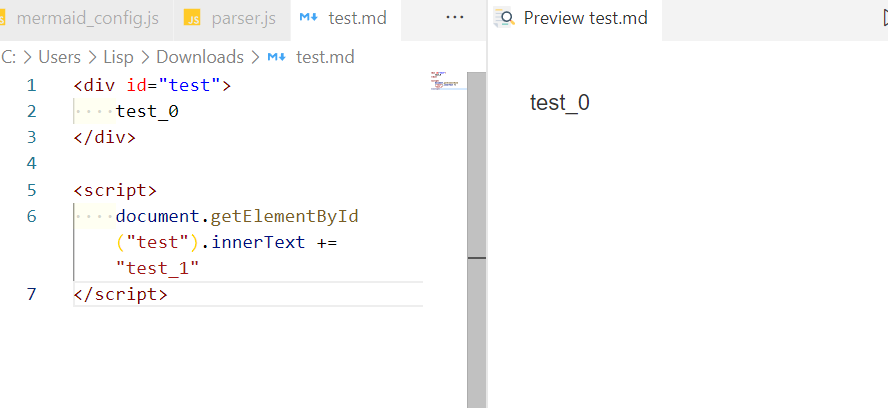
| javascript不能正确执行 | https://api.github.com/repos/shd101wyy/vscode-markdown-preview-enhanced/issues/601/comments | 0 | 2022-06-09T10:44:02Z | 2022-06-09T10:45:53Z | https://github.com/shd101wyy/vscode-markdown-preview-enhanced/issues/601 | 1,265,941,969 | 601 |
[
"shd101wyy",
"vscode-markdown-preview-enhanced"
] | Mermaid works great in Windows, but not in Ubuntu 22.04.

| Mermaid Doesn't Preview in Linux | https://api.github.com/repos/shd101wyy/vscode-markdown-preview-enhanced/issues/600/comments | 0 | 2022-06-09T01:45:15Z | 2022-06-09T01:45:15Z | https://github.com/shd101wyy/vscode-markdown-preview-enhanced/issues/600 | 1,265,488,283 | 600 |
[
"shd101wyy",
"vscode-markdown-preview-enhanced"
] | Hi,
I want to thank your for all your work so far. I'm planning on integrating LaTeX generated images, without doing the file imports, and looking thru other options found [dvisvgm](https://dvisvgm.de/) which is already included in many TeX distributions. I was wondering if there's a possibility to change the defaul... | Add option to change deafault pdf to svg converter from pdf2svg to dvisvgm for LaTeX/TeX users | https://api.github.com/repos/shd101wyy/vscode-markdown-preview-enhanced/issues/826/comments | 0 | 2022-06-08T16:39:50Z | 2023-08-23T02:22:31Z | https://github.com/shd101wyy/vscode-markdown-preview-enhanced/issues/826 | 1,862,444,313 | 826 |
[
"shd101wyy",
"vscode-markdown-preview-enhanced"
] | 比如简单的下述puml
```
ToolTip[[toolTip{tooltip}]]
```
预览时 `ToolTip` 文本的 tooltip 不起作用(即使Open In Brower , chrome中也无法显示)。
对比原版puml渲染的结果,尝试后发现将 title 改为 xlink:title可以解决这个问题(在chrome中)。
PS: 即使替换了最新版的jar 也不起作用 | plantUML渲染后tooltip 不起作用 | https://api.github.com/repos/shd101wyy/vscode-markdown-preview-enhanced/issues/599/comments | 0 | 2022-06-07T22:31:58Z | 2022-06-07T23:31:54Z | https://github.com/shd101wyy/vscode-markdown-preview-enhanced/issues/599 | 1,263,960,353 | 599 |
[
"shd101wyy",
"vscode-markdown-preview-enhanced"
] | Hello, by default the background is white. I know that there is the possibility to change the theme according to several preconfigured themes. But it would be better if the background color was automatically the same as our VSC theme | Background color | https://api.github.com/repos/shd101wyy/vscode-markdown-preview-enhanced/issues/598/comments | 3 | 2022-06-06T22:31:59Z | 2024-04-30T09:22:24Z | https://github.com/shd101wyy/vscode-markdown-preview-enhanced/issues/598 | 1,262,504,822 | 598 |
[
"shd101wyy",
"vscode-markdown-preview-enhanced"
] | There are two similar repositories, but this is one seems to be actively maintained.
I repost issue from the other repo https://github.com/shd101wyy/vscode-markdown-preview-enhanced/issues/320
As far as I understand this extension uses [viz.js](https://github.com/mdaines/viz.js). Because viz.js is compiled down t... | How to render image node in Graphviz | https://api.github.com/repos/shd101wyy/vscode-markdown-preview-enhanced/issues/827/comments | 0 | 2022-06-06T18:24:52Z | 2023-08-23T02:22:34Z | https://github.com/shd101wyy/vscode-markdown-preview-enhanced/issues/827 | 1,862,444,334 | 827 |
[
"shd101wyy",
"vscode-markdown-preview-enhanced"
] |
##### Versions:
- VSCode 1.67.2
- MPE 0.6.3
##### Problem:
For example, markdown code:
```
#### title
```latex {cmd hide}
\documentclass{standalone}
\begin{document}
Hello World
\end{document}
```
```
then when I press Ctrl Enter in the code chunk, nothing hap... | Shift+Enter does't work when code chunk is behind a Tab | https://api.github.com/repos/shd101wyy/vscode-markdown-preview-enhanced/issues/828/comments | 2 | 2022-06-06T04:56:05Z | 2023-08-23T02:22:36Z | https://github.com/shd101wyy/vscode-markdown-preview-enhanced/issues/828 | 1,862,444,364 | 828 |
[
"shd101wyy",
"vscode-markdown-preview-enhanced"
] | C4 rendering should be enabled using both public (free) endpoint https://structurizr.com/json or private endpoint (structurizr can be deployed onprem as well) - ideally using config
here is an example how the solution could look like https://gitlab.com/systemticks/c4-grammar/-/blob/master/extension/src/c4-structuriz... | Enable C4 native markdown rendering | https://api.github.com/repos/shd101wyy/vscode-markdown-preview-enhanced/issues/597/comments | 0 | 2022-06-01T16:16:53Z | 2022-06-01T16:16:53Z | https://github.com/shd101wyy/vscode-markdown-preview-enhanced/issues/597 | 1,256,408,004 | 597 |
[
"shd101wyy",
"vscode-markdown-preview-enhanced"
] | MARP (and its MARP-CORE) is incredibly simple and handy presentation layer for markdown, it would be even better if we could use it directly from markdown-preview-enhanced
https://github.com/marp-team/marp-core
| Enable Slide Presentation mode using marp-core | https://api.github.com/repos/shd101wyy/vscode-markdown-preview-enhanced/issues/596/comments | 0 | 2022-05-31T21:45:02Z | 2022-05-31T21:45:02Z | https://github.com/shd101wyy/vscode-markdown-preview-enhanced/issues/596 | 1,254,447,058 | 596 |
[
"shd101wyy",
"vscode-markdown-preview-enhanced"
] | There are some terms and broken links that I feel are unfamiliar in some expressions.
- Lists
- Blockquote
- Admonitions link
I will try to address the correction of this problem. | Propose to revise the Japanese translation of the Markdown Basics page | https://api.github.com/repos/shd101wyy/vscode-markdown-preview-enhanced/issues/829/comments | 0 | 2022-05-30T01:08:02Z | 2023-08-23T02:22:38Z | https://github.com/shd101wyy/vscode-markdown-preview-enhanced/issues/829 | 1,862,444,389 | 829 |
[
"shd101wyy",
"vscode-markdown-preview-enhanced"
] | Hi, @shd101wyy
usages.md link "使い方" is broken in the Japanese README.
https://github.com/shd101wyy/markdown-preview-enhanced/tree/master/docs/ja-jp
<img width="204" alt="スクリーンショット 2022-05-28 13 22 18" src="https://user-images.githubusercontent.com/8685879/170810027-fb63502f-5945-4a72-ad99-b66936c1c5ca.png">
htt... | usages.md link is broken in the Japanese REAMDE | https://api.github.com/repos/shd101wyy/vscode-markdown-preview-enhanced/issues/830/comments | 1 | 2022-05-28T04:35:03Z | 2023-08-23T02:22:40Z | https://github.com/shd101wyy/vscode-markdown-preview-enhanced/issues/830 | 1,862,444,424 | 830 |
[
"shd101wyy",
"vscode-markdown-preview-enhanced"
] | When using Pandoc through the cli \listoffigures is handled correctly. But in the preview it's not processed, the text \listoffigures remain. I can't find any documentation on why this might happen.
```markdown
# List of figures
{#fig:caption}
\listoffigures
```
Using previewer
<img wid... | \listoffigures not being transformed in preview | https://api.github.com/repos/shd101wyy/vscode-markdown-preview-enhanced/issues/595/comments | 0 | 2022-05-26T19:02:52Z | 2022-05-26T19:02:52Z | https://github.com/shd101wyy/vscode-markdown-preview-enhanced/issues/595 | 1,249,936,930 | 595 |
[
"shd101wyy",
"vscode-markdown-preview-enhanced"
] | When using Pandoc through the cli \listoffigures is handled correctly. But in the preview it's not processed, the text \listoffigures remain. I can't find any documentation on why this might happen.
```markdown
# List of figures
{#fig:caption}
\listoffigures
```
Using previewer
<img wid... | \listoffigures not working | https://api.github.com/repos/shd101wyy/vscode-markdown-preview-enhanced/issues/831/comments | 1 | 2022-05-26T17:00:19Z | 2023-08-23T02:22:43Z | https://github.com/shd101wyy/vscode-markdown-preview-enhanced/issues/831 | 1,862,444,442 | 831 |
[
"shd101wyy",
"vscode-markdown-preview-enhanced"
] | @shd101wyy -- versions after 0.19.1 break rendering of mermaid content
Upgraded to 0.19.2 and mermaid diagrams no longer render.
Atom Version:
<img width="353" alt="Screen Shot 2022-05-22 at 9 53 01 AM" src="https://user-images.githubusercontent.com/7131288/169698623-1d889ef7-6788-41a5-abbe-98281e1141c7.png">
... | 0.19.2 and later not rendering mermaid in Atom 1.60.0 | https://api.github.com/repos/shd101wyy/vscode-markdown-preview-enhanced/issues/832/comments | 5 | 2022-05-22T13:56:38Z | 2023-08-23T02:22:45Z | https://github.com/shd101wyy/vscode-markdown-preview-enhanced/issues/832 | 1,862,444,460 | 832 |
[
"shd101wyy",
"vscode-markdown-preview-enhanced"
] | 不是一次了,换了这个不靠谱的CDN吧 | www.jsdelivr.com又被墙了,插件文档看不了了。 | https://api.github.com/repos/shd101wyy/vscode-markdown-preview-enhanced/issues/833/comments | 4 | 2022-05-17T09:36:21Z | 2023-08-23T02:22:47Z | https://github.com/shd101wyy/vscode-markdown-preview-enhanced/issues/833 | 1,862,444,482 | 833 |
[
"shd101wyy",
"vscode-markdown-preview-enhanced"
] | Can MPE generate a Table of Contents (TOC) out of the h1- h3 headers when generating a pdf file. The TOC can be viewed in the left side of window and clickable when the pdf file is opened in any viewer.
Thanks for a response. | generate a Table of Contents when outputing a pdf file | https://api.github.com/repos/shd101wyy/vscode-markdown-preview-enhanced/issues/834/comments | 1 | 2022-05-16T22:56:44Z | 2024-04-07T20:26:04Z | https://github.com/shd101wyy/vscode-markdown-preview-enhanced/issues/834 | 1,862,444,506 | 834 |
[
"shd101wyy",
"vscode-markdown-preview-enhanced"
] | In the beginning, I wanted to use plantuml, which is a very powerful tool.
But I found that if the plantuml is too big, it will break the right side border and make the preview scroll horizontally.
<img width="694" alt="Snipaste_2022-05-13_14-31-03" src="https://user-images.githubusercontent.com/99344391/168224652-... | Unknown paragraph's bottom margin when I custom css | https://api.github.com/repos/shd101wyy/vscode-markdown-preview-enhanced/issues/835/comments | 0 | 2022-05-13T06:45:53Z | 2023-08-23T02:22:51Z | https://github.com/shd101wyy/vscode-markdown-preview-enhanced/issues/835 | 1,862,444,526 | 835 |
[
"shd101wyy",
"vscode-markdown-preview-enhanced"
] | >I posted this issue in MPE for Atom by mistake, so I post it here again.
I'm using VS code with MPE, but there is a problem.
For example,
Click
`[Instructions](#Instructions-for-Use)`
Should jump to
`# Instructions for Use`
Use - to replace spaces works on Github, but it does not work in the previ... | Fail to jump to a link that contains spaces in one md file | https://api.github.com/repos/shd101wyy/vscode-markdown-preview-enhanced/issues/593/comments | 0 | 2022-05-12T11:57:02Z | 2022-05-12T12:17:50Z | https://github.com/shd101wyy/vscode-markdown-preview-enhanced/issues/593 | 1,233,873,032 | 593 |
[
"shd101wyy",
"vscode-markdown-preview-enhanced"
] | I would like to open the markdown preview by default when opening a markdown file instead of the source.
With the VSC built-in markdown preview I can achieve it with:
```
"workbench.editorAssociations": {
"*.md": "vscode.markdown.preview.editor",
}
```
What is the equivalent with markdown-previe... | How can I open the preview by default? | https://api.github.com/repos/shd101wyy/vscode-markdown-preview-enhanced/issues/592/comments | 1 | 2022-05-10T15:32:24Z | 2024-07-17T13:19:38Z | https://github.com/shd101wyy/vscode-markdown-preview-enhanced/issues/592 | 1,231,344,660 | 592 |
[
"shd101wyy",
"vscode-markdown-preview-enhanced"
] | 本地文本文件链接跳转到浏览器去了,文件打开失败 。
以前好像修复了这个问题,现在好像又出现了。
vscode版本:1.67.0(22年5月7日最新版)
MPE版本:2022年2月28日版本 | 预览中的本地文本文件链接跳转到浏览器去了,打开失败 | https://api.github.com/repos/shd101wyy/vscode-markdown-preview-enhanced/issues/591/comments | 7 | 2022-05-07T14:49:52Z | 2022-05-13T09:22:50Z | https://github.com/shd101wyy/vscode-markdown-preview-enhanced/issues/591 | 1,228,646,832 | 591 |
[
"shd101wyy",
"vscode-markdown-preview-enhanced"
] | In the settings, it says GitHub-flavored Markdown breaks on a newline, unlike Markdown in general. That's not true, at least not anymore. | "Break on Single New Line" option falsely motivated | https://api.github.com/repos/shd101wyy/vscode-markdown-preview-enhanced/issues/836/comments | 3 | 2022-05-06T20:42:13Z | 2024-03-07T13:16:16Z | https://github.com/shd101wyy/vscode-markdown-preview-enhanced/issues/836 | 1,862,444,545 | 836 |
[
"shd101wyy",
"vscode-markdown-preview-enhanced"
] | Hi,
I tried to use this by running a plantuml server locally from docker (`docker run -d -p 8888:8080 plantuml/plantuml-server:jetty`) and specifiying the following `settings.json`:
```json
{
"plantuml.server": "http://localhost:8888",
"plantuml.render": "PlantUMLServer",
"markdown-preview-enhanced.pl... | Render of PlantUML using the "markdown-preview-enhanced.plantumlServer" FAILS | https://api.github.com/repos/shd101wyy/vscode-markdown-preview-enhanced/issues/837/comments | 9 | 2022-05-05T22:39:52Z | 2025-04-09T11:22:50Z | https://github.com/shd101wyy/vscode-markdown-preview-enhanced/issues/837 | 1,862,444,567 | 837 |
Subsets and Splits
No community queries yet
The top public SQL queries from the community will appear here once available.