
issue_owner_repo listlengths 2 2 | issue_body stringlengths 0 262k ⌀ | issue_title stringlengths 1 1.02k | issue_comments_url stringlengths 53 116 | issue_comments_count int64 0 2.49k | issue_created_at stringdate 1999-03-17 02:06:42 2025-06-23 11:41:49 | issue_updated_at stringdate 2000-02-10 06:43:57 2025-06-23 11:43:00 | issue_html_url stringlengths 34 97 | issue_github_id int64 132 3.17B | issue_number int64 1 215k |
|---|---|---|---|---|---|---|---|---|---|
[
"shd101wyy",
"vscode-markdown-preview-enhanced"
] | After I write a wavedrom to dispaly reg,the second signal wavdrom can't display normaml
```wavedrom
{
reg: [
{ "name": "0", "bits": 1, "attr": "", "type":6 },
{ "name": "0", "bits": 1, "attr": "", "type":5 },
{ "name": "0", "bits": 1, "attr": "", "type":4 },
{ "name": "1", "bits": 1, "attr": ... | the wavedrom can't dispaly | https://api.github.com/repos/shd101wyy/vscode-markdown-preview-enhanced/issues/548/comments | 0 | 2021-11-04T13:38:57Z | 2021-11-04T13:38:57Z | https://github.com/shd101wyy/vscode-markdown-preview-enhanced/issues/548 | 1,044,772,964 | 548 |
[
"shd101wyy",
"vscode-markdown-preview-enhanced"
] | How to generate html file with theme ?
The html file I generated on the Preview page can only use the default github-light style. | How to generate html file with theme | https://api.github.com/repos/shd101wyy/vscode-markdown-preview-enhanced/issues/547/comments | 0 | 2021-11-03T07:24:08Z | 2021-11-03T07:24:08Z | https://github.com/shd101wyy/vscode-markdown-preview-enhanced/issues/547 | 1,043,159,474 | 547 |
[
"shd101wyy",
"vscode-markdown-preview-enhanced"
] | Generating a mermaid style diagram using this extension requires annotating a code fence along the lines of:
``````
```mermaid
sequenceDiagram
participant Alice
participant Bob
Alice->John: Hello John, how are you?
```
``````
In contrasts, tools such as the [Sphinx mermaid extension... | Support MyST Style Code Fence Attributes For Diagramming | https://api.github.com/repos/shd101wyy/vscode-markdown-preview-enhanced/issues/901/comments | 0 | 2021-11-02T13:30:51Z | 2023-08-23T02:25:17Z | https://github.com/shd101wyy/vscode-markdown-preview-enhanced/issues/901 | 1,862,446,199 | 901 |
[
"shd101wyy",
"vscode-markdown-preview-enhanced"
] | vscode无法正常显示,typora能正常显示
比如这段公式:
$$
a\leq b
a^b
$$
| 数学公式多加空行就不能显示 | https://api.github.com/repos/shd101wyy/vscode-markdown-preview-enhanced/issues/546/comments | 0 | 2021-11-02T10:17:15Z | 2021-11-02T10:17:15Z | https://github.com/shd101wyy/vscode-markdown-preview-enhanced/issues/546 | 1,042,119,113 | 546 |
[
"shd101wyy",
"vscode-markdown-preview-enhanced"
] | The markdown preview seems to be slow and stuck when I wrote a long document with many mathematical formulas.
When I was typing and deleting, I felt a noticeable freeze in the VSCode and my computer fan is more loud. But if I close the preview or wrote a short document, the Symptoms disappeared.
So, I think the previ... | The VSCode seems to be slow and stuck due to the huge occupation of this extension | https://api.github.com/repos/shd101wyy/vscode-markdown-preview-enhanced/issues/545/comments | 0 | 2021-11-01T15:30:09Z | 2021-11-01T15:30:09Z | https://github.com/shd101wyy/vscode-markdown-preview-enhanced/issues/545 | 1,041,302,596 | 545 |
[
"shd101wyy",
"vscode-markdown-preview-enhanced"
] | I would like to know if there is a way to access or print a python variable inline with the markdown text?
I mean, something like Jupyter Notebook does, for example, if I have the next markdown text and code chunk in a `test.md` file:
\------------------------- Start test.md file ---------------------------
# Th... | Feature request: print python variable from code chunk in line with markdown text. Somthing similar to '{{var}}' in Jupyter Notebook. | https://api.github.com/repos/shd101wyy/vscode-markdown-preview-enhanced/issues/902/comments | 0 | 2021-10-28T22:18:38Z | 2023-08-23T02:25:19Z | https://github.com/shd101wyy/vscode-markdown-preview-enhanced/issues/902 | 1,862,446,233 | 902 |
[
"shd101wyy",
"vscode-markdown-preview-enhanced"
] | It would be great helpful if a feature supports railroad diagram.
[Github of rr](https://github.com/GuntherRademacher/rr)
[On-line generator](https://www.bottlecaps.de/rr/ui)
Examples like this:

 this extension constantly fires of popup modals in the lower righthand corner asking me to sponsor.... multiple times per hour every single time I login. | Spams sponsor messages in gitpod. | https://api.github.com/repos/shd101wyy/vscode-markdown-preview-enhanced/issues/542/comments | 2 | 2021-10-15T23:17:54Z | 2021-10-23T13:15:46Z | https://github.com/shd101wyy/vscode-markdown-preview-enhanced/issues/542 | 1,027,883,189 | 542 |
[
"shd101wyy",
"vscode-markdown-preview-enhanced"
] | 如果全文的最后一行list中含有链接,导出ebook就会报下面的错误
```
Error: ENOENT: no such file or directory, open 'C:\Users\Administrator\AppData\Local\Programs\Microsoft VS Code\https:\xxx.com\t\4205'
```
如果在后面另起两行,插入新的list项不含链接才不会出错 | 导出eBook 报错 | https://api.github.com/repos/shd101wyy/vscode-markdown-preview-enhanced/issues/905/comments | 0 | 2021-10-13T14:50:47Z | 2023-08-23T02:25:26Z | https://github.com/shd101wyy/vscode-markdown-preview-enhanced/issues/905 | 1,862,446,305 | 905 |
[
"shd101wyy",
"vscode-markdown-preview-enhanced"
] | vuepress项目默认的图片路径是docs/.vuepress/public,引用的时候是没有这个路径,预览时图片是错误的,是不是可以考虑类似加个静态资源的base路径? | vuepress项目预览image路径问题支持 | https://api.github.com/repos/shd101wyy/vscode-markdown-preview-enhanced/issues/541/comments | 1 | 2021-10-13T08:30:22Z | 2021-10-13T11:03:04Z | https://github.com/shd101wyy/vscode-markdown-preview-enhanced/issues/541 | 1,024,950,251 | 541 |
[
"shd101wyy",
"vscode-markdown-preview-enhanced"
] | 最近在vsc里使用MPE 写 文档, 预览的时候**code block** 都是正常的,就是用``` 或`` 包起来的部分, syle.less我有改过

但是用**puppeteer**转pdf后发现几乎没有背景色(就是感觉没有突出显示),看起来非常别扭

从文档看并未支持 | 将 import wavejson 文件使用WaveDrom | https://api.github.com/repos/shd101wyy/vscode-markdown-preview-enhanced/issues/525/comments | 0 | 2021-08-20T04:06:33Z | 2021-08-20T04:06:33Z | https://github.com/shd101wyy/vscode-markdown-preview-enhanced/issues/525 | 975,243,124 | 525 |
[
"shd101wyy",
"vscode-markdown-preview-enhanced"
] |
```
Error: mermaid CLI is required to be installed.
Check https://github.com/mermaid-js/mermaid.cli for more information.
Error: Command failed: npx mmdc --theme default --input F:\Users\***\AppData\Local\Temp\mume-mermaid2021719-34304-yfe26j.3d29.mmd --output F:\ATCProjectFiles\****\image\b8965832db3da8d1569707... | 保存为 markdown的时候,无法转换mermaid,即使已经安装mermaid | https://api.github.com/repos/shd101wyy/vscode-markdown-preview-enhanced/issues/524/comments | 1 | 2021-08-19T02:17:22Z | 2021-11-03T09:16:18Z | https://github.com/shd101wyy/vscode-markdown-preview-enhanced/issues/524 | 974,199,634 | 524 |
[
"shd101wyy",
"vscode-markdown-preview-enhanced"
] | 在预览时,不希望将原文也显示出来,有没有办法将原文隐藏了么?
```bash {cmd="cmd.exe"}
dir
``` | code chunk 预览时能把原文隐藏了么? | https://api.github.com/repos/shd101wyy/vscode-markdown-preview-enhanced/issues/523/comments | 0 | 2021-08-18T03:55:04Z | 2021-08-18T03:55:04Z | https://github.com/shd101wyy/vscode-markdown-preview-enhanced/issues/523 | 973,247,693 | 523 |
[
"shd101wyy",
"vscode-markdown-preview-enhanced"
] | 最近发现echarts画图很方便,希望markdown中也能使用,比如下面的写法就能渲染出一个图。
```echarts
{
"title" : {
"text": "简单的折线图",
"subtext": "纯属虚构"
},
"tooltip" : {
"trigger": "axis"
},
"toolbox": {
"show" : true,
"feature" : {
"mark" : {"show": true},
"dataView" : {"show": true, "readOnly": false},
"m... | 该插件能否对echarts支持? | https://api.github.com/repos/shd101wyy/vscode-markdown-preview-enhanced/issues/522/comments | 0 | 2021-08-18T03:14:54Z | 2021-08-18T03:14:54Z | https://github.com/shd101wyy/vscode-markdown-preview-enhanced/issues/522 | 973,233,111 | 522 |
[
"shd101wyy",
"vscode-markdown-preview-enhanced"
] | Hope to support wolfram mathematica language.
[This plugin support wolfram language code block highlight.](https://github.com/weihongliang233/vscode-fenced-code-block-grammar-injection-example) | Not support wolfram language | https://api.github.com/repos/shd101wyy/vscode-markdown-preview-enhanced/issues/916/comments | 2 | 2021-08-15T03:40:17Z | 2023-08-23T02:26:05Z | https://github.com/shd101wyy/vscode-markdown-preview-enhanced/issues/916 | 1,862,446,739 | 916 |
[
"shd101wyy",
"vscode-markdown-preview-enhanced"
] | Hi Yiyi Wang
First of all, you're my hero. Great work you have done on the markdown-previewer
I have some trouble with the `Pandoc` feature. I have added the FrontMatter stuff in the top of the .md file:
```
---
lastmod: '2021-08-12T13:34:37.771Z'
output:
word_document:
pandoc_args:
-... | Pandoc keeps saying 'Error: Output format needs to be specified.' | https://api.github.com/repos/shd101wyy/vscode-markdown-preview-enhanced/issues/917/comments | 2 | 2021-08-12T13:45:45Z | 2025-04-21T06:12:13Z | https://github.com/shd101wyy/vscode-markdown-preview-enhanced/issues/917 | 1,862,446,765 | 917 |
[
"shd101wyy",
"vscode-markdown-preview-enhanced"
] | 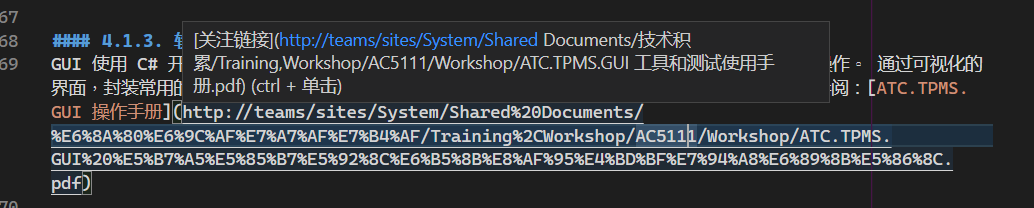
```markdown
[ATC.TPMS.GUI 操作手册](http://teams/sites/System/Shared%20Documents/%E6%8A%80%E6%9C%AF%E7%A7%AF%E7%B4%AF/Training%2CWorkshop/)
```
为例,中间 `Shared%20Documents` 其实是一个空格,在MPE 中,点击会打开:
 offen.
the knowledge link feature of Obsidian is easy to use, but Obsidian support for markdown is not as good as MPE, will you plan to support it ? | Any plans to support Obsidian ? | https://api.github.com/repos/shd101wyy/vscode-markdown-preview-enhanced/issues/918/comments | 1 | 2021-08-05T08:54:09Z | 2023-08-23T02:26:10Z | https://github.com/shd101wyy/vscode-markdown-preview-enhanced/issues/918 | 1,862,446,792 | 918 |
[
"shd101wyy",
"vscode-markdown-preview-enhanced"
] | 这个目录在右边 看着实在是难受 这个位置可以控制吗
Can the directory location be changed now he's on the right
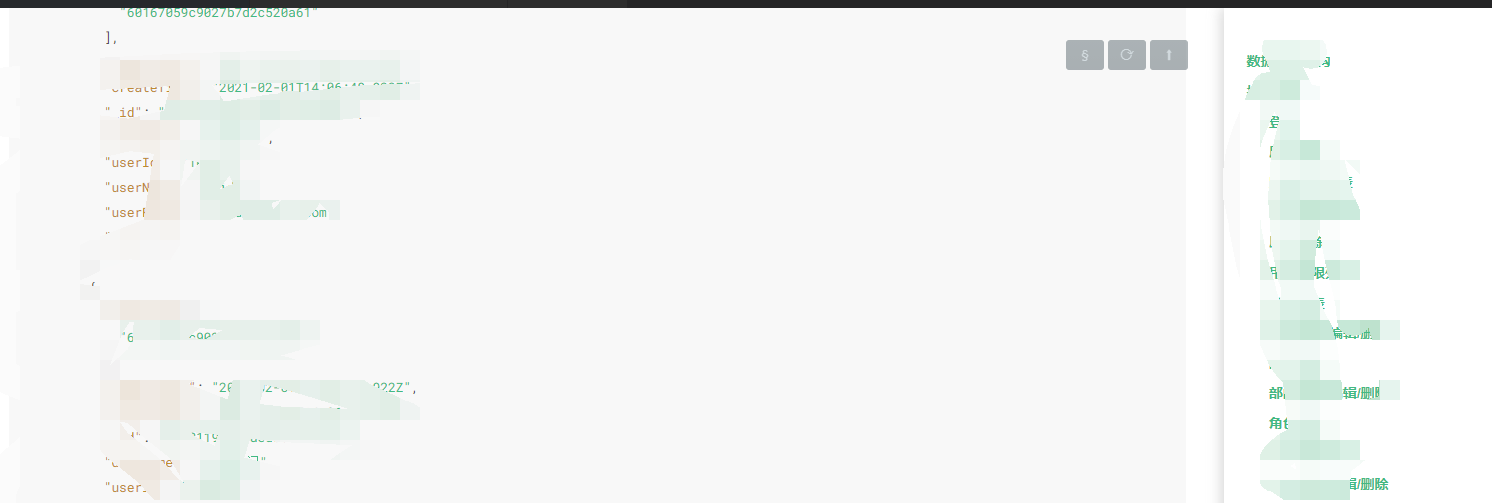
| Can the location of the preview directory be changed 预览的目录的位置可以改吗 | https://api.github.com/repos/shd101wyy/vscode-markdown-preview-enhanced/issues/518/comments | 0 | 2021-08-05T03:32:21Z | 2021-08-05T03:33:06Z | https://github.com/shd101wyy/vscode-markdown-preview-enhanced/issues/518 | 961,391,562 | 518 |
[
"shd101wyy",
"vscode-markdown-preview-enhanced"
] | on ubuntu 20.04 | 预览 Markdown 文件, 不显示预览 | https://api.github.com/repos/shd101wyy/vscode-markdown-preview-enhanced/issues/517/comments | 1 | 2021-08-04T10:37:00Z | 2021-08-04T11:07:09Z | https://github.com/shd101wyy/vscode-markdown-preview-enhanced/issues/517 | 960,226,142 | 517 |
[
"shd101wyy",
"vscode-markdown-preview-enhanced"
] | Mac Mojave
VS Code 1.58.2
MPE v0.5.22
imagemagick-cli 7.1.0-4 Q16
目前版本是这样.. 看上去是因为 imagemagick的参数中没有指定到合适的字体参数.
请教是否有修改调用命令的配置. | Save as Mardown, imagemagick convert svg 到 png 丢掉了所有汉字 | https://api.github.com/repos/shd101wyy/vscode-markdown-preview-enhanced/issues/919/comments | 0 | 2021-07-27T09:55:48Z | 2023-08-23T02:26:12Z | https://github.com/shd101wyy/vscode-markdown-preview-enhanced/issues/919 | 1,862,446,826 | 919 |
[
"shd101wyy",
"vscode-markdown-preview-enhanced"
] | I can run commands from the pallet but the key bindings don't work.
For example:
* Ctrl + Shift + V should open the Preview but nothing happens (it works from the command pallet)
* Ctrl + K V should open the Preview to the side but nothing happens (it works from the command pallet)
* Sync preview doesn't work at ... | Keybindings don't work on linux | https://api.github.com/repos/shd101wyy/vscode-markdown-preview-enhanced/issues/920/comments | 1 | 2021-07-26T21:28:33Z | 2023-08-23T02:26:14Z | https://github.com/shd101wyy/vscode-markdown-preview-enhanced/issues/920 | 1,862,446,852 | 920 |
[
"shd101wyy",
"vscode-markdown-preview-enhanced"
] | Hi. thanks for a great VS Code Extension. I am writing markdown and then right-clicking in the Preview to generate html.
However, my codeblocks use a dark theme in the Preview but are converted to a light theme in the published html. Is there a way to change this? I would like the published html to use the same dark... | codeblock style theme diff between Preview & HTML | https://api.github.com/repos/shd101wyy/vscode-markdown-preview-enhanced/issues/516/comments | 0 | 2021-07-18T20:18:40Z | 2021-08-17T19:30:51Z | https://github.com/shd101wyy/vscode-markdown-preview-enhanced/issues/516 | 947,110,315 | 516 |
[
"shd101wyy",
"vscode-markdown-preview-enhanced"
] | 1、打开 Markdown 文件
2、右键 Markdown 文件 “MPE:打开侧边预览”
3、右键 资源管理器 把 侧边栏移动到右侧,预览面板会遮挡住一部分资源管理器

 | https://api.github.com/repos/shd101wyy/vscode-markdown-preview-enhanced/issues/515/comments | 1 | 2021-07-18T15:14:56Z | 2021-08-06T07:06:40Z | https://github.com/shd101wyy/vscode-markdown-preview-enhanced/issues/515 | 947,056,869 | 515 |
[
"shd101wyy",
"vscode-markdown-preview-enhanced"
] | This issue was originally posted on [stackoverflow](https://stackoverflow.com/q/66756473/10215301), but I still need a support to resolve it.
I'm writing some contents with lines commented out in markdown files, as shown below.
```markdown
Due to the evolving situation of COVID-19,
I will conduct
almost all ex... | lines commented out are counted as empty lines | https://api.github.com/repos/shd101wyy/vscode-markdown-preview-enhanced/issues/921/comments | 0 | 2021-07-18T11:01:32Z | 2023-08-23T02:26:17Z | https://github.com/shd101wyy/vscode-markdown-preview-enhanced/issues/921 | 1,862,446,872 | 921 |
[
"shd101wyy",
"vscode-markdown-preview-enhanced"
] | It would be great if someday MPE integrates [excalidraw](https://excalidraw.com/) | [Feature Request] Integrate excalidraw | https://api.github.com/repos/shd101wyy/vscode-markdown-preview-enhanced/issues/922/comments | 1 | 2021-07-14T10:06:49Z | 2023-08-23T02:26:19Z | https://github.com/shd101wyy/vscode-markdown-preview-enhanced/issues/922 | 1,862,446,905 | 922 |
[
"shd101wyy",
"vscode-markdown-preview-enhanced"
] | How can I get the same syntax highlighting as shown here. 
I've found this answer
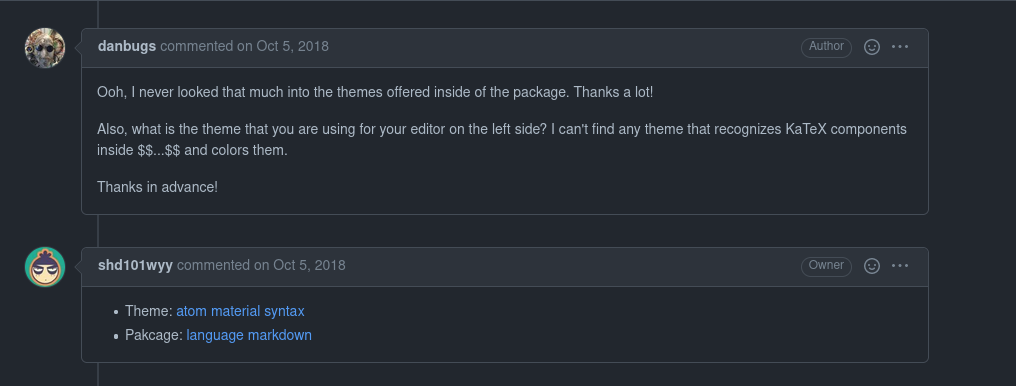
I installed the th... | How to get the same syntax highlighting as the example screenshot | https://api.github.com/repos/shd101wyy/vscode-markdown-preview-enhanced/issues/923/comments | 1 | 2021-07-13T17:00:54Z | 2023-08-23T02:26:21Z | https://github.com/shd101wyy/vscode-markdown-preview-enhanced/issues/923 | 1,862,446,940 | 923 |
[
"shd101wyy",
"vscode-markdown-preview-enhanced"
] | 如题。
如果在工作区设置了主题之后,通过界面的选项进行却换
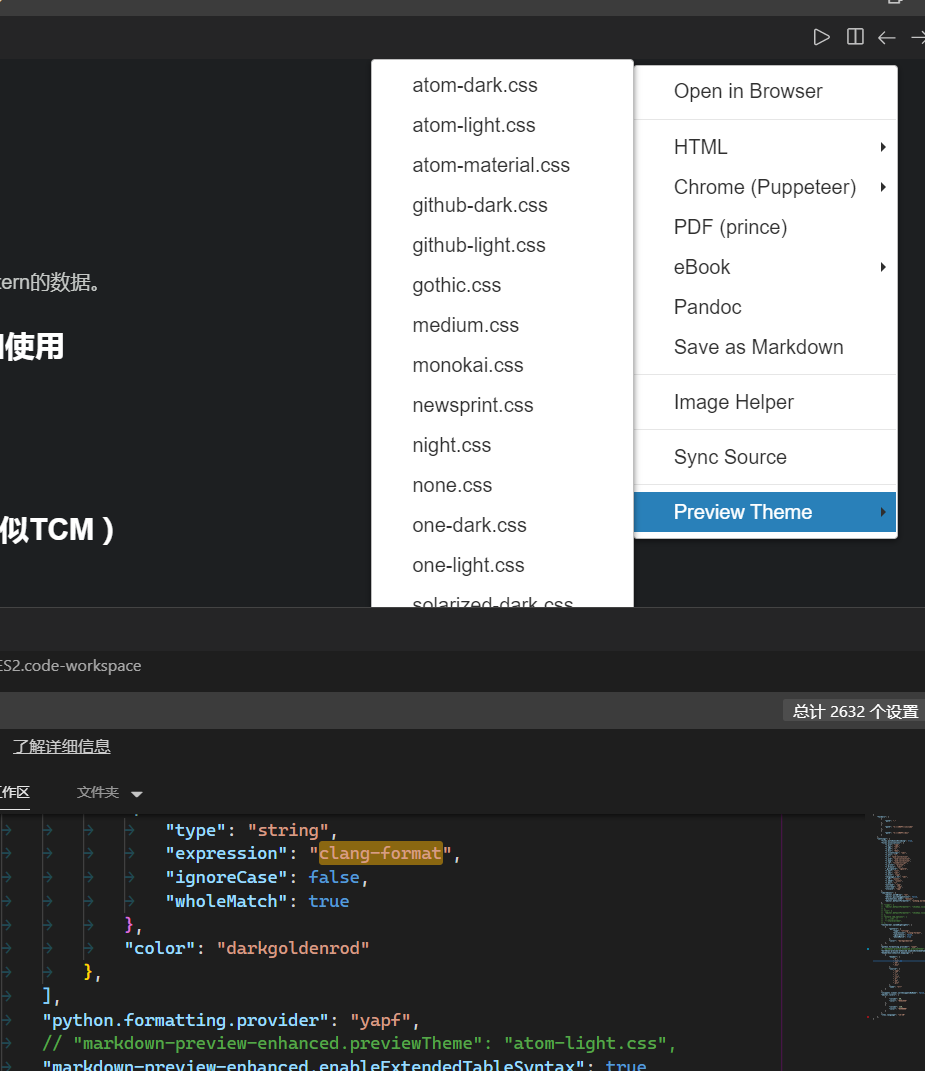
| 当工作区或者文件夹设置了渲染主题之后,使用界面的切换主题不生效。 | https://api.github.com/repos/shd101wyy/vscode-markdown-preview-enhanced/issues/514/comments | 0 | 2021-07-13T03:24:29Z | 2021-07-13T03:24:29Z | https://github.com/shd101wyy/vscode-markdown-preview-enhanced/issues/514 | 942,658,183 | 514 |
[
"shd101wyy",
"vscode-markdown-preview-enhanced"
] | Hello. There is a bug in the markdown rendering where html code is shown that should not appear. I have opened the same file in other editors and none of them fail me. This bug only occurs with this VSCode plugin.
Hello. There is a bug in the markdown rendering where html code is shown that should not appear. I have... | Bug on the rendering tab | https://api.github.com/repos/shd101wyy/vscode-markdown-preview-enhanced/issues/513/comments | 0 | 2021-07-10T19:12:38Z | 2021-07-10T19:12:38Z | https://github.com/shd101wyy/vscode-markdown-preview-enhanced/issues/513 | 941,308,174 | 513 |
[
"shd101wyy",
"vscode-markdown-preview-enhanced"
] | I think the chapter navigation system needs a little redesign. It is one of the most useful features when working with very long documents and is currently not very practical.
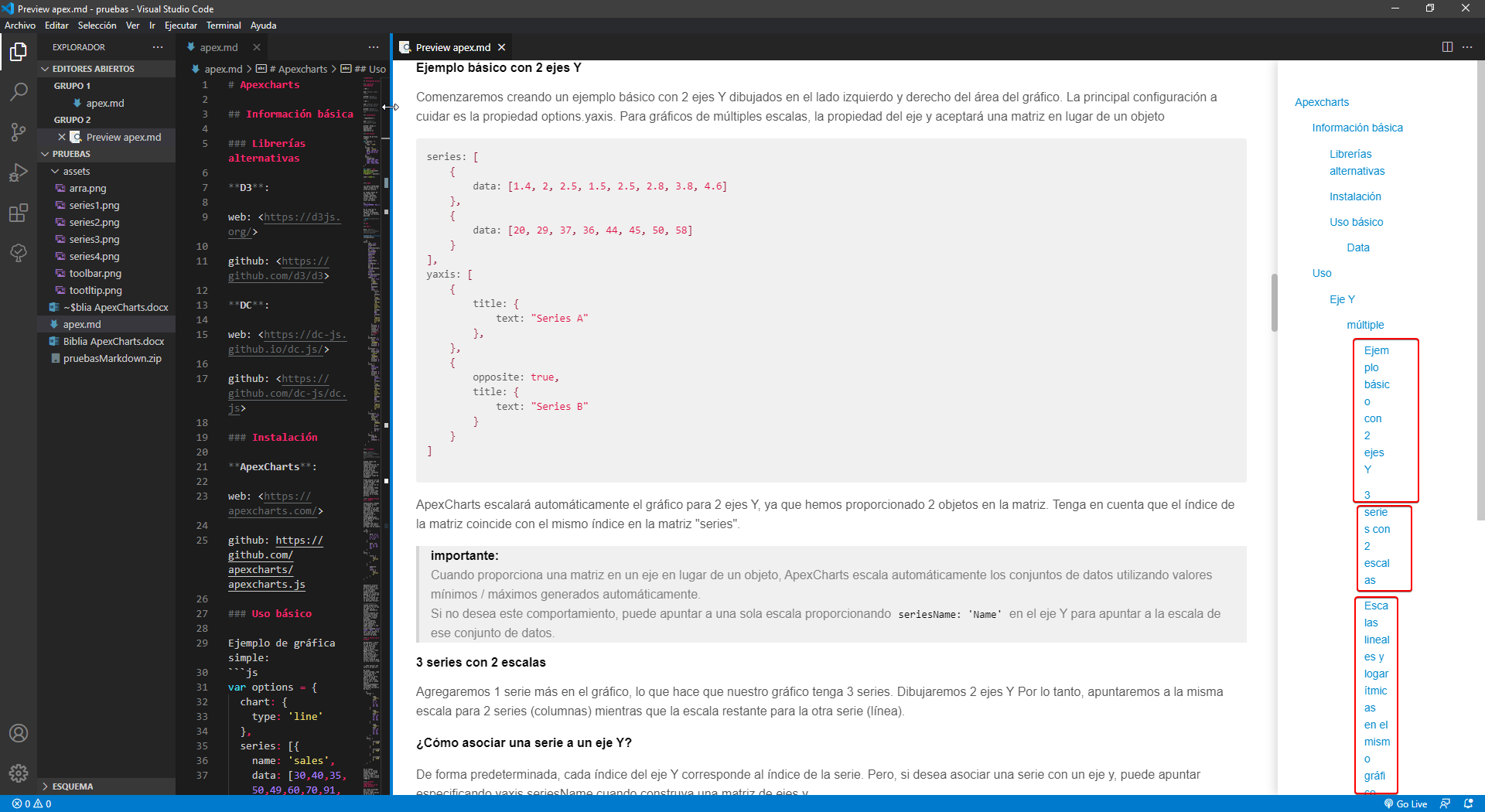
| Issue rendering Chapters Navigation bar | https://api.github.com/repos/shd101wyy/vscode-markdown-preview-enhanced/issues/512/comments | 0 | 2021-07-10T10:26:43Z | 2021-07-10T10:26:43Z | https://github.com/shd101wyy/vscode-markdown-preview-enhanced/issues/512 | 941,221,683 | 512 |
[
"shd101wyy",
"vscode-markdown-preview-enhanced"
] | 不是学前端的,不知道怎么定义样式,之前花好大劲修改了代码块的注释颜色,现在想修改inline code的字体颜色,找了半天是在没找到对应的样式叫什么。
关于列出样式大全的事可以有时间再搞。能先告诉我怎么设置inline code的样式吗 | 能罗列一下样式大全吗 | https://api.github.com/repos/shd101wyy/vscode-markdown-preview-enhanced/issues/924/comments | 2 | 2021-07-09T04:13:20Z | 2023-08-23T02:26:23Z | https://github.com/shd101wyy/vscode-markdown-preview-enhanced/issues/924 | 1,862,446,973 | 924 |
[
"shd101wyy",
"vscode-markdown-preview-enhanced"
] | **Describe the bug**
Numerous font-awesome icons fail to render in Mermaid diagrams. Initially it looked like the issue was affecting all icons containing multiple `-` characters - however, I've just found that `fa:fa-battery-full` is working, so no longer sure what is causing this.
**To Reproduce**
Create a m... | Bug: some font-awesome icons do not render in Mermaid diagrams (others do). Verified not a Mermaid bug. | https://api.github.com/repos/shd101wyy/vscode-markdown-preview-enhanced/issues/511/comments | 1 | 2021-07-08T11:33:44Z | 2024-05-09T01:42:42Z | https://github.com/shd101wyy/vscode-markdown-preview-enhanced/issues/511 | 939,764,703 | 511 |
[
"shd101wyy",
"vscode-markdown-preview-enhanced"
] | For some reason, this package doesn't work on newly created files. For instance, if I do the following
* create a new file `CTRL+N`
* write something or paste some text formatted as Markdown
* run the preview command by either using `CTRL+SHIFT+M` or `Markdown Preview Enhanced: Toggle` in Pallete
it doesn't sh... | The package doesn't work on new files | https://api.github.com/repos/shd101wyy/vscode-markdown-preview-enhanced/issues/925/comments | 1 | 2021-07-07T16:41:51Z | 2023-08-23T02:26:25Z | https://github.com/shd101wyy/vscode-markdown-preview-enhanced/issues/925 | 1,862,447,004 | 925 |
[
"shd101wyy",
"vscode-markdown-preview-enhanced"
] | when open open in browser, the other css are not effected, I want to use vue.css in browser preview.
thanks. | open open in browser | https://api.github.com/repos/shd101wyy/vscode-markdown-preview-enhanced/issues/926/comments | 1 | 2021-07-07T06:34:25Z | 2023-08-23T02:26:27Z | https://github.com/shd101wyy/vscode-markdown-preview-enhanced/issues/926 | 1,862,447,036 | 926 |
[
"shd101wyy",
"vscode-markdown-preview-enhanced"
] | 插件和 MarkdownAllinOne 插件同时启动时会出现输入或删除时卡顿的问题,当版本退回到 0.5.18 时问题消失。 | 插件和 MarkdownAllinOne 共存时卡顿 | https://api.github.com/repos/shd101wyy/vscode-markdown-preview-enhanced/issues/509/comments | 0 | 2021-07-05T19:50:19Z | 2021-07-05T20:13:26Z | https://github.com/shd101wyy/vscode-markdown-preview-enhanced/issues/509 | 937,331,029 | 509 |
[
"shd101wyy",
"vscode-markdown-preview-enhanced"
] | I'm trying to tell the preview to use a custom local JAR.
I tried to set the **plantuml server** to the path of the JAR
I also tried using a `file://` URI, but it only accepts HTTP(S) protocol.
In order to be autonomous on the version used, it would be great to allow our own `plantuml.jar`.
Thanks a lot, this... | Custom plantuml.jar instead of the integrated version | https://api.github.com/repos/shd101wyy/vscode-markdown-preview-enhanced/issues/508/comments | 3 | 2021-07-03T16:22:47Z | 2022-03-29T12:42:55Z | https://github.com/shd101wyy/vscode-markdown-preview-enhanced/issues/508 | 936,285,723 | 508 |
[
"shd101wyy",
"vscode-markdown-preview-enhanced"
] | Hello,
I'm trying to export some PDFs from my Markdown docs. I use MPE in VS Code, and use `gothic.css` as my preview theme.
When I export a PDF, there's a light grey background, surrounded by white margins. I can disable the backgrounds with front matter, but if I do, no other item, like tables, has background c... | My exported PDFs always have a background | https://api.github.com/repos/shd101wyy/vscode-markdown-preview-enhanced/issues/927/comments | 1 | 2021-07-02T15:56:46Z | 2023-08-23T02:26:30Z | https://github.com/shd101wyy/vscode-markdown-preview-enhanced/issues/927 | 1,862,447,063 | 927 |
[
"shd101wyy",
"vscode-markdown-preview-enhanced"
] | Hello,
I'm relatively new to CSS. I'm trying to put together a CSS so I can format PDFs out of my MD files. For the export, I use the `Puppeteer / PDF` option.
I managed to get something that I like by tweaking `style.less`, but I noticed that the changes on `style.less` are applied on top of your preview window ... | How to use different "base" css files for print and preview | https://api.github.com/repos/shd101wyy/vscode-markdown-preview-enhanced/issues/928/comments | 1 | 2021-07-02T15:46:18Z | 2023-08-23T02:26:32Z | https://github.com/shd101wyy/vscode-markdown-preview-enhanced/issues/928 | 1,862,447,086 | 928 |
[
"shd101wyy",
"vscode-markdown-preview-enhanced"
] | Dear manager:
I could not get a correct preview of the slide when the front matter is added.
Do you have any suggestion?
Thanks!
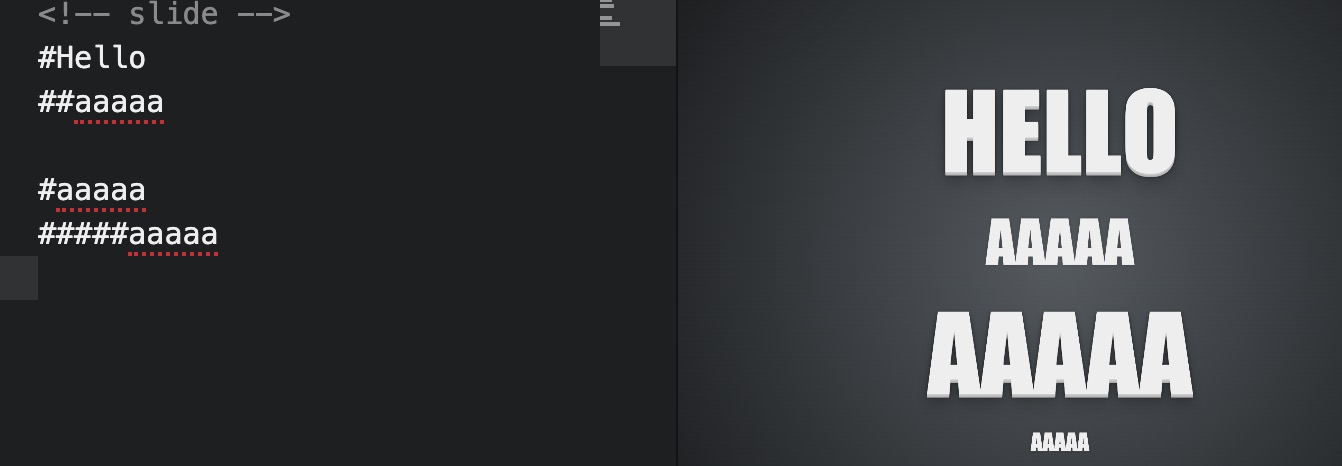

插入了一个本地md的链接,但在预览视图下点击后弹出浏览器打开了一个无法访问的链接,而用vscode自带的预览可以正常跳转。 | 无法在预览中跳转另一个md文件 | https://api.github.com/repos/shd101wyy/vscode-markdown-preview-enhanced/issues/507/comments | 4 | 2021-06-25T13:40:57Z | 2021-07-07T03:07:16Z | https://github.com/shd101wyy/vscode-markdown-preview-enhanced/issues/507 | 930,185,966 | 507 |
[
"shd101wyy",
"vscode-markdown-preview-enhanced"
] | 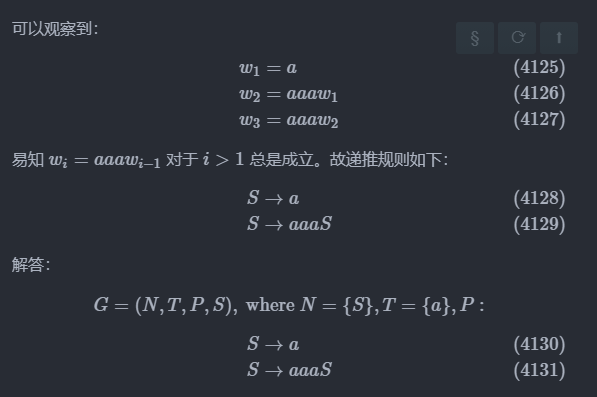
| Number of formulas is very 离谱 | https://api.github.com/repos/shd101wyy/vscode-markdown-preview-enhanced/issues/931/comments | 1 | 2021-06-25T13:27:10Z | 2023-08-23T02:26:38Z | https://github.com/shd101wyy/vscode-markdown-preview-enhanced/issues/931 | 1,862,447,166 | 931 |
[
"shd101wyy",
"vscode-markdown-preview-enhanced"
] | Is there a way to change the font used in the preview?
I'm using the Dendron fork and doesn't seem to have a setting for it, while the regular markdown preview enhanced does
It seems like, however, this extension still exposes some of the regular extension's settings; for example the css theme used in the rende... | [question] using a custom font in the preview | https://api.github.com/repos/shd101wyy/vscode-markdown-preview-enhanced/issues/506/comments | 3 | 2021-06-24T20:18:51Z | 2021-06-25T20:50:40Z | https://github.com/shd101wyy/vscode-markdown-preview-enhanced/issues/506 | 929,581,005 | 506 |
[
"shd101wyy",
"vscode-markdown-preview-enhanced"
] | It would be nice if we could specify a list of TeX macros to MathJax. For example, I often use the macro "\ra" instead of "\rightarrow" in formulas. Such macros can be defined as follows:
```
window.MathJax = {
tex: {
macros: {
ra: "\\rightarrow",
la: "\\leftarrow"
}
}
}
``` | Please add option to specify list of tex-macros to mathjax | https://api.github.com/repos/shd101wyy/vscode-markdown-preview-enhanced/issues/932/comments | 1 | 2021-06-24T06:36:24Z | 2023-08-23T02:26:41Z | https://github.com/shd101wyy/vscode-markdown-preview-enhanced/issues/932 | 1,862,447,196 | 932 |
[
"shd101wyy",
"vscode-markdown-preview-enhanced"
] | I've installed markdown-preview-enhanced and would like a white background for the preview but preserving black for the editor. I see black everywhere and have no idea how to convert it to be like the image on your instruction page?
thanks | preview white? | https://api.github.com/repos/shd101wyy/vscode-markdown-preview-enhanced/issues/933/comments | 3 | 2021-06-21T21:15:44Z | 2023-08-23T02:26:43Z | https://github.com/shd101wyy/vscode-markdown-preview-enhanced/issues/933 | 1,862,447,223 | 933 |
[
"shd101wyy",
"vscode-markdown-preview-enhanced"
] | Hi,
I am trying to render KaTeX maths expressions in a markdown file.
When opening MPE, the github-icon on the lower left of the preview suggests that it is loading but it never stops and the maths is not typeset correctly. I am running VSCodium on Windows 10, with the Pandoc parser enabled.

使用katex时,一切正常
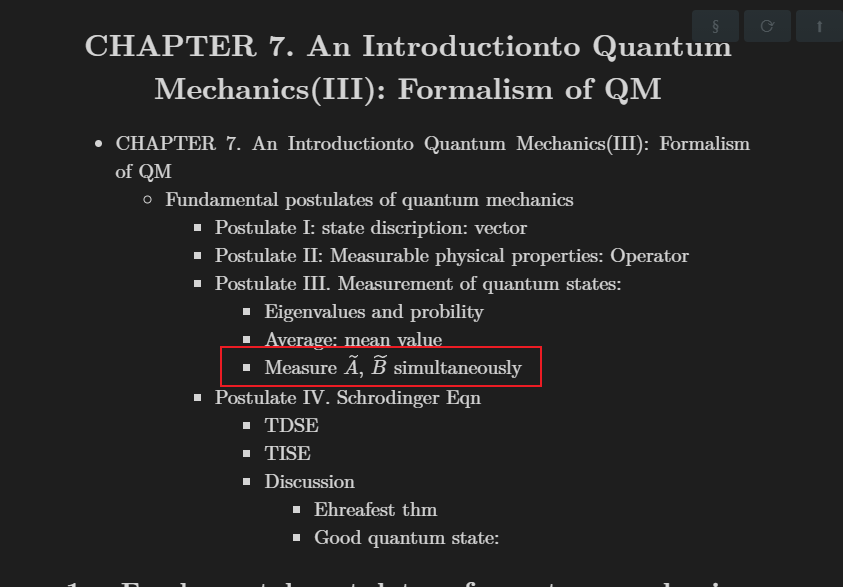
目录是直接输入`[toc]`产生的。比较容易发现目录通过一串无序列表生成。但是正常的无... | 使用mathjax引擎时,含有数学公式的[toc]目录无法正确渲染 | https://api.github.com/repos/shd101wyy/vscode-markdown-preview-enhanced/issues/935/comments | 0 | 2021-06-19T09:59:35Z | 2023-08-23T02:26:47Z | https://github.com/shd101wyy/vscode-markdown-preview-enhanced/issues/935 | 1,862,447,277 | 935 |
[
"shd101wyy",
"vscode-markdown-preview-enhanced"
] | 看起来这里的mathjax 是2.7.5 ,是否可以更新最新的mathjax3.1,以获得更多的功能?

另外很多mathjax可以实现的功能,比如化学包`\ce{}`,尽管源文件里有`mhchem.js`,但是仍然不能使用它。
markdown preview enhanced已经更新到`0.5.21`
使用vscode。 | 是否可以更新mathjax 3.1? | https://api.github.com/repos/shd101wyy/vscode-markdown-preview-enhanced/issues/936/comments | 3 | 2021-06-17T11:17:19Z | 2023-09-01T08:37:15Z | https://github.com/shd101wyy/vscode-markdown-preview-enhanced/issues/936 | 1,862,447,311 | 936 |
[
"shd101wyy",
"vscode-markdown-preview-enhanced"
] | I use a softer and lower contrast dark theme in vscode as I find it significantly easier to read.
The issue I have with this extension is that it takes that control from me, even after digging around in the js files for a while I was not able to unlock the colors from the harsh black-on-white, which will be a proble... | User friendliness | https://api.github.com/repos/shd101wyy/vscode-markdown-preview-enhanced/issues/505/comments | 1 | 2021-06-16T10:21:26Z | 2021-06-24T20:16:34Z | https://github.com/shd101wyy/vscode-markdown-preview-enhanced/issues/505 | 922,424,149 | 505 |
[
"shd101wyy",
"vscode-markdown-preview-enhanced"
] | ```mermaid
graph LR
subgraph top
direction TB
subgraph b1
i1-->f1
end
end
```
比如这段代码无法被正确渲染 | mermaid的subgraph direction尚未支持 | https://api.github.com/repos/shd101wyy/vscode-markdown-preview-enhanced/issues/937/comments | 1 | 2021-06-09T03:20:59Z | 2023-08-23T02:26:51Z | https://github.com/shd101wyy/vscode-markdown-preview-enhanced/issues/937 | 1,862,447,338 | 937 |
[
"shd101wyy",
"vscode-markdown-preview-enhanced"
] | Hello this is a seriously useful project. I should do something to show how much I like it, ok sent $8 thats only about $5 with exchange not much, but a coffee or a beer maybe.
Anyway, it seems that if you try and use font awesome or emojis with enableExtendedTableSyntax, at some point the icon syntax gets mapped t... | font awesome and emojis break enableExtendedTableSyntax | https://api.github.com/repos/shd101wyy/vscode-markdown-preview-enhanced/issues/938/comments | 0 | 2021-06-08T23:41:01Z | 2023-08-23T02:26:54Z | https://github.com/shd101wyy/vscode-markdown-preview-enhanced/issues/938 | 1,862,447,369 | 938 |
[
"shd101wyy",
"vscode-markdown-preview-enhanced"
] | vscode 中
标签只要加上就转不出来,预览不了,什么都没变的情况极少数时候又可以渲染出来
| plantuml 渲染不出来 | https://api.github.com/repos/shd101wyy/vscode-markdown-preview-enhanced/issues/939/comments | 2 | 2021-06-05T07:01:20Z | 2023-08-23T02:26:56Z | https://github.com/shd101wyy/vscode-markdown-preview-enhanced/issues/939 | 1,862,447,393 | 939 |
[
"shd101wyy",
"vscode-markdown-preview-enhanced"
] | OS: Windows 10
IDE: VS Code
Extension: Markdown Preview Enhanced
Exporter: Puppeteer
Format: PDF
Issue:
When defining path in the front matter to export to a sub folder, Puppeteer tries to save in the sub folder of VS code.
Looks like working folder is falling to the executable's folder instead of where my mar... | VSCode-MPE-Puppeteer-PDF-Relative Path Not working | https://api.github.com/repos/shd101wyy/vscode-markdown-preview-enhanced/issues/940/comments | 5 | 2021-06-04T05:55:22Z | 2023-08-23T02:26:59Z | https://github.com/shd101wyy/vscode-markdown-preview-enhanced/issues/940 | 1,862,447,418 | 940 |
[
"shd101wyy",
"vscode-markdown-preview-enhanced"
] | 输入下面的公式,在preview里面渲染出来,x趋向于无穷大的下标没有正确显示在lim符号下面
$\lim_{x\to \infty}f(x)$
但是在公式块环境下输入同样的latex,渲染是正常的
$$
\lim_{x\to \infty}f(x)
$$
问题出可能在\lim 没有被解析成极限符号上。
| [bug]数学行内公式极限符号下标渲染有问题(\lim_{x\to \infty}f(x)) | https://api.github.com/repos/shd101wyy/vscode-markdown-preview-enhanced/issues/941/comments | 1 | 2021-06-03T13:33:46Z | 2023-08-23T02:27:01Z | https://github.com/shd101wyy/vscode-markdown-preview-enhanced/issues/941 | 1,862,447,456 | 941 |
[
"shd101wyy",
"vscode-markdown-preview-enhanced"
] | Thanks for the great vs code extension. :)
My workflow involves two steps:
1) writing doc in markdown using `Markdown Preview Enhanced` default html preview.
2) converting md with pandoc to either html / pdf (using latex, I need citation support)
I would like to be able to create image captions that work both... | support image captions in both html preview and pandoc export | https://api.github.com/repos/shd101wyy/vscode-markdown-preview-enhanced/issues/500/comments | 0 | 2021-06-02T06:48:18Z | 2021-06-02T06:48:18Z | https://github.com/shd101wyy/vscode-markdown-preview-enhanced/issues/500 | 909,175,083 | 500 |
[
"shd101wyy",
"vscode-markdown-preview-enhanced"
] | environment as follows.
- OS: macOS(Big Sur v11.4)
- VSCode: v1.56.2(Universal)
- Markdown Preview Enhanced: v0.5.18
operation
1. create new markdown file.
2. Markdown Preview Enhanced: Create TOC
3. create some heading
e.g.
```
<!-- @import "[TOC]" {cmd="toc" depthFrom=1 depthTo=6 orderedLi... | doesn't work TOC create when file save | https://api.github.com/repos/shd101wyy/vscode-markdown-preview-enhanced/issues/499/comments | 4 | 2021-06-02T02:52:27Z | 2021-06-11T12:23:35Z | https://github.com/shd101wyy/vscode-markdown-preview-enhanced/issues/499 | 909,023,271 | 499 |
[
"shd101wyy",
"vscode-markdown-preview-enhanced"
] | null | 你好,我有时会在 md 文件中使用 #tag,mpe 会将 #tag 识别为标题,请问可以取消吗 | https://api.github.com/repos/shd101wyy/vscode-markdown-preview-enhanced/issues/942/comments | 1 | 2021-05-26T04:42:20Z | 2023-08-23T02:27:03Z | https://github.com/shd101wyy/vscode-markdown-preview-enhanced/issues/942 | 1,862,447,474 | 942 |
[
"shd101wyy",
"vscode-markdown-preview-enhanced"
] | null | is:issue is:open 最新版本不能对预览的图进行缩放,没有滑动栏 | https://api.github.com/repos/shd101wyy/vscode-markdown-preview-enhanced/issues/943/comments | 0 | 2021-05-25T06:59:08Z | 2023-08-23T02:27:05Z | https://github.com/shd101wyy/vscode-markdown-preview-enhanced/issues/943 | 1,862,447,505 | 943 |
[
"shd101wyy",
"vscode-markdown-preview-enhanced"
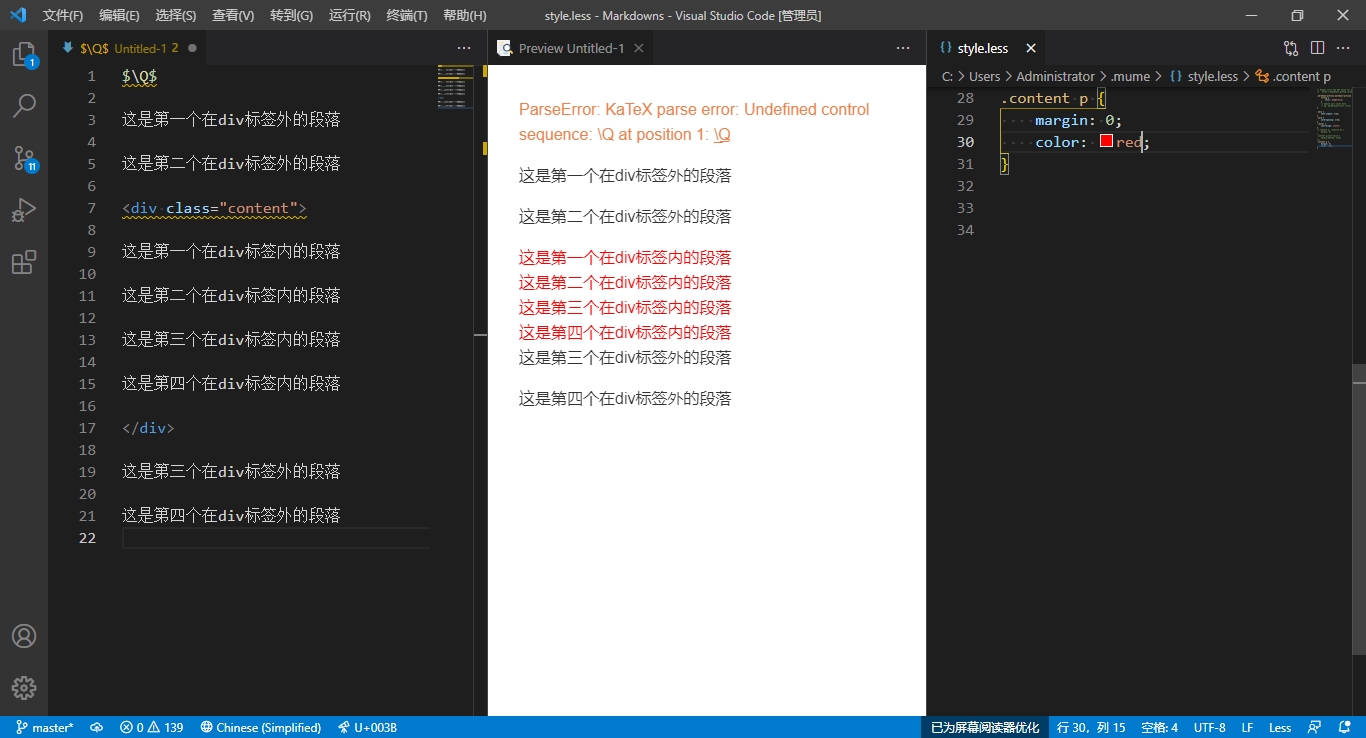
] | KaTeX的\Q无法渲染:
报错:ParseError: KaTeX parse error: Undefined control sequence: \Q at position 1: \̲Q̲
在对div标签内的段落使用margin为0的CSS样式后发现它把div的下外边距也归零了,然而上边距并没有受到影响,并且,正常情况下div标签的外边距是不会受到影响的。
代码如下:
| 渲染错误:KaTeX的\Q渲染报错:CSS的margin属性为0时在对div标签内部的标签消除外边距之后会消除div的下外边距 | https://api.github.com/repos/shd101wyy/vscode-markdown-preview-enhanced/issues/944/comments | 1 | 2021-05-25T06:17:32Z | 2023-08-23T02:27:08Z | https://github.com/shd101wyy/vscode-markdown-preview-enhanced/issues/944 | 1,862,447,559 | 944 |
[
"shd101wyy",
"vscode-markdown-preview-enhanced"
] | Dear Team,
Thank you so much for building such a great plugin! Really love it.
I have one problem regarding exporting the final md to Google Drive with code blocks.
Currently the plugin puts the code in `pre` block. However when copying & pasting the content to Google Docs, styles on the `pre` block is not use... | Problem exporting the md to Google docs with code blocks. | https://api.github.com/repos/shd101wyy/vscode-markdown-preview-enhanced/issues/498/comments | 0 | 2021-05-24T15:25:16Z | 2021-05-24T15:25:16Z | https://github.com/shd101wyy/vscode-markdown-preview-enhanced/issues/498 | 899,763,239 | 498 |
[
"shd101wyy",
"vscode-markdown-preview-enhanced"
] | 

原本是一个本地md的链接,但在预览中的链接地址却变了,点击后使用浏览器打开,然后提示如图,用vscode自带的预览可以正常跳转。 | 无法在预览中跳转另一个md文件 | https://api.github.com/repos/shd101wyy/vscode-markdown-preview-enhanced/issues/497/comments | 6 | 2021-05-23T16:01:46Z | 2021-06-14T00:32:12Z | https://github.com/shd101wyy/vscode-markdown-preview-enhanced/issues/497 | 899,052,116 | 497 |
[
"shd101wyy",
"vscode-markdown-preview-enhanced"
] | import两张图片的时候,怎么显示在一行? | import两个图片的时候,怎么显示在一行? | https://api.github.com/repos/shd101wyy/vscode-markdown-preview-enhanced/issues/945/comments | 0 | 2021-05-23T15:55:34Z | 2023-08-23T02:27:10Z | https://github.com/shd101wyy/vscode-markdown-preview-enhanced/issues/945 | 1,862,447,591 | 945 |
[
"shd101wyy",
"vscode-markdown-preview-enhanced"
] | Hi
I am formatting my citations in the usual way [@citekey] and they render fine in text with the style I'm using. However, when I scroll down I see under my references that they are listed in a weird way, I'm using the pandoc parser:
Example:
# References
1
First article
2
Second article | I don't know why the preview repeats the references twice (pandoc) | https://api.github.com/repos/shd101wyy/vscode-markdown-preview-enhanced/issues/946/comments | 0 | 2021-05-21T23:16:23Z | 2023-08-23T02:27:12Z | https://github.com/shd101wyy/vscode-markdown-preview-enhanced/issues/946 | 1,862,447,616 | 946 |
[
"shd101wyy",
"vscode-markdown-preview-enhanced"
] | 当数学公式没有输入完成时:
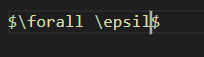
在mpe中,预览是这样的:

在原生的预览中,是这样的:

| 希望mpe可以支持双向搜索~ | https://api.github.com/repos/shd101wyy/vscode-markdown-preview-enhanced/issues/948/comments | 0 | 2021-05-21T02:13:34Z | 2023-08-23T02:27:16Z | https://github.com/shd101wyy/vscode-markdown-preview-enhanced/issues/948 | 1,862,447,667 | 948 |
[
"shd101wyy",
"vscode-markdown-preview-enhanced"
] | 如题,在vsc中预览的时候点击目录可以跳转,但是右键在浏览器打开或者导出为html时有时就不能跳转,请问这是为什么?该如何解决? | markdown导出html后目录不能跳转 | https://api.github.com/repos/shd101wyy/vscode-markdown-preview-enhanced/issues/496/comments | 2 | 2021-05-18T12:40:06Z | 2021-08-05T03:29:03Z | https://github.com/shd101wyy/vscode-markdown-preview-enhanced/issues/496 | 894,335,943 | 496 |
[
"shd101wyy",
"vscode-markdown-preview-enhanced"
] | In StackExchange (StackOveflow) when a link is added using `Ctrk+k` the generated code is in the `Reference Style`:
```
[My Search Engine][001]
[001]: https://www.bing.com/
```
It also keeps the numbers ordered according to their appearance order (With each new link added).
This keeps the note very com... | [Feature Request] Convert Links to Reference Style Links | https://api.github.com/repos/shd101wyy/vscode-markdown-preview-enhanced/issues/495/comments | 0 | 2021-05-18T11:49:10Z | 2021-05-18T11:49:10Z | https://github.com/shd101wyy/vscode-markdown-preview-enhanced/issues/495 | 894,292,888 | 495 |
[
"shd101wyy",
"vscode-markdown-preview-enhanced"
] | I enjoy this extension very much. Can we further support [Admonition](https://www.npmjs.com/package/markdown-it-admonition) syntax in markdown? Like what [Markdown Extended](https://marketplace.visualstudio.com/items?itemName=jebbs.markdown-extended#admonition) and [MkDocs](https://squidfunk.github.io/mkdocs-material/r... | Support Admonition preview | https://api.github.com/repos/shd101wyy/vscode-markdown-preview-enhanced/issues/494/comments | 0 | 2021-05-17T03:06:07Z | 2021-05-17T03:06:07Z | https://github.com/shd101wyy/vscode-markdown-preview-enhanced/issues/494 | 892,844,954 | 494 |
[
"shd101wyy",
"vscode-markdown-preview-enhanced"
] | Thank you for your great VS Code extension, I really enjoy working with it. Today I ran into the problem that I was not able to display a single circumflex `^` in a table cell. Of course, this is due to the enabled extended table syntax and it works as it should. The only problem is that it works too good, e.g. `\^` l... | Unable to display a single circumflex character (^) in a table cell while enableExtendedTableSyntax is true | https://api.github.com/repos/shd101wyy/vscode-markdown-preview-enhanced/issues/949/comments | 2 | 2021-05-10T12:20:20Z | 2023-08-23T02:27:18Z | https://github.com/shd101wyy/vscode-markdown-preview-enhanced/issues/949 | 1,862,447,697 | 949 |
[
"shd101wyy",
"vscode-markdown-preview-enhanced"
] | Hi, here is a problem of my plug. My code is `[test](another_test.md)`. When I open the preview and click the link, my default browser opens and jumped to a weird website like this "https://ac9e778c-d4c2-422c-89fa-6b8ec05500f5.vscode-webview-test.com/vscode-resource/file///Users/steven/another_test.md". But I don't kno... | A vital issue of cross-document jump | https://api.github.com/repos/shd101wyy/vscode-markdown-preview-enhanced/issues/950/comments | 0 | 2021-05-09T15:04:56Z | 2023-08-23T02:27:21Z | https://github.com/shd101wyy/vscode-markdown-preview-enhanced/issues/950 | 1,862,447,719 | 950 |
[
"shd101wyy",
"vscode-markdown-preview-enhanced"
] | 我希望她可以支持Julia Markdwon (.jmd) | 我希望她可以支持Julia Markdwon (.jmd) | https://api.github.com/repos/shd101wyy/vscode-markdown-preview-enhanced/issues/951/comments | 1 | 2021-05-09T06:37:08Z | 2023-08-23T02:27:23Z | https://github.com/shd101wyy/vscode-markdown-preview-enhanced/issues/951 | 1,862,447,742 | 951 |
[
"shd101wyy",
"vscode-markdown-preview-enhanced"
] | It can support R Markdown. Why doesn't it support Julia Markdown (.jmd)? | Why doesn't it support Julia Markdown (.jmd)? | https://api.github.com/repos/shd101wyy/vscode-markdown-preview-enhanced/issues/491/comments | 2 | 2021-05-09T06:21:31Z | 2023-01-19T17:50:41Z | https://github.com/shd101wyy/vscode-markdown-preview-enhanced/issues/491 | 881,868,453 | 491 |
[
"shd101wyy",
"vscode-markdown-preview-enhanced"
] | Hi there, I was using task list syntax, ` - [ ] ` and found out that the task list renders with the disc list style type as shown below:

While it should be rendered this way:
![image](https://user-i... | Task list not rendered properly | https://api.github.com/repos/shd101wyy/vscode-markdown-preview-enhanced/issues/490/comments | 1 | 2021-05-08T06:18:34Z | 2022-09-23T18:43:33Z | https://github.com/shd101wyy/vscode-markdown-preview-enhanced/issues/490 | 880,362,923 | 490 |
[
"shd101wyy",
"vscode-markdown-preview-enhanced"
] | Hi, thank you for this useful VS Code extension. I also use the Pandoc extension to render the markdown to a HTML file, which requires title metadata. The most convenient format for providing that metadata seems to be a YAML block at the very beginning of the file:
```
---
aNiceTitle
---
```
That works for t... | Handling of title metadata. | https://api.github.com/repos/shd101wyy/vscode-markdown-preview-enhanced/issues/952/comments | 0 | 2021-05-03T18:49:30Z | 2023-08-23T02:27:25Z | https://github.com/shd101wyy/vscode-markdown-preview-enhanced/issues/952 | 1,862,447,776 | 952 |
Subsets and Splits
No community queries yet
The top public SQL queries from the community will appear here once available.