
issue_owner_repo listlengths 2 2 | issue_body stringlengths 0 262k ⌀ | issue_title stringlengths 1 1.02k | issue_comments_url stringlengths 53 116 | issue_comments_count int64 0 2.49k | issue_created_at stringdate 1999-03-17 02:06:42 2025-06-23 11:41:49 | issue_updated_at stringdate 2000-02-10 06:43:57 2025-06-23 11:43:00 | issue_html_url stringlengths 34 97 | issue_github_id int64 132 3.17B | issue_number int64 1 215k |
|---|---|---|---|---|---|---|---|---|---|
[
"shd101wyy",
"vscode-markdown-preview-enhanced"
] | As shd101wyy/markdown-preview-enhanced#408 mentioned, would it be possible to support SMILE (Chemistry molecules drawing) as [mathPix ](https://github.com/Mathpix/vscode-mathpix-markdown) extension does?
[mathPix](https://github.com/Mathpix/vscode-mathpix-markdown) supports built-in markdown preview but not MPE :(
| MathPix.SMILE (Chemistry molecules drawing) support | https://api.github.com/repos/shd101wyy/vscode-markdown-preview-enhanced/issues/953/comments | 0 | 2021-05-03T14:38:26Z | 2023-08-23T02:27:27Z | https://github.com/shd101wyy/vscode-markdown-preview-enhanced/issues/953 | 1,862,447,807 | 953 |
[
"shd101wyy",
"vscode-markdown-preview-enhanced"
] | Current themes include `github-dark.css` and `github-light.css`.
Would be nice to see the new GitHub themes (both dark mode and light mode) added as well.
| [Feature] Add GitHub's new themes as preview themes | https://api.github.com/repos/shd101wyy/vscode-markdown-preview-enhanced/issues/488/comments | 0 | 2021-04-30T00:07:07Z | 2021-04-30T00:07:07Z | https://github.com/shd101wyy/vscode-markdown-preview-enhanced/issues/488 | 871,699,656 | 488 |
[
"shd101wyy",
"vscode-markdown-preview-enhanced"
] | If an codeblock starts with
```
```plantUml
```
it is not rendered. It has to be lowercase. | CodeBlock for plantuml are casesensitive | https://api.github.com/repos/shd101wyy/vscode-markdown-preview-enhanced/issues/954/comments | 0 | 2021-04-27T04:28:37Z | 2023-08-23T02:27:29Z | https://github.com/shd101wyy/vscode-markdown-preview-enhanced/issues/954 | 1,862,447,831 | 954 |
[
"shd101wyy",
"vscode-markdown-preview-enhanced"
] | 例如,在官方手册中,代码块总是有相应的标注:
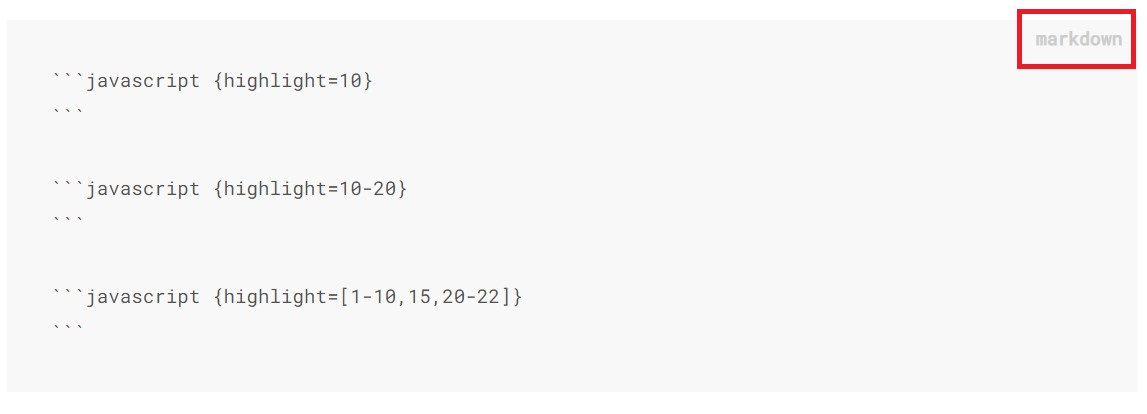
但是在预览效果和导出文档里面却没有。
此外,如果还能添加一个“copy”的快捷按钮就更好了。
另外,如果能实现代码块“continue”时行数也能“continue”就很好了。 | 我希望在代码块的右上角可以添加语言标注。 | https://api.github.com/repos/shd101wyy/vscode-markdown-preview-enhanced/issues/955/comments | 0 | 2021-04-27T03:58:24Z | 2023-08-23T02:27:32Z | https://github.com/shd101wyy/vscode-markdown-preview-enhanced/issues/955 | 1,862,447,854 | 955 |
[
"shd101wyy",
"vscode-markdown-preview-enhanced"
] | I want to use the font "NeoEuler" for the inline math, but I can't get MathJax 2 to use it by changing the fonts myself in the local extension cache and in the MathJax config for the extension.
So I tried to use the style.less to !important override the style of the span elements to font-family: "NeoEulerMedium"
Th... | [Request/Need Help] Update MathJax inclusion to MathJax 3 for font variety | https://api.github.com/repos/shd101wyy/vscode-markdown-preview-enhanced/issues/956/comments | 2 | 2021-04-26T06:00:21Z | 2023-09-01T08:37:37Z | https://github.com/shd101wyy/vscode-markdown-preview-enhanced/issues/956 | 1,862,447,876 | 956 |
[
"shd101wyy",
"vscode-markdown-preview-enhanced"
] | How are modules loaded in so they can be used with Mathjax? The config is slightly different than everthing I have seen yet.
I don't know if this is possible at all, but I want to load in [siunitx](https://github.com/burnpanck/MathJax-siunitx).
EDIT: If this is the wrong place to ask, please close this issue.
| Need help loading in siunitx | https://api.github.com/repos/shd101wyy/vscode-markdown-preview-enhanced/issues/487/comments | 0 | 2021-04-25T15:35:32Z | 2021-04-25T15:35:59Z | https://github.com/shd101wyy/vscode-markdown-preview-enhanced/issues/487 | 867,040,961 | 487 |
[
"shd101wyy",
"vscode-markdown-preview-enhanced"
] | Currently I am using MPE to write notes, but I could not find template insertion support in the documents. I wonder if you could add a template insertion functionality to MPE? | Feature Request: Template insertion | https://api.github.com/repos/shd101wyy/vscode-markdown-preview-enhanced/issues/957/comments | 1 | 2021-04-25T02:57:00Z | 2023-08-23T02:27:36Z | https://github.com/shd101wyy/vscode-markdown-preview-enhanced/issues/957 | 1,862,447,907 | 957 |
[
"shd101wyy",
"vscode-markdown-preview-enhanced"
] | Maybe you know sankey diagrams - a nice way to visualize flows.
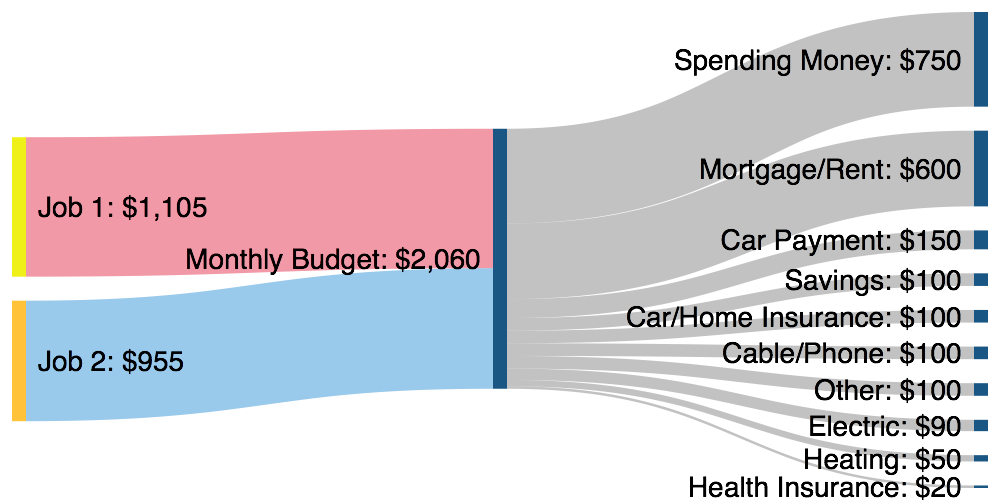
There is already a textual syntax for describing such and it is even here <https://github.com/nowthis/sankeymatic> .
The owner is @nowthis .
The detailed syntax is descri... | Feature request: support for sankey diagramms | https://api.github.com/repos/shd101wyy/vscode-markdown-preview-enhanced/issues/486/comments | 0 | 2021-04-23T20:38:05Z | 2021-04-23T20:57:11Z | https://github.com/shd101wyy/vscode-markdown-preview-enhanced/issues/486 | 866,416,766 | 486 |
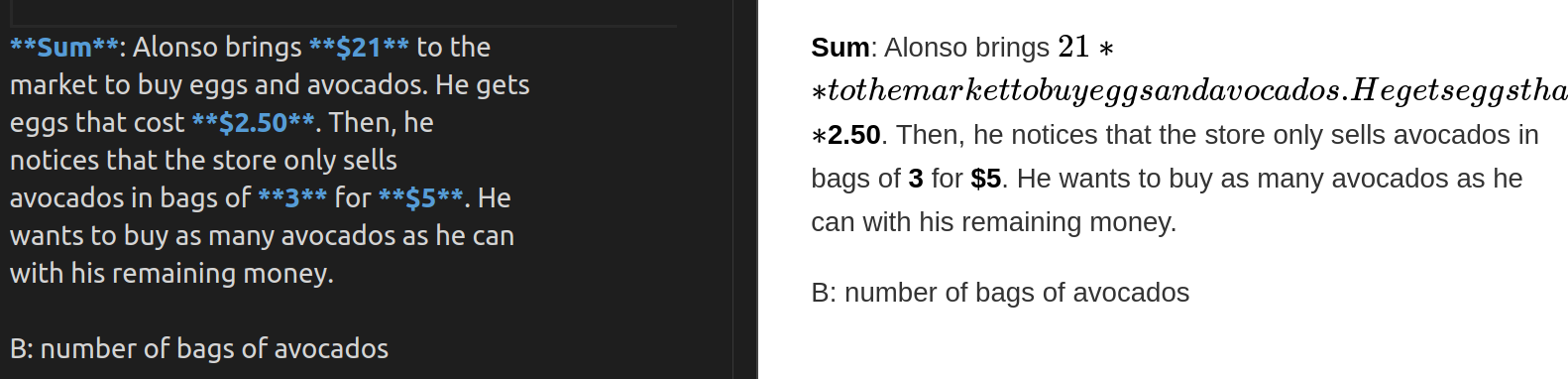
[
"shd101wyy",
"vscode-markdown-preview-enhanced"
] | For example:
```md
***60%***.
```
Should be rendered as

But it is rendered as
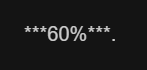
| Preview is not correct in an edge case | https://api.github.com/repos/shd101wyy/vscode-markdown-preview-enhanced/issues/485/comments | 0 | 2021-04-23T14:20:21Z | 2021-04-23T14:20:21Z | https://github.com/shd101wyy/vscode-markdown-preview-enhanced/issues/485 | 866,158,972 | 485 |
[
"shd101wyy",
"vscode-markdown-preview-enhanced"
] | Support for per-project configuration would benefit those using non-markdown file extensions with the package (eg `.txt` files housing markdown). This way, the user can dictate which projects have such files. For settings such as auto-opening preview, this means that a preview pane is not unnecessarily opened for proje... | Support for per-project configuration (eg via atomic-management package) - at least for custom file extensions | https://api.github.com/repos/shd101wyy/vscode-markdown-preview-enhanced/issues/958/comments | 0 | 2021-04-20T09:55:57Z | 2023-08-23T02:27:39Z | https://github.com/shd101wyy/vscode-markdown-preview-enhanced/issues/958 | 1,862,447,943 | 958 |
[
"shd101wyy",
"vscode-markdown-preview-enhanced"
] | Considering that the code module inserted in markdown in vs code is too long, how can I set it up to add a vertical scroll bar? | How to add a vertical scroll bar to the code? | https://api.github.com/repos/shd101wyy/vscode-markdown-preview-enhanced/issues/959/comments | 1 | 2021-04-19T09:53:24Z | 2023-08-23T02:27:41Z | https://github.com/shd101wyy/vscode-markdown-preview-enhanced/issues/959 | 1,862,447,977 | 959 |
[
"shd101wyy",
"vscode-markdown-preview-enhanced"
] | Can I control the size of image in Preview?
| How to control the size of image in Preview? | https://api.github.com/repos/shd101wyy/vscode-markdown-preview-enhanced/issues/960/comments | 1 | 2021-04-18T13:05:47Z | 2023-08-23T02:27:43Z | https://github.com/shd101wyy/vscode-markdown-preview-enhanced/issues/960 | 1,862,448,002 | 960 |
[
"shd101wyy",
"vscode-markdown-preview-enhanced"
] | 当开启 Automatically Show Preview Of Markdown Being Edited时,第一次打开md文件,在侧栏中能够实时更新预览,但是关闭侧栏后回到同一个md文件时,侧栏就再也无法自动渲染tex数学公式,只能相应更新公式源码。
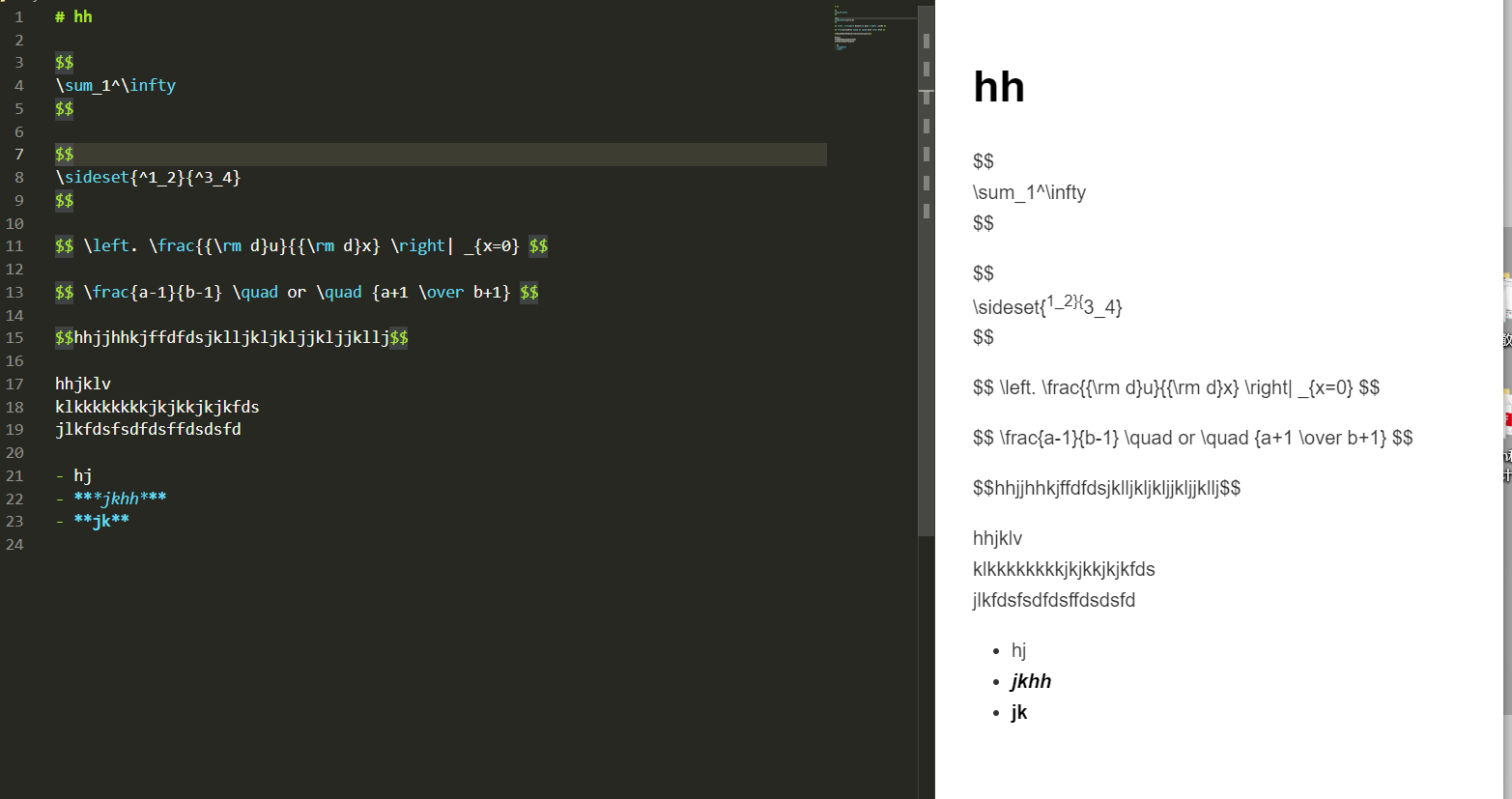
| tex公式的侧边预览不能自动更新 | https://api.github.com/repos/shd101wyy/vscode-markdown-preview-enhanced/issues/961/comments | 0 | 2021-04-17T12:12:07Z | 2023-08-23T02:27:45Z | https://github.com/shd101wyy/vscode-markdown-preview-enhanced/issues/961 | 1,862,448,025 | 961 |
[
"shd101wyy",
"vscode-markdown-preview-enhanced"
] | When writing some math formulae I noticed a difference in KaTeX documentation and the implementation here in markdown-preview-enhanced:
In KaTeX there are the alignment environments `align` and `alignat`, which don't work, but instead the in KaTeX undocumented environment `aligned` works just fine. The documentatio... | Alinging math functions not on par with KaTeX documentation | https://api.github.com/repos/shd101wyy/vscode-markdown-preview-enhanced/issues/484/comments | 0 | 2021-04-16T18:56:50Z | 2021-04-16T18:56:50Z | https://github.com/shd101wyy/vscode-markdown-preview-enhanced/issues/484 | 860,087,537 | 484 |
[
"shd101wyy",
"vscode-markdown-preview-enhanced"
] | [Enter steps to reproduce:]
1. ...
2. ...
**Atom**: 1.56.0 x64
**Electron**: 9.4.4
**OS**: Unknown Windows version
**Thrown From**: [markdown-preview-enhanced](https://github.com/shd101wyy/markdown-preview-enhanced) package 0.18.10
### Stack Trace
Uncaught TypeError: this.webview.getWebContents is not... | Uncaught TypeError: this.webview.getWebContents is not a function | https://api.github.com/repos/shd101wyy/vscode-markdown-preview-enhanced/issues/962/comments | 2 | 2021-04-14T20:09:31Z | 2023-08-23T02:27:47Z | https://github.com/shd101wyy/vscode-markdown-preview-enhanced/issues/962 | 1,862,448,056 | 962 |
[
"shd101wyy",
"vscode-markdown-preview-enhanced"
] | Context:
I use markdown for multiple to-do lists. I switched to this extension so that I can click the checkboxes to deactivate.
The to-do lists link to each other, and when I click on them with the vscode default previewer, it opens the new preview without opening the raw .md file too.
Problem:
With this extensi... | When linking to another markdown file, open preview but not the file | https://api.github.com/repos/shd101wyy/vscode-markdown-preview-enhanced/issues/482/comments | 2 | 2021-04-13T17:38:27Z | 2022-02-17T02:26:12Z | https://github.com/shd101wyy/vscode-markdown-preview-enhanced/issues/482 | 857,181,197 | 482 |
[
"shd101wyy",
"vscode-markdown-preview-enhanced"
] | null | How to change the color of a highlighted font by using a custom method ? | https://api.github.com/repos/shd101wyy/vscode-markdown-preview-enhanced/issues/963/comments | 1 | 2021-04-13T08:11:12Z | 2023-08-23T02:27:50Z | https://github.com/shd101wyy/vscode-markdown-preview-enhanced/issues/963 | 1,862,448,078 | 963 |
[
"shd101wyy",
"vscode-markdown-preview-enhanced"
] | vs code Version: 1.55.0
mac os Version:Catalina 10.15.6
| All of right-click button are not respond | https://api.github.com/repos/shd101wyy/vscode-markdown-preview-enhanced/issues/481/comments | 1 | 2021-04-12T05:53:05Z | 2022-02-24T12:20:25Z | https://github.com/shd101wyy/vscode-markdown-preview-enhanced/issues/481 | 855,576,195 | 481 |
[
"shd101wyy",
"vscode-markdown-preview-enhanced"
] | thank
https://markmap.js.org/

| markmap integration | https://api.github.com/repos/shd101wyy/vscode-markdown-preview-enhanced/issues/480/comments | 0 | 2021-04-12T03:34:36Z | 2021-04-12T03:34:36Z | https://github.com/shd101wyy/vscode-markdown-preview-enhanced/issues/480 | 855,511,121 | 480 |
[
"shd101wyy",
"vscode-markdown-preview-enhanced"
] | VSCode, pandoc parser

-->

Also the identifier preview generates as subscript, but this... | Pandoc: Subscript using '~' in headings shows identifier in preview | https://api.github.com/repos/shd101wyy/vscode-markdown-preview-enhanced/issues/964/comments | 4 | 2021-04-11T09:22:54Z | 2023-08-23T02:27:52Z | https://github.com/shd101wyy/vscode-markdown-preview-enhanced/issues/964 | 1,862,448,100 | 964 |
[
"shd101wyy",
"vscode-markdown-preview-enhanced"
] | sometimes i need to use the extended markdown table syntax, since i need to merge cells. but if i leave an emtpy cell there, it will be merged automatically, but i just want to create an empty cell by purpose.
then how to have both the extended table syntax and empty table cell working together?
| how to create an empty table cell if extended table syntax is enabled | https://api.github.com/repos/shd101wyy/vscode-markdown-preview-enhanced/issues/479/comments | 2 | 2021-04-09T07:13:56Z | 2021-04-30T01:06:52Z | https://github.com/shd101wyy/vscode-markdown-preview-enhanced/issues/479 | 854,240,738 | 479 |
[
"shd101wyy",
"vscode-markdown-preview-enhanced"
] | Hello, I think code highlighting for assembly language can be implemented just like that shown in github:
```asm
# Some comments
lui t0, %hi(boot_page_table)
li t1, 0xffffffffff00000000
sub t0, t0, t1
srli t0, t0, 12
```
Since assembly language is more confusing than any other language, the highl... | Code highlighting support for assembly language | https://api.github.com/repos/shd101wyy/vscode-markdown-preview-enhanced/issues/478/comments | 3 | 2021-04-08T12:49:38Z | 2025-02-02T13:20:07Z | https://github.com/shd101wyy/vscode-markdown-preview-enhanced/issues/478 | 853,438,928 | 478 |
[
"shd101wyy",
"vscode-markdown-preview-enhanced"
] | ATT. I guess that https://github.com/sponsors/shd101wyy should be opened on my side browser.
The workspace is opened in dev container. | "Open Github Sponsers" button doesn't work from notification bar. | https://api.github.com/repos/shd101wyy/vscode-markdown-preview-enhanced/issues/477/comments | 0 | 2021-04-08T08:37:03Z | 2021-04-08T08:37:03Z | https://github.com/shd101wyy/vscode-markdown-preview-enhanced/issues/477 | 853,222,890 | 477 |
[
"shd101wyy",
"vscode-markdown-preview-enhanced"
] | I recently started using [Kroki](https://kroki.io/). It supports many diagram libraries. It would be great to be able to visualize, in markdown, all the diagram types that Kroki supports | Support for Diagrams via Kroki | https://api.github.com/repos/shd101wyy/vscode-markdown-preview-enhanced/issues/965/comments | 7 | 2021-04-07T21:30:25Z | 2023-09-14T20:38:05Z | https://github.com/shd101wyy/vscode-markdown-preview-enhanced/issues/965 | 1,862,448,130 | 965 |
[
"shd101wyy",
"vscode-markdown-preview-enhanced"
] | It seems that special characters in the YAML get treated as markdown and this can interfere with the Pandoc export.
For example, when I try to export the following to Pandoc I get an error `Missing \begin{document}`:
```
---
output: pdf_document
header-includes:
- \let\oldsection\section*
- \renewcomm... | escaping latex in YAML | https://api.github.com/repos/shd101wyy/vscode-markdown-preview-enhanced/issues/966/comments | 0 | 2021-04-06T22:26:51Z | 2023-08-23T02:27:56Z | https://github.com/shd101wyy/vscode-markdown-preview-enhanced/issues/966 | 1,862,448,157 | 966 |
[
"shd101wyy",
"vscode-markdown-preview-enhanced"
] | [Enter steps to reproduce:]
- Open a markdown file by selecting it from the tree view
- Markdown Preview panel opens and renders, but also throws the same exception twice
Basically everything seems to work except that it is throwing this exception which is popping up each time. It's the getWebContents method on... | Uncaught TypeError: this.webview.getWebContents is not a function | https://api.github.com/repos/shd101wyy/vscode-markdown-preview-enhanced/issues/967/comments | 7 | 2021-04-06T21:33:38Z | 2023-08-23T02:27:59Z | https://github.com/shd101wyy/vscode-markdown-preview-enhanced/issues/967 | 1,862,448,184 | 967 |
[
"shd101wyy",
"vscode-markdown-preview-enhanced"
] | LaTeX formulae can not be rendered when the Jupyter extension enabled after the last update. How can I solve this problem?
| LaTeX formulae can not be rendered when Jupyter extension enabled after the last update. | https://api.github.com/repos/shd101wyy/vscode-markdown-preview-enhanced/issues/968/comments | 2 | 2021-03-30T09:46:51Z | 2023-08-23T02:28:01Z | https://github.com/shd101wyy/vscode-markdown-preview-enhanced/issues/968 | 1,862,448,217 | 968 |
[
"shd101wyy",
"vscode-markdown-preview-enhanced"
] | Why are all English titles formatted in uppercase? Can you keep the user typed text? | Why are all English titles formatted in uppercase? | https://api.github.com/repos/shd101wyy/vscode-markdown-preview-enhanced/issues/475/comments | 0 | 2021-03-30T03:03:45Z | 2021-03-30T03:03:45Z | https://github.com/shd101wyy/vscode-markdown-preview-enhanced/issues/475 | 844,017,788 | 475 |
[
"shd101wyy",
"vscode-markdown-preview-enhanced"
] | It will be really awesome if we can have the ability to sort the tables based on column values in ascending or descending order. This will be similar to how tables on Confluence work. | Add ability to sort tables based on column value | https://api.github.com/repos/shd101wyy/vscode-markdown-preview-enhanced/issues/969/comments | 0 | 2021-03-30T00:15:15Z | 2023-08-23T02:28:03Z | https://github.com/shd101wyy/vscode-markdown-preview-enhanced/issues/969 | 1,862,448,237 | 969 |
[
"shd101wyy",
"vscode-markdown-preview-enhanced"
] | I don't know how to over-ride the CSS text-width in the browser preview.
The following CSS will change body width for HTML *exports*:
```css
html body[for="html-export"]:not([data-presentation-mode]) { width: 55%; }
```
However I haven't found a way of changing the width for *in-editor* previews. The followi... | Change CSS Width in Browser Preview | https://api.github.com/repos/shd101wyy/vscode-markdown-preview-enhanced/issues/970/comments | 0 | 2021-03-27T03:41:01Z | 2023-08-23T02:28:05Z | https://github.com/shd101wyy/vscode-markdown-preview-enhanced/issues/970 | 1,862,448,248 | 970 |
[
"shd101wyy",
"vscode-markdown-preview-enhanced"
] | The title is rendered when using code-chunks with `output="markdown"`, see the screenshot.
<img width="825" alt="image" src="https://user-images.githubusercontent.com/682676/112550203-4a50a080-8dbf-11eb-94d7-09a5918acd1a.png">
This is only happening in `output="markdown"` mode, kinda making the output useless.
... | Markdown header rendered | https://api.github.com/repos/shd101wyy/vscode-markdown-preview-enhanced/issues/971/comments | 0 | 2021-03-25T22:12:57Z | 2023-08-23T02:28:08Z | https://github.com/shd101wyy/vscode-markdown-preview-enhanced/issues/971 | 1,862,448,274 | 971 |
[
"shd101wyy",
"vscode-markdown-preview-enhanced"
] | ## Problem
Katex does not render when there is a Jupyter notebook opened.

## How to reproduce
1. Open any markdown file
2. Open any Jupyter notebook file (.ipynb) in VS Code
3. Try some Katex synt... | Cannot render Katex when VS Code Jupyter notebook is running | https://api.github.com/repos/shd101wyy/vscode-markdown-preview-enhanced/issues/972/comments | 0 | 2021-03-25T13:30:44Z | 2023-08-23T02:28:10Z | https://github.com/shd101wyy/vscode-markdown-preview-enhanced/issues/972 | 1,862,448,317 | 972 |
[
"shd101wyy",
"vscode-markdown-preview-enhanced"
] | I'm trying to get a pandoc filter (for rendering tikz to png) to work with the preview, but it doesn't appear to be working
I've tested the filter using a command of the form
```bash
pandoc test.md -f markdown+raw_tex+raw_attribute+citations+tex_math_dollars --filter=pandoc_filter.py -o test.html
```
and it seems ... | filter in pandocArguments not working | https://api.github.com/repos/shd101wyy/vscode-markdown-preview-enhanced/issues/474/comments | 3 | 2021-03-25T02:41:43Z | 2021-03-25T16:08:07Z | https://github.com/shd101wyy/vscode-markdown-preview-enhanced/issues/474 | 840,503,249 | 474 |
[
"shd101wyy",
"vscode-markdown-preview-enhanced"
] | I'm using vscode 1.54.3. Markdown-preview-enchanced was working fine a few days ago, but when I just opened a document, the math is not recognized any more. I'm using mathjax, but switching to katex doesn't help. "Open in browser" still works fine.
I presume an update has broken something. How do I troubleshoot this... | troubleshoot broken preview | https://api.github.com/repos/shd101wyy/vscode-markdown-preview-enhanced/issues/473/comments | 0 | 2021-03-24T03:22:47Z | 2021-03-24T03:22:47Z | https://github.com/shd101wyy/vscode-markdown-preview-enhanced/issues/473 | 839,304,917 | 473 |
[
"shd101wyy",
"vscode-markdown-preview-enhanced"
] | Can you please update markdown-preview-enhanced for atom to be current? It has some issues that need to be addressed. | update markdown-preview-enhanced for atom | https://api.github.com/repos/shd101wyy/vscode-markdown-preview-enhanced/issues/472/comments | 1 | 2021-03-24T01:02:12Z | 2021-03-26T15:08:18Z | https://github.com/shd101wyy/vscode-markdown-preview-enhanced/issues/472 | 839,246,054 | 472 |
[
"shd101wyy",
"vscode-markdown-preview-enhanced"
] | for example, gitlab use `[[_TOC_]]` as placeholder, I want toc show both in MPE and gitlab.
for now, I must write both placeholder.
Is it possible to add some config like the follow?
```
"markdown-preview-enhanced.Toc": [
"[TOC]",
"[[_TOC_]]"
]
``` | cutsom TOC placeholder | https://api.github.com/repos/shd101wyy/vscode-markdown-preview-enhanced/issues/471/comments | 1 | 2021-03-23T02:18:22Z | 2022-06-07T15:43:35Z | https://github.com/shd101wyy/vscode-markdown-preview-enhanced/issues/471 | 838,286,121 | 471 |
[
"shd101wyy",
"vscode-markdown-preview-enhanced"
] | ## 测试环境:
- ubuntu 20.04
- [code-server v3.9.1](https://github.com/cdr/code-server)
- firefox
## 问题
本地图片在自带的预览窗口中能显示,图片的HTML
```html
<img src="%E5%A6%82%E6%9E%9C%E8%83%BD%E6%98%BE%E7%A4%BA%E5%87%BA%E6%9D%A5%E5%B0%B1%E5%A4%AA%E5%A5%BD%E4%BA%86.jpeg" alt="" class="" id="image-hash--1876658901">
```
---
... | 本地图片无法在code-server+浏览器环境显示 | https://api.github.com/repos/shd101wyy/vscode-markdown-preview-enhanced/issues/973/comments | 2 | 2021-03-20T08:54:15Z | 2023-08-23T02:28:12Z | https://github.com/shd101wyy/vscode-markdown-preview-enhanced/issues/973 | 1,862,448,354 | 973 |
[
"shd101wyy",
"vscode-markdown-preview-enhanced"
] | Is this possible?
It would also be nice to have this as a hover or popover window. | Configurable TOC width | https://api.github.com/repos/shd101wyy/vscode-markdown-preview-enhanced/issues/469/comments | 0 | 2021-03-18T12:35:35Z | 2021-03-18T12:35:35Z | https://github.com/shd101wyy/vscode-markdown-preview-enhanced/issues/469 | 834,751,654 | 469 |
[
"shd101wyy",
"vscode-markdown-preview-enhanced"
] | mermaid graph classDef and subgraph styles are honored. mermaid graph linkstyle is not. When a linkstyle is defined it causes the diagram to not be rendered. | mermaid linkStyle is not honored | https://api.github.com/repos/shd101wyy/vscode-markdown-preview-enhanced/issues/974/comments | 1 | 2021-03-16T18:41:23Z | 2023-08-23T02:28:15Z | https://github.com/shd101wyy/vscode-markdown-preview-enhanced/issues/974 | 1,862,448,387 | 974 |
[
"shd101wyy",
"vscode-markdown-preview-enhanced"
] | My markdown file has
``$$
\begin{aligned}
a &= b
\\
c &= d
\end{aligned}
$$``
but the preview pane just shows this error:
ParseError: KaTeX parse error: Expected 'EOF', got '&' at position 19: …gin{aligned} a &̲= b \\ c &= \en…
Any idea what is going on? Weirdly, I am pretty sure I was able to get... | Aligned environment not working? | https://api.github.com/repos/shd101wyy/vscode-markdown-preview-enhanced/issues/975/comments | 3 | 2021-03-15T14:28:37Z | 2023-08-23T02:28:17Z | https://github.com/shd101wyy/vscode-markdown-preview-enhanced/issues/975 | 1,862,448,421 | 975 |
[
"shd101wyy",
"vscode-markdown-preview-enhanced"
] | Is there a way to have the plot that results from a R script code chunk to show in the preview / final document?
Code for the boxplot and what it looks like in the preview are attached. When I run the code in the preview, nothing shows up. If I run the code in the file using hydrogen (second photo) the boxplot show... | Rmarkdown code chunk graph results | https://api.github.com/repos/shd101wyy/vscode-markdown-preview-enhanced/issues/976/comments | 2 | 2021-03-10T21:13:07Z | 2023-08-23T02:28:19Z | https://github.com/shd101wyy/vscode-markdown-preview-enhanced/issues/976 | 1,862,448,447 | 976 |
[
"shd101wyy",
"vscode-markdown-preview-enhanced"
] | when pandoc parser enabled, lua-filter arguments seems not work as expected.
I tested with 'include-files.lua' filter.
~~~
pandoc input.md --lua-filter=include-filtes.lua -o output.md
~~~
where input.md simply written as
```{.include}
test.md
```
as expected, the contents in the text.md ... | not working well with lua-filter | https://api.github.com/repos/shd101wyy/vscode-markdown-preview-enhanced/issues/467/comments | 1 | 2021-03-10T14:07:11Z | 2023-09-17T00:18:07Z | https://github.com/shd101wyy/vscode-markdown-preview-enhanced/issues/467 | 827,794,553 | 467 |
[
"shd101wyy",
"vscode-markdown-preview-enhanced"
] | 
| $ sign is unnecessarily trying latex parsing | https://api.github.com/repos/shd101wyy/vscode-markdown-preview-enhanced/issues/466/comments | 1 | 2021-03-10T02:27:43Z | 2021-03-10T02:43:20Z | https://github.com/shd101wyy/vscode-markdown-preview-enhanced/issues/466 | 826,968,502 | 466 |
[
"shd101wyy",
"vscode-markdown-preview-enhanced"
] | null | eBook 导出html时,显示为no title | https://api.github.com/repos/shd101wyy/vscode-markdown-preview-enhanced/issues/977/comments | 1 | 2021-03-05T13:10:51Z | 2023-08-23T02:28:21Z | https://github.com/shd101wyy/vscode-markdown-preview-enhanced/issues/977 | 1,862,448,478 | 977 |
[
"shd101wyy",
"vscode-markdown-preview-enhanced"
] | Adding support for html brackets would be neat
I just copied some code from [language gfm 2](https://atom.io/packages/language-gfm2) package
language-gfm-2 implementation :
just copied the following code to `/language-gfm-enhanced/grammars/gfm.cson`
within
```coffee
'patterns': [
...
]
```
```coffee... | adding HTML support + solution | https://api.github.com/repos/shd101wyy/vscode-markdown-preview-enhanced/issues/978/comments | 0 | 2021-03-02T11:19:36Z | 2023-08-23T02:28:23Z | https://github.com/shd101wyy/vscode-markdown-preview-enhanced/issues/978 | 1,862,448,497 | 978 |
[
"shd101wyy",
"vscode-markdown-preview-enhanced"
] | 如同这个插件一样https://github.com/mjbvz/vscode-github-markdown-preview-style
在安装后,直接替换掉vscode的预览,而不是再有一个单独的预览插件的样式~
上述插件无法做到代码的行号显示,而您这款可以,但是却无法替换原本的预览~ | 如何使用本插件替换VSCode默认的插件? | https://api.github.com/repos/shd101wyy/vscode-markdown-preview-enhanced/issues/979/comments | 0 | 2021-03-02T01:51:16Z | 2023-08-23T02:28:26Z | https://github.com/shd101wyy/vscode-markdown-preview-enhanced/issues/979 | 1,862,448,514 | 979 |
[
"shd101wyy",
"vscode-markdown-preview-enhanced"
] | Appending the URL with `?print-pdf` in `google-chrome` does not work.
The solution here also doesn't work - https://github.com/shd101wyy/vscode-markdown-preview-enhanced/issues/133
The frustration is Reveal.js is problematic with `img`'s, and they will fall a little off slide. | How do I debug CSS for Print presentation to PDF? | https://api.github.com/repos/shd101wyy/vscode-markdown-preview-enhanced/issues/465/comments | 0 | 2021-03-01T23:42:42Z | 2021-03-01T23:42:42Z | https://github.com/shd101wyy/vscode-markdown-preview-enhanced/issues/465 | 819,415,292 | 465 |
[
"shd101wyy",
"vscode-markdown-preview-enhanced"
] | Atom always froze on startup.
So I removed my `.atom` folder to have a clean one.
Then I wanted to install `markdown-preview-enhanced` as first package.
The installation failed with this error:
```
npm WARN deprecated request@2.88.2: request has been deprecated, see https://github.com/request/request/issues/3142... | Can't install on Atom 1.54.0 | https://api.github.com/repos/shd101wyy/vscode-markdown-preview-enhanced/issues/980/comments | 0 | 2021-02-27T07:25:45Z | 2023-08-23T02:28:28Z | https://github.com/shd101wyy/vscode-markdown-preview-enhanced/issues/980 | 1,862,448,546 | 980 |
[
"shd101wyy",
"vscode-markdown-preview-enhanced"
] | Making a PDF through right click > `Chrome (Puppeteer)` > `PDF` makes a PDF, but the markdown lines (`---`) do not show up.
To me it seems like there is more space where the lines should be in the PDF, so maybe the lines are being added as white so they cannot be seen?
I have a screenshot of a `.md` file where a li... | PDF loses lines | https://api.github.com/repos/shd101wyy/vscode-markdown-preview-enhanced/issues/981/comments | 1 | 2021-02-23T18:46:18Z | 2023-08-23T02:28:30Z | https://github.com/shd101wyy/vscode-markdown-preview-enhanced/issues/981 | 1,862,448,569 | 981 |
[
"shd101wyy",
"vscode-markdown-preview-enhanced"
] | After the recent upgrade to v0.10.25, the preview now continually returns an "initialising" message. See screengrab:
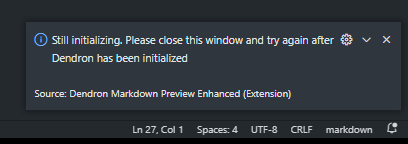
This only started happening with the new version today. Have tried disabling and re-ena... | v0.10.25 - Preview Continually Initialising | https://api.github.com/repos/shd101wyy/vscode-markdown-preview-enhanced/issues/464/comments | 0 | 2021-02-23T07:13:10Z | 2021-02-23T07:30:19Z | https://github.com/shd101wyy/vscode-markdown-preview-enhanced/issues/464 | 814,185,877 | 464 |
[
"shd101wyy",
"vscode-markdown-preview-enhanced"
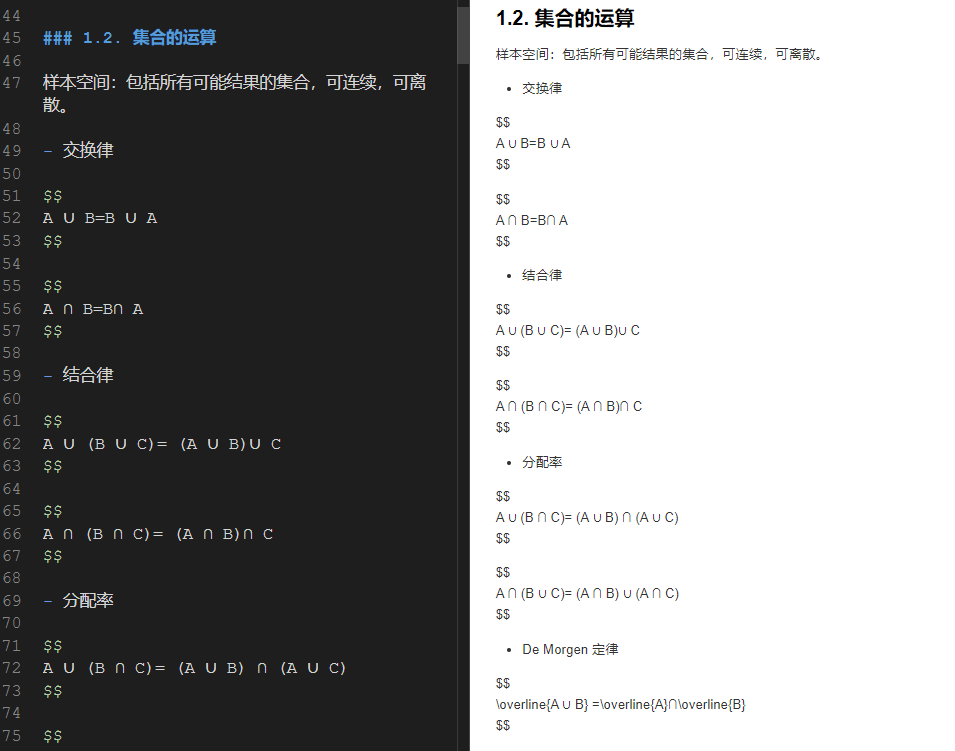
] | If there's no blank line after a display equation in the source, the preview shows a blank line (a big gap).
If there's a blank line after a display equation in the source, the preview shows no blank line (small gap).
### no blank line after the equation in the source:
```
Example text here In vector calculus and... | Incorrect spacing after display equation | https://api.github.com/repos/shd101wyy/vscode-markdown-preview-enhanced/issues/463/comments | 0 | 2021-02-15T19:38:50Z | 2021-02-15T19:38:50Z | https://github.com/shd101wyy/vscode-markdown-preview-enhanced/issues/463 | 808,776,959 | 463 |
[
"shd101wyy",
"vscode-markdown-preview-enhanced"
] | I just wanted to use this package again after I used it a few years ago for a simple presentation and I really liked to use it!
However, I'm facing one major problem which renders the package unusable for me, unfortunately. Maybe it's user error, or maybe there is a bug, hence I'm opening an Issue here.
I set up ... | Missing slides in preview pane | https://api.github.com/repos/shd101wyy/vscode-markdown-preview-enhanced/issues/982/comments | 11 | 2021-02-15T12:38:27Z | 2023-08-23T02:31:49Z | https://github.com/shd101wyy/vscode-markdown-preview-enhanced/issues/982 | 1,862,448,591 | 982 |
[
"shd101wyy",
"vscode-markdown-preview-enhanced"
] | If a cell contains an inlined backtick (`` ` ``), and the following cell also contains inlined code, then the two cells will appear merged in the preview.
Code:
```
| a | b | c |
| -------:|:-------:|:--|
| `` a `` | `b` | c |
| `` ` `` | b | c |
| `` ` `` | b | c |
| `` ` `` | `... | Inlined backticks may cause table cells to be merged | https://api.github.com/repos/shd101wyy/vscode-markdown-preview-enhanced/issues/462/comments | 0 | 2021-02-12T21:45:01Z | 2021-02-12T21:45:01Z | https://github.com/shd101wyy/vscode-markdown-preview-enhanced/issues/462 | 807,566,661 | 462 |
[
"shd101wyy",
"vscode-markdown-preview-enhanced"
] | On android pad, we can use termux + code server( VSCode) .
But termux does not support full java sdk.
On android, we can use dalvikvm to run dex files,
So can we compile plantuml.jar to dex files, and then run on android?
| Can we use this plugin on android pad? | https://api.github.com/repos/shd101wyy/vscode-markdown-preview-enhanced/issues/461/comments | 0 | 2021-02-12T17:04:58Z | 2021-02-12T17:04:58Z | https://github.com/shd101wyy/vscode-markdown-preview-enhanced/issues/461 | 807,393,927 | 461 |
[
"shd101wyy",
"vscode-markdown-preview-enhanced"
] | ### Feature Request
**Problem:** The preview window reloads on all changes, which means embedded iframes are reloaded over and over. This reloading triggers rate limiting or recaptcha for some iframed sites.
**Solution:** A boolean extension setting for iframe rendering. A second boolean setting could toggle whet... | Iframe Rendering Toggle Setting | https://api.github.com/repos/shd101wyy/vscode-markdown-preview-enhanced/issues/983/comments | 0 | 2021-02-12T16:21:58Z | 2023-08-23T02:28:34Z | https://github.com/shd101wyy/vscode-markdown-preview-enhanced/issues/983 | 1,862,448,621 | 983 |
[
"shd101wyy",
"vscode-markdown-preview-enhanced"
] | I am writing Greek text in markdown. When exporting to HTML the Greek text is converted to html entities.
For example the word "λόγος" is converted to "λόγος"
Is there a way to disable this behavior? | Disable utf8 to html entities conversion | https://api.github.com/repos/shd101wyy/vscode-markdown-preview-enhanced/issues/984/comments | 0 | 2021-02-11T11:36:56Z | 2023-08-23T02:28:36Z | https://github.com/shd101wyy/vscode-markdown-preview-enhanced/issues/984 | 1,862,448,651 | 984 |
[
"shd101wyy",
"vscode-markdown-preview-enhanced"
] | pretty simple.
TOC is just a flat list on bitbucket when you use 2 spaces. | cannot configure TOC to use 4 spaces instead of 2 for indent | https://api.github.com/repos/shd101wyy/vscode-markdown-preview-enhanced/issues/985/comments | 0 | 2021-02-11T06:35:15Z | 2023-08-23T02:28:38Z | https://github.com/shd101wyy/vscode-markdown-preview-enhanced/issues/985 | 1,862,448,682 | 985 |
[
"shd101wyy",
"vscode-markdown-preview-enhanced"
] | https://github.com/skanaar/nomnoml | support nomnoml please :) | https://api.github.com/repos/shd101wyy/vscode-markdown-preview-enhanced/issues/986/comments | 0 | 2021-02-10T23:17:15Z | 2023-08-23T02:28:41Z | https://github.com/shd101wyy/vscode-markdown-preview-enhanced/issues/986 | 1,862,448,711 | 986 |
[
"shd101wyy",
"vscode-markdown-preview-enhanced"
] | The _reference_docx parameter_ isn't passed correctly to pandoc as described in the docs.
A quick workaround is to pass the parameter directly to Pandoc using pandoc_args.
'''
output:
word_document:
path: export.docx
pandoc_args: ["--reference-doc", "rmd-minion-reference.docx"]
---
''' | Word template not working | https://api.github.com/repos/shd101wyy/vscode-markdown-preview-enhanced/issues/460/comments | 0 | 2021-02-10T07:28:10Z | 2021-02-10T07:28:10Z | https://github.com/shd101wyy/vscode-markdown-preview-enhanced/issues/460 | 805,256,869 | 460 |
[
"shd101wyy",
"vscode-markdown-preview-enhanced"
] | null | In vscode Line Number is not working | https://api.github.com/repos/shd101wyy/vscode-markdown-preview-enhanced/issues/987/comments | 1 | 2021-02-10T06:23:20Z | 2023-08-23T02:28:43Z | https://github.com/shd101wyy/vscode-markdown-preview-enhanced/issues/987 | 1,862,448,736 | 987 |
[
"shd101wyy",
"vscode-markdown-preview-enhanced"
] | Hi, I'm on macOS Big Sur (11.2) on a Intel Mac (Early 2015) and using
```
Version: 1.53.0
Commit: 8490d3dde47c57ba65ec40dd192d014fd2113496
Date: 2021-02-03T16:01:04.046Z (4 days ago)
Electron: 11.2.1
Chrome: 87.0.4280.141
Node.js: 12.18.3
V8: 8.7.220.31-electron.0
OS: Darwin x64 20.3.0
```
Unfortunately... | Preview view shows nothing | https://api.github.com/repos/shd101wyy/vscode-markdown-preview-enhanced/issues/459/comments | 2 | 2021-02-08T05:13:03Z | 2022-08-11T09:29:44Z | https://github.com/shd101wyy/vscode-markdown-preview-enhanced/issues/459 | 803,192,018 | 459 |
[
"shd101wyy",
"vscode-markdown-preview-enhanced"
] | # Description
If I have an image in a table cell on my _MAC_ computer, it does not show up in the generated Chrome > PDF. However, the image shows up in the preview. Also, when I generate the PDF on my _WINDOWS_ computer it works just fine.
This _used_ to work on my Mac so I tried downgrading but that didn't wor... | Images do not show up in a table cell on MAC | https://api.github.com/repos/shd101wyy/vscode-markdown-preview-enhanced/issues/458/comments | 1 | 2021-02-08T03:34:53Z | 2021-02-12T04:19:13Z | https://github.com/shd101wyy/vscode-markdown-preview-enhanced/issues/458 | 803,155,665 | 458 |
[
"shd101wyy",
"vscode-markdown-preview-enhanced"
] | Key bindigs CMD-I, CMD-B and so forth do nothing. The docs say to look for conflicts in "Key Binding Resolver: Toggle", which does not exist in VSCode....
m-p-e is so useful otherwise that this is a pretty unfortunate usability issue.
Version 0.5.16. | Key bindings for italic, bold, etc. not working in VSCode | https://api.github.com/repos/shd101wyy/vscode-markdown-preview-enhanced/issues/988/comments | 0 | 2021-02-06T18:06:15Z | 2023-08-23T02:28:45Z | https://github.com/shd101wyy/vscode-markdown-preview-enhanced/issues/988 | 1,862,448,751 | 988 |
[
"shd101wyy",
"vscode-markdown-preview-enhanced"
] | ### no gap line in source code = gap in rendered
If there is no blank line after a block equation, the rendered result have a relatively large gap after the block equation:
```
Example text here In vector calculus and differential geometry, Stokes' theorem (sometimes spelled Stokes's theorem), also called the gener... | spacing after block equation | https://api.github.com/repos/shd101wyy/vscode-markdown-preview-enhanced/issues/989/comments | 0 | 2021-02-05T19:23:47Z | 2023-08-23T02:28:47Z | https://github.com/shd101wyy/vscode-markdown-preview-enhanced/issues/989 | 1,862,448,778 | 989 |
[
"shd101wyy",
"vscode-markdown-preview-enhanced"
] | When using a code block with specifying `console` type, the extension doesn't highlight it correctly:
<pre>
```console
$ cp .env.example .env
```
</pre>
Produces the next preview:

| add an switch button to the top-right for fast thems switch | https://api.github.com/repos/shd101wyy/vscode-markdown-preview-enhanced/issues/455/comments | 0 | 2021-02-04T03:42:32Z | 2021-02-04T03:42:32Z | https://github.com/shd101wyy/vscode-markdown-preview-enhanced/issues/455 | 800,900,554 | 455 |
[
"shd101wyy",
"vscode-markdown-preview-enhanced"
] | When you use the flow chart in the fold box and open it after converting it to HTML, there will be problems with the flow chart display, but there is no problem with the preview in vs | https://api.github.com/repos/shd101wyy/vscode-markdown-preview-enhanced/issues/454/comments | 0 | 2021-02-03T05:38:37Z | 2021-02-03T05:38:37Z | https://github.com/shd101wyy/vscode-markdown-preview-enhanced/issues/454 | 799,990,371 | 454 | |
[
"shd101wyy",
"vscode-markdown-preview-enhanced"
] | |OS |win10 |
|:--------------:|:----------:|
|ImageMagick|Installed |
**Error 1**
```
Error: mermaid CLI is required to be installed.
Check https://github.com/mermaid-js/mermaid.cli for more information.
Error: Command failed: npx mmdc --theme default --input C:\Users\小米\AppData\Local... | 转Markdown(GFM)报错 Error in translate to Markdown | https://api.github.com/repos/shd101wyy/vscode-markdown-preview-enhanced/issues/991/comments | 1 | 2021-02-01T18:17:20Z | 2023-08-23T02:28:52Z | https://github.com/shd101wyy/vscode-markdown-preview-enhanced/issues/991 | 1,862,448,819 | 991 |
[
"shd101wyy",
"vscode-markdown-preview-enhanced"
] | Hi!
I want to run TypeScript snippets but I get errors.
This is my code (i have changed backticks with hashtags to display the code properly):
```ts
###ts {cmd=tsc}
class Greeter {
// property
greeting: string;
// constructor
constructor(message: string) {
this.greeting = message; // membe... | Can TypeScript snippets be run? | https://api.github.com/repos/shd101wyy/vscode-markdown-preview-enhanced/issues/992/comments | 3 | 2021-01-31T09:36:21Z | 2023-08-23T02:28:55Z | https://github.com/shd101wyy/vscode-markdown-preview-enhanced/issues/992 | 1,862,448,858 | 992 |
[
"shd101wyy",
"vscode-markdown-preview-enhanced"
] | If I have a checkbox in a markdown file like the following …
- [ ]
If I click the checkbox in the preview, the code in the file changes to …
- [x]
… but did not check the checkbox in the preview.
If you can solve this problem, this would be very awesome.
Thanks much | Markdown checkbox not checked in preview on click | https://api.github.com/repos/shd101wyy/vscode-markdown-preview-enhanced/issues/993/comments | 1 | 2021-01-28T13:53:58Z | 2023-08-23T02:28:57Z | https://github.com/shd101wyy/vscode-markdown-preview-enhanced/issues/993 | 1,862,448,897 | 993 |
[
"shd101wyy",
"vscode-markdown-preview-enhanced"
] | # Description
If I have an image in a table cell on my _MAC_ computer, it does not show up in the generated Chrome > PDF. However, the image shows up in the preview. Also, when I generate the PDF on my _WINDOWS_ computer it works just fine.
This _used_ to work on my Mac so I tried downgrading but that didn't wor... | Images do not show up in a table cell on MAC | https://api.github.com/repos/shd101wyy/vscode-markdown-preview-enhanced/issues/994/comments | 2 | 2021-01-28T03:36:29Z | 2023-08-23T02:28:59Z | https://github.com/shd101wyy/vscode-markdown-preview-enhanced/issues/994 | 1,862,448,929 | 994 |
[
"shd101wyy",
"vscode-markdown-preview-enhanced"
] | plantuml support syntax like
```
@startuml
ditaa
+--------+ +-------+ +-------+
| +---+ ditaa +--> | |
| Text | +-------+ |diagram|
|Document| |!magic!| | |
| {d}| | | | |
+---+----+ +-------+ +-------+
: ^
| ... | plantuml with ditaa not working | https://api.github.com/repos/shd101wyy/vscode-markdown-preview-enhanced/issues/453/comments | 4 | 2021-01-27T10:57:25Z | 2024-06-26T15:49:00Z | https://github.com/shd101wyy/vscode-markdown-preview-enhanced/issues/453 | 794,995,500 | 453 |
[
"shd101wyy",
"vscode-markdown-preview-enhanced"
] | I was wondering if it is possiable setting pandoc docker as the parser otherthan native installation.
I don't want any pandoc filter intrude the system enviroment, so using docker seems a possiable solution,
but when I try wrap the docker command as a shell script, and setting as pandoc path, it does't work out.
... | pandoc docker as parser | https://api.github.com/repos/shd101wyy/vscode-markdown-preview-enhanced/issues/995/comments | 1 | 2021-01-23T08:21:36Z | 2023-08-23T02:29:01Z | https://github.com/shd101wyy/vscode-markdown-preview-enhanced/issues/995 | 1,862,448,950 | 995 |
[
"shd101wyy",
"vscode-markdown-preview-enhanced"
] | Previewing Pandoc Markdown documents has stopped working for me. The preview pane only shows this error:
```
Error: Command failed: pandoc --from=markdown-raw_tex+tex_math_single_backslash --to=html --katex --citeproc
Unknown option --citeproc.
Try pandoc --help for more information.
```
I have added the follo... | Preview fails with Pandoc error | https://api.github.com/repos/shd101wyy/vscode-markdown-preview-enhanced/issues/996/comments | 2 | 2021-01-22T09:58:36Z | 2023-08-23T02:29:04Z | https://github.com/shd101wyy/vscode-markdown-preview-enhanced/issues/996 | 1,862,448,974 | 996 |
[
"shd101wyy",
"vscode-markdown-preview-enhanced"
] | I would love to use your fantastic extension in combination with [Foam](https://github.com/foambubble/foam) but regrettably links to files in different directories than the current one don't work. Foam uses wiki-links and I added the option for them to the settings of your extension.
I get prompted to create the "non ... | Cannot find files referenced in wiki-links when in different directory | https://api.github.com/repos/shd101wyy/vscode-markdown-preview-enhanced/issues/452/comments | 0 | 2021-01-20T18:01:32Z | 2021-01-20T18:09:18Z | https://github.com/shd101wyy/vscode-markdown-preview-enhanced/issues/452 | 790,198,584 | 452 |
[
"shd101wyy",
"vscode-markdown-preview-enhanced"
] | Like Markdown All in One's dark theme. | Does the plugin support dark theme when previewing? | https://api.github.com/repos/shd101wyy/vscode-markdown-preview-enhanced/issues/450/comments | 3 | 2021-01-15T03:09:50Z | 2021-04-02T07:29:58Z | https://github.com/shd101wyy/vscode-markdown-preview-enhanced/issues/450 | 786,496,228 | 450 |
[
"shd101wyy",
"vscode-markdown-preview-enhanced"
] | I am working on a wiki for publishing on GitHub. When I create a link to an external markdown file, I have to include the extension in the link for MPE to then preview the linked page. But when that path is published to GitHub, the file is shown in it's raw form; the link needs to be just the name with no extension. Is... | .md extension in link path opens rendered preview in MPE but points to raw view in GitHub | https://api.github.com/repos/shd101wyy/vscode-markdown-preview-enhanced/issues/997/comments | 0 | 2021-01-12T22:34:16Z | 2023-08-23T02:29:06Z | https://github.com/shd101wyy/vscode-markdown-preview-enhanced/issues/997 | 1,862,449,006 | 997 |
[
"shd101wyy",
"vscode-markdown-preview-enhanced"
] | When I write `**\[\[ \$str1 == \$str2 ]]**` in my .md file, it should be render like **\[\[ \$str1 == \$str2 ]]**.
But actually it display like :
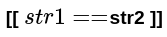
I use `\` to make escape character `$` to be regarded... | Cannot display escape character as normal character when different escape characters are put together. | https://api.github.com/repos/shd101wyy/vscode-markdown-preview-enhanced/issues/449/comments | 0 | 2021-01-10T13:45:37Z | 2021-01-10T13:45:37Z | https://github.com/shd101wyy/vscode-markdown-preview-enhanced/issues/449 | 782,821,750 | 449 |
[
"shd101wyy",
"vscode-markdown-preview-enhanced"
] | Exporting to PDF using Puppeteer doesn't render any math. Everything else is fine. Exporting to PNG or JPEG with Puppeteer work as well. | Export to PDF with Puppeteer doesn't render any math | https://api.github.com/repos/shd101wyy/vscode-markdown-preview-enhanced/issues/998/comments | 2 | 2021-01-08T04:41:32Z | 2023-08-23T02:29:08Z | https://github.com/shd101wyy/vscode-markdown-preview-enhanced/issues/998 | 1,862,449,028 | 998 |
[
"shd101wyy",
"vscode-markdown-preview-enhanced"
] | Hi Wang,
There is an issue which I think is a bug in the new version and I hope you can help to solve it.
The issue is color setting in HTML or CSS does not work after printing it to PDF file by the path 「Chrome(PUPPETER)->PDF」.(preview and HTML printing works fine)
As my searching it did work in the pre-version s... | HTML/CSS color setting does not work by PDF printing in the version 0.5.14 | https://api.github.com/repos/shd101wyy/vscode-markdown-preview-enhanced/issues/448/comments | 4 | 2021-01-06T04:24:13Z | 2022-12-10T19:57:46Z | https://github.com/shd101wyy/vscode-markdown-preview-enhanced/issues/448 | 779,998,393 | 448 |
[
"shd101wyy",
"vscode-markdown-preview-enhanced"
] | If I create a named anchor like so:
```
[a link to bob](#bob)
## this is some anchor <a name="bob"></a>
```
It does not render in preview. (It does render properly when viewed inside the browser.) | links to named anchors don't work in preview | https://api.github.com/repos/shd101wyy/vscode-markdown-preview-enhanced/issues/447/comments | 0 | 2021-01-06T01:55:19Z | 2024-03-16T09:12:48Z | https://github.com/shd101wyy/vscode-markdown-preview-enhanced/issues/447 | 779,865,060 | 447 |
[
"shd101wyy",
"vscode-markdown-preview-enhanced"
] | I am previewing the markdown document in one-dark theme. But I would like to export as PDF in light theme with background (so code get surrounded in colored boxe).
Currently `markdown-preview-enhanced.printBackground` option also sets print theme to current preview theme. So if I want the colored boxes, I get a dar... | [Feature Request] Specify theme of exported PDF, independent from PrintBackground | https://api.github.com/repos/shd101wyy/vscode-markdown-preview-enhanced/issues/446/comments | 2 | 2021-01-01T03:44:58Z | 2025-04-24T07:34:16Z | https://github.com/shd101wyy/vscode-markdown-preview-enhanced/issues/446 | 777,188,160 | 446 |
[
"shd101wyy",
"vscode-markdown-preview-enhanced"
] | When I set to use pandoc parser and KaTeX maths (which is default)
```
"markdown-preview-enhanced.usePandocParser": true,
"markdown-preview-enhanced.mathRenderingOption": "KaTeX",
```
or
```
"markdown-preview-enhanced.usePandocParser": true,
"markdown-preview-enhanced.mathRenderingOption": "None... | Cannot preview maths formula with pandoc parser and katex | https://api.github.com/repos/shd101wyy/vscode-markdown-preview-enhanced/issues/445/comments | 3 | 2021-01-01T02:48:36Z | 2022-04-24T13:30:11Z | https://github.com/shd101wyy/vscode-markdown-preview-enhanced/issues/445 | 777,181,640 | 445 |
[
"shd101wyy",
"vscode-markdown-preview-enhanced"
] | Hi, thanks for you awesome work
I met some trouble with MPE.
When I write markdown code, the preview page can't automatically keep in the center of the screen.
For example, the preview of current code I write scroll to the bottom.
 cannot pa... | plantuml绘图报错 | https://api.github.com/repos/shd101wyy/vscode-markdown-preview-enhanced/issues/1001/comments | 7 | 2020-12-29T07:16:37Z | 2023-08-23T02:29:15Z | https://github.com/shd101wyy/vscode-markdown-preview-enhanced/issues/1001 | 1,862,449,112 | 1,001 |
[
"shd101wyy",
"vscode-markdown-preview-enhanced"
] | After updating the 0.5.14 version, plantuml will not be able to render and will report an error. It can be rendered normally in the .pu file
`An error has occured : java.lang.IllegalArgumentException: source is null
Tu l'as trouve ou celui-la ?`
If you go back to the previous version, you can render normally | Plantuml rendering error caused by version 0.5.14 | https://api.github.com/repos/shd101wyy/vscode-markdown-preview-enhanced/issues/443/comments | 5 | 2020-12-29T02:04:16Z | 2020-12-31T01:59:28Z | https://github.com/shd101wyy/vscode-markdown-preview-enhanced/issues/443 | 775,659,003 | 443 |
[
"shd101wyy",
"vscode-markdown-preview-enhanced"
] | 右键->pandoc->右下角弹框报错Error: write EPIPE,根据教程做的配置上应该没有问题,报这个错为什么呢? | 报错信息:Error: write EPIPE | https://api.github.com/repos/shd101wyy/vscode-markdown-preview-enhanced/issues/1002/comments | 4 | 2020-12-28T09:32:17Z | 2023-08-23T02:29:17Z | https://github.com/shd101wyy/vscode-markdown-preview-enhanced/issues/1002 | 1,862,449,145 | 1,002 |
[
"shd101wyy",
"vscode-markdown-preview-enhanced"
] | 找一个用法都这么难吗 | 这个什么xxx怎么用啊。我淦,英文打字不麻烦吗?做个中国人,写点中文吧 | https://api.github.com/repos/shd101wyy/vscode-markdown-preview-enhanced/issues/1003/comments | 2 | 2020-12-24T12:11:01Z | 2023-08-23T02:29:19Z | https://github.com/shd101wyy/vscode-markdown-preview-enhanced/issues/1003 | 1,862,449,166 | 1,003 |
[
"shd101wyy",
"vscode-markdown-preview-enhanced"
] | ## 版本
插件版本:v0.5.13
vscode版本:
## 复现
```
```cpp
cv::Mat mu_sq = cv::Mat(scaled_size, CV_64FC1);
#if 1 //第一种写法
cv::multiply(mu, mu, mu_sq);//mu_sq --> mu_image
#else // 第二种写法
mu_sq = ... | c++代码不能被正确预览 | https://api.github.com/repos/shd101wyy/vscode-markdown-preview-enhanced/issues/1004/comments | 0 | 2020-12-24T09:26:26Z | 2023-08-23T02:29:21Z | https://github.com/shd101wyy/vscode-markdown-preview-enhanced/issues/1004 | 1,862,449,191 | 1,004 |
[
"shd101wyy",
"vscode-markdown-preview-enhanced"
] | Even though KaTeX supports bra-ket notation (see https://katex.org/docs/supported.html#special-notation), MPE shows "ParseError: KaTeX parse error: Undefined control sequence:" when we use it in a markdown document. | Bra-ket notation is unavailable. | https://api.github.com/repos/shd101wyy/vscode-markdown-preview-enhanced/issues/440/comments | 0 | 2020-12-23T23:40:41Z | 2020-12-23T23:40:41Z | https://github.com/shd101wyy/vscode-markdown-preview-enhanced/issues/440 | 774,095,504 | 440 |
[
"shd101wyy",
"vscode-markdown-preview-enhanced"
] | such as this code:
```mermaid
erDiagram
CUSTOMER ||--o{ ORDER : places
CUSTOMER ||--o{ LINE : places
CUSTOMER{string name}
ORDER ||--|{ LINE-ITEM : contains
ORDER {
int orderNumber
string deliveryAddress
}
LINE-ITEM {
string productCode
int quanti... | not support Attributes in mermaid erDiagram | https://api.github.com/repos/shd101wyy/vscode-markdown-preview-enhanced/issues/439/comments | 0 | 2020-12-21T08:52:10Z | 2020-12-21T08:52:10Z | https://github.com/shd101wyy/vscode-markdown-preview-enhanced/issues/439 | 771,984,709 | 439 |
[
"shd101wyy",
"vscode-markdown-preview-enhanced"
] | Inputting

Results in

I would expect the temporary table ... | SQL preview failing for temporary tables | https://api.github.com/repos/shd101wyy/vscode-markdown-preview-enhanced/issues/438/comments | 0 | 2020-12-18T13:49:14Z | 2020-12-18T13:49:14Z | https://github.com/shd101wyy/vscode-markdown-preview-enhanced/issues/438 | 770,900,661 | 438 |
[
"shd101wyy",
"vscode-markdown-preview-enhanced"
] | My markdown file
```
# Title
Some text here
## Topic 1
@import "./file.yang" {code_block=true class="line-numbers"}
```
The file.yang has one very long line that soft wraps in the editor perfectly, but does not in the preview. I added the line be;low to my local-style.less file. The long like does not ... | Can't get line wrapping to work correctly with line numbers enabled | https://api.github.com/repos/shd101wyy/vscode-markdown-preview-enhanced/issues/1005/comments | 1 | 2020-12-17T05:34:37Z | 2023-08-23T02:29:23Z | https://github.com/shd101wyy/vscode-markdown-preview-enhanced/issues/1005 | 1,862,449,215 | 1,005 |
[
"shd101wyy",
"vscode-markdown-preview-enhanced"
] | 我有很多的图表需要画,希望可以像引入plantUML一样,可以画echart的图,或者作者你告诉我下,如何去扩展这个东西,我自己去扩展下 | 怎么支持echart或者D3.js的扩展 | https://api.github.com/repos/shd101wyy/vscode-markdown-preview-enhanced/issues/1006/comments | 0 | 2020-12-11T09:58:55Z | 2023-08-23T02:29:26Z | https://github.com/shd101wyy/vscode-markdown-preview-enhanced/issues/1006 | 1,862,449,235 | 1,006 |
[
"shd101wyy",
"vscode-markdown-preview-enhanced"
] | null | 能提供md转换html或pdf的命令吗 | https://api.github.com/repos/shd101wyy/vscode-markdown-preview-enhanced/issues/1007/comments | 0 | 2020-12-10T14:31:49Z | 2023-08-23T02:29:28Z | https://github.com/shd101wyy/vscode-markdown-preview-enhanced/issues/1007 | 1,862,449,254 | 1,007 |
[
"shd101wyy",
"vscode-markdown-preview-enhanced"
] | Hi, I am having some trouble when exporting through Pandoc a document with citations (the error goes away when deleting the references). I'm using VSCode (latest version) and the last version of Markdown preview enhanced. The message error is:
`Error: Command failed: pandoc -f markdown+tex_math_single_backslash -o C... | Error when converting document with citations | https://api.github.com/repos/shd101wyy/vscode-markdown-preview-enhanced/issues/436/comments | 1 | 2020-12-09T08:33:39Z | 2020-12-31T20:06:27Z | https://github.com/shd101wyy/vscode-markdown-preview-enhanced/issues/436 | 760,123,033 | 436 |
[
"shd101wyy",
"vscode-markdown-preview-enhanced"
] | There are 2 problems with the ! [ link ] (path) preview.
(I know the correct syntax is without spaces in between. I wrote it like that because it wouldn't have shown correctly here)
* The preview of images doesn't work.
* If the 'path' corresponds to a non-image file, e.g. a '.ods', the program enters in a loop an... | weird behavior with image previews | https://api.github.com/repos/shd101wyy/vscode-markdown-preview-enhanced/issues/1008/comments | 0 | 2020-12-06T10:24:23Z | 2023-08-23T02:29:30Z | https://github.com/shd101wyy/vscode-markdown-preview-enhanced/issues/1008 | 1,862,449,273 | 1,008 |
[
"shd101wyy",
"vscode-markdown-preview-enhanced"
] | I am writing a .md file and when I use the code block to write some code sometimes these weird xml tags appear and they stay there even If i export the file to another format.
Left 2 images:
![Screenshot from 2020-12-05 20-06-07](https://user-images.githubusercontent.com/44571058/101262318-9d7de500-3735-11eb-9552... | Weird HTML tags on preview | https://api.github.com/repos/shd101wyy/vscode-markdown-preview-enhanced/issues/1009/comments | 1 | 2020-12-05T20:08:38Z | 2023-08-23T02:29:32Z | https://github.com/shd101wyy/vscode-markdown-preview-enhanced/issues/1009 | 1,862,449,302 | 1,009 |
Subsets and Splits
No community queries yet
The top public SQL queries from the community will appear here once available.