
issue_owner_repo listlengths 2 2 | issue_body stringlengths 0 262k ⌀ | issue_title stringlengths 1 1.02k | issue_comments_url stringlengths 53 116 | issue_comments_count int64 0 2.49k | issue_created_at stringdate 1999-03-17 02:06:42 2025-06-23 11:41:49 | issue_updated_at stringdate 2000-02-10 06:43:57 2025-06-23 11:43:00 | issue_html_url stringlengths 34 97 | issue_github_id int64 132 3.17B | issue_number int64 1 215k |
|---|---|---|---|---|---|---|---|---|---|
[
"shd101wyy",
"vscode-markdown-preview-enhanced"
] | I don't know if it's already possible or not, but it would be very nice if you could define a document-wide default language for code blocks. Especially helpful for documents containing code of single language.
For example, in AsciiDoc you can use a directive `:source-language: python` and all code will be formatted... | Document-wide default language for code blocks | https://api.github.com/repos/shd101wyy/vscode-markdown-preview-enhanced/issues/1010/comments | 0 | 2020-12-03T13:24:53Z | 2023-08-23T02:29:35Z | https://github.com/shd101wyy/vscode-markdown-preview-enhanced/issues/1010 | 1,862,449,334 | 1,010 |
[
"shd101wyy",
"vscode-markdown-preview-enhanced"
] | [ test ] ( www.test.com#qwe )
->
www.test.com%23qwe | 链接跳转的时候,锚点#会被转义成%23导致链接跳转失败 | https://api.github.com/repos/shd101wyy/vscode-markdown-preview-enhanced/issues/1011/comments | 0 | 2020-12-03T08:14:31Z | 2023-08-23T02:29:37Z | https://github.com/shd101wyy/vscode-markdown-preview-enhanced/issues/1011 | 1,862,449,356 | 1,011 |
[
"shd101wyy",
"vscode-markdown-preview-enhanced"
] | Hi,
I wrote the following diagram in mermaid:
```mermaid
graph TD;
s3in[("AWS S3 bucket <br> Name: #quot;bucket-name#quot;")];
s3in-. triggers .-> lambda[["AWS Lambda: <br> Name: #quot;sort#quot;"]];
lambda--In case language is missing-->comprehend[[AWS Comprehend]];
comprehend-. Sends langua... | mermaid parse error | https://api.github.com/repos/shd101wyy/vscode-markdown-preview-enhanced/issues/1012/comments | 2 | 2020-12-02T14:19:38Z | 2023-08-23T02:29:39Z | https://github.com/shd101wyy/vscode-markdown-preview-enhanced/issues/1012 | 1,862,449,380 | 1,012 |
[
"shd101wyy",
"vscode-markdown-preview-enhanced"
] | The [math rendering doc](https://shd101wyy.github.io/markdown-preview-enhanced/#/math) sends a link to the [KaTeX supported functions/symbols.](https://katex.org/docs/supported.html).
Among those the [html support](https://katex.org/docs/supported.html#html) states that
 syntax_ is enabled, audio or video controls render but the play button remains ghosted.
Example (note: all files do exist in the current folder of the markdown document)
```
[mp3 test](./mymp3.mp3)
[ogg test](./myaudio.oga)
[mp4 test](./mymp4.mp4)
```
<img width... | Audio/Video elements render but do not play | https://api.github.com/repos/shd101wyy/vscode-markdown-preview-enhanced/issues/435/comments | 1 | 2020-11-28T18:29:28Z | 2021-02-12T10:10:56Z | https://github.com/shd101wyy/vscode-markdown-preview-enhanced/issues/435 | 752,740,122 | 435 |
[
"shd101wyy",
"vscode-markdown-preview-enhanced"
] | How to change the font size or scale exclusively in the markdown preview? The preview looks too large compared to UI and editor fonts.
I tried `"markdown.preview.fontSize": 10`, but it doesn't do anything and I didn't find any other settings. | Cannot change the font size in the preview | https://api.github.com/repos/shd101wyy/vscode-markdown-preview-enhanced/issues/434/comments | 1 | 2020-11-27T12:21:28Z | 2020-11-29T18:46:31Z | https://github.com/shd101wyy/vscode-markdown-preview-enhanced/issues/434 | 752,215,540 | 434 |
[
"shd101wyy",
"vscode-markdown-preview-enhanced"
] | If I have a Preview window open, how do I close it automatically if I close the Markdown file?
I would like to do this because if I switch to a non-Markdown file, the Preview remains open, which is confusing.
. I think I might need to add some style customer CSS to resolve this?
 seem not to take into account the color i have set for text in my css
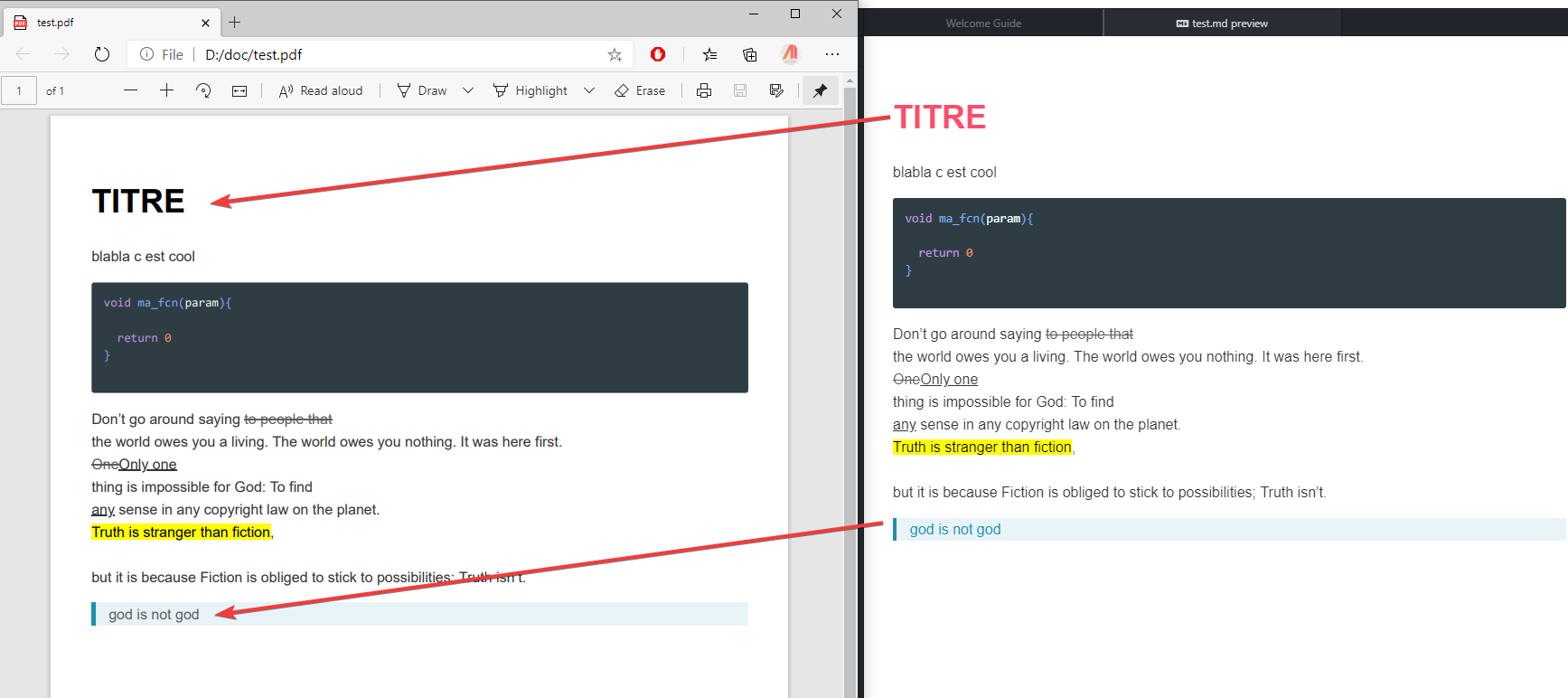
thanks | PDF Export : Wrong text color | https://api.github.com/repos/shd101wyy/vscode-markdown-preview-enhanced/issues/1017/comments | 1 | 2020-11-22T17:08:00Z | 2023-08-23T02:29:50Z | https://github.com/shd101wyy/vscode-markdown-preview-enhanced/issues/1017 | 1,862,449,511 | 1,017 |
[
"shd101wyy",
"vscode-markdown-preview-enhanced"
] | Instead of installing PlantUml in each machine, it is better to allow using a url so for instance a docker instance can server all the vscode clients in an office. | Allow to provide an url to use a local PlantUml server | https://api.github.com/repos/shd101wyy/vscode-markdown-preview-enhanced/issues/1018/comments | 0 | 2020-11-20T15:17:59Z | 2023-08-23T02:29:52Z | https://github.com/shd101wyy/vscode-markdown-preview-enhanced/issues/1018 | 1,862,449,533 | 1,018 |
[
"shd101wyy",
"vscode-markdown-preview-enhanced"
] | If I open the preview on my Gauge .spec file it is working correcly, but neither sync,
scroll nor update is working. I always have to call "Open Preview to the Side" to update the document. Isn't it possible to allow your extentions to work on files other than .md?
Because the Thoughtworks Gauge framework is using ma... | Feature request: support custom file types like .spec | https://api.github.com/repos/shd101wyy/vscode-markdown-preview-enhanced/issues/1019/comments | 0 | 2020-11-18T15:45:00Z | 2023-08-23T02:29:54Z | https://github.com/shd101wyy/vscode-markdown-preview-enhanced/issues/1019 | 1,862,449,550 | 1,019 |
[
"shd101wyy",
"vscode-markdown-preview-enhanced"
] | **Enable HTML5 Embed** which _enables transform audio video link to to html5 to embed audio video tags_ causes preview to fail if there are links ending in `.au` in the document (eg. Australian email addresses). De-selecting the option fixes the problem, but then no embed is available. | Enable HTML5 Embed causes preview fail if Australian email addresses are present (abc@x.y.au etc.) | https://api.github.com/repos/shd101wyy/vscode-markdown-preview-enhanced/issues/1020/comments | 0 | 2020-11-15T10:26:10Z | 2023-08-23T02:29:57Z | https://github.com/shd101wyy/vscode-markdown-preview-enhanced/issues/1020 | 1,862,449,571 | 1,020 |
[
"shd101wyy",
"vscode-markdown-preview-enhanced"
] | https://shd101wyy.github.io/markdown-preview-enhanced/#/zh-cn/diagrams 中,flow charts 的说明中出现了“代码快”。 | 中文文档中的错别字 | https://api.github.com/repos/shd101wyy/vscode-markdown-preview-enhanced/issues/1021/comments | 1 | 2020-11-14T11:02:51Z | 2023-08-23T02:29:59Z | https://github.com/shd101wyy/vscode-markdown-preview-enhanced/issues/1021 | 1,862,449,594 | 1,021 |
[
"shd101wyy",
"vscode-markdown-preview-enhanced"
] | Rendering of wikilink urls in tables is broken.

See also https://github.com/dendronhq/dendron/issues/110
| Wikilink in table is not rendered properly | https://api.github.com/repos/shd101wyy/vscode-markdown-preview-enhanced/issues/431/comments | 0 | 2020-11-12T11:52:56Z | 2020-11-12T11:52:56Z | https://github.com/shd101wyy/vscode-markdown-preview-enhanced/issues/431 | 741,536,460 | 431 |
[
"shd101wyy",
"vscode-markdown-preview-enhanced"
] | I have thousands of notes like "errands list.md" that have spaces in the filenames. Finding your extension made my personal notes so much more usable. I haven't been able to find any Visual Studio Code Markdown enhancements that allow wiki links to have spaces in them. Your extension seems quite advanced, so I was h... | feature request: Allow spaces in [[wiki links]] | https://api.github.com/repos/shd101wyy/vscode-markdown-preview-enhanced/issues/430/comments | 5 | 2020-11-12T00:16:32Z | 2023-09-05T13:19:37Z | https://github.com/shd101wyy/vscode-markdown-preview-enhanced/issues/430 | 741,168,796 | 430 |
[
"shd101wyy",
"vscode-markdown-preview-enhanced"
] | null | 能否支持汇编语言的代码高亮? | https://api.github.com/repos/shd101wyy/vscode-markdown-preview-enhanced/issues/1022/comments | 0 | 2020-11-07T11:55:28Z | 2023-08-23T02:30:01Z | https://github.com/shd101wyy/vscode-markdown-preview-enhanced/issues/1022 | 1,862,449,623 | 1,022 |
[
"shd101wyy",
"vscode-markdown-preview-enhanced"
] | When I create a link to an anchor in the same document, the link will not work in the preview, if it doesn't exactly match the anchor id. Meaning `Foo` is not considered the same as `foo`, which is not correct behaviour.
For example this example will work as intended, as both `someChapter` instances are identical.
... | Case-mismatched hyper-links do not work in preview window. | https://api.github.com/repos/shd101wyy/vscode-markdown-preview-enhanced/issues/429/comments | 0 | 2020-11-05T19:13:34Z | 2020-11-05T19:13:34Z | https://github.com/shd101wyy/vscode-markdown-preview-enhanced/issues/429 | 737,198,511 | 429 |
[
"shd101wyy",
"vscode-markdown-preview-enhanced"
] | 例如image目录下有test.dio文件
可以在test.md文件中使用

是否可以在markdown预览中直接渲染test.dio文件。
| 是否可以支持draw.io文件作为图像链接显示渲染 | https://api.github.com/repos/shd101wyy/vscode-markdown-preview-enhanced/issues/1023/comments | 1 | 2020-11-04T16:28:01Z | 2023-08-23T02:30:03Z | https://github.com/shd101wyy/vscode-markdown-preview-enhanced/issues/1023 | 1,862,449,656 | 1,023 |
[
"shd101wyy",
"vscode-markdown-preview-enhanced"
] | null | xn\ | https://api.github.com/repos/shd101wyy/vscode-markdown-preview-enhanced/issues/1024/comments | 0 | 2020-11-04T16:25:57Z | 2023-08-23T02:30:05Z | https://github.com/shd101wyy/vscode-markdown-preview-enhanced/issues/1024 | 1,862,449,683 | 1,024 |
[
"shd101wyy",
"vscode-markdown-preview-enhanced"
] | VS Code verision: 1.36.1
MPE version: 0.5.0
我在VS Code上使用MPE插件,预览plantuml图时,提示错误如下:
`Error: write EPIPE`
我看到你们之前给的解决方案是把java加到系统全局变量中。但是我公司禁止这么做。。。
我已经在VS Code里可以设置java.home参数,在vscode中启动的terminal已经能正常执行java命令。我想知道MPE是否可以支持读取vscode的java.home变量来执行java程序?
I was trying to render a plant uml diagram, and encountere... | Ho to config MPE read java.home of VSCode instead of JAVA_HOME from system path? | https://api.github.com/repos/shd101wyy/vscode-markdown-preview-enhanced/issues/1025/comments | 0 | 2020-11-02T08:22:24Z | 2023-08-23T02:30:08Z | https://github.com/shd101wyy/vscode-markdown-preview-enhanced/issues/1025 | 1,862,449,708 | 1,025 |
[
"shd101wyy",
"vscode-markdown-preview-enhanced"
] | As of pandoc 2.11 `--filter pandoc-citeproc` has been removed (along with pandoc-citeproc), and replaced with a new library, which is called by using the `--citeproc` argument. In order to ensure compatibility with different pandoc versions, I suggest neither argument is forced onto the user, but rather letting them sp... | Pandoc: Don't force-include --filter pandoc-citeproc as arguments | https://api.github.com/repos/shd101wyy/vscode-markdown-preview-enhanced/issues/1026/comments | 6 | 2020-11-01T16:26:38Z | 2023-08-23T02:30:10Z | https://github.com/shd101wyy/vscode-markdown-preview-enhanced/issues/1026 | 1,862,449,745 | 1,026 |
[
"shd101wyy",
"vscode-markdown-preview-enhanced"
] | To easily express mathematical equations, downloaded this preview, and also loaded the mathjax by way of web via a script description.
But couldn't render that equations at this preview screen,and also seems to be not recognized that equations as a equation in the relevant html file.
Furthermore, the preview scree... | Can't represent equations | https://api.github.com/repos/shd101wyy/vscode-markdown-preview-enhanced/issues/1027/comments | 0 | 2020-11-01T13:33:40Z | 2023-08-23T02:30:12Z | https://github.com/shd101wyy/vscode-markdown-preview-enhanced/issues/1027 | 1,862,449,769 | 1,027 |
[
"shd101wyy",
"vscode-markdown-preview-enhanced"
] | 目前滚动条似乎只是“和源码滚动条动作一致”而已。如果用语法插入了一段长东西,例如表格之类,就会造成表格滚完之后源码滚到很远很远的后面。
现在默认的preview是内容严格跟着源码滚动的。如果把源码折叠,同时滚动预览,源码一边就会停止滚动。如果能做成这样就好了。 | 有大量插入内容的时候滚动不一致 | https://api.github.com/repos/shd101wyy/vscode-markdown-preview-enhanced/issues/1028/comments | 2 | 2020-10-31T04:58:15Z | 2023-08-23T02:30:14Z | https://github.com/shd101wyy/vscode-markdown-preview-enhanced/issues/1028 | 1,862,449,797 | 1,028 |
[
"shd101wyy",
"vscode-markdown-preview-enhanced"
] | Can we add publishing to open-vsx.org? | open-vsx.org | https://api.github.com/repos/shd101wyy/vscode-markdown-preview-enhanced/issues/1029/comments | 0 | 2020-10-28T19:01:13Z | 2023-08-23T02:30:17Z | https://github.com/shd101wyy/vscode-markdown-preview-enhanced/issues/1029 | 1,862,449,819 | 1,029 |
[
"shd101wyy",
"vscode-markdown-preview-enhanced"
] | I am not sure if the project ever worked on 1.49. If there is no issues will you add the releases to github? The marketplace seems to throw away releases quickly | Missing 1.49 compatible version | https://api.github.com/repos/shd101wyy/vscode-markdown-preview-enhanced/issues/1030/comments | 0 | 2020-10-28T18:32:08Z | 2023-08-23T02:30:19Z | https://github.com/shd101wyy/vscode-markdown-preview-enhanced/issues/1030 | 1,862,449,851 | 1,030 |
[
"shd101wyy",
"vscode-markdown-preview-enhanced"
] | 
when export , I got xxx and an empty image icon. | export pdf or html, the linked image not export. | https://api.github.com/repos/shd101wyy/vscode-markdown-preview-enhanced/issues/428/comments | 1 | 2020-10-28T06:54:58Z | 2021-04-20T23:12:32Z | https://github.com/shd101wyy/vscode-markdown-preview-enhanced/issues/428 | 731,161,583 | 428 |
[
"shd101wyy",
"vscode-markdown-preview-enhanced"
] | 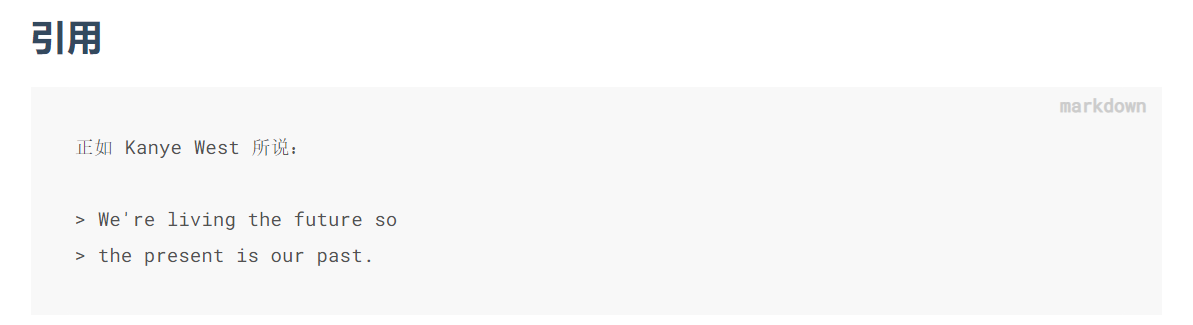
| 在文档里看见了kanye west的时候我正听着808s & heartbreak👍👍 | https://api.github.com/repos/shd101wyy/vscode-markdown-preview-enhanced/issues/1031/comments | 0 | 2020-10-25T14:22:26Z | 2023-11-09T02:29:36Z | https://github.com/shd101wyy/vscode-markdown-preview-enhanced/issues/1031 | 1,862,449,873 | 1,031 |
[
"shd101wyy",
"vscode-markdown-preview-enhanced"
] | 如题。现在导出pdf时,只会导出默认的主题背景。但是我的slide每页都设置了各自的背景图片。这种导出应该怎么操作呢?
THX~ | 请问导出成pdf文件时,怎样才能将设置的背景图片一起导出呢? | https://api.github.com/repos/shd101wyy/vscode-markdown-preview-enhanced/issues/1032/comments | 0 | 2020-10-22T15:39:18Z | 2023-08-23T02:30:23Z | https://github.com/shd101wyy/vscode-markdown-preview-enhanced/issues/1032 | 1,862,449,901 | 1,032 |
[
"shd101wyy",
"vscode-markdown-preview-enhanced"
] | 导出HTML--HTML(offline)后,图片无法嵌入到文件里面,指向本地图片而不是base64格式,侧边栏的设置也不起作用(enableScriptExecution已经开启)
使用的代码是
```yaml
---
html:
embed_local_images: true
embed_svg: true
offline: false
toc: true
---
```
这个问题我两个朋友都出现了,但是同样的md文件,我导出却没问题,请问是什么原因呢 | front-matter内容怎么才能起作用 | https://api.github.com/repos/shd101wyy/vscode-markdown-preview-enhanced/issues/1033/comments | 1 | 2020-10-21T12:44:39Z | 2023-08-23T02:30:25Z | https://github.com/shd101wyy/vscode-markdown-preview-enhanced/issues/1033 | 1,862,449,923 | 1,033 |
[
"shd101wyy",
"vscode-markdown-preview-enhanced"
] | I'm on Macos 10.15.7 using VSCode Insider version. 1.51.0-insider. I'm getting following error.
Error:
Command 'Markdown Preview Enhanced: Run Code Chunk' resulted in an error (Running the contributed command: 'markdown-preview-enhanced.runCodeChunk' failed.) | 'Markdown Preview Enhanced: Run Code Chunk' does not work and gives error given below | https://api.github.com/repos/shd101wyy/vscode-markdown-preview-enhanced/issues/427/comments | 0 | 2020-10-21T07:42:35Z | 2020-10-21T07:42:35Z | https://github.com/shd101wyy/vscode-markdown-preview-enhanced/issues/427 | 726,226,813 | 427 |
[
"shd101wyy",
"vscode-markdown-preview-enhanced"
] | When I use a link like this:
[link](document2.md#header-2)
The markdown preview does not jump to header 2. In the web browser it works. | Preview does not support links to headers in different files | https://api.github.com/repos/shd101wyy/vscode-markdown-preview-enhanced/issues/1034/comments | 0 | 2020-10-19T18:07:22Z | 2023-08-23T02:30:27Z | https://github.com/shd101wyy/vscode-markdown-preview-enhanced/issues/1034 | 1,862,449,941 | 1,034 |
[
"shd101wyy",
"vscode-markdown-preview-enhanced"
] | I just found out that any plain text that resembles an internet URL such as `foo.bar?a=1` is turned into a link and will open that URL in the browser. IMHO, I don't think this is a correct behavior. | Plain text resembles a URL is turned into a link | https://api.github.com/repos/shd101wyy/vscode-markdown-preview-enhanced/issues/1035/comments | 1 | 2020-10-15T08:21:56Z | 2023-08-23T02:30:29Z | https://github.com/shd101wyy/vscode-markdown-preview-enhanced/issues/1035 | 1,862,449,964 | 1,035 |
[
"shd101wyy",
"vscode-markdown-preview-enhanced"
] | Hello, could you please publish this extension to https://open-vsx.org/ ?
It's an open repository for VS Code-like editors, like VS Codium or Theia.
Thank you :pray:
| Publish to open-vsx.org | https://api.github.com/repos/shd101wyy/vscode-markdown-preview-enhanced/issues/426/comments | 2 | 2020-10-14T14:18:25Z | 2021-09-11T18:20:52Z | https://github.com/shd101wyy/vscode-markdown-preview-enhanced/issues/426 | 721,502,537 | 426 |
[
"shd101wyy",
"vscode-markdown-preview-enhanced"
] | Is there a way to preview the markdown in PDF format e.g. pages?
Thanks for your time and extension :) | PDF Live Preview | https://api.github.com/repos/shd101wyy/vscode-markdown-preview-enhanced/issues/1036/comments | 0 | 2020-10-11T20:32:00Z | 2023-08-23T02:30:32Z | https://github.com/shd101wyy/vscode-markdown-preview-enhanced/issues/1036 | 1,862,449,991 | 1,036 |
[
"shd101wyy",
"vscode-markdown-preview-enhanced"
] | 大佬,这个[简介页面](https://shd101wyy.github.io/markdown-preview-enhanced/#/zh-cn/)做的好好看啊,我也想自己做一个这样的页面,(试了gitbook,对LaTeX公式的支持实在差劲),能不能用本插件的做出同样的效果呢?
Hi, [the introduction page of this plugin](https://shd101wyy.github.io/markdown-preview-enhanced/#/) is incredibly beautiful and I want to make a similar one, (have tried gitb... | 插件简介页面做的很漂亮,能不能用本插件做一个类似的出来呢? | https://api.github.com/repos/shd101wyy/vscode-markdown-preview-enhanced/issues/1037/comments | 0 | 2020-10-11T15:24:05Z | 2023-08-23T02:30:34Z | https://github.com/shd101wyy/vscode-markdown-preview-enhanced/issues/1037 | 1,862,450,015 | 1,037 |
[
"shd101wyy",
"vscode-markdown-preview-enhanced"
] | I'm not familiar with the code and I'm wondering if there's a straightforward way to disable custom syntax in `parser.js` in code chunks?
For example, I use `__text__` to generate underlined text. However, I don't want it to work in code chunks.
Thanks for any help! | Disable extend parser in code chunk | https://api.github.com/repos/shd101wyy/vscode-markdown-preview-enhanced/issues/424/comments | 0 | 2020-10-10T07:11:54Z | 2020-10-10T07:11:54Z | https://github.com/shd101wyy/vscode-markdown-preview-enhanced/issues/424 | 718,553,544 | 424 |
[
"shd101wyy",
"vscode-markdown-preview-enhanced"
] | I got this error message when I use MPE render my markdown flowchart(if use vscode default markdown render, it's work fine):
```
Lexical error on line 2. Unrecognized text.
...p; △ subgraph 第3部分
-----------------------^
```
code:
``` mermaid
graph TD
subgraph 第3部分
A(行为调节和控制)
A-->B(动机)
... | Lexical error on line 2. Unrecognized text. | https://api.github.com/repos/shd101wyy/vscode-markdown-preview-enhanced/issues/423/comments | 0 | 2020-10-08T16:34:06Z | 2020-10-08T16:40:01Z | https://github.com/shd101wyy/vscode-markdown-preview-enhanced/issues/423 | 717,496,473 | 423 |
[
"shd101wyy",
"vscode-markdown-preview-enhanced"
] | When testing basic features, I find the feature 'Abbreviation' not working on vscode.
The Markdown Preview Enhanced plugin's version is v0.5.13.
Is there any solution or the feature displays as below?

| Abbreviation doesn't work | https://api.github.com/repos/shd101wyy/vscode-markdown-preview-enhanced/issues/422/comments | 1 | 2020-10-07T11:31:12Z | 2025-01-08T01:06:12Z | https://github.com/shd101wyy/vscode-markdown-preview-enhanced/issues/422 | 716,445,875 | 422 |
[
"shd101wyy",
"vscode-markdown-preview-enhanced"
] | I have an image called **"DOF.png"** in the same folder of the `.md` file, tried the following:
```

@import "DOF.png" {width="300px" height="200px" title="DOF" alt="DOF"}
```
The first one didn't work at all, the second one is showing the following icon:

| Can't Export PDF with Chrome | https://api.github.com/repos/shd101wyy/vscode-markdown-preview-enhanced/issues/420/comments | 0 | 2020-10-05T02:02:12Z | 2022-06-24T06:05:41Z | https://github.com/shd101wyy/vscode-markdown-preview-enhanced/issues/420 | 714,458,106 | 420 |
[
"shd101wyy",
"vscode-markdown-preview-enhanced"
] | 如题 | Reveal.js Theme 选择 solarized.css 无法预览 | https://api.github.com/repos/shd101wyy/vscode-markdown-preview-enhanced/issues/419/comments | 1 | 2020-09-30T01:39:32Z | 2020-09-30T01:42:19Z | https://github.com/shd101wyy/vscode-markdown-preview-enhanced/issues/419 | 711,570,473 | 419 |
[
"shd101wyy",
"vscode-markdown-preview-enhanced"
] | I use the Tomorrow Night theme in VSCode and would love it if the styles used by this extension matched. There are several close alternatives in the existing styles and I can see there are other requests to add specific themes on the issue tracker, so it seems silly to ask that my favorite theme is added to the extensi... | Reusing editor theme in VSCode? | https://api.github.com/repos/shd101wyy/vscode-markdown-preview-enhanced/issues/1039/comments | 0 | 2020-09-27T15:58:03Z | 2023-08-23T02:30:38Z | https://github.com/shd101wyy/vscode-markdown-preview-enhanced/issues/1039 | 1,862,450,071 | 1,039 |
[
"shd101wyy",
"vscode-markdown-preview-enhanced"
] | Related to https://github.com/shd101wyy/vscode-markdown-preview-enhanced/issues/1267, if you specify a link with an absolute path to a local file, Markdown Preview Enhanced will turn this into a relative link. For example:
```
[Link](/an/absolute/path/on/my/computer/file.pdf)
```
will turn into
```
[Link](/ma... | Absolute paths are converted into relative paths | https://api.github.com/repos/shd101wyy/vscode-markdown-preview-enhanced/issues/1040/comments | 0 | 2020-09-25T14:31:48Z | 2023-08-23T02:42:55Z | https://github.com/shd101wyy/vscode-markdown-preview-enhanced/issues/1040 | 1,862,450,100 | 1,040 |
[
"shd101wyy",
"vscode-markdown-preview-enhanced"
] | I've install the package and restart the atom, but got a message of "Failed to activate the markdown-preview-enhanced package"
Sorry I'm not familiar with github. The details are as follows:
```
SyntaxError: Unexpected token ...
at Module.get_Module._compile (/Applications/Atom.app/Contents/Resources/app/src/n... | fail to activate package under atom v1.27.1 | https://api.github.com/repos/shd101wyy/vscode-markdown-preview-enhanced/issues/1041/comments | 0 | 2020-09-24T09:06:18Z | 2023-08-23T02:30:43Z | https://github.com/shd101wyy/vscode-markdown-preview-enhanced/issues/1041 | 1,862,450,129 | 1,041 |
[
"shd101wyy",
"vscode-markdown-preview-enhanced"
] | When I preview a markdown document that contains equations, the equations are drawn (rendered in pandoc). However, when I output with "Open in Browser" or "Chrome (Puppeteer)", it does not work.
* Preview:
 syntax not supported | https://api.github.com/repos/shd101wyy/vscode-markdown-preview-enhanced/issues/1044/comments | 2 | 2020-09-20T11:21:24Z | 2023-08-23T02:31:05Z | https://github.com/shd101wyy/vscode-markdown-preview-enhanced/issues/1044 | 1,862,450,400 | 1,044 |
[
"shd101wyy",
"vscode-markdown-preview-enhanced"
] | for example, when using
`[google](http://www.google.com?v=1&a=a&b=b)`
when click to open in the browser, address only shows
`http://www.google.com?v=1`
tried export to pdf or docx, works fine | [BUG] external link doesn't include '&' symbol | https://api.github.com/repos/shd101wyy/vscode-markdown-preview-enhanced/issues/417/comments | 0 | 2020-09-13T10:18:57Z | 2020-09-13T10:18:57Z | https://github.com/shd101wyy/vscode-markdown-preview-enhanced/issues/417 | 700,541,401 | 417 |
[
"shd101wyy",
"vscode-markdown-preview-enhanced"
] | It seems not possible to have "${workspaceFolder}" in the value of "markdown-preview-enhanced.configPath" is this a known issue or by design?
The only reference I could find to this is in a pull request where the config schema explicitly removed references to "workspaceFolder" see:
* https://github.com/shd101wyy/... | Unable to use "workspaceFolder" variable in "configPath" | https://api.github.com/repos/shd101wyy/vscode-markdown-preview-enhanced/issues/1045/comments | 3 | 2020-09-12T18:51:54Z | 2023-08-23T02:31:08Z | https://github.com/shd101wyy/vscode-markdown-preview-enhanced/issues/1045 | 1,862,450,428 | 1,045 |
[
"shd101wyy",
"vscode-markdown-preview-enhanced"
] | 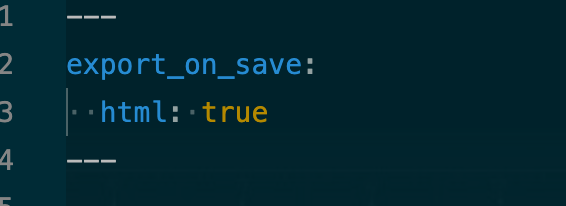
| 我添加了这个frontmatter,并没有自动导出html | https://api.github.com/repos/shd101wyy/vscode-markdown-preview-enhanced/issues/1046/comments | 0 | 2020-09-12T02:29:48Z | 2023-08-23T02:31:10Z | https://github.com/shd101wyy/vscode-markdown-preview-enhanced/issues/1046 | 1,862,450,452 | 1,046 |
[
"shd101wyy",
"vscode-markdown-preview-enhanced"
] | ```
/* Please visit the URL below for more information: */
/* https://shd101wyy.github.io/markdown-preview-enhanced/#/customize-css */
@list: apple, pear, coconut, orange;
.markdown-preview.markdown-preview {
// modify your style here
// eg: background-color: blue;
// @numbers: 一, 二, 三, 四, 五, 六, 七;
... | 看起来自定义样式的style.less不支持less语法,只支持css? | https://api.github.com/repos/shd101wyy/vscode-markdown-preview-enhanced/issues/1047/comments | 0 | 2020-09-09T11:11:59Z | 2023-08-23T02:31:12Z | https://github.com/shd101wyy/vscode-markdown-preview-enhanced/issues/1047 | 1,862,450,482 | 1,047 |
[
"shd101wyy",
"vscode-markdown-preview-enhanced"
] | Hi, Love your lib <3
OS: **MacOS**
I get an error when I export my file to markdown.
It says I need `imagemagick-cli` which i guess is the tool that handles diagram export as images. But my system cant run it due to `unknown developer`. Usually I can override this in my security settings, but i keeps prompting m... | PlantUML Error on "Save as Markdown" | https://api.github.com/repos/shd101wyy/vscode-markdown-preview-enhanced/issues/1048/comments | 2 | 2020-09-09T08:28:52Z | 2023-08-23T02:31:14Z | https://github.com/shd101wyy/vscode-markdown-preview-enhanced/issues/1048 | 1,862,450,511 | 1,048 |
[
"shd101wyy",
"vscode-markdown-preview-enhanced"
] | 当我在自定义样式表内插入:
```
.markdown-preview.markdown-preview {
background: #fff;
}
```
在导出为 PDF 时的样式却是:

我试着调高了 .markdown-preview 的 padding,但依然还是向上面一样。
我也试了
```
@media print {
html, html... | 当预览背景为白色时,导出的 pdf 文件在四周都会有一圈黑色背景 | https://api.github.com/repos/shd101wyy/vscode-markdown-preview-enhanced/issues/1049/comments | 5 | 2020-09-08T12:50:12Z | 2023-08-23T02:31:17Z | https://github.com/shd101wyy/vscode-markdown-preview-enhanced/issues/1049 | 1,862,450,544 | 1,049 |
[
"shd101wyy",
"vscode-markdown-preview-enhanced"
] | Hi, I have been trying to get [loose list](https://github.github.com/gfm/#loose) to work with this extension but no luck so far.
## Steps to reproduce
- Create a list item like this
Then add a line like this
- Finally, add another list item like this
## Expected behaviors
- The additional line
l... | Add loose/tight lists | https://api.github.com/repos/shd101wyy/vscode-markdown-preview-enhanced/issues/415/comments | 1 | 2020-09-08T02:52:15Z | 2024-06-10T21:24:29Z | https://github.com/shd101wyy/vscode-markdown-preview-enhanced/issues/415 | 695,503,492 | 415 |
[
"shd101wyy",
"vscode-markdown-preview-enhanced"
] | Hi,
When I try to use relative path for iframe import (see below), the iframe does not display at all.
```
<iframe src="/my/path/to_page.html" height="750" width="1000" ></iframe>
```
But it works fine in absolute path as below.
```
<iframe src="file:////my/absolute_path/to_page.html" height="750" widt... | Iframe with relative path does not display | https://api.github.com/repos/shd101wyy/vscode-markdown-preview-enhanced/issues/1050/comments | 0 | 2020-09-07T12:29:08Z | 2023-08-23T02:31:19Z | https://github.com/shd101wyy/vscode-markdown-preview-enhanced/issues/1050 | 1,862,450,571 | 1,050 |
[
"shd101wyy",
"vscode-markdown-preview-enhanced"
] | Hello,
Github has the same problem. So I guess it is easier to see the problem:
`非斜体_斜体_非斜体` → this would not work: 非斜体_斜体_非斜体
`非斜体 _斜体_ 非斜体` → this works (adding a space before the first and after the second `_`): 非斜体 _斜体_ 非斜体
In other words, looks like: it works for languages that have space separate word... | Not Rendering Italics well for Chinese | https://api.github.com/repos/shd101wyy/vscode-markdown-preview-enhanced/issues/1051/comments | 0 | 2020-09-06T21:22:45Z | 2023-08-23T02:31:21Z | https://github.com/shd101wyy/vscode-markdown-preview-enhanced/issues/1051 | 1,862,450,590 | 1,051 |
[
"shd101wyy",
"vscode-markdown-preview-enhanced"
] | Hello,
Would it be possible to add a stop execution option for code snippets? | feature request: stop code run button | https://api.github.com/repos/shd101wyy/vscode-markdown-preview-enhanced/issues/1052/comments | 0 | 2020-09-06T16:14:17Z | 2023-08-23T02:31:23Z | https://github.com/shd101wyy/vscode-markdown-preview-enhanced/issues/1052 | 1,862,450,624 | 1,052 |
[
"shd101wyy",
"vscode-markdown-preview-enhanced"
] | There seems to be some access issue in the VSCode preview. When an interactive vega block refers to a local file, the request fails. To reproduce:
1. Create `data.csv` with the following contents:
```csv
x,y
10,55
20,35
30,80
```
2. Create `problem.md` with the following contents:... | No access to local files in interactive vega blocks | https://api.github.com/repos/shd101wyy/vscode-markdown-preview-enhanced/issues/414/comments | 2 | 2020-09-05T14:45:54Z | 2020-10-04T10:08:51Z | https://github.com/shd101wyy/vscode-markdown-preview-enhanced/issues/414 | 694,100,162 | 414 |
[
"shd101wyy",
"vscode-markdown-preview-enhanced"
] | I've just found out about this really great extension and my first thing to try was making graphs with matplotlib.
Sadly, it doesn't seem to be working all that well for me. The example from the docs works perfectly, but when I try plotting with floating point numbers for the x axis that can't be cast to integers (... | Preview graphs with matplotlib aren't showing correctly | https://api.github.com/repos/shd101wyy/vscode-markdown-preview-enhanced/issues/1053/comments | 1 | 2020-09-05T06:49:34Z | 2024-12-03T10:01:54Z | https://github.com/shd101wyy/vscode-markdown-preview-enhanced/issues/1053 | 1,862,450,646 | 1,053 |
[
"shd101wyy",
"vscode-markdown-preview-enhanced"
] | Hello,
Is it possible to delete images that were accidently uploaded to Imgur? | Delete images uploaded to Imgur | https://api.github.com/repos/shd101wyy/vscode-markdown-preview-enhanced/issues/1054/comments | 1 | 2020-09-04T13:46:32Z | 2023-08-23T02:31:28Z | https://github.com/shd101wyy/vscode-markdown-preview-enhanced/issues/1054 | 1,862,450,676 | 1,054 |
[
"shd101wyy",
"vscode-markdown-preview-enhanced"
] | [Enter steps to reproduce:]
1. Install the package
2. The message is immediately shown (and is shown again when opening Atom, even after a complete reboot)
**Atom**: 1.26.1 x64
**Electron**: 1.7.11
**OS**: Ubuntu 18.04.5
**Thrown From**: [markdown-preview-enhanced](https://github.com/shd101wyy/markdown-previe... | Package fails to activate (unexpected token) | https://api.github.com/repos/shd101wyy/vscode-markdown-preview-enhanced/issues/1055/comments | 2 | 2020-09-03T07:40:44Z | 2023-08-23T02:31:30Z | https://github.com/shd101wyy/vscode-markdown-preview-enhanced/issues/1055 | 1,862,450,705 | 1,055 |
[
"shd101wyy",
"vscode-markdown-preview-enhanced"
] | I was editing a bash file in Visual studio code. There was also an open "readme.md" file that I was not actively editing.
I received the error below:
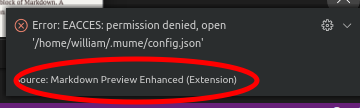
When I looked at this file it has all+r -- Read acce... | Failed ot open $HOME/.mume/config.json | https://api.github.com/repos/shd101wyy/vscode-markdown-preview-enhanced/issues/413/comments | 0 | 2020-09-03T02:09:24Z | 2020-09-03T02:09:24Z | https://github.com/shd101wyy/vscode-markdown-preview-enhanced/issues/413 | 691,570,899 | 413 |
[
"shd101wyy",
"vscode-markdown-preview-enhanced"
] | When using...
- [Mermaid diagrams](https://shd101wyy.github.io/markdown-preview-enhanced/#/diagrams?id=mermaid)
- [GitHub Flavored Markdown Output](https://shd101wyy.github.io/markdown-preview-enhanced/#/markdown)
I installed the latest Mermaid CLI with: `npm install -g @mermaid-js/mermaid-cli`. However, I get the... | bug: mermaid diagram rendering failure | https://api.github.com/repos/shd101wyy/vscode-markdown-preview-enhanced/issues/412/comments | 0 | 2020-09-02T21:38:09Z | 2020-09-02T21:38:09Z | https://github.com/shd101wyy/vscode-markdown-preview-enhanced/issues/412 | 691,439,040 | 412 |
[
"shd101wyy",
"vscode-markdown-preview-enhanced"
] | Hi folks, I am using the markdown-preview-enhanced extension in vs code provided by the Dendron folks (dendron.so). I am not sure if it is the default settings they provide or something else in my vs code config.
The pandoc settings are set to:
markdown-raw_tex+tex_math_single_backslash
First: the inline delimi... | issues with markdown-preview-enhanced and $\sin(x)$ | https://api.github.com/repos/shd101wyy/vscode-markdown-preview-enhanced/issues/1056/comments | 0 | 2020-09-02T19:39:41Z | 2023-08-23T02:31:32Z | https://github.com/shd101wyy/vscode-markdown-preview-enhanced/issues/1056 | 1,862,450,738 | 1,056 |
[
"shd101wyy",
"vscode-markdown-preview-enhanced"
] | Local images are not rendering my Preview pane. But when I chose "open in Browser" they render fine.
A very weird thing is this: it renders for 1 second, then disappears.
E.g. the following two cases:
``
`
| 如图,在VSCode中预览模式下无法查看左侧的大纲内容(编辑模式可以),要是可以通过大纲定位预览文档的位置就好了 | https://api.github.com/repos/shd101wyy/vscode-markdown-preview-enhanced/issues/1058/comments | 0 | 2020-08-30T09:57:48Z | 2023-08-23T02:31:37Z | https://github.com/shd101wyy/vscode-markdown-preview-enhanced/issues/1058 | 1,862,450,782 | 1,058 |
[
"shd101wyy",
"vscode-markdown-preview-enhanced"
] | Issue Type: <b>Bug</b>
I have several markdown files open. Viewing one with the preview side-by-side.
I used to be able to select text in the preview, ctrl-c, switch to another window, ctrl-v, and it would paste the text from the preview.
Now (as of maybe 2 months ago), it sometimes pastes the text from the ma... | Copy-paste out of markdown preview not working consistently | https://api.github.com/repos/shd101wyy/vscode-markdown-preview-enhanced/issues/411/comments | 0 | 2020-08-27T17:48:44Z | 2020-08-27T17:48:44Z | https://github.com/shd101wyy/vscode-markdown-preview-enhanced/issues/411 | 687,428,144 | 411 |
[
"shd101wyy",
"vscode-markdown-preview-enhanced"
] | This extension is really really amazing !
For me , I can say It is the best markdown reader .
Every note app always have some troubles when render rich markdown (special table, latex , mermaid ) , but saddly vscode can't replace them because of the lack of database .
For example,a recent very famous note app ht... | What about making a brand new note app ? | https://api.github.com/repos/shd101wyy/vscode-markdown-preview-enhanced/issues/1059/comments | 0 | 2020-08-27T10:11:52Z | 2023-08-23T02:31:39Z | https://github.com/shd101wyy/vscode-markdown-preview-enhanced/issues/1059 | 1,862,450,805 | 1,059 |
[
"shd101wyy",
"vscode-markdown-preview-enhanced"
] | # Bug description
The latest release of vscode-markdown-preview-enhanced, v0.5.13 doesn't render links using the file protocol directly, even if the file protocol is white listed in the settings, (the protocols I have white listed are "http://, https://, atom://, file://, mailto:, tel:" which as seen includes the file... | [BUG] [WITH-WORKAROUND] Can't use the file protocol directly to link to local files | https://api.github.com/repos/shd101wyy/vscode-markdown-preview-enhanced/issues/410/comments | 1 | 2020-08-25T05:06:18Z | 2020-11-28T16:33:27Z | https://github.com/shd101wyy/vscode-markdown-preview-enhanced/issues/410 | 685,173,441 | 410 |
[
"shd101wyy",
"vscode-markdown-preview-enhanced"
] | I had hoped I could use `@import` to get around the restriction that makes it impossible to render (formatted) code chunks inside tables. Unfortunately, it seems that the `@import` syntax does not work inside tables.
Any chance this functionality could be added? Would definitely set this extension apart from others ... | @import in tables | https://api.github.com/repos/shd101wyy/vscode-markdown-preview-enhanced/issues/1060/comments | 2 | 2020-08-21T13:11:27Z | 2024-09-06T02:56:30Z | https://github.com/shd101wyy/vscode-markdown-preview-enhanced/issues/1060 | 1,862,450,827 | 1,060 |
[
"shd101wyy",
"vscode-markdown-preview-enhanced"
] | I have a lot of article titles, but after clicking ‘ § ', only a part is displayed, and a lot is missing。
[erro description](https://upload-images.jianshu.io/upload_images/22078000-bc809c8830916e1e.png?imageMogr2/auto-orient/strip%7CimageView2/2/w/1240)
| Incomplete display of directory functions(Click ‘ § ' error) | https://api.github.com/repos/shd101wyy/vscode-markdown-preview-enhanced/issues/1061/comments | 0 | 2020-08-21T12:06:56Z | 2023-08-23T02:31:43Z | https://github.com/shd101wyy/vscode-markdown-preview-enhanced/issues/1061 | 1,862,450,860 | 1,061 |
[
"shd101wyy",
"vscode-markdown-preview-enhanced"
] | If i draw two or more wavedrom at a file, then view this file at browser like Chrome, then press F12 and copy svg, the second and other after it image's line will not have line.
But if i delete the first svg, all line will be delete. | All wavedrom line are on the first svg | https://api.github.com/repos/shd101wyy/vscode-markdown-preview-enhanced/issues/409/comments | 0 | 2020-08-20T13:35:37Z | 2020-08-20T13:35:37Z | https://github.com/shd101wyy/vscode-markdown-preview-enhanced/issues/409 | 682,723,580 | 409 |
[
"shd101wyy",
"vscode-markdown-preview-enhanced"
] | 无论是本地视频还是网页视频都无法在 VS Code 里面显示或播放, 但 "Open in Browser" 后都能正常播放
设置中已勾选 "Enable HTML5 Embed"
视频插入代码:
* 本地:
```html
<video src="D:\Test.mp4" controls="true" width="700px"></video>
```
* 网页:
```html
<iframe width="560" height="315" src="https://www.youtube.com/embed/SuFFfevTkyY" frameborder="0" allow="... | 视频无法播放 Can't play videos | https://api.github.com/repos/shd101wyy/vscode-markdown-preview-enhanced/issues/408/comments | 1 | 2020-08-20T07:01:34Z | 2022-01-05T09:01:21Z | https://github.com/shd101wyy/vscode-markdown-preview-enhanced/issues/408 | 682,473,678 | 408 |
[
"shd101wyy",
"vscode-markdown-preview-enhanced"
] | 👋 @shd101wyy!
WDYT of using `yarn` instead of `npm` in this repo? I’ve noticed you’ve already switched to `yarn` in [mume](https://github.com/shd101wyy/mume) and [vscode-markdown-preview-enhanced](https://github.com/shd101wyy/vscode-markdown-preview-enhanced), so wonder if there are any blockers to do so in the rem... | yarn instead of npm? | https://api.github.com/repos/shd101wyy/vscode-markdown-preview-enhanced/issues/1062/comments | 1 | 2020-08-16T19:35:12Z | 2023-08-23T02:31:46Z | https://github.com/shd101wyy/vscode-markdown-preview-enhanced/issues/1062 | 1,862,450,886 | 1,062 |
[
"shd101wyy",
"vscode-markdown-preview-enhanced"
] | 直接按`ctrl + shift + v`显示的是markdown all in one的预览
输入命令`>Markdown: Markdown Preview Enhanced: Open Preview` 才显示的是enhanced的预览 | 预览快捷键与markdown all in one发生冲突 | https://api.github.com/repos/shd101wyy/vscode-markdown-preview-enhanced/issues/407/comments | 2 | 2020-08-16T04:40:24Z | 2020-08-16T04:54:58Z | https://github.com/shd101wyy/vscode-markdown-preview-enhanced/issues/407 | 679,687,286 | 407 |
[
"shd101wyy",
"vscode-markdown-preview-enhanced"
] | 使用ebook-convert将md文件转换为pdf时,如果md的文档超过了pdf的一页,转换后pdf里仅有第一页,后面的文字全部都没有被转换进pdf。
请问这种情况有什么办法吗? | md转换为pdf后内容缺失 | https://api.github.com/repos/shd101wyy/vscode-markdown-preview-enhanced/issues/406/comments | 1 | 2020-08-15T12:57:37Z | 2021-06-21T12:57:22Z | https://github.com/shd101wyy/vscode-markdown-preview-enhanced/issues/406 | 679,560,259 | 406 |
[
"shd101wyy",
"vscode-markdown-preview-enhanced"
] | ```javascript
module.exports = {
onWillParseMarkdown: function(markdown) {
return new Promise((resolve, _reject) => {
markdown = markdown.replace(/-\s\[x\]\s/gm, ($0) =>$0 + "<s><font color=\"gray\">");
markdown = markdown.replace(/-\s\[x\]\s.*/mg, ($0) =>$0+"</font></s>");
retur... | parse.js 只能转换一个自定义语法。 | https://api.github.com/repos/shd101wyy/vscode-markdown-preview-enhanced/issues/405/comments | 2 | 2020-08-15T03:04:57Z | 2020-11-24T16:17:11Z | https://github.com/shd101wyy/vscode-markdown-preview-enhanced/issues/405 | 679,487,855 | 405 |
[
"shd101wyy",
"vscode-markdown-preview-enhanced"
] | ### Behavior
I tried to open style.less, but I could not.
I got the following error message.
```
Command 'Markdown Preview Enhanced: Customize CSS' resulted in an error (command 'markdown-preview-enhanced.customizeCss' not found)
```
### Environment
```
Microsoft Windows Version 2004 Build 19041.450
VS Code ... | Can't open Customize Css in v0.5.13 | https://api.github.com/repos/shd101wyy/vscode-markdown-preview-enhanced/issues/404/comments | 0 | 2020-08-14T02:10:03Z | 2020-09-19T15:13:47Z | https://github.com/shd101wyy/vscode-markdown-preview-enhanced/issues/404 | 678,845,428 | 404 |
[
"shd101wyy",
"vscode-markdown-preview-enhanced"
] | I am on Mac 10.15.3 using Atom 1.49.0.
The slide preview within Atom often goes black and does not come back anymore.
The very first slide does not show up anymore.
Especially if images are to be displayed the preview stays black.
Exporting to HTML or PDF using puppeteer seems to work fine. | reveal.js preview in atom seems broken on Mac Catalina | https://api.github.com/repos/shd101wyy/vscode-markdown-preview-enhanced/issues/1063/comments | 5 | 2020-08-13T20:07:45Z | 2023-08-23T02:31:48Z | https://github.com/shd101wyy/vscode-markdown-preview-enhanced/issues/1063 | 1,862,450,909 | 1,063 |
[
"shd101wyy",
"vscode-markdown-preview-enhanced"
] | I'm willing to help translate documentation to Portuguese (BR). | Translation to Portuguese | https://api.github.com/repos/shd101wyy/vscode-markdown-preview-enhanced/issues/1064/comments | 1 | 2020-08-10T20:08:26Z | 2023-08-23T02:31:50Z | https://github.com/shd101wyy/vscode-markdown-preview-enhanced/issues/1064 | 1,862,450,942 | 1,064 |
[
"shd101wyy",
"vscode-markdown-preview-enhanced"
] | A [mermaid bug](https://github.com/mermaid-js/mermaid/issues/1480#issuecomment-656052057) is causing certain diagrams to render incorrectly in the plugin. An example of a diagram rendered by Markdown Preview Enhanced is included below:

| 怎么改高亮颜色 | https://api.github.com/repos/shd101wyy/vscode-markdown-preview-enhanced/issues/1068/comments | 2 | 2020-08-04T08:26:41Z | 2023-08-23T02:31:59Z | https://github.com/shd101wyy/vscode-markdown-preview-enhanced/issues/1068 | 1,862,451,040 | 1,068 |
[
"shd101wyy",
"vscode-markdown-preview-enhanced"
] |
* vscode version: 1.47.1
* arch version: 5.7.9.1 MANJARO
* chromium 84.0.4147.89 Arch Linux
when i use puppeteer(chrome) to generate either pdf or png, it shows `Error: Chromium revision is not downloaded. Run "npm install" or "yarn install"`
I tryed `sudo npm install -g puppeteer`, it doesn't work | Archlinux can't use puppeteer: Chromium revision is not downloaded | https://api.github.com/repos/shd101wyy/vscode-markdown-preview-enhanced/issues/1069/comments | 5 | 2020-08-02T01:59:58Z | 2023-08-23T02:32:01Z | https://github.com/shd101wyy/vscode-markdown-preview-enhanced/issues/1069 | 1,862,451,068 | 1,069 |
[
"shd101wyy",
"vscode-markdown-preview-enhanced"
] | When I type `:)` as plain text, it shows as an emoji 😀 in the preview. Is it a bug or a feature? And how can I turn it back to plain text? | plain text turns into emoji | https://api.github.com/repos/shd101wyy/vscode-markdown-preview-enhanced/issues/399/comments | 1 | 2020-07-29T11:33:00Z | 2020-07-30T08:48:49Z | https://github.com/shd101wyy/vscode-markdown-preview-enhanced/issues/399 | 667,773,735 | 399 |
[
"shd101wyy",
"vscode-markdown-preview-enhanced"
] | The Markdown [documentation](https://daringfireball.net/projects/markdown/syntax#p) says that paragraphs should require two newlines instead of one to form a new paragraph:
> A paragraph is simply one or more consecutive lines of text, separated by one or more blank lines. (A blank line is any line that looks like a... | Paragraphs are rendered across multiple lines instead of a single line | https://api.github.com/repos/shd101wyy/vscode-markdown-preview-enhanced/issues/398/comments | 2 | 2020-07-29T04:19:20Z | 2020-07-29T17:02:04Z | https://github.com/shd101wyy/vscode-markdown-preview-enhanced/issues/398 | 667,535,834 | 398 |
[
"shd101wyy",
"vscode-markdown-preview-enhanced"
] | null | 添加LaTeX的语法高亮。Add LaTeX syntax highlighting. | https://api.github.com/repos/shd101wyy/vscode-markdown-preview-enhanced/issues/1070/comments | 0 | 2020-07-28T04:29:22Z | 2023-08-23T02:32:04Z | https://github.com/shd101wyy/vscode-markdown-preview-enhanced/issues/1070 | 1,862,451,097 | 1,070 |
[
"shd101wyy",
"vscode-markdown-preview-enhanced"
] | Listed below are a few emoji shortcodes that are not supported by Markdown Preview Enhanced. There are obviously more.
- `:dna:` :dna:
- `:ringed_planet:` :ringed_planet:
- `:test_tube:` :test_tube:
I noticed that this extension relies on [emoji-regex](https://github.com/mathiasbynens/emoji-regex) for emoji sup... | Emoji support is not up to date | https://api.github.com/repos/shd101wyy/vscode-markdown-preview-enhanced/issues/397/comments | 1 | 2020-07-27T06:22:42Z | 2021-05-13T04:58:31Z | https://github.com/shd101wyy/vscode-markdown-preview-enhanced/issues/397 | 666,011,937 | 397 |
[
"shd101wyy",
"vscode-markdown-preview-enhanced"
] | My machine is Ubuntu 20.04 and the keyboard shortcut of ctrl+M ctrl+1 not working.
However its working from command pallate.
And this is the details of vscode
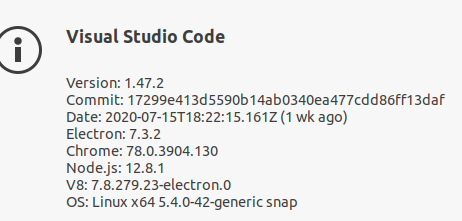
| Make a numbered list keyboard shortcut of ctrl+M ctrl+1 not working | https://api.github.com/repos/shd101wyy/vscode-markdown-preview-enhanced/issues/396/comments | 0 | 2020-07-24T20:36:23Z | 2020-07-24T20:36:23Z | https://github.com/shd101wyy/vscode-markdown-preview-enhanced/issues/396 | 665,404,229 | 396 |
[
"shd101wyy",
"vscode-markdown-preview-enhanced"
] | my Plantum doesn't work anymore... the preview page is always blank
i could find any error in the console and system log
how could i debug?
what is the exact command that is used to launch the plantum.jar? | plantum on macOS not working | https://api.github.com/repos/shd101wyy/vscode-markdown-preview-enhanced/issues/395/comments | 6 | 2020-07-23T19:07:38Z | 2020-07-27T10:54:21Z | https://github.com/shd101wyy/vscode-markdown-preview-enhanced/issues/395 | 664,703,416 | 395 |
[
"shd101wyy",
"vscode-markdown-preview-enhanced"
] | i read the Mermaid is working on mindmaps.. but it is at early stages.
a working (and beautiful!) solution in JS is https://markmap.js.org/
could it be a viable solution to embed? | mindmap with markmap.js | https://api.github.com/repos/shd101wyy/vscode-markdown-preview-enhanced/issues/394/comments | 10 | 2020-07-23T19:03:23Z | 2023-09-02T12:14:57Z | https://github.com/shd101wyy/vscode-markdown-preview-enhanced/issues/394 | 664,701,132 | 394 |
Subsets and Splits
No community queries yet
The top public SQL queries from the community will appear here once available.