
issue_owner_repo listlengths 2 2 | issue_body stringlengths 0 262k ⌀ | issue_title stringlengths 1 1.02k | issue_comments_url stringlengths 53 116 | issue_comments_count int64 0 2.49k | issue_created_at stringdate 1999-03-17 02:06:42 2025-06-23 11:41:49 | issue_updated_at stringdate 2000-02-10 06:43:57 2025-06-23 11:43:00 | issue_html_url stringlengths 34 97 | issue_github_id int64 132 3.17B | issue_number int64 1 215k |
|---|---|---|---|---|---|---|---|---|---|
[
"shd101wyy",
"vscode-markdown-preview-enhanced"
] | 
好像就一直卡在 Uploading ,使用 imgur是可以的,但是这个我不常用毕竟要翻墙。 | 上传sm.ms失效,一直卡在 Uploading | https://api.github.com/repos/shd101wyy/vscode-markdown-preview-enhanced/issues/314/comments | 2 | 2020-01-21T09:58:32Z | 2020-01-31T04:43:55Z | https://github.com/shd101wyy/vscode-markdown-preview-enhanced/issues/314 | 552,767,856 | 314 |
[
"shd101wyy",
"vscode-markdown-preview-enhanced"
] | How can I add temp environmeten variable to a markdown file. | environment variable | https://api.github.com/repos/shd101wyy/vscode-markdown-preview-enhanced/issues/1213/comments | 0 | 2020-01-17T06:11:10Z | 2023-08-23T02:37:20Z | https://github.com/shd101wyy/vscode-markdown-preview-enhanced/issues/1213 | 1,862,454,838 | 1,213 |
[
"shd101wyy",
"vscode-markdown-preview-enhanced"
] | When I examined why MPE cannot use in "untitled", I found it was caused in `isMarkdownFile()`.
Then, I did change
https://github.com/shd101wyy/markdown-preview-enhanced/blob/1830481bc0f01475d512ff2143f3ffc3e88a4985/out/src/extension.js#L112
to
`if (!editor || !editor["getPath"]){`.
At first glance, it seems to... | How to Use in "untitled" | https://api.github.com/repos/shd101wyy/vscode-markdown-preview-enhanced/issues/1214/comments | 1 | 2020-01-16T21:40:39Z | 2023-08-23T02:37:22Z | https://github.com/shd101wyy/vscode-markdown-preview-enhanced/issues/1214 | 1,862,454,863 | 1,214 |
[
"shd101wyy",
"vscode-markdown-preview-enhanced"
] | In mermaid format, adding a `<br/>` inserts line breaks in notes.. This doesn't work in the preview window in vscode, but works well in the browser..
```mermaid
sequenceDiagram
A ->> B : hi
Note right of A: this is a<br/>multi<br/>line<br/>note !
```
## in vscode preview:
同时重命名 | https://api.github.com/repos/shd101wyy/vscode-markdown-preview-enhanced/issues/1215/comments | 0 | 2020-01-15T03:08:42Z | 2023-08-23T02:37:24Z | https://github.com/shd101wyy/vscode-markdown-preview-enhanced/issues/1215 | 1,862,454,887 | 1,215 |
[
"shd101wyy",
"vscode-markdown-preview-enhanced"
] | 表格列过长时预览不能完全显示
| 表格预览显示不完整 | https://api.github.com/repos/shd101wyy/vscode-markdown-preview-enhanced/issues/1216/comments | 0 | 2020-01-13T13:02:44Z | 2023-08-23T02:37:26Z | https://github.com/shd101wyy/vscode-markdown-preview-enhanced/issues/1216 | 1,862,454,915 | 1,216 |
[
"shd101wyy",
"vscode-markdown-preview-enhanced"
] | Could you add the feature to add id/class for blockquote?
I want you render different colors from different quote source.
Thanks
markdown syntax like this:
>{.className}{#id}
>This is the blockquote
html should be like:
<blockquote class=".className">
This is the blockquote
</blockquote>
| add id/class for blockquote | https://api.github.com/repos/shd101wyy/vscode-markdown-preview-enhanced/issues/1217/comments | 0 | 2020-01-13T06:54:03Z | 2023-08-23T02:37:28Z | https://github.com/shd101wyy/vscode-markdown-preview-enhanced/issues/1217 | 1,862,454,940 | 1,217 |
[
"shd101wyy",
"vscode-markdown-preview-enhanced"
] | As the title says.
Thank you. | Please support local file link as [example](file:///home/user/example.html) | https://api.github.com/repos/shd101wyy/vscode-markdown-preview-enhanced/issues/312/comments | 0 | 2020-01-12T15:20:41Z | 2020-01-12T15:20:41Z | https://github.com/shd101wyy/vscode-markdown-preview-enhanced/issues/312 | 548,584,317 | 312 |
[
"shd101wyy",
"vscode-markdown-preview-enhanced"
] | With this Markdown source:
```md
* :heavy_check_mark: denotes a mostly-flat Firefox resident set size
* :x: denotes a steadily increasing Firefox resident set size
# Full Dashboard test suite
<details>
<summary>
:heavy_check_mark: Forced GC/CC after every test, parallelization = 5
</summary>
</details>
... | Emojis are not rendered inside of <summary> tags | https://api.github.com/repos/shd101wyy/vscode-markdown-preview-enhanced/issues/311/comments | 2 | 2020-01-10T16:40:56Z | 2020-01-24T16:47:32Z | https://github.com/shd101wyy/vscode-markdown-preview-enhanced/issues/311 | 548,179,115 | 311 |
[
"shd101wyy",
"vscode-markdown-preview-enhanced"
] | null | 如何实现标准beamer模版? | https://api.github.com/repos/shd101wyy/vscode-markdown-preview-enhanced/issues/1218/comments | 0 | 2020-01-09T08:58:04Z | 2023-08-23T02:37:30Z | https://github.com/shd101wyy/vscode-markdown-preview-enhanced/issues/1218 | 1,862,454,965 | 1,218 |
[
"shd101wyy",
"vscode-markdown-preview-enhanced"
] | So, when I try to open the preview of a markdown file (with the keybinding, or the menu toggle), it doesn't open. Also in the command palette is no entry for markdown-preview-enhanced.
OS: Zorin OS 15.1 based on Ubuntu bionic
Atom version: 1.42.0
markdown-preview-enhanced version: 0.17.0 | Preview not showing up (Linux) | https://api.github.com/repos/shd101wyy/vscode-markdown-preview-enhanced/issues/1219/comments | 0 | 2020-01-07T12:10:46Z | 2023-08-23T02:37:32Z | https://github.com/shd101wyy/vscode-markdown-preview-enhanced/issues/1219 | 1,862,454,996 | 1,219 |
[
"shd101wyy",
"vscode-markdown-preview-enhanced"
] | null | GBK编码写的md文件转HTML乱码了 | https://api.github.com/repos/shd101wyy/vscode-markdown-preview-enhanced/issues/1220/comments | 0 | 2020-01-06T09:52:50Z | 2023-08-23T02:37:34Z | https://github.com/shd101wyy/vscode-markdown-preview-enhanced/issues/1220 | 1,862,455,020 | 1,220 |
[
"shd101wyy",
"vscode-markdown-preview-enhanced"
] | I've been playing with this extension on visual studio code and I think that it looks great!
The flow is easy and has a good impact on the audience.
But... while playing with it I found that the timer is not working when the speaker notes are opened.
Tested on: https://rawgit.com/shd101wyy/markdown-preview-enhan... | [Presentation] Speaker notes fail with a given error in the console | https://api.github.com/repos/shd101wyy/vscode-markdown-preview-enhanced/issues/1221/comments | 1 | 2020-01-05T19:18:53Z | 2023-08-23T02:37:36Z | https://github.com/shd101wyy/vscode-markdown-preview-enhanced/issues/1221 | 1,862,455,044 | 1,221 |
[
"shd101wyy",
"vscode-markdown-preview-enhanced"
] | There should be a special command 'markdown-preview-enhanced' that can be included in a *.md document to inform/warn the reader like
\```markdown-preview-enhanced
markdown-preview-enhanced is needed to render this file correctly
\```
If markdown-preview-enhanced is installed, it will simply not show this text... | Warning when markdown-preview-enhanced is not installed | https://api.github.com/repos/shd101wyy/vscode-markdown-preview-enhanced/issues/1222/comments | 0 | 2020-01-02T18:55:19Z | 2023-08-23T02:37:38Z | https://github.com/shd101wyy/vscode-markdown-preview-enhanced/issues/1222 | 1,862,455,073 | 1,222 |
[
"shd101wyy",
"vscode-markdown-preview-enhanced"
] | 自从 2019 年的 11 月,我一直在开发一款叫做 [crossnote](http://crossnote.app/) 的在线 markdown 笔记记录软件。
我基本上移动了 MPE 的一些功能到 crossnote 上面,并且添加了协同编辑,标签管理,等功能。
这个项目目前还在开发中,bugs 也很多。现在这个网站仅仅运行在 vultr 上面的一个 8GB 内存的服务器上,所以这个项目目前还仅仅是作为展示目的。
如果你有时间,请尝试一下 [crossnote](http://crossnote.app/)。
然后如果你有问题或者意见的话,请发送到 [github/0xGG/crossn... | [请求帮助] 如果你有时间,请帮忙测试下我最新的 crossnote.app 项目,谢谢🙏 | https://api.github.com/repos/shd101wyy/vscode-markdown-preview-enhanced/issues/1223/comments | 1 | 2020-01-02T12:58:37Z | 2023-08-23T02:37:40Z | https://github.com/shd101wyy/vscode-markdown-preview-enhanced/issues/1223 | 1,862,455,092 | 1,223 |
[
"shd101wyy",
"vscode-markdown-preview-enhanced"
] | Over the past 2 months (starting November 2019), I have been developing a cloud based markdown note taking application called as [crossnote](https://crossnote.app/).
I basically moved some features of MPE to it, and added support for collaborative editing, tag management, etc.
The project is still under deve... | [Help needed] If you have time, please help me test the crossnote.app project. Thank you 🙏 | https://api.github.com/repos/shd101wyy/vscode-markdown-preview-enhanced/issues/1224/comments | 1 | 2020-01-02T12:52:58Z | 2023-08-23T02:37:42Z | https://github.com/shd101wyy/vscode-markdown-preview-enhanced/issues/1224 | 1,862,455,112 | 1,224 |
[
"shd101wyy",
"vscode-markdown-preview-enhanced"
] | I'm not sure how other static site generators handle images, but [Hugo](https://gohugo.io) has you put your images into the `static` folder in your development environment. But when Hugo compiles your website, anything in the `static` folder gets moved to your website's root directory. So the markdown files must refe... | Add option to specify root image folder | https://api.github.com/repos/shd101wyy/vscode-markdown-preview-enhanced/issues/309/comments | 0 | 2020-01-01T16:43:16Z | 2020-01-01T16:43:16Z | https://github.com/shd101wyy/vscode-markdown-preview-enhanced/issues/309 | 544,376,285 | 309 |
[
"shd101wyy",
"vscode-markdown-preview-enhanced"
] | [Hugo](https://gohugo.io) allows multiple formats for the markdown frontmatter. Your extension (which is amazing!) works perfectly with the YAML style where the frontmatter is enclosed in `---` but not for the TOML, JSON, or ORG-mode. Is there any chance you could implement at least the TOML? It's extremely similar... | Add option for different frontmatter formats | https://api.github.com/repos/shd101wyy/vscode-markdown-preview-enhanced/issues/308/comments | 0 | 2020-01-01T15:45:59Z | 2020-01-01T15:45:59Z | https://github.com/shd101wyy/vscode-markdown-preview-enhanced/issues/308 | 544,371,194 | 308 |
[
"shd101wyy",
"vscode-markdown-preview-enhanced"
] | I am using the following code for front-matter - the resulting PDF does not have any headers/footers. Is there a syntax error?
```
puppeteer:
pdf:
format: A4
displayHeaderFooter: true
headerTemplate: "<span>This is header</span>"
footerTemplate: "<span>This is footer</span>"
margin:
... | puppeteer front-matter | https://api.github.com/repos/shd101wyy/vscode-markdown-preview-enhanced/issues/307/comments | 2 | 2019-12-28T20:34:06Z | 2024-09-12T00:48:45Z | https://github.com/shd101wyy/vscode-markdown-preview-enhanced/issues/307 | 543,277,919 | 307 |
[
"shd101wyy",
"vscode-markdown-preview-enhanced"
] | Linux mint vscode markdown-preview-enhanced 0.5.0 通过绝对路径插入image 无法预览图片,例如
` `
改成工作目录就可以正常预览,例如
` ` | Linux mint vscode下 通过绝对路径插入image 无法显示 | https://api.github.com/repos/shd101wyy/vscode-markdown-preview-enhanced/issues/1225/comments | 1 | 2019-12-26T07:54:52Z | 2023-08-23T02:57:34Z | https://github.com/shd101wyy/vscode-markdown-preview-enhanced/issues/1225 | 1,862,455,137 | 1,225 |
[
"shd101wyy",
"vscode-markdown-preview-enhanced"
] | It seems Azure DevOps uses [another syntax to embedding mermaid script](https://docs.microsoft.com/en-us/azure/devops/project/wiki/wiki-markdown-guidance?view=azure-devops#add-mermaid-diagrams-to-a-wiki-page) inside their wiki syntax.
```
::: mermaid
graph TD
A --> B
:::
```
Do you have any plan to suppo... | Azure DevOps style mermaid embedding | https://api.github.com/repos/shd101wyy/vscode-markdown-preview-enhanced/issues/306/comments | 0 | 2019-12-25T05:55:06Z | 2019-12-25T05:55:06Z | https://github.com/shd101wyy/vscode-markdown-preview-enhanced/issues/306 | 542,262,544 | 306 |
[
"shd101wyy",
"vscode-markdown-preview-enhanced"
] | ```c {cmd="gcc"}
#include <stdio.h>
int main(int argc,char* argv[]){
printf("Hello World!\n");
return 0;
}
```
通过code chunk运行报错如下:
D:\work\mycode\vscode_code\git_project\MyUniversity\c_language_programming\docs\mydocs\1p02xun23_code_chunk: file not recognized: File format not recognized
collect2.exe: e... | 怎么使用code chunk运行c程序 | https://api.github.com/repos/shd101wyy/vscode-markdown-preview-enhanced/issues/1226/comments | 4 | 2019-12-24T03:35:54Z | 2023-08-23T02:37:47Z | https://github.com/shd101wyy/vscode-markdown-preview-enhanced/issues/1226 | 1,862,455,159 | 1,226 |
[
"shd101wyy",
"vscode-markdown-preview-enhanced"
] | 我在编写文档时,使用的本地图片,文件名中包含#符号,preview无法显示该图片,将#符号替换为%23后可以显示。
替换前:
```
*(V.Hypocenter_Lat-34.213)+92.2*92.2*(V.Hypocenter_... | Convert scrolling to newlines of code blocks when exporting to pdf | https://api.github.com/repos/shd101wyy/vscode-markdown-preview-enhanced/issues/1227/comments | 0 | 2019-12-20T00:45:53Z | 2023-08-23T02:37:49Z | https://github.com/shd101wyy/vscode-markdown-preview-enhanced/issues/1227 | 1,862,455,184 | 1,227 |
[
"shd101wyy",
"vscode-markdown-preview-enhanced"
] | mac atom 1.41 x64 markdown-preview-enhanced 0.17无法打开预览,修改快捷键后也无法打开.atom没有报错,请检查一下.谢谢 | markdown-preview-enhanced 0.17 无法打开预览 | https://api.github.com/repos/shd101wyy/vscode-markdown-preview-enhanced/issues/1228/comments | 4 | 2019-12-14T18:18:11Z | 2023-08-23T02:37:51Z | https://github.com/shd101wyy/vscode-markdown-preview-enhanced/issues/1228 | 1,862,455,203 | 1,228 |
[
"shd101wyy",
"vscode-markdown-preview-enhanced"
] | Hello, i've been trying to use MPE to build a markdown document out of a series of other smaller markdown documents, using the '@import' command, and then the "save to markdown" right-click menu option on the preview pane.
But a series of markdown documents have the '$' (dollar) character on it, and this is breaking... | Markdown document with $ character breaks the "save to markdown" right-click menu option | https://api.github.com/repos/shd101wyy/vscode-markdown-preview-enhanced/issues/1229/comments | 0 | 2019-12-12T15:12:56Z | 2023-08-23T02:41:32Z | https://github.com/shd101wyy/vscode-markdown-preview-enhanced/issues/1229 | 1,862,457,723 | 1,229 |
[
"shd101wyy",
"vscode-markdown-preview-enhanced"
] | Version 0.5.0 doesn't support the wavedrom image generation using:
> \```wavedrom
> {...}
> \```
I will try to find out how to support that. | Wavedrom preview not supported | https://api.github.com/repos/shd101wyy/vscode-markdown-preview-enhanced/issues/304/comments | 0 | 2019-12-09T23:53:54Z | 2019-12-09T23:53:54Z | https://github.com/shd101wyy/vscode-markdown-preview-enhanced/issues/304 | 535,406,877 | 304 |
[
"shd101wyy",
"vscode-markdown-preview-enhanced"
] | I'm using Pandoc export for this kind of markdown:
```markdown
---
title: "Book"
author: Me
date: 02 Décembre 2019
geometry: margin=1in
lang: fr
documentclass: scrbook
fontfamily: sourcesanspro
fontfamilyoptions: default
output:
pdf_document:
toc: true
toc_depth: 3
... | Pandoc export always converts PlantUML to PNG? | https://api.github.com/repos/shd101wyy/vscode-markdown-preview-enhanced/issues/1230/comments | 1 | 2019-12-06T06:18:49Z | 2023-08-23T02:41:34Z | https://github.com/shd101wyy/vscode-markdown-preview-enhanced/issues/1230 | 1,862,457,749 | 1,230 |
[
"shd101wyy",
"vscode-markdown-preview-enhanced"
] | I'm working on a Google Drive with Windows 10, and so my path of documents is always `G:\My Drive\...` (there's a space between My and Drive).
When I try to **Save as Markdown** for the following:
```puml {filename="sequence.svg"}
@startuml
scale 5
A -> B : hello
@enduml
```
inside... | ImageMagick conversion fails when spaces are in Windows directory | https://api.github.com/repos/shd101wyy/vscode-markdown-preview-enhanced/issues/1231/comments | 2 | 2019-12-04T21:56:08Z | 2023-08-23T02:41:36Z | https://github.com/shd101wyy/vscode-markdown-preview-enhanced/issues/1231 | 1,862,457,775 | 1,231 |
[
"shd101wyy",
"vscode-markdown-preview-enhanced"
] | Markdown front-matter:
```
---
export_on_save:
puppeteer: "png"
---
```
When exporting as png the maximum width seems to be 800px.
I tried adding the following to the front matter:
```
puppeteer:
width: 1000px
height: 1000px
```
But the exported image remained at 800px.
Is there a way to... | Puppeteer screenshot width / height | https://api.github.com/repos/shd101wyy/vscode-markdown-preview-enhanced/issues/1232/comments | 0 | 2019-12-03T17:08:26Z | 2023-08-23T02:41:39Z | https://github.com/shd101wyy/vscode-markdown-preview-enhanced/issues/1232 | 1,862,457,799 | 1,232 |
[
"shd101wyy",
"vscode-markdown-preview-enhanced"
] | VS 版本:版本: 1.40.2 (user setup)
OS: Windows_NT x64 10.0.18362
复现方法:
1. 使用Image helper选中一张图片
2. 将``改成`<img scr="path.img">`
期待的结果:
图片正常显示
实际结果:
在使用``时候正常显示图片,在使用`@import "path.img"`时也可以正常显示,但是`<img scr="path.img">`只能显示一个未加载的小图片
| 使用<img scr="">命令无法输出正常的图片 | https://api.github.com/repos/shd101wyy/vscode-markdown-preview-enhanced/issues/1233/comments | 3 | 2019-11-30T05:43:42Z | 2023-10-07T13:08:57Z | https://github.com/shd101wyy/vscode-markdown-preview-enhanced/issues/1233 | 1,862,457,830 | 1,233 |
[
"shd101wyy",
"vscode-markdown-preview-enhanced"
] | 现在预览文档好像默认左对齐,想问一下怎么设置成两端对齐,因为感觉比较好看,尤其是英文文档。看了一遍所有的设置和issue都没有相关说明,如果不额外加html tag的话 | 预览文档时设置成两端对齐 | https://api.github.com/repos/shd101wyy/vscode-markdown-preview-enhanced/issues/1234/comments | 1 | 2019-11-28T14:02:18Z | 2023-08-23T02:41:43Z | https://github.com/shd101wyy/vscode-markdown-preview-enhanced/issues/1234 | 1,862,457,851 | 1,234 |
[
"shd101wyy",
"vscode-markdown-preview-enhanced"
] | I'm trying to add a class (and other attributes) to images, but it isn't rendered as I thought it would.
The class I put with `{ .onethird }` just after the image is rendered as text following the image:
<img width="1305" alt="image" src="https://user-images.githubusercontent.com/78213/69621331-30724280-103f-11ea... | Pandoc style markdown attributes | https://api.github.com/repos/shd101wyy/vscode-markdown-preview-enhanced/issues/1235/comments | 1 | 2019-11-26T10:25:19Z | 2023-08-23T02:41:45Z | https://github.com/shd101wyy/vscode-markdown-preview-enhanced/issues/1235 | 1,862,457,876 | 1,235 |
[
"shd101wyy",
"vscode-markdown-preview-enhanced"
] | A quick search through the Issues indicates that commands seem to mysteriously disappear intermittently. I'm curious as to why this happens so often in this, otherwise seemingly, stable project...
VSCode version
```
Version: 1.40.1 (system setup)
Commit: 8795a9889db74563ddd43eb0a897a2384129a619
Date: 2019-11-13T... | command 'markdown-preview-enhanced.customizeCss' not found | https://api.github.com/repos/shd101wyy/vscode-markdown-preview-enhanced/issues/303/comments | 0 | 2019-11-24T02:05:07Z | 2019-11-24T02:21:37Z | https://github.com/shd101wyy/vscode-markdown-preview-enhanced/issues/303 | 527,637,257 | 303 |
[
"shd101wyy",
"vscode-markdown-preview-enhanced"
] | The preview window on the right properly reflects the edits in the code window.
However, if I use one of the right-click options to export (open in Browser, HTML to file, PDF to Chrome), it is showing the version of the file saved to disk without the recent edits.
The workaround is easy enough once you know the b... | Exporting is using the saved version of file without unsaved edits. | https://api.github.com/repos/shd101wyy/vscode-markdown-preview-enhanced/issues/302/comments | 0 | 2019-11-22T21:56:02Z | 2019-11-22T21:56:26Z | https://github.com/shd101wyy/vscode-markdown-preview-enhanced/issues/302 | 527,433,847 | 302 |
[
"shd101wyy",
"vscode-markdown-preview-enhanced"
] | Hi,
by mistake i uploaded image to imgur. And I'd need to delete it.
Is there a way to do it?
thx a lot
R. | Imgur image deletion | https://api.github.com/repos/shd101wyy/vscode-markdown-preview-enhanced/issues/301/comments | 15 | 2019-11-19T10:16:30Z | 2023-04-22T11:43:29Z | https://github.com/shd101wyy/vscode-markdown-preview-enhanced/issues/301 | 524,909,555 | 301 |
[
"shd101wyy",
"vscode-markdown-preview-enhanced"
] | 当插入C或C++类型的代码块时:

可以看到左边编辑区的代码后面的文字变成了斜体。
如果把代码类型改成Java,则不会有这个问题。

| C和C++的代码块会导致后续的文字变成斜体 | https://api.github.com/repos/shd101wyy/vscode-markdown-preview-enhanced/issues/1236/comments | 1 | 2019-11-17T01:52:10Z | 2023-08-23T02:41:48Z | https://github.com/shd101wyy/vscode-markdown-preview-enhanced/issues/1236 | 1,862,457,897 | 1,236 |
[
"shd101wyy",
"vscode-markdown-preview-enhanced"
] | 有没有转义符可以在开启enableExtendedTableSyntax的情况下,在表格中正确显示">"和"^"? | enableExtendedTableSyntax开启后表格中">"和"^"该如何输入? | https://api.github.com/repos/shd101wyy/vscode-markdown-preview-enhanced/issues/300/comments | 0 | 2019-11-14T08:05:12Z | 2019-11-14T08:05:12Z | https://github.com/shd101wyy/vscode-markdown-preview-enhanced/issues/300 | 522,690,110 | 300 |
[
"shd101wyy",
"vscode-markdown-preview-enhanced"
] | The changelog at https://shd101wyy.github.io/markdown-preview-enhanced/#/newest has only versions up to 0.15.0, current version is 0.17.0 | Changelog missing new releases | https://api.github.com/repos/shd101wyy/vscode-markdown-preview-enhanced/issues/1237/comments | 0 | 2019-11-13T17:57:02Z | 2023-08-23T02:41:50Z | https://github.com/shd101wyy/vscode-markdown-preview-enhanced/issues/1237 | 1,862,457,923 | 1,237 |
[
"shd101wyy",
"vscode-markdown-preview-enhanced"
] | I got an error **command 'markdown-preview-enhanced.openPreviewToTheSide' not found** when I try to use "open the preview to the slide" function in the top right corner of VsCode. And I'm sure I was writing the ".md" file when I try to use this plugin.
This problem occured about one week ago, it still exists.
Hope yo... | command '...' not found when using preview | https://api.github.com/repos/shd101wyy/vscode-markdown-preview-enhanced/issues/1238/comments | 12 | 2019-11-13T13:14:22Z | 2023-10-09T15:21:39Z | https://github.com/shd101wyy/vscode-markdown-preview-enhanced/issues/1238 | 1,862,457,944 | 1,238 |
[
"shd101wyy",
"vscode-markdown-preview-enhanced"
] | Hi!
Can you support [Marp](https://github.com/marp-team/marp) in your extension? I know you have the ability to do presentations in pure MPE, but it would be incredible if you decided to do it.
I [asked](https://github.com/marp-team/marp-vscode/issues/97) the author of Marp about drawing diagrams in Marp, he answere... | Support for Marp | https://api.github.com/repos/shd101wyy/vscode-markdown-preview-enhanced/issues/1239/comments | 0 | 2019-11-12T12:33:59Z | 2023-08-23T02:41:54Z | https://github.com/shd101wyy/vscode-markdown-preview-enhanced/issues/1239 | 1,862,457,969 | 1,239 |
[
"shd101wyy",
"vscode-markdown-preview-enhanced"
] | 一开始Ctrl+shift+V还能增强预览,后面不知道什么原因,这个快捷键只能普通预览了
现在只能鼠标右键预览了
增强预览要使用Ctrl+k v来处理了
| 一开始Ctrl+shift+V还能增强预览,后面不知道什么原因,这个快捷键只能普通预览 | https://api.github.com/repos/shd101wyy/vscode-markdown-preview-enhanced/issues/299/comments | 0 | 2019-11-12T08:51:40Z | 2019-11-12T08:51:40Z | https://github.com/shd101wyy/vscode-markdown-preview-enhanced/issues/299 | 521,410,242 | 299 |
[
"shd101wyy",
"vscode-markdown-preview-enhanced"
] | 目前版本[Class Annotation](https://mermaidjs.github.io/#/classDiagram?id=annotations-on-classes)无法正常渲染。checkout this issue:https://github.com/mjbvz/vscode-markdown-mermaid/issues/39 | 请支持下Mermaid Class Annotation | https://api.github.com/repos/shd101wyy/vscode-markdown-preview-enhanced/issues/1240/comments | 1 | 2019-11-11T09:54:35Z | 2023-08-23T02:41:56Z | https://github.com/shd101wyy/vscode-markdown-preview-enhanced/issues/1240 | 1,862,457,993 | 1,240 |
[
"shd101wyy",
"vscode-markdown-preview-enhanced"
] | Hi!
I have this code in my md:
```
```puml
Bob -> Alice: Hello!
```
```
It works, but renders very small at 124 x 127 pixels. When I select save as markdown a PNG file is created with the same dimensions. This is no good as it is too small.
How can I make the size bigger, and how can I make it s... | How can I resize puml and create SVG not PNG? | https://api.github.com/repos/shd101wyy/vscode-markdown-preview-enhanced/issues/1241/comments | 3 | 2019-11-10T17:29:56Z | 2023-08-23T02:41:58Z | https://github.com/shd101wyy/vscode-markdown-preview-enhanced/issues/1241 | 1,862,458,017 | 1,241 |
[
"shd101wyy",
"vscode-markdown-preview-enhanced"
] | In VS Code I use 'Save as Markdown' and it seems to work with no errors BUT only the first image is referenced in the output, the rest are not converted to reference the PNG files.
```
Name: Markdown Preview Enhanced
Id: shd101wyy.markdown-preview-enhanced
Description: Markdown Preview Enhanced ported to vscode
... | 'Save as Markdown' not working properly | https://api.github.com/repos/shd101wyy/vscode-markdown-preview-enhanced/issues/1242/comments | 0 | 2019-11-09T17:10:32Z | 2023-08-23T02:42:00Z | https://github.com/shd101wyy/vscode-markdown-preview-enhanced/issues/1242 | 1,862,458,041 | 1,242 |
[
"shd101wyy",
"vscode-markdown-preview-enhanced"
] | I have this as front matter
```
---
output: pdf_document
---
```
```
$ pandoc -v
pandoc 2.7.3
```
In VS Code I select `pandoc` to try and export PDF and get
```
Error: Command failed: pandoc -f markdown+tex_math_single_backslash -o /location/title.pdf --pdf-engine=pdflatex pdflatex not found. Please select ... | Can't export PDF with PanDoc | https://api.github.com/repos/shd101wyy/vscode-markdown-preview-enhanced/issues/1243/comments | 2 | 2019-11-09T16:25:35Z | 2023-08-23T02:42:02Z | https://github.com/shd101wyy/vscode-markdown-preview-enhanced/issues/1243 | 1,862,458,071 | 1,243 |
[
"shd101wyy",
"vscode-markdown-preview-enhanced"
] | 如题~ | 请问如何在MPE中的reveal.js功能中实现双列呈现slide呢? | https://api.github.com/repos/shd101wyy/vscode-markdown-preview-enhanced/issues/1244/comments | 0 | 2019-11-09T05:39:31Z | 2023-08-23T02:42:05Z | https://github.com/shd101wyy/vscode-markdown-preview-enhanced/issues/1244 | 1,862,458,097 | 1,244 |
[
"shd101wyy",
"vscode-markdown-preview-enhanced"
] | When menu bar is not displayed (View -> appearance -> Show menu bar) and a .md preview tab is currently opened and has focus, pressing the alt key doesn't trigger showing the menu.
Configuration:
```
Version: 1.39.2 (user setup)
Commit: 6ab598523be7a800d7f3eb4d92d7ab9a66069390
Date: 2019-10-15T15:35:18.241Z
Ele... | Menu bar is not displayed by pressing the alt key | https://api.github.com/repos/shd101wyy/vscode-markdown-preview-enhanced/issues/298/comments | 0 | 2019-11-08T11:51:36Z | 2019-11-08T11:51:36Z | https://github.com/shd101wyy/vscode-markdown-preview-enhanced/issues/298 | 519,973,460 | 298 |
[
"shd101wyy",
"vscode-markdown-preview-enhanced"
] | **Issue:** relative-path local images sometimes may not render in the Markdown Preview
**Configuration:**
* macOS Mojave 10.14.6 (18G1012)
* macOS System Preferences > Accessibility > Display > `[✓]` Reduce transparency: checked (enabled)
* Atom 1.41.0
* markdown-preview-enhanced 0.17.0
* [x] Use Pand... | Issue: some images not rendering in preview when 'Reduce transparency' enabled (macOS) | https://api.github.com/repos/shd101wyy/vscode-markdown-preview-enhanced/issues/1245/comments | 0 | 2019-11-08T02:04:27Z | 2023-08-23T02:42:07Z | https://github.com/shd101wyy/vscode-markdown-preview-enhanced/issues/1245 | 1,862,458,116 | 1,245 |
[
"shd101wyy",
"vscode-markdown-preview-enhanced"
] | Ciao All,
I'm using Mermaid to draw some diagram, (the code below is an example) i'm not able to see new line in the preview.
It seems that the ```<br />``` HTML tag that is supported in Mermaid doesn't work on the latest version of the VS Code Extension
there is no other way to add new line.
EXAMPLE:
`... | mermaid new line is not working | https://api.github.com/repos/shd101wyy/vscode-markdown-preview-enhanced/issues/297/comments | 1 | 2019-11-07T13:18:32Z | 2019-11-08T16:48:27Z | https://github.com/shd101wyy/vscode-markdown-preview-enhanced/issues/297 | 519,261,158 | 297 |
[
"shd101wyy",
"vscode-markdown-preview-enhanced"
] | When using the following markdown:
```
This is a test.
```python {cmd}
x = 1
print(x)
```
```python {cmd continue}
x = 2
print(x)
```
```
I would expect the output to be:
This is a test.
```python
x = 1
print(x)
```
```
1
```
```python
x = 2
print(x)
... | Repeated output when using continue | https://api.github.com/repos/shd101wyy/vscode-markdown-preview-enhanced/issues/296/comments | 0 | 2019-11-06T18:44:17Z | 2022-04-29T11:51:54Z | https://github.com/shd101wyy/vscode-markdown-preview-enhanced/issues/296 | 518,662,753 | 296 |
[
"shd101wyy",
"vscode-markdown-preview-enhanced"
] | VSCode。
mermaid代码片里的几何块是黑色的,可以用鼠标选到里面的字,可能是我没有正确配置mermaid的样式。我之前下过其他markdown mermaid插件可以显示,但是那一插件只能用于vscode内置Markdown预览器,不能用在MPE的预览里。
仅下载了markdown preview enhanced这一个插件。
mermaid_config.js是初始状态:
// config mermaid init call
// http://knsv.github.io/mermaid/#configuration
//
// You can edit the 'MERMAID_CONFIG' var... | mermaid无法正常显示 | https://api.github.com/repos/shd101wyy/vscode-markdown-preview-enhanced/issues/1246/comments | 2 | 2019-11-06T15:06:21Z | 2023-08-23T02:42:09Z | https://github.com/shd101wyy/vscode-markdown-preview-enhanced/issues/1246 | 1,862,458,132 | 1,246 |
[
"shd101wyy",
"vscode-markdown-preview-enhanced"
] | When using Chart.js Markdown Preview extension, can't show chart.
However, vscode default markdown preview can show chart ok. | Can't support Chart.js Markdown Preview extension | https://api.github.com/repos/shd101wyy/vscode-markdown-preview-enhanced/issues/295/comments | 1 | 2019-11-06T09:17:16Z | 2019-11-08T23:05:17Z | https://github.com/shd101wyy/vscode-markdown-preview-enhanced/issues/295 | 518,339,521 | 295 |
[
"shd101wyy",
"vscode-markdown-preview-enhanced"
] | 
| new line in preview mode when add some codes in markdown | https://api.github.com/repos/shd101wyy/vscode-markdown-preview-enhanced/issues/294/comments | 0 | 2019-11-06T04:04:37Z | 2019-11-06T04:04:37Z | https://github.com/shd101wyy/vscode-markdown-preview-enhanced/issues/294 | 518,222,764 | 294 |
[
"shd101wyy",
"vscode-markdown-preview-enhanced"
] | 在编辑器中使用"$"和“$$”来标注的块里面,“_”仍然会被识别为斜体,而预览中是没有问题的。
问题如图所示:

在图中,所有下划线内的部分都被识别成了斜体,相当于"$"和“$$”被无视了。
我的MPE版本是0.17.0,Atom版本是1.41.0 x64 Mac版。 | Please add special support highlight support for MPE | https://api.github.com/repos/shd101wyy/vscode-markdown-preview-enhanced/issues/1247/comments | 7 | 2019-11-05T11:44:49Z | 2023-08-23T02:42:11Z | https://github.com/shd101wyy/vscode-markdown-preview-enhanced/issues/1247 | 1,862,458,153 | 1,247 |
[
"shd101wyy",
"vscode-markdown-preview-enhanced"
] | 设置了之后保存也没效果 | VS Code 中无法设置字体颜色 | https://api.github.com/repos/shd101wyy/vscode-markdown-preview-enhanced/issues/1248/comments | 1 | 2019-11-05T02:28:14Z | 2023-08-23T02:42:13Z | https://github.com/shd101wyy/vscode-markdown-preview-enhanced/issues/1248 | 1,862,458,182 | 1,248 |
[
"shd101wyy",
"vscode-markdown-preview-enhanced"
] | 非常感谢有Image Helper的功能,但是似乎无法控制图片的大小,只能全图,无法改变。试过网上各种markdown的图片改变方法,并未找到。
如果可以,望告知,如果没有,希望增加这一特性,非常感谢作者,将会支持项目 | 似乎没有更改图片大小的功能,希望增加 | https://api.github.com/repos/shd101wyy/vscode-markdown-preview-enhanced/issues/1249/comments | 1 | 2019-11-04T15:10:10Z | 2023-08-23T02:42:16Z | https://github.com/shd101wyy/vscode-markdown-preview-enhanced/issues/1249 | 1,862,458,201 | 1,249 |
[
"shd101wyy",
"vscode-markdown-preview-enhanced"
] | 当这个地址`https://ros-qtc-plugin.readthedocs.io/en/latest/_source/How-to-Install-Users.html`被识别为超链接时,eBook导出报错
```
Error: ENOENT: no such file or directory, open 'D:\Users\xx\Programs\VSCode\https:\ros-qtc-plugin.readthedocs.io\en\latest\_source\How-to-Install-Users.html'
``` | 含有某个超链接导出eBook错误 | https://api.github.com/repos/shd101wyy/vscode-markdown-preview-enhanced/issues/1250/comments | 0 | 2019-11-04T07:46:08Z | 2023-08-23T02:42:18Z | https://github.com/shd101wyy/vscode-markdown-preview-enhanced/issues/1250 | 1,862,458,234 | 1,250 |
[
"shd101wyy",
"vscode-markdown-preview-enhanced"
] | 请问为什么装了markdown all in one后就MPE就不无法正常显示了呢,就是preview会变回最原始的样式,不管怎么更改MPE的设定就无法改变preview的样式,卸载了all in one就能正常使用了,是什么地方冲突了吗,谢谢。 | 装了markdown all in one后MPE无法正常使用 | https://api.github.com/repos/shd101wyy/vscode-markdown-preview-enhanced/issues/293/comments | 2 | 2019-11-02T16:20:45Z | 2022-10-11T04:01:22Z | https://github.com/shd101wyy/vscode-markdown-preview-enhanced/issues/293 | 516,644,964 | 293 |
[
"shd101wyy",
"vscode-markdown-preview-enhanced"
] | I have it but it doesn't work
```
which ebook-convert
/usr/bin/ebook-convert
```
```
Error: Command failed: ebook-convert /tmp/mume2019101-30251-1n3x541.olkl.html /home/.../ALICE.pdf --level1-toc //*[@ebook-toc-level-1]/@heading --level2-toc //*[@ebook-toc-level-2]/@heading --level3-toc //*[@ebook-toc-level-... | Calibre integration? Error: Command failed: ebook-convert | https://api.github.com/repos/shd101wyy/vscode-markdown-preview-enhanced/issues/1251/comments | 1 | 2019-11-01T10:24:29Z | 2023-08-23T02:42:20Z | https://github.com/shd101wyy/vscode-markdown-preview-enhanced/issues/1251 | 1,862,458,262 | 1,251 |
[
"shd101wyy",
"vscode-markdown-preview-enhanced"
] | VS Code will soon be shipping a browser based editing experience. While most extensions should just work when run in browsers, webview extensions will not be able to use the previously documented `vscode-resource:` uri scheme to load local content on the web.
In most cases, VS Code will automatically rewrite `vscod... | Adopt VS Code's asWebviewUri api | https://api.github.com/repos/shd101wyy/vscode-markdown-preview-enhanced/issues/1252/comments | 0 | 2019-10-31T17:51:22Z | 2023-09-04T03:08:04Z | https://github.com/shd101wyy/vscode-markdown-preview-enhanced/issues/1252 | 1,862,458,284 | 1,252 |
[
"shd101wyy",
"vscode-markdown-preview-enhanced"
] | **Atom**: 1.41.0 x64
**Electron**: 4.2.7
**OS**: Mac OS X 10.14.5
**Thrown From**: [markdown-preview-enhanced](https://github.com/shd101wyy/markdown-preview-enhanced) package 0.17.0
### Stack Trace
Uncaught Error: The WebView must be attached to the DOM and the dom-ready event emitted before this method can ... | Uncaught Error: The WebView must be attached to the DOM and the dom-ready event emitted before th... | https://api.github.com/repos/shd101wyy/vscode-markdown-preview-enhanced/issues/1253/comments | 1 | 2019-10-31T15:48:43Z | 2023-08-23T02:42:24Z | https://github.com/shd101wyy/vscode-markdown-preview-enhanced/issues/1253 | 1,862,458,309 | 1,253 |
[
"shd101wyy",
"vscode-markdown-preview-enhanced"
] | First of all, thank you for this awesome extension.
A few years back I used WikidPad as personal wiki creator and that reminded me about one function I am missing in Markdown: auto link creation or better "automatic cross-referencing". It means that if I have already created an md file, it will highlight the text an... | Multi Markdown support, automatic cross-referencing ability | https://api.github.com/repos/shd101wyy/vscode-markdown-preview-enhanced/issues/292/comments | 0 | 2019-10-31T08:12:29Z | 2019-10-31T08:12:29Z | https://github.com/shd101wyy/vscode-markdown-preview-enhanced/issues/292 | 515,242,724 | 292 |
[
"shd101wyy",
"vscode-markdown-preview-enhanced"
] | null | 现在有办法在导出pdf的时候使用toc生成书签吗? | https://api.github.com/repos/shd101wyy/vscode-markdown-preview-enhanced/issues/1254/comments | 0 | 2019-10-30T06:12:57Z | 2023-08-23T02:42:26Z | https://github.com/shd101wyy/vscode-markdown-preview-enhanced/issues/1254 | 1,862,458,330 | 1,254 |
[
"shd101wyy",
"vscode-markdown-preview-enhanced"
] | [Enter steps to reproduce:]
1. ...
2. ...
**Atom**: 1.40.1 x64
**Electron**: 3.1.10
**OS**: Unknown Windows version
**Thrown From**: [markdown-preview-enhanced](https://github.com/shd101wyy/markdown-preview-enhanced) package 0.17.0
### Stack Trace
Uncaught Error: Cannot find module '../type/js/undefin... | Uncaught Error: Cannot find module '../type/js/undefined' | https://api.github.com/repos/shd101wyy/vscode-markdown-preview-enhanced/issues/1255/comments | 0 | 2019-10-29T06:47:52Z | 2023-08-23T02:42:28Z | https://github.com/shd101wyy/vscode-markdown-preview-enhanced/issues/1255 | 1,862,458,353 | 1,255 |
[
"shd101wyy",
"vscode-markdown-preview-enhanced"
] | i want to get this:
* use one-dark css in preview window
* use vue css in export html page
how should i do ?
i have try this in front matter:
```
print_background: false
print_theme: vue
```
but it did not work...
| html export theme should be customizable | https://api.github.com/repos/shd101wyy/vscode-markdown-preview-enhanced/issues/1256/comments | 1 | 2019-10-29T02:16:27Z | 2023-08-23T02:42:30Z | https://github.com/shd101wyy/vscode-markdown-preview-enhanced/issues/1256 | 1,862,458,377 | 1,256 |
[
"shd101wyy",
"vscode-markdown-preview-enhanced"
] | First off - well done for a great add in.
Before discovering MPE I used VScode to write up my markdown file and then opened it in Chromium with the markdown viewer extension. This provided a nice print/save using the Github theme but without the flexibility of doing everything 'within' VScode... plus all of the othe... | Puppeteer change print 'theme' | https://api.github.com/repos/shd101wyy/vscode-markdown-preview-enhanced/issues/291/comments | 4 | 2019-10-28T16:20:07Z | 2020-04-22T11:59:37Z | https://github.com/shd101wyy/vscode-markdown-preview-enhanced/issues/291 | 513,410,469 | 291 |
[
"shd101wyy",
"vscode-markdown-preview-enhanced"
] | All images disappeared when exporting to pdf,
why ? | Image disappears when exporting to pdf | https://api.github.com/repos/shd101wyy/vscode-markdown-preview-enhanced/issues/1257/comments | 0 | 2019-10-27T13:43:08Z | 2023-08-23T02:42:33Z | https://github.com/shd101wyy/vscode-markdown-preview-enhanced/issues/1257 | 1,862,458,398 | 1,257 |
[
"shd101wyy",
"vscode-markdown-preview-enhanced"
] | 编辑器中光标当前所在的行,在预览中显示不出来,只能显示到光标所在行的上一行,平台Window10+Atom | 同步滚动的时候预览比编辑器慢一行 | https://api.github.com/repos/shd101wyy/vscode-markdown-preview-enhanced/issues/1258/comments | 0 | 2019-10-27T06:47:37Z | 2023-08-23T02:42:35Z | https://github.com/shd101wyy/vscode-markdown-preview-enhanced/issues/1258 | 1,862,458,428 | 1,258 |
[
"shd101wyy",
"vscode-markdown-preview-enhanced"
] | 编辑器中光标当前所在的行,在预览中显示不出来,只能显示到光标所在行的上一行,平台Window10+Atom | 同步滚动的时候预览比编辑器慢一行 | https://api.github.com/repos/shd101wyy/vscode-markdown-preview-enhanced/issues/290/comments | 1 | 2019-10-27T06:33:00Z | 2019-10-27T06:47:04Z | https://github.com/shd101wyy/vscode-markdown-preview-enhanced/issues/290 | 512,927,306 | 290 |
[
"shd101wyy",
"vscode-markdown-preview-enhanced"
] | I need to get a pdf output of my markdown file, so I openned a preview in browser and tried to print to pdf. But the graphviz diagram didn't appear in browser(ctrl-k,v works) | is there a way to render the dot disgram in a browser? (not just in preview) | https://api.github.com/repos/shd101wyy/vscode-markdown-preview-enhanced/issues/289/comments | 1 | 2019-10-27T04:11:48Z | 2019-10-27T04:25:12Z | https://github.com/shd101wyy/vscode-markdown-preview-enhanced/issues/289 | 512,917,467 | 289 |
[
"shd101wyy",
"vscode-markdown-preview-enhanced"
] | Atom Version: 1.41
enableScriptExecution set to true within
* .atom/config.cson

| Python Code chunk not working on Atom 1.41 | https://api.github.com/repos/shd101wyy/vscode-markdown-preview-enhanced/issues/1259/comments | 0 | 2019-10-25T17:28:20Z | 2023-08-23T02:42:37Z | https://github.com/shd101wyy/vscode-markdown-preview-enhanced/issues/1259 | 1,862,458,459 | 1,259 |
[
"shd101wyy",
"vscode-markdown-preview-enhanced"
] | [Enter steps to reproduce:]
1. ...
2. ...
**Atom**: 1.41.0 x64
**Electron**: 4.2.7
**OS**: Mac OS X 10.15
**Thrown From**: [markdown-preview-enhanced](https://github.com/shd101wyy/markdown-preview-enhanced) package 0.16.3
### Stack Trace
Uncaught Error: Cannot find module '@shd101wyy/mume'
```
At ... | Uncaught Error: Cannot find module '@shd101wyy/mume' | https://api.github.com/repos/shd101wyy/vscode-markdown-preview-enhanced/issues/1260/comments | 0 | 2019-10-24T18:07:22Z | 2023-08-23T02:42:39Z | https://github.com/shd101wyy/vscode-markdown-preview-enhanced/issues/1260 | 1,862,458,482 | 1,260 |
[
"shd101wyy",
"vscode-markdown-preview-enhanced"
] | [refer: Changing image size in Markdown](https://stackoverflow.com/a/21242579/1319619)
I was wondering if there's any plan to support image size format such as
```

```
or
```

``` | Any plan to support image size? | https://api.github.com/repos/shd101wyy/vscode-markdown-preview-enhanced/issues/287/comments | 5 | 2019-10-24T07:09:55Z | 2023-08-23T02:42:01Z | https://github.com/shd101wyy/vscode-markdown-preview-enhanced/issues/287 | 511,751,918 | 287 |
[
"shd101wyy",
"vscode-markdown-preview-enhanced"
] | Windows 10 Pro 1809 17763.720
Atom 1.41.0 (x64)
MPE: 0.16.3
This morning, only "Loading Preview" is displayed.
It worked until yesterday.
It seems that Atom 1.41.0 was released yesterday and updated automatically.
https://github.com/atom/atom/releases/tag/v1.41.0
It worked after installing Atom 1.40.... | Not working with Atom 1.41.0 ? | https://api.github.com/repos/shd101wyy/vscode-markdown-preview-enhanced/issues/1261/comments | 6 | 2019-10-24T02:37:40Z | 2023-08-23T02:42:41Z | https://github.com/shd101wyy/vscode-markdown-preview-enhanced/issues/1261 | 1,862,458,519 | 1,261 |
[
"shd101wyy",
"vscode-markdown-preview-enhanced"
] | 现在一个单元格里写不了太多内容,否则在编辑器里就很难看,一行太长,不能直观看出表格的形状。如果能实现类似这样的语法就会好很多:
```
| Title A | Title B |
| -------- | --------- |
| AAAAA | CCCCC |
: BBBBB : DDDDD :
|...|...|
```
使其等价于:
```
| Title A | Title B |
| -------- | --------- |
| AAAAABBBBB | CCCCCDDDDD |
|...|...|
```
| 支持多行非空单元格合并的语法 | https://api.github.com/repos/shd101wyy/vscode-markdown-preview-enhanced/issues/1262/comments | 0 | 2019-10-23T18:35:42Z | 2023-08-23T02:42:43Z | https://github.com/shd101wyy/vscode-markdown-preview-enhanced/issues/1262 | 1,862,458,539 | 1,262 |
[
"shd101wyy",
"vscode-markdown-preview-enhanced"
] | From an earlier issue it appears that support for a dark theme was added to the preview #256 . However currently when using the preview with a dark them (atom's pro dark theme) the preview appears light with a light background. The default vscode preview appears with a dark preview as expected. | Dark theme not supported | https://api.github.com/repos/shd101wyy/vscode-markdown-preview-enhanced/issues/286/comments | 1 | 2019-10-22T10:13:11Z | 2019-10-25T15:14:48Z | https://github.com/shd101wyy/vscode-markdown-preview-enhanced/issues/286 | 510,557,178 | 286 |
[
"shd101wyy",
"vscode-markdown-preview-enhanced"
] | Scenario:
Have two .md files, each with a TOC generated by markdown preview enhanced.
Import the second document into the first document.
Expected Outcome:
The second document is imported without the TOC, and headers are added as sub-headers of the current header.
Actual Outcome:
The second document i... | Importing .md with toc issues | https://api.github.com/repos/shd101wyy/vscode-markdown-preview-enhanced/issues/285/comments | 0 | 2019-10-21T13:43:50Z | 2019-10-21T13:43:50Z | https://github.com/shd101wyy/vscode-markdown-preview-enhanced/issues/285 | 509,972,936 | 285 |
[
"shd101wyy",
"vscode-markdown-preview-enhanced"
] | Run code:
`
```javascript {cmd="node"}
const date = Date.now()
console.log(date.toString())
```
`
output:
Error: EPERM: operation not permitted, open 'C:\Program Files\Microsoft VS Code\zhqrx3spu_code_chunk'
need help! thanks! | code chunk run issue :Error: EPERM: operation not permitted, open 'C:\Program Files\Microsoft VS Code\zhqrx3spu_code_chunk' | https://api.github.com/repos/shd101wyy/vscode-markdown-preview-enhanced/issues/1263/comments | 0 | 2019-10-21T01:49:59Z | 2023-08-23T02:42:46Z | https://github.com/shd101wyy/vscode-markdown-preview-enhanced/issues/1263 | 1,862,458,563 | 1,263 |
[
"shd101wyy",
"vscode-markdown-preview-enhanced"
] | 如题,在使用ditaa绘图时中文乱码 | ditaa渲染时中文乱码 | https://api.github.com/repos/shd101wyy/vscode-markdown-preview-enhanced/issues/1264/comments | 1 | 2019-10-19T07:01:18Z | 2023-08-23T02:42:48Z | https://github.com/shd101wyy/vscode-markdown-preview-enhanced/issues/1264 | 1,862,458,593 | 1,264 |
[
"shd101wyy",
"vscode-markdown-preview-enhanced"
] |
I always use this fabulous package.
I like to use code block most.
I want code block fold long sentences at its right ends, not scroll.
I mean, I want to see all words in right side pane even in long sentences.
I tried to tweak style.less file in .mume.
.markdown-preview.markdown-preview {
pre[data-role... | customize the code block long line wrap. | https://api.github.com/repos/shd101wyy/vscode-markdown-preview-enhanced/issues/1265/comments | 6 | 2019-10-16T19:06:17Z | 2023-08-23T02:42:50Z | https://github.com/shd101wyy/vscode-markdown-preview-enhanced/issues/1265 | 1,862,458,620 | 1,265 |
[
"shd101wyy",
"vscode-markdown-preview-enhanced"
] | I install vscode-markdown-extended,and then install Markdown Preview Enhanced too.
when preview the md file, I found the admonition can not show , can anyone give some suggestion? | When use with vscode-markdown-extended, it can not show admonition ? | https://api.github.com/repos/shd101wyy/vscode-markdown-preview-enhanced/issues/1266/comments | 3 | 2019-10-16T11:38:21Z | 2023-08-23T02:42:52Z | https://github.com/shd101wyy/vscode-markdown-preview-enhanced/issues/1266 | 1,862,458,637 | 1,266 |
[
"shd101wyy",
"vscode-markdown-preview-enhanced"
] | Hello
In testMD.zip, .md files with the same contents in UTF-8 encoding are different UTF-8 with BOM. and two .html files derived from them to demonstrate the problem
[testMD.zip](https://github.com/shd101wyy/vscode-markdown-preview-enhanced/files/3729831/testMD.zip)
| Export to HTML does not work correctly for files encoded in UTF-8 with BOM | https://api.github.com/repos/shd101wyy/vscode-markdown-preview-enhanced/issues/281/comments | 1 | 2019-10-15T11:37:44Z | 2019-10-28T18:32:52Z | https://github.com/shd101wyy/vscode-markdown-preview-enhanced/issues/281 | 507,187,162 | 281 |
[
"shd101wyy",
"vscode-markdown-preview-enhanced"
] | Hello
I'm making a dark theme and want to export a dark HTML theme.
style.less
``` css
.markdown-preview {
color: #bdcadb;
background: #1c1f2b;
strong {
color: #f8f8f8;
}
h1, h2, h3, h4, h5, h6 {
color: #bdcaeC;
}
hr {
background-color: #2d3143;
... | The color of sidebar-toc and slidebar-toc_btn does not change in HTML export. | https://api.github.com/repos/shd101wyy/vscode-markdown-preview-enhanced/issues/280/comments | 1 | 2019-10-15T08:58:06Z | 2019-10-28T18:57:35Z | https://github.com/shd101wyy/vscode-markdown-preview-enhanced/issues/280 | 507,103,915 | 280 |
[
"shd101wyy",
"vscode-markdown-preview-enhanced"
] | I'm trying to export to .docx using a reference file, but it seems as though I can only use paths relative to the document's folder -- is there a way to use absolute paths instead? This applies to both the output file and the reference file. | Using absolute paths in Pandoc exports | https://api.github.com/repos/shd101wyy/vscode-markdown-preview-enhanced/issues/1267/comments | 0 | 2019-10-14T19:05:34Z | 2023-08-23T02:42:54Z | https://github.com/shd101wyy/vscode-markdown-preview-enhanced/issues/1267 | 1,862,458,655 | 1,267 |
[
"shd101wyy",
"vscode-markdown-preview-enhanced"
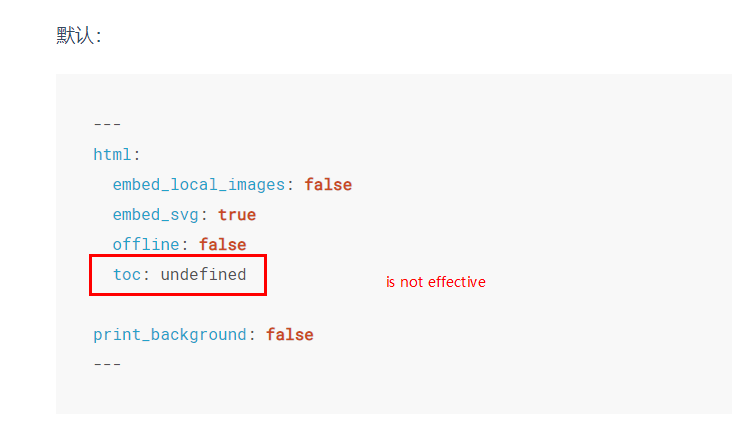
] | > 如果 toc 被设置为 false,那么边栏目录将会被隐藏。如果 toc 被设置为 true,那么边栏目录将会被缺省启动并显示。如果 toc 没有被设置,那么缺省边栏目录将会被启动,但是并不显示。
这个是导出html时候的配置,但是我是用之后无法生效。
| markdow 侧边栏目录选项没有用? | https://api.github.com/repos/shd101wyy/vscode-markdown-preview-enhanced/issues/1268/comments | 1 | 2019-10-14T02:16:58Z | 2023-08-23T02:42:56Z | https://github.com/shd101wyy/vscode-markdown-preview-enhanced/issues/1268 | 1,862,458,679 | 1,268 |
[
"shd101wyy",
"vscode-markdown-preview-enhanced"
] | mermaid cods:
```mermaid
graph TB
O[布尔<br/>向量<br/>概率<br/>语言<br/>学习]
```
in MPE, the Rendering result looks like:
```
布尔向量概率语言学习
```
in typora, the Rendering result looks like:
```
布尔
向量
概率
语言
学习
```
here is some info: [`https://github.com/knsv/mermaid/pull/764`][1]
[1]:https://github.... | newline in mermaid element | https://api.github.com/repos/shd101wyy/vscode-markdown-preview-enhanced/issues/279/comments | 1 | 2019-10-10T03:17:12Z | 2019-11-08T16:52:57Z | https://github.com/shd101wyy/vscode-markdown-preview-enhanced/issues/279 | 505,007,392 | 279 |
[
"shd101wyy",
"vscode-markdown-preview-enhanced"
] | **Using**
Atom : 1.40.1
Electron: 3.1.10
Chrome : 66.0.3359.181
Node : 10.2.0
Updated the relevant part of my *html.md* file in the markdown-preview-enhanced package to the following:
```
## Configuration
Default values:
yaml
---
html:
embed_local_images: true
embed_svg: true
offline: fa... | Saving HTML when updating html.md to embed_local_images: true doesn't embed images in output .html | https://api.github.com/repos/shd101wyy/vscode-markdown-preview-enhanced/issues/1269/comments | 4 | 2019-10-07T10:08:28Z | 2025-02-10T09:25:43Z | https://github.com/shd101wyy/vscode-markdown-preview-enhanced/issues/1269 | 1,862,458,700 | 1,269 |
[
"shd101wyy",
"vscode-markdown-preview-enhanced"
] | When I preview this Markdown at the end of this issue, it works as expected, But when I export via Pandoc, two things go wrong:
q0 has a subscripted 0, and b and d show the epsilon as expected.
However, when I export to Pandoc b and d's labels disappear, and the subscript no longer works.
I can't figure out wh... | Export via Pandoc Loses GraphViz Info (subscript, &html; chars) | https://api.github.com/repos/shd101wyy/vscode-markdown-preview-enhanced/issues/1270/comments | 0 | 2019-10-07T09:04:34Z | 2023-08-23T02:43:00Z | https://github.com/shd101wyy/vscode-markdown-preview-enhanced/issues/1270 | 1,862,458,727 | 1,270 |
[
"shd101wyy",
"vscode-markdown-preview-enhanced"
] | Could you include **markdown-it-admonition** and **markdown-it-TOC** which are included in the **markdown extended** extension on VS-Code in the preview, as the basic VSCode previewer does?
In the documentation of the extension, the corresponding css can be found here https://maxcdn.bootstrapcdn.com/bootstrap/4.0.0/... | Include markdown-it admonition and ToC | https://api.github.com/repos/shd101wyy/vscode-markdown-preview-enhanced/issues/1271/comments | 1 | 2019-10-05T12:21:49Z | 2023-08-23T02:43:02Z | https://github.com/shd101wyy/vscode-markdown-preview-enhanced/issues/1271 | 1,862,458,750 | 1,271 |
[
"shd101wyy",
"vscode-markdown-preview-enhanced"
] | Hi
Do you know how can I open the preview at the bottom instead of at the right of the screen?
| Preview at the bottom? | https://api.github.com/repos/shd101wyy/vscode-markdown-preview-enhanced/issues/278/comments | 0 | 2019-10-04T04:03:43Z | 2019-10-04T04:04:50Z | https://github.com/shd101wyy/vscode-markdown-preview-enhanced/issues/278 | 502,412,512 | 278 |
[
"shd101wyy",
"vscode-markdown-preview-enhanced"
] | For my pandoc filters to work, the plugin should first apply the filters and then apply their own substitutions.
Is there a way to change the order of the substitutions? | Order of substitutions | https://api.github.com/repos/shd101wyy/vscode-markdown-preview-enhanced/issues/1272/comments | 0 | 2019-10-01T23:01:27Z | 2023-08-23T02:43:05Z | https://github.com/shd101wyy/vscode-markdown-preview-enhanced/issues/1272 | 1,862,458,777 | 1,272 |
[
"shd101wyy",
"vscode-markdown-preview-enhanced"
] | 不知道是我设置的问题,还是本身问题
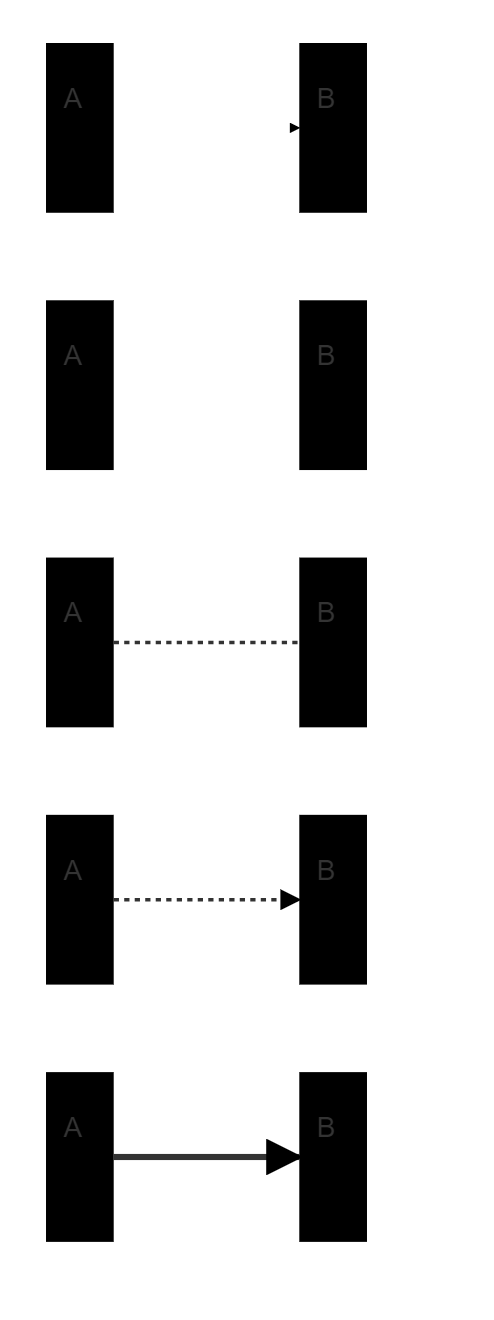
`
```mermaid
graph LR
A[A] --> B[B]
A1[A] --- B1[B]
A4[A] -.- B4[B]
A5[A] -.-> B5[B]
A7[A] ==> B7[B]
A2[A] -- 描述 --- B2[B]
... | mermaid显示异常 | https://api.github.com/repos/shd101wyy/vscode-markdown-preview-enhanced/issues/277/comments | 3 | 2019-10-01T17:29:03Z | 2019-10-11T06:33:06Z | https://github.com/shd101wyy/vscode-markdown-preview-enhanced/issues/277 | 501,039,210 | 277 |
[
"shd101wyy",
"vscode-markdown-preview-enhanced"
] | I highlight some lines in code block, and they look well in Preview and Chrome. But when I export to PDF (print as PDF or Chrome (Puppeteer)), the hightlight lines are unseen.
my code:
```
'''c {.line-numbers highlight=[3,5]}
void ip_drain()
{
while (ipq.next != &ipq) {
ipstat.ips_fragdropped++;
... | Highlight lines can't be seen in exported PDF | https://api.github.com/repos/shd101wyy/vscode-markdown-preview-enhanced/issues/1273/comments | 1 | 2019-10-01T09:55:35Z | 2023-08-23T02:43:07Z | https://github.com/shd101wyy/vscode-markdown-preview-enhanced/issues/1273 | 1,862,458,800 | 1,273 |
[
"shd101wyy",
"vscode-markdown-preview-enhanced"
] | 我的界面不知道为什么不能显示所有的title
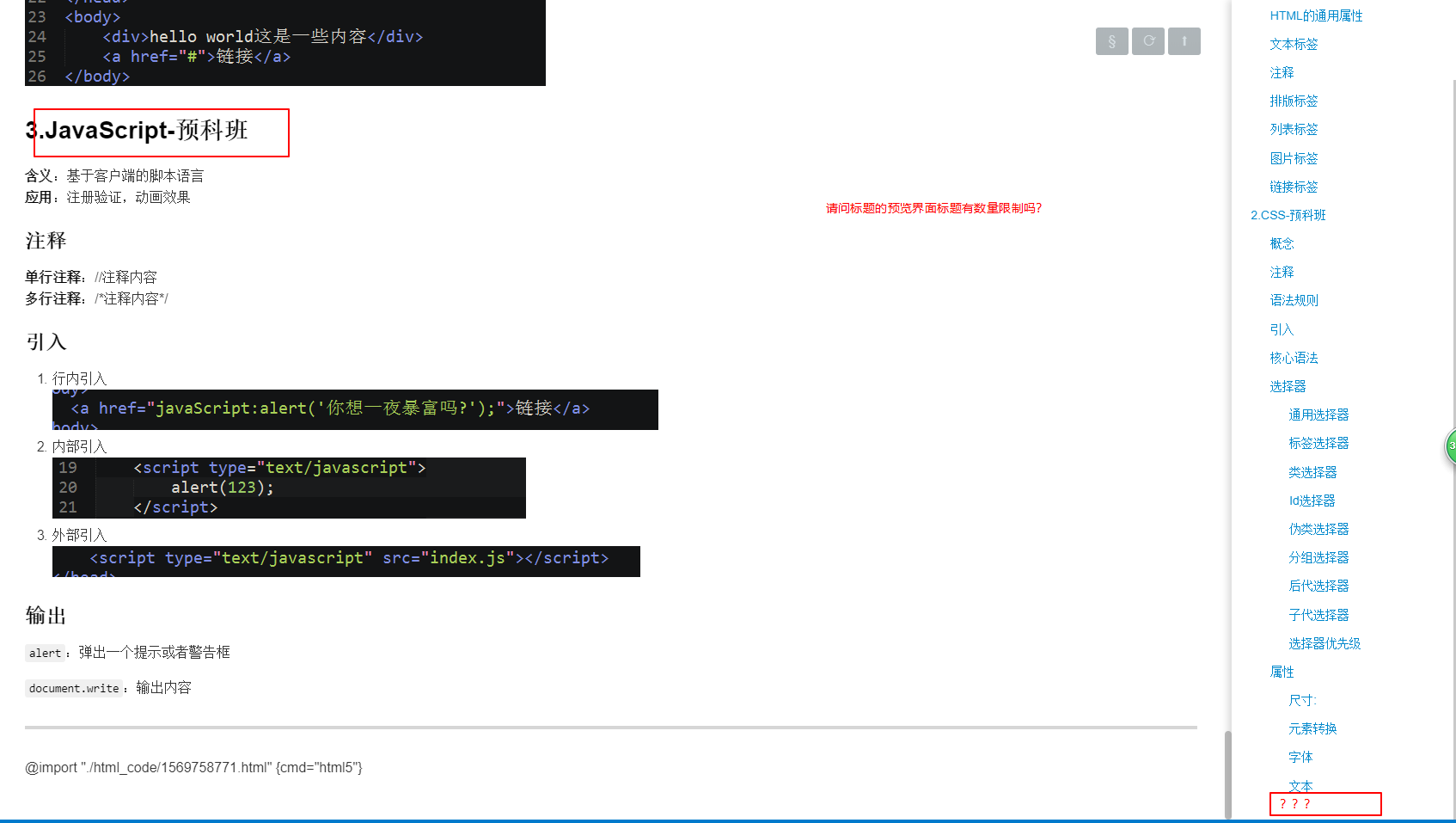
| 关于title“#”的显示问题 | https://api.github.com/repos/shd101wyy/vscode-markdown-preview-enhanced/issues/276/comments | 0 | 2019-09-29T12:49:35Z | 2019-10-01T17:38:06Z | https://github.com/shd101wyy/vscode-markdown-preview-enhanced/issues/276 | 499,912,864 | 276 |
[
"shd101wyy",
"vscode-markdown-preview-enhanced"
] | 这里我应该是正常的导入了图片,但是为什么显示出来的和我预想的不一样。
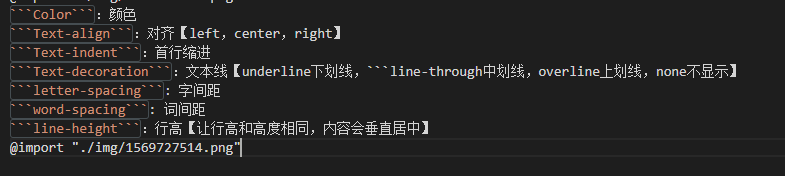
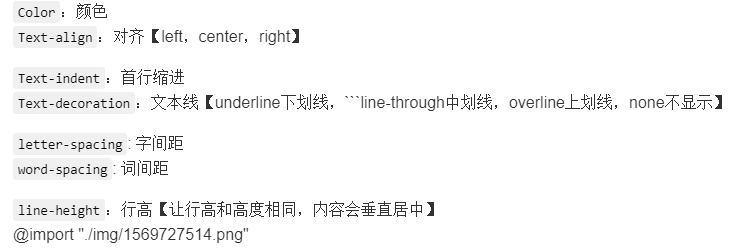
| 关于import 图片的显示问题 | https://api.github.com/repos/shd101wyy/vscode-markdown-preview-enhanced/issues/275/comments | 0 | 2019-09-29T12:24:37Z | 2019-09-29T12:24:37Z | https://github.com/shd101wyy/vscode-markdown-preview-enhanced/issues/275 | 499,909,999 | 275 |
[
"shd101wyy",
"vscode-markdown-preview-enhanced"
] | \---
markdown:
image_dir: /assets
ignore_from_front_matter: true
absolute_image_path: false
export_on_save:
markdown: true
\---
\```python {cmd=true matplotlib=true}
import matplotlib.pyplot as plt
plt.plot([1,2,3,4])
plt.show() # show figure
\```
运行后图像无法通过Save as MarkDown保存为svg | python matplotlib渲染出的内容无法通过Save as Markdown保存 | https://api.github.com/repos/shd101wyy/vscode-markdown-preview-enhanced/issues/1274/comments | 0 | 2019-09-29T08:53:24Z | 2023-08-23T02:43:09Z | https://github.com/shd101wyy/vscode-markdown-preview-enhanced/issues/1274 | 1,862,458,819 | 1,274 |
[
"shd101wyy",
"vscode-markdown-preview-enhanced"
] | This extension was working the last time I used it, but not anymore. In the meantime, I probably installed a update to VSCode, but I don't know which version I had before.
I tried uninstalling the extension, deleting both `~/.mume` and `~/shd101wyy.markdown-preview-enhanced-0.4.3` but that did not help. Is there anyth... | command 'markdown-preview-enhanced.openPreviewToTheSide' not found | https://api.github.com/repos/shd101wyy/vscode-markdown-preview-enhanced/issues/274/comments | 27 | 2019-09-28T13:52:02Z | 2023-10-21T01:18:20Z | https://github.com/shd101wyy/vscode-markdown-preview-enhanced/issues/274 | 499,775,606 | 274 |
[
"shd101wyy",
"vscode-markdown-preview-enhanced"
] | 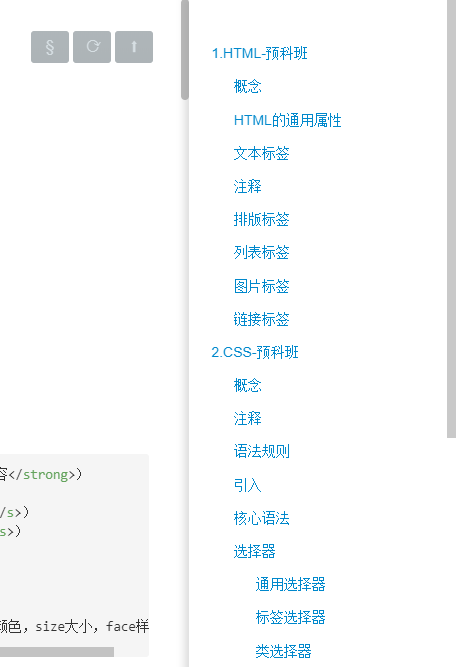
现在是这个样子的。
我希望能够变成父级标签下的子级标签都是可折叠的,而且是默认折叠的,不然子集量一多索引就会变得很长。 | 能不能把预览的标题变成可折叠的。 | https://api.github.com/repos/shd101wyy/vscode-markdown-preview-enhanced/issues/273/comments | 0 | 2019-09-28T12:04:58Z | 2019-09-28T12:04:58Z | https://github.com/shd101wyy/vscode-markdown-preview-enhanced/issues/273 | 499,763,118 | 273 |
[
"shd101wyy",
"vscode-markdown-preview-enhanced"
] | For example:
My code is
```dockerignore
node_modules
npm-debug.log
```
But it actually prints out
```
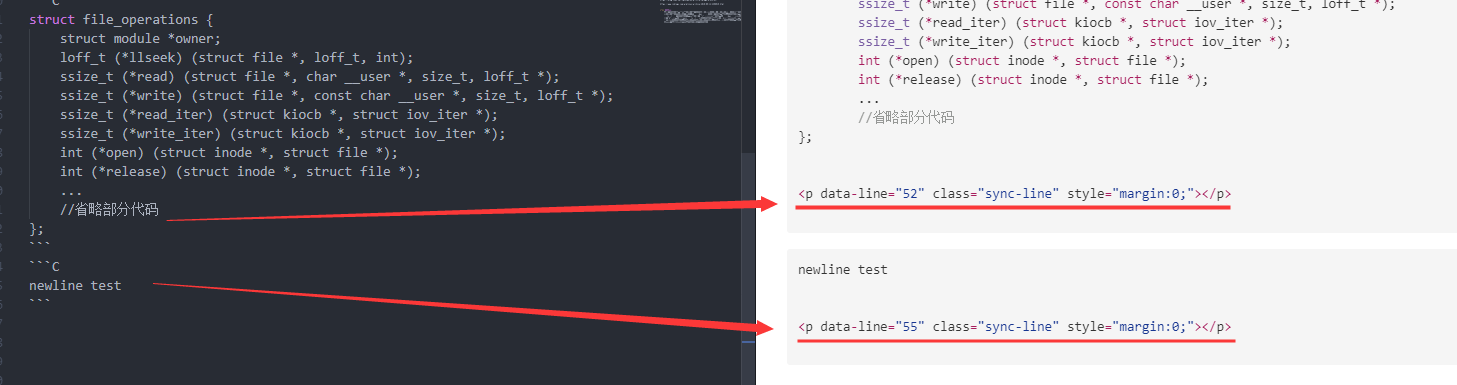
node_modules
npm-debug.log
<p data-line="226" class="sync-line" style="margin:0;"></p>
```
It seems that it only happens when the code block type is dockerignore or dockerfile, though. | The preview window prints out the empty elements | https://api.github.com/repos/shd101wyy/vscode-markdown-preview-enhanced/issues/1275/comments | 0 | 2019-09-27T16:26:29Z | 2023-08-23T02:43:11Z | https://github.com/shd101wyy/vscode-markdown-preview-enhanced/issues/1275 | 1,862,458,839 | 1,275 |
Subsets and Splits
No community queries yet
The top public SQL queries from the community will appear here once available.