
issue_owner_repo listlengths 2 2 | issue_body stringlengths 0 262k ⌀ | issue_title stringlengths 1 1.02k | issue_comments_url stringlengths 53 116 | issue_comments_count int64 0 2.49k | issue_created_at stringdate 1999-03-17 02:06:42 2025-06-23 11:41:49 | issue_updated_at stringdate 2000-02-10 06:43:57 2025-06-23 11:43:00 | issue_html_url stringlengths 34 97 | issue_github_id int64 132 3.17B | issue_number int64 1 215k |
|---|---|---|---|---|---|---|---|---|---|
[
"shd101wyy",
"vscode-markdown-preview-enhanced"
] | ```
@font-face {
font-family: "Microsoft Yahei UI";
src: url('msyh.ttc') format('truetype');
font-weight: normal;
font-style: normal;
}
.markdown-preview.markdown-preview {
font-family: "Microsoft Yahei UI", sans-serif;
}
```
Prince to pdf got this
 for GitHub Flavored Markdown states:
```
will include all graphs (as png images),
```
I tried to do do a flow chart as
```flow
novice=>operation: Novice
ad... | GFM export compiled graphs as images | https://api.github.com/repos/shd101wyy/vscode-markdown-preview-enhanced/issues/1279/comments | 0 | 2019-09-24T07:44:43Z | 2023-08-23T02:43:20Z | https://github.com/shd101wyy/vscode-markdown-preview-enhanced/issues/1279 | 1,862,458,949 | 1,279 |
[
"shd101wyy",
"vscode-markdown-preview-enhanced"
] | 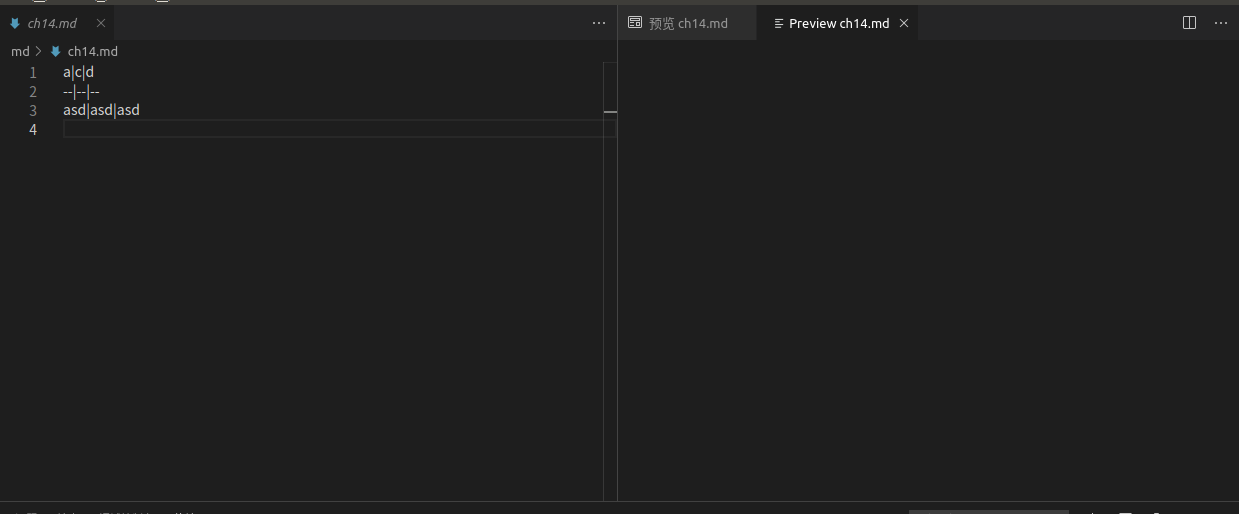
Somehow, it doesn't work anymore.I have try to uninstall and intall it for several times,but nothing works.I even don't know when it becomes impossible to work- -,it worked fine berfore | Can you help me to find why it doesn't work? | https://api.github.com/repos/shd101wyy/vscode-markdown-preview-enhanced/issues/272/comments | 0 | 2019-09-22T13:31:49Z | 2019-09-23T07:45:02Z | https://github.com/shd101wyy/vscode-markdown-preview-enhanced/issues/272 | 496,779,515 | 272 |
[
"shd101wyy",
"vscode-markdown-preview-enhanced"
] | i wanted to export my GFM diagram blocks to image in order to use in my web site, but some of them does not work. `flow`, `mermaid` and `sequence` does not export png images, while `puml`, `vega-lite` and `graphviz` does export png images as intended. FYI | Exporting diagrams to png does not work | https://api.github.com/repos/shd101wyy/vscode-markdown-preview-enhanced/issues/271/comments | 0 | 2019-09-22T10:25:49Z | 2019-09-22T10:25:49Z | https://github.com/shd101wyy/vscode-markdown-preview-enhanced/issues/271 | 496,759,822 | 271 |
[
"shd101wyy",
"vscode-markdown-preview-enhanced"
] | 
When I exported PDF using **princexml** in my vscode markdown, I got this(see the picture). Can someone tell me what's the matter with this Plugin? | My princexml doesn't work correctly in vscode markdown. | https://api.github.com/repos/shd101wyy/vscode-markdown-preview-enhanced/issues/1280/comments | 0 | 2019-09-21T03:20:45Z | 2023-08-23T02:43:22Z | https://github.com/shd101wyy/vscode-markdown-preview-enhanced/issues/1280 | 1,862,458,970 | 1,280 |
[
"shd101wyy",
"vscode-markdown-preview-enhanced"
] | The demo image is down in eBook section in all languages. See following links.
* https://shd101wyy.github.io/markdown-preview-enhanced/#/ebook
* https://shd101wyy.github.io/markdown-preview-enhanced/#/zh-cn/ebook
* https://shd101wyy.github.io/markdown-preview-enhanced/#/zh-tw/ebook | Documentation image down in eBook section under Document Export chapter | https://api.github.com/repos/shd101wyy/vscode-markdown-preview-enhanced/issues/1281/comments | 1 | 2019-09-18T21:19:41Z | 2023-08-23T02:43:25Z | https://github.com/shd101wyy/vscode-markdown-preview-enhanced/issues/1281 | 1,862,459,006 | 1,281 |
[
"shd101wyy",
"vscode-markdown-preview-enhanced"
] | Sometimes we need to add block math in the middle of a paragraph, for example,
```markdown
The inequality can be rewritten as $$ a^2 +b^2 +c^2 \ge (abc)^{1/3}(a+b+c),$$ which is now homogeneous.
```
In the html exported, it is rendered:
```html
<p>The inequality can be rewritten as </p><div class="mathjax-e... | When there is block math in the mid of a paragraph, the text after the math is not correctly displaced | https://api.github.com/repos/shd101wyy/vscode-markdown-preview-enhanced/issues/1282/comments | 0 | 2019-09-17T03:12:00Z | 2023-08-23T02:43:27Z | https://github.com/shd101wyy/vscode-markdown-preview-enhanced/issues/1282 | 1,862,459,045 | 1,282 |
[
"shd101wyy",
"vscode-markdown-preview-enhanced"
] | Check on https://markdown-here.com/ with the following text:
```
1. Whatever I wanna say, you must get (or just updated) the project dependencies through this simple as f* command:
> `yarn install`
Beware to wait enough time to go one but check as well the resolution of the dependencies has succeeded!
```
Bo... | 3-space prefixed paragraph after an ordered list item + a code quote isn't indented as expected | https://api.github.com/repos/shd101wyy/vscode-markdown-preview-enhanced/issues/270/comments | 1 | 2019-09-16T15:51:40Z | 2019-11-08T23:31:47Z | https://github.com/shd101wyy/vscode-markdown-preview-enhanced/issues/270 | 494,135,183 | 270 |
[
"shd101wyy",
"vscode-markdown-preview-enhanced"
] | 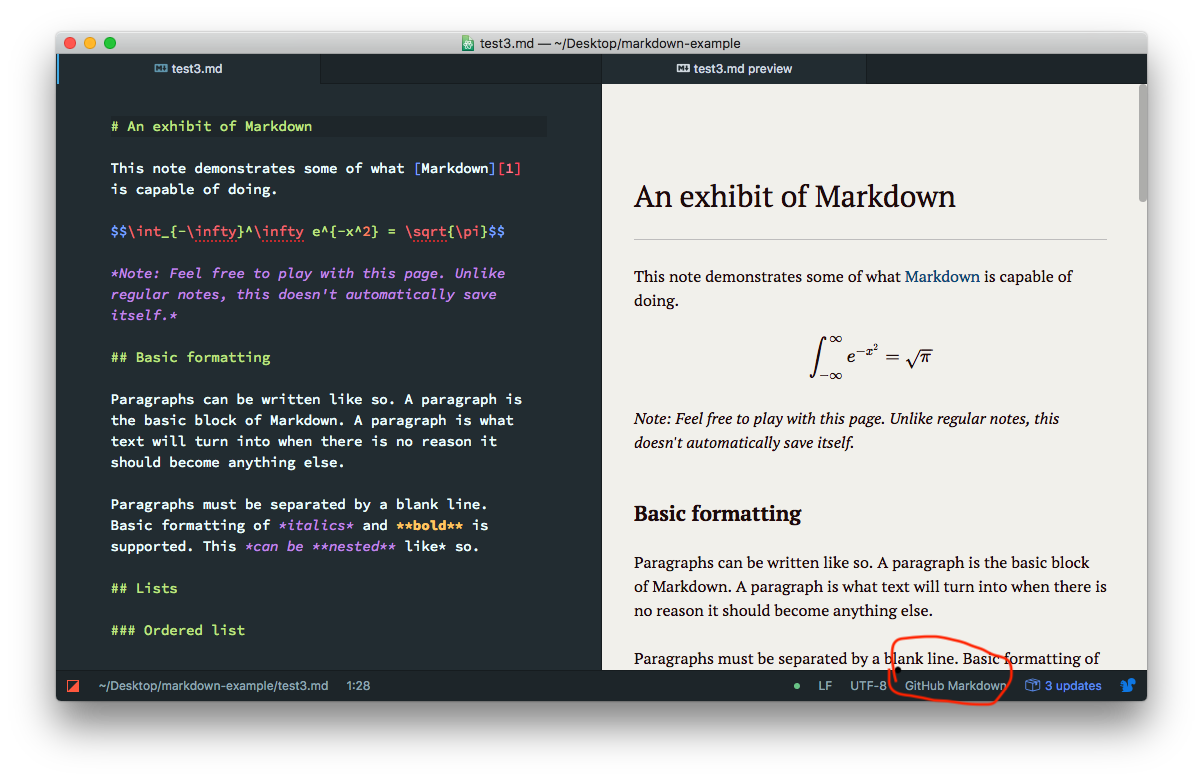
| How can I make the 'vscode languages identifier' to be 'Github Markdown' ? | https://api.github.com/repos/shd101wyy/vscode-markdown-preview-enhanced/issues/269/comments | 0 | 2019-09-16T07:12:17Z | 2019-09-16T07:12:17Z | https://github.com/shd101wyy/vscode-markdown-preview-enhanced/issues/269 | 493,882,700 | 269 |
[
"shd101wyy",
"vscode-markdown-preview-enhanced"
] | code block does`t support mysql(代码块指定编程语言时不支持MySQL语句) | code block does`t support mysql | https://api.github.com/repos/shd101wyy/vscode-markdown-preview-enhanced/issues/1283/comments | 0 | 2019-09-16T05:24:52Z | 2023-08-23T02:43:29Z | https://github.com/shd101wyy/vscode-markdown-preview-enhanced/issues/1283 | 1,862,459,070 | 1,283 |
[
"shd101wyy",
"vscode-markdown-preview-enhanced"
] | VS Code Version: 1.38.1, Markdown Preview Enhanced Version: 0.4.3
使用预览按钮预览markdown文档的时候,能够正常(预览窗口的背景色是白的);但是当我使用快捷键Ctrl+k v预览同一个文件的时候,背景色却不会改变。
使用预览的按钮:

使用这个按钮的效果:
 | https://api.github.com/repos/shd101wyy/vscode-markdown-preview-enhanced/issues/1284/comments | 0 | 2019-09-15T14:10:25Z | 2023-08-23T02:43:31Z | https://github.com/shd101wyy/vscode-markdown-preview-enhanced/issues/1284 | 1,862,459,096 | 1,284 |
[
"shd101wyy",
"vscode-markdown-preview-enhanced"
] | null | 通过python获得markdown-preview-enhanced的渲染结果的最佳实践是什么? | https://api.github.com/repos/shd101wyy/vscode-markdown-preview-enhanced/issues/1285/comments | 2 | 2019-09-14T14:26:19Z | 2023-08-23T02:43:33Z | https://github.com/shd101wyy/vscode-markdown-preview-enhanced/issues/1285 | 1,862,459,116 | 1,285 |
[
"shd101wyy",
"vscode-markdown-preview-enhanced"
] | ```
~#apm -v
apm 2.4.3
npm 6.2.0
node 10.2.1 x64
atom 1.40.1
python 2.7.16
git 2.20.1
~#apm install markdown-preview-enhanced
Installing markdown-preview-enhanced to /home/xxx/.atom/packages ✗
> puppeteer-core@1.15.0 install /tmp/apm-install-dir-119812-26463-1rlw98v.twef/node_modules/markdown-preview-en... | unable to update | https://api.github.com/repos/shd101wyy/vscode-markdown-preview-enhanced/issues/1286/comments | 3 | 2019-09-12T19:01:34Z | 2023-08-23T02:43:35Z | https://github.com/shd101wyy/vscode-markdown-preview-enhanced/issues/1286 | 1,862,459,138 | 1,286 |
[
"shd101wyy",
"vscode-markdown-preview-enhanced"
] | 查看源码如下:
```
<link rel="stylesheet" href="file:////home/xxx/.vscode/extensions/shd101wyy.markdown-preview-enhanced-0.4.3/node_modules/@shd101wyy/mume/dependencies/katex/katex.min.css">
<link rel="stylesheet" href="file:////home/xxxx/.vscode/extensions/shd101wyy.markdown-preview-enhanced-0.4.3/node_modules/@shd101wyy... | 导出或者自动生成的HTML文件内部嵌入的样式和JS脚本文件无法加载 | https://api.github.com/repos/shd101wyy/vscode-markdown-preview-enhanced/issues/1287/comments | 1 | 2019-09-11T06:52:23Z | 2023-08-23T02:43:38Z | https://github.com/shd101wyy/vscode-markdown-preview-enhanced/issues/1287 | 1,862,459,162 | 1,287 |
[
"shd101wyy",
"vscode-markdown-preview-enhanced"
] | markdown extended
Has a function of Admonition, Markdown Preview Enhanced
Cannot be displayed.
Could you tell me how to operate it?
| Admonition not work! | https://api.github.com/repos/shd101wyy/vscode-markdown-preview-enhanced/issues/268/comments | 1 | 2019-09-11T00:01:53Z | 2019-12-08T05:46:04Z | https://github.com/shd101wyy/vscode-markdown-preview-enhanced/issues/268 | 491,951,934 | 268 |
[
"shd101wyy",
"vscode-markdown-preview-enhanced"
] | # env
os: windows 10
atom: 1.40.1 x64
markdown preview enhanced version: 0.16.3
# issue
if i set the front-matter: toc.ordered=true, i can get a sidebar like this:
```
1. title1
1. title 1.1
1. title1.1.1
2. title 1.2
2. title2
1. title 2.1
......
```
and generally people hopes i... | hope sidebar support muti-level table of contents | https://api.github.com/repos/shd101wyy/vscode-markdown-preview-enhanced/issues/1288/comments | 0 | 2019-09-10T04:10:55Z | 2023-08-23T02:43:40Z | https://github.com/shd101wyy/vscode-markdown-preview-enhanced/issues/1288 | 1,862,459,181 | 1,288 |
[
"shd101wyy",
"vscode-markdown-preview-enhanced"
] | i`m using vscode in portable mode.
i want custom the css file path. to support portable... any plan? | Support custom the "custom css" file path | https://api.github.com/repos/shd101wyy/vscode-markdown-preview-enhanced/issues/1289/comments | 0 | 2019-09-09T07:30:56Z | 2023-08-23T02:43:42Z | https://github.com/shd101wyy/vscode-markdown-preview-enhanced/issues/1289 | 1,862,459,203 | 1,289 |
[
"shd101wyy",
"vscode-markdown-preview-enhanced"
] | Are there any plans to add support for the new mermaid 8.2 features? Namely the background highlighting?
https://mermaidjs.github.io/#/sequenceDiagram?id=background-highlighting
Love the plugin. Thank you for your work! | Any plans to add support for the new features in mermaid 8.2? | https://api.github.com/repos/shd101wyy/vscode-markdown-preview-enhanced/issues/1290/comments | 1 | 2019-09-07T14:57:56Z | 2023-08-23T02:43:44Z | https://github.com/shd101wyy/vscode-markdown-preview-enhanced/issues/1290 | 1,862,459,228 | 1,290 |
[
"shd101wyy",
"vscode-markdown-preview-enhanced"
] | ppt导出的html显示空白
检查html源码发现ppt外层罩了一层空白div
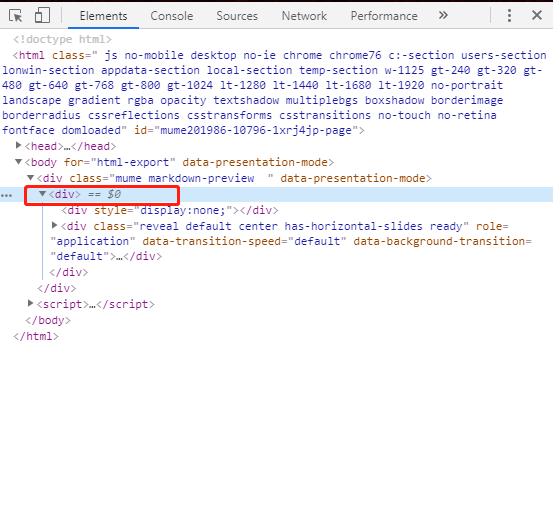
去掉这个div即可正常显示
@shd101wyy
| [幻灯片导出html显示空白] | https://api.github.com/repos/shd101wyy/vscode-markdown-preview-enhanced/issues/267/comments | 1 | 2019-09-06T09:25:28Z | 2019-09-07T03:28:39Z | https://github.com/shd101wyy/vscode-markdown-preview-enhanced/issues/267 | 490,224,422 | 267 |
[
"shd101wyy",
"vscode-markdown-preview-enhanced"
] | Hi,
I'm trying to display an image on my header when printing to PDF with Pupeteer, but I am unable to do it. I'm not an expert on css by any means, so I'm struggling to use the info I find here and there. The info in shd101wyy/vscode-markdown-preview-enhanced#1452 was superuseful to get my footer, that has only tex... | Images in header/footers in PDF with pupeteer | https://api.github.com/repos/shd101wyy/vscode-markdown-preview-enhanced/issues/1291/comments | 2 | 2019-09-05T23:55:31Z | 2023-08-23T02:49:35Z | https://github.com/shd101wyy/vscode-markdown-preview-enhanced/issues/1291 | 1,862,459,257 | 1,291 |
[
"shd101wyy",
"vscode-markdown-preview-enhanced"
] | 如图:
<img width="1140" alt="Screen Shot 2019-09-05 at 10 35 08 AM" src="https://user-images.githubusercontent.com/45305818/64307658-60262700-cfc9-11e9-8c92-4dc767813eef.png">
plantuml和graphviz都是通过brew安装的:
<img width="434" alt="Screen Shot 2019-09-05 at 10 40 23 AM" src="https://user-images.githubusercontent.com/453... | plantuml只显示一个小圆点 | https://api.github.com/repos/shd101wyy/vscode-markdown-preview-enhanced/issues/1292/comments | 3 | 2019-09-05T02:39:10Z | 2023-08-23T02:43:48Z | https://github.com/shd101wyy/vscode-markdown-preview-enhanced/issues/1292 | 1,862,459,288 | 1,292 |
[
"shd101wyy",
"vscode-markdown-preview-enhanced"
] | Hi, I have a similar problem as in #19 it seems, but as I don't speak Japanese, I can't figure out what could be the solution.
I don't want my images to have a limited width, so I tried this in my custom CSS:
```less
.markdown-preview.markdown-preview {
// modify your style here
// eg: background-color: bl... | PlantUML image width | https://api.github.com/repos/shd101wyy/vscode-markdown-preview-enhanced/issues/266/comments | 2 | 2019-09-04T13:25:07Z | 2019-09-27T14:52:47Z | https://github.com/shd101wyy/vscode-markdown-preview-enhanced/issues/266 | 489,159,180 | 266 |
[
"shd101wyy",
"vscode-markdown-preview-enhanced"
] | 现在是黑底,浅灰色字体,我感觉这样子会看瞎的 | 怎么设置预览时引用块的背景和字体颜色? | https://api.github.com/repos/shd101wyy/vscode-markdown-preview-enhanced/issues/1293/comments | 0 | 2019-09-04T09:09:30Z | 2023-08-23T02:43:50Z | https://github.com/shd101wyy/vscode-markdown-preview-enhanced/issues/1293 | 1,862,459,313 | 1,293 |
[
"shd101wyy",
"vscode-markdown-preview-enhanced"
] | MPE作者你好,
请问是否可以支持语法拓展,使得表格和图片可以添加title,比如马克飞象中的图片添加标题的方式:
``
其中@后面,|前面的的内容会显示为图片的标题。
谢谢 | 表格和图片是否可以添加标题? | https://api.github.com/repos/shd101wyy/vscode-markdown-preview-enhanced/issues/1294/comments | 0 | 2019-08-29T16:45:44Z | 2023-08-23T02:43:52Z | https://github.com/shd101wyy/vscode-markdown-preview-enhanced/issues/1294 | 1,862,459,335 | 1,294 |
[
"shd101wyy",
"vscode-markdown-preview-enhanced"
] | # `Maybe you can improve links`
I find that markdown is unfriendly to links.
## `internal link`
```
### `struct TransformData`
```
```
### `extras : QVector<ExtraStruct>`
Key-Value pair, saves certain data in it.
The access function is **setExtra()** and ***extra()**, but just use for internal.
... | Maybe you improve links ? | https://api.github.com/repos/shd101wyy/vscode-markdown-preview-enhanced/issues/265/comments | 0 | 2019-08-29T07:58:06Z | 2019-08-30T03:24:44Z | https://github.com/shd101wyy/vscode-markdown-preview-enhanced/issues/265 | 486,800,048 | 265 |
[
"shd101wyy",
"vscode-markdown-preview-enhanced"
] | 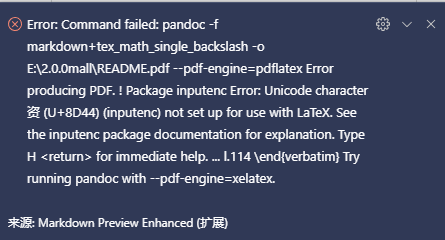
报这个错误 | pandoc导出为PDF的问题 | https://api.github.com/repos/shd101wyy/vscode-markdown-preview-enhanced/issues/1295/comments | 1 | 2019-08-28T02:05:57Z | 2023-08-23T02:43:54Z | https://github.com/shd101wyy/vscode-markdown-preview-enhanced/issues/1295 | 1,862,459,358 | 1,295 |
[
"shd101wyy",
"vscode-markdown-preview-enhanced"
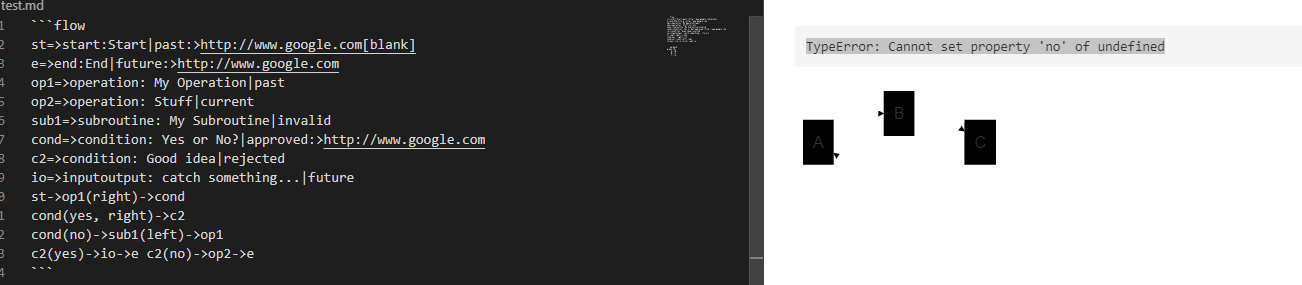
] | according to the case for painting a flow chart ,it return :errortype,how to write here
| flow chart can't be rendering | https://api.github.com/repos/shd101wyy/vscode-markdown-preview-enhanced/issues/264/comments | 0 | 2019-08-27T09:45:18Z | 2019-08-27T09:45:18Z | https://github.com/shd101wyy/vscode-markdown-preview-enhanced/issues/264 | 485,703,442 | 264 |
[
"shd101wyy",
"vscode-markdown-preview-enhanced"
] | This extension appears to be using the `workspace.rootPath` API. This is a deprecated property and may not work as expected. Please use `workspaceFolders` instead. More info: https://github.com/microsoft/vscode/wiki/Adopting-Multi-Root-Workspace-APIs#eliminating-rootpath
https://github.com/microsoft/vscode/issues/6... | Avoid using workspace.rootPath | https://api.github.com/repos/shd101wyy/vscode-markdown-preview-enhanced/issues/263/comments | 0 | 2019-08-24T20:37:35Z | 2019-08-24T20:37:35Z | https://github.com/shd101wyy/vscode-markdown-preview-enhanced/issues/263 | 484,860,025 | 263 |
[
"shd101wyy",
"vscode-markdown-preview-enhanced"
] | 在使用过程(MACOS: md=>docx)中发现一个问题:
test.md:
```
---
output: word_document
---
```dot
digraph G {
甲 -> 乙;
}
```
```
转换出来的docx中汉字没有显示,请教如何解决,十分感谢。 | docx导出GraphViz中文丢失 | https://api.github.com/repos/shd101wyy/vscode-markdown-preview-enhanced/issues/1296/comments | 2 | 2019-08-23T03:17:33Z | 2023-08-23T02:43:56Z | https://github.com/shd101wyy/vscode-markdown-preview-enhanced/issues/1296 | 1,862,459,377 | 1,296 |
[
"shd101wyy",
"vscode-markdown-preview-enhanced"
] | 是否能像vscod插件plantUML一样,提供`Local`和`PlantUMLServer`两种方式实现渲染。 | plantuml 支持能否支持Plantuml服务器即时生成UML图 | https://api.github.com/repos/shd101wyy/vscode-markdown-preview-enhanced/issues/1297/comments | 0 | 2019-08-22T09:58:35Z | 2023-08-23T02:43:58Z | https://github.com/shd101wyy/vscode-markdown-preview-enhanced/issues/1297 | 1,862,459,397 | 1,297 |
[
"shd101wyy",
"vscode-markdown-preview-enhanced"
] | null | 设置里自动打开预览为true,但是打开md文件时没有自动打开预览 | https://api.github.com/repos/shd101wyy/vscode-markdown-preview-enhanced/issues/1298/comments | 1 | 2019-08-19T05:00:50Z | 2023-08-23T02:44:01Z | https://github.com/shd101wyy/vscode-markdown-preview-enhanced/issues/1298 | 1,862,459,423 | 1,298 |
[
"shd101wyy",
"vscode-markdown-preview-enhanced"
] | Hi, shd101wyy,
the ExtendedTableSyntax is a very handy feature that I'm very fond of.
one thing I just wonder is that if I do need a empty cell in a row in my table when the ExtendedTableSyntax is ture, what shall I do? I think the default syntax for the extended table should be more stringent, as the ^ and > ha... | add an empty cell in Extended Table | https://api.github.com/repos/shd101wyy/vscode-markdown-preview-enhanced/issues/1299/comments | 2 | 2019-08-18T11:39:25Z | 2023-08-23T02:44:03Z | https://github.com/shd101wyy/vscode-markdown-preview-enhanced/issues/1299 | 1,862,459,448 | 1,299 |
[
"shd101wyy",
"vscode-markdown-preview-enhanced"
] | Hi, when I'm trying to use pandoc it's all fine but when I'm adding latex files or python plots, though the preview works ; pandoc throws an error and doesn't convert to PDF.
[Enter steps to reproduce:]
1. ...
2. ...
**Atom**: 1.40.0 x64
**Electron**: 3.1.10
**OS**: Ubuntu 19.04
**Thrown From**: [markdown-... | Different Uncaught TypeError: Cannot read property '1' of null | https://api.github.com/repos/shd101wyy/vscode-markdown-preview-enhanced/issues/1300/comments | 3 | 2019-08-17T00:07:20Z | 2023-08-23T02:44:05Z | https://github.com/shd101wyy/vscode-markdown-preview-enhanced/issues/1300 | 1,862,459,481 | 1,300 |
[
"shd101wyy",
"vscode-markdown-preview-enhanced"
] | The generated result by Docsify seems to mess up the markup examples, I am not familiar with Docsify yet to understand why.
Here some examples, there might be more:
https://shd101wyy.github.io/markdown-preview-enhanced/#/markdown-basics?id=emphasis
, `the diagrams will be ... | "Save as Markdown" do not convert mermaid block | https://api.github.com/repos/shd101wyy/vscode-markdown-preview-enhanced/issues/261/comments | 0 | 2019-08-14T05:42:29Z | 2019-08-14T05:45:29Z | https://github.com/shd101wyy/vscode-markdown-preview-enhanced/issues/261 | 480,490,825 | 261 |
[
"shd101wyy",
"vscode-markdown-preview-enhanced"
] | When I use it ,I got this:
> ParseError: KaTeX parse error: Undefined control sequence: \substack at position 7: \sum_{\̲s̲u̲b̲s̲t̲a̲c̲k̲{0\le i\le m\\ … | About " \substack " | https://api.github.com/repos/shd101wyy/vscode-markdown-preview-enhanced/issues/260/comments | 0 | 2019-08-13T15:13:04Z | 2020-06-01T11:18:55Z | https://github.com/shd101wyy/vscode-markdown-preview-enhanced/issues/260 | 480,214,258 | 260 |
[
"shd101wyy",
"vscode-markdown-preview-enhanced"
] | null | vscode 我可以设置预览的样式不是白色吗 就像跟编辑窗口一样的颜色。 | https://api.github.com/repos/shd101wyy/vscode-markdown-preview-enhanced/issues/1302/comments | 1 | 2019-08-13T13:46:52Z | 2023-08-23T02:44:09Z | https://github.com/shd101wyy/vscode-markdown-preview-enhanced/issues/1302 | 1,862,459,521 | 1,302 |
[
"shd101wyy",
"vscode-markdown-preview-enhanced"
] | When I try to change the ImagePath where drag/drop images are placed (default: /assets) the package kills my whole atom settings and breaks down!!! settings are lost. | break down at changing image path | https://api.github.com/repos/shd101wyy/vscode-markdown-preview-enhanced/issues/1303/comments | 0 | 2019-08-12T16:50:32Z | 2023-08-23T02:44:11Z | https://github.com/shd101wyy/vscode-markdown-preview-enhanced/issues/1303 | 1,862,459,548 | 1,303 |
[
"shd101wyy",
"vscode-markdown-preview-enhanced"
] | 若标题上带有链接,如
## [打印机](./打印机)
则在生成的目录中对应的项为
-[打印机](#打印机打印机)
这种形式的目录在Markdown Preview Enhanced中可以跳转,而在Github的README中并不能成功跳转,此种情况下可以成功跳转的是
-[打印机](#打印机)
在TOC的介绍中并没有看到控制这种生成Index方式的参数。
最后非常感谢插件的编写者们,这是一个非常好用的插件 | TOC does not work in Github if the title is linked to somewhere | https://api.github.com/repos/shd101wyy/vscode-markdown-preview-enhanced/issues/259/comments | 0 | 2019-08-11T14:32:54Z | 2019-08-11T14:32:54Z | https://github.com/shd101wyy/vscode-markdown-preview-enhanced/issues/259 | 479,376,041 | 259 |
[
"shd101wyy",
"vscode-markdown-preview-enhanced"
] | 若标题上带有链接,如
## [打印机](./打印机)
则在生成的目录中对应的项为
-[打印机](#打印机打印机)
这种形式的目录在Markdown Preview Enhanced中可以跳转,而在Github的README中并不能成功跳转,此种情况下可以成功跳转的是
-[打印机](#打印机)
在TOC的介绍中并没有看到控制这种生成Index方式的参数。
最后非常感谢插件的编写者们,这是一个非常好用的插件 | TOC does not work in Github if the title is linked to somewhere | https://api.github.com/repos/shd101wyy/vscode-markdown-preview-enhanced/issues/1304/comments | 0 | 2019-08-11T02:34:49Z | 2023-08-23T02:44:13Z | https://github.com/shd101wyy/vscode-markdown-preview-enhanced/issues/1304 | 1,862,459,563 | 1,304 |
[
"shd101wyy",
"vscode-markdown-preview-enhanced"
] | 我把渲染引擎改成了`mathjax`,但是在对公式编号和引用的时候,渲染上出现了错误,举例如下。
```
在公式$\eqref{1}$中, 我们发现了一个有趣的现象
$$
\begin{equation}
\int_0^\infty \frac{x^3}{e^x-1}\,dx = \frac{\pi^4}{15}
\label{1}
\end{equation}
$$
```
插件渲染出来的效果如图

```
```puml
@startuml
:<math>f(x)</math>;
@enduml
```
```
However, the preview is not rendering it properly. I am getting error as below.
`, the output pdf contains mathjax codes, not the rendered equations. The preview window shows the equations correctly. If I first open preview in browser (chrome), save as html (complete), then use prince t... | mathjax equations not rendered in prince converted pdf | https://api.github.com/repos/shd101wyy/vscode-markdown-preview-enhanced/issues/1307/comments | 1 | 2019-07-28T05:06:58Z | 2023-08-23T02:44:20Z | https://github.com/shd101wyy/vscode-markdown-preview-enhanced/issues/1307 | 1,862,459,645 | 1,307 |
[
"shd101wyy",
"vscode-markdown-preview-enhanced"
] | There are times I'd just like to open markdown files just to view without editing. Sort of a view first then subsequently wanting to edit. I use preview enhanced when I'm taking notes on projects and it helps keep me just a bit more organized. | Straight up viewer | https://api.github.com/repos/shd101wyy/vscode-markdown-preview-enhanced/issues/1308/comments | 2 | 2019-07-25T00:15:00Z | 2023-08-23T02:44:22Z | https://github.com/shd101wyy/vscode-markdown-preview-enhanced/issues/1308 | 1,862,459,664 | 1,308 |
[
"shd101wyy",
"vscode-markdown-preview-enhanced"
] | Is there any wiki software (xwiki, wikimedia, etc) or plugin capable of rendering a full markdown-enhanced page?
Currently I can install some extensions to xwiki and enable plantUML, flowchart.js or latex, but it means changing the code in the markdown file.
I am trying to avoid file conversion or exporting to html. | Wiki hosting software | https://api.github.com/repos/shd101wyy/vscode-markdown-preview-enhanced/issues/1309/comments | 0 | 2019-07-24T18:24:59Z | 2023-08-23T02:44:24Z | https://github.com/shd101wyy/vscode-markdown-preview-enhanced/issues/1309 | 1,862,459,688 | 1,309 |
[
"shd101wyy",
"vscode-markdown-preview-enhanced"
] | macOS Mojave Version 10.14.5
VS Code Version 1.36.1
Changing the `Preview Theme` setting has no effect. Theme is always from selected VS Code theme.
All other markdown extensions are uninstalled or disabled.
Same behavior with multiple VS themes.
;
\`\`\`
---
ERROR: Error executing script 'C:\Users\Admin\Desktop\n2n9qoi9j_code_chunk.csx' [FileNotFoundException] δ���ҵ��ļ���C:\Users\Admin\Desktop\n2n9qoi9j_code_chunk.csx����
but python code chunk can run successfully. | while using scriptcs run C# code chunk throw [FileNotFoundException] | https://api.github.com/repos/shd101wyy/vscode-markdown-preview-enhanced/issues/1311/comments | 0 | 2019-07-23T02:29:36Z | 2023-08-23T02:44:28Z | https://github.com/shd101wyy/vscode-markdown-preview-enhanced/issues/1311 | 1,862,459,731 | 1,311 |
[
"shd101wyy",
"vscode-markdown-preview-enhanced"
] | null | 可否增加页眉页脚的md解析功能? | https://api.github.com/repos/shd101wyy/vscode-markdown-preview-enhanced/issues/1312/comments | 0 | 2019-07-17T12:57:32Z | 2023-08-23T02:44:30Z | https://github.com/shd101wyy/vscode-markdown-preview-enhanced/issues/1312 | 1,862,459,749 | 1,312 |
[
"shd101wyy",
"vscode-markdown-preview-enhanced"
] | 希望添加一个实时字数统计功能 | 实时字数统计功能 | https://api.github.com/repos/shd101wyy/vscode-markdown-preview-enhanced/issues/1313/comments | 2 | 2019-07-12T08:27:28Z | 2023-08-23T02:44:32Z | https://github.com/shd101wyy/vscode-markdown-preview-enhanced/issues/1313 | 1,862,459,771 | 1,313 |
[
"shd101wyy",
"vscode-markdown-preview-enhanced"
] | ubuntu18 atom bate 预览无效 快捷键ctrl+shift+m
自带的preview 正常,禁用之后仅使用 enhanced 预览无效,两个都开启的话还是自带的生效,两个都关闭无法预览
windos 的时候没这个问题,现在一脸懵逼 | ubuntu18 atom bate 预览无效 快捷键ctrl+shift+m | https://api.github.com/repos/shd101wyy/vscode-markdown-preview-enhanced/issues/1314/comments | 0 | 2019-07-11T03:27:02Z | 2023-08-23T02:44:34Z | https://github.com/shd101wyy/vscode-markdown-preview-enhanced/issues/1314 | 1,862,459,786 | 1,314 |
[
"shd101wyy",
"vscode-markdown-preview-enhanced"
] | Hi
I very much love this extension and want to use it for my day to day documentation. For single file documentations it works fine. But for multiple docs, I am using mkdocs and also trying hugo. I could not find a way to integrate this workflow in hugo or mkdocs. Can you please share a tutorial or provide hugo/mkdo... | Please support Hugo/mkdocs | https://api.github.com/repos/shd101wyy/vscode-markdown-preview-enhanced/issues/1315/comments | 1 | 2019-07-10T08:23:38Z | 2023-08-23T02:51:39Z | https://github.com/shd101wyy/vscode-markdown-preview-enhanced/issues/1315 | 1,862,459,806 | 1,315 |
[
"shd101wyy",
"vscode-markdown-preview-enhanced"
] | Hey, do you have any plans to support MDX in vscode? I see that it atleast somewhat works, the live sync doesn't however. | Support MDX? | https://api.github.com/repos/shd101wyy/vscode-markdown-preview-enhanced/issues/1316/comments | 4 | 2019-07-10T08:02:07Z | 2024-08-26T13:58:56Z | https://github.com/shd101wyy/vscode-markdown-preview-enhanced/issues/1316 | 1,862,459,835 | 1,316 |
[
"shd101wyy",
"vscode-markdown-preview-enhanced"
] | 行内正常,多行预览似乎不正常,不知道是不是我环境的问题?
MD代码:
$f(x) = sin(x) + 12$
$$
f(x) = sin(x) + 12
f(x) = sin(x) + 12
$$
下面多加了双引号“避免Github解释
“```math {.line-numbers}
f(x) = sin(x) + 12
f(x) = sin(x) + 12
”```
预览结果:
 for standardization's sake?
I work in a team where developers are gen... | standardize language identifier | https://api.github.com/repos/shd101wyy/vscode-markdown-preview-enhanced/issues/254/comments | 0 | 2019-07-08T04:21:54Z | 2019-07-08T04:22:47Z | https://github.com/shd101wyy/vscode-markdown-preview-enhanced/issues/254 | 465,047,091 | 254 |
[
"shd101wyy",
"vscode-markdown-preview-enhanced"
] | 我的文件时overview-raw.md
输出配置是:
```
---
markdown:
image_dir: ./images
path: ./overview.md
ignore_from_front_matter: true
absolute_image_path: false
---
```
按理输出的文件应该是overview.md,但是我多执行几次"Save as Markdown"后,输出文件名就变成了overview-raw_.md了
| 关于"Save as Markdown"的输出文件名问题 | https://api.github.com/repos/shd101wyy/vscode-markdown-preview-enhanced/issues/252/comments | 2 | 2019-07-06T08:45:29Z | 2019-07-08T02:14:41Z | https://github.com/shd101wyy/vscode-markdown-preview-enhanced/issues/252 | 464,833,187 | 252 |
[
"shd101wyy",
"vscode-markdown-preview-enhanced"
] | plantuml等用代码绘制的图能否以图片方式导出到一个指定目录,例如"assets",然后在导出文档中用链接链向这个图。
这样将文档和图提交github后可以直接在github上查看。
当前在github上点击查看只能看到原始的代码,没法看到渲染后的图。 | 能否在“Save as Mardown”功能中实现代码渲染的图和主文档分离? | https://api.github.com/repos/shd101wyy/vscode-markdown-preview-enhanced/issues/251/comments | 2 | 2019-07-06T04:47:34Z | 2019-07-06T08:36:35Z | https://github.com/shd101wyy/vscode-markdown-preview-enhanced/issues/251 | 464,817,527 | 251 |
[
"shd101wyy",
"vscode-markdown-preview-enhanced"
] | this is my code
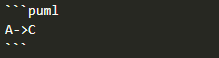
but the preview show this error
Error: write EPIPE
i'm use vscode,the version is 1.36.0.
OS is windows 7 | puml not work | https://api.github.com/repos/shd101wyy/vscode-markdown-preview-enhanced/issues/1320/comments | 4 | 2019-07-05T04:02:13Z | 2023-08-23T02:44:46Z | https://github.com/shd101wyy/vscode-markdown-preview-enhanced/issues/1320 | 1,862,459,922 | 1,320 |
[
"shd101wyy",
"vscode-markdown-preview-enhanced"
] | See [asciimath's website](http://asciimath.org/) for more info
I'd really like to use asciimath instead of LaTeX, since LaTeX's syntax is way too verbose for me. (I wanna be able to write math fast since I'll be using this to take notes in school).
If you don't want to me implement it, is there any way to set ascii... | Add asciimath Math Renderer | https://api.github.com/repos/shd101wyy/vscode-markdown-preview-enhanced/issues/1321/comments | 4 | 2019-07-04T10:57:37Z | 2023-08-23T02:44:49Z | https://github.com/shd101wyy/vscode-markdown-preview-enhanced/issues/1321 | 1,862,459,947 | 1,321 |
[
"shd101wyy",
"vscode-markdown-preview-enhanced"
] | In VSCode, with markdown-preview-enhanced version 0.4.1, the table of contents would previously render like this:
```
* [Level 1](#level-1)
* [Level 2](#level-2)
```
Now it is rendering like this:
```
- [Level 1
](#level-1)
- [Level 2
](#level-2)
```
It also appears that the TOC is being gen... | Create TOC has stopped behaving the same since version 0.4.2 in VSCode | https://api.github.com/repos/shd101wyy/vscode-markdown-preview-enhanced/issues/1322/comments | 2 | 2019-07-03T22:42:42Z | 2023-08-23T02:44:50Z | https://github.com/shd101wyy/vscode-markdown-preview-enhanced/issues/1322 | 1,862,459,967 | 1,322 |
[
"shd101wyy",
"vscode-markdown-preview-enhanced"
] | 比如@import "xx.md", 怎么指定只显示xx.md的前N行或者指定第N行到第N+M行? | 请问怎么只import文件的前几行? | https://api.github.com/repos/shd101wyy/vscode-markdown-preview-enhanced/issues/1323/comments | 2 | 2019-07-03T17:55:01Z | 2023-08-23T02:44:53Z | https://github.com/shd101wyy/vscode-markdown-preview-enhanced/issues/1323 | 1,862,460,032 | 1,323 |
[
"shd101wyy",
"vscode-markdown-preview-enhanced"
] | [Enter steps to reproduce:]
1. ...
2. ...
**Atom**: 1.38.2 x64
**Electron**: 2.0.18
**OS**: linux 5.1.14-121.current
**Thrown From**: [markdown-preview-enhanced](https://github.com/shd101wyy/markdown-preview-enhanced) package 0.16.2
### Stack Trace
Uncaught Error: Cannot find module 'twemoji'
```
... | Uncaught Error: Cannot find module 'twemoji' | https://api.github.com/repos/shd101wyy/vscode-markdown-preview-enhanced/issues/1324/comments | 10 | 2019-07-02T08:27:29Z | 2023-08-23T02:44:55Z | https://github.com/shd101wyy/vscode-markdown-preview-enhanced/issues/1324 | 1,862,460,106 | 1,324 |
[
"shd101wyy",
"vscode-markdown-preview-enhanced"
] | 1: 可否在当前页面直接预览,和退出预览直接编辑,这样效率更高.
2: 请教如何和浏览器集成,并且和浏览器是时时同步滚动的,浏览器预览. | 可否做成类似typora的直接在当前预览和源码编辑模式 | https://api.github.com/repos/shd101wyy/vscode-markdown-preview-enhanced/issues/1325/comments | 1 | 2019-06-29T01:39:37Z | 2023-08-23T02:44:57Z | https://github.com/shd101wyy/vscode-markdown-preview-enhanced/issues/1325 | 1,862,460,171 | 1,325 |
[
"shd101wyy",
"vscode-markdown-preview-enhanced"
] | - I usually write or copy some markdown source (for example use ``` to format and highlight source code) then copy the rendered result into emil/blog.
It would be great if we can use ctrl+a or right context menu in the preview panel to select all, then we can just use ctrl+c to copy the rendered html.
- there are... | Support Ctrl+A in preview pane | https://api.github.com/repos/shd101wyy/vscode-markdown-preview-enhanced/issues/1326/comments | 0 | 2019-06-27T23:31:23Z | 2023-08-23T02:45:00Z | https://github.com/shd101wyy/vscode-markdown-preview-enhanced/issues/1326 | 1,862,460,218 | 1,326 |
[
"shd101wyy",
"vscode-markdown-preview-enhanced"
] | 我在编辑的时候 预览的窗口里字体显示正常 但是导出的PDF文件中中文就变成了乱码...请问这是什么情况啊 | 导出PDF问题 | https://api.github.com/repos/shd101wyy/vscode-markdown-preview-enhanced/issues/1327/comments | 1 | 2019-06-27T04:19:41Z | 2023-08-23T02:45:02Z | https://github.com/shd101wyy/vscode-markdown-preview-enhanced/issues/1327 | 1,862,460,283 | 1,327 |
[
"shd101wyy",
"vscode-markdown-preview-enhanced"
] | 尊敬的作者,您好,我是一位大四电子系本科生,使用您的插件接近半年了,MPE 用于本地的 markdown 编辑真的非常顺手。
正因如此,我希望在写博客的时候,博客上呈现的效果能和我在本地使用 MPE 时的预览效果保持和接近一致,所以我选择直接使用 MPE 导出 html(当然如何将 html 直接部署到网络上又是另一个问题了),在使用导出功能的时候我产生了几个疑问:
1、如果 markdown 源文件中具有 svg、png等资源文件,那么这个 html 是不是无论在任何时候都要于这些资源文件放在同一目录下?
2、如果 markdown 源文件中含有 mathjax、graphviz、mermaid 等需要渲染的内容,那么导出的... | 导出html的几个问题想请教作者 | https://api.github.com/repos/shd101wyy/vscode-markdown-preview-enhanced/issues/250/comments | 2 | 2019-06-26T01:30:53Z | 2019-06-26T01:52:06Z | https://github.com/shd101wyy/vscode-markdown-preview-enhanced/issues/250 | 460,716,706 | 250 |
[
"shd101wyy",
"vscode-markdown-preview-enhanced"
] | There was an upstream bug I reported in knsv/mermaid#858 that appears to be fixed. It would be very helpful if you could update your #dependency.
Thanks! | Mermaid classDiagram breaks on any edit | https://api.github.com/repos/shd101wyy/vscode-markdown-preview-enhanced/issues/249/comments | 4 | 2019-06-25T17:22:58Z | 2019-07-10T10:38:51Z | https://github.com/shd101wyy/vscode-markdown-preview-enhanced/issues/249 | 460,546,680 | 249 |
[
"shd101wyy",
"vscode-markdown-preview-enhanced"
] | platform: Ubuntu 16.04+vscode 1.33.1+MPE0.4.2+nodejs v10.15.3
log:Error: Chromium revision is not downloaded. Run "npm install" or "yarn install"
But when I used script likes
```
const puppeteer = require('puppeteer');
(async () => {
const browser = await puppeteer.launch();
const page = await browser.n... | Using puppeteer to export PDF Failed! | https://api.github.com/repos/shd101wyy/vscode-markdown-preview-enhanced/issues/248/comments | 5 | 2019-06-25T03:52:55Z | 2020-08-17T21:24:29Z | https://github.com/shd101wyy/vscode-markdown-preview-enhanced/issues/248 | 460,195,127 | 248 |
[
"shd101wyy",
"vscode-markdown-preview-enhanced"
] | I submit an issue to wkhtmltopdf https://github.com/wkhtmltopdf/wkhtmltopdf/issues/4394
Seems it's mpe problem here? | Halft blank margin when use wkhtmltopdf convert to pdf | https://api.github.com/repos/shd101wyy/vscode-markdown-preview-enhanced/issues/1328/comments | 0 | 2019-06-24T02:25:13Z | 2023-08-23T02:45:04Z | https://github.com/shd101wyy/vscode-markdown-preview-enhanced/issues/1328 | 1,862,460,335 | 1,328 |
[
"shd101wyy",
"vscode-markdown-preview-enhanced"
] | hi
For below empty code blocl area in markdown, I am getting some weird p tag line in the output. They are there if i enter any text inside but does not appear when i use diagram like dot or plantuml..

... | p tag line appears in pre code | https://api.github.com/repos/shd101wyy/vscode-markdown-preview-enhanced/issues/246/comments | 0 | 2019-06-23T11:50:15Z | 2019-06-23T11:50:15Z | https://github.com/shd101wyy/vscode-markdown-preview-enhanced/issues/246 | 459,567,063 | 246 |
[
"shd101wyy",
"vscode-markdown-preview-enhanced"
] | We've been discussing on atom forums, how [tufte style sidenotes](https://edwardtufte.github.io/tufte-css/) could be supported within the markdown preview (https://discuss.atom.io/t/sidenotes-comments-in-markdown-writing/66079/14). In principle this could offer a way to put comments in text, that don't stop text flow, ... | Custom location for footnotes | https://api.github.com/repos/shd101wyy/vscode-markdown-preview-enhanced/issues/1329/comments | 0 | 2019-06-23T08:54:29Z | 2023-08-23T02:45:06Z | https://github.com/shd101wyy/vscode-markdown-preview-enhanced/issues/1329 | 1,862,460,389 | 1,329 |
[
"shd101wyy",
"vscode-markdown-preview-enhanced"
] | Hi!
I would find it really useful if there were a way to render a local video file.
Thanks! | Local Video Embedding | https://api.github.com/repos/shd101wyy/vscode-markdown-preview-enhanced/issues/1330/comments | 1 | 2019-06-21T21:11:11Z | 2023-08-23T02:45:08Z | https://github.com/shd101wyy/vscode-markdown-preview-enhanced/issues/1330 | 1,862,460,448 | 1,330 |
[
"shd101wyy",
"vscode-markdown-preview-enhanced"
] | Affected versions: 0.4.0 and 0.4.1
Version 0.3.13 is working fine
Whenever I try "Open in Browser" or Chrome (Puppeteer) PDF the locally imported `@import "styles.less"` is not working.
Possibly related to this issue:
https://github.com/shd101wyy/vscode-markdown-preview-enhanced/issues/1344 | Custom styles not working for pdf export (puppeteer) and "Open in Browser" | https://api.github.com/repos/shd101wyy/vscode-markdown-preview-enhanced/issues/245/comments | 1 | 2019-06-21T11:36:51Z | 2023-08-23T02:45:41Z | https://github.com/shd101wyy/vscode-markdown-preview-enhanced/issues/245 | 459,154,249 | 245 |
[
"shd101wyy",
"vscode-markdown-preview-enhanced"
] | 现在可以用`^upper^`的语法标记上标,但是如果`^^`中间是通过空格分隔的多个单词,例如`^upper label^`,就无法正确识别。 | 上标语法不支持空格分隔的多个单词 | https://api.github.com/repos/shd101wyy/vscode-markdown-preview-enhanced/issues/1331/comments | 2 | 2019-06-20T17:01:07Z | 2023-08-23T02:45:10Z | https://github.com/shd101wyy/vscode-markdown-preview-enhanced/issues/1331 | 1,862,460,495 | 1,331 |
[
"shd101wyy",
"vscode-markdown-preview-enhanced"
] | 系统版本:MacOS High Sierra
VSCode版本:1.35.1
MPE版本:0.4.1
当我使用Open Preview to the Side 时,修改源文件预览无法实时更新同步,但是使用Open Preview时是可以实时更新的。不知道是什么原因 | 预览无法实时更新同步 | https://api.github.com/repos/shd101wyy/vscode-markdown-preview-enhanced/issues/244/comments | 3 | 2019-06-19T21:06:45Z | 2019-06-22T09:09:38Z | https://github.com/shd101wyy/vscode-markdown-preview-enhanced/issues/244 | 458,226,967 | 244 |
[
"shd101wyy",
"vscode-markdown-preview-enhanced"
] | 把这个https://github.com/dundalek/markmap js 加进来,就能支持脑图了,看起来挺酷炫的 | 支持脑图吧 | https://api.github.com/repos/shd101wyy/vscode-markdown-preview-enhanced/issues/1332/comments | 0 | 2019-06-18T05:10:32Z | 2023-08-23T02:45:13Z | https://github.com/shd101wyy/vscode-markdown-preview-enhanced/issues/1332 | 1,862,460,548 | 1,332 |
[
"shd101wyy",
"vscode-markdown-preview-enhanced"
] | Hi,
I noticed the included version of plantuml.jar is the March 2019 release. Recently the new v2 preprocessor has become generally available in the May or June releases.
When viewing the license version, I noticed that it is the default GPL version. Curious if that version conflicts with the NCSA license of the ... | Plantuml version and license | https://api.github.com/repos/shd101wyy/vscode-markdown-preview-enhanced/issues/243/comments | 3 | 2019-06-17T15:30:16Z | 2022-04-30T11:08:46Z | https://github.com/shd101wyy/vscode-markdown-preview-enhanced/issues/243 | 457,000,946 | 243 |
[
"shd101wyy",
"vscode-markdown-preview-enhanced"
] | I am developer from VS Code and we introduced Machine Scope for configurations in [1.34](https://code.visualstudio.com/updates/v1_34#_machinespecific-settings) which will help in [remote set ups](https://code.visualstudio.com/docs/remote/remote-overview).
I would like to encourage extension authors to adopt to machi... | Flag machine specific configurations like paths as machine scoped | https://api.github.com/repos/shd101wyy/vscode-markdown-preview-enhanced/issues/242/comments | 2 | 2019-06-17T07:00:37Z | 2019-06-24T01:35:41Z | https://github.com/shd101wyy/vscode-markdown-preview-enhanced/issues/242 | 456,773,806 | 242 |
[
"shd101wyy",
"vscode-markdown-preview-enhanced"
] | What a great plug-in~~~~~Thanks
I want graph of flowChart to be within the page no matter how many elements I add to right.
Just like mermaid which will change front size automatically.

| graph of flowChart is wider than the page | https://api.github.com/repos/shd101wyy/vscode-markdown-preview-enhanced/issues/1333/comments | 1 | 2019-06-16T07:20:14Z | 2023-08-23T02:45:15Z | https://github.com/shd101wyy/vscode-markdown-preview-enhanced/issues/1333 | 1,862,460,612 | 1,333 |
[
"shd101wyy",
"vscode-markdown-preview-enhanced"
] | Hi
Can you please support auto numbering of markdown headers. This is one of features I am missing to be able to use your extension for many of my documentation work.
Afaik its a small feature and easy, so please consider.
I tried putting the below in style.less but nothing happens ([auto numbering css](ht... | Feature Request: Please Support Autonumbering | https://api.github.com/repos/shd101wyy/vscode-markdown-preview-enhanced/issues/241/comments | 2 | 2019-06-16T06:26:10Z | 2020-02-15T09:29:58Z | https://github.com/shd101wyy/vscode-markdown-preview-enhanced/issues/241 | 456,607,727 | 241 |
[
"shd101wyy",
"vscode-markdown-preview-enhanced"
] | I love markdown-preview-enhance, it is a real workflow booster.
What I commonly do is inserting smaller md files into larger ones to package them for different contexts.
At the moment we can only import a full md file which can bring the headline hirachy into trouble.
I would love to be able to import just a subse... | Import only part of markdown file | https://api.github.com/repos/shd101wyy/vscode-markdown-preview-enhanced/issues/1334/comments | 3 | 2019-06-12T11:08:47Z | 2023-08-23T02:45:17Z | https://github.com/shd101wyy/vscode-markdown-preview-enhanced/issues/1334 | 1,862,460,660 | 1,334 |
[
"shd101wyy",
"vscode-markdown-preview-enhanced"
] | 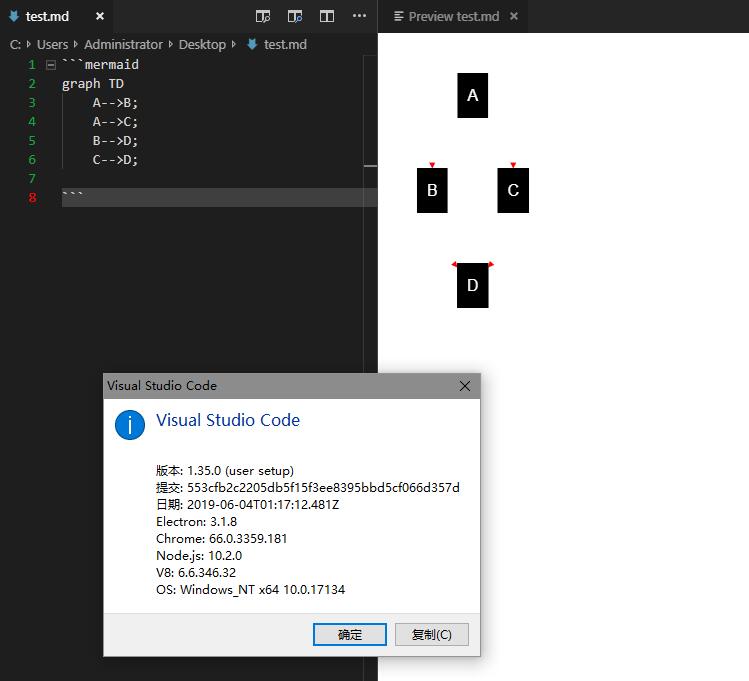
| can't see line between box | https://api.github.com/repos/shd101wyy/vscode-markdown-preview-enhanced/issues/240/comments | 2 | 2019-06-11T05:30:41Z | 2023-08-23T02:51:09Z | https://github.com/shd101wyy/vscode-markdown-preview-enhanced/issues/240 | 454,487,515 | 240 |
[
"shd101wyy",
"vscode-markdown-preview-enhanced"
] | 
OS: Arch linux
Atom : 1.37.0
Electron: 4.1.4
Chrome : 69.0.3497.128
Node : 10.11.0 | Uncaught (in promise) Error: The WebView must be attached to the DOM and the dom-ready event emitted before this method can be called. | https://api.github.com/repos/shd101wyy/vscode-markdown-preview-enhanced/issues/1335/comments | 0 | 2019-06-10T18:14:09Z | 2023-08-23T02:45:19Z | https://github.com/shd101wyy/vscode-markdown-preview-enhanced/issues/1335 | 1,862,460,717 | 1,335 |
[
"shd101wyy",
"vscode-markdown-preview-enhanced"
] | ```json
{
"[markdown]": {
"editor.wordWrap": "on",
"editor.quickSuggestions": false,
"editor.tabSize": 4,
"editor.formatOnSave": true
}
}
``` | vscode editor.formatOnSave conflicts with the MPE TOC generation | https://api.github.com/repos/shd101wyy/vscode-markdown-preview-enhanced/issues/239/comments | 0 | 2019-06-10T09:51:28Z | 2019-06-24T01:35:04Z | https://github.com/shd101wyy/vscode-markdown-preview-enhanced/issues/239 | 454,088,095 | 239 |
[
"shd101wyy",
"vscode-markdown-preview-enhanced"
] | https://github.com/shd101wyy/markdown-preview-enhanced/blob/d0742272b58802069fc1b7111d2d08d569579d7e/styles/loading.css#L6-L8
感觉这里改成 inherit 比较好,否则深色主题下每次打开预览都被亮瞎眼 :stuck_out_tongue_closed_eyes:
相应地,`Loading Preview ...` 这几个字的颜色改一改也比较好,我是改成了灰色,这样可以同时适用于亮、暗主题哈哈 | [建议] Loading 界面采用与主题一致的背景(atom) | https://api.github.com/repos/shd101wyy/vscode-markdown-preview-enhanced/issues/1336/comments | 0 | 2019-06-08T09:23:08Z | 2023-08-23T02:45:21Z | https://github.com/shd101wyy/vscode-markdown-preview-enhanced/issues/1336 | 1,862,460,773 | 1,336 |
[
"shd101wyy",
"vscode-markdown-preview-enhanced"
] | markua.com | Please Support Markua Syntax | https://api.github.com/repos/shd101wyy/vscode-markdown-preview-enhanced/issues/238/comments | 0 | 2019-06-08T07:08:40Z | 2019-06-08T07:08:40Z | https://github.com/shd101wyy/vscode-markdown-preview-enhanced/issues/238 | 453,765,228 | 238 |
[
"shd101wyy",
"vscode-markdown-preview-enhanced"
] | 您好,我将这个插入 toc 后并不能跳转:
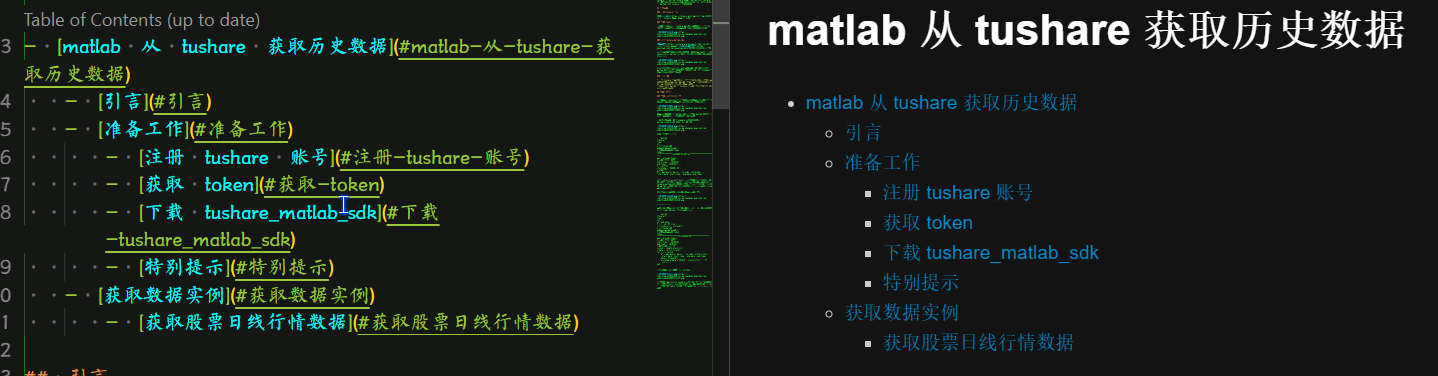
同样的文件,如果用 vscode 自带的预览,则是能够实现跳转的,望修复这个问题,非常感谢
| 插入 toc 预览中并不能实现跳转 | https://api.github.com/repos/shd101wyy/vscode-markdown-preview-enhanced/issues/237/comments | 2 | 2019-06-07T06:48:42Z | 2019-06-08T05:51:31Z | https://github.com/shd101wyy/vscode-markdown-preview-enhanced/issues/237 | 453,363,217 | 237 |
[
"shd101wyy",
"vscode-markdown-preview-enhanced"
] | Hi there. I'm using this plugin for Atom, I like it because it allows math expressions with LaTeX. But I have the problem of inability to export the document to pdf.
When I try with Chrome (Puppeteer) it starts with a blue notification saying the document is being prepared and then a red notification appears with the... | Unable to export to pdf | https://api.github.com/repos/shd101wyy/vscode-markdown-preview-enhanced/issues/1337/comments | 10 | 2019-06-07T03:41:20Z | 2024-03-13T17:40:41Z | https://github.com/shd101wyy/vscode-markdown-preview-enhanced/issues/1337 | 1,862,460,817 | 1,337 |
[
"shd101wyy",
"vscode-markdown-preview-enhanced"
] | The sample is here.
test.md
```md
[TOC]
# header 1 ($T_{ab}$) {attr=true}
ab
# header 2 ($T_{cd}$) {attr=true}
cd
```
[test.pdf](https://github.com/shd101wyy/markdown-preview-enhanced/files/3263706/test.pdf)
test_.md
```md
* [header 1 (<img src="https://latex.codecogs.com/gif.latex?T... | Failed to render the header with Katex formulas and attributes | https://api.github.com/repos/shd101wyy/vscode-markdown-preview-enhanced/issues/1338/comments | 2 | 2019-06-06T17:40:41Z | 2023-08-23T02:45:25Z | https://github.com/shd101wyy/vscode-markdown-preview-enhanced/issues/1338 | 1,862,460,879 | 1,338 |
[
"shd101wyy",
"vscode-markdown-preview-enhanced"
] | The PDF creation time of puppeteer is extremely slow from about 10-15 pages over. (Normally about 10 seconds will suddenly take 5 to 30 minutes)
Can you improve by increasing the buffer etc? | PDF creation time of puppeteer | https://api.github.com/repos/shd101wyy/vscode-markdown-preview-enhanced/issues/1339/comments | 7 | 2019-06-06T16:05:37Z | 2023-08-23T02:45:28Z | https://github.com/shd101wyy/vscode-markdown-preview-enhanced/issues/1339 | 1,862,460,935 | 1,339 |
[
"shd101wyy",
"vscode-markdown-preview-enhanced"
] | When I set `displayAlign` to `left` or `right` in mathjax_config.js it is supposed to align my equations to the left o right (also adding `displayIndent` padding to the left or right on each side) but it does not work, keeping my equations on the center.
With this equation it does not work:
```
$$ 2+2 = 4 $$
``... | Equation alignment does not work | https://api.github.com/repos/shd101wyy/vscode-markdown-preview-enhanced/issues/236/comments | 0 | 2019-06-06T04:21:25Z | 2019-06-06T04:21:25Z | https://github.com/shd101wyy/vscode-markdown-preview-enhanced/issues/236 | 452,824,880 | 236 |
[
"shd101wyy",
"vscode-markdown-preview-enhanced"
] | When I set `autoNumbers="AMS"` in `mathjax_config.js` MathJAX is supposed to add a autoincremental number as a label when specifying equations with `\label{foo}` like:
```
$$ 2 + 2 = 4 \label{a} $$
```
So I can link to that using `\eqref{a}` or `\ref{a}` in markdown or another equation.
However, when using t... | Autonumbering does not work for $$ blocks using autoNumber=AMS | https://api.github.com/repos/shd101wyy/vscode-markdown-preview-enhanced/issues/235/comments | 1 | 2019-06-06T04:13:27Z | 2019-06-06T06:10:23Z | https://github.com/shd101wyy/vscode-markdown-preview-enhanced/issues/235 | 452,823,342 | 235 |
Subsets and Splits
No community queries yet
The top public SQL queries from the community will appear here once available.