
issue_owner_repo listlengths 2 2 | issue_body stringlengths 0 262k ⌀ | issue_title stringlengths 1 1.02k | issue_comments_url stringlengths 53 116 | issue_comments_count int64 0 2.49k | issue_created_at stringdate 1999-03-17 02:06:42 2025-06-23 11:41:49 | issue_updated_at stringdate 2000-02-10 06:43:57 2025-06-23 11:43:00 | issue_html_url stringlengths 34 97 | issue_github_id int64 132 3.17B | issue_number int64 1 215k |
|---|---|---|---|---|---|---|---|---|---|
[
"shd101wyy",
"vscode-markdown-preview-enhanced"
] | The effect of '@import "test.css"' won't be shown in MPE preview.
---
Update: This problem has been solved. The "markdown-preview-enhanced.enableScriptExecution" option should be set to "true" | CSS importing doesn't work | https://api.github.com/repos/shd101wyy/vscode-markdown-preview-enhanced/issues/107/comments | 0 | 2018-04-17T02:24:22Z | 2018-07-15T08:04:23Z | https://github.com/shd101wyy/vscode-markdown-preview-enhanced/issues/107 | 314,881,407 | 107 |
[
"shd101wyy",
"vscode-markdown-preview-enhanced"
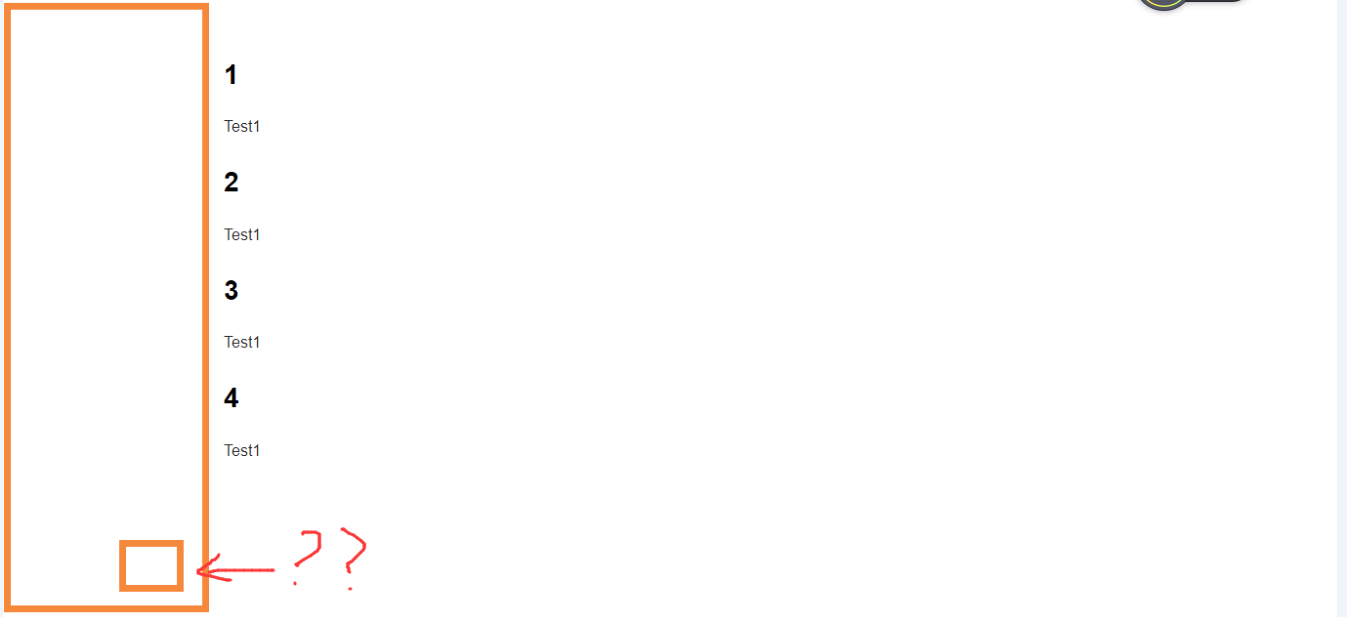
] | I get a syntax error when trying to generate sequence diagrams. It gives an invalid syntax error but, I've copied the diagram code from the MPE documentation so I don't see what it should have invalid syntax.

when I open broswer
| There is no left nav? | https://api.github.com/repos/shd101wyy/vscode-markdown-preview-enhanced/issues/106/comments | 2 | 2018-04-16T08:17:26Z | 2018-04-16T09:46:02Z | https://github.com/shd101wyy/vscode-markdown-preview-enhanced/issues/106 | 314,544,539 | 106 |
[
"shd101wyy",
"vscode-markdown-preview-enhanced"
] | ```
@import "mystyle.css"
```
无效了,只能导入less | 无法导入css | https://api.github.com/repos/shd101wyy/vscode-markdown-preview-enhanced/issues/105/comments | 8 | 2018-04-15T14:54:36Z | 2023-10-03T07:21:07Z | https://github.com/shd101wyy/vscode-markdown-preview-enhanced/issues/105 | 314,422,428 | 105 |
[
"shd101wyy",
"vscode-markdown-preview-enhanced"
] | Hi
Firstly thank you very much for this awesome tool. Finally I could do both coding and documentation (markdown) in same platform thanks to your VS Code extension.
There is only a problem of taking the documentation part to platforms like wordpress.
Wordpress also supports markdown (jetpack) but not extensi... | Feature Request: Kindly provide WP support | https://api.github.com/repos/shd101wyy/vscode-markdown-preview-enhanced/issues/104/comments | 0 | 2018-04-15T14:32:04Z | 2018-04-15T14:32:04Z | https://github.com/shd101wyy/vscode-markdown-preview-enhanced/issues/104 | 314,420,638 | 104 |
[
"shd101wyy",
"vscode-markdown-preview-enhanced"
] | - Markdown Preview Enhanced 0.3.3
- VSCode 1.21.1
- Windows 10 x64

As in the picture, an extra line of html elements is appended to the code block in MPE Preview. However, it vanishes in the generated... | Strange trailing html elements in a code block | https://api.github.com/repos/shd101wyy/vscode-markdown-preview-enhanced/issues/103/comments | 2 | 2018-04-15T08:35:16Z | 2018-04-15T14:55:49Z | https://github.com/shd101wyy/vscode-markdown-preview-enhanced/issues/103 | 314,396,950 | 103 |
[
"shd101wyy",
"vscode-markdown-preview-enhanced"
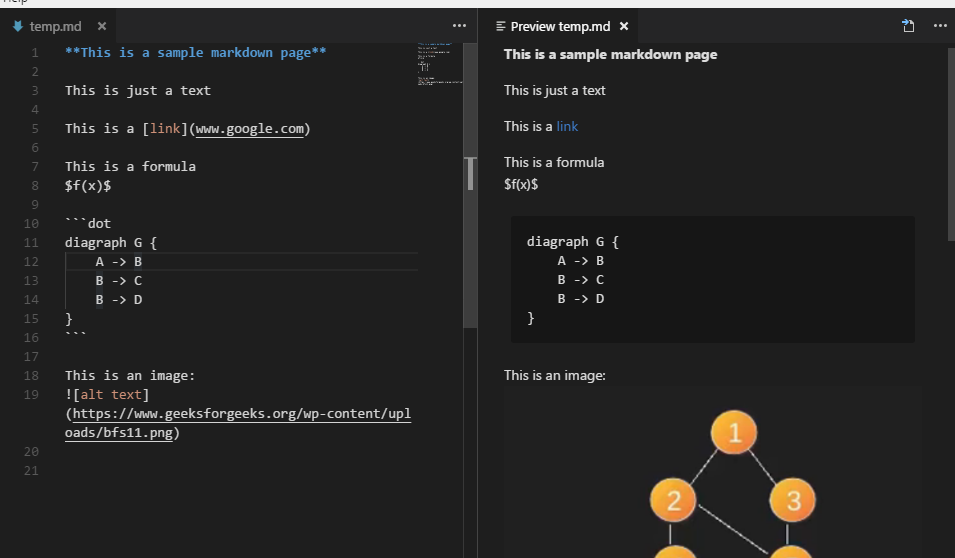
] | Hi
I tried to use just default setting.
Both Katex and graphviz seem to be not working. I tried reinstalling but in vain. Can you please help asap?
| Both mathtype and diagram not working | https://api.github.com/repos/shd101wyy/vscode-markdown-preview-enhanced/issues/1628/comments | 9 | 2018-04-12T16:36:02Z | 2023-08-23T02:56:13Z | https://github.com/shd101wyy/vscode-markdown-preview-enhanced/issues/1628 | 1,862,474,755 | 1,628 |
[
"shd101wyy",
"vscode-markdown-preview-enhanced"
] | Wrong argument passed to pandoc when export pdf with `pandoc`
error message
```
Error: Command failed: pandoc -f markdown+tex_math_single_backslash -o /home/qcg/Desktop/test.pdf --pdf-engine=pdflatex
pandoc: unrecognized option `--pdf-engine=pdflatex'
Try pandoc --help for more information.
```
from `man p... | export pdf with `pandoc` error: wrong argument passed to pandoc | https://api.github.com/repos/shd101wyy/vscode-markdown-preview-enhanced/issues/1629/comments | 4 | 2018-04-11T06:24:50Z | 2025-05-08T06:53:34Z | https://github.com/shd101wyy/vscode-markdown-preview-enhanced/issues/1629 | 1,862,474,799 | 1,629 |
[
"shd101wyy",
"vscode-markdown-preview-enhanced"
] | sorry to border.
i have already installed the texlive and add pdf2svg to PATH.
but after i run the chunk,there will be a chunk like this
```
Unable to open file
```
what should i do ? | failed to run latex code | https://api.github.com/repos/shd101wyy/vscode-markdown-preview-enhanced/issues/1630/comments | 14 | 2018-04-10T13:57:07Z | 2023-08-23T02:56:17Z | https://github.com/shd101wyy/vscode-markdown-preview-enhanced/issues/1630 | 1,862,474,867 | 1,630 |
[
"shd101wyy",
"vscode-markdown-preview-enhanced"
] | When using Puppeteer to print Markdown to PDF, the background can't be printed even the "markdown-preview-enhanced.printBackground" option is set to "true".
I checked the source code and found it's because when calling the related Puppeteer function, Mume doesn't use the option that allowed background to be printed. | Can't print the background using Puppeteer | https://api.github.com/repos/shd101wyy/vscode-markdown-preview-enhanced/issues/102/comments | 2 | 2018-04-10T03:25:47Z | 2021-08-19T03:42:57Z | https://github.com/shd101wyy/vscode-markdown-preview-enhanced/issues/102 | 312,759,941 | 102 |
[
"shd101wyy",
"vscode-markdown-preview-enhanced"
] | ```latex {cmd=true}
\documentclass{standalone}
\begin{document}
Hello world!
\end{document}
```
```python {cmd=true}
print "test"
```
does not work with pandoc but with markdown-it. | pandoc & code chunks | https://api.github.com/repos/shd101wyy/vscode-markdown-preview-enhanced/issues/1631/comments | 2 | 2018-04-10T01:24:07Z | 2023-08-23T02:56:19Z | https://github.com/shd101wyy/vscode-markdown-preview-enhanced/issues/1631 | 1,862,474,923 | 1,631 |
[
"shd101wyy",
"vscode-markdown-preview-enhanced"
] | null | can't install markdown-preview-enhanced | https://api.github.com/repos/shd101wyy/vscode-markdown-preview-enhanced/issues/1632/comments | 1 | 2018-04-09T13:39:19Z | 2023-08-23T02:56:23Z | https://github.com/shd101wyy/vscode-markdown-preview-enhanced/issues/1632 | 1,862,475,014 | 1,632 |
[
"shd101wyy",
"vscode-markdown-preview-enhanced"
] | 例如:
md2html path_of_markdown/abc.md path_of_html/abc.html
导出结果和右键,html效果一样。
命令行特性对于ci自动生成md文件,然后转成html文档,供在线阅读的情况的情况下有用。
喜欢目前预览导出的效果。
如果后续能把右键的功能以命令行调用的特性提供就更好了。
谢谢~
| [Feature Request] 期望能有一个命令行下可执行的命令来转换html | https://api.github.com/repos/shd101wyy/vscode-markdown-preview-enhanced/issues/101/comments | 0 | 2018-04-09T07:16:19Z | 2018-04-10T15:40:45Z | https://github.com/shd101wyy/vscode-markdown-preview-enhanced/issues/101 | 312,419,741 | 101 |
[
"shd101wyy",
"vscode-markdown-preview-enhanced"
] | 主要是对 Note (Warning/Tip/Important) 和 Tabbed content 的支持。 | 能否提供 Microsoft DocFX Flavored Markdown 的支持 | https://api.github.com/repos/shd101wyy/vscode-markdown-preview-enhanced/issues/1633/comments | 0 | 2018-04-08T13:48:02Z | 2023-08-23T02:56:25Z | https://github.com/shd101wyy/vscode-markdown-preview-enhanced/issues/1633 | 1,862,475,059 | 1,633 |
[
"shd101wyy",
"vscode-markdown-preview-enhanced"
] | Provide an option to disable all HTML script tags when exporting to HTML for security. This would keep exported HTML static. Even when `Enable Script Execution` is disabled the following is still rendered at the bottom of the HTML (both offline and cdn):
```html
<script>
(function bindTaskListEvent() {
var task... | Disable all HTML script tags when exporting to HTML | https://api.github.com/repos/shd101wyy/vscode-markdown-preview-enhanced/issues/1634/comments | 1 | 2018-04-08T02:49:14Z | 2023-08-23T02:56:27Z | https://github.com/shd101wyy/vscode-markdown-preview-enhanced/issues/1634 | 1,862,475,124 | 1,634 |
[
"shd101wyy",
"vscode-markdown-preview-enhanced"
] | Dear developer,
I just found with the recent update that I could no longer open the preview window. When I right click the document and select "Markdown Preview Enhanced: open preview" nothing would be shown and when I type in "Markdown Preview Enhanced: open preview" in the command palette, an error message that sa... | Could not open preview window in vs code | https://api.github.com/repos/shd101wyy/vscode-markdown-preview-enhanced/issues/1635/comments | 2 | 2018-04-06T19:52:03Z | 2023-08-23T02:56:29Z | https://github.com/shd101wyy/vscode-markdown-preview-enhanced/issues/1635 | 1,862,475,183 | 1,635 |
[
"shd101wyy",
"vscode-markdown-preview-enhanced"
] | File_1.md:
```
>> 1. Headline
>> @import File_1_A.md
```
File_1_A.md:
```
>> 1.1 Sub headline
>> @import File_1_A_X.md
```
File_1_A_X.md
```
>> 1.1.1 Sub sub headline
>> my content
```
Each import works in the preview, but the preview for the top level document File_1.md does not import anythin... | cascading @import does not work | https://api.github.com/repos/shd101wyy/vscode-markdown-preview-enhanced/issues/1636/comments | 1 | 2018-04-06T06:40:55Z | 2023-08-23T02:56:31Z | https://github.com/shd101wyy/vscode-markdown-preview-enhanced/issues/1636 | 1,862,475,240 | 1,636 |
[
"shd101wyy",
"vscode-markdown-preview-enhanced"
] | I'm currently using Atom with this plugin to write documentation for our software platform. The source text is written in Markdown, rendered into HTML and then uploaded to Zendesk. This plugin is tremendously useful for it, thank you so very much! There is just an issue when rendering Markdown into HTML that is giving ... | Relative file paths are rendered in HTML as absolute file paths | https://api.github.com/repos/shd101wyy/vscode-markdown-preview-enhanced/issues/1637/comments | 1 | 2018-04-05T18:20:31Z | 2023-08-23T02:56:33Z | https://github.com/shd101wyy/vscode-markdown-preview-enhanced/issues/1637 | 1,862,475,280 | 1,637 |
[
"shd101wyy",
"vscode-markdown-preview-enhanced"
] | Application-specific URLs (macOS) appear not to be supported in MPE (VSCode).
Using my favorite reference manager, [Bookends](http://sonnysoftware.com/bookends/bookends.html), I am not able to open references managed by the locally installed application with application-specific links, e.g., `bookends://sonnysoftwar... | [Bug?] Application-specific links not supported | https://api.github.com/repos/shd101wyy/vscode-markdown-preview-enhanced/issues/99/comments | 2 | 2018-04-05T17:48:47Z | 2018-04-05T17:54:55Z | https://github.com/shd101wyy/vscode-markdown-preview-enhanced/issues/99 | 311,707,726 | 99 |
[
"shd101wyy",
"vscode-markdown-preview-enhanced"
] | With MPE supporting CriticMarkup's commenting syntax, I struggle to understand how comments are supposed to be displayed in Preview mode.
If the visualization hasn't been determined at this point, a "post-it like" annotation similar to what many PDF annotation tools offer would be great, i.e.,
* Collapsed with... | [Bug?/Feature Request] CriticMarkup comments in Preview | https://api.github.com/repos/shd101wyy/vscode-markdown-preview-enhanced/issues/98/comments | 0 | 2018-04-04T17:12:35Z | 2018-04-04T17:12:35Z | https://github.com/shd101wyy/vscode-markdown-preview-enhanced/issues/98 | 311,316,850 | 98 |
[
"shd101wyy",
"vscode-markdown-preview-enhanced"
] | With MPE supporting CriticMarkup's highlighting feature it would be nice to highlight text in preview mode and have the source file modified accordingly. | [Feature Request] Highlighting in Preview | https://api.github.com/repos/shd101wyy/vscode-markdown-preview-enhanced/issues/97/comments | 8 | 2018-04-04T17:02:34Z | 2022-11-27T08:33:31Z | https://github.com/shd101wyy/vscode-markdown-preview-enhanced/issues/97 | 311,313,829 | 97 |
[
"shd101wyy",
"vscode-markdown-preview-enhanced"
] | [Speaking of changing option defaults](https://github.com/shd101wyy/markdown-preview-enhanced/pull/837), I'm also wondering what you think of potentially disabling frontmatter rendering by default, i.e. going for:
<img width="438" alt="screen shot 2018-04-04 at 10 47 54" src="https://user-images.githubusercontent.co... | Disabling frontmatter preview by default | https://api.github.com/repos/shd101wyy/vscode-markdown-preview-enhanced/issues/1638/comments | 2 | 2018-04-04T15:11:31Z | 2023-08-23T02:56:35Z | https://github.com/shd101wyy/vscode-markdown-preview-enhanced/issues/1638 | 1,862,475,319 | 1,638 |
[
"shd101wyy",
"vscode-markdown-preview-enhanced"
] | It is good to set the path by ``` "markdown-preview-enhanced.imageFolderPath": "/assets",``` but please add an option to set the Folder for each markdown file.
Example:
myDocument.md - /assets/{myDocument/}
myDocument2.md - /assets/{myDocument2/}
| [Feature Request] Custom Image Path | https://api.github.com/repos/shd101wyy/vscode-markdown-preview-enhanced/issues/95/comments | 0 | 2018-04-04T07:52:39Z | 2018-04-04T07:52:39Z | https://github.com/shd101wyy/vscode-markdown-preview-enhanced/issues/95 | 311,121,503 | 95 |
[
"shd101wyy",
"vscode-markdown-preview-enhanced"
] | U described the feature only for ATOM here: https://shd101wyy.github.io/markdown-preview-enhanced/#/image-helper
Will u add this to VS Code Extension? | [Feature Request] Image Drag n Drop in VSCode | https://api.github.com/repos/shd101wyy/vscode-markdown-preview-enhanced/issues/94/comments | 3 | 2018-04-04T07:48:40Z | 2022-08-21T10:49:58Z | https://github.com/shd101wyy/vscode-markdown-preview-enhanced/issues/94 | 311,120,411 | 94 |
[
"shd101wyy",
"vscode-markdown-preview-enhanced"
] | 期望能增加PLSQL的语法高亮
```plsql
DECLARE
counter number(3):=0;
sumResult number:=0;
BEGIN
LOOP
counter := counter+1;
sumResult := sumResult+counter;
IF counter>=100 THEN --LOOP循环中可以使用IF结构嵌套EXIT关键字退出循环
EXIT;
END IF;
-- EXIT WHEN counter>=100; --注释行,该行可以代替①中的循... | 期望能增加PLSQL的语法高亮 | https://api.github.com/repos/shd101wyy/vscode-markdown-preview-enhanced/issues/93/comments | 2 | 2018-04-03T08:47:15Z | 2018-04-15T21:58:11Z | https://github.com/shd101wyy/vscode-markdown-preview-enhanced/issues/93 | 310,746,178 | 93 |
[
"shd101wyy",
"vscode-markdown-preview-enhanced"
] | 期望能采用 prismjs 进行语法高亮。 | 能否采用 prismjs 进行语法高亮? | https://api.github.com/repos/shd101wyy/vscode-markdown-preview-enhanced/issues/92/comments | 1 | 2018-04-03T08:45:58Z | 2018-04-08T21:14:06Z | https://github.com/shd101wyy/vscode-markdown-preview-enhanced/issues/92 | 310,745,794 | 92 |
[
"shd101wyy",
"vscode-markdown-preview-enhanced"
] | 侧边栏大纲是个非常好用的功能,可是宽度固定了,有些嵌套比较深的大纲换行后就不可读了,可以提供拖拽拓宽大纲的功能吗? | 侧边栏大纲预览调整 | https://api.github.com/repos/shd101wyy/vscode-markdown-preview-enhanced/issues/91/comments | 0 | 2018-04-01T05:41:29Z | 2018-04-01T05:41:29Z | https://github.com/shd101wyy/vscode-markdown-preview-enhanced/issues/91 | 310,297,699 | 91 |
[
"shd101wyy",
"vscode-markdown-preview-enhanced"
] | I suggest we change the default to be "copy to folder".
When I installed this, I was very surprised to have my images uploaded to a provider. It made me want to disable this package because it makes me a bit worried about my work data leaking.
The defaults in this other package are the same as our setting "copy ... | Default Image Behavior | https://api.github.com/repos/shd101wyy/vscode-markdown-preview-enhanced/issues/1639/comments | 4 | 2018-03-31T00:30:49Z | 2023-08-23T02:56:38Z | https://github.com/shd101wyy/vscode-markdown-preview-enhanced/issues/1639 | 1,862,475,370 | 1,639 |
[
"shd101wyy",
"vscode-markdown-preview-enhanced"
] | I am looking for a way to read speaker notes I have prepared in MarkDown.
In this mode I do NOT want the source editor to show at all.
As I click .md files I just want the preview only.
Would also be handy for documentation. | Read Documentation Only Mode | https://api.github.com/repos/shd101wyy/vscode-markdown-preview-enhanced/issues/90/comments | 0 | 2018-03-30T11:09:25Z | 2018-03-30T11:09:25Z | https://github.com/shd101wyy/vscode-markdown-preview-enhanced/issues/90 | 310,040,678 | 90 |
[
"shd101wyy",
"vscode-markdown-preview-enhanced"
] | Would it be possible for the `.mume` directory be implemented to sync across multiple VScode either:
* Using [Settings Sync](https://marketplace.visualstudio.com/items?itemName=Shan.code-settings-sync)
* Add a configuration in User Settings and Workspace Settings (`settings.json`) to allow users to point where to r... | Syncing configuration files in .mume/ | https://api.github.com/repos/shd101wyy/vscode-markdown-preview-enhanced/issues/88/comments | 0 | 2018-03-28T23:09:42Z | 2018-03-28T23:09:42Z | https://github.com/shd101wyy/vscode-markdown-preview-enhanced/issues/88 | 309,564,396 | 88 |
[
"shd101wyy",
"vscode-markdown-preview-enhanced"
] | Hello,
I just installed MPE with a pandoc parser option and I must say that it is absolutely fantastic.
There is just one issue that totally blocks any actual work in my case.
I use EMF images in Markdown. Like this:
```

```
(Pandoc nicely embeds them into .docx for me.)
Now, when I tur... | Preview prompts to save .emf file | https://api.github.com/repos/shd101wyy/vscode-markdown-preview-enhanced/issues/1640/comments | 3 | 2018-03-28T15:57:58Z | 2023-08-23T02:56:40Z | https://github.com/shd101wyy/vscode-markdown-preview-enhanced/issues/1640 | 1,862,475,399 | 1,640 |
[
"shd101wyy",
"vscode-markdown-preview-enhanced"
] | Hi,
The email addresses links are not built correctly:
```markdown
[email](john.doe@mail.com)
```
becomes something like:
```html
<a href="file:///Path/To/File/john.doe@mail.com">email</a>
```
Adding a `mailto` doesn't change anything. I also tried to write the html link directly but the link is automa... | mail links rendering error | https://api.github.com/repos/shd101wyy/vscode-markdown-preview-enhanced/issues/87/comments | 1 | 2018-03-27T22:12:14Z | 2018-03-28T07:46:18Z | https://github.com/shd101wyy/vscode-markdown-preview-enhanced/issues/87 | 309,152,425 | 87 |
[
"shd101wyy",
"vscode-markdown-preview-enhanced"
] | Hi,
Incredible useful piece of code ;-)
- Sync scrolling md and preview
- mermaid integration…that is crazy
- toc
- …
All this is great but the menu (right-mouse button in preview) does nothing.
Same for the three top-right buttons.
Same for the links shown with esc.
I'm using latest Atom/Atom Beta.
I h... | Menu in preview no action | https://api.github.com/repos/shd101wyy/vscode-markdown-preview-enhanced/issues/1641/comments | 2 | 2018-03-27T20:00:18Z | 2023-08-23T02:56:42Z | https://github.com/shd101wyy/vscode-markdown-preview-enhanced/issues/1641 | 1,862,475,442 | 1,641 |
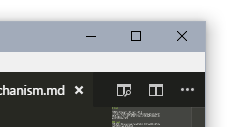
[
"shd101wyy",
"vscode-markdown-preview-enhanced"
] |  | How to bind preivew to the "Open Preview to the Side" button? 如何绑定预览功能到“打开侧边预览”按钮? | https://api.github.com/repos/shd101wyy/vscode-markdown-preview-enhanced/issues/1642/comments | 2 | 2018-03-27T03:08:17Z | 2023-08-23T02:56:44Z | https://github.com/shd101wyy/vscode-markdown-preview-enhanced/issues/1642 | 1,862,475,485 | 1,642 |
[
"shd101wyy",
"vscode-markdown-preview-enhanced"
] | 我现在发布到微信公众号平台的操作流程是这样的:
1.编写markdown
2.导出HTML
3.打开HTML页面,全选页面内容,ctrl+c复制
4.粘贴到微信公众号编辑器
5.发布
发布后你会发现,文章中的代码排版混乱。原因是因为公众号编辑器过滤掉了**pre**标签中的换行等符号,所以每次我要在公众号发布含有代码的文章时,就特别特别麻烦咯,要将**pre**标签中的\n换行符全部用**br**标签替换(手动替换的,特别花费时间。。。唉) | 可以新增一键发布到微信公众号、今日头条、知乎等内容平台的功能吗 | https://api.github.com/repos/shd101wyy/vscode-markdown-preview-enhanced/issues/1643/comments | 3 | 2018-03-25T04:35:09Z | 2023-08-23T02:56:46Z | https://github.com/shd101wyy/vscode-markdown-preview-enhanced/issues/1643 | 1,862,475,548 | 1,643 |
[
"shd101wyy",
"vscode-markdown-preview-enhanced"
] | Could it be feasible to add tag support to headings/elements in markdown-preview-enhanced to filter/export/search according the tags ?
Just what we can found in org-mode: https://orgmode.org/manual/Tags.html
| Tag support like Org-mode | https://api.github.com/repos/shd101wyy/vscode-markdown-preview-enhanced/issues/1644/comments | 0 | 2018-03-24T11:10:47Z | 2023-08-23T02:56:48Z | https://github.com/shd101wyy/vscode-markdown-preview-enhanced/issues/1644 | 1,862,475,603 | 1,644 |
[
"shd101wyy",
"vscode-markdown-preview-enhanced"
] | This great extension does not work with latest Pandoc version:
```
pandoc --version
pandoc 2.1.1
Compiled with pandoc-types 1.17.3, texmath 0.10.1, skylighting 0.6
```
The preview isn't rendered and only the following message is shown:
`[WARNING] Deprecated: --latexmathml, --asciimathml, -m`
By the way, thi... | Preview does not work with pandoc 2.1.1 | https://api.github.com/repos/shd101wyy/vscode-markdown-preview-enhanced/issues/1645/comments | 2 | 2018-03-24T10:04:19Z | 2023-08-23T02:56:50Z | https://github.com/shd101wyy/vscode-markdown-preview-enhanced/issues/1645 | 1,862,475,646 | 1,645 |
[
"shd101wyy",
"vscode-markdown-preview-enhanced"
] | Hi @shd101wyy ,
Is there any possibility to support more nested order list levels? At the moment I can only achieve 2 levels:
```markdown
1. Item 1, level 1.
1.1. Item 11, level 2.
1.2. Item 12, level 2.
2. Item 2, level 1.
```
I am looking to achieve deeper levels:
```markdown
1. Item 1, level 1.
1.... | Order list nesting limit | https://api.github.com/repos/shd101wyy/vscode-markdown-preview-enhanced/issues/1646/comments | 3 | 2018-03-23T08:55:42Z | 2023-08-23T02:56:52Z | https://github.com/shd101wyy/vscode-markdown-preview-enhanced/issues/1646 | 1,862,475,693 | 1,646 |
[
"shd101wyy",
"vscode-markdown-preview-enhanced"
] | before I've updated it today I can use navigation through preview with links and menu (paragraphs), now it is starting to load and then i see just empty panel... and the original file is not scrolling to chosen link as it was doing before | preview fail to navigate through menu and links after last update (my current version 0.15.5) | https://api.github.com/repos/shd101wyy/vscode-markdown-preview-enhanced/issues/1647/comments | 5 | 2018-03-22T12:06:37Z | 2023-08-23T02:56:54Z | https://github.com/shd101wyy/vscode-markdown-preview-enhanced/issues/1647 | 1,862,475,736 | 1,647 |
[
"shd101wyy",
"vscode-markdown-preview-enhanced"
] | 快捷键用的好好的...为什么要改呢 | https://api.github.com/repos/shd101wyy/vscode-markdown-preview-enhanced/issues/86/comments | 1 | 2018-03-21T00:22:47Z | 2018-04-08T21:15:57Z | https://github.com/shd101wyy/vscode-markdown-preview-enhanced/issues/86 | 307,084,548 | 86 | |
[
"shd101wyy",
"vscode-markdown-preview-enhanced"
] | i use solarised dark theme and this gets added to the preview when i export it would be nice to have as an option | ability to swap back to default css | https://api.github.com/repos/shd101wyy/vscode-markdown-preview-enhanced/issues/1648/comments | 3 | 2018-03-20T15:36:00Z | 2023-08-23T02:56:56Z | https://github.com/shd101wyy/vscode-markdown-preview-enhanced/issues/1648 | 1,862,475,792 | 1,648 |
[
"shd101wyy",
"vscode-markdown-preview-enhanced"
] | After Export to HTML,the text or code block in HTML pages is unselectable. | Text is not selectable | https://api.github.com/repos/shd101wyy/vscode-markdown-preview-enhanced/issues/1649/comments | 5 | 2018-03-20T15:20:47Z | 2023-08-23T02:56:58Z | https://github.com/shd101wyy/vscode-markdown-preview-enhanced/issues/1649 | 1,862,475,840 | 1,649 |
[
"shd101wyy",
"vscode-markdown-preview-enhanced"
] | null | 今天更新到最新版本后,出现点击TOC跳转走样问题。 | https://api.github.com/repos/shd101wyy/vscode-markdown-preview-enhanced/issues/1650/comments | 11 | 2018-03-19T06:07:39Z | 2023-08-23T02:57:01Z | https://github.com/shd101wyy/vscode-markdown-preview-enhanced/issues/1650 | 1,862,475,901 | 1,650 |
[
"shd101wyy",
"vscode-markdown-preview-enhanced"
] | TIFF images could not previewed in Atom editor. Will tiff image preview be supported in future release?
| cannot preview tiff format image | https://api.github.com/repos/shd101wyy/vscode-markdown-preview-enhanced/issues/1651/comments | 2 | 2018-03-19T04:01:36Z | 2023-08-23T02:57:03Z | https://github.com/shd101wyy/vscode-markdown-preview-enhanced/issues/1651 | 1,862,475,960 | 1,651 |
[
"shd101wyy",
"vscode-markdown-preview-enhanced"
] | `@import path`会将path与当前工作目录拼接,无法通过绝对路径引用。
如在`/Users/Admin/Desktop/Project/README.MD`中,写入`@import "/Users/Admin/MyCss/MyCss.css"`,会抛出如下错误`Error: ENOENT: no such file or directory, open '/Users/Admin/Desktop/Project/Users/Admin/MyCss/MyCss.css'` | 如何以绝对路径引用CSS? | https://api.github.com/repos/shd101wyy/vscode-markdown-preview-enhanced/issues/1652/comments | 1 | 2018-03-16T07:07:52Z | 2023-08-23T02:57:05Z | https://github.com/shd101wyy/vscode-markdown-preview-enhanced/issues/1652 | 1,862,476,022 | 1,652 |
[
"shd101wyy",
"vscode-markdown-preview-enhanced"
] | 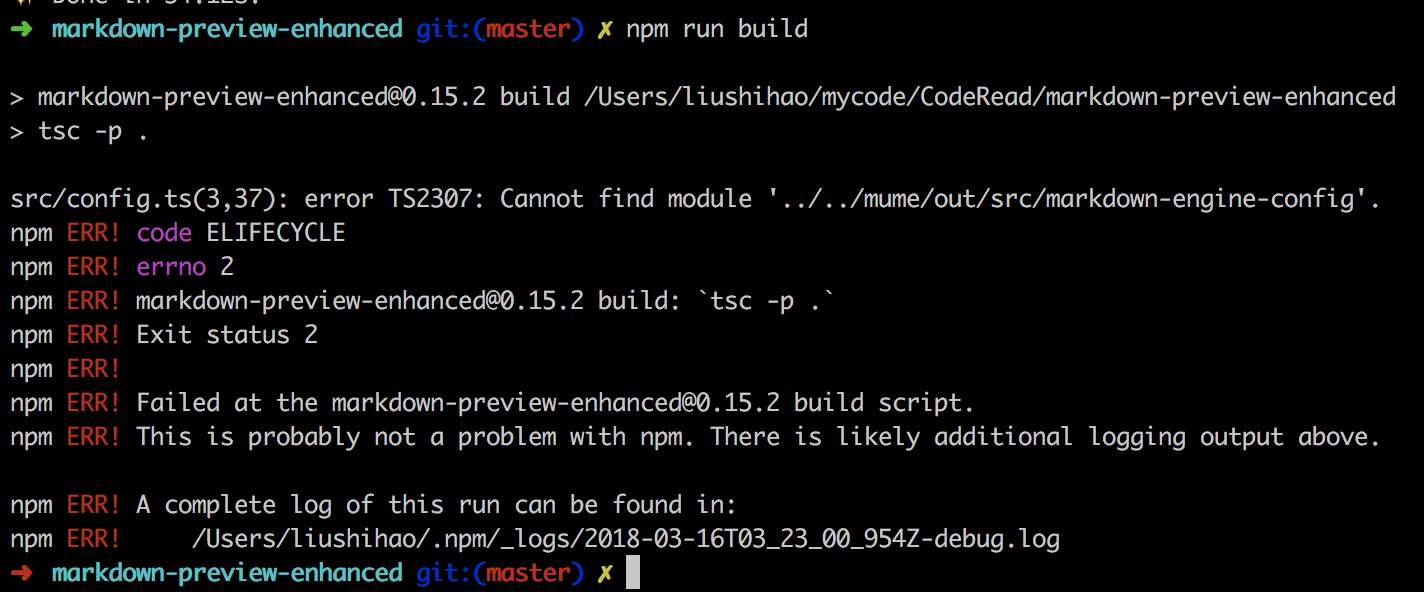
I want to run this project in my own computer, but when I run 'npm run build', there is a error that can not find markdown-engine-config, I do not know what is that.....
我想在我自己的环境下跑这个项目,但是报错信息说缺少markdown... | how to run this project in my own computer? | https://api.github.com/repos/shd101wyy/vscode-markdown-preview-enhanced/issues/1653/comments | 0 | 2018-03-16T03:31:09Z | 2023-08-23T02:57:07Z | https://github.com/shd101wyy/vscode-markdown-preview-enhanced/issues/1653 | 1,862,476,062 | 1,653 |
[
"shd101wyy",
"vscode-markdown-preview-enhanced"
] | 引入的代码块过长的话,会显示滚动条,怎么让其在打印的时候不显示滚动条能看到完整代码呢 | 引入的代码块过长的话,会显示滚动条,怎么让其在打印的时候不显示滚动条能看到完整代码呢 | https://api.github.com/repos/shd101wyy/vscode-markdown-preview-enhanced/issues/1654/comments | 13 | 2018-03-15T05:46:45Z | 2024-08-07T03:55:43Z | https://github.com/shd101wyy/vscode-markdown-preview-enhanced/issues/1654 | 1,862,476,115 | 1,654 |
[
"shd101wyy",
"vscode-markdown-preview-enhanced"
] | I like you package, Congratulation.
I am using R and Python, as you know we can run codes inside .Rmd file,
see
https://rwebapps.ocpu.io/markdownapp/www/
Unfortunately, your package can not run codes. I am wondering if you have plan to add this feature to your package.
| Rmorkdown | https://api.github.com/repos/shd101wyy/vscode-markdown-preview-enhanced/issues/1655/comments | 3 | 2018-03-14T16:53:58Z | 2023-08-23T02:57:11Z | https://github.com/shd101wyy/vscode-markdown-preview-enhanced/issues/1655 | 1,862,476,170 | 1,655 |
[
"shd101wyy",
"vscode-markdown-preview-enhanced"
] | Tested with plantuml, dot, ...
All diagrams are displayed as text blocks. | diagrams are not rendered any more | https://api.github.com/repos/shd101wyy/vscode-markdown-preview-enhanced/issues/1656/comments | 7 | 2018-03-13T04:50:19Z | 2023-08-23T02:57:14Z | https://github.com/shd101wyy/vscode-markdown-preview-enhanced/issues/1656 | 1,862,476,220 | 1,656 |
[
"shd101wyy",
"vscode-markdown-preview-enhanced"
] | In vscode, Shift + Ctrl + M is internally used to open troubleshooting panel, so it does not work when using this shortcut. And the key-binding of (Ctrl + K, V) does not work, either.

| "Open Preview" need another key-binding in vscode | https://api.github.com/repos/shd101wyy/vscode-markdown-preview-enhanced/issues/84/comments | 1 | 2018-03-13T02:31:21Z | 2018-03-13T14:39:11Z | https://github.com/shd101wyy/vscode-markdown-preview-enhanced/issues/84 | 304,606,372 | 84 |
[
"shd101wyy",
"vscode-markdown-preview-enhanced"
] | Hi @shd101wyy,
I created the ticket [Pandoc section labels not found by pandoc-crossref filter when using ATX-style headers (in atom & vscode)](https://github.com/shd101wyy/markdown-preview-enhanced) earlier today. I've done some debugging and am creating this ticket to describe the root cause of the issue.
I cre... | Labels which include a colon in ATX-style headings are dropped before passing to pandoc | https://api.github.com/repos/shd101wyy/vscode-markdown-preview-enhanced/issues/83/comments | 0 | 2018-03-12T17:22:01Z | 2018-03-13T13:16:06Z | https://github.com/shd101wyy/vscode-markdown-preview-enhanced/issues/83 | 304,465,689 | 83 |
[
"shd101wyy",
"vscode-markdown-preview-enhanced"
] | I am using the popular [pandoc-crossref](http://lierdakil.github.io/pandoc-crossref/) filter in both atom and vscode. The filter works properly for setext-style headings but not for ATX-style headings.
### The problem
The following works in the preview window (using setext-style headings).
```
testing {#sec:tes... | Pandoc section labels not found by pandoc-crossref filter when using ATX-style headers (in vscode) | https://api.github.com/repos/shd101wyy/vscode-markdown-preview-enhanced/issues/1657/comments | 1 | 2018-03-12T12:14:19Z | 2023-08-23T02:57:16Z | https://github.com/shd101wyy/vscode-markdown-preview-enhanced/issues/1657 | 1,862,476,281 | 1,657 |
[
"shd101wyy",
"vscode-markdown-preview-enhanced"
] | When I set to use Pandoc Parser I get:
"Error: Command failed: pandoc -f -t html --mathjax -F c:/Users/murat/AppData/Roaming/npm/mermaid-filter.cmd"
I use mermaid-filter in my pandocArguments setting:
"markdown-preview-enhanced.pandocArguments": "-F c:/Users/murat/AppData/Roaming/npm/mermaid-filter.cmd",
but my... | markdown-preview-enhanced.usePandocParser": true, | https://api.github.com/repos/shd101wyy/vscode-markdown-preview-enhanced/issues/82/comments | 0 | 2018-03-10T19:34:40Z | 2018-03-10T19:34:40Z | https://github.com/shd101wyy/vscode-markdown-preview-enhanced/issues/82 | 304,097,834 | 82 |
[
"shd101wyy",
"vscode-markdown-preview-enhanced"
] | When hosting a portal on Mac, preview works just fine, but for the other users it gets stuck in loading phase. The default MD preview does not experience this issue.
Whether this happens only when hosting on macOS I am not sure, but we will try to do the reverse (connect from Mac to Windows). | Preview not loading through Teletype | https://api.github.com/repos/shd101wyy/vscode-markdown-preview-enhanced/issues/1658/comments | 1 | 2018-03-10T19:15:45Z | 2023-08-23T02:57:18Z | https://github.com/shd101wyy/vscode-markdown-preview-enhanced/issues/1658 | 1,862,476,328 | 1,658 |
[
"shd101wyy",
"vscode-markdown-preview-enhanced"
] | When changing any of the themes (code block, preview, etc.), Atom is automatically shut down without warning. There should be a warning stating that Atom will need to be restarted before changes take effect rather than an automatic shut down. It might also be helpful to post previews of the default style sheets in the ... | Shuts down Atom when changing theme | https://api.github.com/repos/shd101wyy/vscode-markdown-preview-enhanced/issues/1659/comments | 1 | 2018-03-08T22:41:04Z | 2023-08-23T02:57:20Z | https://github.com/shd101wyy/vscode-markdown-preview-enhanced/issues/1659 | 1,862,476,381 | 1,659 |
[
"shd101wyy",
"vscode-markdown-preview-enhanced"
] | VSCode Version:
Version 1.21.0
Commit 9a199d77c82fcb82f39c68bb33c614af01c111ba
Datum 2018-03-07T11:04:09.969Z
Shell 1.7.9
Renderer 58.0.3029.110
Node 7.9.0
Architektur x64
When I run `Open Preview` it says `Running the contributed command:'markdown-preview-enhanced.openPreview' failed.`
JavaScript output s... | Extension does not work in VS Code 1.21 | https://api.github.com/repos/shd101wyy/vscode-markdown-preview-enhanced/issues/81/comments | 3 | 2018-03-08T10:41:50Z | 2018-03-19T18:27:43Z | https://github.com/shd101wyy/vscode-markdown-preview-enhanced/issues/81 | 303,434,127 | 81 |
[
"shd101wyy",
"vscode-markdown-preview-enhanced"
] | [Enter steps to reproduce:]
1. ...
2. ...
**Atom**: 1.24.0 x64
**Electron**: 1.6.16
**OS**: Unknown Windows version
**Thrown From**: [markdown-preview-enhanced](https://github.com/shd101wyy/markdown-preview-enhanced) package 0.15.3
### Stack Trace
Uncaught TypeError: this.editor.getElement is not a fu... | Uncaught TypeError: this.editor.getElement is not a function | https://api.github.com/repos/shd101wyy/vscode-markdown-preview-enhanced/issues/1660/comments | 2 | 2018-03-08T09:50:41Z | 2023-08-23T03:26:58Z | https://github.com/shd101wyy/vscode-markdown-preview-enhanced/issues/1660 | 1,862,476,442 | 1,660 |
[
"shd101wyy",
"vscode-markdown-preview-enhanced"
] | # 环境
1. 操作系统:Windows平台
2. Atom版本:1.24.0 x64
3. markdown-preview-enhanced版本:0.92.0
4. 输入法:搜狗输入法
# 复现步骤
1. 打开Atom
2. 打开一个有`[Toc]`以及标题的md文件
3. 打开preview窗口
4. 此时`Alt + Tab`切换到别的窗口,再切换回Atom,中英文切换没有出现问题。
5. 点击preview窗口中的任何按钮(包括TOC跳转以及右上角三个按钮)。
6. 鼠标点击md文件窗口任意位置,把焦点恢复为正在编辑的md文件。
7. 此时`Alt + Tab`切换... | 终于找到了Alt+Tab切换出去再切换回来以后,中英文无法切换的bug的复现方法。 | https://api.github.com/repos/shd101wyy/vscode-markdown-preview-enhanced/issues/1661/comments | 2 | 2018-03-08T08:39:45Z | 2023-08-23T02:57:25Z | https://github.com/shd101wyy/vscode-markdown-preview-enhanced/issues/1661 | 1,862,476,499 | 1,661 |
[
"shd101wyy",
"vscode-markdown-preview-enhanced"
] | ```markdown
```
The break tag should not be rendered <br>
```
```
Returns with Pandoc enabled in preview

Happens in both indented format and backticks
| Tag in Code Block Should be Ignored (Pandoc) | https://api.github.com/repos/shd101wyy/vscode-markdown-preview-enhanced/issues/80/comments | 3 | 2018-03-08T08:35:55Z | 2018-04-15T21:58:55Z | https://github.com/shd101wyy/vscode-markdown-preview-enhanced/issues/80 | 303,396,910 | 80 |
[
"shd101wyy",
"vscode-markdown-preview-enhanced"
] | When I add PlantUML's sequence diagram as below, the body background color in alt group should be transparent as default, but always white actually
in README.md
```
....
``` plantuml
!include ./seq-example.pu
....
```
in seq-example.pu
```
@startuml
skinparam sequence {
GroupBodyBackgroundColor Tran... | PlantUML's skinparam SequenceGroupBodyBackgroundColor is not applied properly | https://api.github.com/repos/shd101wyy/vscode-markdown-preview-enhanced/issues/1662/comments | 1 | 2018-03-08T07:19:21Z | 2023-08-23T02:57:27Z | https://github.com/shd101wyy/vscode-markdown-preview-enhanced/issues/1662 | 1,862,476,541 | 1,662 |
[
"shd101wyy",
"vscode-markdown-preview-enhanced"
] | It would be nice to be able to use LaTeX-style comments (prefixed with '%') inside of $$ blocks. I have a file with several macros that I use across many documents, and I tried to import this (using @import; it's an .md file), but most of the commands weren't defined properly in my Markdown document. I discovered this ... | Support LaTeX comments in math ($$) sections | https://api.github.com/repos/shd101wyy/vscode-markdown-preview-enhanced/issues/1663/comments | 0 | 2018-03-07T22:32:20Z | 2023-08-23T02:57:29Z | https://github.com/shd101wyy/vscode-markdown-preview-enhanced/issues/1663 | 1,862,476,592 | 1,663 |
[
"shd101wyy",
"vscode-markdown-preview-enhanced"
] | I just installed the latest versions of Pandoc (2.1.2) and Atom (1.24.0) in Windows 10.
I get the following error message when I try to get a Word document using Pandoc (right click in the preview window): "Output format needs to be specified." I generated the markdown document with the Markdown Writer package and I... | Pandoc error message | https://api.github.com/repos/shd101wyy/vscode-markdown-preview-enhanced/issues/1664/comments | 4 | 2018-03-05T15:43:15Z | 2023-08-23T02:57:31Z | https://github.com/shd101wyy/vscode-markdown-preview-enhanced/issues/1664 | 1,862,476,648 | 1,664 |
[
"shd101wyy",
"vscode-markdown-preview-enhanced"
] | When I write `[Other](/articles/Index/)`, I want to get a tag like `<a href="/articles/Index/">Other</a>`. But now it will be rendered like `<a href="articles/Index">Other</a>`. How to solve this problem? | A problem with using relative link | https://api.github.com/repos/shd101wyy/vscode-markdown-preview-enhanced/issues/1665/comments | 2 | 2018-03-05T08:22:29Z | 2023-08-23T02:57:33Z | https://github.com/shd101wyy/vscode-markdown-preview-enhanced/issues/1665 | 1,862,476,705 | 1,665 |
[
"shd101wyy",
"vscode-markdown-preview-enhanced"
] | When there is a line break inside LaTeX, for instance as in
```
$a\in
A$
```
LaTeX regards the newline character as a whitespace. This is important, since `$a\in A$` and `$a\inA$` are different. (Indeed the latter is an error unless a macro named `\inA` is provided.) But, in MPE, the above newline example i... | Newline character inside LaTeX math is incorrectly processed | https://api.github.com/repos/shd101wyy/vscode-markdown-preview-enhanced/issues/1666/comments | 1 | 2018-03-05T02:35:58Z | 2023-08-23T02:57:35Z | https://github.com/shd101wyy/vscode-markdown-preview-enhanced/issues/1666 | 1,862,476,773 | 1,666 |
[
"shd101wyy",
"vscode-markdown-preview-enhanced"
] |
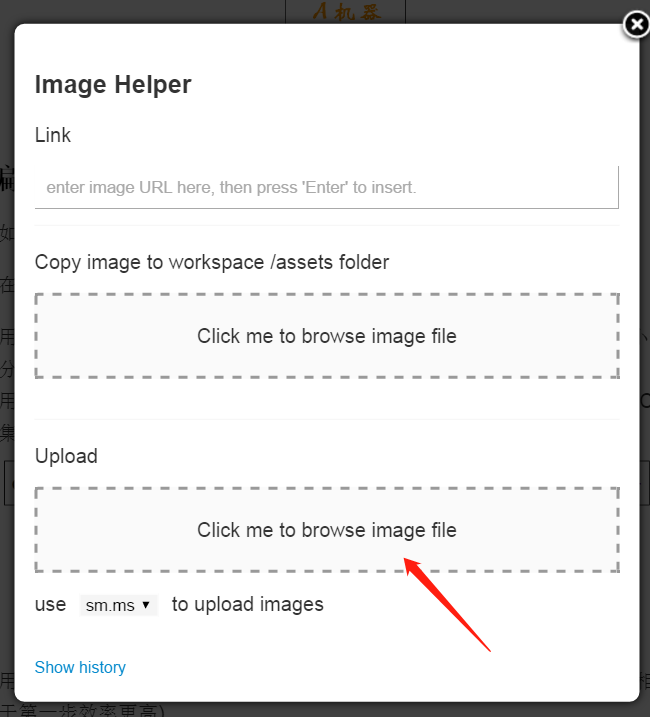
I do not want to click, but I want to upload pictures.
Do you have any idea?
#### thank you! | Can I use the shortcut to upload pictures skip the mouse click? | https://api.github.com/repos/shd101wyy/vscode-markdown-preview-enhanced/issues/1667/comments | 0 | 2018-03-04T06:37:45Z | 2023-08-23T02:57:37Z | https://github.com/shd101wyy/vscode-markdown-preview-enhanced/issues/1667 | 1,862,476,828 | 1,667 |
[
"shd101wyy",
"vscode-markdown-preview-enhanced"
] | I can only export to PDF on save when the markdown preview tab is open. | PDF export on save doesn't work when live preview is not enabled | https://api.github.com/repos/shd101wyy/vscode-markdown-preview-enhanced/issues/1668/comments | 2 | 2018-03-02T16:43:02Z | 2023-08-23T02:57:39Z | https://github.com/shd101wyy/vscode-markdown-preview-enhanced/issues/1668 | 1,862,476,877 | 1,668 |
[
"shd101wyy",
"vscode-markdown-preview-enhanced"
] | Guys are you going to add support for Brackets IDE in the future ? | Support for Brackets? | https://api.github.com/repos/shd101wyy/vscode-markdown-preview-enhanced/issues/1669/comments | 2 | 2018-03-02T08:25:19Z | 2023-08-23T02:57:41Z | https://github.com/shd101wyy/vscode-markdown-preview-enhanced/issues/1669 | 1,862,476,924 | 1,669 |
[
"shd101wyy",
"vscode-markdown-preview-enhanced"
] | ### Platform and Version
Windows 10 1709, VS Code 1.20.1, MPE 0.3.2
### Issue
When i use \<H1\>, \<H3\>, \<H4\> etc. except \<H2\> headers, the TOC seems to can not be shown correctly,as shown below. And if i add an \<H2\> header, TOC will work normally.
 package but have had little success when trying to implement this:
```
MathJax.Ajax.config.path["mhch... | Implementing Chemical Equations Plugin | https://api.github.com/repos/shd101wyy/vscode-markdown-preview-enhanced/issues/1671/comments | 1 | 2018-03-01T00:34:30Z | 2023-08-23T02:57:45Z | https://github.com/shd101wyy/vscode-markdown-preview-enhanced/issues/1671 | 1,862,477,021 | 1,671 |
[
"shd101wyy",
"vscode-markdown-preview-enhanced"
] | Hello, I am very confused that I use markdown-preview-enhanced and markdown-table-editor both with the latest version in Atom editor. But I cannot see the table preview with ctrl-shift-m. I have tried to delete the whole atom editor and .atom directory, then reinstall the software and the extensions but it didn't work.... | Cannot see the table preview | https://api.github.com/repos/shd101wyy/vscode-markdown-preview-enhanced/issues/1672/comments | 0 | 2018-02-28T13:42:27Z | 2023-08-23T03:26:50Z | https://github.com/shd101wyy/vscode-markdown-preview-enhanced/issues/1672 | 1,862,477,072 | 1,672 |
[
"shd101wyy",
"vscode-markdown-preview-enhanced"
] | 文档中说导出是在preview窗口右键就可以了,但是在preview窗口右键没有任何反应……
atom console没有报错
已经停用了core里面的markdown-preview
【暂时使用VS版本了,一切正常 | Atom在preview窗口无法右键 | https://api.github.com/repos/shd101wyy/vscode-markdown-preview-enhanced/issues/1673/comments | 0 | 2018-02-28T10:25:16Z | 2023-08-23T02:57:50Z | https://github.com/shd101wyy/vscode-markdown-preview-enhanced/issues/1673 | 1,862,477,133 | 1,673 |
[
"shd101wyy",
"vscode-markdown-preview-enhanced"
] | Hello,
i really like to use your great extension in VS code. However i have the problem, that i can't get it running properly. The basic Markdown preview is working just fine. Also things like including images.
But math expressions (using Mathjax or KaTex) or plantuml diagrams won't be rendered.
PlantUml: I checked... | Extension (VS code) does not properly work on my windows machine | https://api.github.com/repos/shd101wyy/vscode-markdown-preview-enhanced/issues/1674/comments | 6 | 2018-02-28T09:39:07Z | 2023-08-23T02:57:52Z | https://github.com/shd101wyy/vscode-markdown-preview-enhanced/issues/1674 | 1,862,477,175 | 1,674 |
[
"shd101wyy",
"vscode-markdown-preview-enhanced"
] | 当Save as Markdown时
第一次保存目标文件filename_.md正确生成
之后再Save as Markdown 则filename.md本身被替换了内容
filename_.md没有变
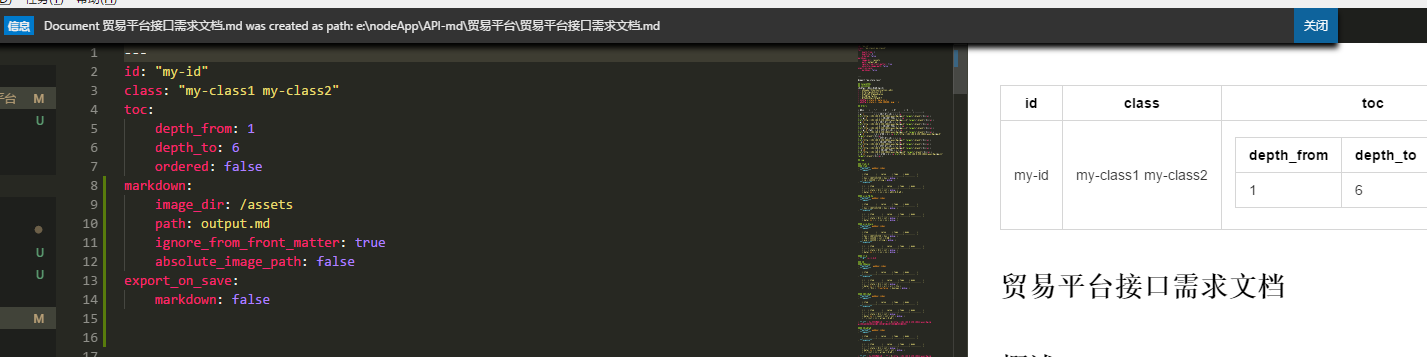
另生成的toc能否添加 当前选中标题高亮? | Save as Markdown替换了当前文件 | https://api.github.com/repos/shd101wyy/vscode-markdown-preview-enhanced/issues/1675/comments | 0 | 2018-02-28T04:26:37Z | 2023-08-23T02:57:54Z | https://github.com/shd101wyy/vscode-markdown-preview-enhanced/issues/1675 | 1,862,477,237 | 1,675 |
[
"shd101wyy",
"vscode-markdown-preview-enhanced"
] | I'm a big fan of your project and I'm trying to write an academic paper with it. The problem is that I can't force a footnote to stay right in the page where I declare it, as they are just displayed at the very bottom of the document (I'm aware that this is its proper behaviour). Am I missing something and, hopefully, ... | Multi page document with page-scoped footnotes? | https://api.github.com/repos/shd101wyy/vscode-markdown-preview-enhanced/issues/1676/comments | 0 | 2018-02-26T22:33:01Z | 2023-08-23T02:57:56Z | https://github.com/shd101wyy/vscode-markdown-preview-enhanced/issues/1676 | 1,862,477,289 | 1,676 |
[
"shd101wyy",
"vscode-markdown-preview-enhanced"
] | https://storybook.js.org/ | Any plans to integrate with Storybook? | https://api.github.com/repos/shd101wyy/vscode-markdown-preview-enhanced/issues/1677/comments | 0 | 2018-02-26T07:39:10Z | 2023-08-23T02:57:58Z | https://github.com/shd101wyy/vscode-markdown-preview-enhanced/issues/1677 | 1,862,477,342 | 1,677 |
[
"shd101wyy",
"vscode-markdown-preview-enhanced"
] | Great jobs. Outline is just in preview mode, if in editor mode, it'll be better.
Thanks. | Can enhance with outline in editor mode | https://api.github.com/repos/shd101wyy/vscode-markdown-preview-enhanced/issues/1678/comments | 0 | 2018-02-26T04:30:58Z | 2023-08-23T02:58:00Z | https://github.com/shd101wyy/vscode-markdown-preview-enhanced/issues/1678 | 1,862,477,393 | 1,678 |
[
"shd101wyy",
"vscode-markdown-preview-enhanced"
] | ERROR: type should be string, got "https://shd101wyy.github.io/markdown-preview-enhanced/#/extend-parser\r\n\r\nIs it possible to access the file name of the currently parsed file from within the parser extension?\r\n\r\nE.g. [hexo](https://hexo.io/docs/asset-folders.html#Tag-Plugins-For-Relative-Path-Referencing) uses `{% asset_img example.jpg}` to relatively reference images, but if I want to render it, I need to convert it into the actual path ``.\r\nBut to do that I need to know the current name of the file." | Referencing file name from extended parser | https://api.github.com/repos/shd101wyy/vscode-markdown-preview-enhanced/issues/1679/comments | 3 | 2018-02-25T21:13:32Z | 2023-08-23T02:58:02Z | https://github.com/shd101wyy/vscode-markdown-preview-enhanced/issues/1679 | 1,862,477,448 | 1,679 |
[
"shd101wyy",
"vscode-markdown-preview-enhanced"
] | After previewing a markdown, 'tab' button does not work as I expected. In edtior I can not even tab. | After preview 'tab' button | https://api.github.com/repos/shd101wyy/vscode-markdown-preview-enhanced/issues/78/comments | 2 | 2018-02-24T17:28:58Z | 2018-03-05T20:15:11Z | https://github.com/shd101wyy/vscode-markdown-preview-enhanced/issues/78 | 299,957,220 | 78 |
[
"shd101wyy",
"vscode-markdown-preview-enhanced"
] | Hello,
`export_on_save` does not work for me.
1) If I have
> ---
> ebook:
> title: TITLE
> ...
> epub:
> pretty-print: true
> export_on_save:
> ebook: "epub"
> ebook: "mobi"
> ebook: "html"
> ---
in the text, then the meta data table on the top of the preview disappears and p... | export_on_save does not work | https://api.github.com/repos/shd101wyy/vscode-markdown-preview-enhanced/issues/1680/comments | 1 | 2018-02-24T14:28:30Z | 2023-08-23T02:58:04Z | https://github.com/shd101wyy/vscode-markdown-preview-enhanced/issues/1680 | 1,862,477,488 | 1,680 |
[
"shd101wyy",
"vscode-markdown-preview-enhanced"
] | When writing a relation such as: `$[Q,P]_{q,p}=1$`, all the text following after it is italicized. The preview and the exported documents are properly rendered. The problem does not appear if the underscore is after an alphanumeric, `$a_i$`.
Do you have any advice for how to escape the underscore in this case? | Underscore for subscripts | https://api.github.com/repos/shd101wyy/vscode-markdown-preview-enhanced/issues/1681/comments | 4 | 2018-02-24T10:28:10Z | 2023-08-23T02:58:07Z | https://github.com/shd101wyy/vscode-markdown-preview-enhanced/issues/1681 | 1,862,477,536 | 1,681 |
[
"shd101wyy",
"vscode-markdown-preview-enhanced"
] | 您好,可以加一下您的微信吗?我的微信是HaoZanGB @shd101wyy | 您好,请问可以添加您的微信吗? | https://api.github.com/repos/shd101wyy/vscode-markdown-preview-enhanced/issues/1682/comments | 0 | 2018-02-24T06:07:08Z | 2023-08-23T02:58:09Z | https://github.com/shd101wyy/vscode-markdown-preview-enhanced/issues/1682 | 1,862,477,589 | 1,682 |
[
"shd101wyy",
"vscode-markdown-preview-enhanced"
] | 插入图片太大的时候,预览markdown时显示的图片很小,要是类似博客那种,点击图片后出现灯箱效果放大查看的功能就好了。 | 能提供单击图片放大查看的功能吗? | https://api.github.com/repos/shd101wyy/vscode-markdown-preview-enhanced/issues/77/comments | 0 | 2018-02-24T01:55:20Z | 2018-02-24T01:55:20Z | https://github.com/shd101wyy/vscode-markdown-preview-enhanced/issues/77 | 299,900,472 | 77 |
[
"shd101wyy",
"vscode-markdown-preview-enhanced"
] | I've reviewed issue #37 but that does not address what I am seeing.
While I am typing my markdown source (on the same line), the preview window scrolls down 1 unit for each keystroke. After a bit of typing, the source and preview are not sync'd. If I move the cursor up a line, the source and preview get re-sync'd.... | Preview scrolls while typing | https://api.github.com/repos/shd101wyy/vscode-markdown-preview-enhanced/issues/76/comments | 0 | 2018-02-22T16:29:14Z | 2018-02-22T16:29:14Z | https://github.com/shd101wyy/vscode-markdown-preview-enhanced/issues/76 | 299,419,797 | 76 |
[
"shd101wyy",
"vscode-markdown-preview-enhanced"
] | I'm trying to output HTML with `pandoc` because I want to use the citation feature. However, when I use the heading:
~~~~
---
title: "Sample Document"
output: html_document
bibliography: bibliography.bib
---
~~~~
I get this error: `Invalid document type.` Any suggestions? | Pandoc output HTML | https://api.github.com/repos/shd101wyy/vscode-markdown-preview-enhanced/issues/1683/comments | 4 | 2018-02-22T16:12:03Z | 2023-08-23T02:58:11Z | https://github.com/shd101wyy/vscode-markdown-preview-enhanced/issues/1683 | 1,862,477,627 | 1,683 |
[
"shd101wyy",
"vscode-markdown-preview-enhanced"
] | Since this plugin adds a number of extra features to markdown (things like @input or runnable code blocks, for example), I was wondering how portable my documents will be. Is there any way to convert them to PDF or HTML without going through Atom's interface?
Is there a node command or something I can pass the mark... | Exporting outside of Atom? | https://api.github.com/repos/shd101wyy/vscode-markdown-preview-enhanced/issues/1684/comments | 4 | 2018-02-20T20:02:12Z | 2023-08-23T02:58:13Z | https://github.com/shd101wyy/vscode-markdown-preview-enhanced/issues/1684 | 1,862,477,672 | 1,684 |
[
"shd101wyy",
"vscode-markdown-preview-enhanced"
] | Hello! Love this plugin so much, I've only just started using it so I apologize if this is maybe just a user error on my part.
I'm writing markdown files that include inline MathJax-style text, using $ and $$, and I've added some macros using the "Open MathJax Config" option. I'm also including a bunch of Latex for ... | Pandoc export doesn't recognize MathJax macros | https://api.github.com/repos/shd101wyy/vscode-markdown-preview-enhanced/issues/1685/comments | 0 | 2018-02-14T02:52:10Z | 2023-08-23T02:58:15Z | https://github.com/shd101wyy/vscode-markdown-preview-enhanced/issues/1685 | 1,862,477,727 | 1,685 |
[
"shd101wyy",
"vscode-markdown-preview-enhanced"
] | 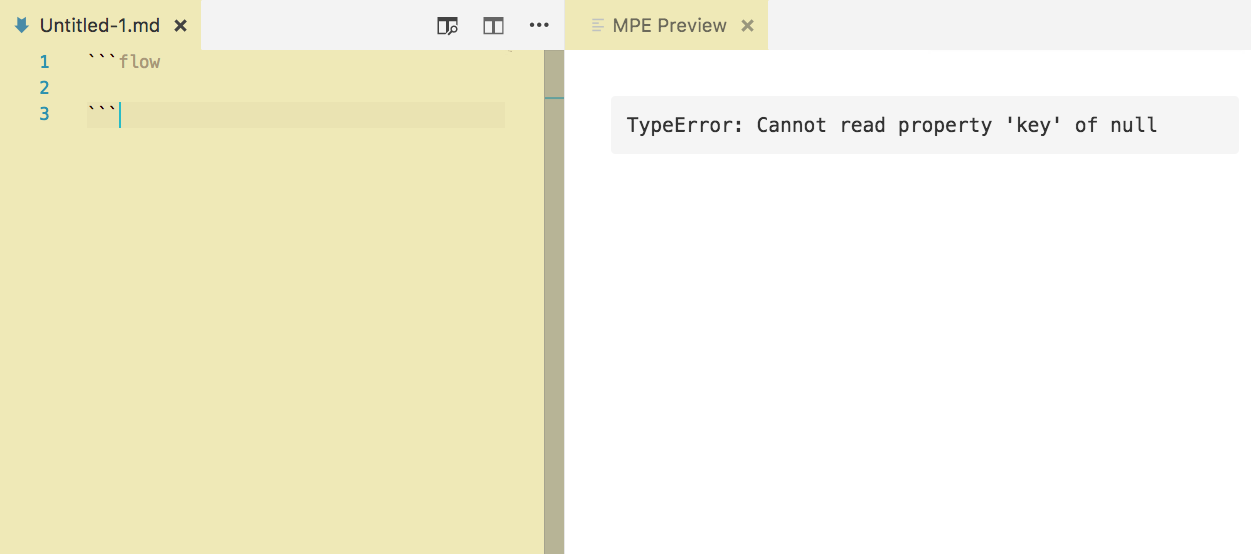
无法识别这个flow,我不知道是需要额外的配置吗?还是就我有错?
It can not recognize the key of "flow".
Should I need to configure some else?
| flow cannot use 流程图无法使用 | https://api.github.com/repos/shd101wyy/vscode-markdown-preview-enhanced/issues/1686/comments | 3 | 2018-02-12T04:47:22Z | 2023-08-23T02:58:17Z | https://github.com/shd101wyy/vscode-markdown-preview-enhanced/issues/1686 | 1,862,477,782 | 1,686 |
[
"shd101wyy",
"vscode-markdown-preview-enhanced"
] | the $$ or $ transfered to undefined. | On Macbook Pro when use atom-preview enhanced , the MathJax can 't render out fine. | https://api.github.com/repos/shd101wyy/vscode-markdown-preview-enhanced/issues/1687/comments | 1 | 2018-02-12T04:03:23Z | 2023-08-23T02:58:44Z | https://github.com/shd101wyy/vscode-markdown-preview-enhanced/issues/1687 | 1,862,477,835 | 1,687 |
[
"shd101wyy",
"vscode-markdown-preview-enhanced"
] | I try to use '~' for subscription in a `math` block , but it does not work
Ouside the math block this works:
> P\~i\~
With the math block it does not (but seemingly everything else).
> $ P\~i\~ $
| Subscript does not work in equation | https://api.github.com/repos/shd101wyy/vscode-markdown-preview-enhanced/issues/1688/comments | 2 | 2018-02-10T18:16:18Z | 2023-08-23T02:58:21Z | https://github.com/shd101wyy/vscode-markdown-preview-enhanced/issues/1688 | 1,862,477,884 | 1,688 |
[
"shd101wyy",
"vscode-markdown-preview-enhanced"
] | null | If there have a function to convert markdown to mind map? | https://api.github.com/repos/shd101wyy/vscode-markdown-preview-enhanced/issues/1689/comments | 4 | 2018-02-10T11:41:02Z | 2023-08-23T02:58:24Z | https://github.com/shd101wyy/vscode-markdown-preview-enhanced/issues/1689 | 1,862,477,934 | 1,689 |
[
"shd101wyy",
"vscode-markdown-preview-enhanced"
] | I am using the extension with VSCode:
```
Version 1.19.3
Commit 7c4205b5c6e52a53b81c69d2b2dc8a627abaa0ba
Date 2018-01-25T10:32:23.601Z
Shell 1.7.9
Renderer 58.0.3029.110
Node 7.9.0
Architecture x64
```
I cannot seem to find instructions anywhere to change the theme of the HTML export?
My user settings at t... | Theme for HTML export | https://api.github.com/repos/shd101wyy/vscode-markdown-preview-enhanced/issues/1690/comments | 2 | 2018-02-07T10:51:43Z | 2023-08-23T02:58:26Z | https://github.com/shd101wyy/vscode-markdown-preview-enhanced/issues/1690 | 1,862,477,976 | 1,690 |
[
"shd101wyy",
"vscode-markdown-preview-enhanced"
] | I need to render whole directory of .md files, which have cross links. And rendered .html files preserve cross-links on .md files. | html rendering doesn't change cross links .md to .html | https://api.github.com/repos/shd101wyy/vscode-markdown-preview-enhanced/issues/1691/comments | 3 | 2018-02-06T11:12:02Z | 2023-08-23T02:58:28Z | https://github.com/shd101wyy/vscode-markdown-preview-enhanced/issues/1691 | 1,862,478,028 | 1,691 |
[
"shd101wyy",
"vscode-markdown-preview-enhanced"
] | This plugin unfortunately ignores, if Atom is run in portable mode .atom sibling directory.
(see https://github.com/atom/atom/issues/10072)
Unfurtunately markdown-preview still generates the .mume folder in the user homedirectory. | Atom portable mode | https://api.github.com/repos/shd101wyy/vscode-markdown-preview-enhanced/issues/1692/comments | 0 | 2018-02-05T14:42:52Z | 2023-08-23T02:58:30Z | https://github.com/shd101wyy/vscode-markdown-preview-enhanced/issues/1692 | 1,862,478,078 | 1,692 |
[
"shd101wyy",
"vscode-markdown-preview-enhanced"
] | null | --version | https://api.github.com/repos/shd101wyy/vscode-markdown-preview-enhanced/issues/1693/comments | 1 | 2018-02-05T09:18:47Z | 2023-08-23T02:58:32Z | https://github.com/shd101wyy/vscode-markdown-preview-enhanced/issues/1693 | 1,862,478,126 | 1,693 |
[
"shd101wyy",
"vscode-markdown-preview-enhanced"
] | Hi,
when I put Formulas in Tables, the cell width seems to be calculated incorrectly.
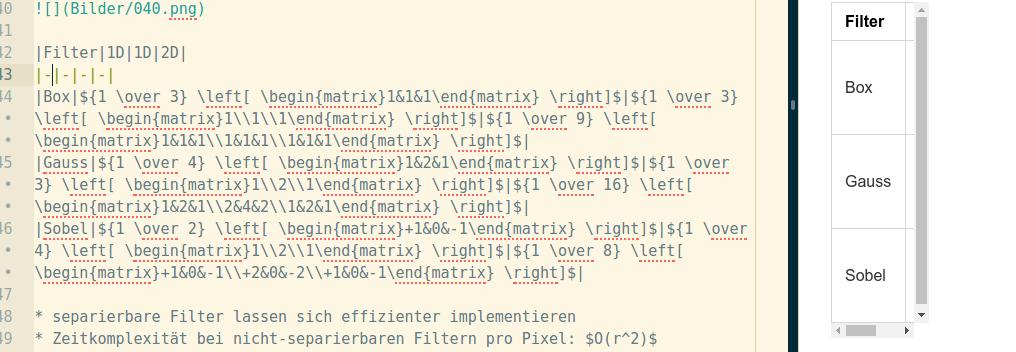
| Pandoc + KaTeX + Tables causes narrow tables | https://api.github.com/repos/shd101wyy/vscode-markdown-preview-enhanced/issues/1694/comments | 3 | 2018-02-02T16:18:36Z | 2023-08-23T02:58:34Z | https://github.com/shd101wyy/vscode-markdown-preview-enhanced/issues/1694 | 1,862,478,181 | 1,694 |
[
"shd101wyy",
"vscode-markdown-preview-enhanced"
] | 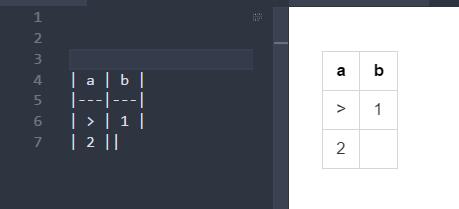
系统:window10,
编辑器: vscode,
版本:0.3.2 | 表格功能无法实现 | https://api.github.com/repos/shd101wyy/vscode-markdown-preview-enhanced/issues/1695/comments | 2 | 2018-02-01T03:26:05Z | 2023-08-23T02:58:36Z | https://github.com/shd101wyy/vscode-markdown-preview-enhanced/issues/1695 | 1,862,478,237 | 1,695 |
[
"shd101wyy",
"vscode-markdown-preview-enhanced"
] | 我用prince导出PDF为空,什么都没有。用浏览器的方法也是一样的,预览的时候没问题,只是导出会有问题。请问这是什么情况? | prince 导出PDF为空 | https://api.github.com/repos/shd101wyy/vscode-markdown-preview-enhanced/issues/1696/comments | 7 | 2018-01-31T15:38:10Z | 2023-08-23T02:58:38Z | https://github.com/shd101wyy/vscode-markdown-preview-enhanced/issues/1696 | 1,862,478,292 | 1,696 |
[
"shd101wyy",
"vscode-markdown-preview-enhanced"
] | environment:
- atom 1.23.3 x64
- macOS 10.13.2


restart Atom still doesn't work. | mathjax rendering doesn't work on preview | https://api.github.com/repos/shd101wyy/vscode-markdown-preview-enhanced/issues/1697/comments | 14 | 2018-01-31T03:36:49Z | 2023-08-31T18:47:36Z | https://github.com/shd101wyy/vscode-markdown-preview-enhanced/issues/1697 | 1,862,478,344 | 1,697 |
[
"shd101wyy",
"vscode-markdown-preview-enhanced"
] | Is it possible to make it so that we can center markdown tables and mermaid diagrams? wrapping each in `<center>` tags doesn't work. | Center mermaid diagrams and tables | https://api.github.com/repos/shd101wyy/vscode-markdown-preview-enhanced/issues/1698/comments | 3 | 2018-01-31T03:00:29Z | 2023-08-23T09:37:02Z | https://github.com/shd101wyy/vscode-markdown-preview-enhanced/issues/1698 | 1,862,478,416 | 1,698 |
Subsets and Splits
No community queries yet
The top public SQL queries from the community will appear here once available.