
issue_owner_repo listlengths 2 2 | issue_body stringlengths 0 262k ⌀ | issue_title stringlengths 1 1.02k | issue_comments_url stringlengths 53 116 | issue_comments_count int64 0 2.49k | issue_created_at stringdate 1999-03-17 02:06:42 2025-06-23 11:41:49 | issue_updated_at stringdate 2000-02-10 06:43:57 2025-06-23 11:43:00 | issue_html_url stringlengths 34 97 | issue_github_id int64 132 3.17B | issue_number int64 1 215k |
|---|---|---|---|---|---|---|---|---|---|
[
"shd101wyy",
"vscode-markdown-preview-enhanced"
] | thank you very much for developing MPE for atom。
I got a problem, the preview (also in browser) Chinese characters cannot be shown correctly in sequence-diagrams with "hand" theme (I am using Mac+Atom):

... | 使用sequence-diagrams的hand theme无法显示中文 | https://api.github.com/repos/shd101wyy/vscode-markdown-preview-enhanced/issues/1545/comments | 4 | 2018-07-25T08:33:49Z | 2023-08-23T02:53:11Z | https://github.com/shd101wyy/vscode-markdown-preview-enhanced/issues/1545 | 1,862,468,513 | 1,545 |
[
"shd101wyy",
"vscode-markdown-preview-enhanced"
] | null | windows下open in browser无反应 | https://api.github.com/repos/shd101wyy/vscode-markdown-preview-enhanced/issues/1546/comments | 3 | 2018-07-24T16:51:12Z | 2023-08-23T02:53:13Z | https://github.com/shd101wyy/vscode-markdown-preview-enhanced/issues/1546 | 1,862,468,531 | 1,546 |
[
"shd101wyy",
"vscode-markdown-preview-enhanced"
] | I'm using the following two settings.
```
"markdown-preview-enhanced.pandocArguments": "--filter=pandoc-crossref, --filter=pandoc-citeproc, --filter=pandoc-latex-newpage"
"markdown-preview-enhanced.usePandocParser": true
```
I get this:
<img width="2032" alt="image" src="https://user-images.githubusercontent.... | Can't get pandoc preview to look like pandoc-rendered document | https://api.github.com/repos/shd101wyy/vscode-markdown-preview-enhanced/issues/126/comments | 0 | 2018-07-23T23:07:52Z | 2018-07-23T23:20:03Z | https://github.com/shd101wyy/vscode-markdown-preview-enhanced/issues/126 | 343,826,900 | 126 |
[
"shd101wyy",
"vscode-markdown-preview-enhanced"
] | Grav博客管理的话,有后台,非常可控,但是对于图表的显示就比较弱了,能否对其进行支持。
[PLUGINS](https://getgrav.org/downloads/plugins) | 能否支持Grav的插件 | https://api.github.com/repos/shd101wyy/vscode-markdown-preview-enhanced/issues/1547/comments | 0 | 2018-07-23T03:20:03Z | 2023-08-23T02:53:15Z | https://github.com/shd101wyy/vscode-markdown-preview-enhanced/issues/1547 | 1,862,468,564 | 1,547 |
[
"shd101wyy",
"vscode-markdown-preview-enhanced"
] | 首先感谢你做了一个很好的插件。
这里有个小问题看下方便改进下么?
插件 markdown-pdf 能够导出以下的PlantUML图,但没有预览
```
@startuml
Bob -[#red]> Alice : hello
Alice -[#0000FF]->Bob : ok
@enduml
```
但是需要现在 markdown-preview-enhanced 插件却要增加
<pre>
```puml
@startuml
Bob -[#red]> Alice : hello
Alice -[#0000FF]->Bob : ok
@enduml
```
</pre>
能不能兼容... | 对于PlantUML的支持,能否不用代码块 | https://api.github.com/repos/shd101wyy/vscode-markdown-preview-enhanced/issues/125/comments | 1 | 2018-07-21T15:25:23Z | 2018-07-24T02:29:43Z | https://github.com/shd101wyy/vscode-markdown-preview-enhanced/issues/125 | 343,334,279 | 125 |
[
"shd101wyy",
"vscode-markdown-preview-enhanced"
] | I follow [here](https://shd101wyy.github.io/markdown-preview-enhanced/#/zh-cn/customize-css) to set the fonts, like
```
html body {
// modify your style here
// eg: background-color: blue;
.markdown-preview.markdown-preview {
@font-face {
font-family: 'DejaVu Sans Mono';
}
font-... | change font-family not work in vs code | https://api.github.com/repos/shd101wyy/vscode-markdown-preview-enhanced/issues/1548/comments | 2 | 2018-07-20T01:59:29Z | 2023-08-23T02:53:17Z | https://github.com/shd101wyy/vscode-markdown-preview-enhanced/issues/1548 | 1,862,468,643 | 1,548 |
[
"shd101wyy",
"vscode-markdown-preview-enhanced"
] | * 问题如题,具体截图如下:

* 环境
| 系统版本 | `vs`版本 | `MPE`版本 |
| ------ | ------ | ------ |
| `mac 10.13.6` |`1.25.1`| `0.3.5` |
| MPE对于相对路径的图片预览还是不支持么 | https://api.github.com/repos/shd101wyy/vscode-markdown-preview-enhanced/issues/124/comments | 1 | 2018-07-18T09:02:49Z | 2018-07-26T01:00:30Z | https://github.com/shd101wyy/vscode-markdown-preview-enhanced/issues/124 | 342,238,428 | 124 |
[
"shd101wyy",
"vscode-markdown-preview-enhanced"
] | 没有开启Zen模式没有问题,开启之后预览为空 | VS Code下禅模式无法预览 | https://api.github.com/repos/shd101wyy/vscode-markdown-preview-enhanced/issues/123/comments | 7 | 2018-07-18T06:49:53Z | 2018-08-14T02:55:00Z | https://github.com/shd101wyy/vscode-markdown-preview-enhanced/issues/123 | 342,198,247 | 123 |
[
"shd101wyy",
"vscode-markdown-preview-enhanced"
] | In case this is helpful to anyone else, you can customize the default number of spaces (currently 4) that represent a tab in your code blocks by doing the following
- Go to `Cmd+Shift+p` and enter Mardown Preview Enhanced: Customize Css
- Edit your default file so it looks like the one below (if you want to change ... | Customizing tab spaces count in code blocks | https://api.github.com/repos/shd101wyy/vscode-markdown-preview-enhanced/issues/1549/comments | 0 | 2018-07-17T22:51:18Z | 2023-08-23T02:53:20Z | https://github.com/shd101wyy/vscode-markdown-preview-enhanced/issues/1549 | 1,862,468,729 | 1,549 |
[
"shd101wyy",
"vscode-markdown-preview-enhanced"
] | 能不能生成 想Linux下tree命令一样的树状图呢 # | 可以生成树状图 | https://api.github.com/repos/shd101wyy/vscode-markdown-preview-enhanced/issues/1550/comments | 0 | 2018-07-17T13:44:50Z | 2024-01-25T01:10:30Z | https://github.com/shd101wyy/vscode-markdown-preview-enhanced/issues/1550 | 1,862,468,809 | 1,550 |
[
"shd101wyy",
"vscode-markdown-preview-enhanced"
] | Currently it's not possible to have:
```
<div class="custom-class">
**should be bold**
</div>
```
since the markdown paragraph is interpreted as text. The only workaround I've found till now is to sacrifice h6 to attach a class to a markdown paragraph, for instance:
```
###### **should be bold** {.custom-... | Feature Request: custom div with markdown content proposal | https://api.github.com/repos/shd101wyy/vscode-markdown-preview-enhanced/issues/1551/comments | 8 | 2018-07-17T11:54:54Z | 2023-08-23T02:53:24Z | https://github.com/shd101wyy/vscode-markdown-preview-enhanced/issues/1551 | 1,862,468,858 | 1,551 |
[
"shd101wyy",
"vscode-markdown-preview-enhanced"
] | MPE's preview window doesn't seem to handle URLs with embedded parentheses. For example, this markdown:
```
[How to Request a Certificate With a Custom Subject Alternative Name](https://docs.microsoft.com/en-us/previous-versions/windows/it-pro/windows-server-2008-R2-and-2008/ff625722(v=ws.10))
```
Seems to gene... | URL with embedded parentheses is not parsed correctly | https://api.github.com/repos/shd101wyy/vscode-markdown-preview-enhanced/issues/122/comments | 1 | 2018-07-17T01:04:05Z | 2018-07-17T16:40:46Z | https://github.com/shd101wyy/vscode-markdown-preview-enhanced/issues/122 | 341,729,181 | 122 |
[
"shd101wyy",
"vscode-markdown-preview-enhanced"
] | Hi shd101wyy,
I just began to use this great tool, but met one issue on pandoc PDF generating.
MPE: 0.15.6
pandoc: 2.2.1
atom: 1.27.2 x64 Debian
This command runs well in console.
pandoc -f markdown-raw_tex+tex_math_single_backslash -o my_spec.pdf --pdf-engine=pdflatex my_spec.md
But I always got "Error: in... | pandoc PDF output issue | https://api.github.com/repos/shd101wyy/vscode-markdown-preview-enhanced/issues/1552/comments | 1 | 2018-07-15T14:18:27Z | 2023-08-23T02:53:26Z | https://github.com/shd101wyy/vscode-markdown-preview-enhanced/issues/1552 | 1,862,468,905 | 1,552 |
[
"shd101wyy",
"vscode-markdown-preview-enhanced"
] | 当配置为:
```
"markdown-preview-enhanced.previewTheme": "vue.css",
"markdown-preview-enhanced.printBackground": true,
```
使用prince导出pdf时,只有第一页。
https://www.princexml.com/forum/topic/1174/only-first-page-of-html-file-is-generated-to-pdf
| vue.css下使用prince导出,只会有第一页 | https://api.github.com/repos/shd101wyy/vscode-markdown-preview-enhanced/issues/1553/comments | 2 | 2018-07-15T01:39:26Z | 2023-08-23T02:53:28Z | https://github.com/shd101wyy/vscode-markdown-preview-enhanced/issues/1553 | 1,862,468,957 | 1,553 |
[
"shd101wyy",
"vscode-markdown-preview-enhanced"
] | prince 使用的最新版本,官网下载的zip包。(没有windows 管理员权限,没有尝试msi版)
导出的pdf只有第一页。
只看这一页的话,样式字体是没有问题的。
但不管多大的markdown文件,导出为pdf后都只有一页。
MPE:0.3.5
vscode:1.25.1
prince:12 | 使用prince导出pdf只有一页 | https://api.github.com/repos/shd101wyy/vscode-markdown-preview-enhanced/issues/121/comments | 3 | 2018-07-14T23:06:30Z | 2023-08-23T02:53:29Z | https://github.com/shd101wyy/vscode-markdown-preview-enhanced/issues/121 | 341,277,331 | 121 |
[
"shd101wyy",
"vscode-markdown-preview-enhanced"
] | 编辑 Markdown 文件完毕后本打算点击 Pandoc 导出, 结果误点了 "Save as Markdown" 选项, 原文件被新生成的 Markdown 文件覆盖, 因忘记 git add, 无法找回原文件. LaTeX 公式被替换为 gif 图片.
希望能对此操作做一个保护. 使导出的文件拥有不同的文件名. 或者检测到当前文件是 Markdown 格式时, 禁用 "Save as Markdown" 选项. | 误操作 Save as Markdown 覆盖了原 Markdown 文件 | https://api.github.com/repos/shd101wyy/vscode-markdown-preview-enhanced/issues/1554/comments | 0 | 2018-07-08T13:37:02Z | 2023-08-23T02:53:30Z | https://github.com/shd101wyy/vscode-markdown-preview-enhanced/issues/1554 | 1,862,469,000 | 1,554 |
[
"shd101wyy",
"vscode-markdown-preview-enhanced"
] | 1. atom插件老版本支持侧边outline,新版本和vscode版本不支持
2. 希望支持单个 or 多个文件夹的md导出,自动生成索引;并提供全局索引
哈哈,我好贪心 | 导出建议 | https://api.github.com/repos/shd101wyy/vscode-markdown-preview-enhanced/issues/1555/comments | 0 | 2018-07-07T12:42:25Z | 2023-08-23T02:53:32Z | https://github.com/shd101wyy/vscode-markdown-preview-enhanced/issues/1555 | 1,862,469,050 | 1,555 |
[
"shd101wyy",
"vscode-markdown-preview-enhanced"
] | I would love to be able to configure code blocks to wrap | Wrapping inside code blocks | https://api.github.com/repos/shd101wyy/vscode-markdown-preview-enhanced/issues/1556/comments | 1 | 2018-07-06T14:41:57Z | 2023-08-23T02:53:34Z | https://github.com/shd101wyy/vscode-markdown-preview-enhanced/issues/1556 | 1,862,469,098 | 1,556 |
[
"shd101wyy",
"vscode-markdown-preview-enhanced"
] | 想把本地图片以 base64 格式嵌入html文档
```
---
html:
embed_local_images: false
embed_svg: true
offline: false
toc: undefined
print_background: false
---
```
请问这段代码应该在哪修改呢?插件设置里没有,把这段代码直接插入.md文件中也没用 | 本地图片嵌入html导出的问题 | https://api.github.com/repos/shd101wyy/vscode-markdown-preview-enhanced/issues/1557/comments | 6 | 2018-07-05T16:11:36Z | 2023-08-23T02:53:36Z | https://github.com/shd101wyy/vscode-markdown-preview-enhanced/issues/1557 | 1,862,469,134 | 1,557 |
[
"shd101wyy",
"vscode-markdown-preview-enhanced"
] | 非常喜欢gitboot那种 | 新功能期待:希望浏览器渲染可以选择将目录浮动在侧边 | https://api.github.com/repos/shd101wyy/vscode-markdown-preview-enhanced/issues/1558/comments | 0 | 2018-07-04T13:04:55Z | 2023-08-23T02:53:38Z | https://github.com/shd101wyy/vscode-markdown-preview-enhanced/issues/1558 | 1,862,469,180 | 1,558 |
[
"shd101wyy",
"vscode-markdown-preview-enhanced"
] | This might be a noob issue but the preview is not toggling for whatever reason. I installed and uninstalled the package but still no luck. Is there a solution for this? I've noticed that this issue was brought up previously but there wasn't a solution in that post. Any help would be greatly appreciated. | Package not toggling | https://api.github.com/repos/shd101wyy/vscode-markdown-preview-enhanced/issues/1559/comments | 2 | 2018-07-04T05:19:39Z | 2023-08-23T02:53:41Z | https://github.com/shd101wyy/vscode-markdown-preview-enhanced/issues/1559 | 1,862,469,223 | 1,559 |
[
"shd101wyy",
"vscode-markdown-preview-enhanced"
] | In the default markdown editor for VSCode, when I click on any point in the markdown preview, VSCode moves the cursor to the nearest markdown code in the editor. It seems MPE currently does not support it. Also, he currently selected line in the editor is indicated in the standard Markdown preview by a light gray bar i... | Click on Preview and move cursor to nearest Markdown code | https://api.github.com/repos/shd101wyy/vscode-markdown-preview-enhanced/issues/1560/comments | 0 | 2018-06-28T20:48:51Z | 2023-08-23T02:53:43Z | https://github.com/shd101wyy/vscode-markdown-preview-enhanced/issues/1560 | 1,862,469,264 | 1,560 |
[
"shd101wyy",
"vscode-markdown-preview-enhanced"
] | As it is done for vega-lite, mermaid, etc., it will be great if it is possible to embed an svg image in a code block and MPE automatically renders it. For example, the following code block
```svg
<svg height="210" width="500">
<polygon points="200,10 250,190 160,210" style="fill:lime;stroke:purple;stroke-width:... | Rendering SVG in a code block as an image | https://api.github.com/repos/shd101wyy/vscode-markdown-preview-enhanced/issues/1561/comments | 1 | 2018-06-28T18:37:36Z | 2023-08-23T02:53:46Z | https://github.com/shd101wyy/vscode-markdown-preview-enhanced/issues/1561 | 1,862,469,304 | 1,561 |
[
"shd101wyy",
"vscode-markdown-preview-enhanced"
] | I'm using a third party program that is used to generate a document in markdown format, but unfortunately the program can only produce documents with a `.txt` extension. I cannot change the program. While I do realize that I could copy or rename the resulting document, it would be nice if MPE supported the `{as=}` opti... | Enhancement to support {as=} option on import of documents | https://api.github.com/repos/shd101wyy/vscode-markdown-preview-enhanced/issues/1562/comments | 1 | 2018-06-28T13:31:56Z | 2023-08-23T02:53:48Z | https://github.com/shd101wyy/vscode-markdown-preview-enhanced/issues/1562 | 1,862,469,346 | 1,562 |
[
"shd101wyy",
"vscode-markdown-preview-enhanced"
] | Can we have autocompletion for math equation, like [LaTeX-Workshop](https://github.com/James-Yu/LaTeX-Workshop)? | autocompletion for math equations | https://api.github.com/repos/shd101wyy/vscode-markdown-preview-enhanced/issues/1563/comments | 0 | 2018-06-27T16:47:08Z | 2023-08-23T02:53:50Z | https://github.com/shd101wyy/vscode-markdown-preview-enhanced/issues/1563 | 1,862,469,388 | 1,563 |
[
"shd101wyy",
"vscode-markdown-preview-enhanced"
] | 看起来我无法加粗带有标点符号的字符串,尤其是字符串之后带有其他字符的时候
包括中文和英文标点
一个可以复现的样例形如
```markdown
**大佬:**的
```
下面是这种bug的截图
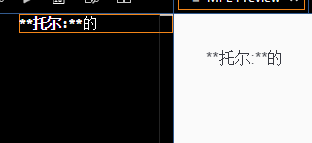
我认为这个bug的产生可能和解析有关
但是似乎直接单行加粗并不会有这个问题
| [bug]can not bold string when there is any punctuation inside string | https://api.github.com/repos/shd101wyy/vscode-markdown-preview-enhanced/issues/1564/comments | 1 | 2018-06-27T14:59:49Z | 2023-08-23T02:53:58Z | https://github.com/shd101wyy/vscode-markdown-preview-enhanced/issues/1564 | 1,862,469,430 | 1,564 |
[
"shd101wyy",
"vscode-markdown-preview-enhanced"
] | The [Links](https://shd101wyy.github.io/markdown-preview-enhanced/#/markdown-basics?id=links) section of the [Markdown Basics](https://shd101wyy.github.io/markdown-preview-enhanced/#/markdown-basics) document shows the following:
` http://github.com - automatic!`
http://github.com - automatic!
and
`[GitHub](... | Documentation Update for Links Section | https://api.github.com/repos/shd101wyy/vscode-markdown-preview-enhanced/issues/1565/comments | 0 | 2018-06-27T14:35:05Z | 2023-08-23T02:53:54Z | https://github.com/shd101wyy/vscode-markdown-preview-enhanced/issues/1565 | 1,862,469,488 | 1,565 |
[
"shd101wyy",
"vscode-markdown-preview-enhanced"
] | When using superscript or subscript you cannot combine it with bold, emphasis or highlight.
Example issues:
`code*^2^*`
`code**^2^**`
`code==^2^==`
Expected the superscript 2 to be in emphasis, bold or highlighted, but instead the actual characters *, **, == are rendered around the superscript 2.
Note cha... | Cannot combine Super/Subscript with bold, emphasis, highlight | https://api.github.com/repos/shd101wyy/vscode-markdown-preview-enhanced/issues/1566/comments | 2 | 2018-06-27T12:40:48Z | 2023-08-23T02:53:57Z | https://github.com/shd101wyy/vscode-markdown-preview-enhanced/issues/1566 | 1,862,469,554 | 1,566 |
[
"shd101wyy",
"vscode-markdown-preview-enhanced"
] | Greetings,
and first off, thank you so much for your great work; I think you have done something amazing here.
When trying to export a presentation as PDF (PhantomJS) everything works nicely except for the mermaid graphs which do not render at all -- is this a known limitation or a bug?
In the first case, are th... | Mermaid (presentation) not visible in PDF export | https://api.github.com/repos/shd101wyy/vscode-markdown-preview-enhanced/issues/1567/comments | 4 | 2018-06-26T16:26:45Z | 2023-08-23T02:53:59Z | https://github.com/shd101wyy/vscode-markdown-preview-enhanced/issues/1567 | 1,862,469,627 | 1,567 |
[
"shd101wyy",
"vscode-markdown-preview-enhanced"
] | toc 目录能否做成思维导图那种样子?,或者导入外部的思维导图文件,需要借助第三方思维导图文件的解析器吗? | 能否显示思维导图文件 | https://api.github.com/repos/shd101wyy/vscode-markdown-preview-enhanced/issues/1568/comments | 5 | 2018-06-23T16:09:58Z | 2023-08-23T02:54:01Z | https://github.com/shd101wyy/vscode-markdown-preview-enhanced/issues/1568 | 1,862,469,704 | 1,568 |
[
"shd101wyy",
"vscode-markdown-preview-enhanced"
] | Hi,
Is there anything special I need to do to get the Image Helper to work? I'm trying to open it up using Ctrl+Shift+P in vscode but I get an error.
`
the link when launched will reference the webpage:
`https://en.wikipedia.org/wiki/Ada` | Links with commas are truncated when referenced | https://api.github.com/repos/shd101wyy/vscode-markdown-preview-enhanced/issues/119/comments | 1 | 2018-06-20T16:50:12Z | 2018-06-20T17:05:35Z | https://github.com/shd101wyy/vscode-markdown-preview-enhanced/issues/119 | 334,165,584 | 119 |
[
"shd101wyy",
"vscode-markdown-preview-enhanced"
] | When importing a CSV file the extension does not properly handle cells with newlines. The following is a CSV that demonstrates the issue. The CSV was created by exporting from Excel. The issue presents itself at "Tax Rates" in the Label column.
Label,Content
Tax City Code,002
Tax City Name,Ada
Tax City Type,Villa... | @import CSV does not properly handle cells with newlines | https://api.github.com/repos/shd101wyy/vscode-markdown-preview-enhanced/issues/118/comments | 1 | 2018-06-20T10:56:50Z | 2018-06-20T16:56:41Z | https://github.com/shd101wyy/vscode-markdown-preview-enhanced/issues/118 | 334,025,952 | 118 |
[
"shd101wyy",
"vscode-markdown-preview-enhanced"
] | Hello,
Currently both double underscore and double * are generating the same html `<strong></strong>`.
Could we add a class to allow to differentiate both of them :
** => `<strong class='star'></strong>`
_ _ => `<strong class='underscore'></strong>`.
This would allow me to style both of them differently and ... | Differenciate `_ _` and `** **` with class | https://api.github.com/repos/shd101wyy/vscode-markdown-preview-enhanced/issues/117/comments | 3 | 2018-06-20T09:34:58Z | 2018-06-20T13:17:54Z | https://github.com/shd101wyy/vscode-markdown-preview-enhanced/issues/117 | 333,998,087 | 117 |
[
"shd101wyy",
"vscode-markdown-preview-enhanced"
] | see https://github.com/Khan/KaTeX/pull/1309 | KaTeX is now support \tag,please update. | https://api.github.com/repos/shd101wyy/vscode-markdown-preview-enhanced/issues/116/comments | 0 | 2018-06-20T01:59:13Z | 2018-06-20T01:59:13Z | https://github.com/shd101wyy/vscode-markdown-preview-enhanced/issues/116 | 333,897,848 | 116 |
[
"shd101wyy",
"vscode-markdown-preview-enhanced"
] | ```mermaid
graph TB
c1-->a2
subgraph one
a1-->a2
end
```
the mermaid code above is not working on preview since I used tabs, I tried using spaces bellow and it works
```mermaid
graph TB
c1-->a2
subgraph one
a1-->a2
end
```
| Mermaid flowchart subgraph not working if tabs were used | https://api.github.com/repos/shd101wyy/vscode-markdown-preview-enhanced/issues/1570/comments | 0 | 2018-06-19T22:18:11Z | 2023-08-23T02:54:05Z | https://github.com/shd101wyy/vscode-markdown-preview-enhanced/issues/1570 | 1,862,469,825 | 1,570 |
[
"shd101wyy",
"vscode-markdown-preview-enhanced"
] | markdown-preview-enhanced doesn't support all table syntax: https://rmarkdown.rstudio.com/authoring_pandoc_markdown.html#tables
One of them is grid table syntax. This is used as default syntax for docx-markdown conversion in pandoc tool :-(
Syntax example
```
+---------------+---------------+-------------------... | Table: support grid tables | https://api.github.com/repos/shd101wyy/vscode-markdown-preview-enhanced/issues/1571/comments | 4 | 2018-06-19T14:09:08Z | 2024-05-14T15:21:37Z | https://github.com/shd101wyy/vscode-markdown-preview-enhanced/issues/1571 | 1,862,469,885 | 1,571 |
[
"shd101wyy",
"vscode-markdown-preview-enhanced"
] | Currently, customization of preview styles only happens from a local file. But I need the css file to be included in git so it will apply on other users as well.
Copied from VSCode settings that implements the feature:
```
// A list of URLs or local paths to CSS style sheets to use from the markdown preview. Rel... | custom css URLs to be set for preview styling | https://api.github.com/repos/shd101wyy/vscode-markdown-preview-enhanced/issues/1572/comments | 1 | 2018-06-18T23:05:56Z | 2023-08-23T02:54:10Z | https://github.com/shd101wyy/vscode-markdown-preview-enhanced/issues/1572 | 1,862,469,945 | 1,572 |
[
"shd101wyy",
"vscode-markdown-preview-enhanced"
] | markdown preview works with markdown-preview
* ctrl-shift-m
* packages -> markdown-preview-enhanced -> toggle ...
-> no reaction
Further tests:
* Disable markdown-preview-enhanced package and enable markdown-preview -> ctrl-shift-m opens a preview window.
* Disable markdown-preview-enhanced package and e... | Strg-Shift-M doesn't work anymore | https://api.github.com/repos/shd101wyy/vscode-markdown-preview-enhanced/issues/1573/comments | 1 | 2018-06-18T13:02:00Z | 2023-08-23T02:54:12Z | https://github.com/shd101wyy/vscode-markdown-preview-enhanced/issues/1573 | 1,862,470,069 | 1,573 |
[
"shd101wyy",
"vscode-markdown-preview-enhanced"
] | 原生markdown不支持table 的扩展语法:
```
| a | b |
|---|---|
| > | 1 |
| 2 | |
```
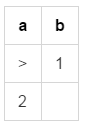
在官方文档中描述是:
 | https://api.github.com/repos/shd101wyy/vscode-markdown-preview-enhanced/issues/115/comments | 2 | 2018-06-18T02:11:55Z | 2018-06-25T15:00:39Z | https://github.com/shd101wyy/vscode-markdown-preview-enhanced/issues/115 | 333,114,455 | 115 |
[
"shd101wyy",
"vscode-markdown-preview-enhanced"
] | 刚刚试了一下,atom崩了。顺便问一下,如何完美嵌入svg(@import方式使用img标签,不能进行检索) | [Bug]使用iframe、object或embed标签会导致无限刷新甚至崩溃 | https://api.github.com/repos/shd101wyy/vscode-markdown-preview-enhanced/issues/1574/comments | 1 | 2018-06-16T12:32:17Z | 2023-08-23T02:54:14Z | https://github.com/shd101wyy/vscode-markdown-preview-enhanced/issues/1574 | 1,862,470,196 | 1,574 |
[
"shd101wyy",
"vscode-markdown-preview-enhanced"
] | An @import tag must specify the location of the document to be imported. The document location is also used in the HTML to generate an appropriate tag. For example, importing a CSS document will generate an HTML link tag. The issue is that the documentation isn't specific about the @import tag's content encoding for th... | @import disconnect with HTML link tag | https://api.github.com/repos/shd101wyy/vscode-markdown-preview-enhanced/issues/1575/comments | 0 | 2018-06-15T15:42:26Z | 2023-08-23T02:54:17Z | https://github.com/shd101wyy/vscode-markdown-preview-enhanced/issues/1575 | 1,862,470,301 | 1,575 |
[
"shd101wyy",
"vscode-markdown-preview-enhanced"
] | As I understand document export configurations is set individually on each markdown file. Is it possible to have a global configuration and export the markdown files unto a different path following the same hierarchy as the original?
sample:
```
index.md
folder1/index.md
folder1/document.md
folder2/index.md
... | Global document export configuration | https://api.github.com/repos/shd101wyy/vscode-markdown-preview-enhanced/issues/1576/comments | 0 | 2018-06-13T08:02:16Z | 2023-08-23T02:54:19Z | https://github.com/shd101wyy/vscode-markdown-preview-enhanced/issues/1576 | 1,862,470,417 | 1,576 |
[
"shd101wyy",
"vscode-markdown-preview-enhanced"
] | 报错信息
```
Detected VS Code engine version: ^1.12.0
Error installing vscode.d.ts: Error: read ECONNRESET
npm ERR! code ELIFECYCLE
npm ERR! errno 1
npm ERR! markdown-preview-enhanced@0.3.5 postinstall: `node ./node_modules/vscode/bin/install`
npm ERR! Exit status 1
npm ERR!
npm ERR! Failed at the markdown-preview... | clone下来的文件npm install后没有找到vscode模块 | https://api.github.com/repos/shd101wyy/vscode-markdown-preview-enhanced/issues/114/comments | 3 | 2018-06-13T04:03:00Z | 2019-01-21T03:09:49Z | https://github.com/shd101wyy/vscode-markdown-preview-enhanced/issues/114 | 331,833,820 | 114 |
[
"shd101wyy",
"vscode-markdown-preview-enhanced"
] | When I couple
```
export_on_save:
html: true
```
with revealjs presentation
```
<!-- slide -->
```
the html file is not exported automatically is this expected behavior? | export_on_save for presentation | https://api.github.com/repos/shd101wyy/vscode-markdown-preview-enhanced/issues/1577/comments | 1 | 2018-06-12T17:40:55Z | 2023-08-23T02:54:21Z | https://github.com/shd101wyy/vscode-markdown-preview-enhanced/issues/1577 | 1,862,470,521 | 1,577 |
[
"shd101wyy",
"vscode-markdown-preview-enhanced"
] | Is it possible to use this in github? | Usage in Github | https://api.github.com/repos/shd101wyy/vscode-markdown-preview-enhanced/issues/1578/comments | 1 | 2018-06-12T14:40:37Z | 2023-08-23T02:54:23Z | https://github.com/shd101wyy/vscode-markdown-preview-enhanced/issues/1578 | 1,862,470,630 | 1,578 |
[
"shd101wyy",
"vscode-markdown-preview-enhanced"
] | After last update checkbox items ( - [ ] ones..) not saved after checked. Also when items checked on the preview side, other side is not updated in accordance.
After reviewing the error, i found out that when a long link added to note such as (http://www.idefix.com/Kitap/Ustalik-Gerektiren-Kafaya-Takmama-Sanati/E... | checkbox items not saved | https://api.github.com/repos/shd101wyy/vscode-markdown-preview-enhanced/issues/1579/comments | 1 | 2018-06-11T10:50:01Z | 2023-08-23T02:54:26Z | https://github.com/shd101wyy/vscode-markdown-preview-enhanced/issues/1579 | 1,862,470,774 | 1,579 |
[
"shd101wyy",
"vscode-markdown-preview-enhanced"
] | I am currently trying out the new VS-Code feature VS Live Share. This feature can be used to write a document together with a friend - you can see where he is typing. (https://marketplace.visualstudio.com/items?itemName=MS-vsliveshare.vsliveshare)
The Preview of your plugin is working. The only problem is, that the ... | [Feature Request] VS-Code Live Sharing | https://api.github.com/repos/shd101wyy/vscode-markdown-preview-enhanced/issues/1580/comments | 1 | 2018-06-08T07:01:31Z | 2023-08-23T02:54:28Z | https://github.com/shd101wyy/vscode-markdown-preview-enhanced/issues/1580 | 1,862,470,891 | 1,580 |
[
"shd101wyy",
"vscode-markdown-preview-enhanced"
] | 我写了一个Markdownd的文件,然后想预览一下,环境:windows。
快捷键是: `ctrl + k + v`
但是显示的是:`组合键(ctrl + K, ctrl +V) 不是命令`。
| 为什么打不开预览 | https://api.github.com/repos/shd101wyy/vscode-markdown-preview-enhanced/issues/113/comments | 1 | 2018-06-06T08:59:43Z | 2018-06-06T09:05:38Z | https://github.com/shd101wyy/vscode-markdown-preview-enhanced/issues/113 | 329,776,970 | 113 |
[
"shd101wyy",
"vscode-markdown-preview-enhanced"
] | 随便输入test.in自动转成超链接,怎么取消呢? | 怎么取消自动超链接? | https://api.github.com/repos/shd101wyy/vscode-markdown-preview-enhanced/issues/1581/comments | 5 | 2018-06-06T02:13:39Z | 2023-08-23T02:54:30Z | https://github.com/shd101wyy/vscode-markdown-preview-enhanced/issues/1581 | 1,862,470,994 | 1,581 |
[
"shd101wyy",
"vscode-markdown-preview-enhanced"
] | null | 能否方便的改变字体颜色与字体大小 | https://api.github.com/repos/shd101wyy/vscode-markdown-preview-enhanced/issues/1582/comments | 2 | 2018-06-04T15:40:43Z | 2023-08-23T02:54:32Z | https://github.com/shd101wyy/vscode-markdown-preview-enhanced/issues/1582 | 1,862,471,104 | 1,582 |
[
"shd101wyy",
"vscode-markdown-preview-enhanced"
] | Hello,
Is there is a way to change the font size of the code block output? Thank you! | customize the code block font size | https://api.github.com/repos/shd101wyy/vscode-markdown-preview-enhanced/issues/1583/comments | 1 | 2018-06-04T00:36:29Z | 2023-08-23T02:54:34Z | https://github.com/shd101wyy/vscode-markdown-preview-enhanced/issues/1583 | 1,862,471,219 | 1,583 |
[
"shd101wyy",
"vscode-markdown-preview-enhanced"
] | 如题,谢谢 | Ubuntu 18.04 + VS Code: 如何设置 MPE Preview 主题与 VS Code 默认主题一致? | https://api.github.com/repos/shd101wyy/vscode-markdown-preview-enhanced/issues/112/comments | 0 | 2018-06-03T14:18:47Z | 2018-06-03T14:18:47Z | https://github.com/shd101wyy/vscode-markdown-preview-enhanced/issues/112 | 328,832,603 | 112 |
[
"shd101wyy",
"vscode-markdown-preview-enhanced"
] |
1. ctrl-shift-m (preview)
2. reinstalling and restating atom didn't help
**Atom**: 1.27.2 x64
**Electron**: 1.7.15
**OS**: Microsoft Windows 10 Pro
**Thrown From**: [markdown-preview-enhanced](https://github.com/shd101wyy/markdown-preview-enhanced) package 0.15.6
### Stack Trace
Uncaught TypeError: C... | Uncaught TypeError: Cannot read property 'destroyItem' of undefined | https://api.github.com/repos/shd101wyy/vscode-markdown-preview-enhanced/issues/1584/comments | 1 | 2018-06-02T20:31:33Z | 2023-08-23T02:54:37Z | https://github.com/shd101wyy/vscode-markdown-preview-enhanced/issues/1584 | 1,862,471,349 | 1,584 |
[
"shd101wyy",
"vscode-markdown-preview-enhanced"
] | Being able to preview Rmarkdown documents would be amazing. I'm too much of a novice to do even that, so I apologize.
This feature would really make my life so much better. Thanks so much! | [Feature Request] Rmarkdown document preview capability | https://api.github.com/repos/shd101wyy/vscode-markdown-preview-enhanced/issues/1585/comments | 1 | 2018-05-27T16:11:21Z | 2023-08-23T02:54:39Z | https://github.com/shd101wyy/vscode-markdown-preview-enhanced/issues/1585 | 1,862,471,454 | 1,585 |
[
"shd101wyy",
"vscode-markdown-preview-enhanced"
] | [Enter steps to reproduce:]
1. When I first time use a new machine, I import the old version .md file, it appeared.
2. ...
**Atom**: 1.27.1 x64
**Electron**: 1.7.15
**OS**: Windows 10
**Thrown From**: [markdown-preview-enhanced](https://github.com/shd101wyy/markdown-preview-enhanced) package 0.15.6
### S... | Uncaught TypeError: this.editor.getFileName is not a function | https://api.github.com/repos/shd101wyy/vscode-markdown-preview-enhanced/issues/1586/comments | 3 | 2018-05-27T15:11:32Z | 2023-08-23T02:54:41Z | https://github.com/shd101wyy/vscode-markdown-preview-enhanced/issues/1586 | 1,862,471,561 | 1,586 |
[
"shd101wyy",
"vscode-markdown-preview-enhanced"
] | 關檔前

一旦關掉檔案
 | 中文 TOC 無法保存 | https://api.github.com/repos/shd101wyy/vscode-markdown-preview-enhanced/issues/1587/comments | 3 | 2018-05-27T07:21:50Z | 2023-08-23T02:54:43Z | https://github.com/shd101wyy/vscode-markdown-preview-enhanced/issues/1587 | 1,862,471,688 | 1,587 |
[
"shd101wyy",
"vscode-markdown-preview-enhanced"
] | 我现在使用的一个atom插件在MacOS 下可以将渲染出的Markdown文档和Evernote进行同步,
插件名: ever-notedown, 请问markdown-preview-enhanced是否能支持这个特性? | 能否在本地和evernote进行同步? | https://api.github.com/repos/shd101wyy/vscode-markdown-preview-enhanced/issues/1588/comments | 0 | 2018-05-26T19:00:45Z | 2023-08-23T02:54:45Z | https://github.com/shd101wyy/vscode-markdown-preview-enhanced/issues/1588 | 1,862,471,803 | 1,588 |
[
"shd101wyy",
"vscode-markdown-preview-enhanced"
] | 
**如图,svg没有显示**
| js-sequence-diagrams图表没有在预览中显示,只可以导出或者在浏览器中查看 | https://api.github.com/repos/shd101wyy/vscode-markdown-preview-enhanced/issues/1589/comments | 2 | 2018-05-26T11:03:38Z | 2023-08-23T02:54:47Z | https://github.com/shd101wyy/vscode-markdown-preview-enhanced/issues/1589 | 1,862,471,894 | 1,589 |
[
"shd101wyy",
"vscode-markdown-preview-enhanced"
] | 是否可以把预览做成服务器的方式,这样除了自己可以看之外,也可以让局域网内的其它人直接访问查看.
这样大家在沟通一些文档,协议时,可以大家一起边讨论边看,还不需要投影,一些小型讨论会很方便,
现在要么都得靠在一起,要么到会议室投影,都不算太方便.
如果预览时同时生成一个url,只要访问此url就可以看到实时的预览,那就很方便了 | 是否可以把预览做成服务器的方式,这样除了自己可以看之外,也可以让局域网内的其它人直接访问查看 | https://api.github.com/repos/shd101wyy/vscode-markdown-preview-enhanced/issues/1590/comments | 1 | 2018-05-23T07:42:00Z | 2023-08-23T02:54:50Z | https://github.com/shd101wyy/vscode-markdown-preview-enhanced/issues/1590 | 1,862,471,996 | 1,590 |
[
"shd101wyy",
"vscode-markdown-preview-enhanced"
] | Setting up a template in the settings like this does not work:
"markdown-preview-enhanced.pandocArguments": "--template=D:\\pandoc\\eisvogel.latex"
while the yaml works just fine:
output:
custom_document:
path: somename.pdf
pandoc_args: [
"--template","D:\\pandoc\\eisvogel.lat... | pandocArguments setting not being applied to pandoc execution | https://api.github.com/repos/shd101wyy/vscode-markdown-preview-enhanced/issues/1591/comments | 2 | 2018-05-22T22:43:50Z | 2023-08-23T02:54:52Z | https://github.com/shd101wyy/vscode-markdown-preview-enhanced/issues/1591 | 1,862,472,077 | 1,591 |
[
"shd101wyy",
"vscode-markdown-preview-enhanced"
] | I have a dot graph that renders well when using phantom.
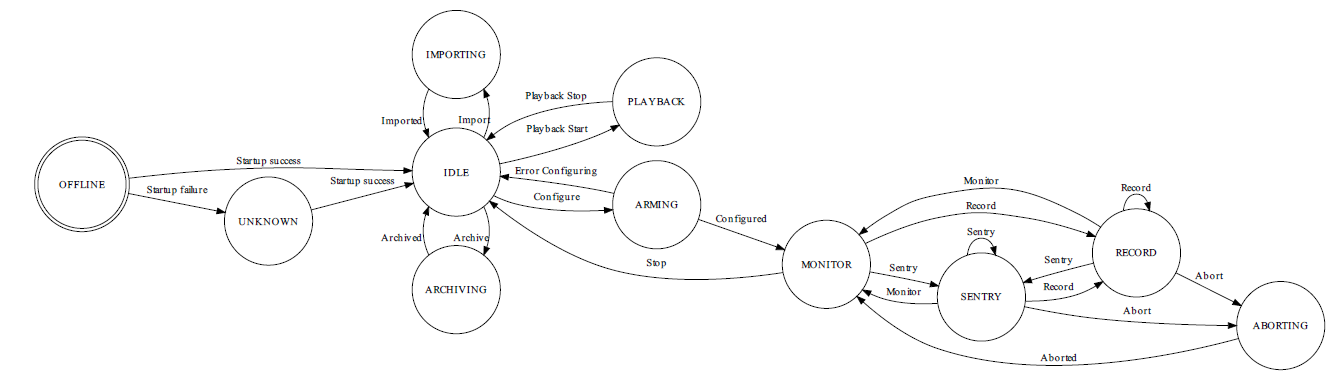
But not so much when using pandoc.

... | Poor graph resolution when using pandoc to output pdf | https://api.github.com/repos/shd101wyy/vscode-markdown-preview-enhanced/issues/1592/comments | 1 | 2018-05-21T05:12:01Z | 2023-08-23T02:54:54Z | https://github.com/shd101wyy/vscode-markdown-preview-enhanced/issues/1592 | 1,862,472,172 | 1,592 |
[
"shd101wyy",
"vscode-markdown-preview-enhanced"
] | like:
```Kotlin
//there should be highlighting codes:
class User(val map: Map<String, Any?>) {
val name: String by map
val age: Int by map
}
``` | Wish add Kotlin highlighting support for code block in ``` | https://api.github.com/repos/shd101wyy/vscode-markdown-preview-enhanced/issues/1593/comments | 6 | 2018-05-19T03:39:14Z | 2023-08-23T02:54:56Z | https://github.com/shd101wyy/vscode-markdown-preview-enhanced/issues/1593 | 1,862,472,246 | 1,593 |
[
"shd101wyy",
"vscode-markdown-preview-enhanced"
] | I'd like to suggest supporting [Madoko](https://github.com/koka-lang/madoko) as an alternative processing backend, in addition to Pandoc and Markdown-it.
Madoko's language extends CommonMark to provide a powerful writing system, particularly for academic purposes. The language extensions are different to Pandoc and ... | Madoko support | https://api.github.com/repos/shd101wyy/vscode-markdown-preview-enhanced/issues/1594/comments | 2 | 2018-05-18T05:44:36Z | 2023-08-23T03:27:48Z | https://github.com/shd101wyy/vscode-markdown-preview-enhanced/issues/1594 | 1,862,472,348 | 1,594 |
[
"shd101wyy",
"vscode-markdown-preview-enhanced"
] | I use flowchart to generate a flow, but return an error : cannot set property 'next' of undefined. But when i used the web http://flowchart.js.org/ to generate a flow using same code, it works fine.
my code is
```flow
st=>start: Start
op1=>operation: L;
sid;
bid;
a... | flowchart: TypeError: Cannot set property 'next' of undefined | https://api.github.com/repos/shd101wyy/vscode-markdown-preview-enhanced/issues/1595/comments | 5 | 2018-05-18T02:40:21Z | 2023-09-06T01:44:25Z | https://github.com/shd101wyy/vscode-markdown-preview-enhanced/issues/1595 | 1,862,472,424 | 1,595 |
[
"shd101wyy",
"vscode-markdown-preview-enhanced"
] | 在mac pro上,我插入保存在本地的图片后(非网络图片,markdown commnads 如下),图片在markdown-preview-enhanced的preview中无法显示,请问有解决方法吗?
```
# Unit 3

```
preview的预览结果
 | https://api.github.com/repos/shd101wyy/vscode-markdown-preview-enhanced/issues/1596/comments | 3 | 2018-05-17T03:49:28Z | 2023-08-23T02:55:03Z | https://github.com/shd101wyy/vscode-markdown-preview-enhanced/issues/1596 | 1,862,472,521 | 1,596 |
[
"shd101wyy",
"vscode-markdown-preview-enhanced"
] | Hi, I am unable to style the body tag just in Prince to export a two-column pdf, but I am able to style it overall. I am editing my ~/.mume/style.less file.
This doesn't work:
```css
/* Please visit the URL below for more information: */
/* https://shd101wyy.github.io/markdown-preview-enhanced/#/customize-css *... | Unable to style body{} with Prince | https://api.github.com/repos/shd101wyy/vscode-markdown-preview-enhanced/issues/1597/comments | 0 | 2018-05-15T15:39:34Z | 2023-08-23T02:55:05Z | https://github.com/shd101wyy/vscode-markdown-preview-enhanced/issues/1597 | 1,862,472,607 | 1,597 |
[
"shd101wyy",
"vscode-markdown-preview-enhanced"
] | I love markdown-preview-enhanced and use it on three macs. I explicitly share the styles.less contents among all of them. I explicitly set up the settings identically (see below). However, on two of the computers the preview acts properly, in particular using the Crimson font and properly respects figure captions ala
... | css not respected? | https://api.github.com/repos/shd101wyy/vscode-markdown-preview-enhanced/issues/1598/comments | 0 | 2018-05-15T13:53:07Z | 2023-08-23T02:55:07Z | https://github.com/shd101wyy/vscode-markdown-preview-enhanced/issues/1598 | 1,862,472,704 | 1,598 |
[
"shd101wyy",
"vscode-markdown-preview-enhanced"
] |  | 使用插件的时候,对输入法有影响,请查一下。谢谢 | https://api.github.com/repos/shd101wyy/vscode-markdown-preview-enhanced/issues/1599/comments | 5 | 2018-05-15T13:37:29Z | 2023-08-23T02:55:09Z | https://github.com/shd101wyy/vscode-markdown-preview-enhanced/issues/1599 | 1,862,472,784 | 1,599 |
[
"shd101wyy",
"vscode-markdown-preview-enhanced"
] | 
- 在VSCODE中出现上面错误,ver 1.23.1 | ParseError: KaTeX parse error | https://api.github.com/repos/shd101wyy/vscode-markdown-preview-enhanced/issues/1600/comments | 1 | 2018-05-15T00:48:29Z | 2023-08-23T02:55:11Z | https://github.com/shd101wyy/vscode-markdown-preview-enhanced/issues/1600 | 1,862,472,889 | 1,600 |
[
"shd101wyy",
"vscode-markdown-preview-enhanced"
] | Hello,
The document preview does not show any line break when using using bulleted lists, dispite the 'force' option being ticked ('Break on single new line').
MacOS Sierra... | Does not diplay emply lines between bulleted lists items | https://api.github.com/repos/shd101wyy/vscode-markdown-preview-enhanced/issues/1601/comments | 7 | 2018-05-13T22:44:49Z | 2023-08-23T02:55:14Z | https://github.com/shd101wyy/vscode-markdown-preview-enhanced/issues/1601 | 1,862,472,990 | 1,601 |
[
"shd101wyy",
"vscode-markdown-preview-enhanced"
] | ## 问题
Mathjs在预览与html输出中中被正确渲染。
用chrome输出任 pdf,jpeg,png均不会被渲染。
## 环境
windows x64 教育版(1803)
Atom 1.26.1 x64
markdown-preview-enhanced v0.15.6 | pdf输出mathjs没有被渲染(chrome) | https://api.github.com/repos/shd101wyy/vscode-markdown-preview-enhanced/issues/1602/comments | 9 | 2018-05-12T00:52:46Z | 2023-08-23T02:55:16Z | https://github.com/shd101wyy/vscode-markdown-preview-enhanced/issues/1602 | 1,862,473,082 | 1,602 |
[
"shd101wyy",
"vscode-markdown-preview-enhanced"
] | example
---
html:
embed_local_images: false
embed_svg: true
offline: false
toc: undefined
title: mysitename
print_background: false
--- | add option for title in html config | https://api.github.com/repos/shd101wyy/vscode-markdown-preview-enhanced/issues/1603/comments | 1 | 2018-05-10T16:52:02Z | 2023-08-23T02:55:18Z | https://github.com/shd101wyy/vscode-markdown-preview-enhanced/issues/1603 | 1,862,473,171 | 1,603 |
[
"shd101wyy",
"vscode-markdown-preview-enhanced"
] | VScode prompted this message:

| Preview shortcut (Ctrl + K, V) does not work | https://api.github.com/repos/shd101wyy/vscode-markdown-preview-enhanced/issues/1604/comments | 2 | 2018-05-10T09:01:17Z | 2023-08-23T02:55:20Z | https://github.com/shd101wyy/vscode-markdown-preview-enhanced/issues/1604 | 1,862,473,261 | 1,604 |
[
"shd101wyy",
"vscode-markdown-preview-enhanced"
] | Suppose, we have a folder which contains several md files. Can I just use one import to import the whole folder? If not, could you please help to support this feature?
Thanks | import files recursively | https://api.github.com/repos/shd101wyy/vscode-markdown-preview-enhanced/issues/1605/comments | 3 | 2018-05-09T12:12:37Z | 2023-08-23T02:55:22Z | https://github.com/shd101wyy/vscode-markdown-preview-enhanced/issues/1605 | 1,862,473,346 | 1,605 |
[
"shd101wyy",
"vscode-markdown-preview-enhanced"
] | The medium theme has some sizing issues and the font size of code block themes are too big for me. I want to edit the css files, but I can only find information about "Customize css" option. Where are the themes located?
OS: macOS
Editor: Atom
Example themes in the settings page for MPE: atom-dark, atom-light, git... | Where are the themes taken from? How to customize? | https://api.github.com/repos/shd101wyy/vscode-markdown-preview-enhanced/issues/1606/comments | 6 | 2018-05-09T04:02:57Z | 2023-08-23T03:27:19Z | https://github.com/shd101wyy/vscode-markdown-preview-enhanced/issues/1606 | 1,862,473,429 | 1,606 |
[
"shd101wyy",
"vscode-markdown-preview-enhanced"
] | VSCode是最新的稳定版:1.23.0
安装后重启过,打开.md文件后右侧会出现选择用markdown preview enhanced来预览(也会出现自带的markdown)。
打开Keyboard Shortcuts设置,没看到`Markdown Preview Enhanced: toggle`,只有`Markdown Preview Enhanced: Open Preview`(默认是cmd+K V),修改`Markdown Preview Enhanced: Open Preview`是能生效的。
还是想用toggle啊,更方便点。谢谢 | ctrl/cmd-shift-M在Mac的VSCode里无效 | https://api.github.com/repos/shd101wyy/vscode-markdown-preview-enhanced/issues/1607/comments | 3 | 2018-05-05T14:28:37Z | 2023-08-23T02:55:27Z | https://github.com/shd101wyy/vscode-markdown-preview-enhanced/issues/1607 | 1,862,473,515 | 1,607 |
[
"shd101wyy",
"vscode-markdown-preview-enhanced"
] | 当我在左侧md文件滚轮时,右侧的预览不能实时的跳转到和左侧md一样的位置,必须点击md文件的某一行,右侧的预览才会跳转。很是不方便。 | 关于必须点击md,右侧预览才会跳转的问题 | https://api.github.com/repos/shd101wyy/vscode-markdown-preview-enhanced/issues/1608/comments | 3 | 2018-05-05T12:22:00Z | 2023-08-23T02:55:29Z | https://github.com/shd101wyy/vscode-markdown-preview-enhanced/issues/1608 | 1,862,473,591 | 1,608 |
[
"shd101wyy",
"vscode-markdown-preview-enhanced"
] | `flowchart` not work. Using following code block,
```flow
st=>start: Start|past:>http://www.google.com[blank]
e=>end: End:>http://www.google.com
op1=>operation: My Operation|past
op2=>operation: Stuff|current
sub1=>subroutine: My Subroutine|invalid
cond=>condition: Yes
or No?|approved:>http://www.google.com
... | `flowchart` not work | https://api.github.com/repos/shd101wyy/vscode-markdown-preview-enhanced/issues/1609/comments | 2 | 2018-05-03T06:05:24Z | 2023-08-23T02:55:31Z | https://github.com/shd101wyy/vscode-markdown-preview-enhanced/issues/1609 | 1,862,473,658 | 1,609 |
[
"shd101wyy",
"vscode-markdown-preview-enhanced"
] | If I install Atom via Flathub on a Linux machine, the markdown-preview-enhanced does not work with pandoc. I get the error:
`Error: spawn pandoc ENOENT`
I guess this is an result of the fact that flatpaks are some kind of container and from within this container Atom cannot reach system pathes.
Unfortunately th... | From in a flatpack pandoc is unreachable: Error: spawn pandoc ENOENT | https://api.github.com/repos/shd101wyy/vscode-markdown-preview-enhanced/issues/1610/comments | 2 | 2018-04-28T19:57:06Z | 2023-08-23T02:55:33Z | https://github.com/shd101wyy/vscode-markdown-preview-enhanced/issues/1610 | 1,862,473,724 | 1,610 |
[
"shd101wyy",
"vscode-markdown-preview-enhanced"
] | Hello, shd101wyy.
Thank you for your awesome package in advance.
I have two questions.
1. It seems that the html source generated by 'Open in browser' and 'HTML > HTML(offlien/cdn hosted)' are different. Is there a way to make html file whose source is exactly same with 'Open in browser'?
I need it because the ... | html file with code chunk output | https://api.github.com/repos/shd101wyy/vscode-markdown-preview-enhanced/issues/1611/comments | 0 | 2018-04-27T14:49:24Z | 2023-08-23T02:55:35Z | https://github.com/shd101wyy/vscode-markdown-preview-enhanced/issues/1611 | 1,862,473,795 | 1,611 |
[
"shd101wyy",
"vscode-markdown-preview-enhanced"
] | HI,
I need to make not regular tables as showed below
```
┌─────────────────────────────────────────────────────────────────────────┬──────────────┐
│ Register Name │ Addr: 0x00 │
├────────┬────┬────┬────┬────┬────┬────┬────┬────┬────┬────┬────┬────┬────┼... | Enhanced tables | https://api.github.com/repos/shd101wyy/vscode-markdown-preview-enhanced/issues/1612/comments | 2 | 2018-04-27T14:26:18Z | 2023-08-23T02:55:37Z | https://github.com/shd101wyy/vscode-markdown-preview-enhanced/issues/1612 | 1,862,473,875 | 1,612 |
[
"shd101wyy",
"vscode-markdown-preview-enhanced"
] | If I use this, I will get two preview button at the top right corner(in Vscode), which looks really ugly, how I fix it?
I hope you can give me a solution. Thanks! | preview button | https://api.github.com/repos/shd101wyy/vscode-markdown-preview-enhanced/issues/1613/comments | 2 | 2018-04-26T13:08:50Z | 2023-08-23T02:55:40Z | https://github.com/shd101wyy/vscode-markdown-preview-enhanced/issues/1613 | 1,862,473,961 | 1,613 |
[
"shd101wyy",
"vscode-markdown-preview-enhanced"
] | I was wondering if there is a way to omit the first row of a csv file when using @import file.csv and outputting to HTML and/or Pandoc (parser does support this).
```
header1,header2 <---
data1,data1
data2,data2
``` | Omit first row in csv file when using @import | https://api.github.com/repos/shd101wyy/vscode-markdown-preview-enhanced/issues/1614/comments | 2 | 2018-04-26T03:23:28Z | 2023-08-23T02:55:42Z | https://github.com/shd101wyy/vscode-markdown-preview-enhanced/issues/1614 | 1,862,474,032 | 1,614 |
[
"shd101wyy",
"vscode-markdown-preview-enhanced"
] | [Enter steps to reproduce:]
1. ...
2. ...
**Atom**: 1.26.0 x64
**Electron**: 1.7.11
**OS**: Unknown Windows version
**Thrown From**: [markdown-preview-enhanced](https://github.com/shd101wyy/markdown-preview-enhanced) package 0.15.6
### Stack Trace
Uncaught Error: tunneling socket could not be establis... | Uncaught Error: tunneling socket could not be established, cause=read ECONNRESET | https://api.github.com/repos/shd101wyy/vscode-markdown-preview-enhanced/issues/1615/comments | 1 | 2018-04-25T05:58:16Z | 2023-08-23T02:55:51Z | https://github.com/shd101wyy/vscode-markdown-preview-enhanced/issues/1615 | 1,862,474,092 | 1,615 |
[
"shd101wyy",
"vscode-markdown-preview-enhanced"
] | [Enter steps to reproduce:]
1. ...
2. ...
**Atom**: 1.26.0 x64
**Electron**: 1.7.11
**OS**: Unknown Windows version
**Thrown From**: [markdown-preview-enhanced](https://github.com/shd101wyy/markdown-preview-enhanced) package 0.15.6
### Stack Trace
Uncaught Error: tunneling socket could not be establis... | Uncaught Error: tunneling socket could not be established, cause=read ECONNRESET | https://api.github.com/repos/shd101wyy/vscode-markdown-preview-enhanced/issues/1616/comments | 1 | 2018-04-25T05:58:15Z | 2023-08-23T02:55:52Z | https://github.com/shd101wyy/vscode-markdown-preview-enhanced/issues/1616 | 1,862,474,148 | 1,616 |
[
"shd101wyy",
"vscode-markdown-preview-enhanced"
] | [Enter steps to reproduce:]
1. ...
2. ...
**Atom**: 1.26.0 x64
**Electron**: 1.7.11
**OS**: Unknown Windows version
**Thrown From**: [markdown-preview-enhanced](https://github.com/shd101wyy/markdown-preview-enhanced) package 0.15.6
### Stack Trace
Uncaught Error: tunneling socket could not be establis... | Uncaught Error: tunneling socket could not be established, cause=read ECONNRESET | https://api.github.com/repos/shd101wyy/vscode-markdown-preview-enhanced/issues/1617/comments | 1 | 2018-04-25T05:58:06Z | 2023-08-23T02:55:52Z | https://github.com/shd101wyy/vscode-markdown-preview-enhanced/issues/1617 | 1,862,474,198 | 1,617 |
[
"shd101wyy",
"vscode-markdown-preview-enhanced"
] | [Enter steps to reproduce:]
1. ...
2. ...
**Atom**: 1.26.0 x64
**Electron**: 1.7.11
**OS**: Unknown Windows version
**Thrown From**: [markdown-preview-enhanced](https://github.com/shd101wyy/markdown-preview-enhanced) package 0.15.6
### Stack Trace
Uncaught Error: tunneling socket could not be establis... | Uncaught Error: tunneling socket could not be established, cause=read ECONNRESET | https://api.github.com/repos/shd101wyy/vscode-markdown-preview-enhanced/issues/1618/comments | 0 | 2018-04-25T05:57:55Z | 2023-08-23T02:55:51Z | https://github.com/shd101wyy/vscode-markdown-preview-enhanced/issues/1618 | 1,862,474,257 | 1,618 |
[
"shd101wyy",
"vscode-markdown-preview-enhanced"
] | 原先还能运行 python 代码块的,现在点击右边三角啥反应没有,,这也没写错啊,,
\```python {cmd=true}
print("python3")
\``` | 无法运行代码块 | https://api.github.com/repos/shd101wyy/vscode-markdown-preview-enhanced/issues/1619/comments | 1 | 2018-04-24T05:38:44Z | 2023-08-23T02:55:53Z | https://github.com/shd101wyy/vscode-markdown-preview-enhanced/issues/1619 | 1,862,474,309 | 1,619 |
[
"shd101wyy",
"vscode-markdown-preview-enhanced"
] | \```Kotlin {cmd="Kotlin"}
object HelloKotlin {
 @JvmStatic fun main(args: Array<String>){
   println("hello kotlin!")
  }
}
\```
这么写的,无法运行,没有预览结果 | code trunk 不支持运行 kotlin | https://api.github.com/repos/shd101wyy/vscode-markdown-preview-enhanced/issues/1620/comments | 0 | 2018-04-24T05:17:02Z | 2023-08-23T02:55:55Z | https://github.com/shd101wyy/vscode-markdown-preview-enhanced/issues/1620 | 1,862,474,365 | 1,620 |
[
"shd101wyy",
"vscode-markdown-preview-enhanced"
] | I just found this plugin. It is awesome! I love it.
I am wondering if we could get support for one of these:
http://jjuliano.github.io/markdown-ui/
https://github.com/lifegadget/ui-markdown
They are Markdown syntax that converts to a User Interface prototype.
| markdown-ui or ui-markdown support | https://api.github.com/repos/shd101wyy/vscode-markdown-preview-enhanced/issues/1621/comments | 0 | 2018-04-23T18:47:26Z | 2023-08-23T02:55:57Z | https://github.com/shd101wyy/vscode-markdown-preview-enhanced/issues/1621 | 1,862,474,401 | 1,621 |
[
"shd101wyy",
"vscode-markdown-preview-enhanced"
] | ``` mermaid
gantt
dateFormat ##YYYY-MM-DD
title XX工作计划
section 第一版
事件机制 :done,p1,2018-04-16,2018-04-17
数据增删改 : p2,2018-04-18,2018-04-27
路由实现 : p3,2018-05-02,2018-05-04
查询报表模块 : p4,2018-04-18,2018-04-27
饼图显示器控件 : ... | Gantt ,the preview effect is different from the Mermaid Live Editor effects on the timeline | https://api.github.com/repos/shd101wyy/vscode-markdown-preview-enhanced/issues/111/comments | 0 | 2018-04-23T07:56:10Z | 2018-04-23T07:57:06Z | https://github.com/shd101wyy/vscode-markdown-preview-enhanced/issues/111 | 316,700,830 | 111 |
[
"shd101wyy",
"vscode-markdown-preview-enhanced"
] | front-matter :
---
toc:
depth_from: 1
depth_to: 6
ordered: false
html:
embed_local_images: true
embed_svg: true
offline: false
toc: true
---
导出为html文件时,侧边栏显示不出来了。 | 侧边栏大纲预览不能显示了 | https://api.github.com/repos/shd101wyy/vscode-markdown-preview-enhanced/issues/110/comments | 2 | 2018-04-23T06:59:48Z | 2023-08-23T09:40:06Z | https://github.com/shd101wyy/vscode-markdown-preview-enhanced/issues/110 | 316,685,356 | 110 |
[
"shd101wyy",
"vscode-markdown-preview-enhanced"
] | 系统 Fedora,如图:Markdown Preview Enhanced 好像把绝对路径当成相对路径来解析了,应该是`file:///home/z/tmp/test.png`,但是里面却加上了 `test.md` 的路径 `/home/z/tmp`。
 | Linux系统中无法使用绝对路径插入图片 | https://api.github.com/repos/shd101wyy/vscode-markdown-preview-enhanced/issues/109/comments | 1 | 2018-04-21T09:42:03Z | 2018-05-03T10:40:24Z | https://github.com/shd101wyy/vscode-markdown-preview-enhanced/issues/109 | 316,477,800 | 109 |
[
"shd101wyy",
"vscode-markdown-preview-enhanced"
] | **Example:**
I have` index.html`
I have` index.md`
I import the **index.html into the index.md** with `@import "index.html"`
In the importation, html indentation is taked as a code block in the markdown ( same with others markdown sintaxis rules).
Then, i have to delete indetation on `index.html` so I don't h... | html imports does not work well. | https://api.github.com/repos/shd101wyy/vscode-markdown-preview-enhanced/issues/1622/comments | 0 | 2018-04-21T08:56:54Z | 2023-08-23T02:55:59Z | https://github.com/shd101wyy/vscode-markdown-preview-enhanced/issues/1622 | 1,862,474,451 | 1,622 |
[
"shd101wyy",
"vscode-markdown-preview-enhanced"
] | 环境:windows10+ vscode 1.22.2
我找到插件默认的预览主题文件夹
C:\Users\myaccount\\.vscode\extensions\shd101wyy.markdown-preview-enhanced-0.3.5\node_modules\@shd101wyy\mume\styles\preview_theme,
然后往里面添加了几个自己的css文件,但是在用户设置页面无法找到新添加的css文件
})-y^{(i)})^2$
$$
\sum_{i=1}^m (h_\theta(x^{(i)})-y^{(i)})^2
$$
The rending results :
<img width="378" alt="dif" src="https://user-images.githubusercontent.com/18346105/38909554-9dce9e94-42f7-11e8-9aef-e35af9cf6dbf.png">
The same raw content, but the different rending result... | mathjax rendering problem with single line $\sum$ | https://api.github.com/repos/shd101wyy/vscode-markdown-preview-enhanced/issues/1625/comments | 0 | 2018-04-18T02:56:56Z | 2023-08-23T02:56:06Z | https://github.com/shd101wyy/vscode-markdown-preview-enhanced/issues/1625 | 1,862,474,605 | 1,625 |
[
"shd101wyy",
"vscode-markdown-preview-enhanced"
] | Using the `ctrl+k, ctrl+v` shortcut in version 0.3.5 results in a `command 'markdown-preview-enhanced.openPreview' not found` message appearing.
Selecting "Markdown Preview Enhanced: Open Preview" from the command pallet *also* results in `command 'markdown-preview-enhanced.openPreview' not found`. | Cannot open preview in latest version | https://api.github.com/repos/shd101wyy/vscode-markdown-preview-enhanced/issues/108/comments | 14 | 2018-04-17T17:07:02Z | 2023-12-01T10:59:59Z | https://github.com/shd101wyy/vscode-markdown-preview-enhanced/issues/108 | 315,151,422 | 108 |
Subsets and Splits
No community queries yet
The top public SQL queries from the community will appear here once available.