
issue_owner_repo listlengths 2 2 | issue_body stringlengths 0 262k ⌀ | issue_title stringlengths 1 1.02k | issue_comments_url stringlengths 53 116 | issue_comments_count int64 0 2.49k | issue_created_at stringdate 1999-03-17 02:06:42 2025-06-23 11:41:49 | issue_updated_at stringdate 2000-02-10 06:43:57 2025-06-23 11:43:00 | issue_html_url stringlengths 34 97 | issue_github_id int64 132 3.17B | issue_number int64 1 215k |
|---|---|---|---|---|---|---|---|---|---|
[
"shd101wyy",
"vscode-markdown-preview-enhanced"
] | I have just installed your plugin and would like to use it to embed latex in my markdown.
My operating system is ubuntu 18.04.1, and I have installed the texlive-full and pdf2svg packages.
Running the sample from your website:
```
```latex {cmd:true, hide:true}
\documentclass{standalone}
\begin{document}
... | latex not rendering | https://api.github.com/repos/shd101wyy/vscode-markdown-preview-enhanced/issues/1477/comments | 4 | 2018-10-29T19:02:08Z | 2023-08-23T02:50:28Z | https://github.com/shd101wyy/vscode-markdown-preview-enhanced/issues/1477 | 1,862,466,544 | 1,477 |
[
"shd101wyy",
"vscode-markdown-preview-enhanced"
] | I updated MPE for VSCode 0.3.8 to 0.3.10.
Then the command "markdown-preview-enhanced.createTOC" does not renew TOC structure automatically. On other machine with MPE 0.3.8, TOC is automatically renewed when I add some contents with section header at the same file.
regards, | VSCode: Cannot renew TOC at version 0.3.10 | https://api.github.com/repos/shd101wyy/vscode-markdown-preview-enhanced/issues/1478/comments | 5 | 2018-10-29T07:40:37Z | 2023-08-23T02:50:30Z | https://github.com/shd101wyy/vscode-markdown-preview-enhanced/issues/1478 | 1,862,466,575 | 1,478 |
[
"shd101wyy",
"vscode-markdown-preview-enhanced"
] | Example...
\```python {output="dot"}
#python code to generate a dot graph
\```
This should run the python interpreter to generate a graph description in the dot language and then pipe the output to the dot renderer instead of just displaying the output from the python program.
| Feature request: Enhance output type to run code block output through specified filter and render the processed output instead. | https://api.github.com/repos/shd101wyy/vscode-markdown-preview-enhanced/issues/1479/comments | 0 | 2018-10-28T16:37:27Z | 2023-08-23T02:50:32Z | https://github.com/shd101wyy/vscode-markdown-preview-enhanced/issues/1479 | 1,862,466,595 | 1,479 |
[
"shd101wyy",
"vscode-markdown-preview-enhanced"
] | 如果直接创建一个`.md`文件, 用vscode打开进行预览就会报错, 但是如果将文件放到一个文件夹中, 比如文件夹命名为`test`, 再在vscode中打开这个文件对`.md`进行预览(右键该文件夹选择`open with code`), 预览就能成功.
然而我记得以前的版本是可以直接预览`.md`文件的~ | 解决v0.3.9--Unable to open 'MPE Preview': Cannot read property 'uri' of undefined. | https://api.github.com/repos/shd101wyy/vscode-markdown-preview-enhanced/issues/162/comments | 2 | 2018-10-28T15:30:10Z | 2018-10-29T21:35:33Z | https://github.com/shd101wyy/vscode-markdown-preview-enhanced/issues/162 | 374,765,899 | 162 |
[
"shd101wyy",
"vscode-markdown-preview-enhanced"
] | 点击预览之后报错:无法打开“MPE Preview”: Cannot read property 'filter' of undefined。
VScode版本
版本: 1.28.2 (system setup)
提交: 7f3ce96ff4729c91352ae6def877e59c561f4850
日期: 2018-10-17T00:23:12.403Z
Electron: 2.0.9
Chrome: 61.0.3163.100
Node.js: 8.9.3
V8: 6.1.534.41
架构: ia32
| VScode更新后无法使用 | https://api.github.com/repos/shd101wyy/vscode-markdown-preview-enhanced/issues/1480/comments | 2 | 2018-10-28T13:07:11Z | 2023-08-23T02:50:35Z | https://github.com/shd101wyy/vscode-markdown-preview-enhanced/issues/1480 | 1,862,466,624 | 1,480 |
[
"shd101wyy",
"vscode-markdown-preview-enhanced"
] | 可以进行编辑但是无法预览😭 | 无法打开“MPE Preview”: Cannot read property 'filter' of undefined。 | https://api.github.com/repos/shd101wyy/vscode-markdown-preview-enhanced/issues/161/comments | 6 | 2018-10-28T09:43:24Z | 2018-10-29T21:35:39Z | https://github.com/shd101wyy/vscode-markdown-preview-enhanced/issues/161 | 374,735,553 | 161 |
[
"shd101wyy",
"vscode-markdown-preview-enhanced"
] | when I try to open preview, "Unable to open 'MPE Preview': Cannot read property 'filter' of undefined." shows up and failed to open it. | Unable to open 'MPE Preview': Cannot read property 'filter' of undefined. | https://api.github.com/repos/shd101wyy/vscode-markdown-preview-enhanced/issues/1481/comments | 4 | 2018-10-28T07:23:52Z | 2023-08-23T02:50:37Z | https://github.com/shd101wyy/vscode-markdown-preview-enhanced/issues/1481 | 1,862,466,650 | 1,481 |
[
"shd101wyy",
"vscode-markdown-preview-enhanced"
] | After I install the vscode-markdown-preview-enhanced, it cannot render the preview page and throw out an error:Unable to open 'MPE Preview': Cannot read property 'filter' of undefined.
I have tried to uninstall it and download again but it still has this error. Even I reinstall my vs-code and it still doesn't work.
... | Error:Cannot read property 'filter' of undefined. | https://api.github.com/repos/shd101wyy/vscode-markdown-preview-enhanced/issues/160/comments | 6 | 2018-10-28T05:23:54Z | 2018-10-28T07:10:35Z | https://github.com/shd101wyy/vscode-markdown-preview-enhanced/issues/160 | 374,719,117 | 160 |
[
"shd101wyy",
"vscode-markdown-preview-enhanced"
] | Hey!
So, is there a way to specify page breaks for when we PDF export? That is, specify that we want specific content on a page and other content on another page?
That is, supposed I wanted to make a cover page. Is it possible?
Thanks in advance! | PDF Export Specifications ⁉️ | https://api.github.com/repos/shd101wyy/vscode-markdown-preview-enhanced/issues/1482/comments | 8 | 2018-10-28T01:35:54Z | 2023-08-23T02:50:39Z | https://github.com/shd101wyy/vscode-markdown-preview-enhanced/issues/1482 | 1,862,466,681 | 1,482 |
[
"shd101wyy",
"vscode-markdown-preview-enhanced"
] | URL with question mark(?) opens file explorer instead of web page when clicked in preview
example:
```
[ne555 timer](https://www.mouser.co.uk/ProductDetail/Texas-Instruments/NE555P?qs=sGAEpiMZZMsG1k5vdNM%2fc6UNh9pCnCAm)
```
enviornment:
vscode on windows 10 with firefox as the default browser
Link works fi... | URL with question mark(?) opens file explorer | https://api.github.com/repos/shd101wyy/vscode-markdown-preview-enhanced/issues/158/comments | 2 | 2018-10-27T13:40:34Z | 2018-10-30T22:43:08Z | https://github.com/shd101wyy/vscode-markdown-preview-enhanced/issues/158 | 374,646,313 | 158 |
[
"shd101wyy",
"vscode-markdown-preview-enhanced"
] | Hey, great work! Thanks.
In my markdown text I have text that is recognized as domain name, say:
```markdown
An example of a domain name is example.com.
```
The `example.com` gets rendered as a hyperlink to `http://example.com`. Is there a way to prevent this? | Is there a way to disable automatic linking of domain-name-like strings? | https://api.github.com/repos/shd101wyy/vscode-markdown-preview-enhanced/issues/1483/comments | 2 | 2018-10-26T06:43:31Z | 2023-08-23T02:50:41Z | https://github.com/shd101wyy/vscode-markdown-preview-enhanced/issues/1483 | 1,862,466,709 | 1,483 |
[
"shd101wyy",
"vscode-markdown-preview-enhanced"
] | In the pandoc bibliography, we can add some reference. Can the reference in the text be clickable? When it is clicked, it will jump to the bibliography item. This is a common feature in almost all papers. | Feature Request: Adding clickable reference | https://api.github.com/repos/shd101wyy/vscode-markdown-preview-enhanced/issues/1484/comments | 0 | 2018-10-25T02:20:04Z | 2023-08-23T02:50:43Z | https://github.com/shd101wyy/vscode-markdown-preview-enhanced/issues/1484 | 1,862,466,729 | 1,484 |
[
"shd101wyy",
"vscode-markdown-preview-enhanced"
] | Paste Image is an extension for markdown in vscode to paste the image from the clipboard.
And it could set the image store path, but if the file is moved away, the index to the image is wrong.
If all the image stored in one place indexed from the project root, and the markdown preview enhanced could parse the vscode ... | Could parse the vscode variable? | https://api.github.com/repos/shd101wyy/vscode-markdown-preview-enhanced/issues/157/comments | 2 | 2018-10-23T07:59:58Z | 2018-10-24T05:41:54Z | https://github.com/shd101wyy/vscode-markdown-preview-enhanced/issues/157 | 372,859,070 | 157 |
[
"shd101wyy",
"vscode-markdown-preview-enhanced"
] | Hey!
I have been running into some issues where pandoc doesn't recognize $\Tau$, while weirdly working fine for $\tau$.
Looking online, it seems like pandoc might need an update (as suggested here: https://github.com/jgm/pandoc/issues/2651). Would you mind checking it out?
Thanks! | Could you please update pandoc? | https://api.github.com/repos/shd101wyy/vscode-markdown-preview-enhanced/issues/1485/comments | 3 | 2018-10-23T05:40:28Z | 2023-08-23T02:50:45Z | https://github.com/shd101wyy/vscode-markdown-preview-enhanced/issues/1485 | 1,862,466,755 | 1,485 |
[
"shd101wyy",
"vscode-markdown-preview-enhanced"
] | No amount of ctrl-shift-enter's or shift-enter's do anything. I have texlive and pdf2svg packages installed, I#m getting nothing going to the assets/ directory. On hovering over the code block in the render, I get 2 icons in the corner, "play" and "all" buttons which do nothing.
I'm on Gentoo.
| LaTeX blocks not rendering | https://api.github.com/repos/shd101wyy/vscode-markdown-preview-enhanced/issues/156/comments | 12 | 2018-10-22T18:57:02Z | 2019-10-07T10:46:34Z | https://github.com/shd101wyy/vscode-markdown-preview-enhanced/issues/156 | 372,651,964 | 156 |
[
"shd101wyy",
"vscode-markdown-preview-enhanced"
] | hi, I installed enhance for several times in atom, and os is win10, but failed to load the preview, when I press ctrl+shiff+m, nothing happened, even a warning. I tried to remove atom, and enhance in three difference directory, and reinstall them again, but still failed. so I want some help here, thanks
| help, can't active preview | https://api.github.com/repos/shd101wyy/vscode-markdown-preview-enhanced/issues/1486/comments | 1 | 2018-10-22T02:31:54Z | 2023-08-23T02:50:47Z | https://github.com/shd101wyy/vscode-markdown-preview-enhanced/issues/1486 | 1,862,466,795 | 1,486 |
[
"shd101wyy",
"vscode-markdown-preview-enhanced"
] | hi, I installed latest markdown-preview-enhance, but I can't load preview view, my environments are below:
* win10
* atom 1.31.2 x64
* nodejs v8.12.0
thanks.
| can't preview | https://api.github.com/repos/shd101wyy/vscode-markdown-preview-enhanced/issues/1487/comments | 0 | 2018-10-22T00:55:02Z | 2023-08-23T02:50:49Z | https://github.com/shd101wyy/vscode-markdown-preview-enhanced/issues/1487 | 1,862,466,822 | 1,487 |
[
"shd101wyy",
"vscode-markdown-preview-enhanced"
] | I use this extension on VSCode.
I set to render the preview using pandoc and pandoc's filter.
Since, rendering cost of this way is high on some documents, I use with toggling scroll sync and live update by keyboard shortcut.
However, it is impossible to immediately confirm the current state (Toggling twice, I can ... | Status for scroll sync and live update | https://api.github.com/repos/shd101wyy/vscode-markdown-preview-enhanced/issues/155/comments | 2 | 2018-10-19T23:42:40Z | 2018-12-05T10:02:03Z | https://github.com/shd101wyy/vscode-markdown-preview-enhanced/issues/155 | 372,148,516 | 155 |
[
"shd101wyy",
"vscode-markdown-preview-enhanced"
] | 在vscode中的预览模式可以设置为和主题的背景一样吗? | 背景颜色 | https://api.github.com/repos/shd101wyy/vscode-markdown-preview-enhanced/issues/154/comments | 0 | 2018-10-19T14:09:28Z | 2018-10-19T14:21:18Z | https://github.com/shd101wyy/vscode-markdown-preview-enhanced/issues/154 | 371,974,062 | 154 |
[
"shd101wyy",
"vscode-markdown-preview-enhanced"
] | 默认的中文字体是宋体,我想更改字体。
但是这两种方式似乎都没有效果,不知道我需要提供什么信息来帮助您定位问题? | 引用的css和在style.less中定义的css似乎都不生效 | https://api.github.com/repos/shd101wyy/vscode-markdown-preview-enhanced/issues/153/comments | 7 | 2018-10-18T02:57:49Z | 2019-01-21T02:47:12Z | https://github.com/shd101wyy/vscode-markdown-preview-enhanced/issues/153 | 371,341,915 | 153 |
[
"shd101wyy",
"vscode-markdown-preview-enhanced"
] | 我用的vsCode。我在md文件中这样写。
\`\`\`flow
\`\`\`
然后预览就会出现 TypeError: Cannot read property 'key' of null.
希望大佬帮忙看下是什么问题。 | 无法画flow流程图 | https://api.github.com/repos/shd101wyy/vscode-markdown-preview-enhanced/issues/1488/comments | 2 | 2018-10-16T09:51:38Z | 2023-08-23T02:50:51Z | https://github.com/shd101wyy/vscode-markdown-preview-enhanced/issues/1488 | 1,862,466,849 | 1,488 |
[
"shd101wyy",
"vscode-markdown-preview-enhanced"
] | null | 无法通过拖拽上传图片 | https://api.github.com/repos/shd101wyy/vscode-markdown-preview-enhanced/issues/1489/comments | 2 | 2018-10-16T04:13:42Z | 2023-08-23T02:50:53Z | https://github.com/shd101wyy/vscode-markdown-preview-enhanced/issues/1489 | 1,862,466,877 | 1,489 |
[
"shd101wyy",
"vscode-markdown-preview-enhanced"
] | os: Ubuntu | open in browser 失效了, 1.28版本 | https://api.github.com/repos/shd101wyy/vscode-markdown-preview-enhanced/issues/1490/comments | 11 | 2018-10-15T16:26:50Z | 2023-09-02T02:40:37Z | https://github.com/shd101wyy/vscode-markdown-preview-enhanced/issues/1490 | 1,862,466,895 | 1,490 |
[
"shd101wyy",
"vscode-markdown-preview-enhanced"
] | 最开始的时候是好用的,后来不晓得修改了 什么配置,生成pdf或者预览网页都是空白
无论是在浏览器预览
还是phontomjs生成都是空白页 | mpe插件生成pdf或者网页预览都是空白 | https://api.github.com/repos/shd101wyy/vscode-markdown-preview-enhanced/issues/1491/comments | 4 | 2018-10-15T02:00:32Z | 2023-08-23T02:50:57Z | https://github.com/shd101wyy/vscode-markdown-preview-enhanced/issues/1491 | 1,862,466,919 | 1,491 |
[
"shd101wyy",
"vscode-markdown-preview-enhanced"
] | null | images in tables are deleted (pandoc viewer) | https://api.github.com/repos/shd101wyy/vscode-markdown-preview-enhanced/issues/1492/comments | 0 | 2018-10-14T12:02:41Z | 2023-08-23T02:51:00Z | https://github.com/shd101wyy/vscode-markdown-preview-enhanced/issues/1492 | 1,862,466,950 | 1,492 |
[
"shd101wyy",
"vscode-markdown-preview-enhanced"
] | the preview page would become blank when I switch between normal and zen mode. | the preview page would become blank when I switch between normal and zen mode. | https://api.github.com/repos/shd101wyy/vscode-markdown-preview-enhanced/issues/152/comments | 0 | 2018-10-13T11:39:15Z | 2018-10-13T11:39:15Z | https://github.com/shd101wyy/vscode-markdown-preview-enhanced/issues/152 | 369,794,260 | 152 |
[
"shd101wyy",
"vscode-markdown-preview-enhanced"
] | 预览同步有之后问题,具体见下面几副图所示。
从第一张滚动到第二图的位置,预览没动。滚动到第三张的位置时,预览完全滞后,已经不能显示了。
mermaid
gantt
dateFormat YYYY-MM-DD
title gantt diagram mermaid
section A section
Completed task :done, des1, 2014-01-06,2014-01-08
Active task :active, des2, 2014-01-09, 3d
Future task : des3, after des2, 5d
Future tas... | gantt has a bad style | https://api.github.com/repos/shd101wyy/vscode-markdown-preview-enhanced/issues/1494/comments | 1 | 2018-10-11T13:03:50Z | 2023-08-23T02:51:04Z | https://github.com/shd101wyy/vscode-markdown-preview-enhanced/issues/1494 | 1,862,467,003 | 1,494 |
[
"shd101wyy",
"vscode-markdown-preview-enhanced"
] | 只出现了下列代码
`<!-- @import "[TOC]" {cmd="toc" depthFrom=1 depthTo=6 orderedList=false} -->`
现在只能用 [TOC] 生成了,顺便,使用以下代码并没有生成边栏toc
```
---
toc:
depth_from: 1
depth_to: 6
ordered: false
---
``` | VS版 create TOC 功能不正常 | https://api.github.com/repos/shd101wyy/vscode-markdown-preview-enhanced/issues/1495/comments | 6 | 2018-10-11T02:53:00Z | 2023-08-23T02:51:06Z | https://github.com/shd101wyy/vscode-markdown-preview-enhanced/issues/1495 | 1,862,467,024 | 1,495 |
[
"shd101wyy",
"vscode-markdown-preview-enhanced"
] | 
| mermaid styles out of date | https://api.github.com/repos/shd101wyy/vscode-markdown-preview-enhanced/issues/1496/comments | 2 | 2018-10-08T17:35:48Z | 2023-08-23T02:51:08Z | https://github.com/shd101wyy/vscode-markdown-preview-enhanced/issues/1496 | 1,862,467,043 | 1,496 |
[
"shd101wyy",
"vscode-markdown-preview-enhanced"
] | Mathjax ver.2.7 allows to use `label` command ([ref. doc](http://docs.mathjax.org/en/latest/tex.html?)highlight=label), but it does not rendered on MPE:
```
$$
\begin{equation}
\int_0^\infty \frac{x^3}{e^x-1}\,dx = \frac{\pi^4}{15} \label{sample}
\end{equation}
$$
```
If you have any idea for solving the ... | Rendering error in using `\label` command in math block | https://api.github.com/repos/shd101wyy/vscode-markdown-preview-enhanced/issues/1497/comments | 0 | 2018-10-08T16:52:54Z | 2023-08-23T02:51:10Z | https://github.com/shd101wyy/vscode-markdown-preview-enhanced/issues/1497 | 1,862,467,075 | 1,497 |
[
"shd101wyy",
"vscode-markdown-preview-enhanced"
] | ```
@import "workspace/Test.java"
```
works as expected.
```
<div>
@import "workspace/Test.java"
</div>
```
shows only
```
@import "workspace/Test.java"
```
exported html:
```html
<body for="html-export" >
<div class="mume markdown-preview " >
<html><head></head><body><div>
<p... | import doesn't work inside divs | https://api.github.com/repos/shd101wyy/vscode-markdown-preview-enhanced/issues/1498/comments | 1 | 2018-10-07T08:26:10Z | 2023-08-23T02:51:12Z | https://github.com/shd101wyy/vscode-markdown-preview-enhanced/issues/1498 | 1,862,467,100 | 1,498 |
[
"shd101wyy",
"vscode-markdown-preview-enhanced"
] | Hey!
It's me again! :D
So, I have a couple of glitches to report regarding exporting markdown to pdf.
1. Using Chrome (Puppeteer) I get an error saying:
```
Error: Chromium revision is not downloaded. Run "npm install" or "yarn install"
```
2. Phantom JS, code chunks that are a bit long will get cut of... | Exporting to PDF glitches | https://api.github.com/repos/shd101wyy/vscode-markdown-preview-enhanced/issues/1499/comments | 3 | 2018-10-05T22:29:43Z | 2023-08-23T02:51:15Z | https://github.com/shd101wyy/vscode-markdown-preview-enhanced/issues/1499 | 1,862,467,128 | 1,499 |
[
"shd101wyy",
"vscode-markdown-preview-enhanced"
] | Hey shd101wyy!
It's me again!
I was just wondering, how did you make your markdown preview look like:
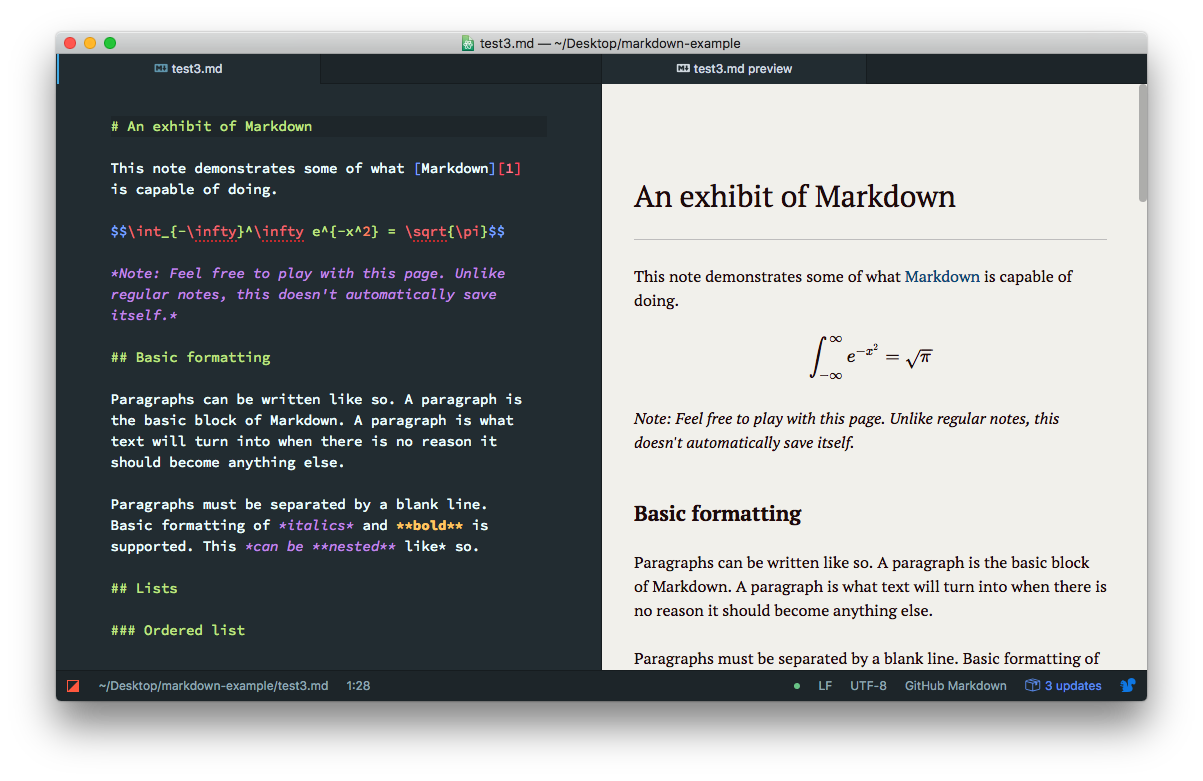
It looks awesome and I would really enjoy something similar.
Also, when you export to pdf w... | I'm curious! | https://api.github.com/repos/shd101wyy/vscode-markdown-preview-enhanced/issues/1500/comments | 5 | 2018-10-05T17:22:23Z | 2023-08-23T02:51:17Z | https://github.com/shd101wyy/vscode-markdown-preview-enhanced/issues/1500 | 1,862,467,155 | 1,500 |
[
"shd101wyy",
"vscode-markdown-preview-enhanced"
] | 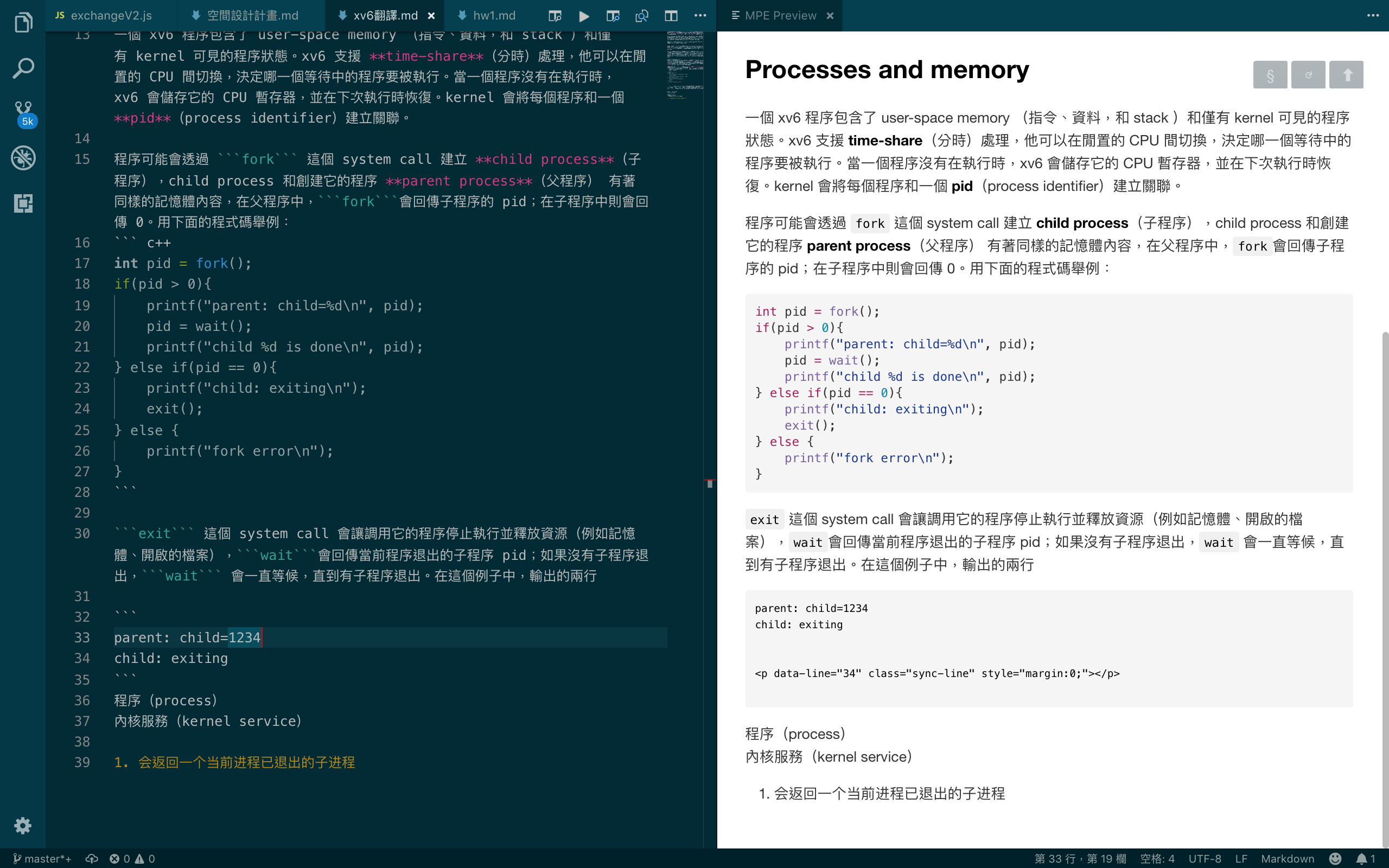
如图,
```
parent: child=1234
child: exiting
```
的解析出现了一段```<p data-line="34" class="sync-line" style="margin:0;"></p>```
上一篇同样内容的 issue 已经 closed 了 @@ | ```xxx``` 出现不明 html 标签 | https://api.github.com/repos/shd101wyy/vscode-markdown-preview-enhanced/issues/1501/comments | 7 | 2018-10-05T07:07:07Z | 2023-08-23T02:51:19Z | https://github.com/shd101wyy/vscode-markdown-preview-enhanced/issues/1501 | 1,862,467,190 | 1,501 |
[
"shd101wyy",
"vscode-markdown-preview-enhanced"
] | Oops! By mistake, I submitted this issue with an empty a description. Sorry about that!
In any case, I am posting this issue because no matter what I do I keep on getting
`Error: spawn erd ENOENT`
To get it installed on my computer I've tried several things:
- Started reading your issue with baronTommy @ h... | ERD help! | https://api.github.com/repos/shd101wyy/vscode-markdown-preview-enhanced/issues/1502/comments | 5 | 2018-10-04T18:56:53Z | 2023-08-23T02:51:21Z | https://github.com/shd101wyy/vscode-markdown-preview-enhanced/issues/1502 | 1,862,467,224 | 1,502 |
[
"shd101wyy",
"vscode-markdown-preview-enhanced"
] | Version 0.3.8
mermaid graph will have black background and some grey text.
User setting is by default:
"markdown-preview-enhanced.mermaidTheme": "mermaid.css",
Used exactly the same in my own settings and got error message on the usage of mermaid.css.
Used setting:
"markdown-preview-enhanced.mermaidTheme":... | Mermaid preview, graph will be dark | https://api.github.com/repos/shd101wyy/vscode-markdown-preview-enhanced/issues/151/comments | 4 | 2018-10-02T09:27:40Z | 2020-05-19T11:44:21Z | https://github.com/shd101wyy/vscode-markdown-preview-enhanced/issues/151 | 365,813,004 | 151 |
[
"shd101wyy",
"vscode-markdown-preview-enhanced"
] | When I press `ctrl-shift-m` to activate markdown-preview-enhanced, it displays a loading ui before displaying the rendered html document. It takes about serveral minutes even for small size markdown file. If it contains plantuml, it takes much more time. | preview loading takes too long time? | https://api.github.com/repos/shd101wyy/vscode-markdown-preview-enhanced/issues/1503/comments | 0 | 2018-10-02T08:07:19Z | 2023-08-23T02:51:23Z | https://github.com/shd101wyy/vscode-markdown-preview-enhanced/issues/1503 | 1,862,467,245 | 1,503 |
[
"shd101wyy",
"vscode-markdown-preview-enhanced"
] | Hi, this package is really nice, I used it to render markdown, plantuml, mermaid very well. But I come across a problem, that is I put some css code into `style.less` to render headings with number, for example:
```
# part a
## section a
## section b
# part b
```
above markdown will be rendered as following:... | style.less not work? | https://api.github.com/repos/shd101wyy/vscode-markdown-preview-enhanced/issues/1504/comments | 0 | 2018-10-02T07:51:48Z | 2023-08-23T02:51:25Z | https://github.com/shd101wyy/vscode-markdown-preview-enhanced/issues/1504 | 1,862,467,275 | 1,504 |
[
"shd101wyy",
"vscode-markdown-preview-enhanced"
] | Thank you very much for a great package.
I am having an issue using Pandoc with Katex.
I am on Atom 1.31.1, MPE 0.15.7, Katex 0.10.0-rc.1 and Pandoc 2.2.1 on macOS10.13.6.
I would like to use Katex with Pandoc for preview.
With `Use Pandoc Parser` ticked I have tried `--katex` in both `Pandoc Options: Command L... | Issue with Pandoc and Katex | https://api.github.com/repos/shd101wyy/vscode-markdown-preview-enhanced/issues/1505/comments | 2 | 2018-10-01T00:40:20Z | 2023-08-23T02:51:28Z | https://github.com/shd101wyy/vscode-markdown-preview-enhanced/issues/1505 | 1,862,467,300 | 1,505 |
[
"shd101wyy",
"vscode-markdown-preview-enhanced"
] | Is there any support for latex packages? | Latex packages? | https://api.github.com/repos/shd101wyy/vscode-markdown-preview-enhanced/issues/150/comments | 1 | 2018-09-30T02:17:08Z | 2019-02-19T19:13:24Z | https://github.com/shd101wyy/vscode-markdown-preview-enhanced/issues/150 | 365,183,989 | 150 |
[
"shd101wyy",
"vscode-markdown-preview-enhanced"
] | 这个是生成的
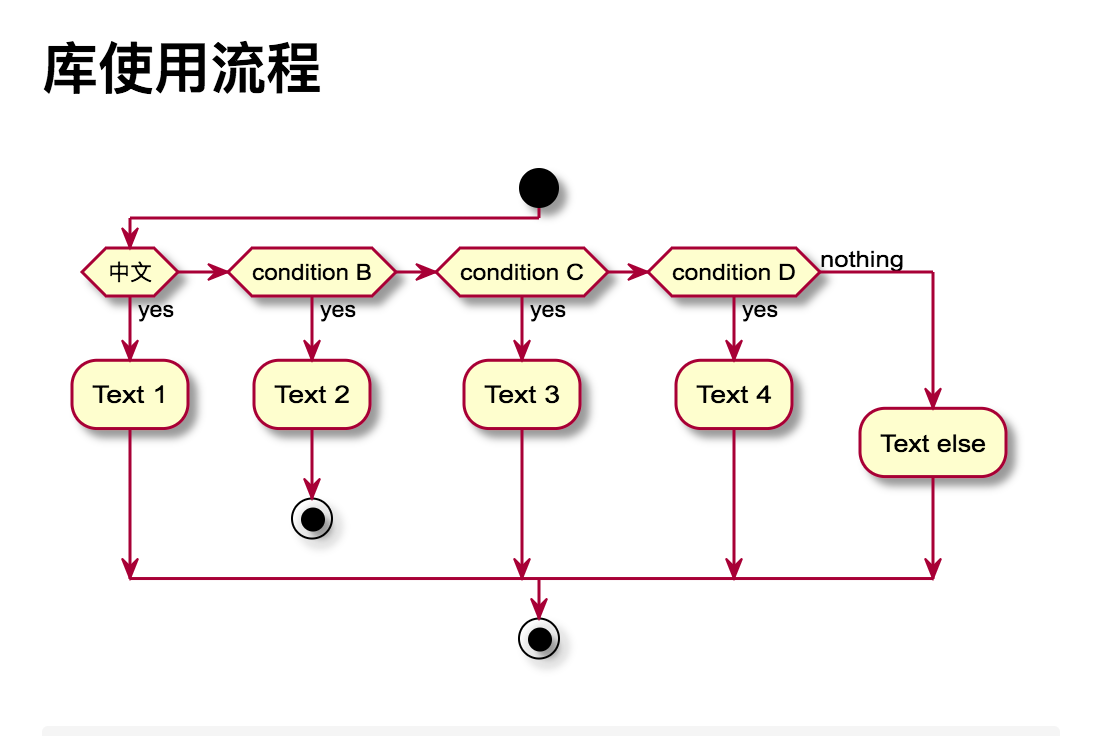
save as markdown 之后就这样了
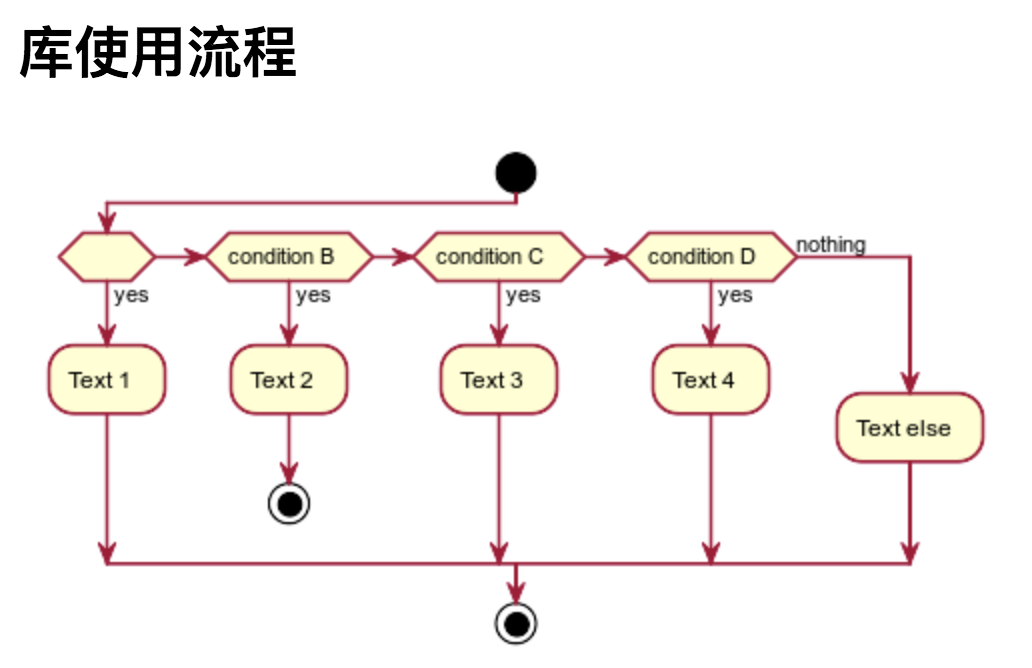
| MAC 导出图片缺少中文文字 | https://api.github.com/repos/shd101wyy/vscode-markdown-preview-enhanced/issues/1506/comments | 2 | 2018-09-29T16:38:18Z | 2023-08-23T02:51:46Z | https://github.com/shd101wyy/vscode-markdown-preview-enhanced/issues/1506 | 1,862,467,513 | 1,506 |
[
"shd101wyy",
"vscode-markdown-preview-enhanced"
] | ### In diagrams TD, LR or Gantt, the objects should appear with the default theme:
here how it should be: [Mermaid Live Editor](https://mermaidjs.github.io/mermaid-live-editor/#/view/eyJjb2RlIjoiZ3JhcGggVERcbkFbQ2hyaXN0bWFzXSAtLT58R2V0IG1vbmV5fCBCKEdvIHNob3BwaW5nKVxuQiAtLT4gQ3tMZXQgbWUgdGhpbmt9XG5DIC0tPnxPbmV8IERbTGFw... | All objects are rendered as black boxes | https://api.github.com/repos/shd101wyy/vscode-markdown-preview-enhanced/issues/149/comments | 3 | 2018-09-27T13:04:43Z | 2020-01-27T20:31:23Z | https://github.com/shd101wyy/vscode-markdown-preview-enhanced/issues/149 | 364,466,558 | 149 |
[
"shd101wyy",
"vscode-markdown-preview-enhanced"
] | There was an error, while exporting to markdown. The document contains multiple plantuml diagrams.
ImageMagick is installed, but reading the error, this is also not really an installation issue here.
```
Error: ImageMagick is required to be installed to convert svg to png.
Error: Command failed: magick /var/fo... | Failed Markdown export on OSX Mojave | https://api.github.com/repos/shd101wyy/vscode-markdown-preview-enhanced/issues/1507/comments | 4 | 2018-09-26T16:23:52Z | 2023-08-23T02:51:48Z | https://github.com/shd101wyy/vscode-markdown-preview-enhanced/issues/1507 | 1,862,467,537 | 1,507 |
[
"shd101wyy",
"vscode-markdown-preview-enhanced"
] | CHANGELOG.md contents were removed in a seemingly unrelated commit https://github.com/shd101wyy/vscode-markdown-preview-enhanced/commit/bd3541fad26c8834331cb57f088f1d4b2ac0ab98 over 1 year ago. Now that the project is not in such a rapid development, it would be nice to have changelog preview in VSCode instead of havin... | Proper changelog | https://api.github.com/repos/shd101wyy/vscode-markdown-preview-enhanced/issues/148/comments | 2 | 2018-09-25T22:15:20Z | 2023-02-03T14:19:22Z | https://github.com/shd101wyy/vscode-markdown-preview-enhanced/issues/148 | 363,786,936 | 148 |
[
"shd101wyy",
"vscode-markdown-preview-enhanced"
] | I got this issue after upgrade:
.vscode/extensions/shd101wyy.markdown-preview-enhanced-0.3.6/node_modules/@shd101wyy/mume/dependencies/viz/full.render.js:7
var Module=typeof Module!=="undefined"?Module:{};var moduleOverrides={};var key;for(key in Module){if(Module.hasOwnProperty(key)){moduleOverrides[key]=Module[ke... | Sept 24 upgrade cause crash | https://api.github.com/repos/shd101wyy/vscode-markdown-preview-enhanced/issues/145/comments | 10 | 2018-09-24T14:55:25Z | 2023-09-04T11:51:44Z | https://github.com/shd101wyy/vscode-markdown-preview-enhanced/issues/145 | 363,183,518 | 145 |
[
"shd101wyy",
"vscode-markdown-preview-enhanced"
] | I think that update from 24 Sept 2018 changed behavior.
First thing is about wrapping:

That is ok, I can live with it. But graphs have worse situation:
, \oiint and \oiiint is supported but it doesn't seem to work for me.
Any ideas how I can fix this? | \oiint & \oiiint doesn't work | https://api.github.com/repos/shd101wyy/vscode-markdown-preview-enhanced/issues/1509/comments | 4 | 2018-09-19T18:42:40Z | 2023-08-23T02:51:52Z | https://github.com/shd101wyy/vscode-markdown-preview-enhanced/issues/1509 | 1,862,467,574 | 1,509 |
[
"shd101wyy",
"vscode-markdown-preview-enhanced"
] | mermaid 最新版本有 classdiagram 还有 git diagram,可否更新支持? | mermaid 最新版本功能 | https://api.github.com/repos/shd101wyy/vscode-markdown-preview-enhanced/issues/141/comments | 0 | 2018-09-15T02:16:44Z | 2018-09-15T02:16:44Z | https://github.com/shd101wyy/vscode-markdown-preview-enhanced/issues/141 | 360,498,439 | 141 |
[
"shd101wyy",
"vscode-markdown-preview-enhanced"
] | Love markdown-preview-enhanced for the record, only question and probably bug or feature request:
If I create a presentation in markdown-preview-enhanced and have beamer output enabled, it appears that the <!-- slide --> gets translated before passing the content to Beamer to MUMESLIDE. I was wondering if there is ... | MUMESLIDE in Beamer Output | https://api.github.com/repos/shd101wyy/vscode-markdown-preview-enhanced/issues/1510/comments | 2 | 2018-09-13T14:48:23Z | 2023-08-23T02:51:54Z | https://github.com/shd101wyy/vscode-markdown-preview-enhanced/issues/1510 | 1,862,467,597 | 1,510 |
[
"shd101wyy",
"vscode-markdown-preview-enhanced"
] | Hi,
I tried out a gantt diagram according the documentation on http://plantuml.com/gantt-diagram
But when trying to add working with resources and % complete, the preview gives an error message
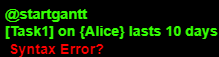
```puml... | Preview doesn't render with Plant UML gantt view on resources and percentage complete | https://api.github.com/repos/shd101wyy/vscode-markdown-preview-enhanced/issues/140/comments | 6 | 2018-09-13T11:38:54Z | 2021-06-14T06:51:24Z | https://github.com/shd101wyy/vscode-markdown-preview-enhanced/issues/140 | 359,857,940 | 140 |
[
"shd101wyy",
"vscode-markdown-preview-enhanced"
] | 公式:
```
\def\arraystretch{1.5}
\begin{array}{c:c:c}
a & b & c \\ \hline
d & e & f \\
\hdashline
g & h & i
\end{array}
```

, I found it does not support mermaid styling. But other visualcode mermaid plugin does support it.
```mermaid
graph TB
sq[Square shape] --> ci((Circle shape))
subgraph A subgraph
od>Odd shape]-- Two line<br/>... | support mermaid styling | https://api.github.com/repos/shd101wyy/vscode-markdown-preview-enhanced/issues/139/comments | 1 | 2018-09-12T15:25:00Z | 2018-12-17T14:12:56Z | https://github.com/shd101wyy/vscode-markdown-preview-enhanced/issues/139 | 359,533,823 | 139 |
[
"shd101wyy",
"vscode-markdown-preview-enhanced"
] | 可以通过命令批量转html或pdf么 | 可以通过命令批量转html或pdf么 | https://api.github.com/repos/shd101wyy/vscode-markdown-preview-enhanced/issues/1512/comments | 1 | 2018-09-12T10:38:59Z | 2023-08-23T02:51:59Z | https://github.com/shd101wyy/vscode-markdown-preview-enhanced/issues/1512 | 1,862,467,650 | 1,512 |
[
"shd101wyy",
"vscode-markdown-preview-enhanced"
] | 更新了最新版的vscode之后,我用的monokai主题,发现预览的背景是深色的,不是白色的,感觉出了点问题 | vscode最新版下,预览的时候背景色是深色 | https://api.github.com/repos/shd101wyy/vscode-markdown-preview-enhanced/issues/1513/comments | 1 | 2018-09-10T05:12:55Z | 2023-08-23T02:52:01Z | https://github.com/shd101wyy/vscode-markdown-preview-enhanced/issues/1513 | 1,862,467,674 | 1,513 |
[
"shd101wyy",
"vscode-markdown-preview-enhanced"
] | example self defined norm
$$\newcommand\norm[1]{\left\lVert#1\right\rVert}$$ | Don' t support newcommand in latex | https://api.github.com/repos/shd101wyy/vscode-markdown-preview-enhanced/issues/1514/comments | 0 | 2018-09-09T17:43:27Z | 2023-08-23T02:52:04Z | https://github.com/shd101wyy/vscode-markdown-preview-enhanced/issues/1514 | 1,862,467,709 | 1,514 |
[
"shd101wyy",
"vscode-markdown-preview-enhanced"
] | Occasionally I cannot toggle the markdown preview enhanced dialog, the following console log has been captured from atom
```
Uncaught (in promise) Error: watch /home/myName/.mume ENOSPC
at _errnoException (util.js:1024:11)
at FSWatcher.start (fs.js:1386:19)
at Object.fs.watch (fs.js:1412:11)
at ... | Occasionally Unable to Toggle Preview Dialog | https://api.github.com/repos/shd101wyy/vscode-markdown-preview-enhanced/issues/1515/comments | 3 | 2018-09-07T15:41:25Z | 2023-08-23T02:52:06Z | https://github.com/shd101wyy/vscode-markdown-preview-enhanced/issues/1515 | 1,862,467,740 | 1,515 |
[
"shd101wyy",
"vscode-markdown-preview-enhanced"
] | Markdown source has some Chinese characters, such as
```
$12.5/月
```
MPE gets some error,
```
ParseError: KaTeX parse error: Expected 'EOF', got '月' at position 6: 12.5/月̲,
```
| ParseError: KaTeX parse error: Expected 'EOF', got '月' at position 6: 12.5/月̲, | https://api.github.com/repos/shd101wyy/vscode-markdown-preview-enhanced/issues/138/comments | 2 | 2018-09-07T01:58:56Z | 2019-03-07T09:23:28Z | https://github.com/shd101wyy/vscode-markdown-preview-enhanced/issues/138 | 357,891,197 | 138 |
[
"shd101wyy",
"vscode-markdown-preview-enhanced"
] | If there is a header with newlines, each line is displayed on top of each other. All of the lines overlap
For example,
```
## Lyndon B. Johnson Space Center <br/> Houston, Texas
```
"Houston, Texas" will be displayed on top of "Lyndon B. Johnson Space Center"
See attached screenshot:
<img width="1384" ... | Header with newlines causes text to overlap | https://api.github.com/repos/shd101wyy/vscode-markdown-preview-enhanced/issues/1516/comments | 1 | 2018-09-04T23:33:48Z | 2023-08-23T02:52:08Z | https://github.com/shd101wyy/vscode-markdown-preview-enhanced/issues/1516 | 1,862,467,767 | 1,516 |
[
"shd101wyy",
"vscode-markdown-preview-enhanced"
] | ### 希望导出到html后,toc可以像[官方文档](https://shd101wyy.github.io/markdown-preview-enhanced/#/zh-cn/)中那样:
1. 显示为黑色(而不是超链接的颜色)
2. 在浏览当前模块时,当前模块能够高亮为超链接的颜色
3. 一级标题加粗,其他不加粗,三级标题有“-”标志
这样显示会比现在清楚一些。
### 希望导出html后,toc的位置可以自定义,比如出现在页面右边
### 希望能够自定义配置默认的front matter
最后感谢开发者,这个插件真是太好用了! | 一些期待的关于toc的新功能~ | https://api.github.com/repos/shd101wyy/vscode-markdown-preview-enhanced/issues/1517/comments | 0 | 2018-09-04T06:54:52Z | 2023-08-23T02:52:10Z | https://github.com/shd101wyy/vscode-markdown-preview-enhanced/issues/1517 | 1,862,467,791 | 1,517 |
[
"shd101wyy",
"vscode-markdown-preview-enhanced"
] | [Enter steps to reproduce:]
1. ...
2. ...
**Atom**: 1.30.0-beta1 x64
**Electron**: 2.0.5
**OS**: Unknown Windows version
**Thrown From**: [markdown-preview-enhanced](https://github.com/shd101wyy/markdown-preview-enhanced) package 0.15.6
### Stack Trace
Uncaught Error: tunneling socket could not be est... | Uncaught Error: tunneling socket could not be established, cause=socket hang up | https://api.github.com/repos/shd101wyy/vscode-markdown-preview-enhanced/issues/1518/comments | 0 | 2018-09-04T03:22:20Z | 2023-08-23T02:52:12Z | https://github.com/shd101wyy/vscode-markdown-preview-enhanced/issues/1518 | 1,862,467,817 | 1,518 |
[
"shd101wyy",
"vscode-markdown-preview-enhanced"
] | I'm trying to render following UML diagram through your vscode extension.
But it is not able to render for specific case when `shape = record` `constraint=false` for the (4->3 & 2->5) node connection.
It is getting properly rendered in http://www.webgraphviz.com/
Please let me know if there is any other altern... | [Error : lost edge x y ] UML class diagram is not getting rendered for node [ shape=record, constraint=false ] | https://api.github.com/repos/shd101wyy/vscode-markdown-preview-enhanced/issues/1519/comments | 0 | 2018-09-01T11:40:21Z | 2023-08-23T02:52:15Z | https://github.com/shd101wyy/vscode-markdown-preview-enhanced/issues/1519 | 1,862,467,840 | 1,519 |
[
"shd101wyy",
"vscode-markdown-preview-enhanced"
] | Mermaid Sequence Diagram: Alternative paths syntax breaks when there are more than 1 "else" blocks. This works fine in the mermaid live editor - https://mermaidjs.github.io/mermaid-live-editor/
Example:
```mermaid
sequenceDiagram
participant a
participant b
participant c
alt path1
... | Mermaid Sequence Diagrams - alt with more than one else blocks fails to render | https://api.github.com/repos/shd101wyy/vscode-markdown-preview-enhanced/issues/1520/comments | 2 | 2018-09-01T07:51:33Z | 2023-08-23T02:52:17Z | https://github.com/shd101wyy/vscode-markdown-preview-enhanced/issues/1520 | 1,862,467,859 | 1,520 |
[
"shd101wyy",
"vscode-markdown-preview-enhanced"
] | It's good that current \def works globally. However, when converting the markdown to latex, \def is considered only locally then generates an error. So I want a \gdef or \global support but you don't have to change the way \def works. | request a \gdef or \global support in math equation | https://api.github.com/repos/shd101wyy/vscode-markdown-preview-enhanced/issues/137/comments | 1 | 2018-09-01T05:22:05Z | 2018-09-01T05:32:02Z | https://github.com/shd101wyy/vscode-markdown-preview-enhanced/issues/137 | 356,173,682 | 137 |
[
"shd101wyy",
"vscode-markdown-preview-enhanced"
] | Hello,
I love plantuml and I love your atom plugin
However I am trying to draw a state engine and it is NOT working.
I am using a basic sample.
```plantuml
@startuml
[*] --> State1
State1 --> [*]
State1 : this is a string
State1 : this is another string
State1 -> State2
State2 --> [*]
@enduml
... | State Diagram will not render. | https://api.github.com/repos/shd101wyy/vscode-markdown-preview-enhanced/issues/1521/comments | 2 | 2018-08-31T20:36:50Z | 2023-08-23T02:52:53Z | https://github.com/shd101wyy/vscode-markdown-preview-enhanced/issues/1521 | 1,862,467,878 | 1,521 |
[
"shd101wyy",
"vscode-markdown-preview-enhanced"
] | Feature request: Is it possible to show TOC on sidebar, rather than in preview window?
For example, the docker extension add its own view in sidebar.
<img width="106" alt="screen shot 2018-08-30 at 5 41 32 pm" src="https://user-images.githubusercontent.com/12189252/44843895-04b9ae80-ac7c-11e8-8dbd-235282da3a94.png"... | Feature request: Show TOC on sidebar | https://api.github.com/repos/shd101wyy/vscode-markdown-preview-enhanced/issues/1522/comments | 0 | 2018-08-30T09:46:40Z | 2023-08-23T02:52:21Z | https://github.com/shd101wyy/vscode-markdown-preview-enhanced/issues/1522 | 1,862,467,903 | 1,522 |
[
"shd101wyy",
"vscode-markdown-preview-enhanced"
] | I can't quite figure out what the various options for `markdown-preview-enhanced.pandocMarkdownFlavor` is.
I don't even fully understand the default value of `"markdown-raw_tex+tex_math_single_backslash"`.
Is it documented somewhere? | Documentation for markdown-preview-enhanced.pandocMarkdownFlavor? | https://api.github.com/repos/shd101wyy/vscode-markdown-preview-enhanced/issues/136/comments | 2 | 2018-08-28T11:13:58Z | 2018-08-30T22:01:55Z | https://github.com/shd101wyy/vscode-markdown-preview-enhanced/issues/136 | 354,683,451 | 136 |
[
"shd101wyy",
"vscode-markdown-preview-enhanced"
] | Hey, there is already a feature that allows you to generate a presentation from a markdown file.
Could you extend this to actually reduce the necessary amount of html coding inside the markdown files necessary to create the slides?
Like it is already done with https://github.com/regebro/hovercraft, where you can ge... | Feature request: presentation creation like in hovercraft | https://api.github.com/repos/shd101wyy/vscode-markdown-preview-enhanced/issues/1523/comments | 0 | 2018-08-27T22:04:52Z | 2023-08-23T02:52:23Z | https://github.com/shd101wyy/vscode-markdown-preview-enhanced/issues/1523 | 1,862,467,928 | 1,523 |
[
"shd101wyy",
"vscode-markdown-preview-enhanced"
] | First off, thanks for this awesome extension, it completely obsoleted boostnote in my workflow, please continue your great work!
I did run into a little problem:
I'm running MPE in Visual Studio Code 1.26.1 on Antergos (Arch Linux derivative) and noticed that the preview won't scroll automatically if I scroll in th... | Preview does not auto-scroll with scrolling in editor | https://api.github.com/repos/shd101wyy/vscode-markdown-preview-enhanced/issues/1524/comments | 0 | 2018-08-27T21:58:50Z | 2023-09-05T13:21:40Z | https://github.com/shd101wyy/vscode-markdown-preview-enhanced/issues/1524 | 1,862,467,966 | 1,524 |
[
"shd101wyy",
"vscode-markdown-preview-enhanced"
] | When editing a file opened from a UNC path (e.g., \\server\share\readme.md), Markdown Preview Enhanced fails to open. VS Code displays an error:
Running the contributed command:'markdown-preview-enhanced.openPreview' failed. | Cannot preview markdown file opened from UNC path | https://api.github.com/repos/shd101wyy/vscode-markdown-preview-enhanced/issues/135/comments | 3 | 2018-08-25T18:12:35Z | 2019-03-06T03:45:42Z | https://github.com/shd101wyy/vscode-markdown-preview-enhanced/issues/135 | 354,032,294 | 135 |
[
"shd101wyy",
"vscode-markdown-preview-enhanced"
] | Hi,
I'm trying to generate PDFs out of my MD files from Visual Studio Code with your plugin. I'm not an expert on all this "MD only generates HTML" kerfuffle and I'm struggling to do it.
Right now, I managed to get the Pandoc / PDF button to work, but it generates a quite bland PDF. How can I tell pandoc to use t... | Question: Specify a css file when exporting to PDF via Pandoc? | https://api.github.com/repos/shd101wyy/vscode-markdown-preview-enhanced/issues/1525/comments | 0 | 2018-08-23T10:14:51Z | 2023-08-23T02:52:28Z | https://github.com/shd101wyy/vscode-markdown-preview-enhanced/issues/1525 | 1,862,467,989 | 1,525 |
[
"shd101wyy",
"vscode-markdown-preview-enhanced"
] | Hello,
Great tool! Its taken my documentation skills waaaay up a notch.
**Issue:** Mermaid .png is NOT writing to `/assets`.
**Setup:**
- Workspace:
```
/git/myDir/assets
```
- User Settings:
```
"markdown-preview-enhanced.imageFolderPath": "/assets"
```
- Front matter in `/myDir/test.md` file:
... | Mermaid .png not saving to imageFolderPath | https://api.github.com/repos/shd101wyy/vscode-markdown-preview-enhanced/issues/1526/comments | 5 | 2018-08-22T22:50:42Z | 2023-08-23T02:52:30Z | https://github.com/shd101wyy/vscode-markdown-preview-enhanced/issues/1526 | 1,862,468,014 | 1,526 |
[
"shd101wyy",
"vscode-markdown-preview-enhanced"
] | Thanks a lot for developing great markdown-preview-enhanced.
I am using atom + mpe on macos mojave. My markdown includes some blocks of plantUML and in Chinese. I got following error messages in the pdf files from pandoc export.
```
Error: ImageMagick is required to be installed to convert svg to png.
Error: Co... | failed to convert svg to png with ImageMagick in pandoc export | https://api.github.com/repos/shd101wyy/vscode-markdown-preview-enhanced/issues/1527/comments | 8 | 2018-08-22T22:07:32Z | 2023-08-23T02:52:32Z | https://github.com/shd101wyy/vscode-markdown-preview-enhanced/issues/1527 | 1,862,468,041 | 1,527 |
[
"shd101wyy",
"vscode-markdown-preview-enhanced"
] | 在VSCODE环境下,
使用` "markdown.extension.toc.githubCompatibility": true`设置的自动侧栏
打开页面默认为收起状态,如何使其默认展开?
找了很久,没有找到相应的配置文档 | 使用默认的TOC,如何使他默认展开状态? | https://api.github.com/repos/shd101wyy/vscode-markdown-preview-enhanced/issues/1528/comments | 3 | 2018-08-22T03:53:25Z | 2023-08-23T02:52:34Z | https://github.com/shd101wyy/vscode-markdown-preview-enhanced/issues/1528 | 1,862,468,069 | 1,528 |
[
"shd101wyy",
"vscode-markdown-preview-enhanced"
] | ### | 添加图片路径如果是绝对路径,会添加失败,其他插件是可以添加成功的。 | https://api.github.com/repos/shd101wyy/vscode-markdown-preview-enhanced/issues/1529/comments | 0 | 2018-08-16T15:35:38Z | 2023-08-23T02:52:37Z | https://github.com/shd101wyy/vscode-markdown-preview-enhanced/issues/1529 | 1,862,468,091 | 1,529 |
[
"shd101wyy",
"vscode-markdown-preview-enhanced"
] | I've asked a similar question in #88 about syncing the directory `~/.mume` (Windows `%USERPROFILE%\.mume`) so that I can move around the mathjax config file.
[VSCode now support portability ](https://code.visualstudio.com/docs/editor/portable) thus I would like to request a minor change to MPE which is to add a user... | Changing .mume/ path | https://api.github.com/repos/shd101wyy/vscode-markdown-preview-enhanced/issues/134/comments | 1 | 2018-08-15T00:21:36Z | 2018-08-15T16:25:33Z | https://github.com/shd101wyy/vscode-markdown-preview-enhanced/issues/134 | 350,641,892 | 134 |
[
"shd101wyy",
"vscode-markdown-preview-enhanced"
] | I have a simple presentation in a `.md` file with the following front-matter,
```
---
presentation:
enableSpeakerNotes: true
theme: white.css
center: false
---
```
When I right click in the MPE Preview (in VS Code), I am able to export and view the slideshow just fine. However, when I attempt to p... | Unable to print presentation to PDF | https://api.github.com/repos/shd101wyy/vscode-markdown-preview-enhanced/issues/133/comments | 4 | 2018-08-14T15:06:37Z | 2018-08-14T17:29:42Z | https://github.com/shd101wyy/vscode-markdown-preview-enhanced/issues/133 | 350,470,645 | 133 |
[
"shd101wyy",
"vscode-markdown-preview-enhanced"
] | ```dot
digraph R {
node [shape=record];
{ rank=same rA sA tA }
{ rank=same uB vB wB }
rA -> sA[rankdir = LR];
sA -> vB;
t -> rA;
uB -> vB[rankdir = LR];
wB -> u;
wB -> tA;
}
``` | Graphviz code --- it can't be displayed graphics properly . | https://api.github.com/repos/shd101wyy/vscode-markdown-preview-enhanced/issues/132/comments | 0 | 2018-08-14T14:36:36Z | 2018-08-14T14:36:36Z | https://github.com/shd101wyy/vscode-markdown-preview-enhanced/issues/132 | 350,457,402 | 132 |
[
"shd101wyy",
"vscode-markdown-preview-enhanced"
] | I have a simple presentation in a `.md` file with the following front-matter,
```
---
presentation:
enableSpeakerNotes: true
theme: white.css
center: false
---
```
When I right click in the MPE Preview (in VS Code), I am able to export and view the slideshow just fine. However, when I attempt to p... | Unable to print presentation to PDF | https://api.github.com/repos/shd101wyy/vscode-markdown-preview-enhanced/issues/1530/comments | 1 | 2018-08-14T13:53:50Z | 2023-08-23T02:52:39Z | https://github.com/shd101wyy/vscode-markdown-preview-enhanced/issues/1530 | 1,862,468,120 | 1,530 |
[
"shd101wyy",
"vscode-markdown-preview-enhanced"
] | I have attached an example of using an image link in a subfolder
[issue.zip](https://github.com/shd101wyy/markdown-preview-enhanced/files/2285583/issue.zip)
| Ebook pdf relative image links not working from subfolders | https://api.github.com/repos/shd101wyy/vscode-markdown-preview-enhanced/issues/1531/comments | 2 | 2018-08-14T05:07:24Z | 2023-08-23T02:52:41Z | https://github.com/shd101wyy/vscode-markdown-preview-enhanced/issues/1531 | 1,862,468,150 | 1,531 |
[
"shd101wyy",
"vscode-markdown-preview-enhanced"
] | ### Environment
* ATOM
* Markdown Preview Enhanced 0.15.6
### Description
When I use a C# code block enter the code
```csharp
```csharp
using System;
using System.Collections.Generic;
using System.Linq;
using System.Text;
using System.Threading.Tasks;
namespace AuthorAttribute
{
/// <summary
... | I meet a bug about C# Code Block | https://api.github.com/repos/shd101wyy/vscode-markdown-preview-enhanced/issues/1532/comments | 2 | 2018-08-13T13:53:33Z | 2023-08-23T02:52:43Z | https://github.com/shd101wyy/vscode-markdown-preview-enhanced/issues/1532 | 1,862,468,182 | 1,532 |
[
"shd101wyy",
"vscode-markdown-preview-enhanced"
] | 引入代码时采用了缩进,将导致语言错误。
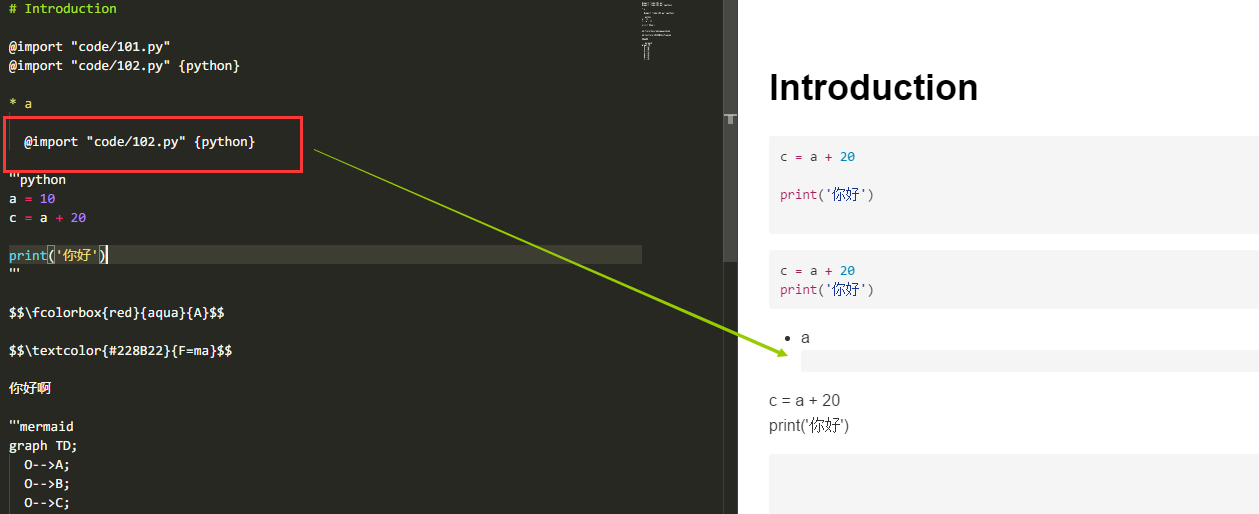
这个问题似乎与 @shd101wyy/mume 这个库有关系。问题似乎是 [/src/transformer.ts](https://github.com/shd101wyy/mume/blob/master/src/transformer.ts#L920) 拼接头部空白区域导致。
```python
outputString = outputString... | @import 缩进问题 | https://api.github.com/repos/shd101wyy/vscode-markdown-preview-enhanced/issues/1533/comments | 0 | 2018-08-13T07:37:38Z | 2023-08-23T02:52:45Z | https://github.com/shd101wyy/vscode-markdown-preview-enhanced/issues/1533 | 1,862,468,208 | 1,533 |
[
"shd101wyy",
"vscode-markdown-preview-enhanced"
] | When generating an html file from a .md file that includes a mermaid diagram, the diagram is displayed as text:
If you could add the two script lines in the html & rename the language-mermaid clas... | Feature Request: Render mermaid html output | https://api.github.com/repos/shd101wyy/vscode-markdown-preview-enhanced/issues/131/comments | 2 | 2018-08-10T09:30:20Z | 2018-08-12T07:25:53Z | https://github.com/shd101wyy/vscode-markdown-preview-enhanced/issues/131 | 349,442,344 | 131 |
[
"shd101wyy",
"vscode-markdown-preview-enhanced"
] | Hi,
I really like this extensions method of rendering a csv as a table, like so:
```
@import "table.csv"
```
Now, editing the csv file is really cumbersome, because I don't have a live preview of the final table.
I need to:
1. Save the table.csv file
2. Switch to the markdown file that contains the `@im... | Inline Csv-Table with triple backticks (```) ? | https://api.github.com/repos/shd101wyy/vscode-markdown-preview-enhanced/issues/1534/comments | 0 | 2018-08-08T16:32:51Z | 2023-08-23T02:52:47Z | https://github.com/shd101wyy/vscode-markdown-preview-enhanced/issues/1534 | 1,862,468,236 | 1,534 |
[
"shd101wyy",
"vscode-markdown-preview-enhanced"
] | 如题 | 希望可以提供Kotlin的编辑器代码高亮 | https://api.github.com/repos/shd101wyy/vscode-markdown-preview-enhanced/issues/1535/comments | 1 | 2018-08-08T13:06:33Z | 2023-08-23T02:54:57Z | https://github.com/shd101wyy/vscode-markdown-preview-enhanced/issues/1535 | 1,862,468,258 | 1,535 |
[
"shd101wyy",
"vscode-markdown-preview-enhanced"
] | Plantuml describes different exmaples in http://plantuml.com/class-diagram for generating a class diagram.
But in the preview this is not visible:

| plantuml Class Diagram not showing in Markdown Preview Enhanced | https://api.github.com/repos/shd101wyy/vscode-markdown-preview-enhanced/issues/1536/comments | 2 | 2018-08-08T11:27:41Z | 2023-08-23T02:52:52Z | https://github.com/shd101wyy/vscode-markdown-preview-enhanced/issues/1536 | 1,862,468,283 | 1,536 |
[
"shd101wyy",
"vscode-markdown-preview-enhanced"
] | Hi,
Excellent add on!!
I have a problem, I am using windows, I am trying to work with flow and even with the below example"
```flow
st=>start: Start:>http://www.google.com[blank]
e=>end:>http://www.google.com
op1=>operation: My Operation
sub1=>subroutine: My Subroutine
cond=>condition: Yes or No?:>http://ww... | TypeError: t.shiftX is not a function | https://api.github.com/repos/shd101wyy/vscode-markdown-preview-enhanced/issues/1537/comments | 3 | 2018-08-08T05:28:31Z | 2023-08-23T02:52:54Z | https://github.com/shd101wyy/vscode-markdown-preview-enhanced/issues/1537 | 1,862,468,314 | 1,537 |
[
"shd101wyy",
"vscode-markdown-preview-enhanced"
] | $$a^2+b^2=c^2 \tag {1.2}$$这种公式编号不能预览呢,而且我查了katex是支持渲染这个\tag latex 关键字的 | 不能预览latex 公式编号 | https://api.github.com/repos/shd101wyy/vscode-markdown-preview-enhanced/issues/1538/comments | 2 | 2018-08-07T10:43:43Z | 2023-08-23T02:52:56Z | https://github.com/shd101wyy/vscode-markdown-preview-enhanced/issues/1538 | 1,862,468,341 | 1,538 |
[
"shd101wyy",
"vscode-markdown-preview-enhanced"
] | Hi,
Installed atom including markdown-preview-enhanced (version 0.15.6) on Windows-10
Developer tools console tell me:
Error running script C:\Users\defossez\.mume\parser.js
get_Module._compile @ <embedded>:11750
I've not changed anything to the parser.js script in the .mume directory.
clicking on <embedded>:... | error reported in developer tools console. | https://api.github.com/repos/shd101wyy/vscode-markdown-preview-enhanced/issues/1539/comments | 1 | 2018-08-06T15:33:13Z | 2023-08-23T02:52:58Z | https://github.com/shd101wyy/vscode-markdown-preview-enhanced/issues/1539 | 1,862,468,361 | 1,539 |
[
"shd101wyy",
"vscode-markdown-preview-enhanced"
] | I have set the following CSS in the settings and the CSS works when html is previewed in a tab. But when exported or Opened in the browser, the CSS doesn't work anymore but it takes some predefined CSS.
```json
"markdown-preview-enhanced.previewTheme": "solarized-light.css",
``` | CSS not working with exported HTML or when viewed in Browser | https://api.github.com/repos/shd101wyy/vscode-markdown-preview-enhanced/issues/130/comments | 2 | 2018-08-06T15:01:09Z | 2018-08-07T08:40:49Z | https://github.com/shd101wyy/vscode-markdown-preview-enhanced/issues/130 | 347,961,048 | 130 |
[
"shd101wyy",
"vscode-markdown-preview-enhanced"
] | I have set the following CSS in the settings and the CSS works when html is previewed in a tab. But when exported or Opened in the browser, the CSS doesn't work anymore but it takes some predefined CSS.
```json
"markdown-preview-enhanced.previewTheme": "solarized-light.css",
``` | CSS not working with exported HTML or when viewed in Browser. | https://api.github.com/repos/shd101wyy/vscode-markdown-preview-enhanced/issues/1540/comments | 1 | 2018-08-06T14:58:56Z | 2023-08-23T02:53:00Z | https://github.com/shd101wyy/vscode-markdown-preview-enhanced/issues/1540 | 1,862,468,377 | 1,540 |
[
"shd101wyy",
"vscode-markdown-preview-enhanced"
] | R Markdown supports automatic current date by using
```yaml
date: "`r format(Sys.time(), '%d %B, %Y')`"
```
Could you please support this?
[Source: YAML current date in rmarkdown - Stack Overflow](https://stackoverflow.com/questions/23449319/yaml-current-date-in-rmarkdown) | Automatically take current date in YAML header | https://api.github.com/repos/shd101wyy/vscode-markdown-preview-enhanced/issues/129/comments | 1 | 2018-08-06T14:20:15Z | 2024-01-24T09:07:24Z | https://github.com/shd101wyy/vscode-markdown-preview-enhanced/issues/129 | 347,944,193 | 129 |
[
"shd101wyy",
"vscode-markdown-preview-enhanced"
] | The following does not work if defined in _output.yaml. Works only when defined inside each Markdown file's YAML header.
```yaml
export_on_save:
html: true
```
I hope that you resolve this as it makes the Markdown file less portable as this yaml configuration might not be recognized by other parsers.
I pref... | export_on_save: html: true does not work if in _output.yaml | https://api.github.com/repos/shd101wyy/vscode-markdown-preview-enhanced/issues/128/comments | 0 | 2018-08-06T14:18:20Z | 2018-09-21T23:07:09Z | https://github.com/shd101wyy/vscode-markdown-preview-enhanced/issues/128 | 347,943,409 | 128 |
[
"shd101wyy",
"vscode-markdown-preview-enhanced"
] | Moving the MPE Preview window from vertical split to horizontal split (shortcut `Alt+Shift+0`) returns a blank pane. This might've been because of the new update?
Attempted this on a VSCode environment with fresh install of MPE and default settings. | Horizontal preview now returns blank. | https://api.github.com/repos/shd101wyy/vscode-markdown-preview-enhanced/issues/127/comments | 0 | 2018-08-05T01:27:32Z | 2018-08-05T01:28:07Z | https://github.com/shd101wyy/vscode-markdown-preview-enhanced/issues/127 | 347,660,607 | 127 |
[
"shd101wyy",
"vscode-markdown-preview-enhanced"
] | just update atom from 1.28 to 1.29
and markdown-preview-enhanced failed
please help, thank you
Atom Version: 1.29.0
System: Windows7 x64
Thrown From: markdown-preview-enhanced package, [v0.15.6](https://github.com/shd101wyy/markdown-preview-enhanced/releases/tag/v0.15.6)
Cannot find module '@shd101wyy/m... | Failed to activate the markdown-preview-enhanced package | https://api.github.com/repos/shd101wyy/vscode-markdown-preview-enhanced/issues/1541/comments | 13 | 2018-08-02T15:53:17Z | 2023-08-23T02:53:03Z | https://github.com/shd101wyy/vscode-markdown-preview-enhanced/issues/1541 | 1,862,468,412 | 1,541 |
[
"shd101wyy",
"vscode-markdown-preview-enhanced"
] | To render bold characters represents vectors, we need to add a package (bm) to the latex document.
For example,
$$
\usepackage{bm}
\bm{a}
$$
But it does not seem to be able to use the function in this atom/vscode package.
How should we do to use additional packages in math blocks?
Thanks. | Using additional package of Latex in math-block | https://api.github.com/repos/shd101wyy/vscode-markdown-preview-enhanced/issues/1542/comments | 2 | 2018-08-01T02:24:58Z | 2023-08-23T02:53:05Z | https://github.com/shd101wyy/vscode-markdown-preview-enhanced/issues/1542 | 1,862,468,434 | 1,542 |
[
"shd101wyy",
"vscode-markdown-preview-enhanced"
] | Hi
When I am in middle of constructing multi line latex formulas, when I try to go to next line, the preview render fails. Due to this, I am unable to follow the formula I am typing ( as usually its derivation from last step).
Can something be done about it? Can I configure to ignore new line as error so it con... | new line temporarily fails to render latex | https://api.github.com/repos/shd101wyy/vscode-markdown-preview-enhanced/issues/1543/comments | 3 | 2018-07-29T13:58:07Z | 2023-08-23T02:53:07Z | https://github.com/shd101wyy/vscode-markdown-preview-enhanced/issues/1543 | 1,862,468,464 | 1,543 |
[
"shd101wyy",
"vscode-markdown-preview-enhanced"
] | The [docs for markdown-preview-enhanced](https://shd101wyy.github.io/markdown-preview-enhanced/#/presentation) are BEAUTIFUL!
Please share how you generated them. | How did you generate docs! | https://api.github.com/repos/shd101wyy/vscode-markdown-preview-enhanced/issues/1544/comments | 1 | 2018-07-28T04:32:27Z | 2023-08-23T02:53:09Z | https://github.com/shd101wyy/vscode-markdown-preview-enhanced/issues/1544 | 1,862,468,489 | 1,544 |
Subsets and Splits
No community queries yet
The top public SQL queries from the community will appear here once available.