| | --- |
| | pretty_name: SimWorld Unreal Backend (Binary + Paks) |
| | license: apache-2.0 |
| | language: |
| | - en |
| | tags: |
| | - simulation |
| | - unreal-engine |
| | - binaries |
| | - paks |
| | - robotics |
| | - multimodal |
| | - agents |
| | task_categories: |
| | - other |
| | size_categories: |
| | - n<1K |
| | --- |
| | |
| | # SimWorld: An Open-ended Realistic Simulator for Autonomous Agents in Physical and Social Worlds |
| | <p align="center"> |
| | <img src="https://github.com/user-attachments/assets/5d2da588-9470-44ef-82a9-5d45d592497a" width="840" height="795" alt="image" /> |
| | </p> |
| |
|
| |
|
| | **SimWorld** is a simulation platform for developing and evaluating **LLM/VLM** AI agents in complex physical and social environments. |
| |
|
| | <div align="center"> |
| | <a href="https://simworld-ai.github.io/"><img src="https://img.shields.io/badge/Website-SimWorld-blue" alt="Website" /></a> |
| | <a href="https://github.com/maitrix-org/SimWorld"><img src="https://img.shields.io/github/stars/maitrix-org/SimWorld?style=social" alt="GitHub Stars" /></a> |
| | <a href="https://simworld.readthedocs.io/en/latest"><img src="https://img.shields.io/badge/Documentation-Read%20Docs-green" alt="Documentation" /></a> |
| | <a href="https://arxiv.org/abs/2512.01078"><img src="https://img.shields.io/badge/arXiv-2512.01078-b31b1b?logo=arxiv&logoColor=white" alt="arXiv:2512.01078" /></a> |
| | </div> |
| | |
| | ## 🔥 News |
| | - 2025.11 The white paper of **SimWorld** is available on arxiv! |
| | - 2025.9 **SimWorld** has been accepted to NeurIPS 2025 main track as a **spotlight** paper! 🎉 |
| | - 2025.6 The first formal release of **SimWorld** has been published! 🚀 |
| | - 2025.3 Our demo of **SimWorld** has been accepted by CVPR 2025 Demonstration Track! 🎉 |
| |
|
| | ## 💡 Introduction |
| | SimWorld is built on Unreal Engine 5 and offers core capabilities to meet the needs of modern agent development. It provides: |
| | - Realistic, open-ended world simulation with accurate physics and language-based procedural generation. |
| | - Rich interface for LLM/VLM agents, supporting multi-modal perception and natural language actions. |
| | - Diverse and customizable physical and social reasoning scenarios, enabling systematic training and evaluation of complex agent behaviors like navigation, planning, and strategic cooperation. |
| |
|
| | ## 🏗️ Architecture |
| | <p align="center"> |
| | <img width="799" height="671" alt="image" src="https://github.com/user-attachments/assets/2e67356a-7dca-4eba-ab57-de1226e080bb" /> |
| | </p> |
| | |
| | **SimWorld** consists of three layers: |
| | - the Unreal Engine Backend, providing diverse and open-ended environments, rich assets and realistic physics simulation; |
| | - the Environment layer, supporting procedural city generation, language-driven scene editing, gym-like APIs for LLM/VLM agents and traffic simulation; |
| | - the Agent layer, enabling LLM/VLM agents to reason over multimodal observations and history while executing actions via a local action planner. |
| |
|
| | SimWorld's architecture is designed to be modular and flexible, supporting an array of functionalities such as dynamic world generation, agent control, and performance benchmarking. The components are seamlessly integrated to provide a robust platform for **Embodied AI** and **Agents** research and applications. |
| |
|
| | ### Project Structure |
| | ```bash |
| | simworld/ # Python package |
| | local_planner/ # Local action planner component |
| | agent/ # Agent system |
| | assets_rp/ # Live editor component for retrieval and re-placing |
| | citygen/ # City layout procedural generator |
| | communicator/ # Core component to connect Unreal Engine |
| | config/ # Configuration loader and default config file |
| | llm/ # Basic llm class |
| | map/ # Basic map class and waypoint system |
| | traffic/ # Traffic system |
| | utils/ # Utility functions |
| | data/ # Default data files, e.g., object categories |
| | weather/ # Weather system |
| | data/ # Necessary input data |
| | config/ # Example configuration file and user configuration file |
| | examples/ # Examples of usage, such as layout generation and traffic simulation |
| | docs/ # Documentation source files |
| | README.md |
| | ``` |
| |
|
| | ## Setup |
| | ### Installation |
| | + Python Client |
| | Make sure to use Python 3.10 or later. |
| | ```bash |
| | git clone https://github.com/SimWorld-AI/SimWorld.git |
| | cd SimWorld |
| | conda create -n simworld python=3.10 |
| | conda activate simworld |
| | pip install -e . |
| | ``` |
| |
|
| | + UE server |
| | Download the SimWorld server executable from huggingface. Choose the version according to your OS and the edition you want to use. |
| |
|
| | We offer two versions of the SimWorld UE package: the base version, which comes with an empty map, and the additional environments version, which provides extra pre-defined environments for more diverse simulation scenarios. Both versions include all the core features of SimWorld. |
| |
|
| | | Platform | Package | Scenes/Maps Included | Download | Notes | |
| | | --- | --- | --- | --- | --- | |
| | | Windows | Base | Empty map for procedural generation | [Download](https://huggingface.co/datasets/SimWorld-AI/SimWorld/resolve/main/Base/Windows.zip) | Full agent features; smaller download. | |
| | | Linux | Base | Empty map for procedural generation | [Download](https://huggingface.co/datasets/SimWorld-AI/SimWorld/resolve/main/Base/Linux.zip) | Full agent features; smaller download. | |
| |
|
| | Additional environment paks are available on the [environments paks page](https://huggingface.co/datasets/SimWorld-AI/SimWorld/tree/main/AdditionEnvironmentPaks). You may download them as needed according to the OS you are using. |
| |
|
| | **Note:** |
| | 1. Please check the [documentation](https://simworld.readthedocs.io/en/latest/getting_started/additional_environments.html#usage) for usage instructions of the **100+ Maps** version. |
| | 2. If you only need core functionality for development or testing, use **Base**. If you want richer demonstrations and more scenes, use the **Additional Environments (100+ Maps)**. |
| |
|
| | ### Quick Start |
| |
|
| | We provide several examples of code in `examples/`, showcasing how to use the basic functionalities of SimWorld, including city layout generation, traffic simulation, asset retrieval, and activity-to-actions. Please follow the examples to see how SimWorld works. |
| |
|
| | #### Configuration |
| |
|
| | SimWorld uses YAML-formatted configuration files for system settings. The default configuration files are located in the `simworld/config` directory while user configurations are placed in the `config` directory. |
| |
|
| | - `simworld/config/default.yaml` serves as the default configuration file. |
| | - `config/example.yaml` is provided as a template for custom configurations. |
| |
|
| | Users can switch between different configurations by specifying a custom configuration file path through the `Config` class. |
| |
|
| | To set up your own configuration: |
| |
|
| | 1. Create your custom configuration by copying the example template: |
| | ```bash |
| | cp config/example.yaml config/your_config.yaml |
| | ``` |
| |
|
| | 2. Modify the configuration values in `your_config.yaml` according to your needs. |
| |
|
| | 3. Load your custom configuration in your code: |
| | ```python |
| | from simworld.config import Config |
| | config = Config('path/to/your_config') # use absolute path here |
| | ``` |
| |
|
| | #### Agent Action Space |
| | SimWorld provides a comprehensive action space for pedestrians, vehicles and robots (e.g., move forward, sit down, pick up). For more details, see [actions](https://simworld.readthedocs.io/en/latest/components/ue_detail.html#actions) and `examples/ue_command.ipynb`. |
| |
|
| | #### Using the Camera |
| | SimWorld supports a variety of sensors, including RGB images, segmentation maps, and depth images. For more details, please refer to the [sensors](https://simworld.readthedocs.io/en/latest/components/ue_detail.html#sensors) and the example script `examples/camera.ipynb`. |
| |
|
| | #### Commonly Used APIs |
| | All APIs are located in `simworld/communicator`. Some of the most commonly used ones are listed below: |
| | - `communicator.get_camera_observation` |
| | - `communicator.spawn_object` |
| | - `communicator.spawn_agent` |
| | - `communicator.generate_world` |
| | - `communicator.clear_env` |
| |
|
| | #### Simple Running Example |
| |
|
| | Once the SimWorld UE5 environment is running, you can connect from Python and control an in-world humanoid agent in just a few lines: |
| | (The whole example of minimal demo is shown in `examples/gym_interface_demo.ipynb`) |
| |
|
| | ```python |
| | from simworld.communicator.unrealcv import UnrealCV |
| | from simworld.communicator.communicator import Communicator |
| | from simworld.agent.humanoid import Humanoid |
| | from simworld.utils.vector import Vector |
| | from simworld.llm.base_llm import BaseLLM |
| | from simworld.local_planner.local_planner import LocalPlanner |
| | from simworld.llm.a2a_llm import A2ALLM |
| | |
| | class Agent: |
| | def __init__(self, goal): |
| | self.goal = goal |
| | self.llm = BaseLLM("gpt-4o") |
| | self.system_prompt = f"You are an intelligent agent in a 3D world. Your goal is to: {self.goal}." |
| | |
| | def action(self, obs): |
| | prompt = f"{self.system_prompt}\n You are currently at: {obs}\nWhat is your next action?" |
| | action = self.llm.generate_text(system_prompt=self.system_prompt, user_prompt=prompt) |
| | return action |
| | |
| | class Environment: |
| | def __init__(self, comm: Communicator): |
| | self.comm = comm |
| | self.agent: Humanoid | None = None |
| | self.action_planner = None |
| | self.agent_name: str | None = None |
| | self.target: Vector | None = None |
| | self.action_planner_llm = A2ALLM(model_name="gpt-4o-mini") |
| | |
| | def reset(self): |
| | """Clear the UE scene and (re)spawn the humanoid and target.""" |
| | # Clear spawned objects |
| | self.comm.clear_env() |
| | |
| | # Blueprint path for the humanoid agent to spawn in the UE level |
| | agent_bp = "/Game/TrafficSystem/Pedestrian/Base_User_Agent.Base_User_Agent_C" |
| | |
| | # Initial spawn position and facing direction for the humanoid (2D) |
| | spawn_location, spawn_forward = Vector(0, 0), Vector(0, 1) |
| | self.agent = Humanoid(spawn_location, spawn_forward) |
| | self.action_planner = LocalPlanner(agent=self.agent, model=self.action_planner_llm, rule_based=False) |
| | |
| | # Spawn the humanoid agent in the Unreal world |
| | self.comm.spawn_agent(self.agent, name=None, model_path=agent_bp, type="humanoid") |
| | |
| | # Define a target position the agent is encouraged to move toward (example value) |
| | self.target = Vector(1000, 0) |
| | |
| | # Return initial observation (optional, but RL-style) |
| | observation = self.comm.get_camera_observation(self.agent.camera_id, "lit") |
| | |
| | return observation |
| | |
| | def step(self, action): |
| | """Use action planner to execute the given action.""" |
| | # Parse the action text and map it to the action space |
| | primitive_actions = self.action_planner.parse(action) |
| | |
| | self.action_planner.execute(primitive_actions) |
| | |
| | # Get current location from UE (x, y, z) and convert to 2D Vector |
| | location = Vector(*self.comm.unrealcv.get_location(self.agent)[:2]) |
| | |
| | # Camera observation for RL |
| | observation = self.comm.get_camera_observation(self.agent.camera_id, "lit") |
| | |
| | # Reward: negative Euclidean distance in 2D plane |
| | reward = -location.distance(self.target) |
| | |
| | return observation, reward |
| | |
| | if __name__ == "__main__": |
| | # Connect to the running Unreal Engine instance via UnrealCV |
| | ucv = UnrealCV() |
| | comm = Communicator(ucv) |
| | |
| | # Create the environment wrapper |
| | agent = Agent(goal='Go to (1700, -1700) and pick up GEN_BP_Box_1_C.') |
| | env = Environment(comm) |
| | |
| | obs = env.reset() |
| | |
| | # Roll out a short trajectory |
| | for _ in range(100): |
| | action = agent.action(obs) |
| | obs, reward = env.step(action) |
| | print(f"obs: {obs}, reward: {reward}") |
| | # Plug this into your RL loop / logging as needed |
| | ``` |
| |
|
| | ## Star History |
| |
|
| | [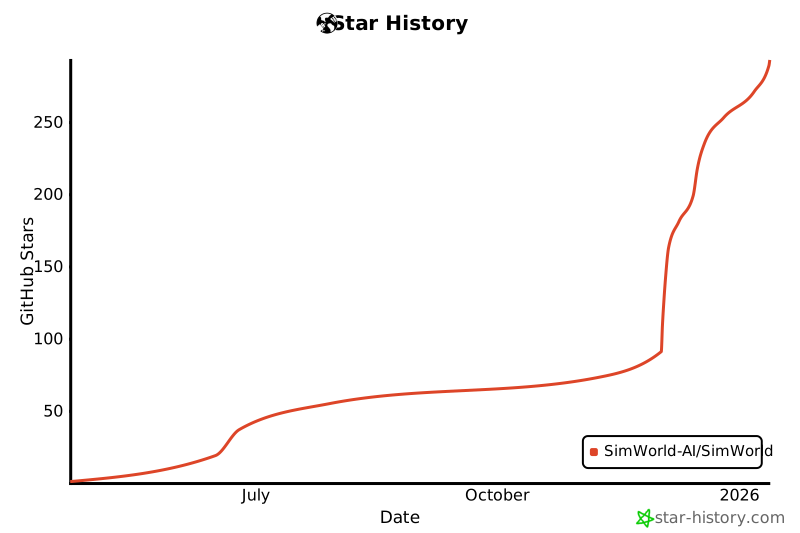](https://www.star-history.com/#SimWorld-AI/SimWorld&type=date&legend=bottom-right) |
| |
|


