
Hub documentation
Sign in with Hugging Face
Sign in with Hugging Face
You can use the HF OAuth / OpenID connect flow to create a “Sign in with HF” flow in any website or App.
This will allow users to sign in to your website or app using their HF account, by clicking a button similar to this one:

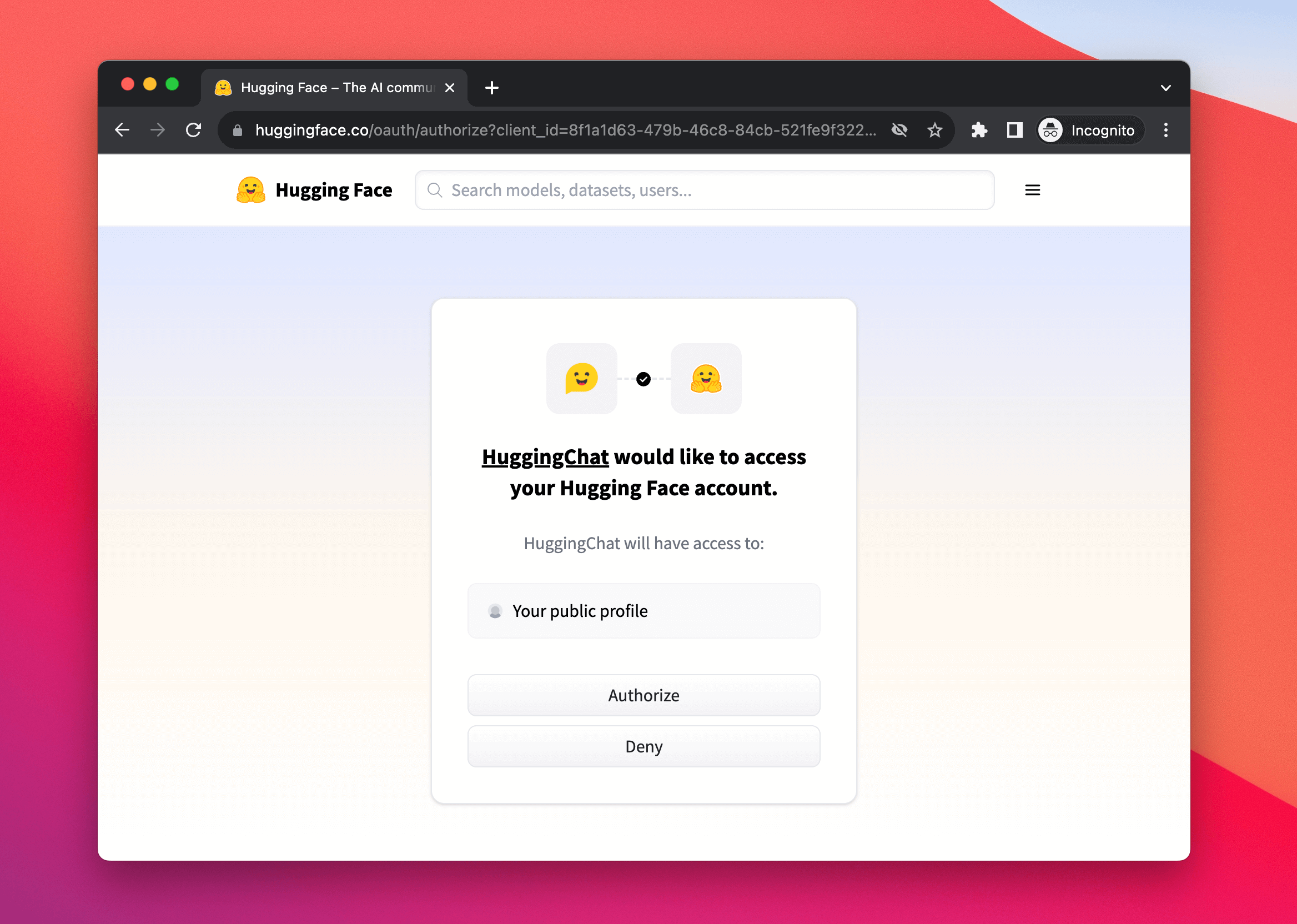
After clicking this button your users will be presented with a permissions modal to authorize your app:
Creating an oauth app
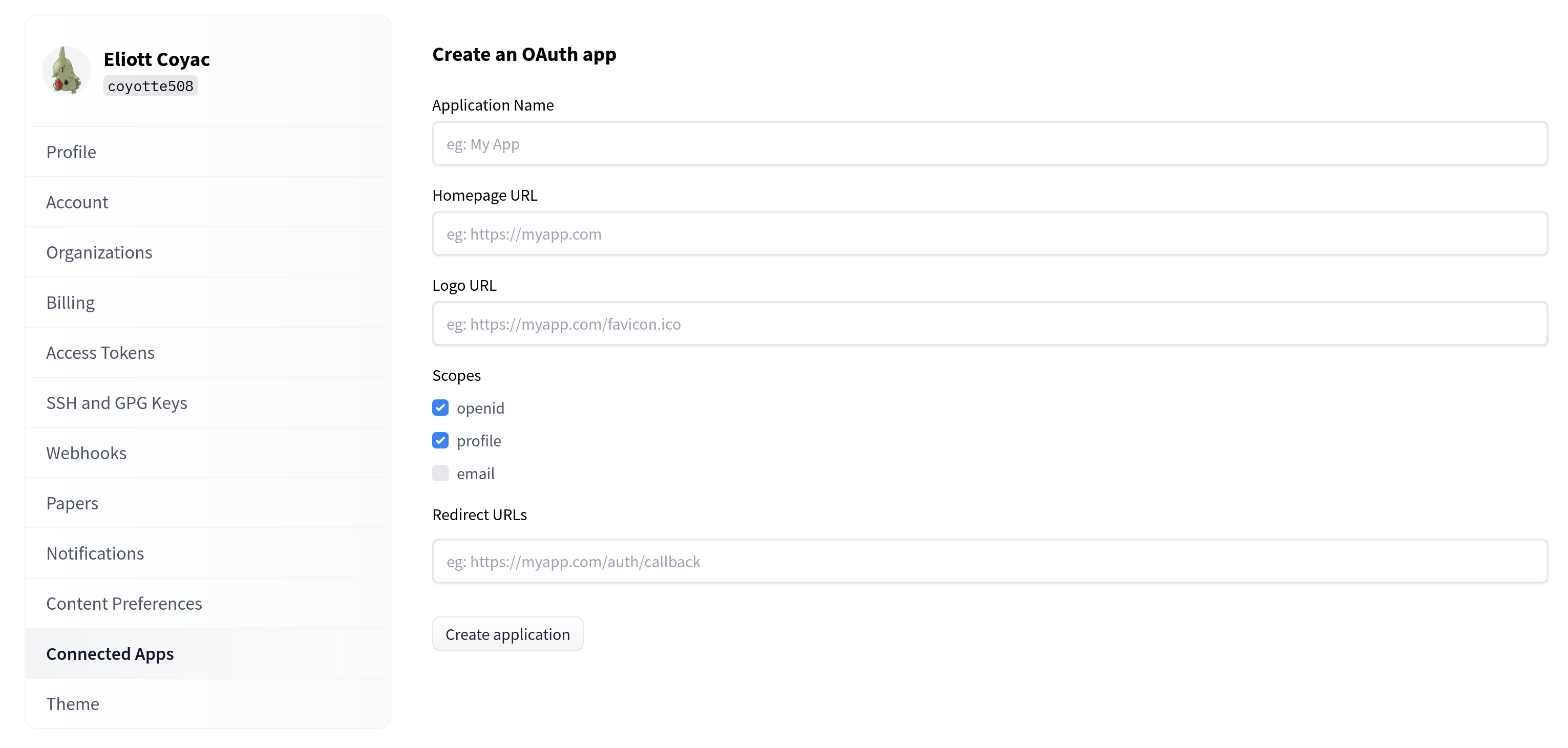
You can create your application in your settings:
Public OAuth apps (no secret)
You can create or use OAuth apps without a client secret. This is useful for native apps, CLIs, or other contexts where keeping a secret is impractical.
- At app creation: When creating a new OAuth app, you can choose to create it without a secret.
- After creation: For an existing app, you can delete the client secret in the app settings. The app will then work as a public app.
Public apps authenticate using only the client ID (e.g. in device code or authorization code flows with PKCE). Apps that have a secret can still use the secret when needed (e.g. Authorization: Basic for token requests).
Redirect URIs
The redirect_uri sent in an authorization request must exactly match one of the redirect URIs registered on your app.
Loopback redirect URIs are the one exception: for URIs using the http scheme on a loopback host (localhost, 127.0.0.1 or [::1]), any port is accepted at request time, as long as every other component matches a registered URI. This follows RFC 8252 §7.3 / OAuth 2.1, and lets native apps, CLIs and MCP clients register a port-less URI such as http://localhost/callback and then listen on whatever ephemeral port the operating system assigns them (e.g. http://localhost:49282/callback).
A few things to keep in mind:
- The exception only applies to the
httpscheme.httpsand custom-scheme (e.g.myapp://callback) redirect URIs always require an exact match, port included. - Loopback hosts are matched individually: a request for
http://localhost:49282/callbackdoes not match a registeredhttp://127.0.0.1/callback. Register both if your app may use either. - Only the port may differ. Path, query and userinfo must still match exactly.
If you are hosting in Spaces
If you host your app on Spaces, then the flow will be even easier to implement (and built-in to Gradio directly); Check our Spaces OAuth guide.
Automated oauth app creation
Hugging Face supports CIMD aka Client ID Metadata Documents, which allows you to create an oauth app for your website in an automated manner:
- Add an endpoint to your website
/.well-known/oauth-cimdwhich returns the following JSON:
{
  client_id:                  "[your website url]/.well-known/oauth-cimd",
  client_name:                "Your Website",
  redirect_uris:              ["[your website url]/oauth/callback/huggingface"],
  token_endpoint_auth_method: "none",
  logo_uri:                  "https://....", // optional
  client_uri:                 "[your website url]", // optional
}- Use
"[your website url]/.well-known/oauth-cimd"as client ID, and PCKE as auth mechanism
Native apps and MCP clients that receive the authorization code on a local port can list port-less loopback URIs in redirect_uris, e.g. ["http://localhost/callback", "http://127.0.0.1/callback"] — see Redirect URIs.
This is particularly useful for ephemeral environments or MCP clients. See an implementation example in Hugging Chat.
Device code OAuth
Device code flow lets users authorize an app on one device (e.g. a CLI) by entering a short code on another device (e.g. a phone or browser). No redirect URI or browser on the device running the app is required.


Testing with a sample script
You can test a device-code OAuth app with the following script. Replace <Client ID> with your app’s client ID. For public apps (no secret), the script works as-is. For apps with a secret, add an Authorization: Basic header (Base64 of client_id:client_secret) to both the device and token requests.
#!/bin/bash
CLIENT_ID="<Client ID>"

# Step 1: Get device code
RESPONSE=$(curl -s -X POST https://huggingface.co/oauth/device \
  -d "client_id=$CLIENT_ID")

DEVICE_CODE=$(echo $RESPONSE | jq -r '.device_code')
USER_CODE=$(echo $RESPONSE | jq -r '.user_code')
VERIFICATION_URI=$(echo $RESPONSE | jq -r '.verification_uri')

echo "Device Code: $DEVICE_CODE"
echo "User Code: $USER_CODE"
echo ""
echo "Open: ${VERIFICATION_URI}"
echo "Enter the user code: $USER_CODE"
echo ""
read -p "Press Enter after authorizing..."

# Step 3: Get token
curl -X POST https://huggingface.co/oauth/token \
  -d "grant_type=urn:ietf:params:oauth:grant-type:device_code" \
  -d "device_code=$DEVICE_CODE" \
  -d "client_id=$CLIENT_ID"
For OAuth apps that have a client secret, include an
Authorization: Basicheader (with Base64-encodedclient_id:client_secret) on both the device code request and the token request.
Currently supported scopes
The currently supported scopes are:
openid: Receive an ID token in addition to the access token.profile: Read the user’s profile information (username, avatar, etc.)email: Read the user’s email address.read-billing: Know whether the user has a payment method set up.read-memberships: Read which organizations the user belongs to, and their role in each of them. This does not grant access to the organizations’ settings or resources.read-repos: Read the user’s personal repos.gated-repos: Read the content of public gated repos the user has been granted access to. Unlikeread-repos, this does not grant access to private repos.contribute-repos: Create repositories and access those created by this app. Cannot access any other repositories unless additional permissions are granted.write-repos: Read and write the user’s personal repos.manage-repos: Fully manage the user’s personal repos, including creating and deleting them.read-collections: Read the user’s personal collections.write-collections: Read and write the user’s personal collections, including creating and deleting them.inference-api: Make inference requests to Inference Providers on behalf of the user.read-endpoints: View the user’s Inference Endpoints and make inference requests to them on behalf of the user.write-endpoints: Manage the user’s Inference Endpoints, including creating and deleting them. Includesread-endpointsaccess.jobs: Run jobswebhooks: Manage webhookswrite-discussions: Open discussions and Pull Requests on behalf of the user as well as interact with discussions (including reactions, posting/editing comments, closing discussions, …). To open Pull Requests on private repos, you need to request theread-reposscope as well.
All other information is available in the OpenID metadata.
Please contact us if you need any extra scopes.
Accessing organization resources
By default, the oauth app does not need to access organization resources.
But some scopes like read-repos or read-billing apply to organizations as well.
The user can select which organizations to grant access to when authorizing the app. If you require access to a specific organization, you can add orgIds=ORG_ID as a query parameter to the OAuth authorization URL. You have to replace ORG_ID with the organization ID, which is available in the organizations.sub field of the userinfo response.
Branding
You are free to use your own design for the button. Below are some SVG images helpfully provided.
Check out our badges with explanations for integrating them in markdown or HTML.







Token Exchange for Organizations (RFC 8693)
This feature is part of the Enterprise plan.
Token Exchange allows organizations to programmatically issue access tokens for their members without requiring interactive user consent. This is particularly useful for building internal tools, automation pipelines, and enterprise integrations that need to access Hugging Face resources on behalf of organization members.
If you only need keyless authentication from a CI/CD workflow (GitHub Actions, GitLab CI, CircleCI, …) — without per-member token issuance — see Trusted Publishers, which also uses
/oauth/tokenbut takes an OIDCid_tokenminted by your CI provider as the subject token (no Enterprise plan required, no client credentials).
This feature implements RFC 8693 - OAuth 2.0 Token Exchange, a standard protocol for token exchange scenarios.
Use cases
Token Exchange is designed for scenarios where your organization needs to:
- Build internal platforms: Create dashboards or portals that access Hugging Face resources on behalf of your team members, without requiring each user to manually authenticate.
- Automate CI/CD pipelines: Issue short-lived, scoped tokens for automated workflows that need to push models or datasets to organization repositories.
- Integrate with enterprise identity systems: Bridge your existing identity provider with Hugging Face by issuing tokens based on your internal user directory.
- Implement custom access controls: Build middleware that issues tokens with specific scopes based on your organization’s internal policies.
How it works
- Your organization has an OAuth application bound to your organization with the
token-exchangeprivilege. - Your backend service authenticates with this OAuth app using client credentials.
- Your service requests an access token for a specific organization member (identified by email).
- Hugging Face verifies the user is a member of your organization and issues a scoped token.
- The issued token can only access resources within your organization’s scope.
Prerequisites
To use Token Exchange, you need an organization-bound OAuth application with the token-exchange privilege. Contact Hugging Face support to set up an eligible OAuth app for your organization.
Once configured, you will receive:
- A Client ID (e.g.,
a1b2c3d4-e5f6-7890-abcd-ef1234567890) - A Client Secret (keep this secure!)
Organization administrators can manage the OAuth app after creation, including refreshing the client secret and configuring the token duration.
Authentication
Token Exchange uses HTTP Basic Authentication with your OAuth app credentials. Create the authorization header by Base64-encoding your client_id:client_secret:
# Create the authorization header
export CLIENT_ID="your-client-id"
export CLIENT_SECRET="your-client-secret"
export AUTH_HEADER=$(echo -n "${CLIENT_ID}:${CLIENT_SECRET}" | base64)
Issuing tokens by email
To issue an access token for an organization member using their email address:
curl -X POST "https://huggingface.co/oauth/token" \
  -H "Content-Type: application/x-www-form-urlencoded" \
  -H "Authorization: Basic ${AUTH_HEADER}" \
  -d "grant_type=urn:ietf:params:oauth:grant-type:token-exchange" \
  -d "subject_token=user@yourorg.com" \
  -d "subject_token_type=urn:huggingface:token-type:user-email"
Response
A successful request returns an access token:
{
  "access_token": "hf_oauth_...",
  "token_type": "bearer",
  "expires_in": 28800,
  "scope": "openid profile email read-repos",
  "id_token": "eyJhbGciOiJS...",
  "issued_token_type": "urn:ietf:params:oauth:token-type:access_token"
}
The id_token field is included when the openid scope is requested.
You can then use this token to make API requests on behalf of the user:
curl "https://huggingface.co/api/whoami-v2" \
  -H "Authorization: Bearer ${ACCESS_TOKEN}"
Scope control
By default, issued tokens inherit all scopes configured on the OAuth app. You can request specific scopes by adding the scope parameter. See Currently supported scopes for available values.
The token’s effective permissions are limited both by the requested scope and by the user’s role within the organization.
curl -X POST "https://huggingface.co/oauth/token" \
  -H "Content-Type: application/x-www-form-urlencoded" \
  -H "Authorization: Basic ${AUTH_HEADER}" \
  -d "grant_type=urn:ietf:params:oauth:grant-type:token-exchange" \
  -d "subject_token=user@yourorg.com" \
  -d "subject_token_type=urn:huggingface:token-type:user-email" \
  -d "scope=openid profile"
Follow the principle of least privilege: request only the scopes your application actually needs.
Security considerations
Tokens issued via Token Exchange have built-in security restrictions:
- Organization-scoped: Tokens can only access resources within your organization (models, datasets, Spaces, and collections owned by the org). Outside the org, access is read-only and limited to: public collections from any user or organization, and public gated repos the user has been individually granted access to.
- No personal access: Tokens cannot access the user’s personal private repositories or private repos from other organizations.
- Short-lived: Tokens expire after 8 hours by default. Organization administrators can configure the token duration (up to 30 days) in the OAuth app settings. No refresh tokens are provided.
- Auditable: All token exchanges are logged and visible in your organization’s audit logs.
Protect your OAuth app credentials carefully. Anyone with access to your client secret can issue tokens for any member of your organization.
Error responses
| Error | Description |
|---|---|
invalid_client | Client is not authorized to use token exchange, or the app is not bound to an organization |
invalid_grant | User not found in the bound organization |
invalid_scope | Requested scope is not valid |
Reference
Grant type:
urn:ietf:params:oauth:grant-type:token-exchangeRequest parameter (subject_token_type):
| Value | Description |
|---|---|
urn:huggingface:token-type:user-email | Identify the user by their email address |
Response field (issued_token_type):
| Value | Description |
|---|---|
urn:ietf:params:oauth:token-type:access_token | Indicates an access token was issued |
Related documentation:
Update on GitHub