

title: QALoop Annotation Platform
emoji: 📝
colorFrom: blue
colorTo: green
sdk: docker
pinned: false
QA Annotation System
The Expert Validation Platform in QALoop — a human-in-the-loop framework for large-scale agricultural QA construction and evaluation (ICDM). This web application supports collaborative QA annotation and quality management: multi-user task workflows, configurable annotation schemas, statistics and export, plus optional LLM-assisted review of annotation notes. It receives candidate QA pairs from upstream synthesis pipelines and converts expert judgments into structured feedback for pipeline iteration.
Demo Usage
This Space is a demo environment — works out of the box with no manual Secrets configuration.
Login
When you open the Space page, the login form is pre-filled with the default admin credentials. Click "Login" to start exploring.
| Item | Default |
|---|---|
| Admin username | admin |
| Admin password | 123456 |
Quick Demo Flow
After login, sample projects and QA data are pre-loaded. You can:
- Browse projects / datasets — View the pre-loaded "Test" project and QA pairs in the admin dashboard
- View annotation configs — Explore existing rating, single-select, and other annotation dimensions
- Claim and annotate — Switch to the user center to complete tasks
- View analysis / export — Check annotation progress, LLM analysis reports, and export results
To build from scratch, you can also create projects, configure schemas, and import JSON / CSV data yourself.
Demo Sample Data (seed/demo.sql)
On first HF Space startup with an empty database, scripts/space_init.py automatically imports seed/demo.sql (SQLite text dump, git-friendly; HF does not accept binary .db files).
| Item | Details |
|---|---|
| Pre-loaded content | 1 project, 3 datasets, 50 QA pairs, annotation configs, and sample annotation results |
| LLM config | Pre-filled Base URL and gpt-5.1; API Key injected via LLM_API_KEY env var, not written to sql |
| Runtime data | After import, written to /data/annotations.db inside the container; web UI changes only affect the runtime DB |
| Relation to sql | Web UI actions do not write back to demo.sql; updating Demo data requires manual export and push |
Example for updating Demo data:
# Export from local runtime DB (remember to redact llm_api_key)
sqlite3 ../data/annotations.db ".dump" > seed/demo.sql
git add seed/demo.sql && git commit -m "Update demo seed" && git push space main
To disable auto-import: set environment variable SEED_DEMO_DATA=false.
Registering Regular Users
Currently in production mode: new users can self-register, but must be manually enabled by an admin in "User Management" before they can annotate.
Demo Default Configuration
| Setting | Default | Description |
|---|---|---|
SECRET_KEY |
qaloop-demo-jwt-secret-key-32bytes |
JWT signing key (Demo only, do not use in production) |
ADMIN_USERNAME |
admin |
Admin auto-created on first startup |
ADMIN_PASSWORD |
123456 |
Admin password |
DB_DIR |
/data |
Database storage directory |
ENVIRONMENT |
production |
New registrations require admin enablement |
Security note: The above are public Demo settings. Do not store real sensitive data. For production deployment, override
SECRET_KEYandADMIN_PASSWORDvia HF Secrets.
Deploy to Hugging Face Spaces
- Create a Space on Hugging Face, SDK type Docker
- Push the contents of
platform/to the Space repository (you can upload only the platform subdirectory as the repo root) - No Secrets needed for Demo — build and run directly
- For production deployment, override in Space Settings → Repository secrets:
| Secret | Demo Default | Description |
|---|---|---|
SECRET_KEY |
qaloop-demo-jwt-secret-key-32bytes |
JWT key; use a random string in production |
ADMIN_USERNAME |
admin |
Admin username auto-created on first startup |
ADMIN_PASSWORD |
123456 |
Admin password (at least 6 characters) |
- Optional Variables:
| Variable | Default | Description |
|---|---|---|
DB_DIR |
/data |
SQLite data directory (Dockerfile defaults to /data) |
ENVIRONMENT |
production |
New registrations require admin enablement |
LLM_BASE_URL |
http://43.159.131.233:3001/v1 |
LLM API Base URL (OpenAI-compatible) |
LLM_MODEL_NAME |
gpt-5.1 |
LLM model name |
- LLM Analysis (optional): Set in Space Settings → Repository secrets:
| Secret | Description |
|---|---|
LLM_API_KEY |
LLM API Token (auto-written to system config on startup) |
Demo pre-fills Base URL and model name for OpenAI-compatible calls:
from openai import OpenAI

client = OpenAI(
    base_url="http://43.159.131.233:3001/v1",
    api_key="your-token",  # Set LLM_API_KEY in HF Secrets
)
# model: gpt-5.1
- After the Space build completes, visit the page and log in with
admin/123456
Note: On free Spaces, annotation data may be lost after sleep/restart if persistent storage is not enabled. Fine for Demo purposes; for production collaborative annotation, deploy on your own server.
Highlights
- Projects and datasets — Project-level organization with JSON / CSV import and export
- Flexible annotation configs — Rating, category, text, single/multi-select, binary; optional reason and confidence fields
- Collaboration and permissions — Superuser admin dashboard; regular users claim tasks and annotate; JWT auth
- Analysis and export — Annotation progress and statistics; configurable simplified export
- Optional LLM — OpenAI-compatible Chat API, default
http://43.159.131.233:3001/v1+gpt-5.1; Token injected viaLLM_API_KEYenv var - Seed questions — Predefined question templates organized by type/subtype
- UI language — Chinese and English (i18n)
System Overview
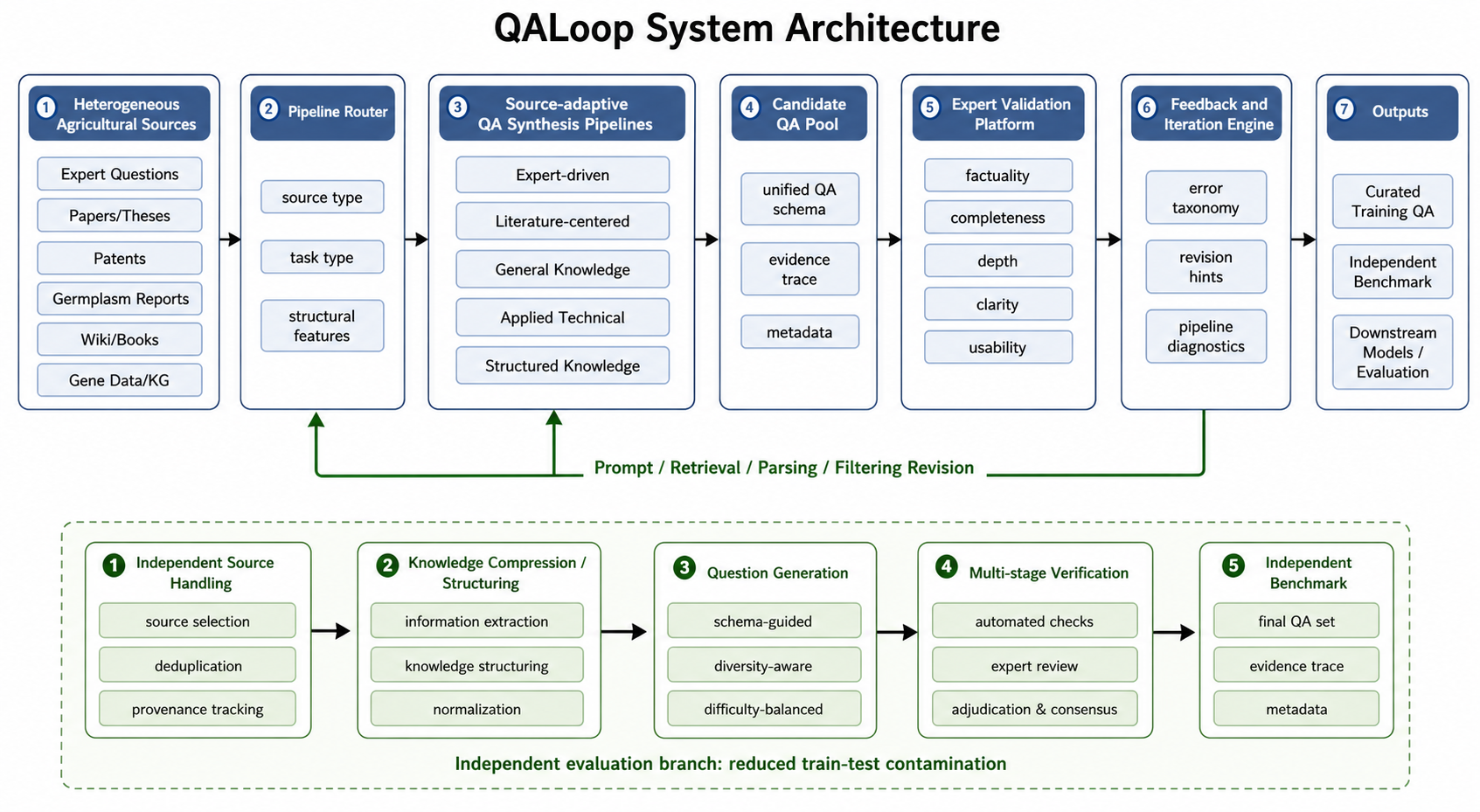
The diagram above shows the full QALoop workflow. This platform corresponds to the Expert Validation Platform stage — receiving candidate QA pairs from upstream synthesis pipelines and supporting human quality review, feedback, and export.
This repository covers data import → schema configuration → multi-user annotation → statistics/analysis → export. It does not include built-in "automatic QA generation" or "automatic model scoring/evaluation" modules; these can be integrated via upstream/downstream systems.
flowchart LR
  subgraph external [External Optional]
    Gen[QA Generation]
    Eval[Model Evaluation]
  end
  subgraph app [This System]
    Import[Import Dataset]
    Config[Annotation Config]
    Ann[Human Annotation]
    Stats[Statistics & Analysis]
    Export[Export Results]
  end
  Gen -.-> Import
  Import --> Config --> Ann --> Stats --> Export
  Export -.-> Eval
Configurable Schema Example
Annotation dimensions and field names are defined by admins in Annotation Config, not hardcoded in the product. If your research uses multi-dimensional quality scales (e.g., factuality, completeness), implement them via multiple score / category configs. Below is an illustrative JSON (actual export structure depends on your config):
{
  "question": "What is drought resistance?",
  "answer": "Drought resistance refers to a plant's ability to maintain growth and yield under drought conditions.",
  "annotations": {
    "factuality_score": 5,
    "completeness_score": 4,
    "notes": "Correct explanation but could add mechanistic details"
  }
}
Tech Stack
- Backend: Python 3.12+ / FastAPI / SQLAlchemy / SQLite
- Frontend: Vanilla HTML + JS + CSS (no framework)
- Auth: JWT (SHA-256 client-side hashing)
- Package manager: uv
Requirements
- Python >= 3.12
- uv (Python package manager)
Quick Start
1. Clone the Repository
git clone <repo-url>
cd qa-annotation
2. Install Dependencies
# Install uv (if not already installed)
curl -LsSf https://astral.sh/uv/install.sh | sh

# Create virtual environment and install all dependencies
uv sync

# For dev tools (pre-commit, etc.)
uv sync --group dev
3. Configure Environment Variables
Create a .env file:
cp .env.example .env
Then edit .env and must update SECRET_KEY:
# Required
SECRET_KEY=your-random-secret-key-here

# Optional (defaults below)
ENVIRONMENT=development
HOST=0.0.0.0
PORT=8000
RELOAD=false
TOKEN_EXPIRE_DAYS=7
| Variable | Required | Description | Default |
|---|---|---|---|
SECRET_KEY |
Yes | JWT key; must be a random string in production | - |
ENVIRONMENT |
No | development or production |
development |
HOST |
No | Listen address | 0.0.0.0 |
PORT |
No | Listen port | 8000 |
RELOAD |
No | Enable hot reload (for development) | false |
TOKEN_EXPIRE_DAYS |
No | Token expiration in days | 7 |
In production, newly registered users are disabled by default and require manual admin enablement.
4. Create Superuser
# Interactive creation (recommended)
python scripts/create_superuser.py

# Create via command-line arguments
python scripts/create_superuser.py --username admin --password yourpassword
5. Start the Server
# Option 1: Direct run
uvicorn qa_annotate.main:app --reload --host 0.0.0.0 --port 8000

# Option 2: Via entry point (requires uv sync first)
qa
After startup, visit http://localhost:8000 and log in with the superuser account. API docs: http://localhost:8000/docs.
User Guide
Admin Workflow
Login — Log in with superuser account, enter admin dashboard
Create project — Set name and description
Create annotation config — Define task type (rating, category, text, single-select, multi-select, binary), and whether reason/confidence fields are required
Link config to project — Associate annotation configs with projects, with ordering support
Import dataset — Upload QA data in JSON or CSV format
Manage users — Create/enable/disable annotator accounts
Configure LLM (optional) — Fill in the following keys in "System Config" (stored in database, not
.env):Config Key Description llm_api_keyLLM API Key llm_base_urlBase URL (e.g., https://api.openai.com/v1)llm_model_nameModel name (e.g., gpt-4o)Use "Test Connection" to verify. Current implementation is mainly for summarizing and analyzing annotation notes; core annotation works without LLM config.
View analysis — Annotation progress, statistics, and (if configured) LLM analysis reports
Annotator Workflow
- Register/Login — In development, registered users can usually annotate immediately; in production, admin must enable the account
- Claim task — Claim a dataset from "Available Tasks"
- Annotate — Fill in fields according to config
- My tasks — View and track progress
Permissions (Summary)
| Capability | Superuser | Regular User |
|---|---|---|
| Admin dashboard (projects, datasets, users, system config, etc.) | Yes | No |
| Claim tasks and submit annotations | Yes | Yes (must be enabled) |
Superusers also have an active regular user identity and can participate in annotation when needed.
Data Format
Import QA dataset (JSON):
[
  {
    "question": "Question content",
    "answer": "Answer content"
  }
]
Extra fields are supported; specify which extra fields to display in project config.
Project Structure
qa_annotate/
├── api/               # FastAPI router modules
│   ├── analysis.py    # Annotation result analysis and LLM endpoints
│   ├── annotation.py  # Annotation configs and results
│   ├── auth.py        # Authentication and permissions
│   ├── dataset.py     # Dataset management
│   ├── project.py     # Project management
│   ├── seed_question.py  # Seed questions
│   ├── system_config.py  # System configuration
│   └── user.py        # User management
├── database/          # Database layer
│   ├── base.py        # Engine, session, initialization
│   ├── models.py      # SQLAlchemy ORM models
│   └── crud.py        # CRUD operations
├── schema/            # Pydantic request/response models
├── services/          # Business services (e.g., LLM calls)
├── utils/             # Utilities (password hashing, etc.)
├── config.py          # Global config (pydantic-settings)
├── html/              # HTML pages
├── static/
│   ├── js/            # JavaScript
│   ├── css/           # Stylesheets
│   └── locales/       # i18n translation files
└── main.py            # Application entry point
Database Backup
# Manual backup
python scripts/backup_db.py

# Scheduled backup (every 12 hours)
python scripts/backup_db.py --schedule --interval 12
Development
# Install dev dependencies
uv sync --group dev

# Install pre-commit hooks
pre-commit install

# Lint and format
ruff check --fix .
ruff format .
Research and Citation
This platform is the Expert Validation Platform component of QALoop. If you use it in a publication, please cite the QALoop ICDM paper and describe annotation dimensions and guideline version, export format and field meanings. See the root README for BibTeX.
Roadmap
- Inter-annotator agreement (IAA) metrics and adjudication tools
- Active learning or priority queue (integrated with task claiming)
- Richer chain-of-thought / multi-segment annotation display (extend Schema and UI as needed)
- Multimodal field display (if datasets include image URLs, etc.)
License
MIT