
issue_owner_repo listlengths 2 2 | issue_body stringlengths 0 262k ⌀ | issue_title stringlengths 1 1.02k | issue_comments_url stringlengths 53 116 | issue_comments_count int64 0 2.49k | issue_created_at stringdate 1999-03-17 02:06:42 2025-06-23 11:41:49 | issue_updated_at stringdate 2000-02-10 06:43:57 2025-06-23 11:43:00 | issue_html_url stringlengths 34 97 | issue_github_id int64 132 3.17B | issue_number int64 1 215k |
|---|---|---|---|---|---|---|---|---|---|
[
"shd101wyy",
"vscode-markdown-preview-enhanced"
] | [Enter steps to reproduce:]
1. ...
2. ...
**Atom**: 1.34.0 x64
**Electron**: 2.0.16
**OS**: Unknown Windows version
**Thrown From**: [markdown-preview-enhanced](https://github.com/shd101wyy/markdown-preview-enhanced) package 0.15.8
### Stack Trace
Uncaught Error: Cannot find module './schema/default_s... | Uncaught Error: Cannot find module './schema/default_safe' | https://api.github.com/repos/shd101wyy/vscode-markdown-preview-enhanced/issues/1403/comments | 0 | 2019-03-08T05:57:51Z | 2023-08-23T02:47:46Z | https://github.com/shd101wyy/vscode-markdown-preview-enhanced/issues/1403 | 1,862,463,369 | 1,403 |
[
"shd101wyy",
"vscode-markdown-preview-enhanced"
] | Extension 'shd101wyy.markdown-preview-enhanced' uses the 'vscode.previewHtml' command which is deprecated and will be removed soon. Please file an issue against this extension to update to use VS Code's webview API. | vscode.previewHtml is deprecated and will be removed soon | https://api.github.com/repos/shd101wyy/vscode-markdown-preview-enhanced/issues/1404/comments | 7 | 2019-03-08T01:32:03Z | 2023-08-23T02:47:48Z | https://github.com/shd101wyy/vscode-markdown-preview-enhanced/issues/1404 | 1,862,463,411 | 1,404 |
[
"shd101wyy",
"vscode-markdown-preview-enhanced"
] | Hi! shd101wyy!
I can't use two `*` marks to bold a word in a multi-level structure. But when I use four `*` marks, it works accidently. But in Typora, everything works well. I'm no sure is there a bug or I don't write it grammatically right.
我在多层级结构中加粗一段文字时, 使用两个星号并不奏效, 但用四个星号却可以. 我却没有找到关于四个星号的markdown语法, 也不肯定这是不是一... | Can't bold a word in multi-level structure | https://api.github.com/repos/shd101wyy/vscode-markdown-preview-enhanced/issues/1405/comments | 0 | 2019-03-06T07:26:08Z | 2023-08-23T02:47:51Z | https://github.com/shd101wyy/vscode-markdown-preview-enhanced/issues/1405 | 1,862,463,468 | 1,405 |
[
"shd101wyy",
"vscode-markdown-preview-enhanced"
] | works at vscode 1.31, not work at vscode insider 1.32.
The preview does not change according with the editor content.
The code chunk does not work in vscode insider 1.32.
There is a notice about the outdated htmlpreview method.
Hope to move ahead to webview method in order to work at the coming version of ... | preview fail to sync with edit windows | https://api.github.com/repos/shd101wyy/vscode-markdown-preview-enhanced/issues/190/comments | 5 | 2019-03-06T03:41:11Z | 2021-01-22T14:54:04Z | https://github.com/shd101wyy/vscode-markdown-preview-enhanced/issues/190 | 417,608,237 | 190 |
[
"shd101wyy",
"vscode-markdown-preview-enhanced"
] | Extension 'shd101wyy.markdown-preview-enhanced' uses the 'vscode.previewHtml' command which is deprecated and will be removed soon. Please file an issue against this extension to update to use VS Code's webview API.
Right-click to export HTML or open the menu in chrome and nothing happens. | The plugin is not available on VSCode Insiders V1.32 | https://api.github.com/repos/shd101wyy/vscode-markdown-preview-enhanced/issues/1406/comments | 2 | 2019-03-06T02:14:48Z | 2023-08-23T02:47:53Z | https://github.com/shd101wyy/vscode-markdown-preview-enhanced/issues/1406 | 1,862,463,518 | 1,406 |
[
"shd101wyy",
"vscode-markdown-preview-enhanced"
] | Hi,
This is a great vscode extension !
I use the "Save as markdown" feature to write document in markdown with math expression, diagrams and code chunks, that can be read on GitHub .md files directly.
In the generated GitHub Flavor Markdown file, math expressions are rendered using GIF images thanks to codecogs web ... | Save as markdown: math as GIF have poor quality | https://api.github.com/repos/shd101wyy/vscode-markdown-preview-enhanced/issues/189/comments | 1 | 2019-03-03T11:55:20Z | 2019-03-18T18:13:49Z | https://github.com/shd101wyy/vscode-markdown-preview-enhanced/issues/189 | 416,507,493 | 189 |
[
"shd101wyy",
"vscode-markdown-preview-enhanced"
] | 我自定义了一些css 在style.css,然后在插件对应的预览窗口中并不能完全显示出这些css控制的效果。他只完成了我对颜色的修改;对img图标的display和::after 则没有作用到;
而右键预览窗口->在浏览器中打开,则这些css样式都作用到了。
```css
.markdown-preview.markdown-preview {
// modify your style here
// eg: background-color: blue;
p>code,li>code{
background: #ffebeb;
color: #c7254e;
... | customize CSS 的修改没作用到预览 | https://api.github.com/repos/shd101wyy/vscode-markdown-preview-enhanced/issues/1407/comments | 0 | 2019-03-03T03:01:38Z | 2023-08-23T02:47:55Z | https://github.com/shd101wyy/vscode-markdown-preview-enhanced/issues/1407 | 1,862,463,563 | 1,407 |
[
"shd101wyy",
"vscode-markdown-preview-enhanced"
] | The original definition of Markdown from **daringfireball** says
>The implication of the “one or more consecutive lines of text” rule is that Markdown supports “hard-wrapped” text paragraphs. This differs significantly from most other text-to-HTML formatters (including Movable Type’s “Convert Line Breaks” option) w... | “hard-wrapped” text paragraphs. | https://api.github.com/repos/shd101wyy/vscode-markdown-preview-enhanced/issues/1408/comments | 4 | 2019-03-01T18:13:27Z | 2023-08-23T02:47:57Z | https://github.com/shd101wyy/vscode-markdown-preview-enhanced/issues/1408 | 1,862,463,607 | 1,408 |
[
"shd101wyy",
"vscode-markdown-preview-enhanced"
] | 扩展语法中,表格的colspan和rowspan在atom中表现正常,但在vscode中不能正常转换 | 表格的colspan和rowspan的异常表现 | https://api.github.com/repos/shd101wyy/vscode-markdown-preview-enhanced/issues/1409/comments | 1 | 2019-02-26T08:03:41Z | 2023-08-23T02:48:00Z | https://github.com/shd101wyy/vscode-markdown-preview-enhanced/issues/1409 | 1,862,463,647 | 1,409 |
[
"shd101wyy",
"vscode-markdown-preview-enhanced"
] | Great package guys!
but...
newlines are converted into `<br/>`.
This doesn't seem to be compliant with markdown. viz: from https://daringfireball.net/projects/markdown/syntax#p
> When you do want to insert a <br /> break tag using Markdown, you end a line with two or more spaces, then type return. | newlines are converted into `<br/>`. This is not compliant markdown. | https://api.github.com/repos/shd101wyy/vscode-markdown-preview-enhanced/issues/188/comments | 4 | 2019-02-25T00:08:24Z | 2019-04-27T02:17:24Z | https://github.com/shd101wyy/vscode-markdown-preview-enhanced/issues/188 | 413,886,996 | 188 |
[
"shd101wyy",
"vscode-markdown-preview-enhanced"
] | When I export to word with Pandoc, the image is shown with some problems:
1. using `![img]()` to insert image is shown ok
2. using `@import “ ”` image is ignored
3. after changing markdown parser to Pandoc, then using `@import “ ”`, using Pandoc to export with errors
| Export to word with Pandoc, img is ignored | https://api.github.com/repos/shd101wyy/vscode-markdown-preview-enhanced/issues/1410/comments | 0 | 2019-02-21T14:10:44Z | 2023-08-23T02:48:02Z | https://github.com/shd101wyy/vscode-markdown-preview-enhanced/issues/1410 | 1,862,463,692 | 1,410 |
[
"shd101wyy",
"vscode-markdown-preview-enhanced"
] | When I use the markdown command > like following:

Then the error occur as showed in pic.
But when I erase the relative >, the error disappears as:
, it's been good. However, I dislike having to write so much boilerplate for every LaTeX block. Would it be possible to add a setting in this extension's configuration for ... | LaTeX template | https://api.github.com/repos/shd101wyy/vscode-markdown-preview-enhanced/issues/187/comments | 2 | 2019-02-19T19:26:48Z | 2019-02-21T04:46:32Z | https://github.com/shd101wyy/vscode-markdown-preview-enhanced/issues/187 | 412,086,119 | 187 |
[
"shd101wyy",
"vscode-markdown-preview-enhanced"
] | https://github.com/shd101wyy/markdown-preview-enhanced/issues/418
和这个问题一样 | TOC无法生成了 | https://api.github.com/repos/shd101wyy/vscode-markdown-preview-enhanced/issues/1412/comments | 0 | 2019-02-16T11:59:32Z | 2023-08-23T02:48:06Z | https://github.com/shd101wyy/vscode-markdown-preview-enhanced/issues/1412 | 1,862,463,785 | 1,412 |
[
"shd101wyy",
"vscode-markdown-preview-enhanced"
] | https://github.com/shd101wyy/markdown-preview-enhanced/issues/418
和这个问题一样 | TOC 无法 | https://api.github.com/repos/shd101wyy/vscode-markdown-preview-enhanced/issues/1413/comments | 0 | 2019-02-16T11:59:31Z | 2023-08-23T02:48:08Z | https://github.com/shd101wyy/vscode-markdown-preview-enhanced/issues/1413 | 1,862,463,825 | 1,413 |
[
"shd101wyy",
"vscode-markdown-preview-enhanced"
] | 在部分代码块显示时会有以下不该有的内容
<p data-line="460" class="sync-line" style="margin:0;"></p>
求助。谢谢 | 代码块显示异常 | https://api.github.com/repos/shd101wyy/vscode-markdown-preview-enhanced/issues/1414/comments | 0 | 2019-02-15T09:13:18Z | 2023-08-23T02:48:10Z | https://github.com/shd101wyy/vscode-markdown-preview-enhanced/issues/1414 | 1,862,463,873 | 1,414 |
[
"shd101wyy",
"vscode-markdown-preview-enhanced"
] | 在Settings里设置预览字体并没有生效,
```json
{
"markdown.preview.fontFamily": "'Source Code Pro'"
}
```
把插件disable之后,预览字体就生效了 | markdown.preview.fontFamily 没有生效 | https://api.github.com/repos/shd101wyy/vscode-markdown-preview-enhanced/issues/186/comments | 1 | 2019-02-15T08:23:31Z | 2019-03-08T19:39:19Z | https://github.com/shd101wyy/vscode-markdown-preview-enhanced/issues/186 | 410,655,199 | 186 |
[
"shd101wyy",
"vscode-markdown-preview-enhanced"
] | Thanks for the great package!
[jupytext](https://github.com/mwouts/jupytext) can convert Jupyter Notebooks to Rmarkdown files.
In these files the code cells look like this:
```
```{python cmd=true ipub={'figure': {'caption': 'this is a caption'}}}
print("hallo")
...
```
MPE does not like this at ... | Support RMarkdown style code cells | https://api.github.com/repos/shd101wyy/vscode-markdown-preview-enhanced/issues/185/comments | 0 | 2019-02-14T17:40:12Z | 2019-02-14T17:45:25Z | https://github.com/shd101wyy/vscode-markdown-preview-enhanced/issues/185 | 410,414,885 | 185 |
[
"shd101wyy",
"vscode-markdown-preview-enhanced"
] | 你好!
不好意思,关于代码块的运行已经搞了好多次了,每次运行都是相同的报错:Error: spawm ... ENOENT,具体的报错见图片
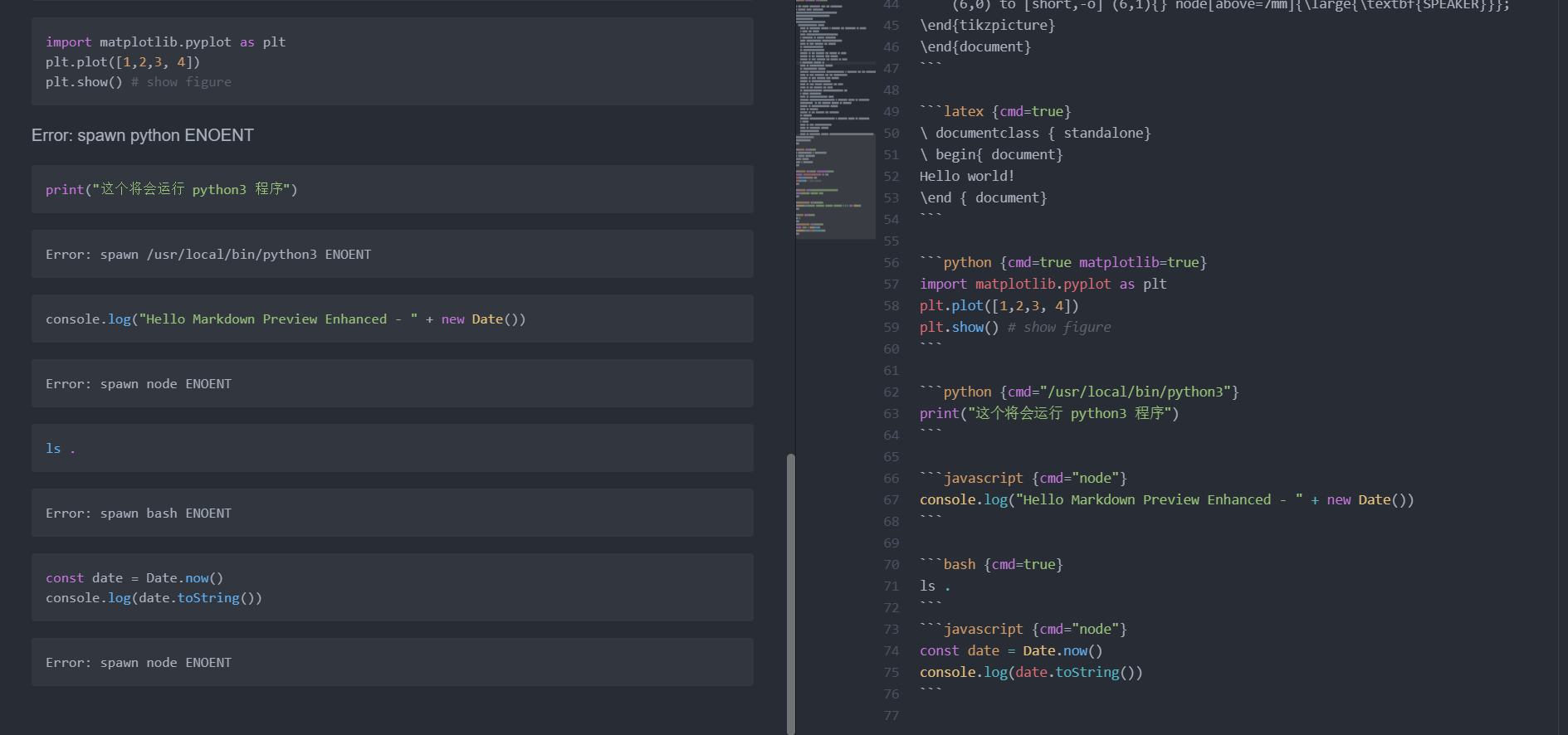
后来试着重装插件,结果第一次安装失败,第二次安装才成功,下面是报错的相关信息:
[安装错误.txt](https://github.com/shd101wyy/markdown-preview-enhanced/files/2859572/default.txt)... | 代码块运行报错 | https://api.github.com/repos/shd101wyy/vscode-markdown-preview-enhanced/issues/1415/comments | 0 | 2019-02-13T09:06:15Z | 2023-08-23T02:48:12Z | https://github.com/shd101wyy/vscode-markdown-preview-enhanced/issues/1415 | 1,862,463,908 | 1,415 |
[
"shd101wyy",
"vscode-markdown-preview-enhanced"
] | Hi
As per my understanding, and experience, I am able to customize reveal components only in markdown preview extension's style.less file. Something like below.
```
.markdown-preview.markdown-preview {
// modify your style here
// eg: background-color: blue;
.reveal p {
display: ... | How to customize CSS for reveal components locally? | https://api.github.com/repos/shd101wyy/vscode-markdown-preview-enhanced/issues/1416/comments | 0 | 2019-02-13T07:30:19Z | 2023-08-23T02:48:14Z | https://github.com/shd101wyy/vscode-markdown-preview-enhanced/issues/1416 | 1,862,463,956 | 1,416 |
[
"shd101wyy",
"vscode-markdown-preview-enhanced"
] | As the name suggest, nested bullets render with unnaturally large tab spaces when converted to PDF (using prince).
Here's how the Markdown looks:
<img width="1060" alt="screen shot 2019-02-13 at 12 14 01 am" src="https://user-images.githubusercontent.com/11794995/52693603-61580f80-2f24-11e9-862f-71848ff3750e.png">
... | Nested bullets render with large tab spaces in PDF (prince) | https://api.github.com/repos/shd101wyy/vscode-markdown-preview-enhanced/issues/1417/comments | 0 | 2019-02-13T07:15:42Z | 2023-08-23T02:48:16Z | https://github.com/shd101wyy/vscode-markdown-preview-enhanced/issues/1417 | 1,862,463,998 | 1,417 |
[
"shd101wyy",
"vscode-markdown-preview-enhanced"
] | The `vscode.previewHtml` command is deprecated and will be replace. Need to update to use VSC's webview API.
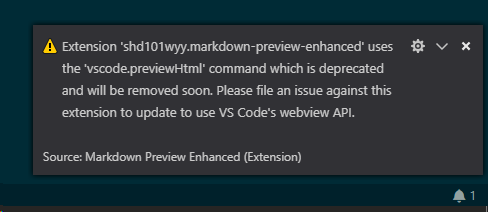
| Replace vscode.previewHtml | https://api.github.com/repos/shd101wyy/vscode-markdown-preview-enhanced/issues/184/comments | 1 | 2019-02-11T22:57:36Z | 2019-02-14T16:50:17Z | https://github.com/shd101wyy/vscode-markdown-preview-enhanced/issues/184 | 409,015,716 | 184 |
[
"shd101wyy",
"vscode-markdown-preview-enhanced"
] | The "save to markdown" feature is really nice, but I think it would be even nicer if we could put our enhancements in comment blocks to keep a single source of truth and use the extension to render the images for github. We could enable/configure this also in the markdown front-matter.
```markdown
<!--export {path... | Feature request: GMF in comment mode | https://api.github.com/repos/shd101wyy/vscode-markdown-preview-enhanced/issues/1418/comments | 0 | 2019-02-11T12:53:30Z | 2023-08-23T02:48:18Z | https://github.com/shd101wyy/vscode-markdown-preview-enhanced/issues/1418 | 1,862,464,042 | 1,418 |
[
"shd101wyy",
"vscode-markdown-preview-enhanced"
] | Hi! I discovered that in Atom preview CSS adjacent sibling combinator seems to be not workings.
For example, with this less code
``` less
.markdown-preview.markdown-preview {
h1 + h2 { color: red; }
}
```
and this markdown
```md
#Title
## First heading
Some text
## Second heading
Some other text
`... | CSS adjacent sibling combinator not working in atom preview | https://api.github.com/repos/shd101wyy/vscode-markdown-preview-enhanced/issues/1419/comments | 0 | 2019-02-10T11:35:38Z | 2023-08-23T02:48:21Z | https://github.com/shd101wyy/vscode-markdown-preview-enhanced/issues/1419 | 1,862,464,079 | 1,419 |
[
"shd101wyy",
"vscode-markdown-preview-enhanced"
] | Hi if I write
# MyStyledHeader {# | phantom | https://api.github.com/repos/shd101wyy/vscode-markdown-preview-enhanced/issues/1420/comments | 0 | 2019-02-07T11:24:51Z | 2023-08-23T02:48:23Z | https://github.com/shd101wyy/vscode-markdown-preview-enhanced/issues/1420 | 1,862,464,127 | 1,420 |
[
"shd101wyy",
"vscode-markdown-preview-enhanced"
] | I want to change color of variables in markdown preview enhanced(MPE).
I know how to do that in atom editor itself, but I can't in MPE.
Scope at cursor indicates "text.md reference.variable.md".
Please tell me how to edit styles.less file under .mume direcotry. | change color of variables in markdown preview enhanced(MPE) | https://api.github.com/repos/shd101wyy/vscode-markdown-preview-enhanced/issues/1421/comments | 0 | 2019-02-07T02:50:02Z | 2023-08-23T02:48:33Z | https://github.com/shd101wyy/vscode-markdown-preview-enhanced/issues/1421 | 1,862,464,162 | 1,421 |
[
"shd101wyy",
"vscode-markdown-preview-enhanced"
] | MPE renders syntax highlighting different from the pandoc binary. I am using pandoc to render the preview as evidenced by me passing in --toc and a toc being created. For example, when I enter the following:
```shell
% git status
```
The git command is tokenized by MPE but in pandoc from the command line it is... | Difference in syntax highlighting | https://api.github.com/repos/shd101wyy/vscode-markdown-preview-enhanced/issues/183/comments | 0 | 2019-02-06T14:12:26Z | 2019-02-06T14:12:26Z | https://github.com/shd101wyy/vscode-markdown-preview-enhanced/issues/183 | 407,254,048 | 183 |
[
"shd101wyy",
"vscode-markdown-preview-enhanced"
] | VScode上没有找到可以将md输出为pdf的选项,无法将Latex数学符号输出,只有preview。 请问什么时候出output功能 | 请问如何在VScode上通过Markdown Enhanced Preview 输出PDF? | https://api.github.com/repos/shd101wyy/vscode-markdown-preview-enhanced/issues/182/comments | 1 | 2019-02-04T23:23:31Z | 2020-03-10T07:27:49Z | https://github.com/shd101wyy/vscode-markdown-preview-enhanced/issues/182 | 406,564,970 | 182 |
[
"shd101wyy",
"vscode-markdown-preview-enhanced"
] | Could you add syntax highlighting of C# ?
能否增加C#的语法高亮?
| Could you add syntax highlighting of C# ?能否增加C#的语法高亮? | https://api.github.com/repos/shd101wyy/vscode-markdown-preview-enhanced/issues/181/comments | 0 | 2019-02-02T13:22:43Z | 2019-02-02T13:22:43Z | https://github.com/shd101wyy/vscode-markdown-preview-enhanced/issues/181 | 405,982,723 | 181 |
[
"shd101wyy",
"vscode-markdown-preview-enhanced"
] | Hi phantom.js don`t put pagenumber to pdf export.
This is my phantom config:
Thanks in advance for get into.
```
let config = {
"border": {
"top": "2cm",
"right": "2cm",
"bottom": "2cm",
"left": "2cm"
},
"footer": {
"height": "28mm",
"contents": {
default: '<span st... | phantom.js pagenumber | https://api.github.com/repos/shd101wyy/vscode-markdown-preview-enhanced/issues/1422/comments | 0 | 2019-02-01T16:11:02Z | 2023-08-23T02:48:27Z | https://github.com/shd101wyy/vscode-markdown-preview-enhanced/issues/1422 | 1,862,464,214 | 1,422 |
[
"shd101wyy",
"vscode-markdown-preview-enhanced"
] | 有两个问题(或者建议)?
1.我没有用斜体,只用了粗体(检查了很多遍,没有遗漏的*或_),但是最后显示的,就变成了全文斜体...(发布到网上的,是正常的,只是live预览的却是斜体耶)
2.能否支持font-awesome?(我试用了其他插件,不过,有的图标可以显示,有的不可以)。不知道以后能不能支持这种这字体呢?(我突然觉得,不显示的图标,难道是pro的?)
1. always showing italic type when i do not using it. i checked... | always showing italic type when i do not using it. | https://api.github.com/repos/shd101wyy/vscode-markdown-preview-enhanced/issues/1423/comments | 0 | 2019-01-29T04:00:03Z | 2023-08-23T02:48:30Z | https://github.com/shd101wyy/vscode-markdown-preview-enhanced/issues/1423 | 1,862,464,271 | 1,423 |
[
"shd101wyy",
"vscode-markdown-preview-enhanced"
] | ## 通过元数据设置 Pandoc Arguments
您好,我按您在文档中所说(如下图)在文章元数据中添加 Pandoc Arguments:
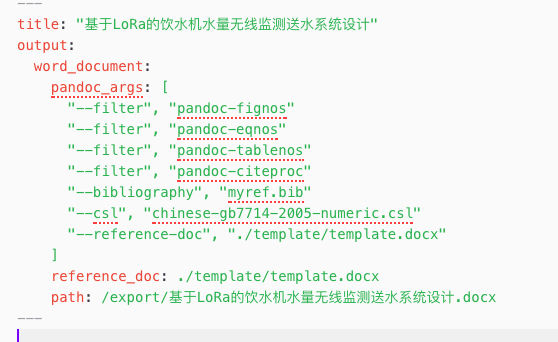
但是无法正确得到预览,并得到如下提示,不知是否是我写的格式有错误?
```
[pandoc warning] Could not parse YAML header: did not find expected ',' or ']' "sour... | 设定 pandoc_args 后 使用Pandoc 预览的一些错误 | https://api.github.com/repos/shd101wyy/vscode-markdown-preview-enhanced/issues/1424/comments | 0 | 2019-01-28T12:19:59Z | 2023-08-23T02:48:32Z | https://github.com/shd101wyy/vscode-markdown-preview-enhanced/issues/1424 | 1,862,464,305 | 1,424 |
[
"shd101wyy",
"vscode-markdown-preview-enhanced"
] | I think the current behavior of automatic opening and closing previews is a bit shaky to me. If been thinking a bit on how it could be solved and have some idea now. I'm curious what others think. Please consider my proposal below.
I am using Atom, so this issue is focused on Atom. I'm not sure how well it would tra... | Feature request: enhance preview window auto open/close behavior | https://api.github.com/repos/shd101wyy/vscode-markdown-preview-enhanced/issues/1425/comments | 1 | 2019-01-28T02:48:10Z | 2023-08-23T02:59:03Z | https://github.com/shd101wyy/vscode-markdown-preview-enhanced/issues/1425 | 1,862,464,357 | 1,425 |
[
"shd101wyy",
"vscode-markdown-preview-enhanced"
] | I am still having problem with this :
When I want to rename a file from the Tree View, the automatic preview steels the focus and I am unable to use F2 shortcut to quickly rename the file.
When I disable the package everything goes fine.
I am using Atom 1.26.1 and Markdown Preview Enhanced 0.15.8
_Origina... | Automatic preview stealing Tree View focus | https://api.github.com/repos/shd101wyy/vscode-markdown-preview-enhanced/issues/1426/comments | 1 | 2019-01-26T12:17:37Z | 2023-08-23T02:48:36Z | https://github.com/shd101wyy/vscode-markdown-preview-enhanced/issues/1426 | 1,862,464,403 | 1,426 |
[
"shd101wyy",
"vscode-markdown-preview-enhanced"
] | creating a blank markdown document with this code:
```markdown

```
results in a constantly flickering/updating rendering. GitHub renders fine, though:
 | constantly refreshing for some images | https://api.github.com/repos/shd101wyy/vscode-markdown-preview-enhanced/issues/1427/comments | 0 | 2019-01-25T23:30:37Z | 2023-08-23T02:48:38Z | https://github.com/shd101wyy/vscode-markdown-preview-enhanced/issues/1427 | 1,862,464,450 | 1,427 |
[
"shd101wyy",
"vscode-markdown-preview-enhanced"
] | # Enhancement Proposal
## Problem Statement
I have a number of different documentation projects. These projects sometimes require different styling or fixups using `~/.mume/styles.less` and `~/.mume/parser.js`. Currently MPE only looks for `styles.less` and `parser.js` in the `~/.mume` directory. As a result when I w... | Enhancement: loading of styles.less, parser.js or other configuration files | https://api.github.com/repos/shd101wyy/vscode-markdown-preview-enhanced/issues/1428/comments | 0 | 2019-01-24T12:22:15Z | 2023-08-23T02:48:40Z | https://github.com/shd101wyy/vscode-markdown-preview-enhanced/issues/1428 | 1,862,464,503 | 1,428 |
[
"shd101wyy",
"vscode-markdown-preview-enhanced"
] | no image file was exported and the exported md file looks the same with the original md file.
Thanks,
Wei | Diagram drew using mermaid is not exported when "save as markdown" | https://api.github.com/repos/shd101wyy/vscode-markdown-preview-enhanced/issues/1429/comments | 1 | 2019-01-24T01:48:47Z | 2023-08-23T02:48:42Z | https://github.com/shd101wyy/vscode-markdown-preview-enhanced/issues/1429 | 1,862,464,540 | 1,429 |
[
"shd101wyy",
"vscode-markdown-preview-enhanced"
] | 1.34.0 X64
Can't:
```
# Git Bash 使用说明
## 仓库克隆
```
Can:
```
## git remote
```
| sidebar TOC can't jump to the header mixed with Chinese | https://api.github.com/repos/shd101wyy/vscode-markdown-preview-enhanced/issues/1430/comments | 6 | 2019-01-20T12:29:10Z | 2023-08-23T02:48:44Z | https://github.com/shd101wyy/vscode-markdown-preview-enhanced/issues/1430 | 1,862,464,570 | 1,430 |
[
"shd101wyy",
"vscode-markdown-preview-enhanced"
] | 1. PDF只有第一页, 导出为pdf的方式是在生成的presentation html后面加上"?print-pdf",使其加载css. 但是此方法只有第一页.
2. slide里面,根据mermaid sequenceDiagram生成的diagram, 其字体没有正确加载
版本:0.3.11 | Presentation无法导出全部pdf,同时其中的mermaid字体不正确 | https://api.github.com/repos/shd101wyy/vscode-markdown-preview-enhanced/issues/1431/comments | 0 | 2019-01-18T03:36:41Z | 2023-08-23T02:48:46Z | https://github.com/shd101wyy/vscode-markdown-preview-enhanced/issues/1431 | 1,862,464,603 | 1,431 |
[
"shd101wyy",
"vscode-markdown-preview-enhanced"
] | It would be nice if it is in VS Code.
For example,
- https://www.npmjs.com/package/markdown-it-furigana
- https://github.com/joeellis/showdown-kanji | Support for ruby text / furigana | https://api.github.com/repos/shd101wyy/vscode-markdown-preview-enhanced/issues/180/comments | 0 | 2019-01-16T07:22:27Z | 2019-01-16T07:22:27Z | https://github.com/shd101wyy/vscode-markdown-preview-enhanced/issues/180 | 399,678,500 | 180 |
[
"shd101wyy",
"vscode-markdown-preview-enhanced"
] | when only one esacaped $, for example: `with 8.9 billion 20 \$`, the output is as expected.
when two escaped $ in one line, for example: `with 8.9 billion 20 \$ and 11.5 billion 100 \$`, the output is: with 8.9 billion 20 and11.5billion100 .
I enabled all the features that MPE provides and use mathjax default... | Two adjacent escaped \$ | https://api.github.com/repos/shd101wyy/vscode-markdown-preview-enhanced/issues/1432/comments | 0 | 2019-01-13T11:01:50Z | 2023-08-23T02:48:49Z | https://github.com/shd101wyy/vscode-markdown-preview-enhanced/issues/1432 | 1,862,464,649 | 1,432 |
[
"shd101wyy",
"vscode-markdown-preview-enhanced"
] | Hi,
thanks for this great project ! I do love this package and use it every day.
The following code chunk creates correct png files, but they are not correctly embedded in the preview window or the html export. Do I miss something?
```
```python {cmd="/usr/bin/nwdiag3" run_on_save=true args=["-T","png"] outp... | code chunks png | https://api.github.com/repos/shd101wyy/vscode-markdown-preview-enhanced/issues/1433/comments | 2 | 2019-01-12T14:36:44Z | 2023-08-23T02:48:51Z | https://github.com/shd101wyy/vscode-markdown-preview-enhanced/issues/1433 | 1,862,464,698 | 1,433 |
[
"shd101wyy",
"vscode-markdown-preview-enhanced"
] | 你好! 非常感谢你的贡献,我经常用你的这个插件写md和制作ppt,真的非常方便,节省了不少时间。发现了几个问题,跟你反映一下。
在md文本中添加ppt注释的时候能不能像hackmd一样直接在末尾输入:“Note:”就可以简单方便的加入注释呢?
我的讲者界面的时间显示是不动的,一直是00:00,希望可以改进!
非常感谢!! | 关于Note | https://api.github.com/repos/shd101wyy/vscode-markdown-preview-enhanced/issues/1434/comments | 0 | 2019-01-08T15:02:29Z | 2023-08-23T02:48:53Z | https://github.com/shd101wyy/vscode-markdown-preview-enhanced/issues/1434 | 1,862,464,738 | 1,434 |
[
"shd101wyy",
"vscode-markdown-preview-enhanced"
] | 你好! 非常感谢你的贡献,我经常用你的这个插件写md和制作ppt,真的非常方便,节省了不少时间。发现了几个问题,跟你反映一下。
1. 在md文本中添加ppt注释的时候能不能像hackmd一样直接在末尾输入:“Note:”就可以简单方便的加入注释呢?
2. 我的讲者界面的时间显示是不动的,一直是00:00,希望可以改进!
非常感谢!!
| 关于演讲者界面 | https://api.github.com/repos/shd101wyy/vscode-markdown-preview-enhanced/issues/1435/comments | 0 | 2019-01-08T14:59:58Z | 2023-08-23T02:48:55Z | https://github.com/shd101wyy/vscode-markdown-preview-enhanced/issues/1435 | 1,862,464,772 | 1,435 |
[
"shd101wyy",
"vscode-markdown-preview-enhanced"
] | When previewing a markdown file used for a wiki, links such as `[My Page 2](this-is-my-page-2)` do not work. However, if I change it to `[My Page 2](this-is-my-page-2.md)` it opens fine and I can navigate the wiki in the preview view. The problem is, those links break on the wiki.
It would be great to support wiki-s... | Support wiki-style links in preview | https://api.github.com/repos/shd101wyy/vscode-markdown-preview-enhanced/issues/179/comments | 5 | 2019-01-04T17:57:01Z | 2025-04-30T22:19:59Z | https://github.com/shd101wyy/vscode-markdown-preview-enhanced/issues/179 | 396,013,881 | 179 |
[
"shd101wyy",
"vscode-markdown-preview-enhanced"
] | If you do `[[TextA|TextB]]`, the previewer links to the file `TextB.md` and displays the text "TextA". According to this https://www.mediawiki.org/wiki/Help:Links, and other normal markdown extensions, this is the wrong way around.
The help page for github on wikilinks, https://help.github.com/articles/adding-links-... | Piped WikiLinks is switched arround | https://api.github.com/repos/shd101wyy/vscode-markdown-preview-enhanced/issues/1436/comments | 0 | 2019-01-01T18:00:44Z | 2023-08-23T02:49:32Z | https://github.com/shd101wyy/vscode-markdown-preview-enhanced/issues/1436 | 1,862,464,810 | 1,436 |
[
"shd101wyy",
"vscode-markdown-preview-enhanced"
] | 在文章中使用脚注时,必须按先后顺序编号且不能重复使用脚注。否则脚注右上角标识就会显示错误,而且最后也无法显示全所有脚注。
这一点在Typora中就很好用,脚注可以像引用一样,不需要考虑顺序的引用,而且可重复引用。
望后续版本改进!
很棒的插件!谢谢! | 脚注功能不够灵活 | https://api.github.com/repos/shd101wyy/vscode-markdown-preview-enhanced/issues/178/comments | 0 | 2018-12-28T01:53:10Z | 2018-12-28T01:53:10Z | https://github.com/shd101wyy/vscode-markdown-preview-enhanced/issues/178 | 394,525,940 | 178 |
[
"shd101wyy",
"vscode-markdown-preview-enhanced"
] | 因为需要经常编写代码,每次都要输入 ``` javascript ... ``` 。为了省时间,在 vscode中定义了代码段,想着能像js中一样使用代码段快速输入这个格式。但是不成功。这是什么原因呢? | 在vscode中定义了代码段,编写md文件时并不生效是怎么回事呀 | https://api.github.com/repos/shd101wyy/vscode-markdown-preview-enhanced/issues/177/comments | 2 | 2018-12-25T08:22:52Z | 2018-12-25T14:52:18Z | https://github.com/shd101wyy/vscode-markdown-preview-enhanced/issues/177 | 393,984,986 | 177 |
[
"shd101wyy",
"vscode-markdown-preview-enhanced"
] | i can't open the preview pane, both ctl+shift+m and packages-markdown preview enhanced-toggle don't work | i have installed the package successfully, but it doesn't work | https://api.github.com/repos/shd101wyy/vscode-markdown-preview-enhanced/issues/1437/comments | 0 | 2018-12-24T02:18:58Z | 2023-08-23T02:49:00Z | https://github.com/shd101wyy/vscode-markdown-preview-enhanced/issues/1437 | 1,862,464,858 | 1,437 |
[
"shd101wyy",
"vscode-markdown-preview-enhanced"
] | Hi, in advance, thanks for this great project ! I do love this package.
I would like to ask you how we can make settings for embedded code blocks.
What I really want to do in particular is, I want to make `automaticallyShowPreviewOfMarkdownBeingEdited` disable when the cursor is on code block.
I often use this p... | Settings for embedded code block in markdown | https://api.github.com/repos/shd101wyy/vscode-markdown-preview-enhanced/issues/1438/comments | 0 | 2018-12-23T10:29:35Z | 2023-08-23T02:49:02Z | https://github.com/shd101wyy/vscode-markdown-preview-enhanced/issues/1438 | 1,862,464,904 | 1,438 |
[
"shd101wyy",
"vscode-markdown-preview-enhanced"
] |
When I insert a youtube video it refresh the content inside the iframe constantly as you can see in the video
https://www.youtube.com/embed/Hee8WyxNXn4 | Youtube Iframe flickering | https://api.github.com/repos/shd101wyy/vscode-markdown-preview-enhanced/issues/1439/comments | 0 | 2018-12-20T14:01:10Z | 2023-08-23T02:49:04Z | https://github.com/shd101wyy/vscode-markdown-preview-enhanced/issues/1439 | 1,862,464,966 | 1,439 |
[
"shd101wyy",
"vscode-markdown-preview-enhanced"
] | I got no replies at ['markdown-preview-enhanced' repository](markdown-preview-enhanced), so i try again here.
If the this option is checked, the markdown file is parsed using command
```pandoc -f -t html --mathjax --filter pandoc-citeproc```,
even if `katex` is chosen in `Math Rendering Option`. And these de... | Default flags of "Use Pandoc Parser" option | https://api.github.com/repos/shd101wyy/vscode-markdown-preview-enhanced/issues/176/comments | 4 | 2018-12-20T12:59:04Z | 2018-12-27T00:17:57Z | https://github.com/shd101wyy/vscode-markdown-preview-enhanced/issues/176 | 393,036,390 | 176 |
[
"shd101wyy",
"vscode-markdown-preview-enhanced"
] | 在Preview中预览时blockquote的背景颜色是可以显示的,但是生成HTML后在浏览器中显示没有背景颜色,只有左侧竖线,CSS中也没有对blockquote的background-color的相关定义,而且无论是用哪个主题均会有这种情况 | blockquote中的背景颜色无法显示 | https://api.github.com/repos/shd101wyy/vscode-markdown-preview-enhanced/issues/175/comments | 1 | 2018-12-18T15:49:34Z | 2019-09-04T10:21:48Z | https://github.com/shd101wyy/vscode-markdown-preview-enhanced/issues/175 | 392,217,448 | 175 |
[
"shd101wyy",
"vscode-markdown-preview-enhanced"
] | See here for example https://python-markdown.github.io/extensions/admonition/
| Is there any way to easily get support for admonition or something similar? | https://api.github.com/repos/shd101wyy/vscode-markdown-preview-enhanced/issues/1440/comments | 2 | 2018-12-17T22:13:47Z | 2023-08-23T02:49:06Z | https://github.com/shd101wyy/vscode-markdown-preview-enhanced/issues/1440 | 1,862,465,014 | 1,440 |
[
"shd101wyy",
"vscode-markdown-preview-enhanced"
] | Hi. I observed that using pandoc and pandoc-eqnos filter (--filter=pandoc-eqnos in pandoc settings) results in broken preview:
* equation numbers are displayed at the single place, one at the top of others (see attachment) and
* live syncing is broken.
With the --standalone pandoc option the above issues are gon... | pandoc-eqnos issue | https://api.github.com/repos/shd101wyy/vscode-markdown-preview-enhanced/issues/1441/comments | 1 | 2018-12-17T13:24:17Z | 2023-08-23T02:49:08Z | https://github.com/shd101wyy/vscode-markdown-preview-enhanced/issues/1441 | 1,862,465,063 | 1,441 |
[
"shd101wyy",
"vscode-markdown-preview-enhanced"
] | Hello,
my plantuml diagrams are displayed in the preview window (pandoc parser).
When exporting the following file to pdf (with pandoc)
---
title: "Test"
output:
pdf_document:
---
``` plantuml
class BST{
}
```
only the soruce code of the diagram is di... | plantuml diagram in pandoc export | https://api.github.com/repos/shd101wyy/vscode-markdown-preview-enhanced/issues/1442/comments | 1 | 2018-12-16T21:09:55Z | 2023-08-23T02:49:11Z | https://github.com/shd101wyy/vscode-markdown-preview-enhanced/issues/1442 | 1,862,465,116 | 1,442 |
[
"shd101wyy",
"vscode-markdown-preview-enhanced"
] | There was an error in the PDF conversion.
I figured out that if error commend is ["phantomjs" is required to be installed],
I need to set the environment variable.
I want you to tell people how to set it up. | Please show me the solution. | https://api.github.com/repos/shd101wyy/vscode-markdown-preview-enhanced/issues/1443/comments | 0 | 2018-12-15T12:30:44Z | 2023-08-23T02:49:13Z | https://github.com/shd101wyy/vscode-markdown-preview-enhanced/issues/1443 | 1,862,465,164 | 1,443 |
[
"shd101wyy",
"vscode-markdown-preview-enhanced"
] | 代码块内的代码可以根据缩进、花括号、冒号等智能进行折叠。即使这段代码是不完整的。
也就是说在代码块内,折叠方案改为对应语言的文件的。
我在VSCode上试了好久也没有发现这个功能,markdown本身的元素是可以折叠的,但是代码块内的代码却不能。折叠方案有自动和根据缩进两种,但是却不能兼用。
JetBrains的IDE,类似Idea是支持这种功能的,但是遗憾的是不支持mpe的拓展特性,代码块不能标识为某个类({.aClass}),否则无法高亮。
或者是说VSCode其实是有这种功能的,只是我没有找到? | MPE是否可以增加markdown代码块折叠功能? | https://api.github.com/repos/shd101wyy/vscode-markdown-preview-enhanced/issues/1444/comments | 0 | 2018-12-14T10:59:42Z | 2023-08-23T02:49:15Z | https://github.com/shd101wyy/vscode-markdown-preview-enhanced/issues/1444 | 1,862,465,211 | 1,444 |
[
"shd101wyy",
"vscode-markdown-preview-enhanced"
] | Behavior:
ctrl+shift+s is mapped to "markdown-preview-enhanced.syncPreview", which is a commonly used and default shortcut for "save as" in VSCode and many other text editors.
Expected:
select another key combination or leave it unmapped | Plugin hijacks ctrl+shift+s keybinding which is by default "Save as" | https://api.github.com/repos/shd101wyy/vscode-markdown-preview-enhanced/issues/174/comments | 0 | 2018-12-10T07:24:09Z | 2018-12-10T07:24:09Z | https://github.com/shd101wyy/vscode-markdown-preview-enhanced/issues/174 | 389,171,176 | 174 |
[
"shd101wyy",
"vscode-markdown-preview-enhanced"
] | Hey,
On the insiders build (Version 1.30.0-insider (1.30.0-insider)) when you try and drag the preview tab to be part of a horizontal split:
```
<Md preview>
-------------
<md file>
```
You get the following error:
Unable to open 'MPE Preview': ModelService: Cannot add model because it already exists!... | Unable to open 'MPE Preview': ModelService: Cannot add model because it already exists!. | https://api.github.com/repos/shd101wyy/vscode-markdown-preview-enhanced/issues/173/comments | 4 | 2018-12-08T19:32:41Z | 2019-03-08T21:24:19Z | https://github.com/shd101wyy/vscode-markdown-preview-enhanced/issues/173 | 388,952,104 | 173 |
[
"shd101wyy",
"vscode-markdown-preview-enhanced"
] | Hi shd,
in https://github.com/ismay/coarse there is a JS library that transform an svg into a similar but rough styled image (it wraps the roughjs lib). There is also a cli tool that can be used to transform an svg into a rough one (if you need a superquick gif demo please look at https://twitter.com/i/status/102531... | Feature Request: ability to render diagrams with roughjs style | https://api.github.com/repos/shd101wyy/vscode-markdown-preview-enhanced/issues/1445/comments | 0 | 2018-12-06T17:27:38Z | 2023-08-23T02:49:18Z | https://github.com/shd101wyy/vscode-markdown-preview-enhanced/issues/1445 | 1,862,465,264 | 1,445 |
[
"shd101wyy",
"vscode-markdown-preview-enhanced"
] | Why don't you add the docs function at Markdown without the need for grammar problems? | DOCS function | https://api.github.com/repos/shd101wyy/vscode-markdown-preview-enhanced/issues/172/comments | 0 | 2018-12-05T09:30:37Z | 2018-12-05T09:30:37Z | https://github.com/shd101wyy/vscode-markdown-preview-enhanced/issues/172 | 387,666,164 | 172 |
[
"shd101wyy",
"vscode-markdown-preview-enhanced"
] | Is it possible to get an option for TOC and title auto numbering ?
Something similar as in this exemple link in [typora](https://support.typora.io/Auto-Numbering/) | Title and toc autonumbering | https://api.github.com/repos/shd101wyy/vscode-markdown-preview-enhanced/issues/1446/comments | 6 | 2018-12-03T16:45:38Z | 2023-08-23T02:49:20Z | https://github.com/shd101wyy/vscode-markdown-preview-enhanced/issues/1446 | 1,862,465,305 | 1,446 |
[
"shd101wyy",
"vscode-markdown-preview-enhanced"
] | I'm in style.less, and trying to make "pre" code different than "code" code:
```
.markdown-preview.markdown-preview code{color:#c7254e; background-color:#f9f2f4;font-size:.75em;}
.markdown-preview.markdown-preview pre{color:#000;background-color:#eee;border:1px solid #ccc;border-radius: 4px;font-size:.75em;}
```
p... | Similar styles | https://api.github.com/repos/shd101wyy/vscode-markdown-preview-enhanced/issues/1447/comments | 3 | 2018-12-03T14:50:07Z | 2023-08-23T02:49:22Z | https://github.com/shd101wyy/vscode-markdown-preview-enhanced/issues/1447 | 1,862,465,347 | 1,447 |
[
"shd101wyy",
"vscode-markdown-preview-enhanced"
] | If the this option is checked, the markdown file is parsed using command
```pandoc -f -t html --mathjax --filter pandoc-citeproc```,
even if `katex` is chosen in `Math Rendering Option`. And these default flags make it unable to set the path of `pandoc-citeproc` mannually, which makes errors in case there are s... | Default flags of "Use Pandoc Parser" option in VS Code | https://api.github.com/repos/shd101wyy/vscode-markdown-preview-enhanced/issues/1448/comments | 0 | 2018-11-30T11:13:49Z | 2023-08-23T02:49:24Z | https://github.com/shd101wyy/vscode-markdown-preview-enhanced/issues/1448 | 1,862,465,402 | 1,448 |
[
"shd101wyy",
"vscode-markdown-preview-enhanced"
] | ebook-convert (calibre 3.34.0)
markdown-preview-enhanced 0.15.8
ebook-example (clone from https://github.com/shd101wyy/ebook-example.git)
when I convert to ebook , on ebook not have chapter's content , | ebook export not have chapter content | https://api.github.com/repos/shd101wyy/vscode-markdown-preview-enhanced/issues/1449/comments | 5 | 2018-11-29T06:43:48Z | 2023-08-23T02:49:27Z | https://github.com/shd101wyy/vscode-markdown-preview-enhanced/issues/1449 | 1,862,465,444 | 1,449 |
[
"shd101wyy",
"vscode-markdown-preview-enhanced"
] | 你好开发者,我想你能否让MPE支持Anki卡片的制作?利用Markdown记笔记真的非常棒,能够导出成Epub格式能够适合各类电子设备,这个功能我非常喜欢。但是我想如果是笔记复习的话,anki显得更好一些,不知道能不能支持。 | MPE能够支持Anki卡片的制作? | https://api.github.com/repos/shd101wyy/vscode-markdown-preview-enhanced/issues/1450/comments | 0 | 2018-11-27T08:29:52Z | 2023-08-23T02:49:29Z | https://github.com/shd101wyy/vscode-markdown-preview-enhanced/issues/1450 | 1,862,465,500 | 1,450 |
[
"shd101wyy",
"vscode-markdown-preview-enhanced"
] | I add a new language addin for vscode, but it not work in markdown-preview-enhanced. | support for a new language | https://api.github.com/repos/shd101wyy/vscode-markdown-preview-enhanced/issues/1451/comments | 0 | 2018-11-27T01:30:57Z | 2023-08-23T02:49:31Z | https://github.com/shd101wyy/vscode-markdown-preview-enhanced/issues/1451 | 1,862,465,543 | 1,451 |
[
"shd101wyy",
"vscode-markdown-preview-enhanced"
] | Hello!
How's it going?
Just a callback for issue shd101wyy/markdown-preview-enhanced#57, is there any way to have headers/footers for exporting to PDF now? For this specific document, I plan to export with Pandoc but it would be useful to have it for Puppeteer too.
Thanks!
| Headers/Footers on PDF! | https://api.github.com/repos/shd101wyy/vscode-markdown-preview-enhanced/issues/1452/comments | 7 | 2018-11-24T18:03:05Z | 2023-08-23T02:49:33Z | https://github.com/shd101wyy/vscode-markdown-preview-enhanced/issues/1452 | 1,862,465,594 | 1,452 |
[
"shd101wyy",
"vscode-markdown-preview-enhanced"
] | Hi
It would be great to have the plugin [markdown-it/markdown-it-container](https://github.com/markdown-it/markdown-it-container). This would allow for custom HTML-containers, without breaking up the source code with line breaks.
**Quote from the plugin's README**
With this plugin you can create block containers... | Support for markdown-it-container | https://api.github.com/repos/shd101wyy/vscode-markdown-preview-enhanced/issues/171/comments | 0 | 2018-11-24T13:41:29Z | 2018-11-24T13:41:29Z | https://github.com/shd101wyy/vscode-markdown-preview-enhanced/issues/171 | 383,990,574 | 171 |
[
"shd101wyy",
"vscode-markdown-preview-enhanced"
] | It would be awesome if I could run code chunks using Hydrogen's kernel connection (which hydrogen already does) and then capture the output in Markdown as your code chunks do. I'm currently using Hydrogen's rich markdown documents to code in R and Python inside Markdown, but I have to manually insert the output which i... | Suggestion: Code Chunk Atom Hydrogen integration | https://api.github.com/repos/shd101wyy/vscode-markdown-preview-enhanced/issues/1453/comments | 1 | 2018-11-24T13:16:52Z | 2023-08-23T02:49:35Z | https://github.com/shd101wyy/vscode-markdown-preview-enhanced/issues/1453 | 1,862,465,639 | 1,453 |
[
"shd101wyy",
"vscode-markdown-preview-enhanced"
] | Hello,
When I export to HTML the only options seems to be either a) Offline b) CDN Hosted
Please provide an option to use relative paths for the dependencies like Katex etc. | Export to HTML should have option for relative path for dependencies | https://api.github.com/repos/shd101wyy/vscode-markdown-preview-enhanced/issues/1454/comments | 0 | 2018-11-22T00:34:49Z | 2023-08-23T02:49:37Z | https://github.com/shd101wyy/vscode-markdown-preview-enhanced/issues/1454 | 1,862,465,687 | 1,454 |
[
"shd101wyy",
"vscode-markdown-preview-enhanced"
] | Hello,
this extension is super good!! I wonder if it support exporting image with sequence-diagrams automatically when save as markdown. It will be really useful to me. I tried but seems not work when I add filename above , something like following:
```sequence {filename="test.png"}
A->B: Login page Redirect to... | does it support exporting sequence-diagrams image when save as markdown | https://api.github.com/repos/shd101wyy/vscode-markdown-preview-enhanced/issues/1455/comments | 1 | 2018-11-20T13:11:06Z | 2023-08-23T02:49:39Z | https://github.com/shd101wyy/vscode-markdown-preview-enhanced/issues/1455 | 1,862,465,735 | 1,455 |
[
"shd101wyy",
"vscode-markdown-preview-enhanced"
] | With the default parser, the following code produces an indented bulleted list:
```markdown
- first
- second (indented)
- third
```
If using the pandoc parser, the indent is not preserved, resulting in a flat bulleted list.
However, if I use the pandoc command-line tool directly to process that markdown,... | Indented bulleted lists are not displayed correctly when using Pandoc parser | https://api.github.com/repos/shd101wyy/vscode-markdown-preview-enhanced/issues/1456/comments | 5 | 2018-11-20T09:26:04Z | 2023-08-23T02:49:42Z | https://github.com/shd101wyy/vscode-markdown-preview-enhanced/issues/1456 | 1,862,465,787 | 1,456 |
[
"shd101wyy",
"vscode-markdown-preview-enhanced"
] | 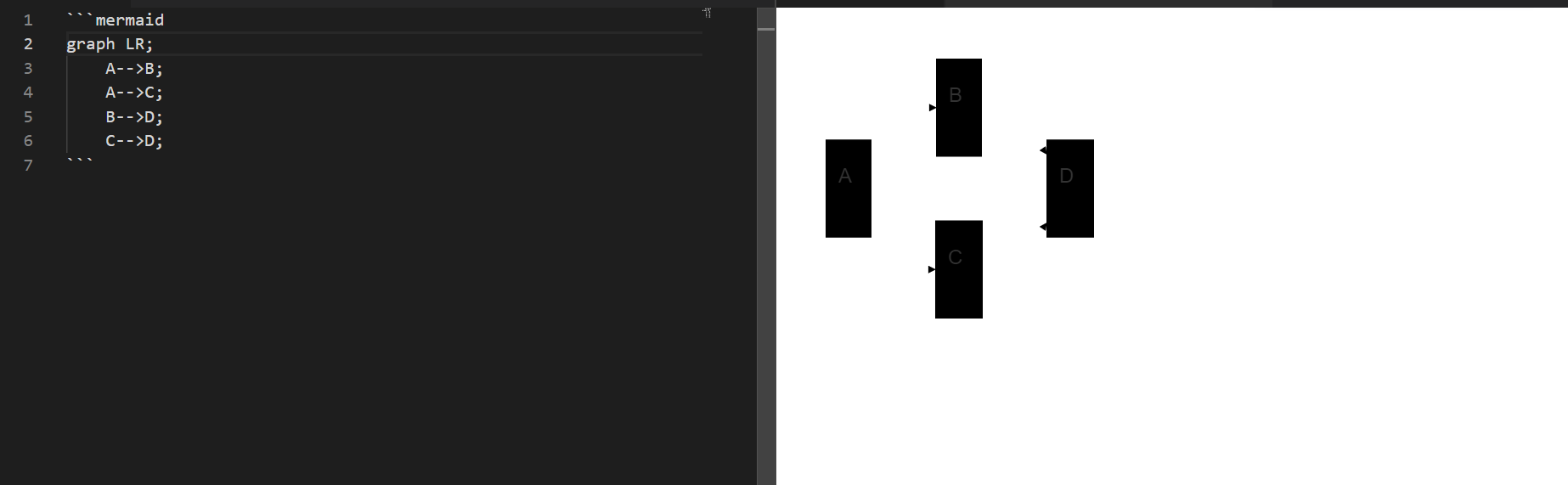
vscode | 背景颜色似乎不太对 | https://api.github.com/repos/shd101wyy/vscode-markdown-preview-enhanced/issues/1457/comments | 1 | 2018-11-19T07:11:21Z | 2023-08-23T02:49:44Z | https://github.com/shd101wyy/vscode-markdown-preview-enhanced/issues/1457 | 1,862,465,835 | 1,457 |
[
"shd101wyy",
"vscode-markdown-preview-enhanced"
] | 刚打开时预览正常,编辑一段时间后预览就不再同步更新。关闭文件重新打开,右上角按钮也不响应。需要关闭 vscode 主窗口重新打开才又恢复工作。但编辑一段时间后又会出现同样问题。
出现问题后文件可以保存,所以不会有什么损失,就是要反复重启主界面很麻烦。
注意到出现这个问题的时候,左边大纲好像也不工作了,不知道两者是什么关系?
再补充一点:在 atom 中没有这个问题。两者都是用 pandoc 渲染预览的。插件和应用都是最新版。 | 在 mac vscode 中经常失去响应 | https://api.github.com/repos/shd101wyy/vscode-markdown-preview-enhanced/issues/1458/comments | 2 | 2018-11-17T08:55:14Z | 2023-08-23T02:49:59Z | https://github.com/shd101wyy/vscode-markdown-preview-enhanced/issues/1458 | 1,862,465,881 | 1,458 |
[
"shd101wyy",
"vscode-markdown-preview-enhanced"
] | It would be nice to have hierarchical trees (like directory structures but not limited to) to be nicely translated in a tree view like that (see https://www.cssscript.com/demo/minimalist-tree-view-in-pure-css/)
The feature could process a syntax like ascii-tree (https://atom.io/packages/ascii-tree)
but allow also ... | add a simple treeview rendering | https://api.github.com/repos/shd101wyy/vscode-markdown-preview-enhanced/issues/1459/comments | 1 | 2018-11-16T22:51:51Z | 2023-08-23T02:49:49Z | https://github.com/shd101wyy/vscode-markdown-preview-enhanced/issues/1459 | 1,862,465,936 | 1,459 |
[
"shd101wyy",
"vscode-markdown-preview-enhanced"
] | 您好,我有个问题想反馈
````
```python {cmd output="text"}
print(type(1))
print('<b>aa</b')
```
````
我想打印出终端python运行的样子,就是普通的字符串.可是把output改成markdown,html,text均达不到想要的效果 | code chunk转义 | https://api.github.com/repos/shd101wyy/vscode-markdown-preview-enhanced/issues/1460/comments | 2 | 2018-11-16T14:11:59Z | 2023-08-23T02:49:51Z | https://github.com/shd101wyy/vscode-markdown-preview-enhanced/issues/1460 | 1,862,465,976 | 1,460 |
[
"shd101wyy",
"vscode-markdown-preview-enhanced"
] | In markdown-preview, unicode emojis (🍕) are rendered b/w and markdown emojis (`:pizza:`) are rendered in color (:pizza:). In markdown-preview-enhanced, either is rendered b/w. Would be nice to have color emoji font support.
This is on Linux. Thanks! | emoji color icons | https://api.github.com/repos/shd101wyy/vscode-markdown-preview-enhanced/issues/1461/comments | 3 | 2018-11-13T23:08:12Z | 2023-08-23T02:49:53Z | https://github.com/shd101wyy/vscode-markdown-preview-enhanced/issues/1461 | 1,862,466,035 | 1,461 |
[
"shd101wyy",
"vscode-markdown-preview-enhanced"
] | null | Feature Request: 将图片直接嵌入文本 | https://api.github.com/repos/shd101wyy/vscode-markdown-preview-enhanced/issues/1462/comments | 0 | 2018-11-13T14:03:03Z | 2023-08-23T02:49:55Z | https://github.com/shd101wyy/vscode-markdown-preview-enhanced/issues/1462 | 1,862,466,086 | 1,462 |
[
"shd101wyy",
"vscode-markdown-preview-enhanced"
] | i want to create more useful PPTs with markdown, and i found some libraries with js. Is there a simple way to extend this add-on to support it ? thanks. | How to extend by myself with other syntax. | https://api.github.com/repos/shd101wyy/vscode-markdown-preview-enhanced/issues/1463/comments | 0 | 2018-11-13T09:57:51Z | 2023-08-23T02:49:57Z | https://github.com/shd101wyy/vscode-markdown-preview-enhanced/issues/1463 | 1,862,466,137 | 1,463 |
[
"shd101wyy",
"vscode-markdown-preview-enhanced"
] | Just curious -- trying to get markdown to look like that but can't at the moment. | What is the CSS/font family used in the example? | https://api.github.com/repos/shd101wyy/vscode-markdown-preview-enhanced/issues/1464/comments | 4 | 2018-11-11T21:34:45Z | 2023-08-23T02:50:00Z | https://github.com/shd101wyy/vscode-markdown-preview-enhanced/issues/1464 | 1,862,466,193 | 1,464 |
[
"shd101wyy",
"vscode-markdown-preview-enhanced"
] | I'm using the latest version of MPE, and I found a problem about bold and italic text symbol, in some case the bold and italicsymbol (like ** or _ _) can not make text bold or italic, nothing change after I added this.
But when I use MarkdownPad 2 and do the same action, it's all done.
**Screenshots**
 on Ubuntu 18.04. I really love what this extension enables! I'm a data scientist and blogger so the functionality it enables can really boost my productivity! Unfortunately, there are some frustrating I've found so far:
- Leaflet maps do render in the pr... | Saved matplolib plots and Leaflet maps in Preview | https://api.github.com/repos/shd101wyy/vscode-markdown-preview-enhanced/issues/1466/comments | 0 | 2018-11-09T20:08:22Z | 2023-08-23T02:50:04Z | https://github.com/shd101wyy/vscode-markdown-preview-enhanced/issues/1466 | 1,862,466,278 | 1,466 |
[
"shd101wyy",
"vscode-markdown-preview-enhanced"
] | - os x 10.13.6
- vs code 1.28.2
It seems like the markdown is reprocessed whenever the window in which it is displayed is focused. So if you switch tabs in vs code then your current scroll position is lost. Any setting to disable this? | reloads on window blur? | https://api.github.com/repos/shd101wyy/vscode-markdown-preview-enhanced/issues/1467/comments | 1 | 2018-11-08T04:51:18Z | 2023-08-23T02:50:06Z | https://github.com/shd101wyy/vscode-markdown-preview-enhanced/issues/1467 | 1,862,466,292 | 1,467 |
[
"shd101wyy",
"vscode-markdown-preview-enhanced"
] | Hi, I'm on the VS Code team. I noticed that your extension uses the `vscode.previewHtml` command which is deprecated and which we are actively working to remove: https://github.com/Microsoft/vscode/issues/62630
We've developed a [webview API][docs] that provides a much better developer experience and offers a number... | Upgrade to VS Code's webview API | https://api.github.com/repos/shd101wyy/vscode-markdown-preview-enhanced/issues/169/comments | 1 | 2018-11-06T22:54:35Z | 2019-03-08T07:46:23Z | https://github.com/shd101wyy/vscode-markdown-preview-enhanced/issues/169 | 378,069,007 | 169 |
[
"shd101wyy",
"vscode-markdown-preview-enhanced"
] | 能不能在导出的时候把依赖的.css和.js文件都拷贝到html同一文件夹下,这样在不同设备间移动的时候比较方便。😀😀😀 | 关于导出html幻灯片 | https://api.github.com/repos/shd101wyy/vscode-markdown-preview-enhanced/issues/1468/comments | 4 | 2018-11-06T16:45:51Z | 2023-08-23T02:50:08Z | https://github.com/shd101wyy/vscode-markdown-preview-enhanced/issues/1468 | 1,862,466,318 | 1,468 |
[
"shd101wyy",
"vscode-markdown-preview-enhanced"
] | 非常喜欢文档这个界面,是用了什么开源程序或主题吗,多谢
https://shd101wyy.github.io/markdown-preview-enhanced/#/ | 求教文档那个网站是用什么程序做的,谢谢 | https://api.github.com/repos/shd101wyy/vscode-markdown-preview-enhanced/issues/168/comments | 1 | 2018-11-06T09:14:13Z | 2018-11-06T16:45:31Z | https://github.com/shd101wyy/vscode-markdown-preview-enhanced/issues/168 | 377,753,353 | 168 |
[
"shd101wyy",
"vscode-markdown-preview-enhanced"
] | 表格扩展语法无效?望能加入思维导图功能,类似于幕布的那种功能 | 表格扩展语法无效?望能加入思维导图功能 | https://api.github.com/repos/shd101wyy/vscode-markdown-preview-enhanced/issues/1469/comments | 3 | 2018-11-06T00:23:53Z | 2023-08-23T02:50:11Z | https://github.com/shd101wyy/vscode-markdown-preview-enhanced/issues/1469 | 1,862,466,335 | 1,469 |
[
"shd101wyy",
"vscode-markdown-preview-enhanced"
] | Hi!
I use your extension in VS Code. Thanks for such a great piece of software, I really appreciate your work.
I use [markdownlint](https://github.com/DavidAnson/markdownlint) as my MD linter, and it complains that the TOC has tabs instead of spaces (it's [rule 10](https://github.com/DavidAnson/markdownlint/blob/v0... | Soft tabs in VS Code | https://api.github.com/repos/shd101wyy/vscode-markdown-preview-enhanced/issues/1470/comments | 1 | 2018-11-05T15:43:02Z | 2023-08-23T02:50:13Z | https://github.com/shd101wyy/vscode-markdown-preview-enhanced/issues/1470 | 1,862,466,367 | 1,470 |
[
"shd101wyy",
"vscode-markdown-preview-enhanced"
] | 请问阁下,此插件对android端的移植性怎么样?可以移植么 | 关于移植到android的请求 | https://api.github.com/repos/shd101wyy/vscode-markdown-preview-enhanced/issues/1471/comments | 0 | 2018-11-03T03:20:47Z | 2023-08-23T02:50:15Z | https://github.com/shd101wyy/vscode-markdown-preview-enhanced/issues/1471 | 1,862,466,393 | 1,471 |
[
"shd101wyy",
"vscode-markdown-preview-enhanced"
] | ```markdown
| a | b | c |
| - | - | - |
| d | ||
```
This should be rendered as:
<table>
<thead>
<tr><th>a</th><th>b</th><th>c</th></tr>
<thead>
<tbody>
<tr><td>d</td><td colspan=2></td></tr>
</tbody>
</table> | Support empty table cells | https://api.github.com/repos/shd101wyy/vscode-markdown-preview-enhanced/issues/167/comments | 0 | 2018-11-03T02:54:19Z | 2018-11-03T02:54:19Z | https://github.com/shd101wyy/vscode-markdown-preview-enhanced/issues/167 | 377,016,781 | 167 |
[
"shd101wyy",
"vscode-markdown-preview-enhanced"
] | ```markdown
| a | b |
| c | d |
| - | - |
| e | f |
```
This should be rendered as:
<table>
<thead>
<tr><th>a</th><th>b</th></tr>
<tr><th>c</th><th>d</th></tr>
</thead>
<tbody>
<tr><td>e</td><td>f</td></tr>
</tbody>
</table>
| Support multiple headers in a table | https://api.github.com/repos/shd101wyy/vscode-markdown-preview-enhanced/issues/166/comments | 0 | 2018-11-03T02:50:19Z | 2018-11-03T02:55:42Z | https://github.com/shd101wyy/vscode-markdown-preview-enhanced/issues/166 | 377,016,543 | 166 |
[
"shd101wyy",
"vscode-markdown-preview-enhanced"
] | On windows 10 I keep getting:
```
Error: ImageMagick is required to be installed to convert svg to png.
Error: Command failed: convert C:\Users\smag\AppData\Local\Temp\mume-svg118102-12668-1lvlnjv.rk2q.svg C:\Users\[userid]\Desktop\MPE_tryout\assets\1d71d338ce53e8b5769d5adbe4ce262b0.png
Invalid Parameter - C:\Use... | "Save as Markdown" fails om windows | https://api.github.com/repos/shd101wyy/vscode-markdown-preview-enhanced/issues/1472/comments | 0 | 2018-11-02T11:52:16Z | 2023-08-23T02:50:17Z | https://github.com/shd101wyy/vscode-markdown-preview-enhanced/issues/1472 | 1,862,466,419 | 1,472 |
[
"shd101wyy",
"vscode-markdown-preview-enhanced"
] | 1. 幻灯片的html有向下的按钮,但是如果在md文件里标识是向下翻页
2. 文档中说可以通过less文件对不同的slice采用不同的style,但是less文件写在哪儿?怎么和md文件绑定? | 幻灯片如何设置向下翻页? 如果对不同slice设置不同设置? | https://api.github.com/repos/shd101wyy/vscode-markdown-preview-enhanced/issues/1473/comments | 3 | 2018-11-02T01:32:43Z | 2023-08-23T02:50:19Z | https://github.com/shd101wyy/vscode-markdown-preview-enhanced/issues/1473 | 1,862,466,439 | 1,473 |
[
"shd101wyy",
"vscode-markdown-preview-enhanced"
] | Jekyll supports the use of custom variables in FrontMatter.
It would be nice if the same could be implemented for Markdown-Preview-Enhanced/mume.
**FrontMatter**
```
---
productname: My Awesome Product
versionnumber: 1.1.3
---
```
**Usage in the Markdown file**
Welcome to the {{ page.productname ... | Feature Request: Support custom variables in FrontMatter | https://api.github.com/repos/shd101wyy/vscode-markdown-preview-enhanced/issues/1474/comments | 0 | 2018-11-01T03:57:39Z | 2023-08-23T02:50:22Z | https://github.com/shd101wyy/vscode-markdown-preview-enhanced/issues/1474 | 1,862,466,465 | 1,474 |
[
"shd101wyy",
"vscode-markdown-preview-enhanced"
] | Dear MPE,
I am trying to create more beautiful presentations. The instructions are not clear to me on how to access reveal.js presentation themes. Do I need to install or invoke reveal.js? Just using the below doesnt do anything:
```
presentation:
theme: night.css
``` | Reveal.js and presentations | https://api.github.com/repos/shd101wyy/vscode-markdown-preview-enhanced/issues/1475/comments | 1 | 2018-10-30T15:56:29Z | 2023-08-23T09:27:14Z | https://github.com/shd101wyy/vscode-markdown-preview-enhanced/issues/1475 | 1,862,466,484 | 1,475 |
[
"shd101wyy",
"vscode-markdown-preview-enhanced"
] | 代码块中,tab缩进默认好像是8个space,请问这个可以设置成4个吗?谢谢 | Atom代码块tab缩进长度设置 | https://api.github.com/repos/shd101wyy/vscode-markdown-preview-enhanced/issues/1476/comments | 1 | 2018-10-30T11:36:42Z | 2023-08-23T02:50:26Z | https://github.com/shd101wyy/vscode-markdown-preview-enhanced/issues/1476 | 1,862,466,513 | 1,476 |
[
"shd101wyy",
"vscode-markdown-preview-enhanced"
] | Some code blocks add the line:
```<p data-line="45" class="sync-line" style="margin:0;"></p>```
https://imgur.com/a/LwRTuLV
for some reason, it only appears in the MPE Preview, its not there when I render to PDF
Code:
`# Onboard: Activate a Country #
## Opal Subscriber Sync Service ##
### Run SQL CSD ... | Code blocks render extra stuff | https://api.github.com/repos/shd101wyy/vscode-markdown-preview-enhanced/issues/164/comments | 11 | 2018-10-30T00:05:04Z | 2023-01-24T16:08:01Z | https://github.com/shd101wyy/vscode-markdown-preview-enhanced/issues/164 | 375,266,051 | 164 |
Subsets and Splits
No community queries yet
The top public SQL queries from the community will appear here once available.