

You need to agree to share your contact information to access this dataset
This repository is publicly accessible, but you have to accept the conditions to access its files and content.
This dataset is available for non-commercial research under CC BY-NC 4.0. Commercial teams may request free internal evaluation access. Training, fine-tuning, product development, production use, commercial redistribution, commercial hosting, and broader commercial use require separate written rights from Imagine io.
Log in or Sign Up to review the conditions and access this dataset content.
PhysicalAI SimReady Kitchens: 800 Scenes
800 simulation-ready OpenUSD kitchen environments for robotics, embodied AI, and physical AI evaluation.
This release is a public sample of Imagine.io's programmable world-generation infrastructure. It is designed to help research and commercial teams evaluate controlled, metadata-rich indoor environments for perception, scene understanding, simulation, and physical AI workflows.
License notice. Public access is CC BY-NC 4.0 for non-commercial research only. Commercial teams may request free internal evaluation access by completing the gated form on this page. Training, fine-tuning, production use, redistribution, and custom scene generation require a separate written commercial license. To talk before requesting access, reach out via the contact form on physical.imagine.io.
Dataset size: approximately 559 GB total (~700 MB per scene). See the Quick Start section for downloading individual scenes without the full archive.
About this release
This dataset is the first public release in Imagine.io's SimReady environments family: a series of rights-controlled, simulation-ready environments generated from Imagine.io's configurable world-generation engine. Each scene is built from structured configuration rules, physically plausible layout constraints, real-world scale assets, PBR materials, collision geometry, articulation where applicable, and scene-level metadata. The result is a dataset that is useful for testing how robotics, embodied AI, and multimodal models behave across controlled variations in layout, lighting, materials, clutter, and object composition.
Sample scenes
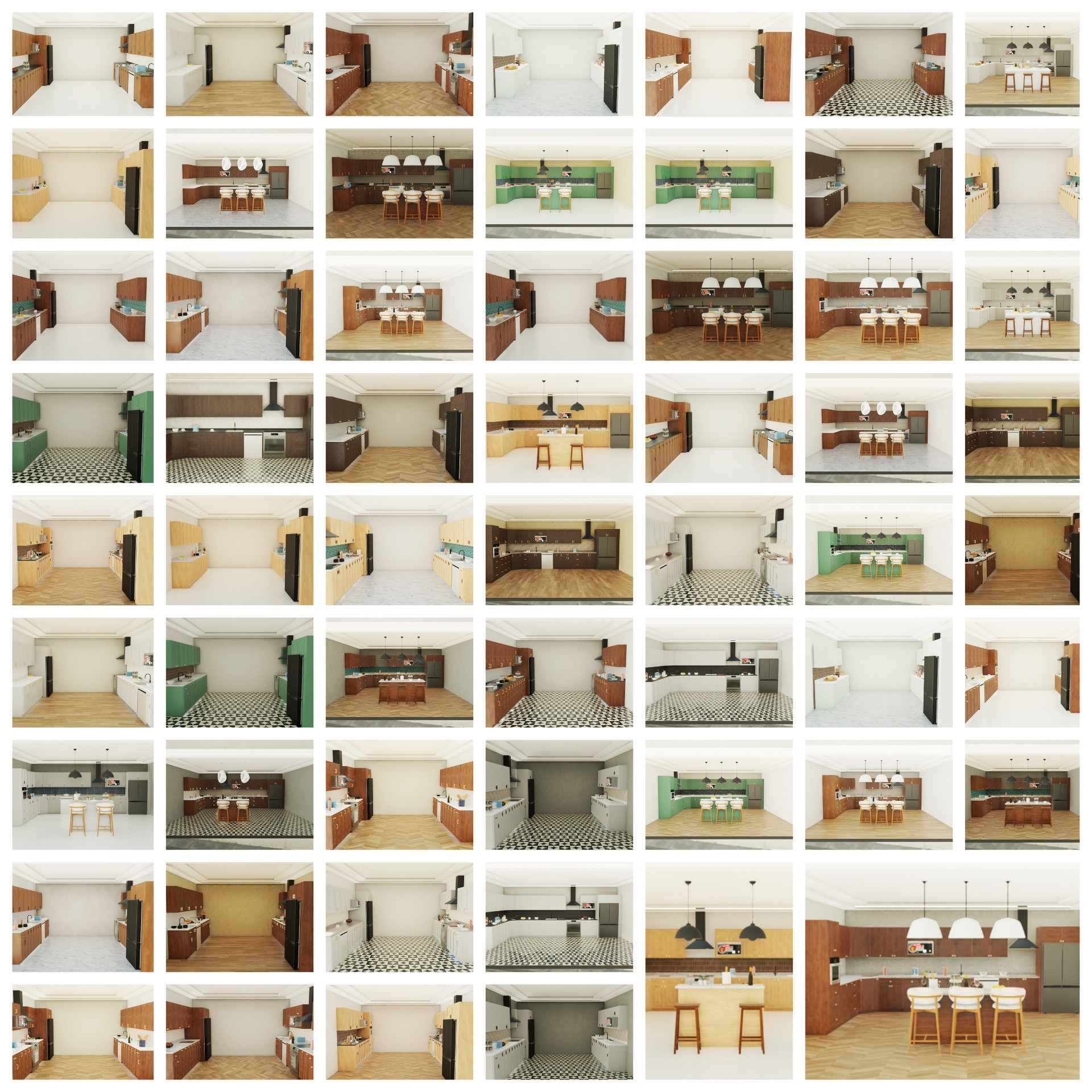
Scenes span the full range of the variation parameters: cabinet finishes, island configurations, lighting conditions, clutter levels, and material combinations.
How these scenes were made
Each scene is composed from Imagine.io's internally authored, rights-controlled 3D object library. These objects were designed and built by experienced furniture, interior, and 3D production artists to reflect real-world scale, structure, materials, and construction details. They are not copied from customer CAD, manufacturer files, marketplace assets, branded products, or third-party scans.
The assets are authored using real-world units and physically plausible dimensions, with millimeter-level scale conventions for simulation and visualization workflows. They are prepared with PBR materials, clean geometry, collision meshes, physics properties, articulation where applicable, and structured metadata. Simulation readiness combines automated checks with human QA. That configuration is built once per asset and carries through to every scene the asset appears in.
Our configuration engine then composes these prepared assets into kitchen scenes through rule-based parametric variation across 15 design and lighting axes. Each composition is constrained for physical validity at scene level too, before being added to the dataset. The 800 scenes here are sampled from a rich parameter space, with assignments chosen to maximize visual and structural diversity within the sample.
Variation is parametric, principled, and reproducible. Use these scenes as a baseline for non-commercial research, evaluation, synthetic data generation, and controlled scene stress tests. Commercial training and evaluation rights are available separately.
Validation
The scenes have been tested in NVIDIA Isaac Sim by Imagine.io and reviewed with NVIDIA feedback as high-quality, simulation-ready content. References to NVIDIA, Isaac Sim, Omniverse, and SimReady throughout this page describe technical compatibility and validation context, not certification or endorsement. No NVIDIA partnership, certification, or trademark license is implied beyond what is documented here.
Dataset summary
| Field | Specification |
|---|---|
| Scene count | 800 |
| Format | OpenUSD (.usd) packaged as .zip per scene |
| Per-scene size | ~700 MB |
| Total dataset size | ~559 GB |
| Sample render | Pre-rendered ground-truth annotations bundled inside each scene ZIP |
| Geometry source | Internally authored, rights-controlled 3D object library |
| Physics | Articulated joints, collision meshes, mass properties |
| Materials | PBR (Physically Based Rendering) |
| Lighting | 3 conditions (daylight, warm evening, dim artificial) |
| Sim compatibility | NVIDIA Isaac Sim, Omniverse, any OpenUSD-compatible engine |
| License | CC-BY-NC-4.0 public; commercial evaluation and paid licenses available |
What's in each scene
Each scene contains a complete kitchen environment composed of internally authored 3D assets. Loaded into Isaac Sim or Omniverse, you can:
- Use the pre-rendered pass or render any pass at any resolution from any camera angle (RGB, depth, surface normals, semantic segmentation, instance segmentation, material IDs)
- Query the underlying 3D geometry for any pixel
- Articulate cabinet doors, drawers, and appliance components via standard USD physics APIs
- Modify lighting, camera position, and object placement programmatically
- Run physics simulation with measured collision meshes and mass properties
A sample render (PNG) is bundled with each scene ZIP as a preview, so you can see what a scene looks like immediately after extraction without loading the USD into Isaac Sim.
Visual proof
Visual mesh vs. collision mesh
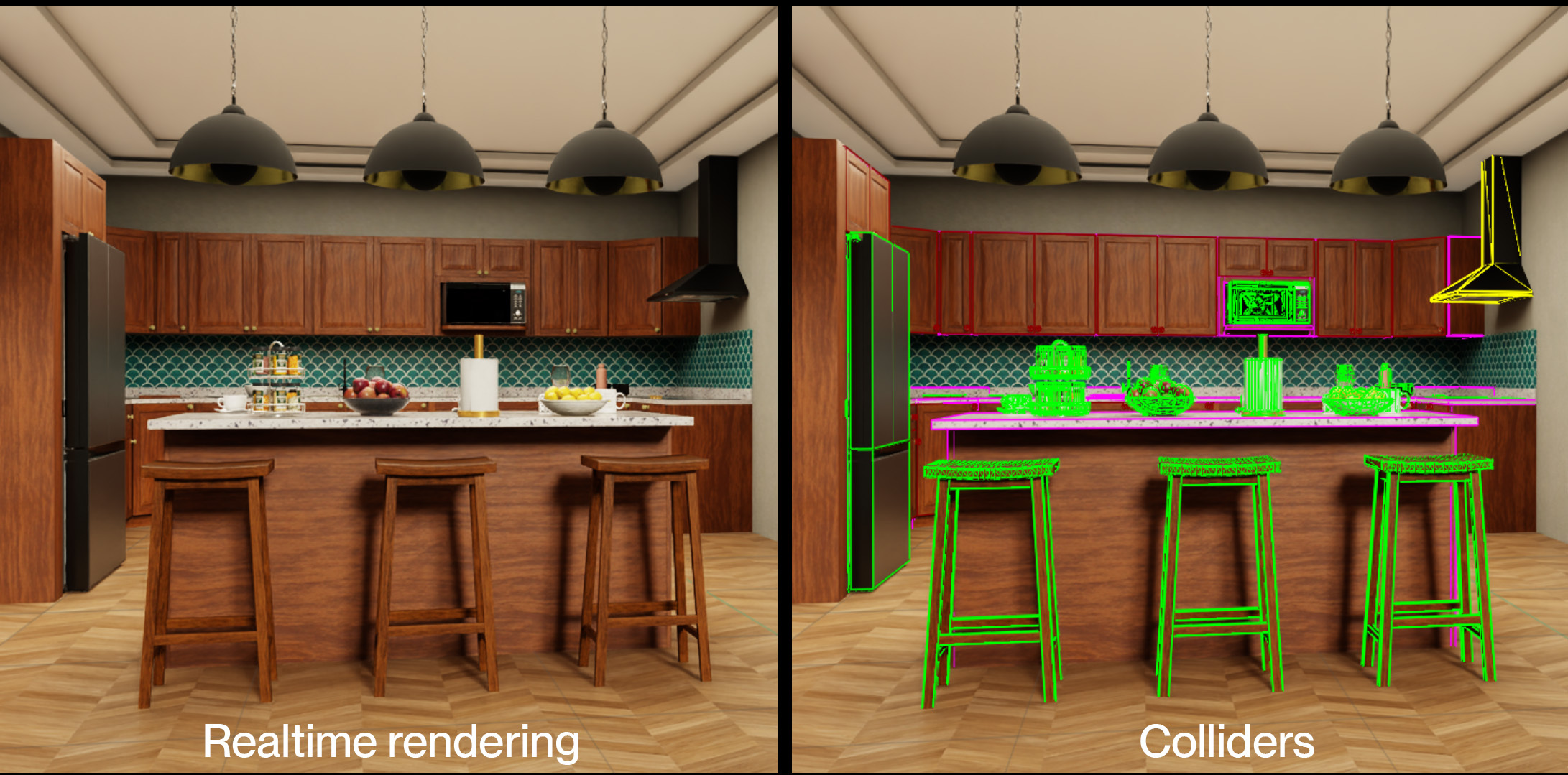
Every asset has a hand-authored collision mesh alongside its visual mesh. The collision geometry is what drives physics simulation: contact, grasp planning, articulation. The visual mesh is what the camera renders. Both are embedded in the same USD file.
Semantic segmentation
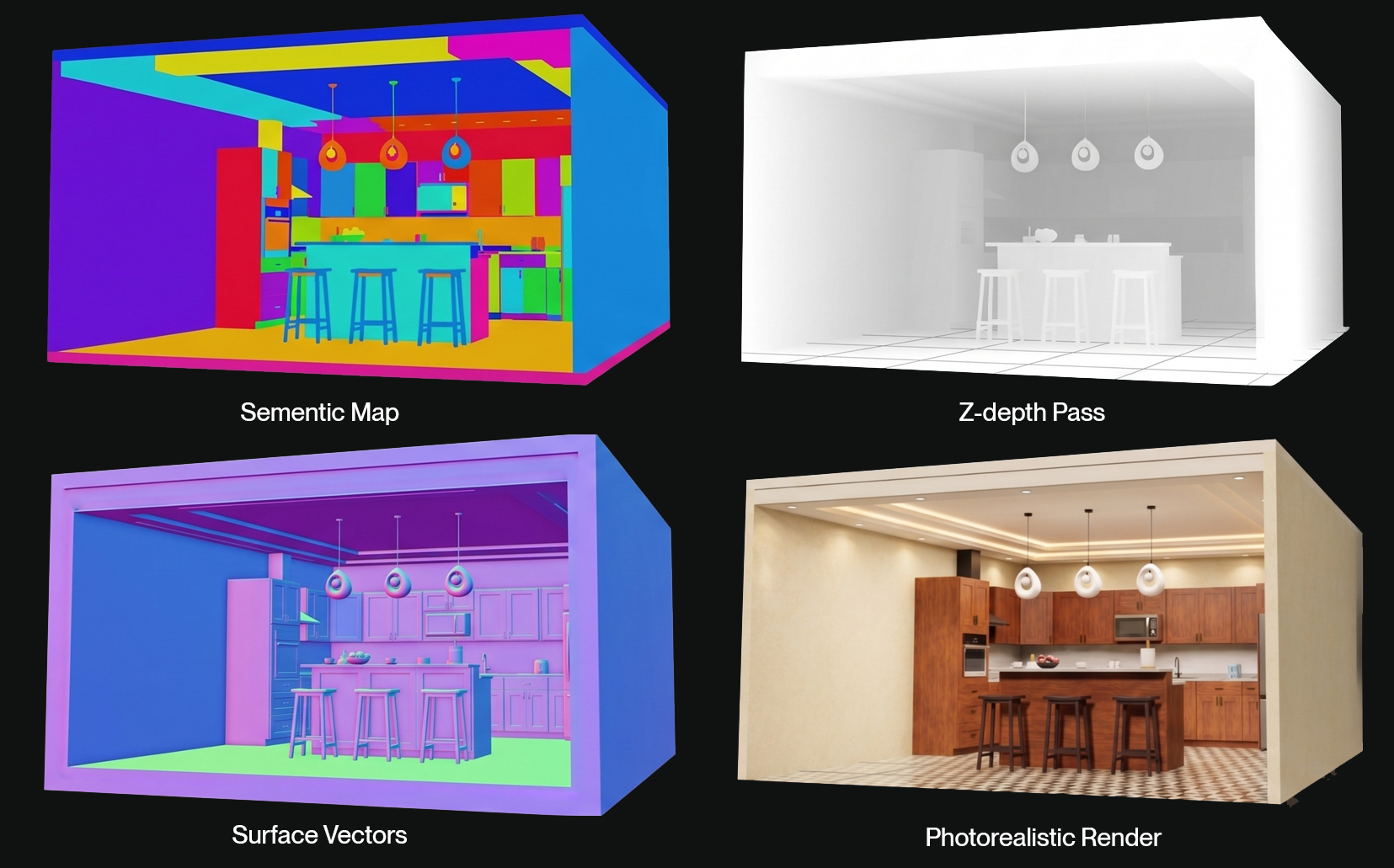
Ground-truth labels are intrinsic to the scene geometry, not post-hoc annotations. Render semantic segmentation, instance segmentation, or material IDs at any resolution, from any camera angle, without manual labeling.
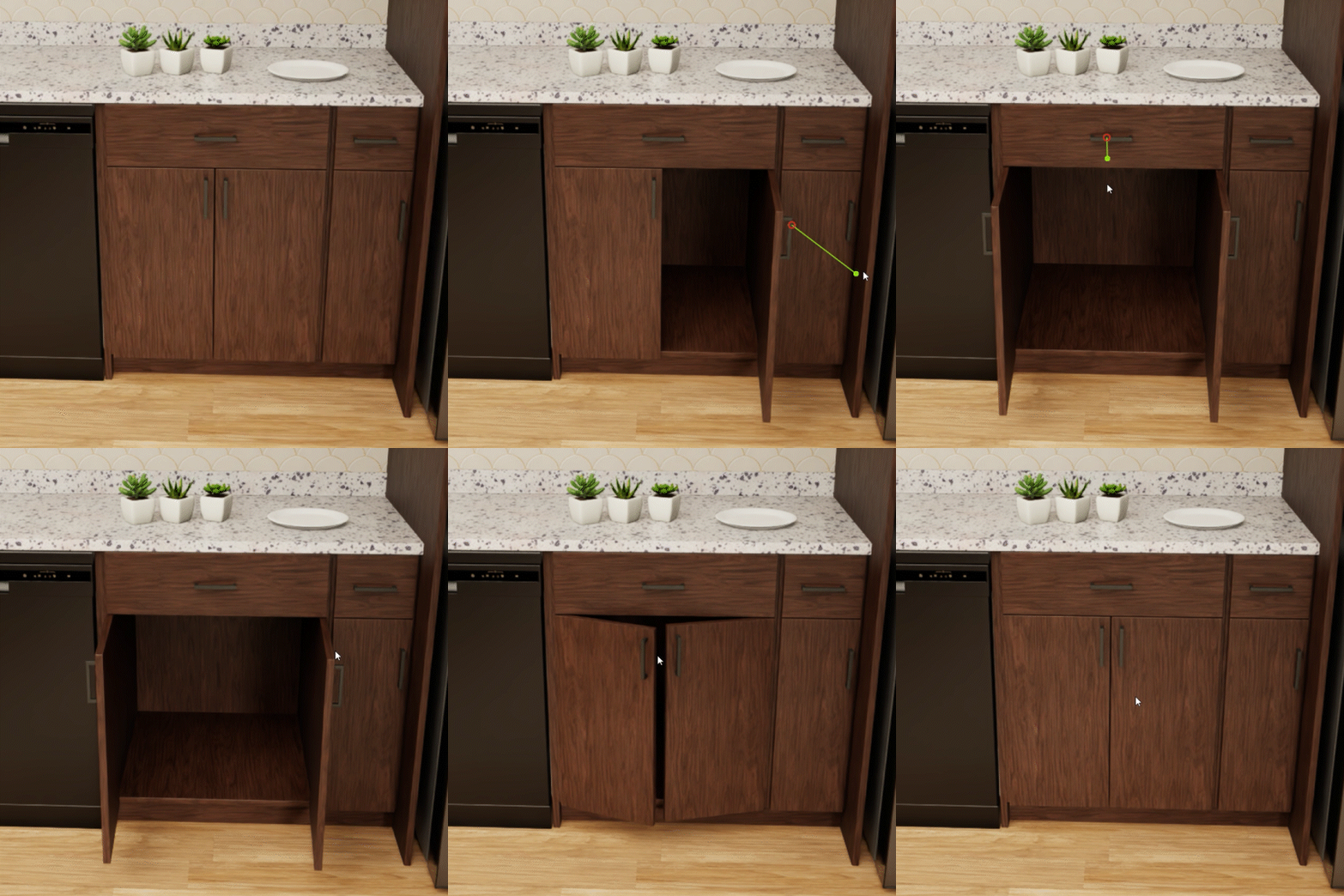
Physics articulation in Isaac Sim
Articulated joints, hinges, and sliders work out of the box. Load a scene into Isaac Sim and cabinet doors swing, drawers pull, faucets rotate.
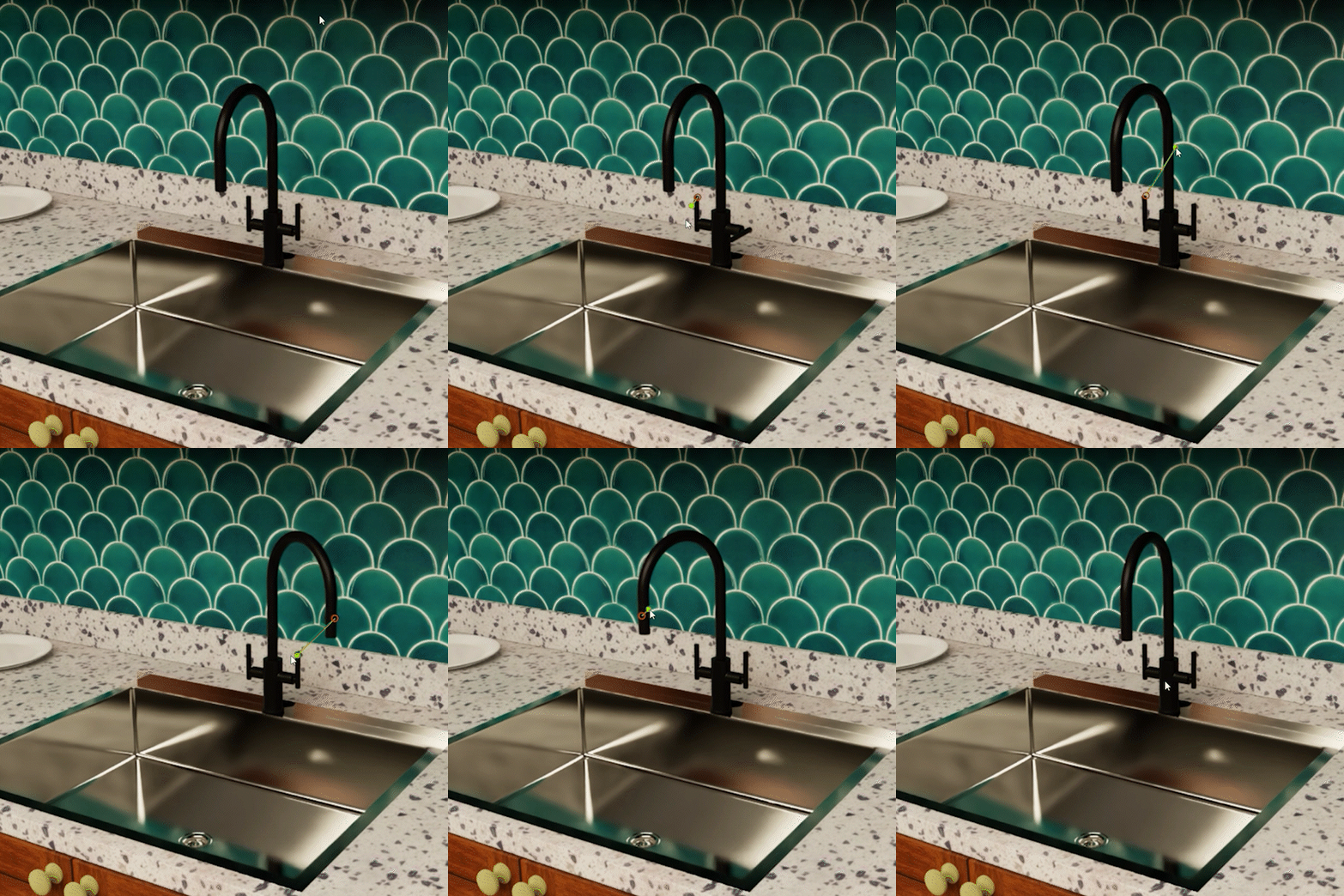
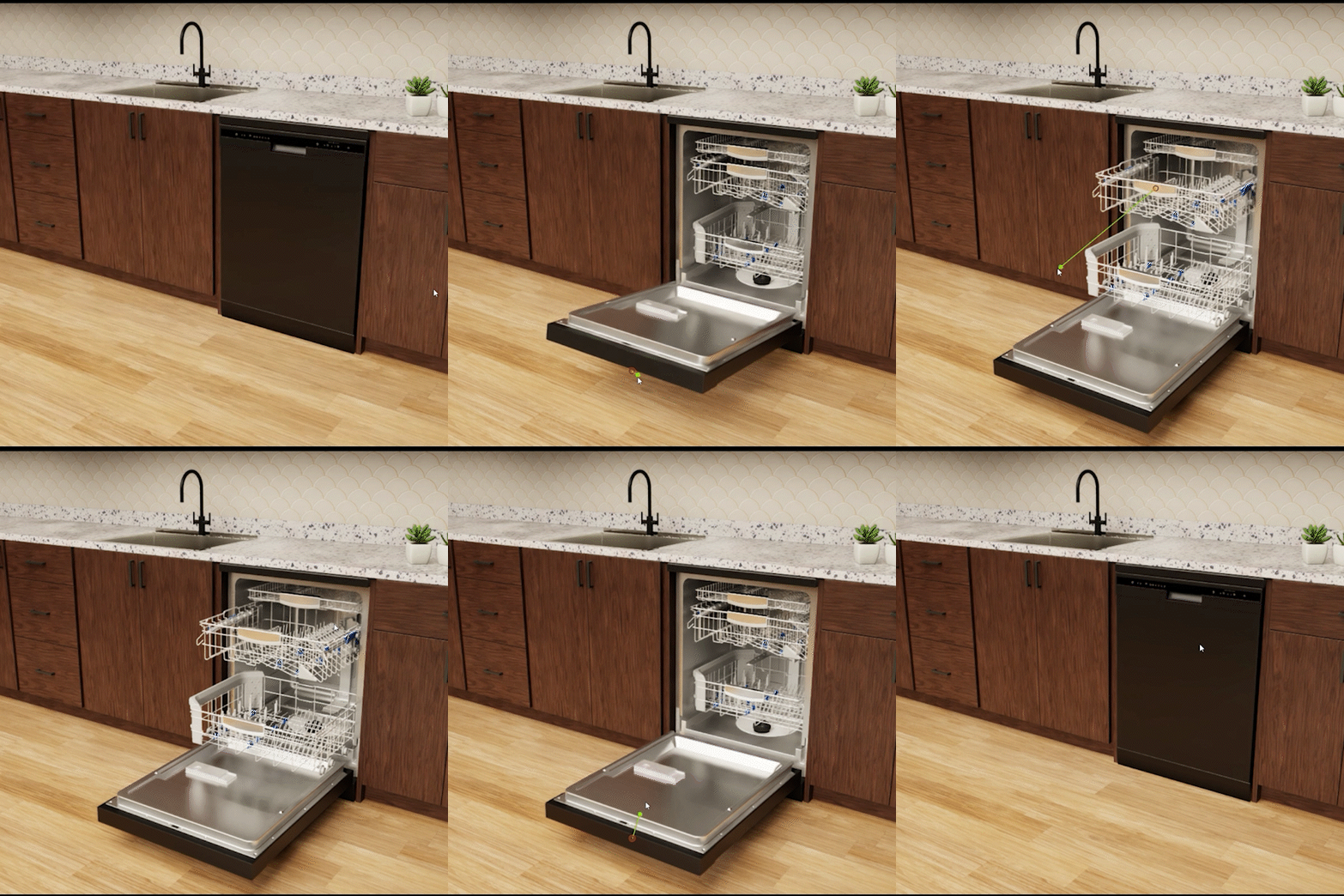
Variation parameters
Each scene is a unique combination across 15 design and environmental axes:
| Axis | Options |
|---|---|
| Cabinet finishes | black acrylic, white metallic, walnut, american walnut, mahogany, white oak, sage green, forest green, silk grey |
| Countertops | white metallic, granite, stone, terrazzo |
| Hardware finish | brass, chrome, matte black, stainless |
| Door styles | slab, shaker, recessed panel, raised panel |
| Handle types | t-bar, knob, d-pulls, plus 3 additional handle designs |
| Island configurations | none, classic, classic_8ft, double_tier, double_tier_8ft |
| Island seating | chair, stool |
| Island pendants | 4 pendant designs |
| Lighting | bright daylight, warm evening, dim artificial |
| Clutter level | low, medium, high |
| Wall tiles | 15 tile patterns including hex marble, subway, ceramic bone |
| Floor materials | marble (2 variants), tiles, wood (2 variants) |
| Wall materials | plaster, stone, plus 5 additional finishes |
| Ceiling materials | white, cream, aged, cool |
| Appliance preset | full suite, range with hood, range minimal, chef no microwave, range no dishwasher, stove and hood, essentials only, compact with microwave |
Per-scene parameter assignments are recorded in scene metadata for filtering and stratified sampling.
Metadata schema (sample)
Every scene ships with a metadata JSON file (<scene_id>_metadata.json) describing variation assignments, coordinate conventions, USD export details, the input layout, per-product mesh statistics, the full scene graph, and build stats. The schema is versioned (schema_version: "1.0").
Below is a trimmed sample from var_galley_005136af_metadata.json showing the top-level sections most useful for filtering and pipeline setup. The full file additionally includes a per-product material_slots list, a layout_products_input array describing the configurator inputs, every products[] entry with mesh stats, and a complete scene_graph with per-prim transforms (local and world), AABB world bounds, semantics, material bindings, custom props, and parent/child relationships.
{
  "schema": "kitchen_scene_metadata_v1",
  "schema_version": "1.0",
  "generated_at": "2026-04-23T17:57:40+00:00",
  "scene_id": "var_galley_005136af",
  "layout_id": "var_galley_005136af",
  "units": {
    "length": "meters",
    "angle": "radians",
    "mass": "kilograms"
  },
  "coordinate_system": {
    "handedness": "right",
    "up": [0, 1, 0],
    "forward": [0, 0, -1],
    "note": "Converted from Blender Z-up to AI-standard Y-up; USDA export keeps Blender Z-up."
  },
  "usd_export": {
    "stage_up_axis": "Z",
    "meters_per_unit": 1.0,
    "usdz_file": "var_galley_005136af.usdz",
    "usda_file": "var_galley_005136af.usda",
    "root_prim_path": "/Root"
  },
  "variation_config": {
    "scene_option_id": "opt_galley",
    "cabinet_finish": "opt_finish_wood_02",
    "countertop_finish": "opt_countertop_granite",
    "hardware_finish": "opt_hardware_stainless",
    "door_style": "opt_door_style_onyx",
    "door_handle": "opt_handle_5",
    "lighting": "warm_evening",
    "clutter": "low",
    "island": "opt_no_island",
    "island_seating": "chair",
    "island_pendant": "pendant_2",
    "floor_material": "Marble_2_0.6_meter",
    "wall_material": "wall_texture_01_1.5_meter",
    "ceiling_material": "white",
    "wall_tile": "2_Hexagon_Polished_Marble_tiles_0.1x0.125_meter",
    "harmony_score": 20
  },
  "build_stats": {
    "product_count": 9,
    "appliance_count": 7,
    "rigid_body_count": 75,
    "articulation_root_count": 40,
    "collider_count": 5,
    "joint_count": 40,
    "material_count": 237,
    "camera_count": 0,
    "light_count": 3,
    "scene_graph_node_count": 1118
  }
}
Filtering by metadata. The variation_config block contains the option IDs assigned to this scene. To filter scenes by axis (for example, all scenes with lighting: warm_evening and clutter: low), iterate over the metadata files and match on variation_config values. The friendly axis names shown in the Variation parameters table above correspond to these option IDs.
Coordinate conventions. Note the deliberate split between coordinate_system.up = [0, 1, 0] (Y-up, the AI/robotics convention used by the metadata) and usd_export.stage_up_axis = "Z" (Z-up, the Blender/USD export convention preserved in the USD files). Pipelines reading metadata for spatial reasoning should use Y-up; pipelines loading the USD directly into Isaac Sim or Omniverse get Z-up by default.
Scene complexity at a glance. The build_stats block gives a per-scene summary (products, appliances, rigid bodies, articulation roots, colliders, joints, materials, lights, total scene graph nodes) so you can estimate complexity and filter for scenes that match your pipeline's articulation or asset density requirements before downloading the full scene ZIP.
Quick start
Browse before downloading
Each scene includes a sample render PNG. To browse the visual variety without downloading the full dataset:
from huggingface_hub import HfApi

api = HfApi()
files = api.list_repo_files("imagineio/PhysicalAI-SimReady-Kitchens-v1", repo_type="dataset")
preview_files = [f for f in files if f.endswith(".png")]
Download a single scene
Most users will want individual scenes rather than the full 559 GB archive:
from huggingface_hub import snapshot_download

config_id = "<config_id>"

# Define the folder path pattern
folder_path = f"scenes/{config_id}/*"

scene_folder_path = snapshot_download(
    repo_id="imagineio/PhysicalAI-SimReady-Kitchens-v1",
    allow_patterns=folder_path,
    repo_type="dataset",
)

print(f"Folder downloaded to: {scene_folder_path}")
Or run: python dataset_tools/download_scene.py --config-id <config_id>
Load into Isaac Sim
from omni.isaac.core.utils.stage import add_reference_to_stage

add_reference_to_stage(
    usd_path=scene_path,
    prim_path="/World/Kitchen"
)
Or run (under Isaac Sim's Python): $KIT_PYTHON dataset_tools/load_isaac.py --input scene.zip
Starter pack: 10 scenes
Grab a 10-scene slice (~8 GB) to kick the tires before committing to the full archive:
from huggingface_hub import HfApi, snapshot_download

api = HfApi()
files = api.list_repo_files("imagineio/PhysicalAI-SimReady-Kitchens-v1", repo_type="dataset")
config_ids = sorted({f.split("/")[1] for f in files if f.startswith("scenes/")})[:10]

snapshot_download(
    repo_id="imagineio/PhysicalAI-SimReady-Kitchens-v1",
    repo_type="dataset",
    allow_patterns=[f"scenes/{cid}/*" for cid in config_ids],
)
Or run: python dataset_tools/download_scene.py --starter-pack
Download the full dataset
If you have the storage and bandwidth:
from huggingface_hub import snapshot_download

snapshot_download(
    repo_id="imagineio/PhysicalAI-SimReady-Kitchens-v1",
    repo_type="dataset",
)
Or run: python dataset_tools/download_scene.py --all --yes
Use cases
- Manipulation policy training (grasping, placement, opening cabinets and drawers)
- Vision-language-action model training and evaluation
- Sim-to-real transfer benchmarking
- Synthetic data generation with arbitrary ground truth labels
- Scene understanding and 3D perception research
- Benchmarking simulation environment diversity
Roadmap
This release is version 1.0. Planned additions:
- Additional domains beyond kitchens (warehouses, retail, bathrooms, factories, broader home environments).
License and usage
Imagine.io operates a three-path licensing model. The path that applies depends on who you are and what you want to do with the dataset.
Path 1: Public non-commercial research (CC BY-NC 4.0)
This public dataset release is provided under the Creative Commons Attribution-NonCommercial 4.0 International License (CC BY-NC 4.0).
Non-commercial researchers may use, copy, share, and adapt this dataset for research, education, and non-commercial evaluation purposes, provided they give appropriate attribution to Imagine.io, link to the license, and indicate if changes were made.
Commercial use is not permitted under the public CC BY-NC 4.0 license. Commercial use includes, but is not limited to:
- Use by for-profit companies for internal R&D
- Model training or fine-tuning for commercial systems
- Model evaluation or benchmarking for commercial systems, unless separately approved under evaluation terms
- Product development
- Synthetic data generation for commercial use
- Paid consulting or customer projects
- Commercial redistribution, resale, sublicensing, or public hosting of the dataset
- Incorporation into commercial products, platforms, datasets, or simulation services
This license does not grant rights to third-party trademarks, logos, brand names, patents, publicity rights, or other rights not owned or controlled by Imagine.io.
Path 2: Free commercial evaluation
Commercial teams may request free internal evaluation access from Imagine.io. This evaluation access allows approved teams to test the dataset against existing models and simulation pipelines for purchase evaluation only. It does not permit training, fine-tuning, product development, production use, commercial redistribution, external publication, or derivative commercial datasets unless separately agreed in writing.
To request commercial evaluation access, click Request access at the top of this page and complete the gated form. Select "Commercial internal evaluation" in the Intended use field, describe what you want to evaluate, and we will review and approve typically within one business day.
If you would like to talk before submitting a request, reach out via the contact form on physical.imagine.io.
Free commercial evaluation terms (summary)
These terms apply to commercial teams approved for free internal evaluation access. Final terms are sent for written acceptance before access is granted.
Purpose. Approved commercial teams may access the approved evaluation dataset solely to evaluate whether the PhysicalAI SimReady Kitchens dataset is suitable for their internal model, simulation, perception, embodied AI, or physical AI workflows.
Allowed.
- Download and inspect approved evaluation files
- Load scenes into internal simulation or model-evaluation pipelines
- Run existing models against the dataset
- Generate internal evaluation results for purchase decisions
- Share internal findings within the requesting company
Not allowed.
- Training or fine-tuning models
- Using the dataset to improve production systems
- Product development or production deployment
- Redistribution, resale, sublicensing, public hosting, or transfer to third parties
- Publishing benchmark results, papers, model cards, demos, or blog posts without written approval
- Creating derivative commercial datasets
- Extracting source assets for resale, asset libraries, or competing platforms
- Using the dataset to build or train a directly competing 3D asset, simulation-content, or world-generation platform
Term. Evaluation access is limited (typically 30 to 90 days) unless extended in writing.
Data handling. Upon request or end of evaluation, evaluator must delete or certify deletion of dataset files unless a commercial license is signed.
Commercial conversion. Training, fine-tuning, benchmarking, production use, custom data generation, API access, and broader commercial rights require a separate written commercial license.
Path 3: Paid commercial license
Commercial training, fine-tuning, benchmarking, synthetic data generation, platform integration, custom scene generation, and production use require a separate written commercial license from Imagine.io.
Paid commercial licensees may use trained or evaluated model weights commercially. Restrictions apply to redistribution of the dataset itself, source scene files, extracted assets, derivative commercial datasets, and creation of competing asset or world-generation platforms. Final terms are scoped per engagement.
To start a commercial license conversation, reach out via the contact form on physical.imagine.io.
Commercial evaluation and custom generation
This release is a public sample of what Imagine.io's generation engine can produce. Teams that need more can work with us on:
- Free internal evaluation access for commercial teams (Path 2 above)
- Custom scene packs for robotics and physical AI evaluation
- Commercial model training and benchmarking rights (Path 3 above)
- Recurring dataset subscriptions with new domains and updates
- Synthetic render-pass generation (RGB, depth, segmentation, normals, instance maps) at scale
- OpenUSD, Isaac Sim, and Omniverse-compatible environment generation in domains beyond kitchens
- API or engine access for parameter-driven world generation against your asset library
Citation and attribution
If you use this dataset in non-commercial research, model cards, GitHub repositories, demos, or publications, please include:
"PhysicalAI SimReady Kitchens by Imagine.io, Version 1.0, licensed for non-commercial use under CC BY-NC 4.0."
Please also include:
- A link to this dataset page and imagine.io
- A link to the CC BY-NC 4.0 license
- A note describing any modifications, filtering, rendering, conversion, augmentation, or derived annotations
@dataset{imagine_physicalai_simready_kitchens_2026,
  author    = {Imagine.io},
  title     = {PhysicalAI SimReady Kitchens},
  year      = {2026},
  version   = {1.0},
  publisher = {Hugging Face},
  url       = {https://huggingface.co/datasets/imagineio/PhysicalAI-SimReady-Kitchens-v1},
  license   = {CC BY-NC 4.0}
}
About Imagine.io
This dataset is a sample of what our generation engine produces.
Imagine.io is the world generation layer for physical AI. Our configuration engine composes thousands of internally authored, rights-controlled 3D products and environment objects into physics-validated training environments through parametric variation. Teams use the engine to generate environment volumes tuned to their training needs: thousands of composed scenes with controlled parameters for materials, layout, lighting, and clutter.
We started with kitchens to showcase what the engine produces. The same engine extends to any environment or industry where physical simulation matters. Teams who need more come to us for:
- The engine itself for composing scenes from your own asset library, the same way the 800 kitchens were composed from ours
- Custom asset libraries built to your specifications and made compatible with the engine, so you can compose scenes specific to your domain
- Custom digital replicas or simulation-ready environments built under customer-specific rights and specifications, for composition at scale
Learn more at physical.imagine.io or get in touch.
Version 1.0 · April 2026. Dataset maintained by Imagine.io.
- Downloads last month
- 20